

Most advice about older servers is too blunt. People say a decade-old platform is automatically the wrong buy. That's lazy guidance.
A Xeon E5-2690 v3 server can still be a rational deployment in 2026 if you care more about affordable core density, broad software compatibility, and proven behavior than about chasing the newest platform features. It stops making sense when power efficiency, memory bandwidth, storage expansion, or high per-core speed drive the business case. That distinction matters more than the CPU's age.
In practice, older dual-socket Xeon boxes still earn their keep in virtualization labs, budget private clouds, game hosting, and general-purpose dedicated server roles. They're less attractive for dense consolidation, modern analytics stacks, or anything that leans hard on current platform features. If you're evaluating one today, the right question isn't “Is it old?” It's “Is it old in a way that hurts my workload?”
The Enduring Value of a Xeon E5-2690 v3 Server
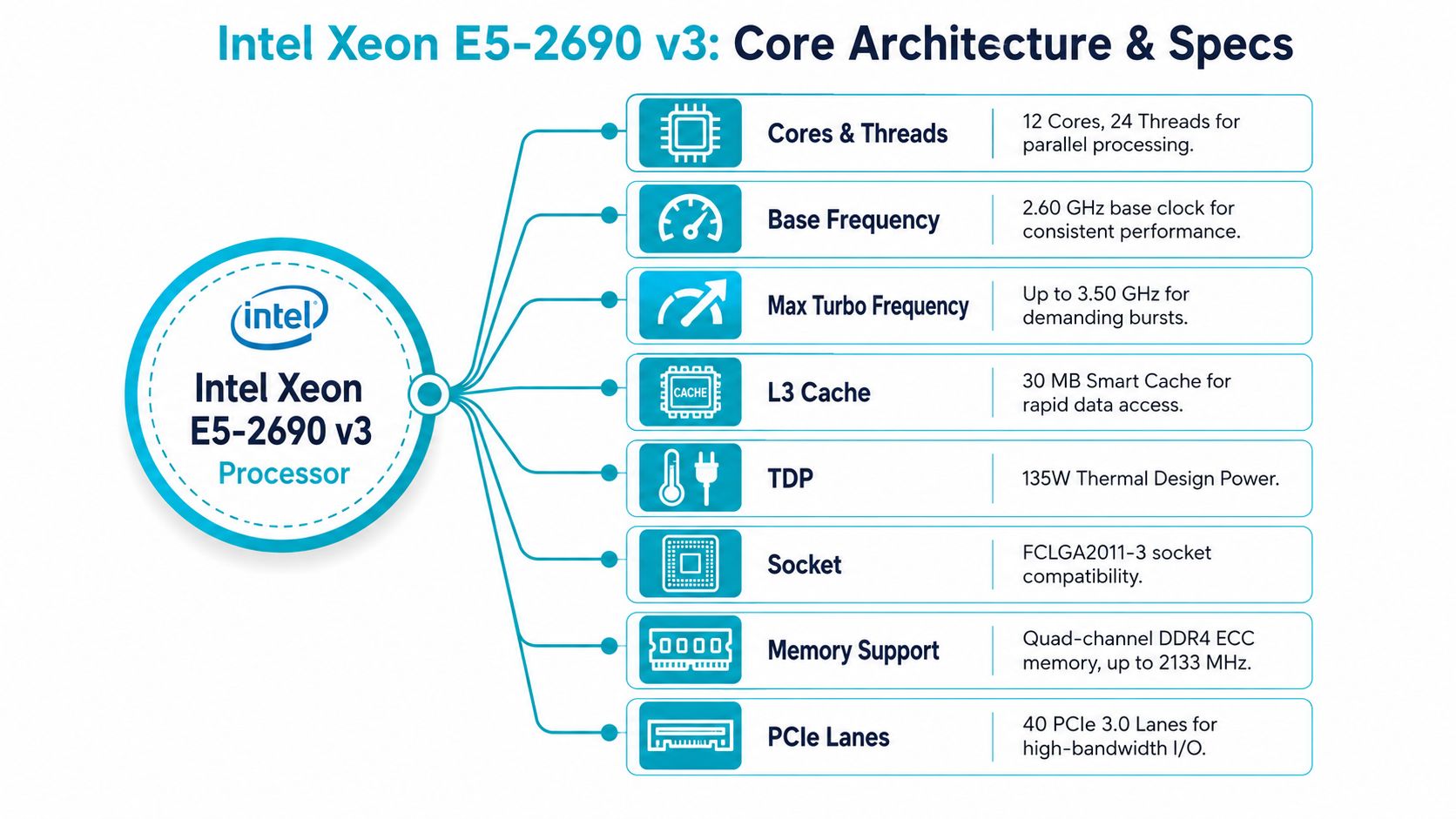
The Intel Xeon E5-2690 v3 came from Intel's Xeon E5 v3 family, launched in Q3 2014, with 12 cores, 24 threads, a 2.60 GHz base clock, 3.50 GHz max turbo, 30 MB SmartCache, 22 nm process technology, support for up to 768 GB of DDR4 memory, and up to 40 PCIe 3.0 lanes On paper, that sounds old. In a rack, it still solves real problems.
A lot of teams don't need bleeding-edge silicon. They need predictable virtualization performance, enough threads to divide among many guests, and a platform with mature drivers and broad hypervisor support. That's where this chip still holds value. If the job is “run a stack of Linux VMs reliably on budget hardware,” the E5-2690 v3 is still in the conversation.
The catch is knowing where that value ends. A Xeon E5-2690 v3 server is strong when you buy it for what it is, not for what newer CPUs do better.
Practical rule: Older Xeon hardware is a deployment choice, not a nostalgia choice. Buy it when workload density matters more than platform modernity.
Three situations still make sense:
- Budget virtualization nodes for Proxmox, KVM, or mixed lab and staging environments
- Multi-tenant hosting roles where many small to mid-size instances matter more than peak single-thread speed
- Game or utility servers that benefit from many assignable threads and roomy memory footprints
If you're sorting through dedicated hardware options, it helps to understand the bare metal server model before comparing an older dual-Xeon host against newer EPYC or Ryzen systems. The server itself isn't the whole decision. The hosting model shapes how much value you get from the hardware.
Technical Specifications and Architecture
Specs matter here because this CPU lives or dies by platform balance. The E5-2690 v3 is old enough that raw model numbers are less useful than understanding what the server can support in a rack.
Core layout and what it means in practice
This is a 12-core, 24-thread Haswell-EP processor with a 2.60 GHz base clock and a 3.50 GHz turbo ceiling. Those numbers still translate into useful host density for virtualization, shared services, and general infrastructure roles where many tasks run at once and few of them need top-tier single-thread speed.
That distinction matters in 2026. A dual-socket E5-2690 v3 server can present enough total threads to run a respectable number of VMs or containers, but each core is still from an older generation. If the workload spends its time on PHP workers, small databases, utility services, CI runners, or light game instances, the thread count helps. If it depends on fast per-core response, newer EPYC parts pull ahead quickly.
For teams sizing older dedicated hardware, thread count alone is never the whole story. ARPHost customers comparing older dual-Xeon nodes against newer platforms should review how CPU cores and threads affect VM density and scheduling before choosing based on core totals alone.
Cache, memory, and platform behavior
The processor includes 30 MB of shared cache, which still helps on mixed infrastructure loads. Repeated application code paths, metadata-heavy services, and smaller database working sets all benefit when the host avoids unnecessary trips back to main memory.
Memory support is one of the reasons this platform stayed in service so long. It can handle large ECC DDR4 configurations, which keeps it relevant for VM hosts, database replicas, and caching layers that need capacity more than cutting-edge CPU efficiency. In practical terms, RAM often determines whether an older server remains useful. If the box can keep guests resident and avoid swap pressure, the age of the CPU matters less.
I/O also deserves attention because older compute can still be paired with workable storage and networking layouts. PCIe 3.0 is not current-generation, but it is enough for many SATA SSD, NVMe boot, and moderate uplink deployments. The limitation shows up when you start stacking high-speed storage, heavier packet processing, or accelerator cards that make more sense on newer boards.
A few architecture traits shape buying decisions:
- 12 cores and 24 threads per CPU work well for moderate VM density and mixed-service hosting
- Large ECC memory capacity keeps the platform usable for memory-heavy but CPU-moderate roles
- Shared cache and dual-socket scaling suit consolidation better than latency-sensitive applications
- PCIe 3.0 era I/O is serviceable for standard hosting builds, but it is a constraint for newer high-throughput designs
The practical takeaway is simple. The E5-2690 v3 architecture still works when the job rewards concurrency, memory capacity, and low acquisition cost. It stops making sense when power efficiency, per-core speed, or modern I/O become the main requirement.
Real-World Performance and Benchmarks
Benchmarks don't tell the whole story, but they do tell you whether a processor still has enough muscle for the jobs people assign to it.
CPU Benchmark reports 69 million primes/sec, 37,605 thousand strings/sec, 4,791 MB/sec, and 279,196 KB/sec for the Xeon E5-2690 v3 in its test suite, while also listing 768 GB maximum memory support with DDR4 1600/1866/2133 ECC Those figures aren't abstract if you map them to server behavior.
What those numbers suggest
Primes per second gives you a rough feel for raw integer throughput. That matters for background compute, some scripting workloads, compression tasks, and a lot of general systems work that isn't graphics-heavy.
Strings per second is useful because hosting stacks do a lot of string work. Web applications, log handling, middleware, API parsing, and many database-adjacent operations all lean on this kind of activity. It doesn't mean “web hosting score,” but it does support the view that this CPU still handles ordinary infrastructure workloads capably.
The reported memory-related figures matter just as much. Older CPUs often fail modern use cases because the platform can't feed the workload. This one remained useful because it supports substantial ECC memory capacity, which helps keep many VMs practical on a single host.
Where performance still feels solid
For a Xeon E5-2690 v3 server, real-world comfort usually shows up in situations like these:
- Virtualization hosts running many modest VMs rather than a few very demanding ones
- General-purpose dedicated servers for web stacks, control panels, CI workers, and utility services
- Storage-heavy support roles where memory capacity and stable platform behavior matter more than cutting-edge instruction sets
Where the limits show up fast
The processor feels old when you push it into jobs that reward newer architecture:
| Workload pattern | How the E5-2690 v3 behaves |
|---|---|
| High single-thread demand | Serviceable, but not competitive with modern CPUs |
| Very dense consolidation | Usable, but power and platform efficiency become harder to justify |
| Modern acceleration-oriented apps | Limited by age, feature set, and older I/O generation |
The benchmark story is simple. This CPU still has enough throughput for a lot of useful server work. It just doesn't win by doing more per watt, more per rack unit, or more per core than modern alternatives.
Ideal Workloads and Use Cases in 2026
Buying older server hardware in 2026 is not a mistake by default. It is a budgeting decision, and the Xeon E5-2690 v3 still makes sense when the workload is steady, understood, and not heavily dependent on modern per-core speed or platform efficiency.
Proxmox virtualization on a budget
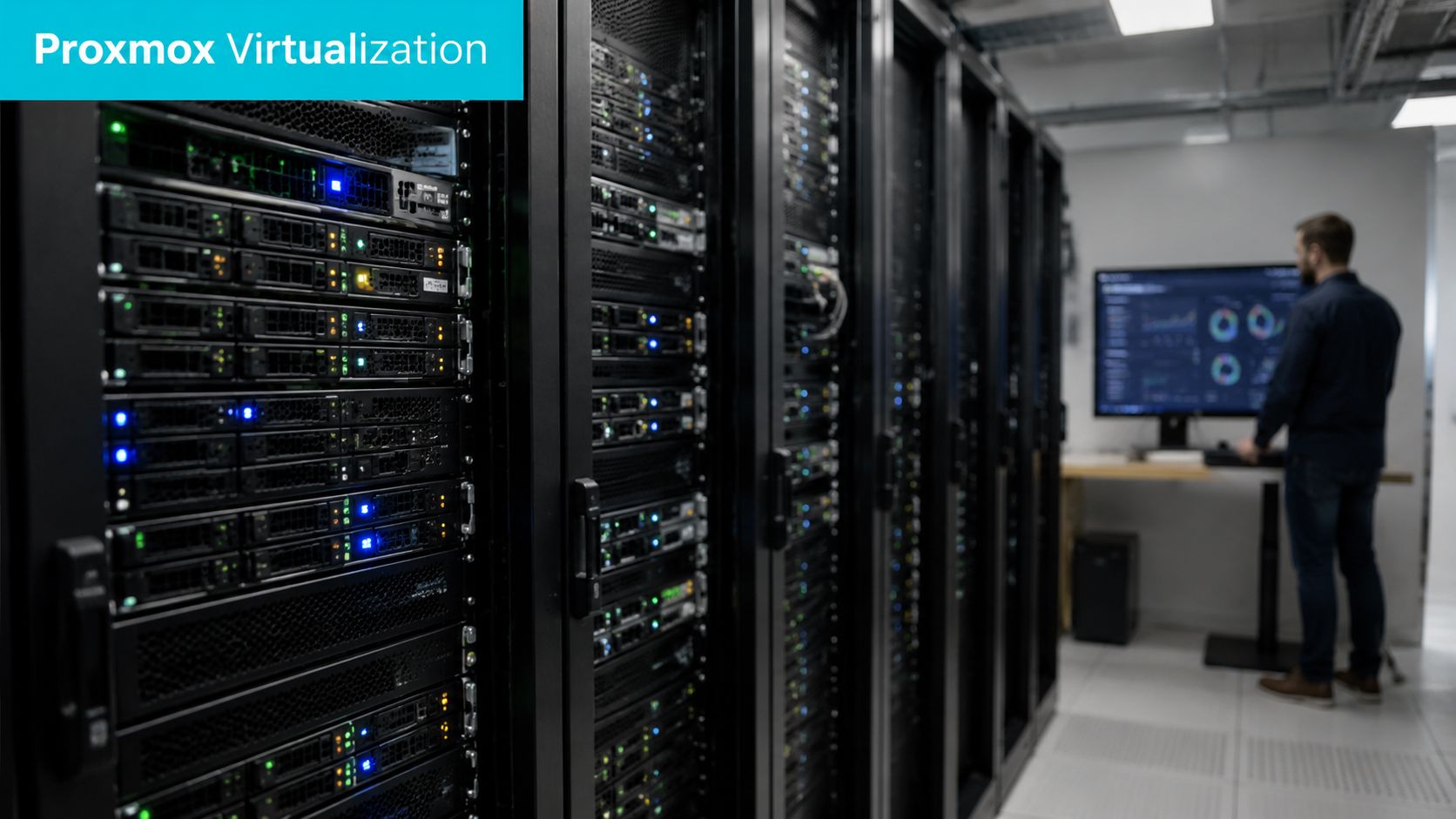
One of the better fits is a Proxmox VE node for mixed internal services. A Xeon E5-2690 v3 server has enough cores and memory capacity to run development VMs, utility appliances, monitoring, small databases, backup coordinators, and ordinary application hosts without feeling strained. That matters for operators who need usable virtualization now and would rather spend less on the initial server purchase.
This platform works best where VM count matters more than peak VM performance. Lab clusters, MSP utility nodes, internal business systems, and modest multi-role hosts are good examples. It is less compelling for environments that expect aggressive consolidation from a single box.
A quick check after provisioning tells you what the host is exposing to the OS:
lscpu
numactl --hardware
free -h
lsblk
That is enough to verify topology, NUMA layout, available memory, and disk presentation before you place production guests.
Operational insight: Older dual-socket systems reward disciplined VM placement. Pin latency-sensitive guests carefully, keep an eye on cross-NUMA traffic, and avoid mixing bursty tenants with storage-heavy jobs on the same host unless you have tested the contention pattern.
ARPHost offers this CPU in inventory for buyers who want a lower-cost Proxmox base and already know their resource profile. That is usually the right buyer for this platform. Someone with predictable service loads, moderate density targets, and a clear cap on growth over the next year or two.
Multi-tenant VPS and utility hosting
This hardware also fits smaller VPS nodes and general utility hosting. It handles a broad mix of routine background work well, especially when customer workloads peak at different times. DNS, control panels, backup agents, web servers, containers, small KVM guests, and support services can coexist on the same machine if storage and memory are sized properly.
The appeal is practical:
- Lower acquisition cost than a newer platform
- Broad Linux and hypervisor compatibility
- Predictable behavior for familiar hosting stacks
- Enough thread capacity for mixed, moderate tenant loads
The limit is density economics. Once you need to fit more customers into less space, with tighter power budgets and better performance isolation, the old dual-Xeon math starts to break down.
A broader private cloud option is often the next step once a single host turns into a platform requirement. That's where dedicated Proxmox private cloud plans make more sense than trying to manually scale a pile of standalone servers.
A short explainer is useful here before going deeper into deployment choices:
Dedicated game servers and specialty roles
Game hosting depends on the title. Some game servers care a lot about single-thread performance, and this processor is no longer strong by current standards. Others benefit more from having enough threads to split multiple instances, voice tools, databases, scheduling tasks, and admin services across the same host. In that second case, the E5-2690 v3 can still be a sensible budget choice.
It also remains useful in support roles that do not justify a newer EPYC deployment:
- Build workers and CI jobs
- Internal staging environments
- Backup relay or archive-oriented services
- Monitoring, logging, and support systems
The question is not just boot compatibility, but whether drivers, storage layout, power cost, and expected tenant density still make sense for the job. If they do, this CPU remains a valid purchase. If the plan involves dense virtualization, strong per-core performance, heavy memory bandwidth demand, or long-term power efficiency, a newer AMD EPYC platform is the better investment.
Lifecycle Trade-Offs Versus Modern CPUs
Cheap servers are easy to buy. Expensive mistakes show up later on the power bill, in rack usage, and in the number of boxes you need to manage.
Upfront savings versus operating reality
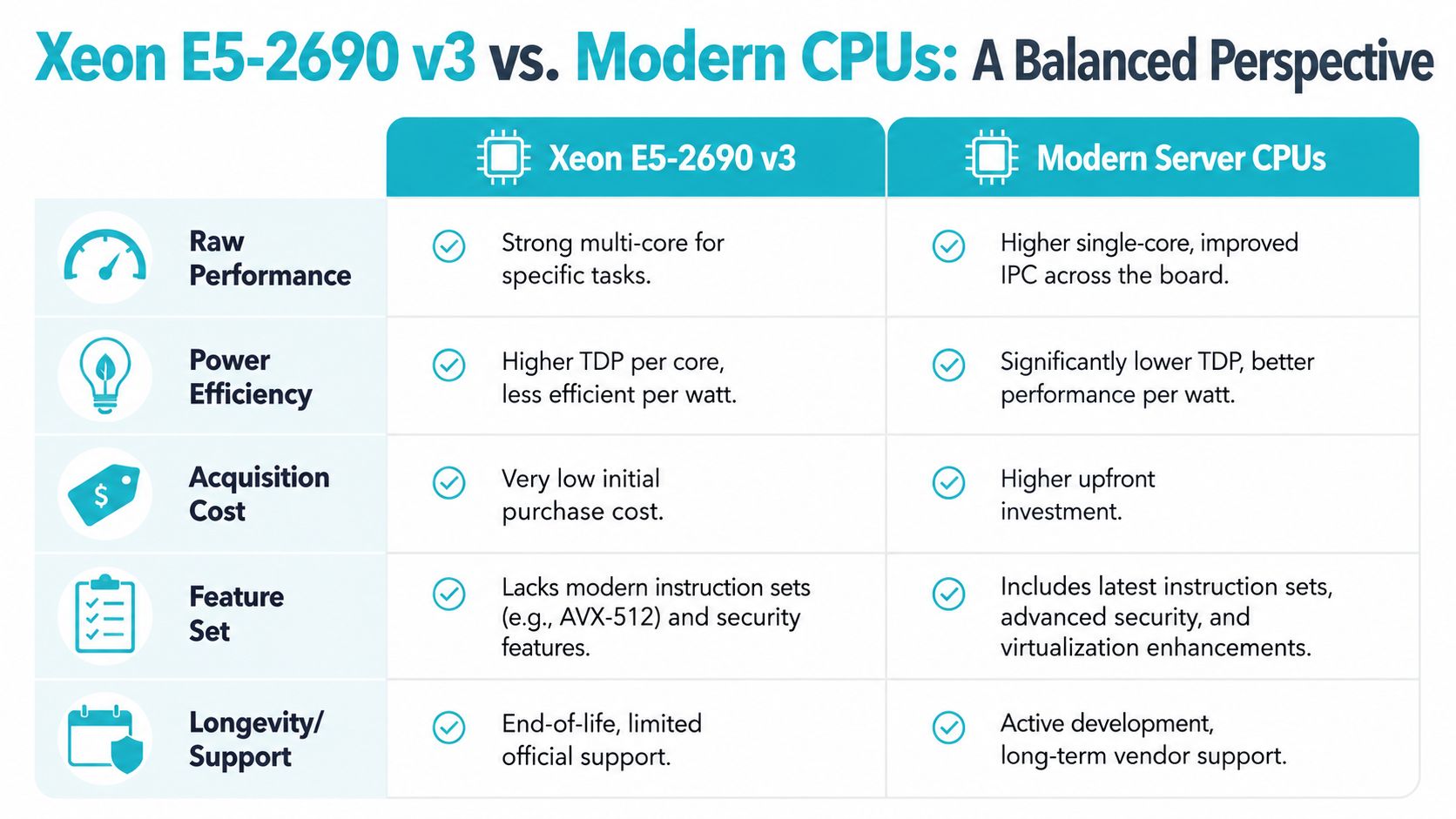
By 2026, the E5-2690 v3 is a known quantity. It offers plenty of threads for the money, the platform is mature, and replacement parts are easy to find. That still does not make it the right long-term host for every production role.
The key decision is lifecycle cost. A dual-Xeon system can be a smart purchase if the workload is stable, margins are tight, and absolute density is not the goal. It becomes harder to justify when the server runs around the clock under steady load, especially if you are paying meaningful rates for power and cooling or trying to consolidate more services into fewer racks.
Storage planning matters here too. Older servers often pencil out well on CPU cost, then lose that advantage because the disk layout was chosen badly. Before committing to aging hardware, review the rebuild, redundancy, and capacity trade-offs in this guide to server RAID configuration planning.
Where modern CPUs pull ahead
Newer CPUs do not only cut job times. They change how much infrastructure you can replace with one machine.
| Decision area | Older E5-2690 v3 platform | Modern EPYC-class platform |
|---|---|---|
| Entry cost | Lower buy-in for budget deployments | Higher initial spend |
| Power efficiency | Weaker value over long runtimes | Better fit for sustained production use |
| Memory and I/O growth | Less headroom for expansion | Better for fast storage and larger memory footprints |
| Consolidation strategy | Works for moderate VM density | Better for aggressive consolidation targets |
That difference matters most in virtualization, database hosting, and storage-heavy application stacks. In those roles, stronger per-core speed, newer platform I/O, and better efficiency usually outweigh the purchase discount of an older Xeon box.
Where the E5-2690 v3 still makes financial sense
I would still deploy this platform for budget-conscious projects with clear limits.
It fits best when thread count matters more than top-end single-core speed, growth is predictable, and the business case depends on low entry cost more than maximum performance per watt. It also remains a reasonable choice for secondary nodes, lab environments, utility hosting, and small VM fleets that do not need modern platform features.
That is the practical split for ARPHost buyers in 2026. Choose a Xeon E5-2690 v3 server when you want proven hardware at a lower price and you understand the efficiency trade. Choose EPYC when the workload will grow, density matters, or the server needs to stay competitive for years instead of doing a job cheaply today.
Recommended ARPHost Bare Metal Configurations
The easiest way to choose between platforms is to match the server to the bottleneck you expect.
Pick the dual E5-2690 v3 when cost per thread matters
The most direct fit for this article's topic is the Dual Intel Xeon E5-2690 V3 server. With 28 cores, 56 threads, and 64GB DDR4 ECC RAM, it lines up well with Proxmox nodes, multi-tenant utility hosting, and general-purpose dedicated workloads where broad concurrency matters more than modern platform features.
This is the right choice for buyers who want to:
- Host many smaller VMs instead of a few huge ones
- Run mixed infrastructure roles on one box without overspending
- Build budget staging or private cloud capacity on proven hardware
Storage design still matters. Before you provision anything, revisit the role of redundancy, rebuild behavior, and usable capacity in your RAID configuration planning. Older servers are often bought for value, but storage mistakes erase that value fast.
Pick EPYC when memory pressure or density is the issue
The AMD EPYC 4584PX option is the better fit for memory-intensive applications, larger databases, and high-density virtualization. If the older Xeon feels attractive only because it's cheaper up front, but your project will push memory hard or grow quickly, EPYC is usually the cleaner answer.
Use that class of system when you expect:
- heavier database residency in RAM
- denser VM packing
- stronger long-term expansion requirements
- more demanding storage or networking plans
Pick Ryzen when per-core speed is the priority
The AMD Ryzen 9600X option fits smaller single-tenant deployments, development environments, and workloads that care more about fast individual cores than lots of total threads. That includes some app servers, lower-density control stacks, and specialty software that doesn't scale neatly across many vCPUs.
A simple buying framework works well here:
- Choose Dual E5-2690 v3 for affordable virtualization and general hosting.
- Choose EPYC for memory-heavy or consolidation-heavy production work.
- Choose Ryzen for high-clock-speed tasks with lower parallelism.
If you're already comparing hosted dedicated options, start with the current bare metal server listings and filter by workload type first, not brand preference.
Practical Provisioning and Management Advice
Older server platforms don't tolerate sloppy operations as well as newer ones. They'll run for a long time, but only if you treat provisioning and lifecycle management seriously.
Initial build checklist
Before putting a Xeon E5-2690 v3 server into production, verify the basics in firmware and BIOS:
- Enable virtualization features required by your hypervisor
- Confirm NUMA visibility so VM placement behaves as expected
- Update firmware where supported to reduce stability and compatibility surprises
- Validate storage mode and controller behavior before layering a hypervisor on top
This isn't glamorous work, but it prevents the classic issues people blame on “old hardware” when the actual cause is poor setup discipline.
Patch the platform first. Tune the hypervisor second. Place workloads third.
Plan for upgrades cautiously
One of the more common operational questions with this generation is whether a current v3 system can be extended with a v4 CPU swap. Community discussion around a ProLiant DL380 Gen9 upgrade path from Xeon E5-2690 v3 to Xeon E5-2680 v4 shows that teams do consider this route, but it requires careful BIOS and firmware verification, as highlighted in this HPE community thread on the v3-to-v4 CPU change.
That's the right takeaway. Don't assume socket compatibility equals deployment safety. Vendor firmware support, thermal behavior, and platform validation still matter.
Day-two management matters more on older hardware
Once the host is live, the routine work becomes the primary differentiator:
- keep firmware and OS patching on schedule
- monitor memory pressure and noisy-neighbor behavior
- track disk health early, not after latency complaints
- revisit VM placement after major tenant changes
Indeed, managed operations become more valuable than the server itself. An older platform can remain useful for years when someone is actively watching patch cadence, storage behavior, and hypervisor health. Without that, it usually fails in boring, preventable ways.
Frequently Asked Questions
Can this platform run modern operating systems
Usually, yes, if the OS and hypervisor still support the platform and the rest of the hardware stack. The primary question isn't just boot compatibility. It's whether drivers, firmware, and your management tooling remain clean and maintainable.
How should I think about security on older Xeon servers
Treat security as an operations problem, not a CPU marketing problem. Keep firmware, hypervisor, and guest operating systems current where support exists. If you can't maintain patch discipline, older hardware becomes harder to justify.
Is a dual E5-2690 v3 server too much for a homelab
Sometimes. If you only need a few light VMs, a smaller modern system may be quieter, simpler, and cheaper to operate. If your lab mirrors production workflows with many guests, shared storage testing, or clustered virtualization, the extra threads are useful.
Should I buy this instead of a newer EPYC box
Only if your workloads match the older platform's strengths. Buy it for affordable concurrency and proven behavior. Skip it if you need better per-core speed, higher density, newer I/O, or better long-term efficiency.
If you're weighing an older dual-Xeon host against a newer platform, ARPHost, LLC offers a practical mix of bare metal, VPS, Proxmox private cloud, and managed infrastructure options so you can match the server to the workload instead of forcing the workload onto the wrong server.
