

You’ve probably seen the problem already. Mail works fine until the website server slows down, a spam filter gets too aggressive, or a host reboots at the wrong moment, and suddenly orders, client replies, and password resets pile up somewhere you can’t see. For a growing SMB, this illustrates the importance of email hosting, it isn’t just about getting an inbox, it’s about keeping business communication reachable, branded, and under control.
In 2025, global email usage reached 4.59 billion users, and those users exchanged about 376.4 billion messages per day That scale explains why even a small company’s mail setup has to behave like critical infrastructure, not a casual add-on. When email fails, the interruption touches sales, support, internal approvals, and compliance in one shot.
Introduction to email hosting
A local manufacturer might bundle its website and email on the same small server because it looks simple. Then one morning the server gets hit by a stability issue, the contact form still loads, but the mail side starts dropping outbound replies or burying inbound messages in spam. The business doesn’t just lose convenience, it loses visibility into customer demand.
Email hosting is the service that gives a business managed mailboxes, storage, spam filtering, message transfer, and administration for a custom domain. It’s a separate layer from domain registration, which is why owning example.com doesn’t automatically give you name@example.com mailboxes. A domain gives you the address, while email hosting provides the server-side machinery that moves and stores the mail.
That distinction matters because hosted mail is now a large infrastructure category, not a side feature. Market research estimated the global Email Hosting Services market at about US$43.3 billion in 2022 and projected it to reach US$155.1 billion by 2030 (Yahoo Finance market summary). In practice, that growth reflects one thing, businesses want reliable domain-based communication with centralized control.
For SMBs, the hidden question isn’t “Do we need email?” It’s “Where should email live, who manages it, and what happens when the website has trouble?” Managed infrastructure and 24/7 support from providers like ARPHost, LLC can remove some of that operational burden, especially when a company doesn’t want one outage to take out both its site and its mail flow.
Understanding how email hosting works
The message path from sender to inbox
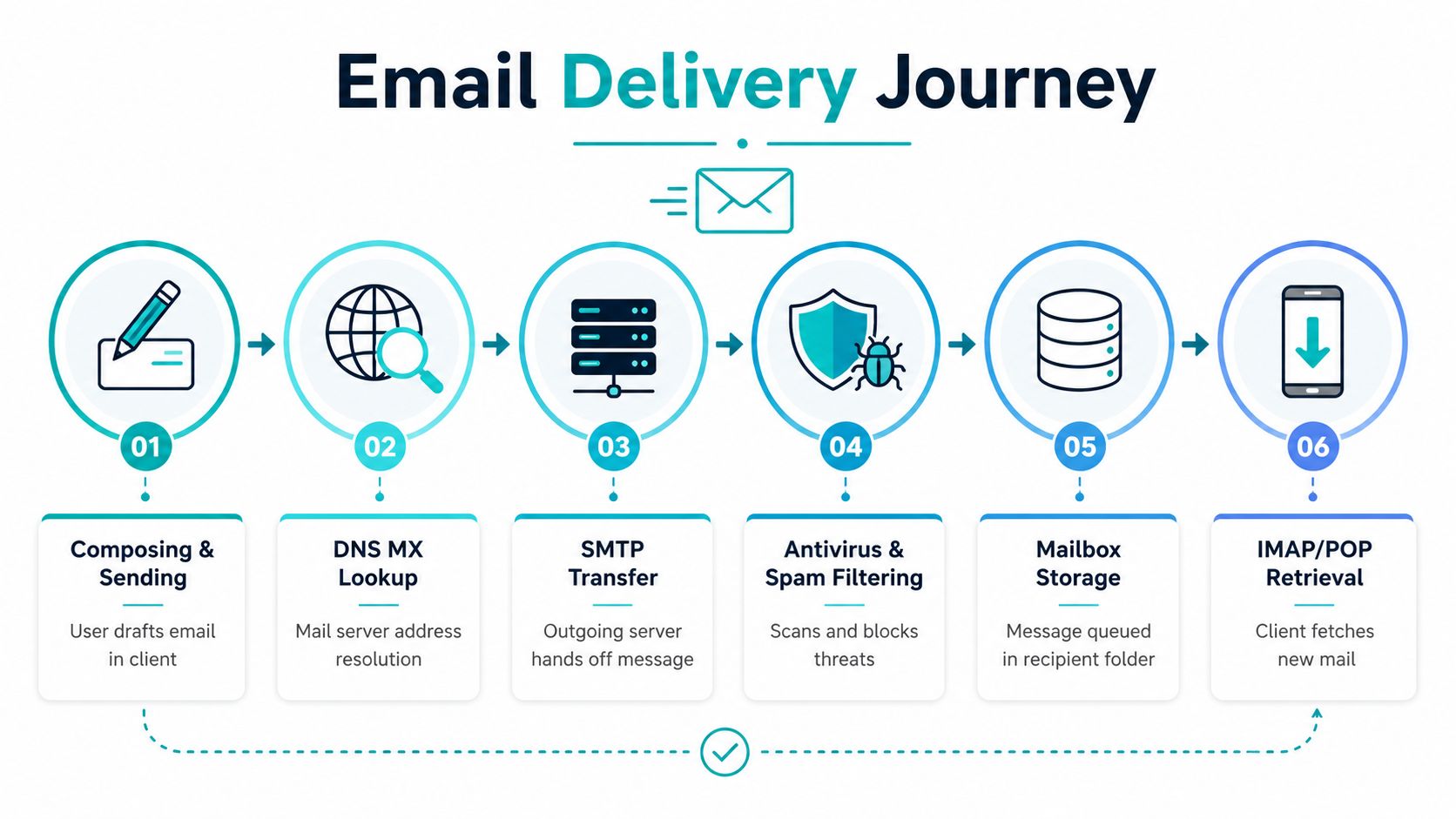
Think of email like a postal system with extra checks at every stop. A sender writes the message, the system looks up the destination’s mail server, the outgoing mail server transfers it, security filters inspect it, and then the recipient’s mailbox stores it until the user opens it on a phone or laptop.
The technical version starts with DNS. When someone sends to your domain, the sender’s mail system checks the MX record, which tells the world which server is authoritative for incoming mail. One provider guide explains that after confirming domain ownership with a TXT record, you add the email provider’s MX record so mail routes to the right host (Northwest Registered Agent).
From there, SMTP handles the handoff between mail servers, while IMAP or POP lets the user fetch stored mail from the mailbox service. In self-hosted or privately managed setups, a full stack is typical, including Postfix as the MTA and Dovecot for IMAP or POP, plus SPF, DKIM, and DMARC records to reduce the chance that messages are treated as spam (Valebyte technical guide).
Practical rule: if MX routing or authentication is wrong, the message may still leave your system, but receiving providers are more likely to distrust it.
Why reputation and encryption matter
Mail servers don’t just move data, they also judge the source. Modern mailbox providers use authentication signals to verify sender legitimacy and reduce abuse, so an unmanaged setup needs more than “it sends.” It needs a clean DNS posture, encrypted submission, and an IP address that doesn’t look suspicious to receiving systems.
That’s why email hosting feels closer to logistics than to simple file storage. A good host keeps the path clear, the mailbox accessible, and the sender identity consistent enough that other systems don’t treat routine business mail like junk.
Exploring common email hosting types
Different architectures serve different businesses
A small consultancy, a regulated firm, and a product team sending transactional notices may all use email hosting, but their needs are not the same. One team may care most about low admin work. Another may need strict control over routing, storage, and access. A third may mainly want dependable delivery for automated messages.
Shared hosting mailboxes are the simplest path. Multiple users sit on the same underlying infrastructure, which works well for small teams that need branded addresses, basic storage, and little day-to-day administration.
Dedicated mail servers give a business more isolation and more control. They fit better when a company wants custom routing, tighter policy settings, or a mail system that does not share resources with the website that sits beside it.
Exchange, IMAP, and POP plans are common choices for organizations that want mailbox syncing across devices and more structured mailbox behavior. They suit teams that want familiar business email features without building and maintaining the stack themselves.
SMTP relay services focus on outgoing mail. They are a practical fit for password resets, order confirmations, and system alerts, where the priority is dependable message submission rather than a human inbox.
Cloud-hosted SaaS email takes the most work off the internal team. The provider runs the backend, handles most routine maintenance, and leaves the business to manage users, policies, and identity.
Operational risk changes with the setup. If a company bundles web hosting and email hosting too tightly, a failure in one area can affect the other. That is why a mail service with separate infrastructure often gives SMBs a safer operating model, even when the bundle looks cheaper at first glance. Market interest in these services remains strong, which reflects how many different business problems each model can solve.
Picking the right fit
A startup that only needs branded mailboxes may be fine with a managed cloud service. A growing company that wants control over routing, storage, and security policies may prefer a dedicated mail server or a VPS-backed mail stack. For teams that already run application workloads, bundled services can look attractive, but the trade-offs matter more than the discount.
The difference between forwarding and full mailbox hosting is easy to miss. Forwarding can send messages from a branded address into another inbox, which is useful for simple aliasing, but it does not provide the same sending, storage, policy, and admin controls as a real hosted mailbox. Full mailbox hosting gives the business a place to receive, store, search, and manage mail inside one system, which matters as soon as more than one person depends on the address.
ARPHost, LLC also offers email hosting as a business service, along with broader infrastructure options for teams that want to keep applications and communication under one support umbrella. The important point is not the logo on the invoice. It is whether the architecture matches the way the business uses mail.
Comparing hosted and self hosted options
Managed service versus self-maintained stack
The temptation to self-host email usually comes from two impulses, cost control and control over data. Both are reasonable. The problem is that mail systems are reputation-sensitive, maintenance-heavy, and less forgiving than a typical internal app.
The operational gap is bigger than many buyers expect. A recent expert guide notes that web hosting and email hosting are different services, and while they can be bundled, it’s best practice to keep them separate for reliability and security (Elementor best practices). That matters because a shared failure mode can knock out both your website and your mail at the same time.
| Model | Strength | Hidden risk |
|---|---|---|
| Managed email hosting | The provider handles updates, filtering, and support | Less direct server control |
| Self-hosted mail | More configuration freedom | Reputation work, patching, and monitoring fall on your team |
| Free forwarding | Branded addresses without full mailbox hosting | No real mailbox infrastructure for sent and stored mail |
A lot of readers also miss the difference between forwarding and full mailbox hosting. Forwarding can route messages from a branded address to another inbox, which is handy for simple aliasing, but it doesn’t give you the same sending, storage, policy, and admin controls as a hosted mailbox. That distinction is especially important for businesses that need retention, multiple users, or reliable outbound identity.
Bundling may look cheaper on paper, but a single outage can affect both web and mail, and reputation problems can spread faster when everything shares the same host.
Why SMBs often prefer the managed route
Self-hosting is possible, but it brings ongoing maintenance, authentication work, reputation management, and troubleshooting responsibility. For many SMBs, that burden is larger than the savings. Managed email hosting reduces the number of moving parts the internal team has to babysit, which is often the primary business case.
Key features and security considerations
Security now sits at the center of email hosting
Modern email hosting is measured by more than inbox size or branding. The essential features now include SPF, DKIM, DMARC, anti-spam filtering, antivirus scanning, and two-factor authentication Those aren’t extras anymore. They’re the baseline for trusted business mail.
The reason is simple. Phishing campaigns, spoofed sender addresses, and malware attachments target email because it reaches people directly. If the host doesn’t enforce identity checks and message scanning, users end up doing the filtering mentally, which is a bad security model for any business.
What to verify before you buy
- Authentication controls: Make sure the provider supports SPF, DKIM, and DMARC in a way you can manage, not just toggle once and forget.
- Filtering depth: Ask how the host handles spam and malware scanning, because those checks affect both inbox safety and deliverability.
- Account protection: Two-factor authentication should be available for admin and user accounts, especially where customer or payroll data might pass through mail.
- Domain policy visibility: You want clear control over the DNS records that tell other systems your mail is legitimate.
For practical guidance on locking down accounts and user behavior. It’s a useful complement to provider-side controls, because technology and user habits need to line up.
The most important takeaway is that email hosting is now a security product as much as a mailbox product. If the provider can’t explain authentication, filtering, and access controls in plain language, that’s a sign the service may be cheaper than the risk it introduces.
ARPHost’s email-security guidance is available at this security best-practices page, which is useful if you’re comparing provider-side controls with your own internal policy work.
Initial setup migration and pricing factors
The first setup steps that usually trip people up
A custom email setup starts with DNS and routing, not with a login screen. Teams often treat it like opening a new account, then get stuck when messages never arrive or fail to send because the domain, mail routing, and authenticated submission were not configured in the right order.
The clean sequence is simple once you separate the pieces. Verify the domain with a TXT record, point mail routing to the right host with an MX record, then make sure outbound mail uses a secure authenticated path instead of an open relay. In many environments, that also means checking which submission ports the provider allows and whether the hosting company blocks outbound mail until you request access.
Operational rule: if your host blocks mail-related network paths, the admin panel can look correct while mail still fails in practice.
Migration needs a careful hand too. Export the old mailbox data, confirm that aliases and catch-all behavior match the new setup, and test outbound sending before you switch off the old system. If you want a practical walkthrough of the order, this setup guide compares the moving parts against a real deployment.
What drives price
Email hosting price usually reflects five things, even when a sales page only advertises “mailboxes.” Those factors are storage quota, user count, security features, support level, and whether the plan includes hosted infrastructure or only forwarding. A forwarding-only setup can be very low cost, while a full mailbox plan carries more overhead because it stores mail, handles authentication, and supports access controls.
The budget conversation becomes clearer when you separate mailbox needs from server needs. A small team may only need simple hosted email, while a business with application servers, remote workers, and tighter access controls may want email tied to a VPS or managed environment. For teams that want more infrastructure control, ARPHost’s VPS hosting starts at $4.25/month, and that can sit alongside broader managed services when mail is only one part of the stack.
Decision checklist for SMBs and technical buyers
Use the business problem to choose the architecture
A good email decision starts with usage, not vendor branding. If the team only needs a few branded inboxes, the answer is usually simple. If mail has to support compliance, shared administration, retention, or outbound reputation work, the decision gets more technical.
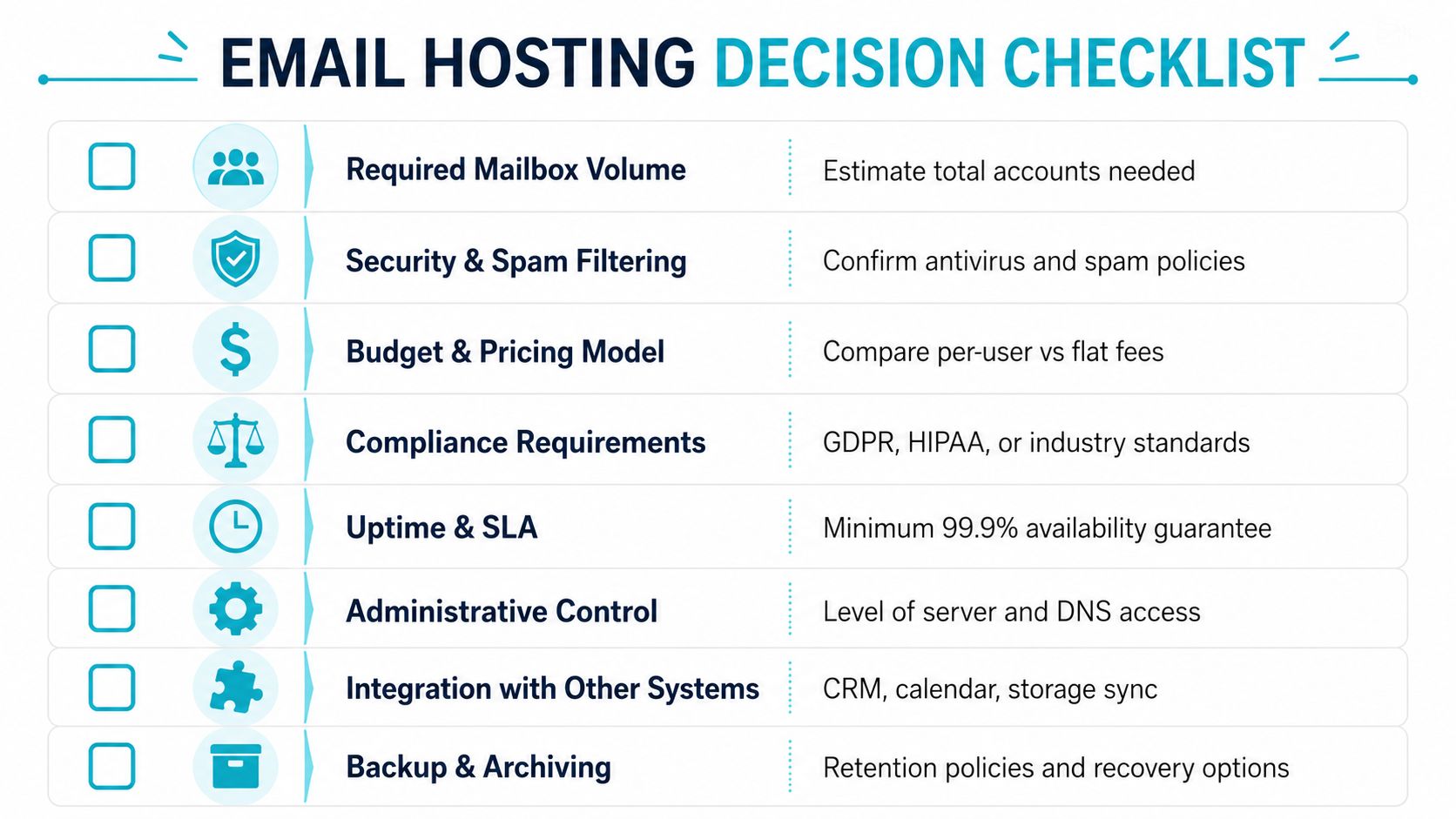
Use this filter when comparing providers:
- Required mailbox volume: Count the users, aliases, and shared mailboxes, not just the visible staff count.
- Security and spam filtering: Confirm that the host supports strong filtering and authentication controls.
- Budget model: Compare per-user pricing against flat-fee and bundled infrastructure options.
- Compliance needs: Check whether the plan fits your retention, access, and policy obligations.
- Uptime expectations: Ask how the provider isolates mail from website or application outages.
- Administrative control: Decide how much DNS and mailbox-level access your team needs.
- Integration needs: Verify compatibility with calendars, CRM tools, and storage workflows.
- Backup and archiving: Confirm that recovery and retention policies are clear before migration.
When dedicated infrastructure makes sense
If email is tied to business-critical workloads, stronger control may matter more than the lowest monthly price. That’s where dedicated hardware, private cloud, or a secure VPS environment can make sense, especially when the company already values root access, custom firewalling, or separated failure domains. For heavier workloads, bare metal servers and Proxmox-based private clouds can fit mail alongside other systems without forcing everything onto one overloaded shared host.
You can compare those options against the broader hosting stack in ARPHost’s provider-selection guide, especially if email is being evaluated alongside servers, backups, and support coverage.
Conclusion and next steps
Email hosting works best when it’s treated as infrastructure, not a convenience feature. The right setup protects deliverability, keeps branded mail separate from website outages, and gives your team a cleaner path for security and administration. If you want a managed route with support behind it, look at hosted email, secure web hosting bundles, and infrastructure options that keep mail stable as your business grows.
Start by reviewing your current mail path, then compare it with a managed provider that can handle authentication, filtering, and recovery without making your team build all of that from scratch. From there, you can decide whether a VPS, secure bundle, or dedicated cloud is the cleaner fit for your operations.
A CTA for ARPHost, LLC. Explore the company’s managed email, VPS, and secure hosting options, then request a quote if you want help separating mail from website risk and tightening your business email setup.
