

On-premise backups used to be the only game in town. You’d buy the hardware, install the software, and cross your fingers that your IT team had the time to manage it all between a dozen other fires. Backup as a Service (BaaS) flips that model on its head, moving data protection from a capital-intensive burden to a streamlined operational service.
In short, BaaS is a subscription service where you hand off your entire data backup and recovery process to a specialized third-party provider like ARPHost. Instead of sinking huge amounts of capital into your own hardware and software, you pay a predictable monthly fee. An expert team then handles everything for you in a secure, offsite cloud environment. It's the simplest way to trade a massive upfront expense for a manageable operational cost, backed by enterprise-grade security and expertise.
What Is Backup as a Service (BaaS)?
Think of BaaS like hiring a high-tech security firm for your company’s digital crown jewels. Rather than building your own Fort Knox—buying the safes, hiring the guards, and running 24/7 surveillance (your on-premise backup equivalent)—you subscribe to an expert team that already has a state-of-the-art vault ready to go.
This "set it and forget it" approach is catching on, and fast. The global Backup as a Service market is set to explode from USD 8.34 billion in 2025 to a staggering USD 41.49 billion by 2031. Why the massive jump? Businesses are tired of being locked into rigid, old-school backup solutions and are flocking to the flexibility of the cloud. You can dig into the numbers yourself in this comprehensive BaaS market report.
To help get oriented, here’s a quick look at the core concepts that make up a BaaS offering.
BaaS at a Glance: Key Concepts
| Concept | Description |
|---|---|
| Subscription Model | You pay a recurring fee (monthly or annually) instead of a large one-time capital purchase. |
| Third-Party Provider | An external company like ARPHost owns, manages, and maintains the backup infrastructure and software. |
| Offsite Cloud Storage | Your data is stored securely in a remote data center, protecting it from local disasters like fire or flood. |
| Managed Service | The provider handles all backup tasks: scheduling, monitoring, testing, and recovery. |
| Data Recovery | The service includes the ability to restore your data quickly after a loss event. |
These components work together to create a seamless, hands-off data protection strategy.
The Core Components of BaaS
A BaaS provider takes on the full responsibility for the infrastructure, software, and labor needed to protect your data, no matter where it lives. This typically covers a wide range of sources:
- Physical Servers: The classic Bare Metal Server running your most critical legacy applications.
- Virtual Machines (VMs): All your VMs hosted on platforms like Proxmox or VMware, often within a Dedicated Proxmox Private Cloud.
- Endpoints: Crucial data stored on employee laptops and desktops, which are often the most vulnerable.
- SaaS Applications: Protecting the data you generate in cloud services like Microsoft 365.
This fully managed approach frees your IT team from the soul-crushing, day-to-day grind of running backups, verifying their integrity, and managing storage capacity. Instead of just reacting to failures and putting out fires, your team can finally focus on strategic projects that actually move the business forward.
With a provider like ARPHost, you’re not just buying storage space; you’re investing in a complete "digital vault" protected by fully managed IT services. It’s the peace of mind that comes from knowing your data is always protected and, more importantly, always recoverable when you need it most.
How the BaaS Architecture Actually Works
So, how does your data get from your servers to a secure cloud vault? It helps to peek behind the curtain. The process is surprisingly straightforward, designed to be automated and stay out of your way. It all starts with a small, lightweight piece of software called an agent.
This agent gets installed on your source systems—whether that's one of ARPHost's High-Availability VPS Hosting plans, a beefy Bare Metal Server, or a VM inside your own Proxmox private cloud. The agent’s only job is to be a secure pipeline for your data, but it doesn't do a thing until you give it marching orders.
Defining and Executing the Backup
From a central dashboard, you set your backup policies. This is where you tell the system exactly what to protect (files, databases, or entire VMs) and how often to do it (daily, hourly, you name it). Once a backup job kicks off, the agent gets to work.
First, it intelligently reads the data you’ve selected. Then, it performs a few critical steps before sending anything over the network:
- Compression: The agent shrinks your data down, saving on storage space and network bandwidth.
- Deduplication: It smartly identifies and skips redundant blocks of data, making sure only unique information gets sent.
- Encryption: Your data is encrypted before it ever leaves your server. This is a non-negotiable security step known as encryption in-transit.
This visual shows the basic flow: your data, securely packaged, moving from your local server to an offsite cloud vault.
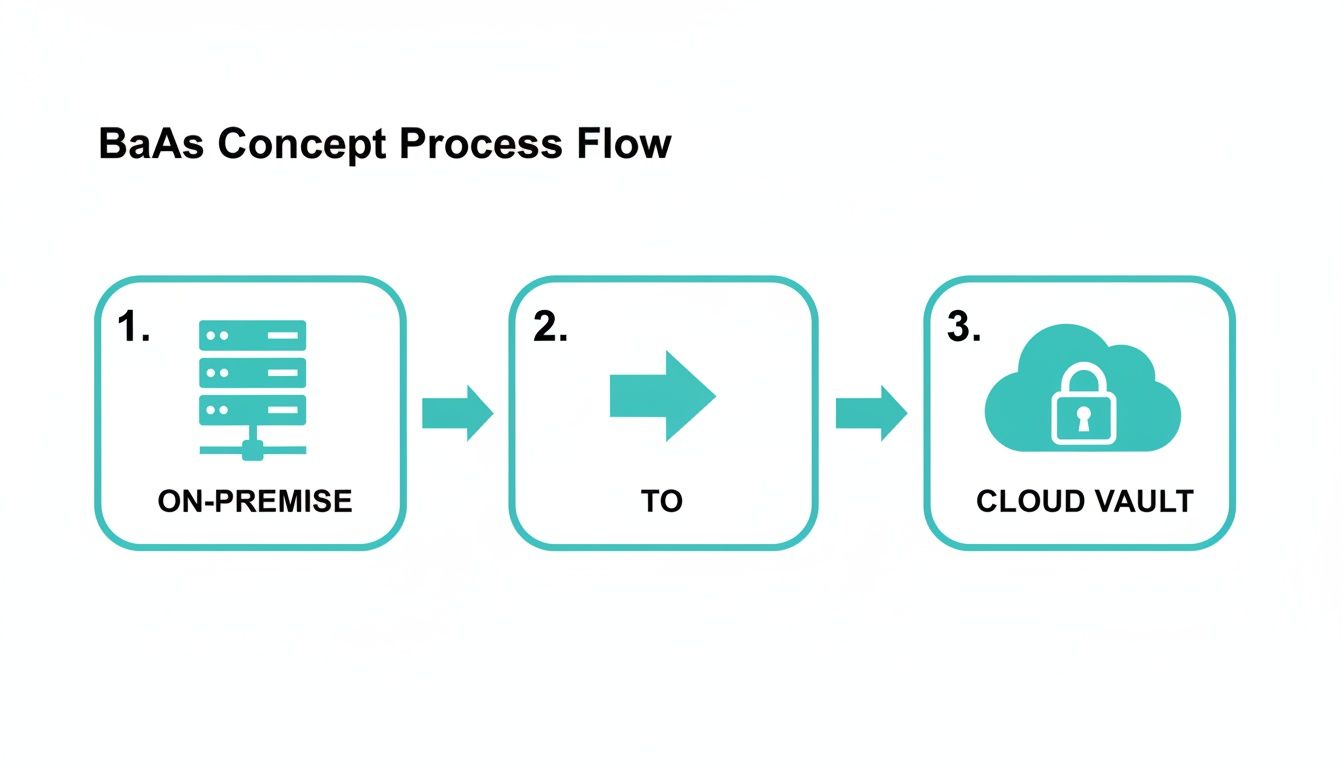
The key here is the managed handoff. Your responsibility ends once the agent takes over, and the provider's begins the moment your data hits their secure network.
The Provider's Secure Backend
Once your encrypted data packet arrives at the BaaS provider’s infrastructure, it’s securely stored. The provider handles all the backend complexity—the servers, storage arrays, and networking needed to keep your data safe and available. At ARPHost, we use Proxmox Backup Server to manage this, which adds another critical layer of security with encryption at-rest.
Why ARPHost Excels Here
Our BaaS architecture is built on a secure, multi-tenant foundation. This means your data is logically walled off from every other customer, period. No cross-contamination, no unauthorized access. When you combine that with smart data deduplication and immutable storage options, your backups aren't just protected—they're incredibly efficient. Our expert 24/7 support team monitors the entire infrastructure, ensuring your backups are successful and recoverable.
If you want to really get into the weeds of how these cloud systems are built for resilience, materials like the AWS Certified Solutions Architect Professional Study Guide offer a deep dive. The principles of redundant, fault-tolerant design are the bedrock of any quality BaaS provider's promise to protect your information.
Ready to protect your servers with a hands-off, expert-managed solution? Explore ARPHost's Proxmox Backup as a Service plans today.
BaaS vs. Traditional Backups vs. DRaaS
When it comes to protecting your data, you've got options. But let's be clear: not all "backup" is created equal. Knowing the difference between Backup as a Service (BaaS), old-school traditional backups, and Disaster Recovery as a Service (DRaaS) is the first step toward building a strategy that actually works when you need it.
The traditional approach is the classic DIY route. You buy the servers, you license the software, and your team is on the hook for everything. This means racking hardware, running daily jobs, and swapping out dead drives. Sure, you have total control, but it comes with a hefty price tag in both upfront costs and the constant drain on your IT staff's time.
It's All About Purpose and Scope
Backup as a Service flips the script. Instead of owning and managing a pile of hardware and software, you're buying an outcome: data restorability. A BaaS provider like ARPHost handles the infrastructure, the software, and all the maintenance. Your job is simply to make sure your data gets backed up. We handle the rest.
DRaaS, however, plays in a different league entirely. Its goal isn't just getting your files back; it's about guaranteeing business continuity. A DRaaS provider doesn't just copy your data—it replicates your entire IT environment. We’re talking servers, networking, applications, the whole nine yards, all on standby in a secure cloud.
When your primary site goes down—whether from a hardware failure, a natural disaster, or a ransomware attack—DRaaS lets you "failover" and run your entire operation from the replica environment. This can happen in minutes, not the hours or days it might take to restore everything from a simple backup.
Getting these terms straight is essential. A deeper understanding of the differences between Business Continuity and Disaster Recovery can help clarify exactly where BaaS and DRaaS fit into your larger resilience plan.
To really nail down the right fit, it helps to see these three models side-by-side. Each one solves a different problem, and picking the wrong one is a recipe for either overspending or being dangerously underprepared.
Comparing Data Protection Models: BaaS vs. Traditional vs. DRaaS
This table contrasts the three main approaches to data protection, helping IT decision-makers choose the right strategy for their business needs.
| Feature | Backup as a Service (BaaS) | Traditional On-Premise Backup | Disaster Recovery as a Service (DRaaS) |
|---|---|---|---|
| Primary Goal | Data restorability (recovering files, VMs, databases) | Data restorability | Business continuity (failing over the entire IT environment) |
| Management | Managed by the provider | Managed entirely by your in-house IT team | Managed by the provider, often in partnership with your IT team |
| Infrastructure | Provider's cloud infrastructure | On-site servers, storage, and software you own | Provider's cloud infrastructure (compute, storage, networking) |
| Capital Expense (CapEx) | Low to none | High (hardware, software licenses) | Low to none |
| Operating Expense (OpEx) | Predictable monthly or annual subscription | High (power, cooling, maintenance, staff time) | Predictable monthly or annual subscription (typically higher than BaaS) |
| Recovery Time Objective (RTO) | Hours to days | Hours to days, depending on infrastructure speed | Minutes to hours |
| Recovery Point Objective (RPO) | Minutes to hours (defined by backup frequency) | Minutes to hours | Seconds to minutes (near-synchronous replication) |
| Best For | SMBs and enterprises looking to offload backup management and CapEx. | Organizations with strict data sovereignty or existing investment. | Mission-critical applications where downtime is measured in financial loss. |
Ultimately, the choice hinges on your tolerance for downtime. If you can afford to be offline for a few hours while data is restored, BaaS is a cost-effective and reliable solution. If every minute of downtime costs you serious money, DRaaS is a non-negotiable investment.
So, Which Model Is Right for You?
Let's break it down into simple terms:
- Traditional Backups: Stick with this only if you have strict data sovereignty rules that forbid off-site storage, have already sunk costs into hardware, and have a dedicated IT team with the skills and time to manage a complex backup system.
- Backup as a Service (BaaS): This is the sweet spot for most businesses. It's perfect if you want to get rid of the headache of managing backups, slash your capital spending, and get reliable data recovery without the complexity and cost of a full DR solution.
- Disaster Recovery as a Service (DRaaS): This is mission-critical territory. If your business grinds to a halt and loses significant money or customer trust the second your services go down, you need DRaaS.
At ARPHost, we focus on providing a smart balance. Our Proxmox Backup as a Service is a tough, managed solution designed to protect the data on your Bare Metal Server or Dedicated Proxmox Private Clouds. For those needing DR-like resilience, our High-Availability VPS Hosting plans are built on self-healing CEPH storage, creating an infrastructure that automatically survives hardware failures.
The Key Benefits of a BaaS Strategy
Switching to a Backup as a Service (BaaS) strategy is about more than just offloading data. It's about fundamentally changing how you approach data protection, turning a dreaded cost center into a real strategic advantage by tackling the biggest headaches IT teams face every day.
The most immediate win? You get to ditch unpredictable capital spending (CapEx) for a clean, predictable operational expense (OpEx). Forget shelling out for new backup servers, tape libraries, and the inevitable replacement cycle. Instead, you pay a simple monthly fee, making budgets straightforward and eliminating those nasty surprise hardware bills.
Free Up Your Team and Bolster Your Security
Beyond the budget, BaaS gives your IT team their time back. It ends the soul-crushing routine of managing backup jobs, swapping out tapes, manually verifying copies, and troubleshooting failures. Your skilled people can finally focus on projects that actually move the business forward, instead of just keeping the lights on.
Security is where BaaS really shines. Most providers deliver enterprise-grade security features that are frankly out of reach for many smaller businesses to build and manage on their own. This isn't just a checkbox; it's a massive upgrade.
- End-to-End Encryption: Your data is locked down tight, both as it travels to the cloud and while it’s stored there.
- Immutable Backups: This is a game-changer. It creates tamper-proof copies of your data that ransomware can't touch. For a deeper look, check out our guide on how immutable backup solutions work.
- Geographic Redundancy: Copies of your backups live in different physical data centers. If a fire or flood hits one location, your data is still safe somewhere else.
The entire industry is already moving this way. A recent survey found that 83% of MSP professionals expect their clients to choose cloud backups over anything else. It's no surprise when cloud spending has jumped by 20.4% in the last year alone. As this analysis of BaaS trends shows, the flexibility and on-demand nature of BaaS have made it the go-to for any modern business.
Why ARPHost Excels Here
Our managed Proxmox BaaS is built to deliver these benefits without compromise. We combine the power of immutable, encrypted backups with our 24/7 expert support, making sure your data isn’t just backed up, but fully recoverable when you need it most. We handle the infrastructure, the monitoring, and the troubleshooting so you can have total peace of mind. Our fully managed IT services take this even further, creating a comprehensive data protection and recovery plan tailored to your business needs.
Ready to offload your backup management entirely? Explore ARPHost's comprehensive managed IT services for a truly hands-off experience.
Putting BaaS to Work with Proxmox Backup Server
Alright, enough with the theory. This is where the rubber meets the road. Let's walk through how to set up a real-world BaaS strategy using Proxmox Backup Server, a powerhouse tool that’s central to ARPHost’s managed infrastructure.
We'll see just how quickly you can go from zero to having your virtual machines and containers—whether they're running on ARPHost Bare Metal Servers or a Dedicated Proxmox Private Cloud—fully protected. The process turns the abstract idea of BaaS into a few simple, concrete steps.
Step 1: Provision a Secure Backup Datastore
First things first: your backups need a dedicated, secure home. With ARPHost, this is a painless process. When you sign up for our Proxmox Backup as a Service, we provision a secure, dedicated Proxmox Backup Server instance for you. Our team makes sure the hardware is tuned for the intense I/O that backup and restore jobs demand.
This datastore becomes the single source of truth for all your backup data—isolated, secure, and built for a high-performance production environment.
Step 2: Connect Your Proxmox VE Host
Next, you need to introduce your production environment (where your VMs and containers live) to its new backup destination. You can do this right inside the Proxmox VE interface on your source host.
- In Proxmox VE, navigate to Datacenter -> Storage -> Add.
- Choose Proxmox Backup Server from the list.
- Fill in the details for your ARPHost-provisioned backup server: the server address, username, password, and datastore name.
- Most importantly, you'll add the server’s fingerprint. This creates a trusted, encrypted link between the two systems.
That’s it. This simple handshake establishes a secure channel between your production VMs and their offsite backup location, paving the way for automated protection.
Step 3: Create and Run Your First Backup Job
With the connection live, you're ready to create your first backup job. From your Proxmox VE host, just right-click a VM or container and hit Backup. A configuration window will pop up.
- Storage: Pick the ARPHost PBS datastore you just added.
- Mode: You have options. Snapshot is the fastest. Suspend is great for running databases that need consistency. Stop guarantees full consistency but requires a moment of downtime.
- Compression: Select an algorithm like ZSTD, which gives you a fantastic balance of speed and space savings.
Click Backup, and you’re off. The Proxmox interface gives you a real-time log, showing data being deduplicated, compressed, and sent securely to the backup server. For you scripters and automation fans, you can also fire off backups right from the command line.
# Example CLI command to back up a VM with ID 101 to the 'arphost-pbs' storage
vzdump 101 --storage arphost-pbs --mode snapshot --compress zstd
This hands-on approach cuts through the jargon and shows you exactly what is backup as a service in practice. It's a managed solution that integrates seamlessly into your existing workflows.
Scaling This with ARPHost
Setting this up yourself offers great control, but let's be honest—managing retention policies, running verification jobs, and performing recovery drills at scale can become a full-time job. This is where ARPHost's fully managed IT services step in. Our team handles the entire workflow for you, ensuring your backups aren't just running, but are verified, tested, and ready for a fast restore the moment you need them.
Ready to move to a managed private cloud where backups are simply handled for you? Explore our Dedicated Proxmox Private Cloud plans starting at $299/month.
How to Choose the Right BaaS Provider
Let's be blunt: not all BaaS providers are created equal. Far from it. Choosing the right partner is one of the most critical decisions you'll make, because your business’s entire resilience hangs in the balance. This isn't just about finding a place to dump your data—it's about vetting a partner whose service will actually work when everything else has failed.
Your evaluation should boil down to a few non-negotiable questions. This isn't the time for a simple checkbox exercise; you need to dig in and verify that a provider’s marketing promises hold up under real-world pressure.
Security and Compliance
First things first: security. Does the provider offer end-to-end encryption, ensuring your data is scrambled both on its way to their servers and while it's sitting there? What about immutable storage? This is your last line of defense against ransomware, creating a tamper-proof copy of your data that attackers can't touch. These aren’t nice-to-haves; they are the absolute fundamentals of modern data protection.
Just as important is data sovereignty. You need to know exactly where your data will live. For any U.S.-based business, using a provider with U.S.-only data centers—like ARPHost—is the simplest way to keep your data under domestic regulations and avoid compliance headaches.
Why ARPHost Excels Here
We built our service around data integrity. Our Proxmox-based backups feature mandatory end-to-end encryption and options for immutability. All client data is housed exclusively within our U.S. data centers, period. It never leaves the country, which simplifies compliance and keeps your data secure. Our Secure Web Hosting Bundles extend this security philosophy to your web presence with Imunify360 and CloudLinux OS.
Integration and Recovery
Next, you have to think about the technical fit. Will the solution play nicely with your current stack, whether you’re running on VMware, Hyper-V, or a Dedicated Proxmox Private Cloud? Finding a provider with deep expertise in your platform of choice, as ARPHost has with Proxmox, can save you from a world of integration pain.
Finally, grill them on their recovery process. When disaster strikes, how fast can you realistically get your data back? Is there genuine 24/7 expert support—meaning you can get a knowledgeable human on the phone or chat when your system goes down at 2 a.m.? An automated ticket response won't cut it when your business is offline. For a deeper dive into what to look for, check out our guide on the best backup solutions for small businesses.
Ready for a BaaS provider that checks all the boxes? Request a managed services quote and let ARPHost secure your data.
Frequently Asked Questions About BaaS
Even the best BaaS strategy can leave a few nagging questions. Let's clear up some of the most common ones we hear from IT teams so you can move forward with total confidence.
Is BaaS Secure Enough for Sensitive Data?
That’s the big one, isn’t it? The answer is a hard yes—if you pick the right provider. Real security isn’t just a checkbox; it's a multi-layered defense. At ARPHost, we start with end-to-end encryption. This means your data is scrambled before it ever leaves your server, stays encrypted while it travels, and remains encrypted while sitting in our data centers.
But we go a step further with immutable backups. Think of these as write-once, read-many copies of your data. Once a backup is made, it’s set in stone—it cannot be altered or deleted, not even by the nastiest ransomware strain. This duo of encryption and immutability turns your backup repository into a fortress for your most critical information.
What Makes BaaS Different from Cloud Storage?
It's easy to confuse the two, but they serve completely different purposes. Services like Dropbox or Google Drive are built for file syncing and sharing, not for structured data protection. They're great for collaboration, but they’re not a recovery plan.
BaaS, on the other hand, is purpose-built for disaster recovery. It creates versioned, application-aware backups of entire systems—virtual machines, databases, and all. While cloud storage just syncs the latest version of a file, a BaaS solution like ours lets you rewind a whole server to a precise point-in-time, right before a disaster or attack hit.
Can I Use BaaS for SaaS Data Like Microsoft 365?
Yes, and honestly, you can't afford not to. The shared responsibility model is tricky; Microsoft hosts the service, but you are responsible for protecting your own data that lives inside it. Accidental deletions, rogue employees, or ransomware attacks targeting your M365 environment are your problem to solve.
A staggering 87% of IT pros reported SaaS data loss in 2026, a problem that keeps getting worse. As the 2027 State of SaaS Backup and Recovery Report makes clear, simply relying on the platform's built-in retention policies is a gamble most businesses lose.
Need to restore a failed server fast? With ARPHost, your backups can be quickly recovered to a new Bare Metal Server or a flexible, high-performance VPS Hosting environment, getting you back online with minimal disruption.