

You usually notice application layer gateway behavior only when something breaks.
A hosted phone system starts dropping audio in one direction. An FTP client logs in fine, then hangs the moment the file transfer begins. A camera stream works inside the office but fails from a remote site behind a different firewall. The ports look open. Basic connectivity checks pass. Yet the application still fails because the firewall understands the network flow, but not the application riding on top of it.
That gap is where an ALG lives.
If you're asking what is application layer gateway in practical terms, the short answer is this: it's a firewall or proxy function that reads application traffic in sufficient detail to rewrite, permit, block, or steer it based on protocol-specific behavior. Sometimes that saves a deployment. Sometimes it's the exact thing causing the outage. For IT teams running VoIP, legacy FTP workflows, RTSP media, private cloud workloads, or mixed colocation and VPS environments, knowing when an ALG helps and when it hurts is part of basic operational hygiene.
The Hidden Network Helper You Need to Understand
A familiar pattern shows up in support escalations.
A business moves its PBX into a private cloud. Registration succeeds, phones ring, and everyone assumes the cutover is clean. Then users report one-way audio. On another day, a vendor uploads files through FTP from a branch office and the control session connects, but the actual data session never completes. The firewall team checks rules, sees the expected ports open, and still can't explain the failure.
Those are classic situations where the network path is technically available, but the application protocol is carrying extra addressing or session details that basic firewall logic doesn't handle well. SIP can embed address information inside signaling. FTP can negotiate separate channels for control and data. RTSP can do something similar with media streams. A standard packet filter may allow the outer flow and still miss what the application needs next.
Why this gets missed
Many teams troubleshoot from Layer 3 and Layer 4 upward. That's sensible, but it can leave out the layer where these failures happen.
An Application Layer Gateway, or ALG, sits in that missing space. It doesn't just see ports and sessions. It inspects the application conversation and decides whether to rewrite payload details, open temporary paths, or enforce protocol-aware policy.
Some of the hardest firewall issues aren't blocked ports. They're valid ports carrying application data that the firewall doesn't understand correctly.
Why it matters in hosted environments
This matters more in managed hosting, private cloud, and colocation than many teams expect. You're often dealing with NAT boundaries, tenant separation, softphones, SBCs, vendor appliances, and applications that behave differently across networks. In those environments, the ALG can be the quiet helper making traffic work, or the quiet saboteur breaking a clean design.
Decoding the Application Layer Gateway
The easiest way to understand an ALG is to compare it with two different kinds of gatekeepers.
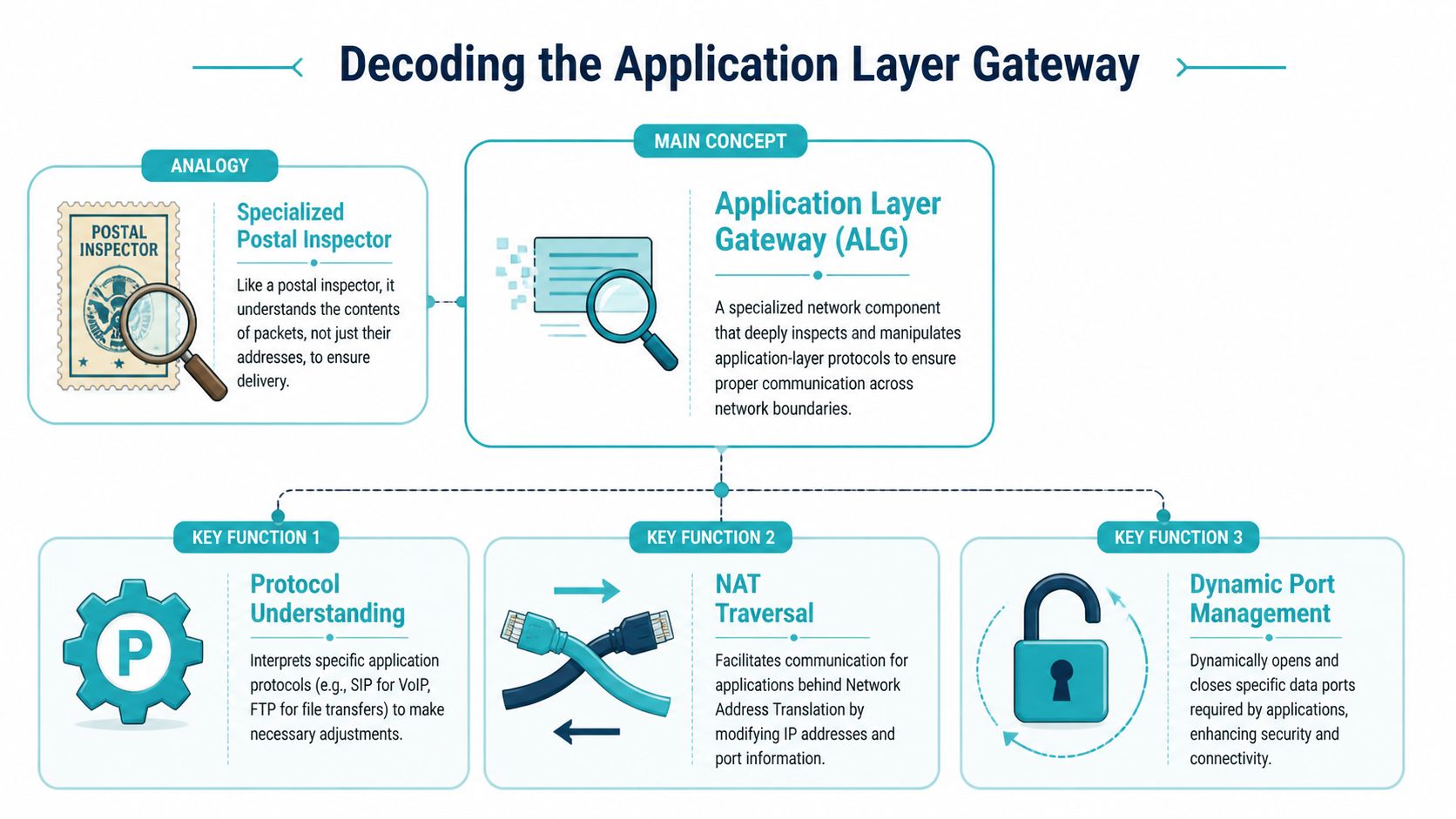
A basic firewall works like a lobby guard checking envelope labels. It looks at source, destination, protocol, and port. That works for many workloads, but it doesn't reveal what the application is trying to do inside the packet. An Application Layer Gateway acts more like a specialist inspector who understands the contents and can make a decision based on the protocol itself.
ALGs operate at OSI Layer 7, where they inspect application-specific data in real time rather than relying only on IP addresses and ports. That is what separates them from traditional Layer 4 devices, and it's especially important for protocols like SIP where call signaling can include embedded addressing details that have to be rewritten for NAT traversal. In VoIP specifically, an ALG can inspect SIP messages such as INVITE, translate private addresses and UDP ports inside the headers, and keep signaling, audio, and video streams synchronized across concurrent sessions, as described in Palo Alto Networks' overview of how an app gateway works at Layer 7.
What the ALG actually reads
At the network edge, the ALG isn't satisfied with "UDP on a known port" or "TCP session established."
It looks deeper for protocol semantics such as:
- SIP call setup details that identify a call attempt and describe where media should flow next
- FTP control instructions that tell each side which data channel to open
- HTTP request attributes that can influence backend selection, policy, or filtering
- Application payload values that still reference internal addressing after NAT has changed the outer packet
That deeper awareness is why ALGs can solve problems that a simpler firewall can't.
Why this is useful and dangerous
The same capability that makes ALGs useful also makes them risky. If the firewall interprets the protocol correctly, it can save you from awkward static rules and manual workarounds. If the implementation is poor, or the application uses encryption or vendor-specific behavior the ALG doesn't expect, the firewall may rewrite the wrong fields or interfere with a session that would've worked better untouched.
Operational takeaway: An ALG isn't just "more firewall." It's protocol-specific logic, and protocol-specific logic can be either precise or fragile.
The Critical Role of ALGs in NAT Traversal
Most real-world ALG conversations are really NAT conversations.
NAT solves one set of problems and creates another. It lets internal systems use private addressing while sharing external connectivity through a public edge. That's standard practice across offices, VPS environments, colocated appliances, and private cloud deployments. The trouble starts when an application embeds its own addressing information in the payload. NAT changes the packet header, but it doesn't automatically fix the application data inside the packet.
Where NAT breaks the application
Take a VoIP endpoint behind a firewall. It sends signaling out to a provider, but the SIP payload may still advertise a private address for media return. The provider receives valid signaling, then tries to send audio to an address that only exists inside the private network. The call establishes. The audio path fails.
FTP has a similar pattern. The control connection may pass cleanly, but the protocol can negotiate a second connection for data transfer. If the firewall doesn't understand that negotiation, the transfer fails even though authentication and command exchange worked.
This is exactly why application-aware gateways became important in firewall design. The concept took shape in the late 1980s and early 1990s as security architecture moved beyond simple packet filters. RFC 1083 in 1988 introduced TACACS and highlighted the need for application-aware gateways, and by 1996 roughly 70% of enterprise firewalls included at least one application-level proxy module
What the ALG changes in flight
An ALG handles this by intercepting the session and making protocol-aware adjustments before forwarding traffic.
A typical NAT traversal sequence looks like this:
The client sends an application request
The packet reaches the firewall with normal source and destination headers, but the payload may still contain private session details.The ALG inspects the application payload
It identifies protocol fields that reference unreachable internal addresses or ports.The firewall rewrites those embedded values
Instead of forwarding private details unchanged, it substitutes reachable values associated with the public-facing side of the session.Temporary return paths are created
The firewall opens narrow, dynamic pinholes for the expected response or media traffic.The ALG tracks the related streams
It keeps the control and data pieces associated so return traffic lands at the correct internal system.
Why this matters for hosted VoIP
In SIP deployments, teams frequently decide between relying on the firewall's SIP ALG and relying on endpoint or PBX features such as STUN, ICE, or direct SBC handling. If you want the NAT side of that design explained from the signaling perspective, ARPHost has a useful breakdown of what a STUN server does.
NAT doesn't "break VoIP" by itself. It breaks protocols that carry their own path instructions unless something rewrites those instructions correctly.
In private cloud and colocation environments, this becomes more important because you may have multiple boundaries in play. A VM can sit behind virtual networking, an edge firewall, and upstream provider controls. If no component owns the application-aware rewrite task cleanly, the deployment works only intermittently.
ALGs in Action with SIP, FTP, and RTSP
The phrase what is application layer gateway becomes much clearer when you look at protocol behavior instead of abstract definitions. ALGs matter because some applications don't use a single neat flow. They negotiate extra channels, advertise callback details, or separate signaling from media.
SIP and voice traffic
SIP is the protocol most admins associate with ALGs, and for good reason. A phone or PBX can signal successfully while the media path still fails. The reason is simple. Signaling and media are related, but they aren't identical flows.
A SIP-aware ALG reads the signaling exchange, identifies where the RTP media streams are supposed to go, rewrites embedded addressing where needed, and permits the corresponding audio streams. Without that step, you can end up with ringing phones and silent calls.
If you're working through hosted telephony design, ARPHost's guide to VoIP with SIP is a practical reference for the application side of that stack.
FTP and separate data channels
FTP breaks assumptions that many modern firewalls make. It uses a control session for commands, then establishes a separate data connection for transfers. That means "the login worked" tells you very little about whether file transfer will work.
An FTP ALG watches the control channel for commands that define how the data channel should be established. It then rewrites or permits the required connection details so the transfer can start.
RTSP and media control
RTSP has a similar operational pattern in video and streaming environments. The control session negotiates how media should flow, which means the firewall needs more context than simple port allow rules provide.
That is one reason ALG and proxy behavior still show up in media, surveillance, and edge streaming deployments long after many teams stopped thinking about FTP.
How ALGs handle common protocols
| Protocol | The Problem with NAT | How the ALG Solves It |
|---|---|---|
| SIP | Signaling may advertise private media addresses that remote systems can't reach | Reads signaling, rewrites embedded address details, and permits related media streams |
| FTP | Control and data use separate connections that basic rules don't automatically coordinate | Inspects FTP commands and opens or rewrites the data path dynamically |
| RTSP | Control traffic negotiates media delivery outside the original session | Tracks the negotiated media flow and allows the required related streams |
A useful way to think about this is proxy behavior. An ALG often acts as an intermediary with separate client-side and server-side connections. That architecture can improve security because it hides internal systems and enables policy based on application behavior, but it also costs more in compute and introduces more processing overhead, as explained in NordLayer's description of proxy-based application-level gateways and Layer 7 routing.
If the protocol opens one connection and quietly negotiates another, basic firewall logic often isn't enough.
The ALG Dilemma When to Enable and When to Disable
This is the question that matters in production. Not "what is application layer gateway" in theory, but whether you should leave it on.
The honest answer is that there isn't a universal default. Some networks work better with a protocol helper enabled. Others become more stable the moment you disable it and let the application handle NAT traversal itself.
Palo Alto's documentation highlights a gap many smaller IT teams run into. A lot of guidance explains SIP ALG or FTP ALG in isolation, but doesn't give smaller organizations a usable framework for deciding whether to leave those features enabled on modern managed firewalls. The same material also notes a real trade-off: enabling SIP ALG can reduce NAT traversal issues, but it can also add inspection latency and interfere with end-to-end encryption, as discussed in Palo Alto's notes on application-level gateways in managed firewall decisions.
When enabling an ALG makes sense
An ALG is often worth trying when:
- The application is legacy and expects the firewall to assist with NAT traversal
- You don't control both endpoints and need the edge device to normalize behavior
- The protocol is cleartext and predictable enough for the firewall to parse reliably
- You want tighter policy enforcement on application commands rather than broad port-level access
This comes up often with older FTP workflows, SIP trunks connected to office firewalls, and media systems installed by third parties.
When disabling it is the better move
Disabling the ALG is usually the right test when:
- The application already supports NAT traversal methods natively
- Traffic is encrypted, so the firewall can't safely inspect or rewrite the application payload
- Vendor documentation explicitly recommends disabling SIP ALG
- You see symptoms introduced only when traffic crosses a specific firewall
A lot of modern voice deployments fit this pattern. SBCs, hosted PBXs, and well-designed softphone clients often behave better when the firewall stops trying to be clever.
A related lesson shows up outside voice too. In environments focused on securing industrial IoT deployments, teams regularly discover that protocol-aware inspection helps only when it's aligned with the actual application design. If the inspection layer is outdated or mismatched, it creates troubleshooting noise instead of security value.
A practical decision framework
Use this quick sequence before you flip the setting:
Check the application guidance
See whether the PBX, SBC, FTP service, or media platform expects ALG assistance or warns against it.Identify encryption use
If signaling is encrypted, the firewall may not be able to inspect what it needs.Map who owns NAT traversal
Decide whether the firewall, endpoint, or session border controller is responsible.Test one variable at a time
Don't change port rules, timeout values, and ALG state all at once.
For a visual overview, this short explainer is a helpful companion before making the call.
ALG Troubleshooting and Configuration Best Practices
Troubleshooting ALG issues gets easier once you stop treating them as generic firewall problems.
Look for symptoms that point to application awareness gone wrong rather than basic packet loss.
Common symptoms worth recognizing
- One-way audio on VoIP calls usually points to signaling succeeding while media routing fails
- FTP login succeeds but transfer stalls often means the control session worked and the data path did not
- Calls fail only from one site or one firewall can indicate a vendor-specific ALG implementation issue
- Encrypted voice or app traffic behaves inconsistently may mean the firewall can't inspect the payload cleanly
- Cloud load balancer plus firewall plus private NAT creates intermittent breakage often means multiple layers are trying to help in conflicting ways
A newer complication is cloud-native networking. Research summarized in an arXiv paper notes a knowledge gap around ALG behavior in SD-WAN and cloud-native architectures, where reverse proxies and service meshes may already perform inspection. Teams deploying SIP-based services on Kubernetes or Proxmox-backed platforms can wrongly assume the cloud-native ingress layer replaces traditional ALG needs, leaving NAT and security handling inconsistent across workloads, as discussed in this analysis of ALG blind spots in cloud-native architectures.
A field-tested checklist
When an application breaks across NAT, use this order:
Confirm whether an ALG is enabled
Many admins waste time debugging the app while forgetting the firewall is modifying payloads.Capture both signaling and media behavior
You need to know whether the control session succeeds while the secondary stream fails.Disable the ALG as a clean test
This is often the fastest way to determine whether the helper is helping.Review protocol mode details
For FTP especially, make sure the client and server mode align with the firewall behavior. If you need a quick refresher on ports and control versus data behavior, ARPHost has a practical guide on the default FTP port.Document the final state
Teams forget why a SIP ALG was disabled, then re-enable it during a firewall refresh months later.
Best practice: If an application already has a clean NAT traversal design, don't assume an ALG improves it. Prove it in testing.
Why managed environments still need explicit decisions
Private cloud, VPS, and colocation setups make this harder because there may be several inspection points. A virtual edge, a hardware firewall, and an ingress proxy can all influence the same session. The best results come from assigning responsibility clearly. One layer should own the protocol rewrite logic, and the others should stay predictable.
Common Questions about Application Layer Gateways
Can an ALG inspect encrypted traffic like SIP over TLS
Usually not in the same way it handles cleartext signaling. If the firewall can't read the protocol details inside the session, it can't reliably rewrite application-layer addressing fields. That's one reason encrypted voice deployments often rely on SBCs or endpoint-native NAT traversal instead of generic SIP ALG behavior.
Is an ALG the same as a WAF
No. A Web Application Firewall focuses on HTTP and HTTPS security policy for web applications, such as request inspection and attack filtering. An ALG is a broader Layer 7 concept tied to protocol-aware mediation, rewriting, proxying, or routing for specific applications such as SIP, FTP, SMTP, or HTTP.
Do ALGs still matter with IPv6
Yes, but the role changes. NAT pressure is lower in IPv6-focused designs, so some classic ALG use cases become less central. Even then, application-aware policy enforcement, proxying, and Layer 7 routing still matter.
What's the safest default for SIP ALG
There isn't a universal safe default. If the voice platform vendor says disable it, start there. If you're dealing with older systems or awkward NAT boundaries, test with it enabled and compare results.
Where should a team start if they're unsure
Start with a small controlled test, document the traffic path, and decide which component owns NAT traversal. That's far safer than leaving every protocol helper enabled and hoping the defaults match your application.
If your team needs help deciding where ALG belongs in your stack, ARPHost, LLC can help with managed infrastructure and network operations across VPS hosting, bare metal servers, colocation, SIP services, and Proxmox private cloud environments. If you want a low-cost place to test firewall behavior, you can start with VPS hosting. If you're designing a larger virtualized platform, review Proxmox private cloud options. For organizations that want the firewall, voice, server, and day-to-day troubleshooting handled as one service, request details on fully managed IT services.
