

So, what exactly is a DID number? In simple terms, a Direct Inward Dialing (DID) number is a virtual phone number that lets you route calls directly to a specific person, desk, or department inside your company—all without going through a clunky central switchboard or a frustrated receptionist.
Think of it like having unique, direct-dial phone numbers for every employee in a large office building. This simple but incredibly powerful technology is the secret sauce behind modern business communication, especially when powered by a robust Virtual PBX.
What Are DIDs and How Do They Work?
At its heart, a Direct Inward Dialing (DID) number frees businesses from the old model of needing a separate, physical phone line for every single phone number. That traditional approach was expensive and a nightmare to manage. A single business might have been stuck paying for dozens of costly physical lines wired into a legacy phone system.
Instead, DIDs run over VoIP (Voice over Internet Protocol), usually connecting to your company’s Virtual PBX phone system through a SIP Trunk. This setup completely changes the game by digitizing your voice communications.
To help clarify the differences, here's a quick comparison.
DIDs vs Traditional Phone Lines At a Glance
This table breaks down how DID numbers stack up against the old-school analog phone lines they replaced.
| Feature | DID Numbers (with VoIP/PBX) | Traditional Phone Lines |
|---|---|---|
| Flexibility | Extremely high. Route to any device, anywhere. | Low. Tied to a physical location and a specific desk phone. |
| Scalability | Instant. Add or remove numbers in minutes via software. | Slow and costly. Requires a technician to install new physical lines. |
| Cost | Low monthly fee for a block of numbers. | High monthly rental cost per line. |
| Geographic Presence | Use local numbers from any city, managed from one office. | Limited to the local area where the physical line is installed. |
| Management | Centralized and simple through a web-based PBX interface. | Complex and decentralized. Changes often require a service call. |
As you can see, DIDs offer a far more dynamic and cost-effective solution for any modern business.
This digital approach brings some serious advantages:
- Slash Your Costs: You can buy a block of DIDs for a tiny fraction of what it costs to install and maintain multiple analog lines.
- Scale on Demand: Need to onboard a new employee? Just assign them a new DID number in your PBX software. The whole process takes minutes, not weeks.
- Work from Anywhere: DIDs can ring a desk phone, a softphone app on a laptop, or an employee's mobile phone. It’s perfect for supporting remote and hybrid teams.
- Happier Customers: Callers can instantly reach the exact person or department they need, skipping frustrating phone menus and endless hold music.
If you're interested in the history and technical foundation, you can dive deeper into the concept of DIDs (Direct Inward Dialing).
This setup turns a static, old-fashioned phone system into a flexible communication tool. A business can instantly create a "local" presence in New York, Chicago, and Los Angeles by using local DIDs for each city—all while answering the calls from a single office in Denver.
When you pair this technology with a solid hosting environment, like the managed Virtual PBX solutions from ARPHost, it becomes virtually bulletproof. Hosting your phone system on a secure VPS or a dedicated Proxmox private cloud guarantees high-quality, stable connections, shielding your business-critical communications from downtime and security risks.
You can learn more by checking out our complete guide on what a DID number is.
How DIDs Connect Callers to Your Team
To really get what DIDs are all about, you have to look under the hood. The technology is surprisingly straightforward, working behind the scenes to connect your customers to the exact right person on your team without any fuss. It’s a process that turns a simple phone call into a precisely guided digital journey.
When a customer dials one of your DID numbers, the call starts its trip on the good old Public Switched Telephone Network (PSTN). From there, it hits your VoIP provider's gateway, which is where the real magic begins. Instantly, the call is converted from a classic analog signal into digital data packets.
The Digital Journey to Your PBX
These data packets don’t just float off into the ether. They’re sent across the internet through a SIP Trunk straight to your company’s IP-PBX (Internet Protocol Private Branch Exchange). This PBX could be a FreePBX system running on a rock-solid ARPHost secure VPS, giving you total command over your communications.
The moment the call arrives at your PBX, the system reads the specific DID number that was dialed. This is the key step—it’s what puts the "direct" in "direct inward dialing."
Think of your PBX as an expert traffic controller. It checks its dial plan—a set of rules you create—to see exactly where that specific DID number is supposed to route the call. This intelligence is what makes DIDs so much more powerful than a traditional business line.
This routing can be as simple or as complex as you need. A call to a DID can be sent to:
- A specific employee's desk phone or softphone app.
- A ring group that dials the entire sales team at once.
- An automated attendant (IVR) that gives callers a menu of options.
- A dedicated voicemail box for after-hours calls.
This diagram breaks down the simple but powerful flow from caller to employee.
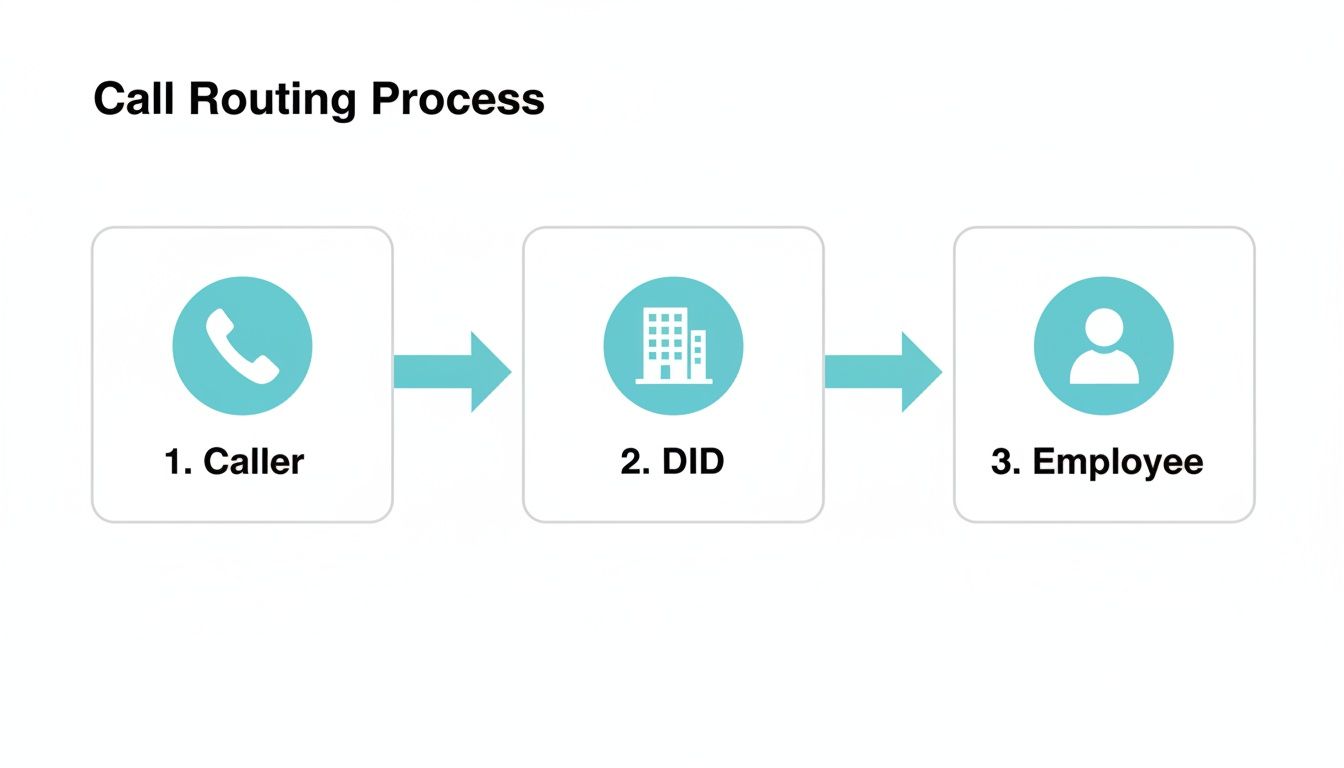
As you can see, the call travels from the outside world, is identified by its unique DID, and then smartly routed to the correct person or department.
Configuring the Call Flow
In a system like FreePBX, you set up this logic using what are called "inbound routes." For every DID you own, you simply create a rule. For example:
- DID Number 555-123-4001: Set destination to extension
101(John's desk). - DID Number 555-123-4002: Set destination to ring group
601(Sales Team). - DID Number 555-123-4003: Set destination to an IVR menu ("Press 1 for Sales…").
Understanding this separation of duties is critical. Your VoIP provider gives you the DID and the SIP Trunk to connect to the world. Your PBX—hosted securely with a provider like ARPHost—handles all the routing logic. For businesses that would rather not get their hands dirty, ARPHost's managed Virtual PBX solutions can take care of all this complex configuration, ensuring your calls land where they should, every time.
To get a better handle on the technology connecting your PBX to the phone network, you’ll want to check out our guide on SIP trunking and VoIP.
Putting DIDs to Work for Your Business
Alright, enough with the theory. Let's talk about what DIDs actually do for a business. These aren't just virtual phone numbers; they're strategic tools. When you get clever with them, you can drive real growth, make your team more efficient, and uncover insights you never knew you were missing.
Think about your sales team. Instead of routing every call through a clunky main line, what if each rep had their own unique DID? Suddenly, they can build direct relationships with clients. Customers get an instant, personal point of contact, completely skipping those frustrating phone menus. That one change can make a massive difference in the customer experience.

Driving Growth and Efficiency
Here's where it gets really powerful: marketing. Assign a different DID to each of your campaigns. Give one number to your Google Ads, another to a LinkedIn promotion, and a third to that print mailer you sent out. Now you can track exactly which channels are making the phone ring. This is gold for optimizing your marketing spend and doubling down on what actually works.
This kind of granular tracking transforms your phone system from a simple utility into a powerful business intelligence tool. You’re no longer guessing which campaigns are landing; you have clear, actionable data staring you in the face.
This flexibility also applies to your company's physical (or not-so-physical) footprint. Many businesses use DIDs to create a "local" presence in cities where they don't have an office. This builds immediate trust with regional customers who are always more likely to dial a familiar area code.
This level of control gives you some serious, tangible benefits:
- Data-Driven Marketing: Stop wasting money. Know precisely which ads generate calls and allocate your budget with confidence.
- Enhanced Customer Experience: Connect callers directly to the right person, cutting out friction and hold music.
- Operational Agility: Support your remote and hybrid teams seamlessly by routing calls to any device, anywhere in the world.
When you use DIDs this way, they become a core part of your infrastructure, helping you build powerful communication hubs for business success.
Scaling This with ARPHost
The best part about DIDs is how easily they scale, especially when you manage them correctly. You can get rid of dozens of expensive, clunky physical phone lines and consolidate them into a single, efficient SIP trunk that connects to a Virtual PBX phone system. This doesn't just slash costs; it puts all your management tools in one place.
With ARPHost, you can deploy a fully configured Virtual PBX on one of our secure web hosting bundles or a high-performance VPS hosting plan, with options starting from just $5.99/month. We handle all the technical heavy lifting on the backend, giving you a rock-solid platform to manage your DIDs, set up complex call routing, and scale your communications effortlessly as your business grows. It's a managed approach that ensures your phone system is always stable, secure, and ready for whatever you throw at it.
Ready to put DIDs to work? Explore ARPHost's Virtual PBX solutions at https://arphost.com/virtual-pbx-phone-systems/ and start building a smarter communication strategy today.
How to Get and Manage Your DIDs
Getting your business phone numbers sorted out shouldn't be a headache. Whether you're grabbing brand-new DIDs or bringing your existing numbers over with you, a solid plan is all you need to ensure a smooth, zero-downtime transition.
The first path is provisioning, which is just a fancy word for getting new numbers from a provider. You’ll need to decide what you need. Are you aiming for a local presence in a few key cities with local numbers? Or does a single toll-free number make more sense for your national customer base? Most VoIP providers have a deep inventory, letting you pick numbers that fit your strategy.
The Number Porting Process
If you already have business numbers you can't afford to lose, you'll be dealing with number porting. This is the process of moving your existing phone numbers from your old carrier to a new one. It’s all governed by a regulatory framework called Local Number Portability (LNP), which gives you the right to keep your numbers when you switch.
A successful port comes down to one thing: getting the details right. The whole process hinges on a document called a Letter of Authorization (LOA). This is what gives your new provider the green light to request your numbers from your current carrier.
CRITICAL TIP: The single biggest reason porting requests get rejected is mismatched information. The business name, service address, and account details on your LOA must be a perfect, character-for-character match with what your current provider has on file. A tiny mistake like "Corp." instead of "Corporation" is enough to get it bounced.
A Roadmap for a Smooth Transition
To sidestep the common traps and pull off a seamless move, stick to these proven steps:
- Gather Your Docs: Before you do anything else, grab a recent phone bill from your current provider. It has all the critical information you'll need for the LOA.
- Submit a Flawless LOA: Work with your new provider to fill out the Letter of Authorization with surgical precision. Double-check every single field before you send it off.
- Don't Cancel Your Old Service: This one is crucial. Wait until the port is 100% complete before you cancel your old account. If you cancel early, you will lose your numbers for good.
- Coordinate the Port Date: Work with your new provider to schedule the exact day and time for the final switch. This helps minimize any chance of service interruption.
Honestly, this process can be a real time-sink, full of paperwork and back-and-forth with carriers. This is exactly where a managed services partner proves its worth. Instead of wrestling with the technical details yourself, you can hand off the entire project.
At ARPHost, our fully managed IT services include handling the entire number porting process from start to finish. Our team manages the LOA submission, coordinates with both carriers, and guarantees a zero-downtime transition to your new Virtual PBX phone system. We take the administrative burden off your plate so you can stay focused on your business.
Ready for a communication upgrade without the hassle? Explore ARPHost's Virtual PBX solutions at https://arphost.com/virtual-pbx-phone-systems/ and let our experts manage your DIDs from day one.
Integrating DIDs with Your Core IT Systems
Here's where DIDs stop being just phone numbers and start becoming serious business intelligence tools. The real magic happens when you integrate your Virtual PBX phone system—the brain powered by your DIDs—with the core software that runs your business.
Think about it. A sales call comes in on a dedicated marketing DID. Instead of a cold handoff, your PBX talks to your CRM. Before the agent even says "hello," they see the caller's entire purchase history, open tickets, and contact details. That's not just a phone call; it's a context-aware conversation that makes customers feel known, not processed. The same logic applies to your helpdesk—incoming calls can auto-generate support tickets, complete with call details, slashing manual entry and human error.
Building a Resilient VoIP Foundation
For any IT pro, this is where the fun begins. You want a communication backbone that's not just functional but bulletproof—secure, stable, and completely under your control. The best way to achieve this is by deploying an open-source PBX like FreePBX on a high-performance hosting platform.
Your choice of hosting is everything here. Throwing your PBX on a cheap, shared server is a recipe for disaster. You’ll be fighting call jitter, dropped connections, and security holes that leave your entire company exposed. For mission-critical VoIP, a dedicated, high-performance environment isn't a luxury; it's a non-negotiable.
Two ARPHost solutions provide the rock-solid backbone you need:
- High-Availability VPS Hosting: Our KVM-based virtual servers give you truly dedicated resources and CEPH-powered storage. This guarantees your PBX has the consistent horsepower needed for crystal-clear, uninterrupted audio.
- Dedicated Proxmox Private Clouds: For ultimate control and isolation, running your FreePBX instance inside a Proxmox environment on dedicated hardware is the gold standard. It delivers unmatched security and performance, completely eliminating any "noisy neighbor" problems.
By hosting your PBX on a dedicated or high-availability platform, you are building a fortress around your communications. This isolation protects your system from resource contention and external threats, ensuring your phone system is as reliable as your power grid.
Why ARPHost Excels Here
We get it. ARPHost provides the kind of infrastructure built for the intense demands of real-time communication. Our secure VPS hosting and dedicated Proxmox private clouds are engineered from the ground up for high-performance VoIP deployments. We don’t just sell servers; we understand what DIDs are and the robust infrastructure they need to thrive.
Our high-availability VPS plans (from $5.99/month) use KVM virtualization for true resource isolation. For those who need the whole machine, our Proxmox private clouds (starting at $299/month) offer a fully dedicated environment with full root access. Both are backed by our 24/7 expert support, so your communications infrastructure is always online and performing flawlessly.
And if you want the power without the day-to-day headache, our fully managed IT services can handle the entire project—from deploying FreePBX on a hardened server to configuring your DIDs and integrations.
Ready for a rock-solid communication backbone? View ARPHost's Proxmox Private Cloud plans at https://arphost.com/proxmox-private-clouds/ and build a VoIP system you can bet your business on.
Why ARPHost is Your Ideal Communications Partner
So, we've covered the what, how, and why of DIDs. You get it—they're essential for any modern business. But knowing you need DIDs, SIP trunks, and a Virtual PBX is a world away from actually managing the tangled web of configurations, security risks, and constant upkeep that comes with them.
That’s where we come in. ARPHost doesn’t just sell you the parts and wish you luck. We deliver a complete, hands-off communications solution.
Your End-to-End Solution
Our fully managed IT services are designed to lift that technical weight right off your shoulders. We handle it all: provisioning the DIDs, setting up the SIP trunks, and hosting your Virtual PBX on our own secure, high-performance infrastructure. It's a unified approach that's becoming the new standard—the hosting infrastructure services market is set to hit USD 46.0 billion by 2036. This massive growth is a clear signal that businesses are turning to experts to manage their critical systems. You can discover more about this expanding market and see why.
This isn’t just a basic setup. Our comprehensive service means:
- Initial Setup and Configuration: We build your entire phone system from the ground up, getting it right from day one. No guesswork.
- Proactive Monitoring and Patching: Our team is always watching, ensuring your system stays online, secure, and up-to-date.
- 24/7 Expert Support: Got a question or need to make a change? Our U.S.-based experts are here for you, around the clock.
When you plug your communications into our managed ecosystem, you're not just buying a phone system. You're getting a reliable, secure, and rock-solid platform that lets your team get back to running the business, not fighting IT fires.
Our approach guarantees your phone system just works. It’s backed by a team that understands every single layer of the stack, from the bare metal servers and Proxmox private clouds all the way up to the Virtual PBX software itself. You can see the real-world impact and learn how ARPHost saves businesses thousands with hosted Virtual PBX in our detailed guide.
Ready for a communications solution that’s truly managed by experts? Request a custom quote for our managed IT services at https://arphost.com/managed-services/ today.
Common Questions About DIDs, Answered
Let's clear up a few common questions that pop up when IT pros start digging into Direct Inward Dialing. We'll cut through the noise and give you straight answers.
What Is the Difference Between a DID and a Toll-Free Number?
The short answer? It's all about who pays for the call and what the number's primary job is.
With a DID (Direct Inward Dialing) number, the caller pays any standard long-distance or local charges. Its main purpose is to act like a direct line, routing calls straight to a specific person, desk, or department inside your phone system.
A toll-free number, on the other hand, makes the call free for the person dialing it. Your business picks up the tab instead. But here’s where it gets interesting: a toll-free number often just acts as a friendly front. Behind the scenes, it's usually pointed directly at a DID, which then does the hard work of routing the call to the right place.
How Many DIDs Can I Have on One SIP Trunk?
This is a classic point of confusion. A SIP trunk’s limit isn't based on how many phone numbers you have, but on how many calls can happen at the exact same time. Think of your SIP trunk as a highway with a set number of lanes (call channels).
You can have hundreds or even thousands of DIDs (the exit ramps) all connected to that one highway. The only bottleneck is the number of cars (calls) that can fit in the lanes at once.
Can I Send Texts with a DID Number?
Absolutely. It’s no longer just a feature for personal mobile numbers. Modern VoIP providers, including ARPHost, now offer SMS-enabled DIDs.
This lets you use your official business numbers for two-way text messaging with customers, which is a game-changer for everything from appointment reminders to customer support and marketing updates.
Is a DID the Same as a VoIP Number?
Not exactly, but they are closely related. Think of it like this: a DID is a specific kind of VoIP number.
While practically all DIDs in modern phone systems are powered by VoIP, not every VoIP number is configured to be a DID. A DID is specifically built to bypass the main reception line and route directly to a final destination within a PBX. That direct-routing capability is its secret sauce.
At ARPHost, our Virtual PBX phone systems are built to give you total control over your DIDs, SIP trunks, and call routing from a single, secure platform. We handle all the backend complexity so you can focus on running your business.
Explore ARPHost's Virtual PBX solutions at https://arphost.com/virtual-pbx-phone-systems/ and find a smarter way to manage your communications.