

You’re probably in one of two situations right now. You need a first website for a new business, or you already have a simple site and you’re realizing the platform choice matters more than you thought.
At first glance, website hosting vs website builder looks like a beginner question. It isn’t. It’s a business ownership question. The tool you pick now affects how fast you launch, how much you can customize, how easily you can integrate other systems, and how painful it will be if you need to move later.
Many business owners pick a builder because it feels efficient. Drag, drop, publish, done. That can be the right move when speed matters most and the site is small. But the cost of convenience often shows up later, when you need better SEO control, custom workflows, multiple apps, stronger performance tuning, or a clean migration path.
Traditional hosting asks more from you up front. You need a platform such as WordPress, a hosting account, and at least a basic plan for maintenance. In exchange, you get control over the underlying environment and a much clearer claim on your digital assets.
Your First Website A Crossroads Decision
A local service business launches with a builder because the owner needs something live this week. The template looks polished. Forms work. The domain connects. For the first stretch, that decision feels smart.
Then the business grows.
The owner wants a booking workflow that doesn’t fit the builder’s app ecosystem. Their marketing team wants deeper SEO customization. Their operations person wants branded email, cleaner CRM integration, and fewer platform limitations. The website that felt simple at launch starts to feel narrow.
That’s the crossroads. The decision isn’t just about getting pages online. It’s about choosing whether your website will be a packaged service or part of your broader infrastructure.
Early convenience has value. So does long-term control. The mistake is treating them like the same thing.
Here’s a quick comparison before we go deeper:
| Criteria | Website Builder | Traditional Hosting |
|---|---|---|
| Getting started | Fastest path for non-technical users | Requires setup of hosting plus CMS or codebase |
| Design workflow | Template-driven and guided | Fully flexible, but more hands-on |
| Control | Limited to platform rules | Broad control over files, apps, and environment |
| Scalability | Usually tied to vendor plans and features | Expandable through better hosting, plugins, custom stacks |
| Portability | Often limited by platform export options | Easier to move when you control files and stack |
| Operational effort | Lower at launch | Higher unless you use managed hosting |
Practical rule: If your site is mostly brochure pages and a contact form, a builder may be enough for now. If your site is becoming a business system, hosting deserves serious consideration.
The strongest decisions come from thinking past launch day. Your future problems are usually more expensive than your current setup time.
The Core Distinction Two Paths to an Online Presence
The cleanest way to understand this is simple. Web hosting is the infrastructure that stores and serves your website. A website builder is the software used to create the site. In practice, many builders bundle hosting, while self-hosted systems such as WordPress require separate hosting.
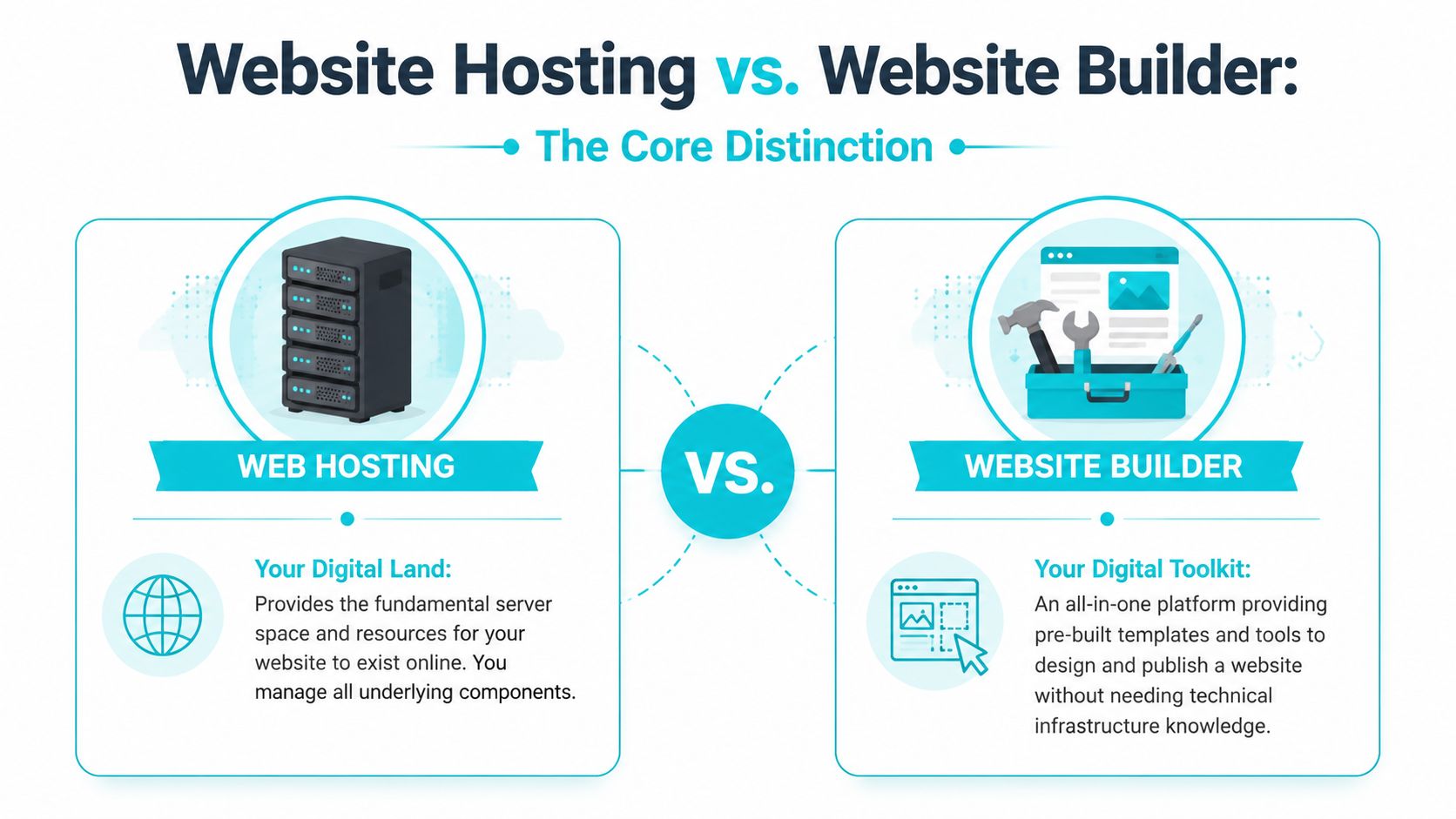
The furnished apartment versus the land you build on
A website builder is like renting a furnished apartment. You can move in fast. The furniture is already there. Maintenance is mostly handled. But you can’t tear down walls, reroute utilities, or rebuild the floor plan.
Hosting is closer to owning the land and choosing the structure. You can build what you want, use the tools you prefer, and change contractors if needed. That flexibility comes with responsibility, but it also creates advantage.
That distinction matters most when a business stops being simple. A site that starts as a landing page often becomes a storefront, lead engine, help center, content hub, or customer portal. Builders work well when your needs stay inside the platform’s boundaries. Hosting works better when those boundaries start getting in the way.
Why control matters in practical terms
Control isn’t just a developer concern. It affects ordinary business decisions:
- Custom functionality: You may need scripts, plugins, or API connections that a builder won’t allow.
- Vendor choice: With hosted infrastructure, you can change themes, developers, providers, and tooling without rebuilding everything from zero.
- Growth path: You can start small and still keep a path open to more advanced architecture.
For businesses that know they’ll want something more customized, it helps to review how teams approach custom web development services before committing to an all-in-one platform. Even if you stay simple today, understanding the custom route makes the trade-off clearer.
Hosting vs Builders A Head-to-Head Comparison
The market tells you both models are established. A projection cited by Elementor says that by 2026, WordPress powers over 43.5% of all websites, while over 18 million websites are built with DIY website builders, and Wix holds about 45% of that builder segment. That shows two different paths at scale. One favors open, hosting-based flexibility. The other concentrates around ease of use and packaged workflows, according to Elementor’s hosting statistics summary.
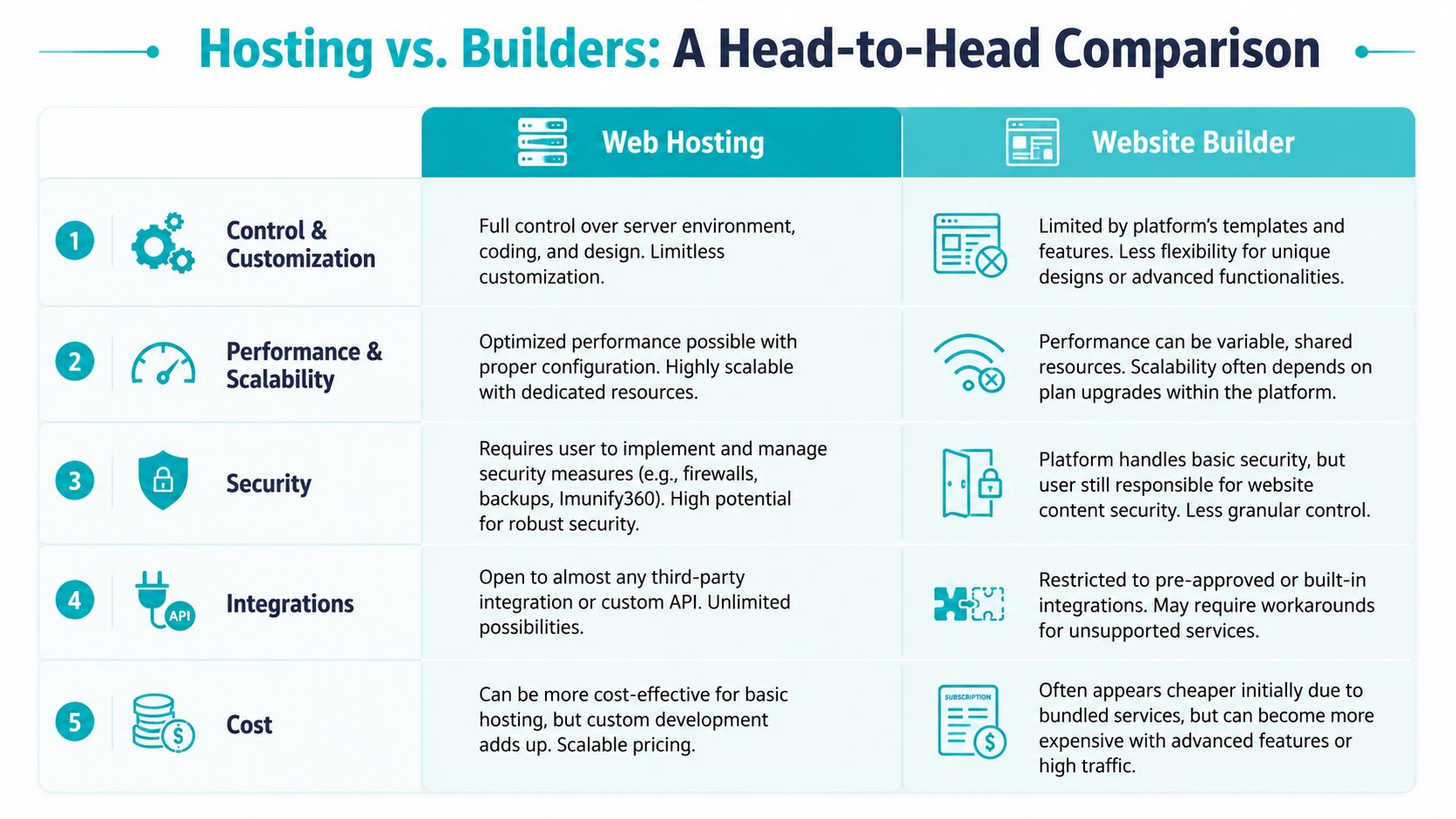
Control and customization
Builders simplify decisions by reducing options. That’s helpful until you need something unusual. A custom checkout flow, a member-only area with specific permissions, a unique content model, or advanced schema control can all push against platform limits.
Hosting gives you a larger toolbox. You choose the CMS, theme, plugins, caching model, security stack, and deployment method. If your team works with WordPress, Laravel, headless CMS setups, or containerized apps, hosting is the route that preserves those choices.
Many business owners underestimate future cost. Restrictions don’t always show up as a line item. They show up as workarounds, duplicate tools, or redesign projects.
Performance and scalability
Builder platforms usually abstract the infrastructure away. That reduces complexity, but it also means you don’t get much visibility into how the environment is tuned.
With hosting, you can choose an environment based on the workload:
- Small business sites: Shared or managed WordPress hosting can be enough.
- Growing content or commerce sites: VPS plans provide more consistent resources and configuration freedom.
- Heavy applications or large stores: Bare metal or private cloud setups give tighter performance control.
If you’re comparing providers, this guide on how to choose a web hosting provider is useful because it frames the decision around workload, support model, and growth path rather than headline pricing alone.
Later in the buying process, this is where real infrastructure options start to matter. A business that begins on a single site can expand into a VPS, then move to dedicated hardware if application demands justify it.
Here’s a practical explainer worth watching before you commit to either path:
Security and maintenance
Builders remove a lot of maintenance burden. That’s one of their biggest strengths. The platform typically handles core updates, certificates, and baseline patching behind the scenes.
The trade-off is visibility. You often don’t know exactly what controls exist, what’s configurable, or how incidents are handled. That may be acceptable for a basic site. It becomes less comfortable when a website is tied to revenue, customer records, forms, transactions, or custom code.
Hosting gives you room to implement your own security model. That can include web application firewall choices, malware controls, backup policies, staged updates, user separation, and tighter admin practices. It’s more work, but it’s also more transparent.
A secure website isn’t just one with a lock icon. It’s one you can update, audit, back up, and recover on your terms.
Integrations and SEO flexibility
A builder can connect to common tools well enough for many small teams. The trouble starts when your stack isn’t common.
You may need marketing automation, custom analytics events, inventory sync, CRM logic, advanced redirects, structured content, or app-level API workflows. Hosting is better suited to that kind of environment because it doesn’t assume a closed app marketplace should define your options.
This is also why commerce teams often compare ecosystems instead of just templates.
Long-term cost
Builders often look cheaper because the subscription bundles everything. That’s real savings in the short term, especially for a simple launch.
Long-term cost is different. You have to factor in:
- Feature gating: Important capabilities may sit behind higher plans.
- Redesign costs: Rebuilding around platform constraints takes time.
- Migration exposure: Leaving later may require a partial or full rebuild.
- Operational duplication: Separate services get added because the builder can’t do what you need.
Hosting can cost more in setup and management. It can also reduce expensive rework when the business needs flexibility later.
One practical middle ground is managed infrastructure. For example, ARPHost, LLC offers hosted options ranging from website hosting and VPS environments to bare metal servers and managed IT support, which can reduce the operational burden without forcing a closed builder model.
Beyond the Website Your Digital Infrastructure
A business website rarely stays “just a website” for long. It becomes connected to email, forms, databases, file storage, marketing tools, payment workflows, support systems, and internal operations.
That’s where the builder versus hosting decision starts affecting more than design.

What the bundled model gets right
Wix notes that a website builder is usually an all-in-one stack that bundles the builder, hosting, SSL, security patches, and updates into one subscription, while standalone hosting provides server space and still requires a CMS plus separate setup. That materially changes launch speed and operational overhead for small teams without in-house infrastructure skills.
For a solo founder or small office, that convenience is meaningful. One bill, one dashboard, fewer moving parts.
Where the all-in-one model starts to pinch
The bundled model gets harder when your infrastructure needs split into different layers.
A few common examples:
- Business email: Teams often want domain-based email with clearer admin control and separation from the site platform.
- Databases and applications: Custom apps, reporting tools, and internal systems may need hosting environments the builder doesn’t support.
- API integrations: Vendors may require middleware, custom scripts, or server-side processing.
- Multi-site operations: Franchises, agencies, and multi-brand companies often need cleaner governance across several properties.
A hosted environment lets you treat the website as one service within a broader stack, not as the center of a closed ecosystem. That matters when different teams own marketing, operations, and IT.
The infrastructure mindset
Business owners usually ask, “How do I launch this website?” A better long-term question is, “Where will this website live once it becomes important?”
Operational advice: If your website needs to exchange data with other business systems, choose a platform based on integration freedom first and page editing convenience second.
That one shift in thinking prevents a lot of rebuilds.
The Hidden Risk Platform Lock-In and Migration Pain
Most builder comparisons stop at ease of use versus control. That’s incomplete. The harder question is what happens when you outgrow the platform.
TechRadar points out that migration and lock-in risk is often overlooked in these comparisons, and that builder ecosystems are often “closed,” while self-hosted environments let you keep and move your files. That makes portability a practical business issue, not just a technical preference, as discussed in TechRadar’s website builder versus web hosting comparison.
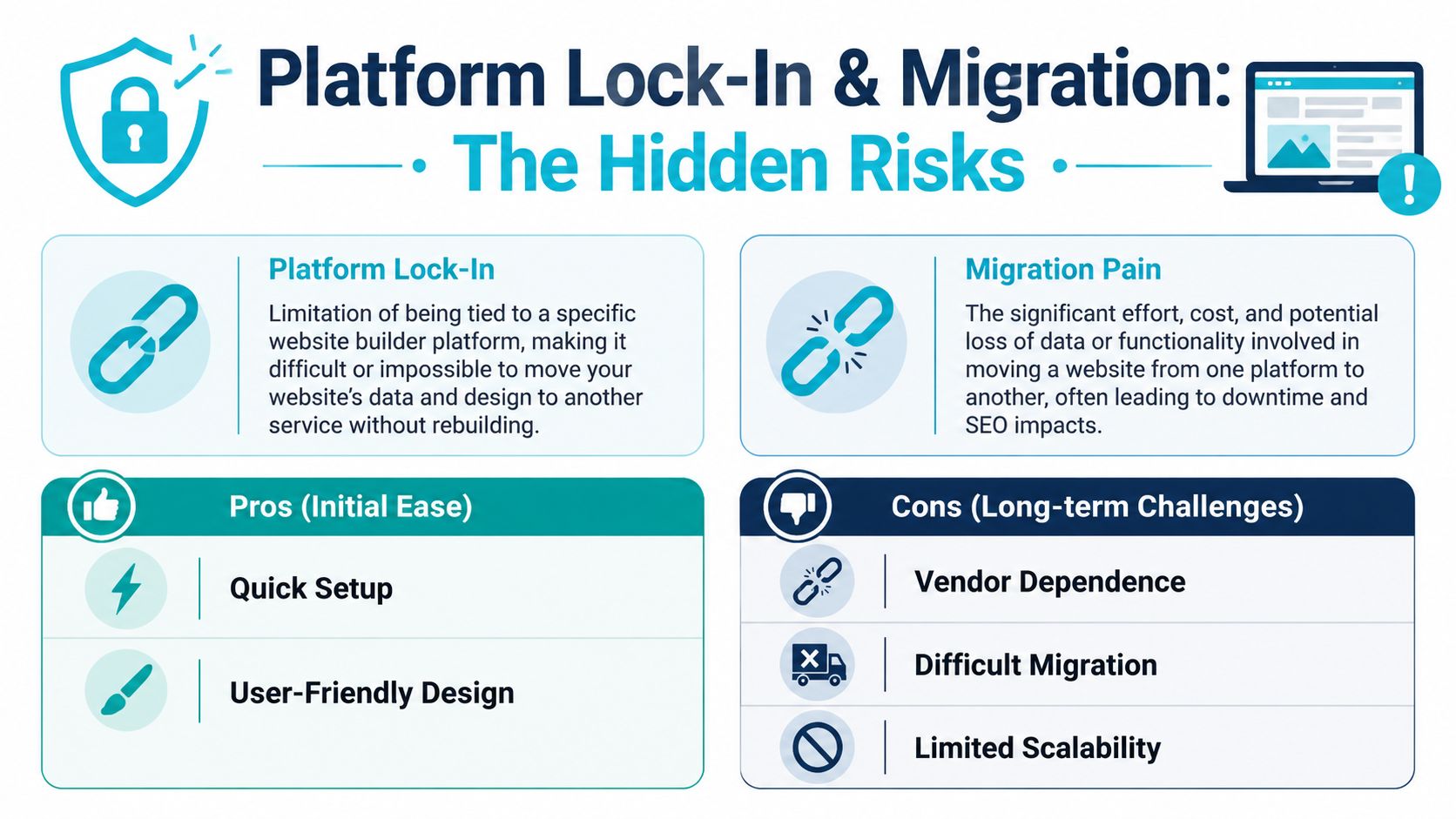
What lock-in looks like in practice
Lock-in usually arrives unnoticed. At first, it feels like convenience. One dashboard. One theme system. One app marketplace.
Then the business needs something the platform doesn’t handle well. At that point, you may run into problems like these:
- Limited export options: You may be able to export text or product data, but not the actual site structure or design logic.
- Manual rebuilds: Pages often need to be recreated in WordPress or another stack.
- SEO disruption: Redirect mapping, URL preservation, metadata handling, and content parity all need careful planning.
- Email and domain complexity: Even when the domain is portable, related services often need separate cleanup and coordination.
That’s why migration cost is often underestimated. The monthly subscription was never the full cost. The platform exit can become the expensive part.
How self-hosted sites reduce this risk
A self-hosted site doesn’t remove all migration work, but it changes the balance of power. When you control the CMS, files, database, and hosting relationship, you have a more practical path to moving providers or changing architecture.
You’re not asking a platform to let you leave. You’re moving assets you already control.
For businesses already facing that transition, a structured migration plan matters more than speed. Start with a content inventory, URL map, redirect plan, and staging environment. Then validate forms, media, metadata, and analytics before cutover. If you’re preparing for that move, this guide on how to migrate a website to a new host is a useful planning reference.
Decision Matrix Which Path Is Right for Your Business
The right answer depends less on ideology and more on what kind of organization you’re building.
Small businesses and startups
If you need a clean brochure site, a services page, and a contact form, a builder can work. If you expect the site to become a lead-generation engine with content, email, and custom integrations, hosted WordPress is usually the safer long-term bet.
For smaller companies that want to skip the builder and start with a flexible foundation, small business web hosting options fit better than a closed platform because they leave room to expand.
Developers and IT teams
Developers rarely benefit from a restricted site builder unless the project is intentionally simple. If you need SSH access, deployment workflows, version control, application logs, custom runtimes, or staging discipline, hosting is the natural choice.
A practical split looks like this:
| Team profile | Better fit | Why |
|---|---|---|
| Solo founder, non-technical | Builder or managed hosting | Faster launch, lower admin overhead |
| Marketing-led SMB | Managed WordPress on hosting | Better SEO, plugin choice, portability |
| Developer team | VPS or bare metal | Control over stack, deployment, integrations |
| Enterprise IT | Private cloud or dedicated infrastructure | Governance, isolation, custom architecture |
The AMD Ryzen 9600X configuration is a sensible fit for single-tenant dev environments and high-clock-speed application work. It gives teams a cleaner path for staging, testing, and application-level control than a builder ever will.
Growing ecommerce stores
Commerce changes the equation fast. Product catalogs, checkout logic, database activity, third-party apps, and fulfillment workflows all add complexity.
If the store is expected to grow into custom workflows or deeper control, hosting-backed platforms tend to age better. The AMD EPYC 4584PX configuration makes more sense for memory-intensive databases and denser workloads than a fixed builder environment.
Enterprises and multi-site organizations
Enterprises usually care less about drag-and-drop editing and more about governance, portability, compliance, segmentation, and integration. A dedicated Proxmox private cloud or bare metal platform fits that operating model better than a builder subscription.
The Dual Intel Xeon E5-2690 V3 configuration is especially suitable for Proxmox clusters, multi-tenant workloads, and teams that need infrastructure they can shape over time.
Choose the platform that matches the business you expect to become, not just the site you need this month.
Start Building with ARPHost Today
If you’ve decided that hosting is the better long-term path, the setup process doesn’t need to be complicated.
Step 1 Choose your foundation
Start with the environment that matches the site’s real workload. A simple business site can begin on standard website hosting or a small VPS. If you expect custom plugins, heavier traffic, or multiple applications, start one tier higher than your minimum requirement.
That avoids the common mistake of building a production website on the cheapest possible environment and redesigning around the limitation later.
Step 2 Deploy the application you actually need
Use a CMS that fits your team. For many businesses, that’s WordPress because it balances editor usability with broad plugin and integration support. If the project is more custom, use a stack your developers can own and document.
Instant application deployment matters here. It shortens the path from infrastructure to usable site and reduces setup errors.
Step 3 Scale without surrendering control
The point of hosting isn’t to create extra admin work. It’s to keep your options open while adding support where needed.
A good hosting path gives you room to add managed services, backup strategy, stronger security controls, and eventually larger infrastructure if the site becomes a central business asset. That could mean moving from basic web hosting to VPS, from VPS to bare metal, or from isolated servers to private cloud.
If you want a practical place to start, review VPS hosting, secure web hosting bundles, bare metal servers, Proxmox private clouds, or managed services based on how much control and support your team needs.
If you’re weighing website hosting vs website builder and want a setup that keeps long-term control in your hands, ARPHost, LLC offers hosting, VPS, bare metal, private cloud, and managed service options that support both first launches and more demanding production environments.
