

You're probably doing this right now. You search for website hosting services near me, open a map pack, compare a few providers, and assume the one with the closest office will give you the fastest site and the quickest help.
That's usually the wrong filter.
For most businesses, the key question isn't whether the host is ten miles away. It's whether they can keep your site online, secure, patched, backed up, and recoverable when something breaks. A nearby sales office doesn't fix malware, certificate errors, slow application queries, or a bad restore process. Infrastructure design and support maturity do.
Rethinking Your Search for Local Hosting
The phrase website hosting services near me sounds straightforward. In practice, it mixes together several very different needs: lower latency, local support, compliance, easier communication, and confidence that someone will answer when production goes sideways.
Those are valid needs. But they don't all point to the same solution.
What local should mean
A provider can be geographically close and still be a poor fit. I've seen businesses choose a “local” host and end up with weak backups, thin support coverage, and generic shared hosting that falls apart as soon as traffic spikes or a plugin update misfires.
A more useful definition of local is strategic locality. That means asking:
- Where are the data centers? Your users care about response time from where they are, not where the host's office is.
- Where is the support team? Fast escalation matters more than a storefront.
- Where is your data stored and backed up? That matters for recovery and compliance.
- Who manages patching and security? Distance doesn't solve operational risk.
The market itself pushes you to think this way. The global web hosting services market was estimated at US$159.9 billion in 2024 and is projected to reach US$355.8 billion by 2029, while there are more than 330,000 providers worldwide and North America remains the largest region. That's a fragmented provider environment with concentrated infrastructure. Vetting quality matters more than map distance.
Practical rule: Search for the provider that is closest to your users, closest to your recovery requirements, and closest to real engineering support. Those are rarely the same thing as the nearest street address.
Why proximity often gets overvalued
For static assets and cached content, modern delivery layers can reduce the value of pure server proximity. For dynamic applications, locality still matters, but it matters in a more technical way. Network path quality, DNS response, upstream carriers, and how the app itself is tuned usually decide whether a site feels fast.
That same mindset shows up in adjacent services. If you were hiring a regional creative partner for event coverage, you wouldn't just choose the nearest listing. You'd look at execution quality, turnaround, and fit. Hosting deserves the same level of scrutiny.
The better search pattern
Instead of searching only by geography, search by outcome:
- Managed WordPress hosting with security support
- VPS hosting with backups and malware protection
- Bare metal hosting with migration assistance
- Proxmox private cloud with managed support
- Colocation with remote hands
That shift gets you out of the “cheap shared plan near me” trap and into an infrastructure decision based on uptime, response, and recovery.
Decoding Your Business and Technical Needs
Before you compare providers, define the workload. Hosting fails when buyers match the wrong platform to the wrong application. A brochure site, a busy WooCommerce store, a custom SaaS app, and an internal business platform don't belong on the same class of hosting.
Match the platform to the workload
Shared hosting is fine for simple sites with light traffic and low operational sensitivity. It becomes a problem when the application starts depending on stable resources, custom server tuning, predictable maintenance windows, or strict security controls.
A VPS is usually the first serious step up. You get isolated resources, more predictable performance, and room to tune the stack. That makes it a practical choice for growing business sites, ecommerce, agency-managed WordPress, and apps that need scheduled jobs, staging, or more control over the runtime.
Bare metal fits workloads that need full hardware access, high sustained performance, custom virtualization, or stricter tenant isolation. For busy databases, application clusters, and infrastructure-heavy deployments, bare metal starts to make sense.
Colocation is different. You own the hardware and place it in a facility with power, cooling, and connectivity. That works when you need hardware control, existing appliance investments, or a hybrid footprint.
Here's the quick comparison.
Choosing Your Hosting Type SMB vs. Developer vs. Enterprise
| Hosting Type | Best For | Key Benefit | ARPHost Solution |
|---|---|---|---|
| Shared Hosting | SMB brochure sites, simple content sites | Easy management and low overhead | Secure web hosting bundles |
| VPS Hosting | Growing SMBs, developers, ecommerce | Isolated resources and stack flexibility | VPS hosting |
| Bare Metal Servers | High-traffic apps, databases, custom stacks | Dedicated hardware and full control | Bare metal servers |
| Colocation | Enterprises, MSPs, hybrid IT teams | Keep your own hardware in a controlled facility | Colocation |
What usually pushes a business to move up
Most migrations don't happen because of storage limits. They happen because the business hits operational friction.
- Shared hosting breaks process control: You need staging, worker processes, custom modules, or cleaner isolation.
- Performance becomes inconsistent: The app slows down at the wrong time, and you can't tell whether the bottleneck is your code, the database, or the hosting layer.
- Security expectations rise: You need malware protection, patching discipline, and restore confidence.
- Support quality matters more: You can't afford generic replies during an outage.
Server location, caching, image handling, application efficiency, and DNS all work together. That's why it's a mistake to buy based on storage quotas or advertised bandwidth alone.
A slow site often isn't “underpowered.” It's poorly matched. Wrong hosting tier, weak caching, no tuning, and no one responsible for the stack.
A practical selection lens
Use this simple filter:
- Choose shared hosting if the site is low-risk, mostly static, and downtime is inconvenient rather than costly.
- Choose VPS if the site generates leads, revenue, appointments, or customer portal activity.
- Choose bare metal if you need dedicated performance, custom virtualization, or multiple production workloads on one hardware platform.
- Choose colocation if you already have hardware or network appliances you need to keep under your control.
If you want a good baseline framework before provider comparisons, ARPHost has a useful guide on how to choose a web hosting provider.
Effective Vetting Tactics Beyond Google Maps
The best providers often won't win the map pack. They win on architecture, documentation, and operational discipline.

Search like an operator
Generic searches return generic hosts. Refine the query to the capability you need:
- Managed VPS hosting for WooCommerce
- Proxmox private cloud provider
- Bare metal server with migration support
- Managed Juniper firewall provider
- DDoS protected web hosting
- Colocation with remote hands
This approach surfaces specialists instead of coupon-driven hosting brands.
The broader market also explains why specialist vetting matters. The U.S. holds 51.52% of the global web hosting market share and hosts 112.05 million websites. In other words, infrastructure concentration is high. A strong national provider can have better connectivity, better upstream relationships, and a deeper support bench than a small local shop.
Check the provider's operational footprint
A serious hosting company leaves operational clues. Look for them.
Signs of a mature operation
- A real status page: If incidents happen, do they communicate clearly?
- A technical knowledge base: Documentation quality tells you how they think.
- Defined support channels: Ticket, phone, and chat all have a place. You want escalation paths, not just contact forms.
- Service segmentation: If everything is sold as one-size-fits-all hosting, that's a warning sign.
- Security-specific offerings: Providers that understand risk usually separate standard web hosting from managed protection.
One concrete example is whether they offer DDoS-protected web hosting as a distinct service rather than treating attacks as an afterthought.
Test before you buy
Don't rely on sales claims. Run your own checks.
What to validate
Latency from your user geography
Test from where your customers are. If your customers are regional, check regional paths. If they're national, test from multiple locations.DNS response behavior
DNS is easy to ignore until it becomes the slowest first step in page delivery.Page delivery under load
A host can feel fine for one user and collapse when checkout traffic, API calls, or admin tasks stack up.Support response quality
Open a pre-sales ticket with technical questions. Judge the answer, not the politeness.
If support can't explain backups, restore workflow, patching responsibility, and escalation paths before the sale, they won't be stronger after the invoice is paid.
A nearby provider with weak incident handling isn't local in any way that helps your business. A provider with strong engineering support, sane architecture, and clear operational ownership usually is.
Your Critical Evaluation Checklist
Marketing pages talk about speed and reliability. Production hosting is won or lost in the details. This is the checklist I'd use before approving any migration.
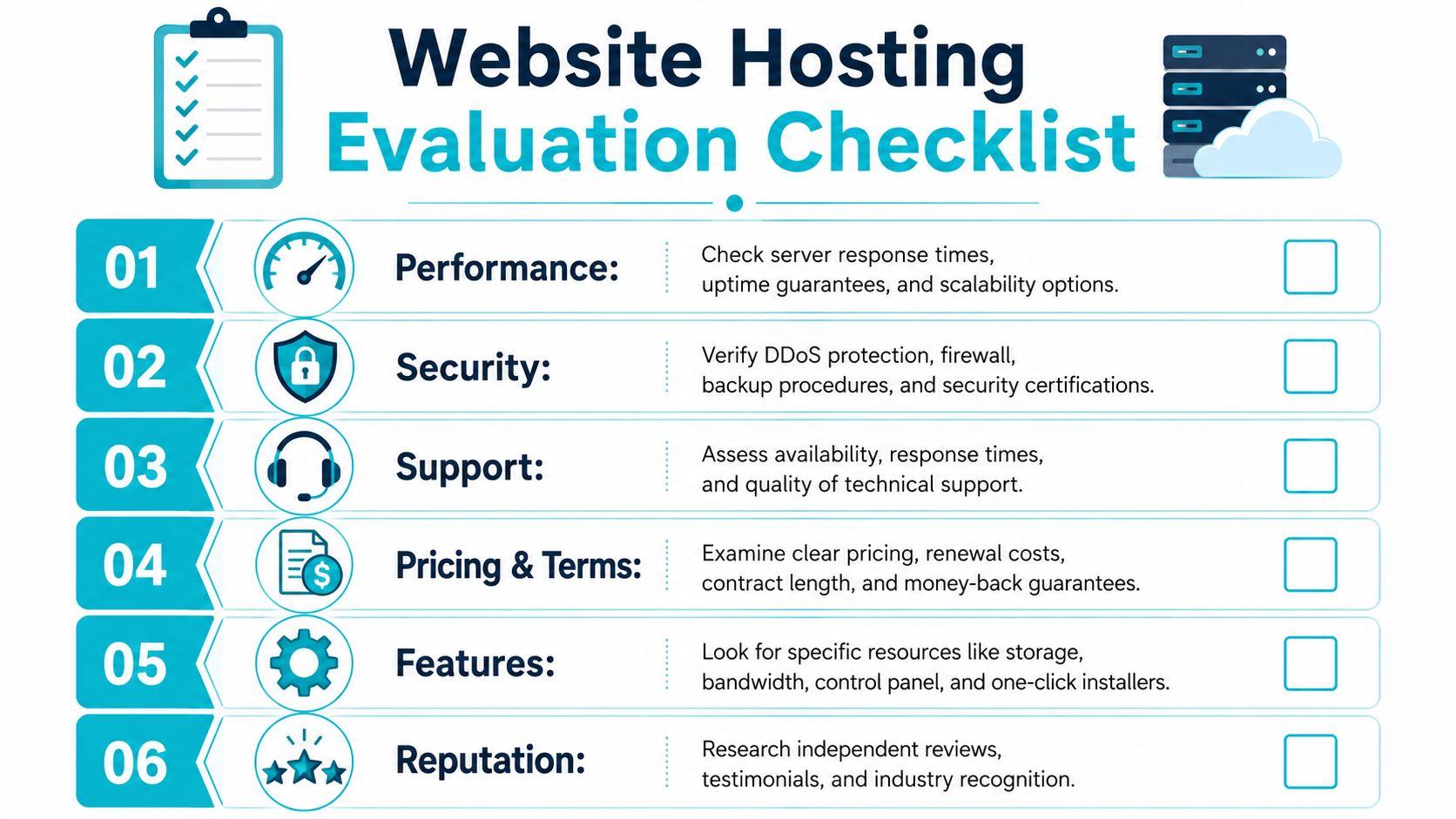
Performance and resource design
Start with the architecture, not the slogan. Ask what class of environment you're buying. Shared tenancy, isolated VPS, dedicated hardware, and private cloud all behave differently under load.
Look for:
- Clear resource boundaries: You should know whether CPU, memory, and storage are isolated.
- Scalability path: Can you move from shared to VPS, VPS to bare metal, or bare metal into a private cloud without rebuilding everything?
- Caching compatibility: Reverse proxy, object cache, and CDN integration should fit the application.
- Application visibility: Basic access to logs, metrics, and troubleshooting tools matters.
Security controls that map to real failures
Reputable managed hosting providers emphasize 24/7 uptime support, SSL installation, malware protection, and regular backups because those controls align with common production failures such as certificate problems and malware persistence.
That's the right baseline. I'd push further.
Security questions that matter
- Who patches the OS and control panel?
- How is malware detected and remediated?
- Is there network-layer protection for abuse and attack traffic?
- Who owns firewall changes and monitoring?
- What happens after compromise? Detection without response is not enough.
For website-focused workloads, tools like Imunify360, CloudLinux OS, and Webuzo are useful because they address common operational issues: account isolation, malware scanning, and cleaner admin workflows. They don't replace disciplined patching, but they improve the security baseline.
Operational test: Ask the provider to walk you through a certificate failure, a hacked CMS plugin, and a brute-force abuse event. Their answers will tell you whether they run a hosting platform or a sales funnel.
Backups and restore reality
A provider saying “we do backups” doesn't tell you enough. You need to know how often, where they land, who can restore them, and whether restores are tested.
Look for this checklist:
- Backup cadence tied to business risk: A content site and an ecommerce store don't need the same frequency.
- Separation from primary hosting: Backups on the same failure domain are not a recovery plan.
- Immutable or otherwise protected copies: This matters when ransomware or destructive admin errors are part of the threat model.
- Restore testing: A backup that hasn't been restored is a hope, not a control.
- Recovery ownership: Know whether your team or the host executes restores.
For teams moving beyond generic shared hosting, managed services earn their keep. A host that combines proactive monitoring, patching, and disciplined backup operations removes a lot of hidden risk.
Support and escalation
Support quality is one of the easiest things to underestimate and one of the most expensive to get wrong.
Evaluate support like this
| Area | What to look for | What to avoid |
|---|---|---|
| Availability | 24/7 support with technical depth | Business-hours-only coverage |
| Escalation | Clear handoff to engineering | Endless front-line triage |
| Scope | Help with hosting, security, and migrations | “We only reboot servers” support |
| Communication | Specific answers and ownership | Scripted replies and vague promises |
One practical benchmark is whether the provider can support not just hosting, but adjacent operational pieces such as migrations, monitoring, firewalling, and business continuity. That's where managed infrastructure becomes materially different from commodity hosting.
Pricing and contract clarity
Cheap hosting is often expensive once you count admin time, cleanup, and emergency migrations.
Review:
- Renewal terms
- Management scope
- Backup inclusion or add-on pricing
- Migration assistance
- Upgrade path without forced rebuilds
Sticker price matters. Total operating cost matters more.
Essential Questions to Ask Potential Providers
Most sales calls stay too shallow. Ask better questions and weak providers reveal themselves quickly.

Many buyers still assume local means faster. That's often not the deciding factor. Modern CDNs and cloud routing can reduce the performance advantage of host location, while hands-on support, managed security, and fast escalation have a larger effect on uptime and user experience, as discussed in Web Ascender's analysis of cheap web hosting trade-offs.
Ask for process, not promises
Don't ask, “Do you do backups?” Ask, “Describe your backup workflow, where copies live, how restores are performed, and who owns the restore during an incident.”
Don't ask, “Is support available?” Ask, “What happens when a ticket involves the OS, the application stack, and a network issue at the same time?”
Questions that expose real capability
For migrations
“How do you handle cutover planning, rollback, and post-migration validation?”For security ownership
“What part of patching is yours, and what part remains ours?”For scaling
“If this workload outgrows its current plan, what is the next architecture?”For private cloud readiness
“If we move from a single server to a clustered environment, what does that transition look like?”For business continuity
“How do you protect backups from the same event that impacts the production workload?”For support quality
“Can we speak with someone technical about the stack before signing?”
Good providers answer with workflows, boundaries, and trade-offs. Weak providers answer with adjectives.
A useful mindset for vendor calls
Competence shows up in discovery questions, implementation detail, and ownership. Hosting is no different. You're not buying rack space. You're buying the provider's judgment during failures, maintenance, and growth.
When a provider can't speak clearly about incident response, restore testing, migration sequencing, or escalation, keep moving.
Making the Final Decision and Onboarding
The final decision should balance platform fit, operational risk, and management overhead. Price matters, but unmanaged complexity creates hidden cost fast.
Use a simple decision framework
For an SMB, the right answer is usually managed hosting with strong support, clean backups, malware protection, and an easy path to move up from shared hosting to VPS.
For a developer or DevOps team, the decision often turns on control and scalability. You want root-level flexibility, predictable resources, and a clear upgrade path into dedicated hardware or private cloud when the workload matures.
For an enterprise or MSP, the focus shifts to isolation, recovery design, compliance alignment, and support that can work alongside internal IT. That often points toward bare metal, colocation, or a dedicated virtualization environment.
Don't skip the recovery lens
Many “website hosting services near me” decisions go wrong because buyers compare front-end features and ignore recovery.
As ransomware remains a major risk, NIST Cybersecurity Framework 2.0 highlights governance and recovery as core functions, and providers that can deliver immutable backups and tested restore protocols
That means your final short list should answer three hard questions:
- How quickly can we restore?
- Who owns the incident response workflow?
- Can this platform grow without a disruptive rebuild?
What onboarding should look like
A competent onboarding process is structured. It usually includes workload discovery, migration planning, DNS and cutover coordination, validation, monitoring setup, and post-move tuning. For more complex moves, especially from older VMware-based or single-server environments, migration support is worth paying for because it reduces avoidable downtime and rollback chaos.
If you're planning a move, review a practical migration sequence like how to migrate a website to a new host. It helps separate the application move from the business risk.
The right provider for “near me” isn't the one nearest to your office. It's the one nearest to your users, nearest to your support expectations, and nearest to your recovery requirements.
If you're moving beyond generic shared hosting and need help choosing between VPS, secure web hosting bundles, bare metal, Proxmox private cloud, colocation, or fully managed IT services, ARPHost, LLC offers those options with migration support, backup-focused planning, and managed infrastructure for businesses that need more than a cheap hosting account.
