

A lot of Florida businesses are running on infrastructure that wasn’t chosen for Florida at all. The site is hosted somewhere far from the people using it, the admin panel feels sluggish during peak hours, and every checkout, form submit, or API request carries just enough delay to be noticed. That problem usually gets blamed on the application, the theme, or the database. Often, the underlying issue is simpler. The server is in the wrong place, and the hosting model is too limited for the workload.
That’s why VPS hosting in Tampa, Florida keeps coming up in serious infrastructure conversations. It gives you dedicated resources, root-level control, and a location that makes practical sense for companies serving customers across Florida, the Southeast, and nearby international markets. If your business depends on responsive websites, stable business apps, or predictable backend performance, Tampa isn’t just a nearby option. It’s a strategic one.
Your Business Deserves Faster Tampa Hosting
A common pattern looks like this. A Florida company launches on shared hosting or on a low-cost VPS in another region because setup is quick and the monthly bill looks small. A few months later, the site feels inconsistent. Local users in Tampa, Orlando, Miami, or across the Southeast hit random slowdowns. Admin tasks drag. Ecommerce sessions feel fragile during busy periods.
That’s usually the point where the business realizes hosting isn’t just a line item. It directly affects customer trust, staff productivity, and how much engineering time gets wasted chasing symptoms.
VPS hosting accounts for about 10.3% of the entire web hosting market, reflecting its rising popularity as small and medium-sized enterprises seek better performance and security. While average entry-level VPS costs are $13.41–$15.57/month, competitive providers in major U.S. hubs like Tampa, FL offer KVM NVMe plans starting as low as $5.99/month.
That changes the buying conversation. You’re no longer choosing between “cheap shared hosting” and “expensive dedicated infrastructure.” You can move into isolated resources and faster storage without taking a massive cost jump. A local NVMe VPS platform in Tampa also makes more sense for businesses that care about application responsiveness inside Florida rather than just benchmark screenshots.
What usually improves first
When a Florida workload moves from generic hosting to a well-built Tampa VPS, the first wins tend to be operational:
- Checkout and login stability gets easier to maintain because the environment isn’t fighting noisy neighbors on shared infrastructure.
- Backend administration feels faster because storage and memory pressure are easier to control.
- Security work becomes more realistic because a VPS gives you system-level control that shared plans usually restrict.
- Support discussions get better because you can talk about the server as an actual system, not a black box.
A slow site doesn’t always need a redesign. Sometimes it needs the right region, the right storage, and a hosting layer that isn’t oversold.
Understanding Virtual Private Server Fundamentals
A VPS is easiest to understand with a building analogy. Shared hosting is like renting a bed in a crowded dorm. You share too much, you control very little, and another tenant’s bad behavior can affect your experience. A Virtual Private Server is more like renting your own apartment in the same building. The building is still shared physical hardware, but your unit has defined walls, assigned utilities, and its own lock.

That difference matters because business workloads don’t fail in abstract ways. They fail when another tenant spikes disk activity, when your CMS can’t keep enough memory available, or when you need a package, service, or tuning change that shared hosting won’t allow.
What a VPS actually gives you
Most business-grade VPS platforms use KVM virtualization or a similar model that creates real separation between tenants. In practice, that means your environment gets allocated CPU, RAM, storage, and its own operating system instance.
With that setup, you typically gain:
- Resource isolation so another customer’s workload is far less likely to interfere with your application behavior.
- Root access so you can install packages, tune services, configure security tools, and control the stack.
- Custom operating system choices for teams that need Linux distributions or application-specific builds.
- Safer testing and deployment because a VPS behaves more like a real server than a restricted web hosting account.
Why shared hosting breaks down
Shared hosting still has a place for very small, static, or low-risk sites. It stops being the right tool when the workload includes carts, memberships, API calls, staging environments, scheduled tasks, or custom server software.
A quick way to judge fit is to ask a few blunt questions:
- Do you need server-level settings changed? Shared hosting won’t be flexible enough.
- Do you care which process is consuming memory or CPU? You need isolation and observability.
- Do you run WordPress, Magento, Joomla, or a custom app with real traffic? A VPS is usually the safer baseline.
- Do you need backups, patching, or automation that matches business risk? You want a platform you can manage.
Practical rule: If your website is part of operations, not just marketing, treat hosting as infrastructure. That usually means moving beyond shared plans.
Where control becomes business value
Full root control isn’t just for developers who like tinkering. It matters when you need to enforce SSH key access, add monitoring agents, isolate services, install security tooling, or tune PHP, database, and caching settings around your workload. That’s the point where a VPS stops being a “bigger hosting package” and starts acting like a usable production environment.
Why Tampa is a Strategic Hosting Location
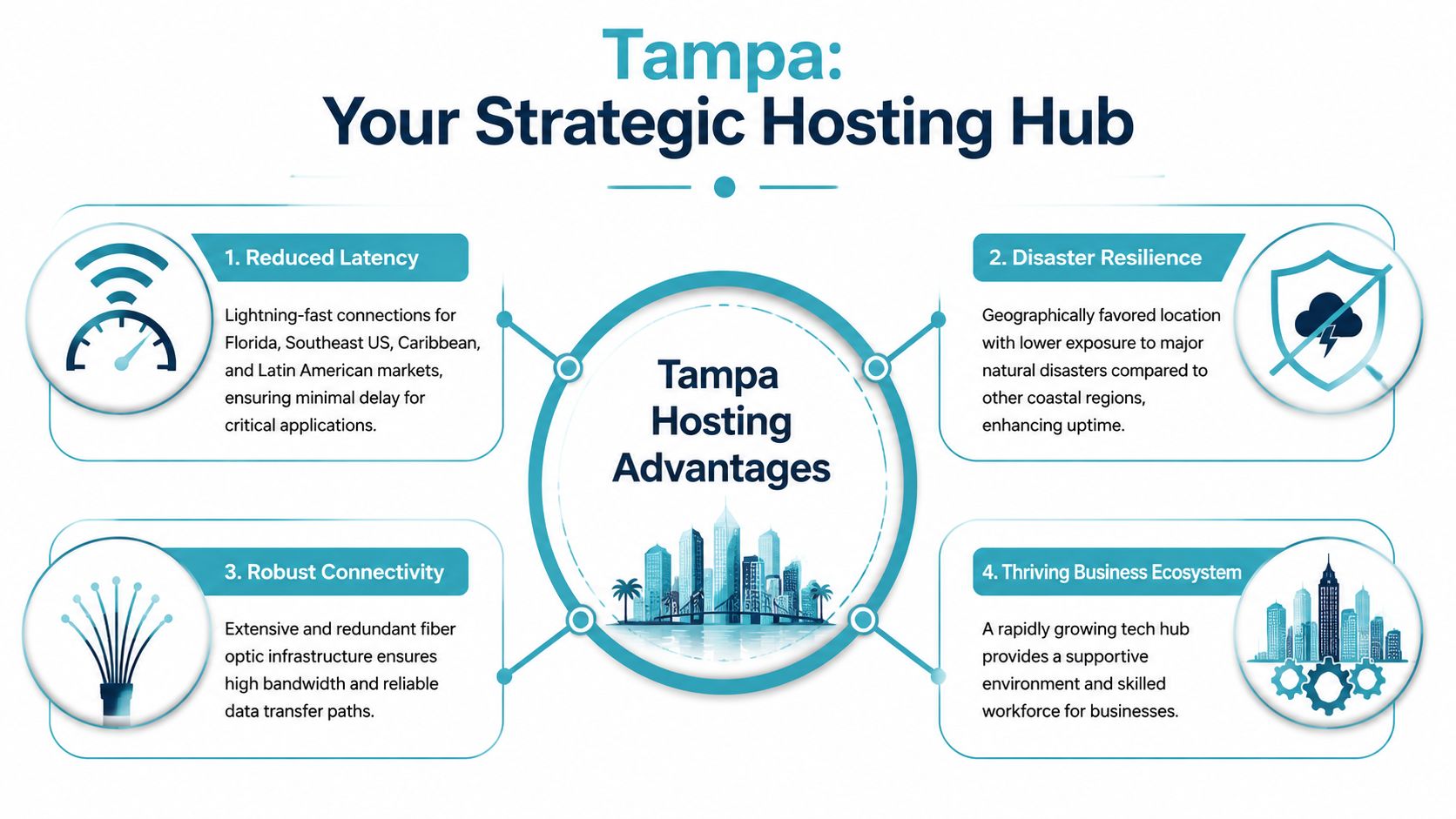
Location affects more than vanity latency tests. It shapes how quickly users reach your applications, how stable regional traffic feels under load, and how practical your disaster recovery design will be. For companies serving Florida, the Southeast, and nearby international audiences, Tampa has a strong geographic profile that generic national hosting guides usually ignore.
Latency matters more than many teams admit
If your users are concentrated in Florida or along the US East Coast, distance still shows up in the user experience. You’ll notice it in authenticated sessions, admin dashboards, cart updates, payment steps, and any app that performs multiple sequential requests. Tampa also has practical reach toward LATAM-facing workloads, which is relevant for bilingual services, support portals, ecommerce, and customer platforms serving both North American and Latin American audiences.
Enterprise-grade VPS hosting in Tampa, FL, leveraging 10Gbps network connectivity and NVMe storage, delivers a 3-5x reduction in I/O wait times compared to legacy SAS SSD architectures, directly causing a 40% improvement in page load speeds. Furthermore, recent IDC reports indicate that 42% of enterprise clients in the Southeast now mandate specific disaster recovery protocols and geographically isolated backups for any Tampa-based hosting.
Those numbers line up with what operators see in real environments. Fast storage and a strong network fabric don’t just improve homepages. They help the messy parts of production: database-backed pages, API responses, search, cart sessions, and admin tasks.
The hurricane question needs a serious answer
Any article about hosting in Florida that skips storm resilience is incomplete. The issue isn’t whether Florida has hurricanes. It does. The issue is whether your hosting plan assumes failure can happen and whether your recovery design is explicit instead of implied.
Florida’s recent storm activity has pushed disaster planning higher on the buying checklist, especially for regulated operations, ecommerce, and businesses that can’t tolerate prolonged downtime. For Tampa-based infrastructure, that means the conversation should include backup placement, recovery workflow, failover options, and whether “redundant power” is backed by an actual continuity strategy.
A good Tampa deployment usually includes:
- Geographically isolated backups so the recovery copy doesn’t live in the same risk envelope as production.
- Documented recovery steps that your team can execute under pressure.
- Clear RPO and RTO expectations inside the service agreement, even if the exact values vary by workload.
- Provider-side coordination for power, network, and hardware incidents rather than a vague promise of uptime.
If your business would lose money or customers during a regional outage, backup storage in the same metro isn’t enough. You need separation, not just duplication.
Tampa works well for more than websites
This location profile makes sense for several workload types:
| Workload | Why Tampa fits |
|---|---|
| Ecommerce stores | Faster customer-facing responses for Florida and Southeast buyers |
| Client portals | Better session responsiveness for regional users |
| VoIP-adjacent apps | Lower delay helps consistency for control panels and integrated services |
| Private cloud nodes | Strong local access plus regional reach |
| LATAM-facing SaaS | Practical positioning for US East Coast and nearby international traffic |
Businesses that need rack space, private hardware, or hands-on infrastructure planning should also look at managed colocation pricing in Tampa, because the same geographic logic applies when you bring your own systems or build hybrid environments.
Managed vs Unmanaged VPS A Critical Decision
Many hosting decisions often go wrong. Buyers compare monthly price, glance at resource specs, and stop there. That misses the actual cost question. A VPS isn’t just a server. It’s an ongoing operations responsibility.
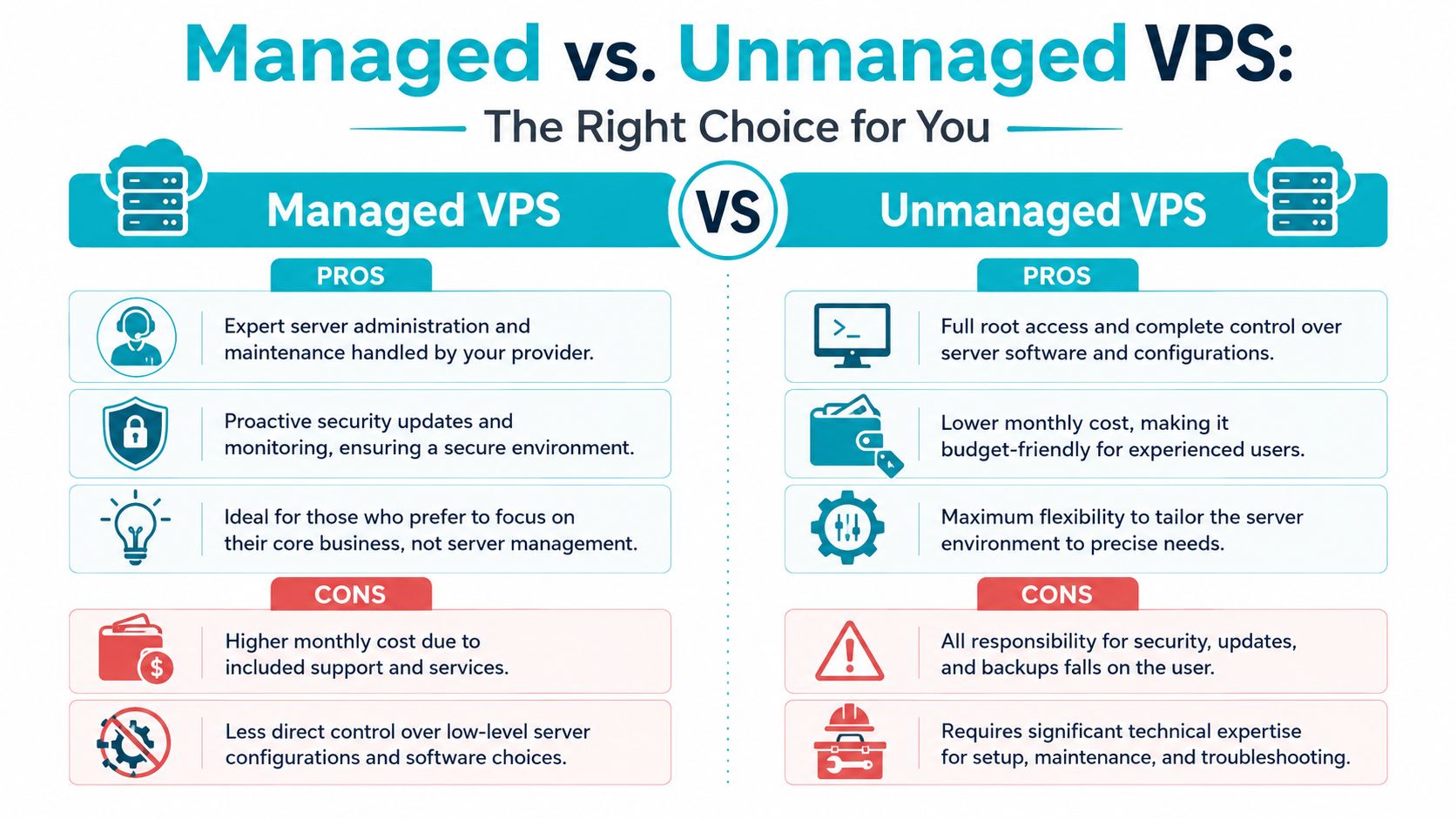
If you choose unmanaged VPS hosting, you get the machine and the access. You also own patching, hardening, monitoring, backup verification, log review, service troubleshooting, and the middle-of-the-night decisions when something breaks. That can be a perfectly sound choice if your team has Linux experience and enough time to treat the server like production infrastructure.
What unmanaged actually means in practice
Unmanaged plans are often attractive for engineers because they offer maximum control. You decide how to secure SSH, which packages to install, how to schedule backups, and how aggressively to tune the stack. That flexibility is real.
It also means your team is responsible for tasks like:
- OS maintenance including updates, kernel awareness, package compatibility, and service restarts.
- Security hardening such as disabling weak authentication paths and enforcing key-based access.
- Monitoring and alerting so small faults don’t become customer-visible incidents.
- Backup testing because backups that haven’t been restored are still an assumption.
For teams running Proxmox or planning larger virtualized environments, that responsibility grows. Official Proxmox cluster guidance states that reliable High Availability quorum requires at least three nodes, and the third node can be a low-spec device. That’s a good reminder that infrastructure resilience is rarely just one box with a fancy label.
Why many SMBs move to managed service later
A critical gap in Tampa VPS hosting content is the lack of transparency distinguishing “fully managed” from “semi-managed” support. Industry data shows that 68% of SMBs upgrade to managed services within 12 months due to unexpected troubleshooting burdens, yet many local providers fail to define the scope of administration, creating a dangerous expectation gap.
That expectation gap causes most of the frustration. A buyer thinks “managed” means patching, incident response, security work, and backup help. The provider may mean something narrower, such as reboot assistance or limited monthly admin time.
How to evaluate the decision properly
The right comparison is total operational load, not just plan price.
| Decision factor | Managed VPS | Unmanaged VPS |
|---|---|---|
| Day-to-day admin | Provider handles most routine server tasks | Your team handles everything |
| Security baseline | Usually includes hardening and update workflows | You must define and maintain the baseline |
| Troubleshooting burden | Shared with provider | Falls entirely on your staff |
| Control level | Lower at the deepest system layers | Highest |
| Fit | Teams focused on apps and business outcomes | Experienced admins and DevOps teams |
A good managed VPS is especially useful when the business has one of these conditions:
- Small internal IT staff and no appetite for routine Linux administration
- Compliance pressure around patching, backups, or access control
- Revenue dependence on the site or app staying stable
- Growth plans that require predictable support, not ad hoc firefighting
Managed hosting costs more on paper. Unmanaged hosting often costs more in staff attention.
Why ARPHost excels here
One practical option is managed vs unmanaged VPS hosting from ARPHost, where the distinction is useful precisely because businesses need to know whether they’re buying raw infrastructure or operational help. That matters if you need secure managed VPS hosting, proactive updates, backup support, or a path into broader fully managed IT services for servers rather than just a low monthly invoice.
Finding Your Perfect ARPHost Tampa VPS Plan
The right VPS plan isn’t the one with the longest spec list. It’s the one that matches your workload without wasting budget or forcing an upgrade too early. For Tampa deployments, the most common mistake is under-sizing memory for dynamic sites and then blaming the application when latency starts climbing under concurrent use.
For moderate-traffic websites or small business applications in the Tampa market, 4GB to 8GB of RAM is the technical sweet spot to prevent memory thrashing and ensure optimal processor utilization, as configurations below 4GB often trigger swap usage under concurrent load, degrading latency by 200-300ms
That single sizing rule helps narrow the field quickly for WordPress, Magento, Joomla, small CRM portals, and internal apps with logged-in users.
ARPHost Tampa VPS Plans
A practical starting point looks like this:
| Plan Name | vCPU Cores | RAM | NVMe Storage | Price/Month |
|---|---|---|---|---|
| VPS 2 | 2 | 2GB | 40GB | $5.99 |
| VPS 4 | 2 | 4GB | 80GB | $9.99 |
| VPS 8 | 4 | 8GB | 160GB | $19.99 |
| VPS 16 | 6 | 16GB | 320GB | $39.99 |
Matching plan size to real workloads
The smallest plan has a place, but it’s not for everything. A 2GB system can work for light development, utility services, or very small web workloads. It’s usually not where you want to park a busy content site with plugins, scheduled jobs, and database activity.
The stronger fits usually look like this:
- VPS 4 for production small business sites. Many WordPress and Joomla installs find sufficient comfort to handle routine traffic without constant memory pressure.
- VPS 8 for stores and heavier CMS stacks. Magento, WooCommerce, staging plus production workflows, and plugin-heavy sites generally behave better with room to breathe.
- VPS 16 for multi-service application nodes. If you’re running app services, databases, caching layers, or multiple customer environments, more headroom matters.
Don’t buy the smallest plan your app can boot on. Buy the smallest plan your app can operate on without fighting swap and CPU contention.
Secure web hosting bundles versus raw VPS
Not every team wants to build the stack from scratch. That’s where secure web hosting bundles can make sense, especially when they include tools like Imunify360, CloudLinux OS, and Webuzo. That combination is useful for businesses that need website and email hosting with stronger isolation, malware defense, and easier panel-based administration.
For teams that do want root control, a VPS remains the more flexible path. It’s the better fit when you need custom packages, customized runtime settings, or development workflows that don’t fit a conventional panel model.
When to move beyond VPS
Some workloads outgrow virtualization for reasons that have nothing to do with vanity. They need more memory, denser consolidation, or dedicated hardware for predictable performance.
That’s where Tampa bare metal makes sense:
- Dual Intel Xeon E5-2690 V3, 28 cores and 64GB DDR4 ECC RAM for Proxmox clusters, game server hosting, and multi-tenant VPS nodes.
- AMD EPYC 4584PX, 16 cores and 192GB DDR5 RAM for memory-intensive workloads, large databases, AI/ML inference, and high-density virtualization.
- AMD Ryzen 9600X, 6 cores and 96GB DDR5 RAM for single-tenant applications, development environments, and high-clock-speed workloads.
Those systems are especially relevant if you’re planning dedicated Proxmox cloud pricing discussions, private cloud builds, or a hybrid design that starts on VPS and expands into dedicated nodes. For businesses ready to provision immediately, VPS hosting plans are the straightforward starting point, and bare metal servers in Tampa provide the upgrade path when shared hypervisor capacity is no longer the right fit.
Deploying Your VPS and Migrating with Confidence
Many teams don’t delay a move because they doubt the benefits. They delay because deployment and migration feel risky. The fix is a process that’s simple enough to execute and disciplined enough to protect production.
A practical first deployment flow
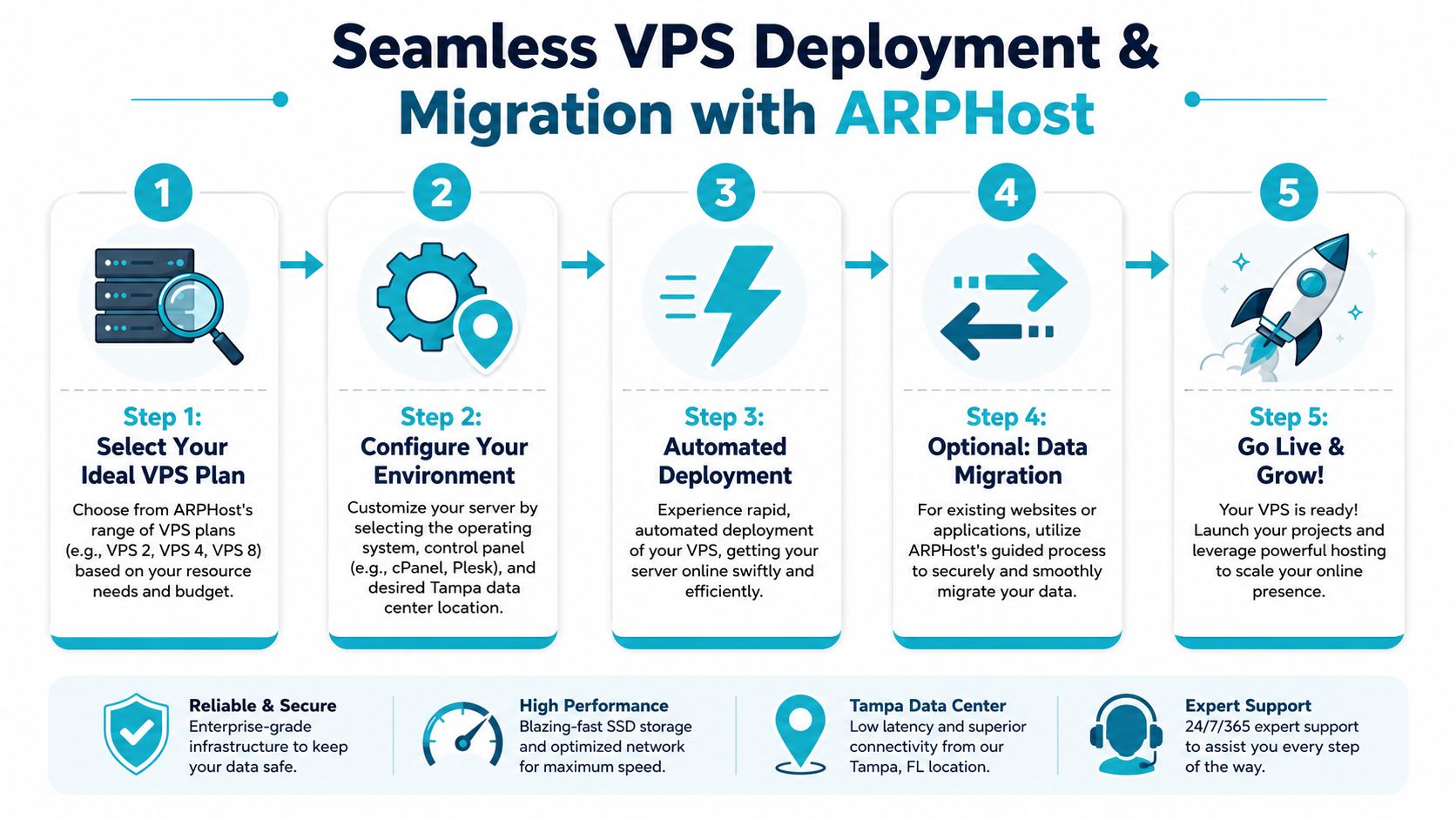
For a standard Tampa VPS rollout, the workflow is usually:
- Choose the operating model. Decide whether you want a raw VPS, a panel-managed web environment, or a broader managed service arrangement.
- Select the operating system and access method. Keep the build as simple as possible at first.
- Apply a security baseline before going live. For Proxmox-related environments and Linux administration generally, secure practice includes disabling root SSH access, creating a normal user with administrative privileges, enforcing SSH keys, and disabling password-based logins, as covered in this Proxmox hardening walkthrough.
- Install the application stack or control panel. If Webuzo is included, use it to deploy common apps cleanly.
- Restore content and test. Validate application behavior before final cutover.
Using instant applications without making a mess
Webuzo and similar panels are useful because they shorten time to first deployment. You can bring up WordPress or Joomla quickly, but speed shouldn’t replace discipline.
A safe pattern is:
- Create the instance
- Deploy the application from the panel
- Update core and extensions immediately
- Install only the components you need
- Test login, forms, scheduled jobs, and backups before launch
For teams moving into virtualized clusters later, newer Proxmox capabilities also matter. Proxmox VE 9.2 introduced native Dynamic Load Balancing via the Cluster Resource Scheduler, allowing automated rebalancing of active guests using Dynamic scheduling mode, as shown in this Proxmox VE 9.2 feature overview. That’s relevant when a single VPS evolves into a broader private cloud design.
Migration is mostly a planning problem
The actual move is rarely the hardest part. The hard part is sequencing.
A careful migration checklist usually includes:
- Application audit so you know what services, versions, and dependencies must be replicated
- Backup validation before any change window begins
- Staging test on the new VPS
- Cutover timing that avoids your busiest business periods
- Rollback plan if the app doesn’t behave as expected after launch
If your stack is simple, that can be a self-managed move. If it’s a revenue-critical site, a database-backed application, or part of a broader virtualization refresh, managed help is usually worth it. That’s especially true when the migration is a stepping stone toward Proxmox private cloud plans or a larger estate that may later need broader managed services.
If you’re evaluating VPS hosting in Tampa, Florida and want a practical next step, ARPHost, LLC offers Tampa-based VPS, secure web hosting bundles, bare metal servers, Proxmox private clouds, colocation, instant applications, and managed IT services that fit both hands-on teams and businesses that need operational support.
