

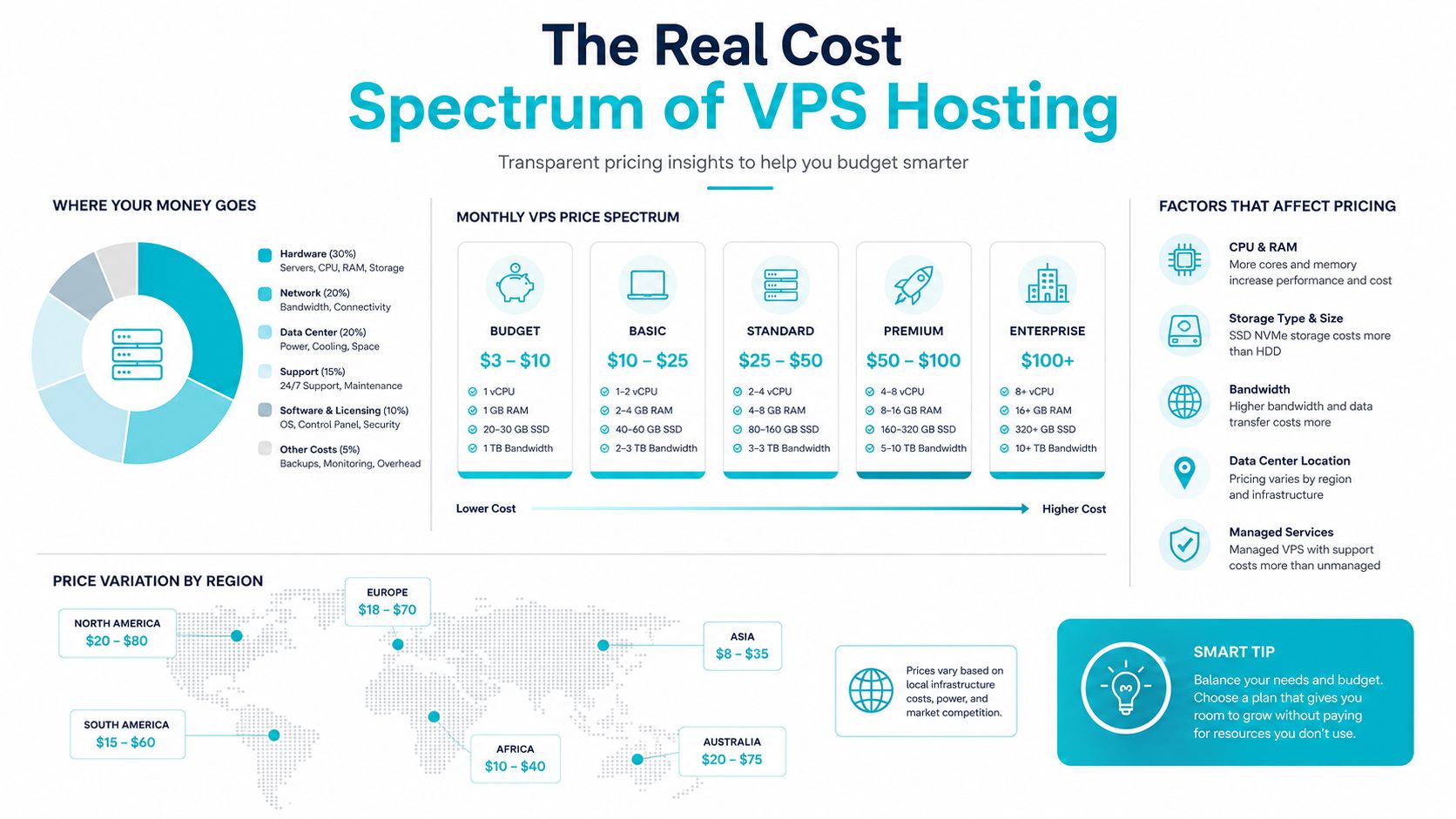
Realistic production VPS hosting usually costs $20–$50/month for 2–4 vCPU and 4–8 GB RAM. Entry-level plans can start around $4–$15/month, but those tiers are often underprovisioned for real workloads.
Most buyers get burned because they shop for the sticker price instead of the server that holds up under production traffic. Cheap VPS is fine for experimentation, dev boxes, and very small sites. It’s a bad bargain the moment you need predictable performance, sane bandwidth headroom, and fewer midnight fixes.
The Real Cost Spectrum of VPS Hosting
Cheap VPS is not the same thing as affordable production hosting. That is the mistake buyers keep making, and it is why pricing guides that stop at the entry tier mislead more than they help. VPS hosting pricing sits between shared and dedicated hosting for a reason, and the gap is wide enough that the wrong plan can cost more in downtime than it saves on the monthly bill. Major consumer guides still put typical VPS costs at $20–$100/month, while newer 2026 roundups show entry-level averages closer to $13.41–$15.57/month and mid-range plans around $21.89–$25.17/month. Forbes Advisor’s hosting cost guide keeps the broader market context honest, with shared hosting often around $2.50–$4.63/month and dedicated hosting commonly starting around $80/month.
The floor and the ceiling are both real
The low end keeps getting cheaper, but cheap does not equal usable for production. Recent research shows promotional entries as low as $2–$4.99/month from some providers, while a 2026 comparison cited premium VPS plans above $2,000/month for advanced configurations. That spread is not marketing noise, it reflects hardware, isolation, and how much service the provider includes in the market roundup.
Practical rule: if a plan looks suspiciously cheap, check the resource envelope first. RAM, CPU, storage class, and bandwidth policy matter more than the word “VPS.”
A good example of the low-end benchmark is ARPHost’s VPS Hosting starting at $5 per month. That kind of price can work for a small production project, but only if the workload is modest and you are honest about the support and headroom you are giving up.
A useful way to see the market is through raw configuration comparisons. One value comparison listed 1 vCPU / 1 GB RAM at $2/month, 4 vCPU / 8 GB RAM at $8/month, and bare metal at $42/month for a 6c/12t/64 GB That is the actual shape of pricing. You are paying for compute, memory, network, storage, and support, not a label on a product page.
Why the spread exists
The gap comes from capacity and service tier. A provider can sell a tiny unmanaged slice very cheaply, then charge more as RAM, CPU, SSD or NVMe storage, bandwidth, and support stack up. The performance of cloud vs shared comparison helps explain why VPS sits in the middle, but the buyer lesson is simpler, shared hosting is cheap because you share risk, while VPS makes you pay for isolation and control.
The honest take from production work is blunt. Entry VPS is fine for a test, a brochure site, or a low-stakes app. Real businesses usually land in the middle band, because that is where the server stops getting in the way and starts holding up under normal traffic.
Understanding VPS Pricing Models and Billing Structures
The billing model changes the final price more than many expect. A $10/month plan on a longer commitment is not the same purchase as a $15/month monthly plan, because the annual path often lowers the effective cost materially. One 2025 VPS pricing study found an average VPS price of $10 for yearly or multi-year subscriptions, while monthly billing often rises to $20 or more. The Forbes guide also shows the broader market pattern, where contract length materially changes what you pay.
Monthly, annual, and hourly are different tools
Monthly billing is the safest default for uncertain projects. Annual billing makes sense once you know the workload is stable and the provider isn’t punishing you with hidden fees. Hourly billing works for bursty or temporary workloads, but it’s usually a trap for always-on services because the meter never stops.
| VPS Billing Model Comparison | Typical Price Range | Best For | Trade-offs |
|---|---|---|---|
| Monthly billing | Higher than annual billing at the same spec | Production sites, cautious buyers, short commitments | Less discount, easier exit |
| Annual billing | Lower effective cost over time | Stable workloads, known capacity needs | Locked-in commitment, harder to switch fast |
| Hourly billing | Good for short-lived usage | Testing, migration windows, temporary jobs | Easy to overspend if the server stays online |
If the server runs all month, treat hourly pricing as an exception, not a strategy.
Read the pricing page like a procurement sheet
Don’t trust the headline price until you’ve checked what’s included. Some providers bundle backups, control panels, or support into the monthly fee. Others charge separately for each piece, and that can erase the advertised savings quickly.
The way to judge billing is straightforward.
- Map the workload duration. If it’s permanent, compare monthly against annual total cost.
- Check what’s bundled. Backups, monitoring, and support can change the actual bill.
- Watch contract terms. Some plans look cheap until renewal.
- Test upgrade friction. A low entry price is useless if scaling forces a migration.
That’s the point most pricing content skips. The cheapest headline number is only a win if the billing structure matches the life of the service.
Key Cost Drivers That Determine Your VPS Price
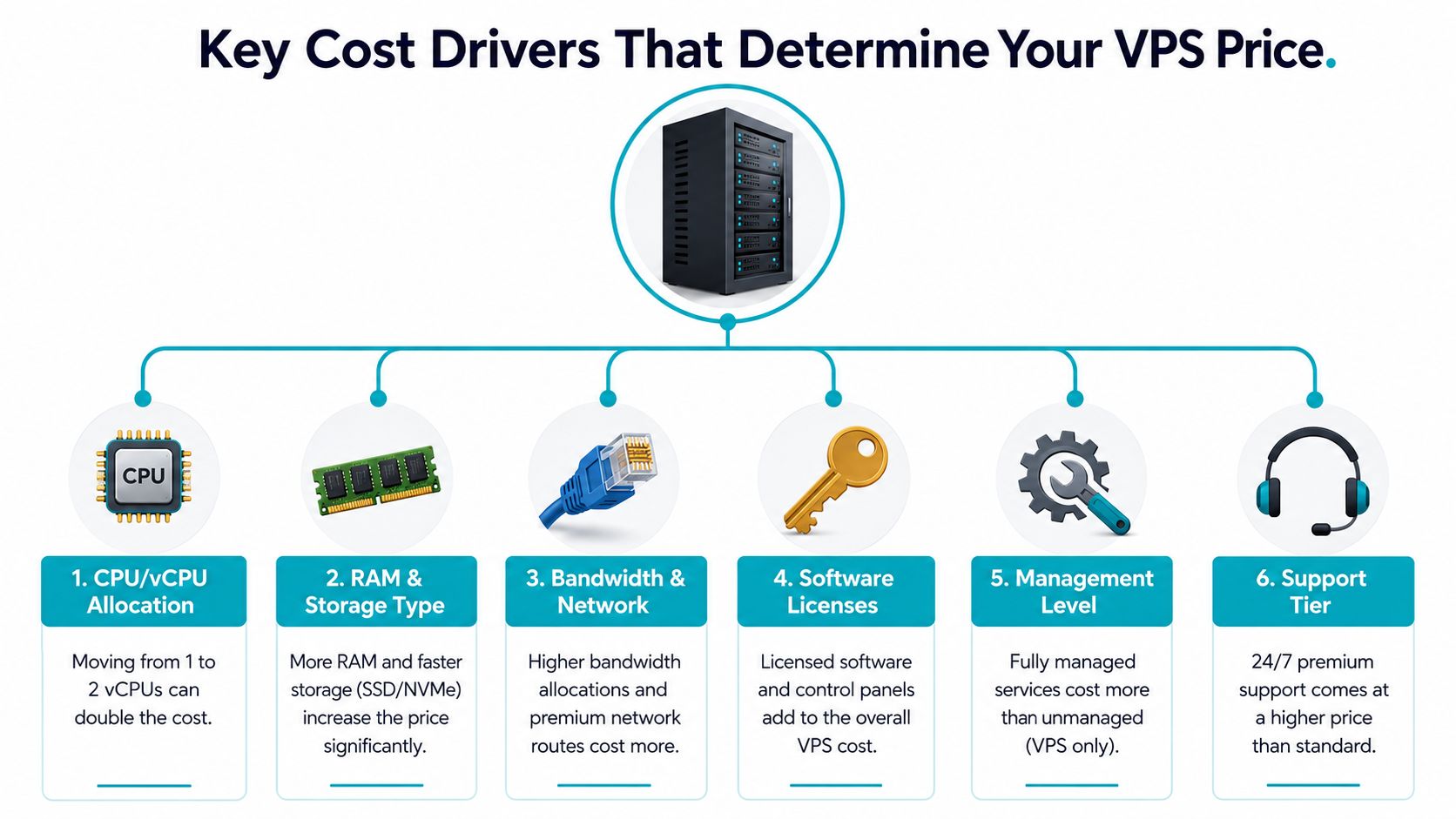
The label “VPS” tells you almost nothing about the bill. The price starts with the resource envelope, and every serious upgrade has a direct cost. A provider’s entry plan at $4.54/month can include 2 vCores, 4 GB RAM, 40 GB SSD, and 500 Mbps public bandwidth, while a step-up plan at $8.50/month doubles CPU and RAM, moves storage to 75 GB NVMe, and raises network capacity to 1 Gbps That is the kind of jump buyers need to understand before they compare plans.
CPU, RAM, storage, and bandwidth are the real levers
CPU allocation is the first thing people fixate on, but RAM is usually the first thing that hurts production. Storage type matters too, because moving from SSD to NVMe usually raises the price for lower latency and better I/O. Network capacity matters when traffic is steady, not just spiky.
A clean way to look at it:
- CPU/vCPU allocation: more cores help with concurrency and background work.
- RAM and storage type: memory keeps the app breathing, storage class affects latency.
- Bandwidth and network: the pipe matters more than many buyers admit.
- Software licenses: panels and bundled software can push the bill upward.
- Management level: unmanaged and managed plans are not comparable products.
- Support tier: faster human response has real operating value.
Rule of thumb: pay for RAM before you pay for extra CPU if your app is database-heavy or plugin-heavy.
The hidden extras that stack up
Backup services often add recurring cost, and IP addresses or licenses can do the same. Even when each add-on looks small, the monthly run rate changes, and the break-even point against a larger plan moves with it.
The practical move is to normalize the bundle before you compare servers. A “cheap” VPS with weak storage, no backups, and thin support can cost more than a slightly larger instance that already includes the pieces you would otherwise buy separately. Use ARPHost’s cost-to-server calculator when you want to price the full bill instead of the sticker price.
The hard truth is simple. Buyers do not get rewarded for shaving a dollar off the base server if they give up performance headroom. The server that looks cheap on paper can be the expensive one in operations.
Bandwidth Policies and Overage Costs Explained
Bandwidth is where many VPS buyers get surprised after they’ve already deployed. The plan looked fine, the traffic looked normal, and then the usage number started climbing. Market pricing data shows entry VPS tiers commonly sit at $5–$15/month with 1–2 CPU cores, 1–2 GB RAM, and 1 TB bandwidth, while business-ready plans often move into the $20–$50/month band with 2–4 cores, 4–8 GB RAM, and 2–4 TB bandwidth in the VPS hosting specs guide. That bandwidth jump is one reason the price moves faster than people expect.
Metered, unmetered, and “unlimited” are not the same thing
Unmetered usually means the provider doesn’t meter each gigabyte in a simple pay-as-you-go way, but that doesn’t make the pipe infinite. “Unlimited” often still hides a fair-use policy or a technical ceiling. Metered plans are cleaner to understand, but they make overage math your problem.
For planning, use the traffic profile, not hope. A 100,000-pageview site at roughly 3 MB per page can consume about 300 GB/month before any safety margin per the bandwidth planning guidance. That’s already enough to push a small site into a higher tier if images, downloads, or API calls are involved.
Choose the tier before the overage chooses you
Here’s the step I recommend.
- Estimate page views or transfer volume.
- Multiply by realistic page weight, not your best-case cache hit.
- Add headroom for spikes, backups, and admin traffic.
- Compare that total against the included allowance.
- Decide whether a larger fixed tier is cheaper than overage risk.
Sustained transfer demand usually belongs on a higher fixed tier. Small overage rates look harmless until the site keeps growing.
Location matters too. Bandwidth economics and latency both shift with geography, so a low-cost server in the wrong region can create performance complaints that have nothing to do with CPU. Buyers who ignore this usually chase “unlimited” plans and then wonder why the experience still feels constrained.
The right answer is rarely the lowest allowance. It’s the tier that leaves enough room for real traffic without turning bandwidth into a recurring surprise.
Managed vs Unmanaged VPS The Total Cost of Ownership Gap
The price tag is the wrong place to start. The question is what the server costs once you include labor, downtime risk, patching, backups, and the hours spent fixing avoidable mistakes. ARPHost’s managed vs unmanaged VPS comparison gets at the core trade-off clearly, and that trade-off is why unmanaged plans can look cheap while the total bill climbs.
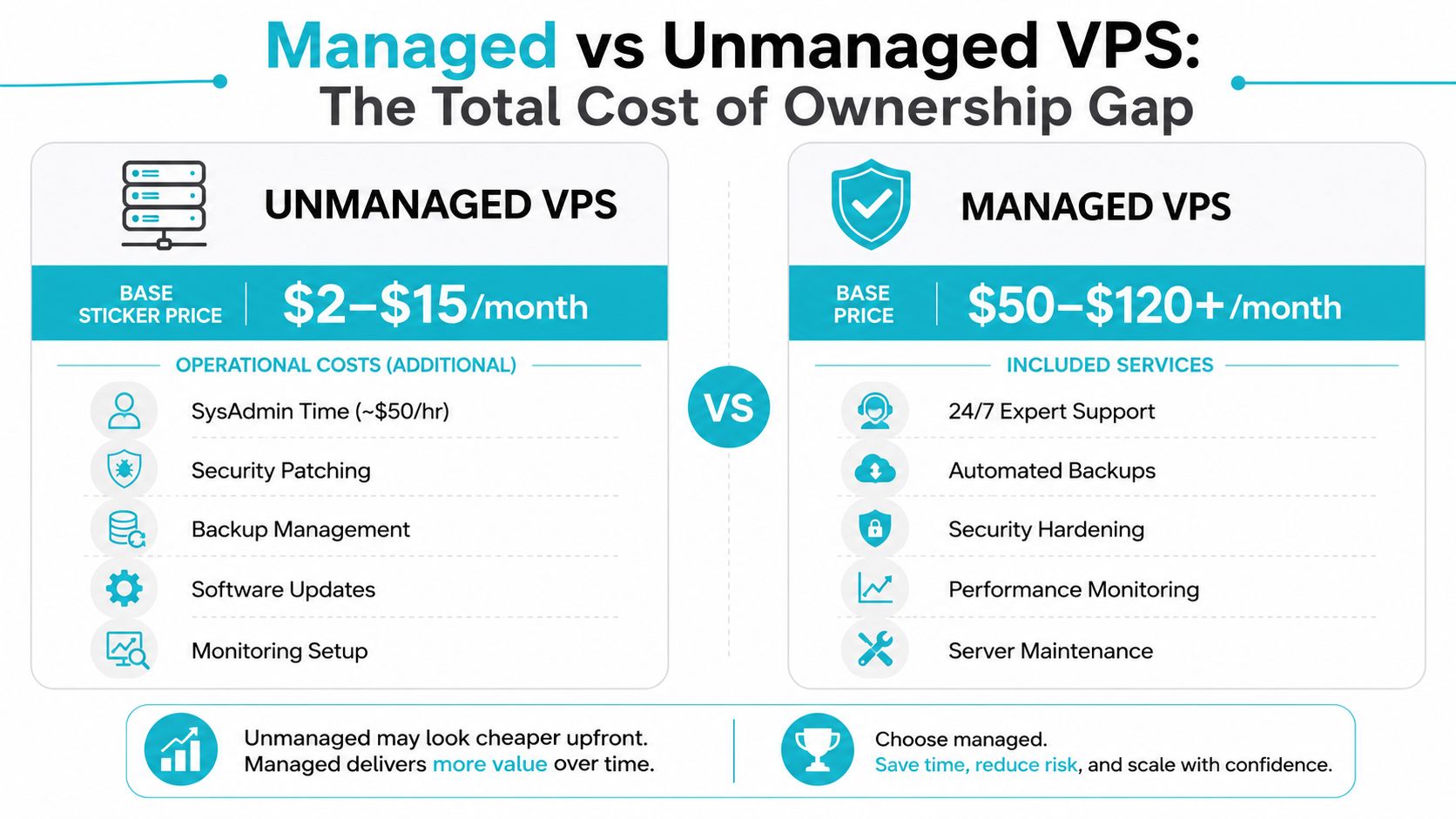
Unmanaged VPS plans can start around $2–$15/month, while managed VPS can run $50–$120+/month The monthly fee looks higher on paper, but that price often replaces the cost of internal labor and the damage caused by slow response times.
What you actually buy with managed service
Managed service pays for the operational work that keeps a VPS from becoming a fire drill.
- 24/7 expert support
- Automated backups
- Security hardening
- Performance monitoring
- Server maintenance
Unmanaged service gives you the machine and the invoice. You still own OS updates, security hardening, troubleshooting, backup verification, and the test restores nobody remembers to run. That is acceptable if your team already works comfortably in Linux and has time to own the stack. It is a bad deal if the server becomes one more shared responsibility that no one owns.
The hidden bill is internal time
Pricing pages rarely account for human time, and that omission distorts the buying decision. Every patch cycle, alert, failed update, backup check, and restore drill has to land on someone’s desk. If that person is a founder, a developer, or an already-busy sysadmin, the low-cost plan stops being low-cost fast.
My bias is simple: if nobody on your team wants to own the server at 2 a.m, do not buy an unmanaged VPS and pretend the savings are real.
Operational services change the economics in a direct way. A managed stack often costs less overall when downtime is expensive, compliance is in play, or the application cannot afford slow response during an incident. That is the same reason the managed SIEM buyer’s guide matters as a comparison point, because it shows how staffing, monitoring, and response turn a software bill into an operations bill.
Managed service is usually the right answer for production workloads that need steady oversight. Unmanaged still makes sense for lab environments, highly specialized builds, or teams with real infrastructure depth and a clear on-call plan. If you do not have that depth, the cheaper plan usually moves the cost from the provider’s invoice into your own payroll and incident queue.
If you want a provider that already wraps VPS, backups, and operational help into the environment, ARPHost, LLC offers that kind of managed infrastructure alongside VPS and private cloud services. That is a different purchase than bare metal alone, and it is built for teams that want less firefighting.
Right-Sizing Your VPS Configuration for Production Workloads
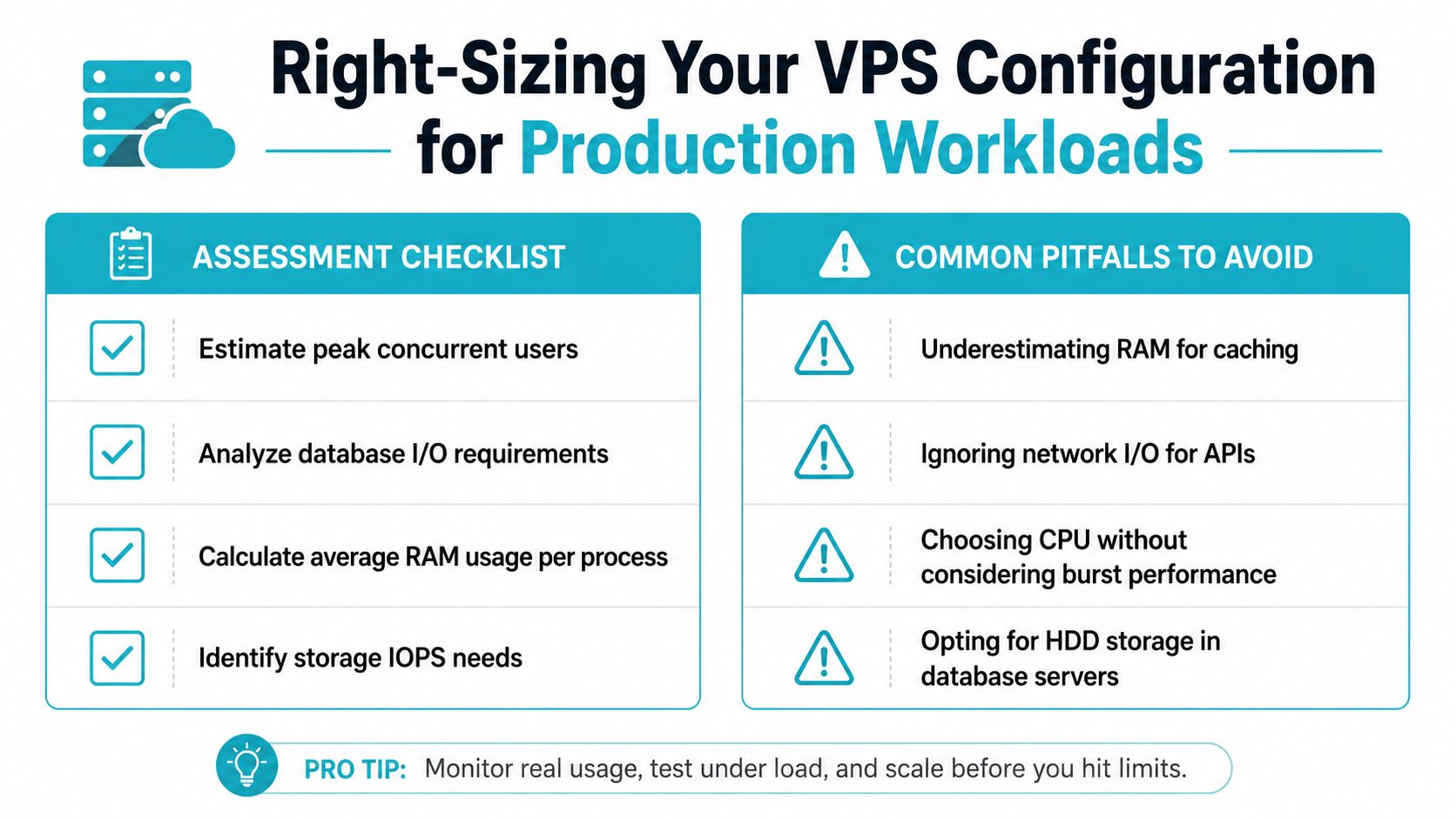
Entry-tier specs are where a lot of buyers get trapped. The plan looks inexpensive, the dashboard looks clean, and then the server starts struggling the moment the workload becomes real. A realistic production baseline is usually 2–4 vCPU and 4–8 GB RAM, and heavier setups can rise to 8–16 GB RAM That’s why a budget plan that looks fine on paper often turns into an upgrade within weeks.
Match the workload, not the marketing tier
Basic sites usually need less horsepower than business apps. That doesn’t mean they need “almost nothing.” It means the right size is driven by concurrency, plugin count, database activity, and the tolerance for slow admin panels.
A practical sizing view looks like this.
- Basic websites: 1–2 vCPU, 2–4 GB RAM
- Business apps with databases: 2–4 vCPU, 4–8 GB RAM
- Email servers or admin-heavy stacks: 4–8 vCPU, 8–16 GB RAM
Those are not vanity specs. They’re the difference between a server that stays responsive and one that starts swapping when the workload gets busy.
Underprovisioning costs more than it saves
The usual buyer mistake is starting too small and treating the first upgrade as a success. In reality, the first upgrade often just corrects the original sizing error. If your app needs database caching, background jobs, or a heavier admin interface, you’re better off provisioning for that from day one.
Production rule: buy the server the workload needs today, plus enough headroom that the next upgrade isn’t urgent.
The same logic applies to scaling strategy. Start small only if the application is light and the upgrade path is easy. If the site is customer-facing and revenue-dependent, provision for the expected load rather than the minimum viable launch size.
One practical example from the hosting world is a Dual Intel Xeon E5-2690 V3 bare metal node with 28 cores, 64GB DDR4 ECC RAM, and enterprise storage in Tampa, FL, which is a fit for Proxmox clusters and multi-tenant VPS nodes. For larger memory-driven workloads, an AMD EPYC 4584PX with 192GB DDR5 RAM and NVMe storage is the kind of platform that makes sense when the app footprint is bigger than a cheap VPS can comfortably hold. Those aren’t random upsells, they’re examples of what happens when the workload outgrows the category.
How to Evaluate VPS Providers and Make Your Final Decision
Cheap VPS pricing looks attractive until you add the total operating cost. The lowest sticker price often comes with weak support, clumsy upgrade paths, or a location that works for the provider, not for your users. Buy on price alone and you usually pay for it later through avoidable migration work and lost time.
Start with the workload, then judge the provider.
Use a short, hard shortlist
Build your shortlist from requirements, not vendor logos.
- Define the workload. Call out RAM pressure, database activity, background jobs, and any uptime sensitivity.
- Shortlist 3–5 providers. Compare like for like, not marketing labels or vague plan names.
- Test support responsiveness. Ask a real pre-sales question and measure how clearly, and how fast, they answer.
- Check exit terms. Know what happens if you outgrow the plan or need to leave.
- Verify upgrade paths. A clean scale-up is worth paying for.
The support test matters more than buyers expect. A provider that answers clearly before the sale usually behaves better after the sale. A provider that hides the upgrade path or buries renewal terms is telling you exactly how they make money, by relying on the cheap entry price as the hook.
Don’t buy the cheapest plan if the provider is wrong
Geographic location, support depth, and specialization matter more than a small monthly discount. General web workloads can live on commodity cloud. Managed services, Proxmox expertise, private cloud design, and structured environments call for a provider that knows those stacks.
ARPHost, LLC is one option if you want VPS, bare metal, private clouds, and managed infrastructure from a single U.S.-based provider with a Tampa footprint. The point is not the lowest sticker price. The point is whether the server, the support, and the operating model fit the workload you run.
If you need one simple rule, use this one. Pay for the configuration you will use, not the cheapest entry tier you can tolerate on paper. Underprovisioned VPS plans force earlier upgrades, more hands-on management, and more firefighting, which is where the hidden cost gap opens up fast.
