

A lot of people land on the same question at roughly the same moment. The project is ready, the shared hosting account feels cramped, and the cloud bill from a larger provider looks silly for something that might still be a side project, a small client site, or an early SaaS prototype. So you search for VPS hosting $5 per month and start wondering whether that tiny monthly bill is a smart move or a trap.
Sometimes it’s a smart move.
Sometimes it’s the cheapest way to create a much more expensive problem.
The difference comes down to workload, expectations, and whether you understand what a budget VPS can do under real conditions.
The Allure of the Five-Dollar Server
The appeal is obvious. You want root access, your own software stack, and none of the restrictions that come with bargain shared hosting. A five-dollar VPS sounds like the perfect middle ground. It feels serious enough to run a real application, but still cheap enough that a mistake won’t hurt much.
That price also stands out because it sits well below normal industry ranges. Entry-level VPS hosting plans typically cost between $13.41 and $15.57 per month, while mid-range options average $21.89 to $25.17 per month, which makes a $5/month VPS a clear outlier according to this web hosting pricing roundup. That doesn’t automatically make the offer bad. It does mean you should assume trade-offs until proven otherwise.
Here’s the practical reality. If you’re launching a brochure site, a dev box, or a lightweight app with a predictable footprint, a budget VPS can be enough. If you’re putting customer revenue, production databases, email deliverability, or a busy WooCommerce stack on it, you need to think much harder before calling it “good enough.”
Practical rule: A cheap VPS is fine when failure is inconvenient. It’s the wrong place to save money when failure interrupts sales, support, or customer trust.
What matters isn’t whether five dollars is possible. It is. What matters is whether the specific plan gives you enough CPU time, RAM, disk speed, and operational support to stay out of trouble.
If you’re comparing low-cost entry points, start with providers that publish clear specs, transparent billing, and an obvious upgrade path instead of teaser pricing. For a reference point, you can review affordable VPS options before you commit to a rock-bottom plan that might box you in.
Deconstructing the Typical $5 VPS Offer
A true budget VPS is usually a narrow resource envelope. That’s not a criticism. It’s the whole reason the price exists.
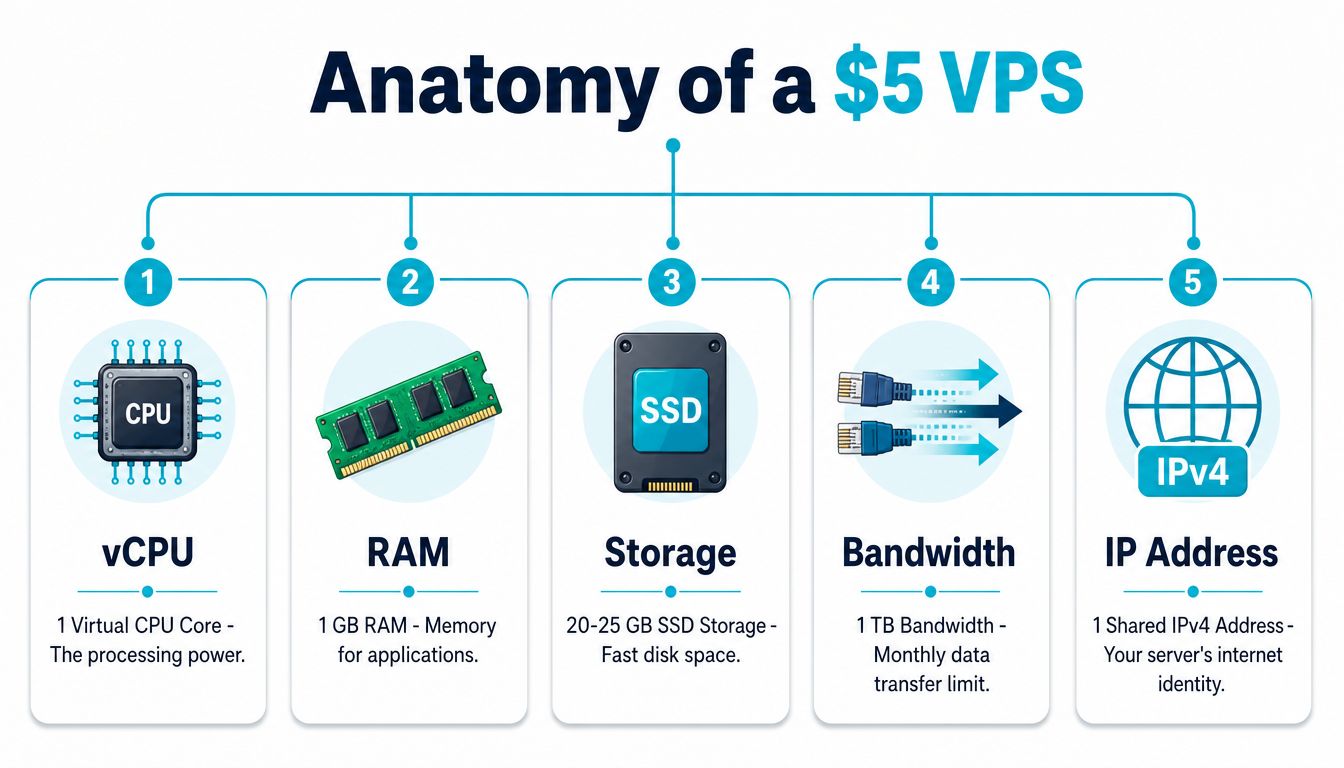
Recent data from July 2026 shows that the average $5/month VPS adheres to the 1 vCPU, 1 GB RAM, 30 GB SSD, and 1 TB bandwidth standard, although some providers offer more aggressive specs in the same price bracket, which creates a wide capability gap between plans.
What those specs mean in practice
A 1 vCPU plan can handle basic web serving, cron jobs, and light application logic. It starts to choke when PHP workers pile up, background tasks overlap, or database queries become frequent enough that latency turns into queueing.
With 1 GB RAM, the operating system itself already matters. A minimal Linux install is manageable. Add a control panel, a database server, web server, caching layer, and security tooling, and you’ll burn through memory fast. Swap activity is often the first warning sign that the plan looked fine on paper but isn’t fine under load.
30 GB SSD storage is enough for a lean application, logs, backups stored elsewhere, and a modest database. It’s not enough if you keep local snapshots, large media libraries, or several environments on the same node.
Then there’s the line item many newer buyers ignore. 1 TB bandwidth is often acceptable for small sites, but transfer allowances matter when you host downloads, stream media, or proxy traffic through the box.
KVM versus container-based plans
The virtualization layer matters as much as the raw spec sheet.
With KVM, the VPS behaves much more like a real virtual machine. You get stronger isolation, a separate kernel context, and more predictable compatibility for custom kernels, firewall tooling, and certain application stacks. That’s one reason many developers prefer KVM VPS hosting over budget container-based offerings.
Container-based virtualization such as OpenVZ or LXC can be efficient, but you need to know what you’re buying. These environments may share more with the host and can impose limits that aren’t obvious until you need something low-level.
If a provider leads with price but is vague about virtualization, storage type, and CPU policy, assume the missing details are not in your favor.
Reading the spec sheet like an admin
When you compare low-end VPS plans, check these first:
- Virtualization type. Prefer KVM when you need stronger isolation and broader OS flexibility.
- Storage wording. “SSD” and “NVMe” are not interchangeable in practice.
- CPU description. Shared CPU is normal at this tier, but vague wording can hide aggressive oversubscription.
- Backup scope. “Backups available” is different from included automated recovery points.
- Support boundary. Cheap unmanaged hosting usually stops at node and network availability.
A five-dollar VPS isn’t fake. It’s just small. If you treat it like a tiny Linux machine with a narrow mission, it can work well.
Performance Uptime and Support Trade-offs
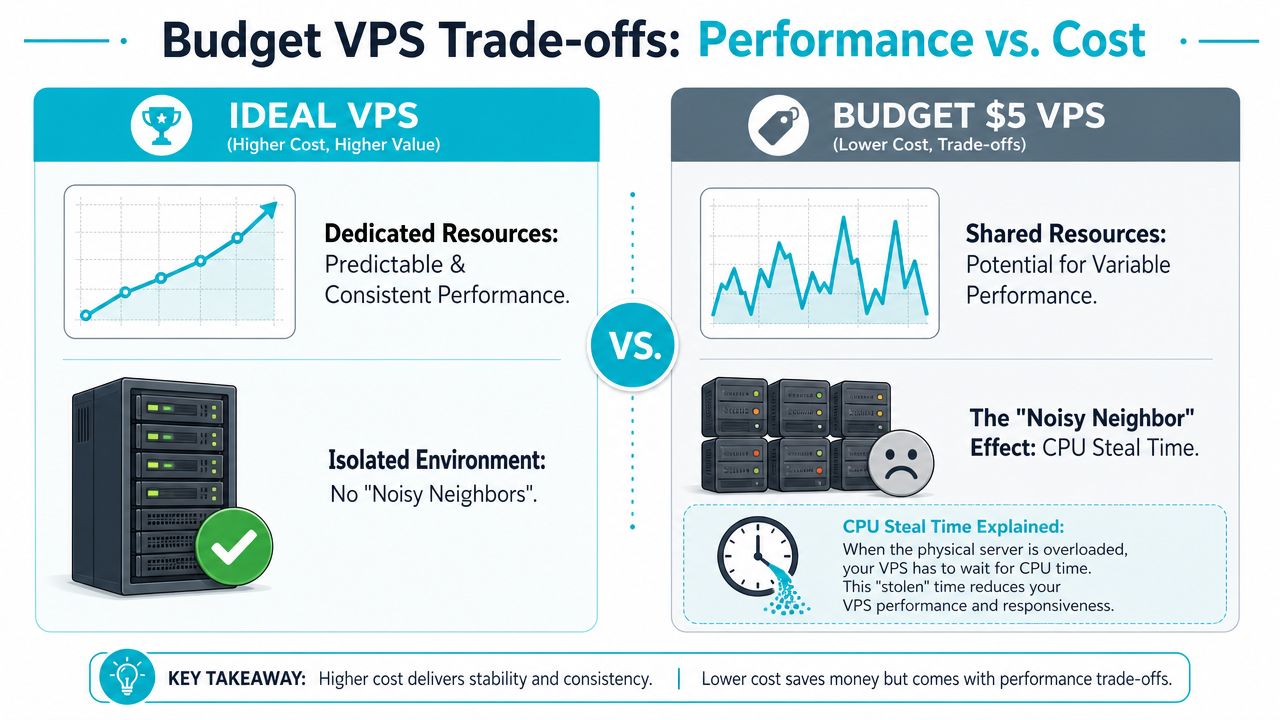
The easiest way to understand a budget VPS is to think of an apartment building. Your unit is private, but the pipes, hallways, and elevator are shared. If too many people use the building badly, your experience changes even if nothing is technically “down.”
That’s what happens with CPU steal time, bursty disk I/O, and inconsistent network performance on crowded virtualization nodes. The plan may be online, but your app still feels slow.
Performance comparisons show that moving from entry-level VPS plans priced between $3.90 and $4.50 to mid-tier plans priced between $5.28 and $5.99 can produce a threefold CPU boost and cut server response time from 1,200ms to 360ms. That gap matters more than most buyers expect because latency compounds across page generation, database access, and API calls.
Where cheap plans usually bend first
The first issue is rarely full outage. It’s inconsistency.
One request is fast. The next one hangs. Your dashboard feels okay at night and sluggish during business hours. A database import that should be routine becomes unpredictable. That pattern usually points to shared resource contention, not bad code alone.
A few common symptoms show up early:
- Spiky load averages when traffic hasn’t changed much
- Slow backups or package installs because storage throughput drops under contention
- PHP workers piling up while the site still appears partly functional
- Support replies that focus only on node availability, not your application health
Support is part of the price
Support on ultra-budget plans is often narrower than people assume. If the host node is up and the network port is passing traffic, many low-cost providers consider the service delivered. They may not help with database tuning, firewall mistakes, failed updates, broken web stacks, or hardening work.
That’s not necessarily unfair. It’s what unmanaged hosting means. But it catches non-admin buyers off guard.
If you need guidance on where the line sits between self-managed and provider-assisted service, compare those responsibilities before you buy. A useful reference is this breakdown of managed vs unmanaged VPS hosting.
Budget hosting is cheapest when your own time is cheap. Once downtime starts consuming developer hours, the monthly savings disappear fast.
For production workloads, many teams eventually move toward stronger storage consistency, clearer support boundaries, and platforms built for failure recovery rather than bare-minimum deployment.
Ideal Use Cases for Budget VPS Hosting
A budget VPS makes sense when the workload is narrow, the stack is lean, and the consequences of a bad afternoon aren’t catastrophic.
VPS hosting under $5/month typically provides 512MB to 2GB RAM and 10GB to 75GB storage, which is enough for static websites, personal blogs, and lightweight development environments handling 100 to 500 daily visitors with proper caching. Benchmarks in the same review also reported 99.95% uptime for budget NVMe-backed plans.
Workloads that fit comfortably
A static site is the cleanest match. Nginx serving HTML, CSS, JavaScript, and optimized media barely touches CPU or RAM once it’s configured properly.
A personal WordPress site can also work if you keep the stack disciplined. That means a lightweight theme, restrained plugin count, page caching, external backups, and a willingness to skip bloated builders.
Development boxes are another good fit. A small VPS can host staging code, test deploy scripts, run Git hooks, or serve as a remote shell environment without much drama.
Good uses and bad uses
Here’s the dividing line I use in practice:
- Good fit. Portfolio sites, documentation portals, internal tools, sandbox environments, basic VPN endpoints, and small automation jobs.
- Borderline fit. Low-traffic business sites with dynamic content, small CMS installs, or demo apps that need uptime but not heavy concurrency.
- Poor fit. Busy ecommerce, multi-user SaaS, large databases, media processing, large Docker stacks, or anything that people rely on all day.
A five-dollar VPS works best when one process is doing one job well. It breaks down when several services compete for the same small pool of CPU and memory.
This is also where one-click deployment matters. If your provider supports instant application templates, you can get WordPress, Joomla, or a basic app stack online quickly without spending the whole budget on setup time. That’s often a better use of a small VPS than trying to turn it into a do-everything production platform.
The Reality of Unmanaged Server Administration
The hard part of VPS hosting $5 per month usually isn’t the bill. It’s the fact that the server is now your responsibility.

On an unmanaged VPS, the provider normally delivers the virtual machine, network access, and base OS image. After that, patching, user management, SSH hardening, firewall policy, intrusion prevention, package updates, web stack setup, backups, and service monitoring land on you.
That’s fine if you’re comfortable living in the shell and you already know how to recover from your own mistakes. It’s a bad fit if you need cPanel-style simplicity, business-hours support, or compliance-minded security without hands-on admin work.
The minimum hardening checklist
When I bring up a fresh Linux VPS, I don’t install application code first. I lock down the box first.
A basic starting sequence looks like this:
adduser deploy
usermod -aG sudo deploy
That gives you a non-root administrative account. Next, update the system before you expose anything publicly:
apt update && apt upgrade -y
Then install a firewall and allow only the services you need:
apt install ufw -y
ufw allow OpenSSH
ufw allow 80/tcp
ufw allow 443/tcp
ufw enable
For brute-force protection on SSH and other exposed services:
apt install fail2ban -y
systemctl enable fail2ban
systemctl start fail2ban
If you’re deploying a web app, also review SSH authentication, disable anything unused, set up log rotation, and configure remote backups before launch.
What unmanaged really means during an incident
Many buyers learn the lesson the hard way. If an update breaks PHP, if your database fills the disk, or if you lock yourself out with a bad firewall rule, cheap unmanaged hosting usually doesn’t include application-level rescue.
That’s why it’s worth watching an admin workflow before you decide you’re ready to own one. This short walkthrough helps set expectations:
Why ARPHost excels here
For buyers who want low-cost VPS infrastructure but don’t want to hand-build every security layer, one practical option is cheap unmanaged VPS hosting with a clear path into more hands-on services and secure web hosting bundles. That matters when you want root access today, but expect to add managed monitoring, backups, Webuzo, CloudLinux OS, Imunify360, or broader server administration support later.
The same logic applies at the business level. A secure VPS can host the app, but someone still has to watch logs, patch services, verify backups, and respond when a plugin update or package change breaks production. That’s where managed hosting and fully managed IT services stop being “nice to have” and start saving real time.
How to Evaluate Providers and Avoid Hidden Costs
A cheap VPS is only cheap if the monthly number is real, the billing is straightforward, and the plan can grow with you.
The most common buying mistake is focusing on the advertised rate instead of the total commitment. A critical mismatch exists between advertised $5 pricing and actual total cost because some providers require long commitments to reach that price, and a study of under-$5 plans found that 83% of the “best value” offers were tied to multi-year terms, as discussed in this analysis of hidden VPS pricing traps.
What to verify before checkout
Use a short checklist and don’t skip the billing page.
- Monthly billing really means monthly. If the low rate only appears with a long prepaid term, compare the actual upfront cost instead of the headline.
- Virtualization is disclosed. KVM, storage type, backup policy, and support scope should be easy to find.
- Upgrade path is obvious. You shouldn’t need a full migration just to add resources or move into a more resilient platform.
- Support language is precise. “24/7 support” can still mean “we’ll tell you the node is online.”
If your business operates across regions, it also helps to review hosting guidance that focuses on local billing and practical buyer concerns.
Comparing a Typical $5 VPS vs. ARPHost Secure VPS
| Feature | Typical $5 VPS | ARPHost Secure VPS Starter ($5.99/mo) |
|---|---|---|
| Virtualization | May be unclear or mixed by provider | KVM-based secure managed VPS hosting |
| Resource profile | Often very small, with tight RAM limits | Starter tier positioned for entry workloads with a clearer upgrade path |
| Billing clarity | May depend on teaser terms or long commitments | Published product path and service-based expansion options |
| Security tooling | Often self-configured | Can align with secure web hosting bundles using Imunify360, CloudLinux OS, and Webuzo |
| Support model | Commonly infrastructure-only on unmanaged plans | Option to pair hosting with managed services and operational support |
| Growth options | Often requires shopping again later | Can scale into HA VPS, private cloud, colocation, or bare metal |
The point isn’t that every generic $5 VPS is bad. Many are useful. The point is that the cheapest plan becomes expensive if you outgrow it quickly, misread the support boundary, or get trapped in long-term billing for a workload that needed a different class of service.
Decision Checklist and Your Growth Path
Use a five-dollar VPS if your answers lean toward simplicity.
Can you manage Linux from the command line without panicking during an outage? Is the application non-critical? Can you tolerate variable performance while you validate an idea, host a dev environment, or run a small content site? If yes, a budget VPS can be a rational first step.
Don’t stay there too long if your signs have changed.
Signals you’ve outgrown the plan
A small VPS is ready to retire when you notice patterns like these:
- Application slowdowns are affecting users. Response times are no longer just an annoyance for you.
- You’re stacking too many roles on one server. Web, database, mail, queue workers, and backups shouldn’t all fight for the same tiny footprint.
- You need stronger recovery and monitoring. Production needs tested backups, alerting, and cleaner operational ownership.
- Traffic isn’t the issue, concurrency is. Even modest traffic can hurt when several dynamic requests land together.
A sensible scale-up path
The cheapest smooth upgrade is usually a better VPS, not an immediate jump to enterprise infrastructure. Move into a secure VPS with more memory, cleaner storage performance, and either managed support or a clear path to it. For production services that need stronger resilience, a high-availability VPS with CEPH-backed storage makes more sense than repeatedly stretching an ultra-budget node.
When the application starts leaning heavily on databases, virtualization density, or memory-hungry services, dedicated hardware becomes the logical next step. A practical example is the AMD EPYC 4584PX with 16 cores, 32 threads, 192GB DDR5 RAM, and NVMe storage in Tampa, FL, which is well suited to growing databases, high-density virtualization, and heavier application workloads on bare metal servers. If you need cluster control and full virtualization flexibility, Proxmox private clouds are the next rung up. If you want operational help around patching, monitoring, backups, and broader infrastructure administration, fully managed IT services for servers fill that gap.
The best path is the one that lets you start small without rebuilding everything when the project becomes real.
Start with a platform that fits today, then move up only when your workload proves it’s time. ARPHost, LLC offers a practical ladder from low-cost VPS deployment to secure web hosting bundles, high-availability VPS, Proxmox-based private clouds, colocation, bare metal, instant applications, and managed services, so you can start with a secure VPS and scale with confidence.
