

Your phone system usually becomes a priority at the worst possible time. A sales team starts missing calls during a move to hybrid work. An old PBX appliance fails and no one wants to keep feeding money into aging hardware. Or the business has already chosen VoIP, but call quality is uneven because the underlying problem isn’t the phone software. It’s the infrastructure underneath it.
That’s where most buying guides fall short. They treat VoIP and PBX as a feature checklist. In practice, the harder decision is where the system runs, who manages it, how it survives failures, and whether the network can carry voice cleanly every day.
For an owner, operations lead, or IT manager, the right answer usually isn’t “VoIP or PBX.” It’s which combination of VoIP technology, PBX control plane, and hosting model fits the business you run.
Beyond the Buzzwords What Are VoIP and PBX
Most businesses don’t replace phones because they want new terminology. They replace them because the current setup is rigid, expensive to maintain, hard to extend to remote staff, and tied to one office closet full of hardware no one wants to touch.
VoIP means Voice over Internet Protocol. It’s the transport method. Your voice is turned into digital packets and sent across an IP network instead of a traditional phone line. If email replaced internal memos by using the data network you already had, VoIP does the same thing for calls.
PBX means Private Branch Exchange. It’s the call control system. It decides where calls go, which extension rings, when voicemail picks up, how an auto-attendant behaves, and how internal users reach each other. In plain terms, the PBX is the switchboard logic, even when no human operator exists.
The practical distinction
A lot of confusion comes from treating these as competing products. They aren’t.
- VoIP is the delivery method: It handles how voice travels.
- PBX is the control layer: It handles routing, extensions, voicemail, queues, and policies.
- Modern systems combine both: An IP-PBX or hosted PBX uses VoIP to provide PBX functionality.
That distinction matters because it changes how you shop. If you only compare “phone systems,” you’ll overlook the critical design choices around servers, redundancy, network quality, and support boundaries.
Practical rule: If your team needs extensions, ring groups, auto-attendants, transfers, voicemail, and call routing, you still need PBX functionality. The question is whether you run it on-site, host it in the cloud, or consume it as a managed service.
The market shift is substantial. The global VoIP services market reached USD 172.49 billion in 2025 and is projected to expand to USD 308.41 billion by 2030, with SMEs making up 45% to 60% of the customer base, according to Mordor Intelligence’s VoIP services market analysis. That lines up with what IT teams see on the ground. Smaller and mid-sized businesses increasingly want business phone features without the overhead of legacy telephony.
If you want a deeper foundation before planning a migration, this overview of what PBX systems are is a useful starting point.
The Evolution How VoIP and PBX Work Together
The modern phone stack is easier to understand if you compare it to email.
You can run your own mail server in-house. You can use a hosted service. Or you can keep part of the system on-premises while connecting to outside services for delivery and resilience. VoIP and PBX follow the same pattern.
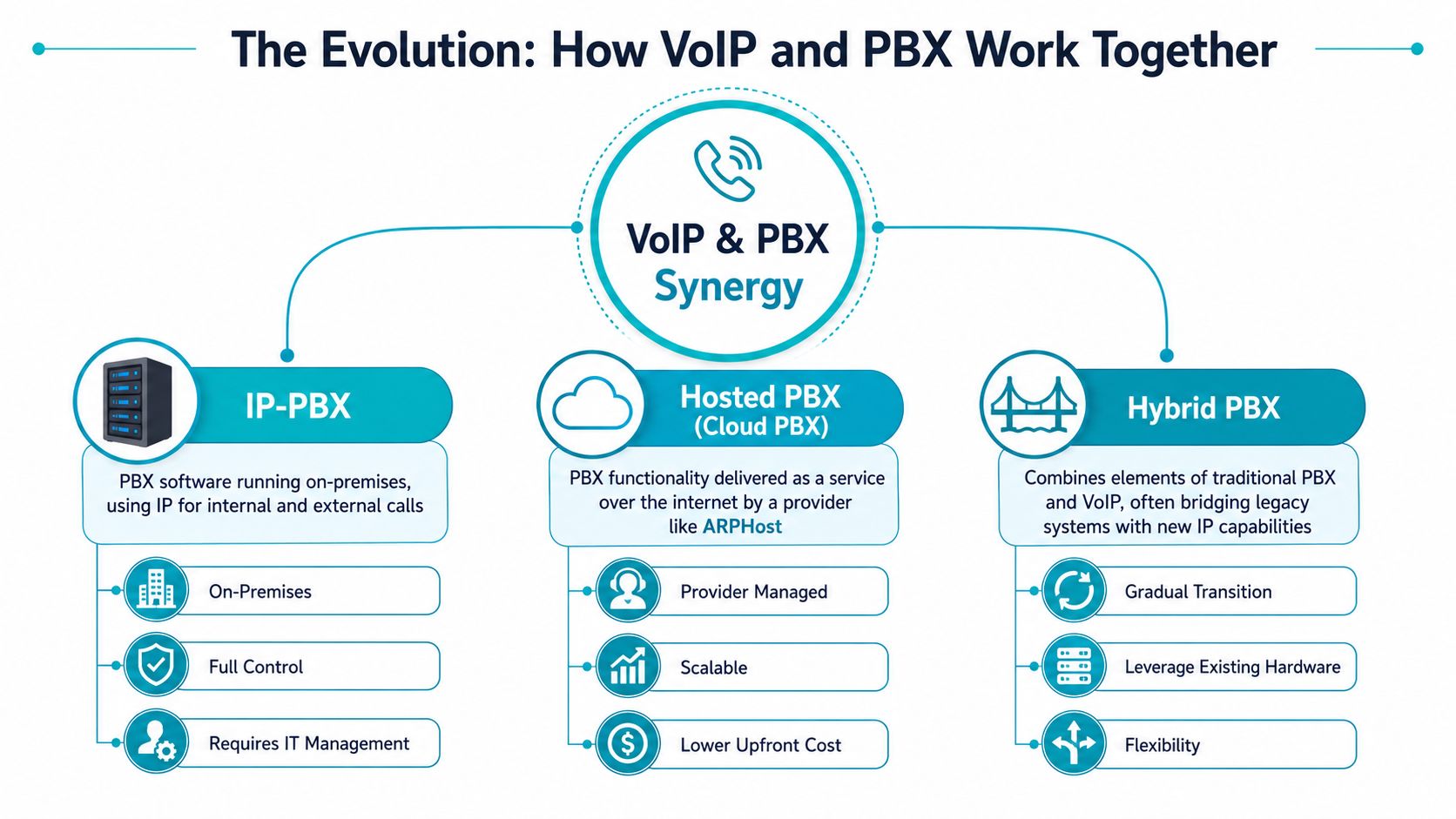
IP-PBX
An IP-PBX is the PBX you run yourself, either on dedicated hardware or as software on a server or VM. Calls move over IP internally, and external connectivity is usually handled through SIP trunks.
This model fits teams that want policy control, local integrations, custom dial plans, or tighter operational ownership. It also means your staff handles patching, backups, firewall rules, failover design, and troubleshooting.
Hosted PBX
A hosted PBX moves the PBX brain into a provider-managed environment. Users connect with desk phones, softphones, or mobile clients over the internet, while the provider runs the platform underneath.
The business appeal is obvious. The hosted PBX market was valued at approximately $12.8 billion in 2024 and is forecast to reach roughly $30.4 billion by 2030 at a 15.2% annual rate. Businesses switching to VoIP-based PBX systems can experience average savings between 50% and 75% on their communication budgets, according to Future Market Insights on the PBX market.
Hosted also changes asset strategy.
SIP trunking and hybrid paths
SIP trunking is the bridge between your PBX and external calling. Instead of buying and maintaining traditional trunks, you connect your PBX to the phone network over IP. That can support a full IP-PBX deployment or a staged migration where existing infrastructure stays in place for a while.
A hybrid design is often the least disruptive route. Keep critical call flows on-site. Move remote users, overflow routing, or new locations onto hosted services. Then phase out legacy components on your own schedule.
For teams evaluating that middle path, this explanation of SIP trunking and VoIP is worth reviewing.
The wrong comparison is “old PBX versus new app.” The right comparison is where the call control lives, where the trunks terminate, and who owns the operational burden.
Choosing Your Deployment Model On-Prem vs Hosted vs Hybrid
The best deployment model isn’t the one with the longest feature list. It’s the one your team can operate reliably.
A small office with limited IT time usually shouldn’t inherit a self-hosted telephony stack unless there’s a strong reason. A compliance-heavy environment may reject fully hosted voice because it needs more local control. A multi-site business often lands in the middle with a hybrid design.
What each model optimizes for
On-premises IP-PBX gives you control. You choose the server, storage, firewall policies, backup windows, and upgrade timing. That’s useful when telephony integrates with local systems or when management wants the PBX physically under company control.
Hosted or cloud PBX trades some control for simplicity. You reduce hardware ownership, speed up deployment, and make remote user onboarding much easier. It’s often the cleanest option for businesses that want voice features without building telephony expertise in-house.
Hybrid PBX is the transition model and sometimes the long-term model. It works well when one office has established equipment but remote workers, branch sites, or failover routes need cloud flexibility.
On-Prem vs Hosted vs Hybrid PBX Comparison
| Criterion | On-Premises IP-PBX | Hosted/Cloud PBX | Hybrid PBX |
|---|---|---|---|
| Control | Highest control over system, policies, and upgrades | Lower infrastructure control | Split control based on what stays local |
| Upfront cost model | More hardware and deployment effort | Lower upfront infrastructure burden | Mixed, depending on reused assets |
| Maintenance | Internal team or contractor manages everything | Provider handles most platform operations | Shared responsibility |
| Scalability | Strong, but tied to server and network planning | Easier user expansion | Flexible if designed carefully |
| Remote work fit | Works, but needs deliberate setup | Natural fit | Good for mixed environments |
| Failure domain | Local outages can have bigger impact without redundancy | Provider-side resilience is stronger if chosen well | Depends on call path design |
| Customization | Highest | Usually more limited | Moderate to high |
| Best fit | Businesses with IT depth and specific requirements | SMBs that want less operational overhead | Organizations migrating in stages |
Where infrastructure changes the answer
A phone system on a weak server, noisy network, or consumer-grade firewall won’t perform well just because the PBX software is popular.
That’s why deployment planning needs to include the compute layer:
- Dedicated hardware: Good for large call volumes, custom integrations, and predictable performance.
- Virtual private servers: Good for lighter PBX workloads, branch systems, labs, and test environments.
- Private cloud clusters: Good when you want virtualized resilience, easier snapshots, and room to grow.
- Colocation: Useful if you already own specialized PBX appliances or gateways and need a better facility.
For businesses looking at hosted options through a cost lens, this walkthrough on how hosted VirtualPBX can reduce business phone costs adds a practical budgeting angle.
If the business can’t tolerate prolonged call outages, don’t choose a model based only on licensing. Choose the model that gives you a clean failure plan.
Architecting Your VoIP PBX on ARPHost Infrastructure
A business usually notices infrastructure limits during a bad day, not during procurement. Calls start clipping during peak hours, a reboot takes longer than expected, or the only person who knows the PBX host is out of office. At that point, the software matters less than the platform under it.
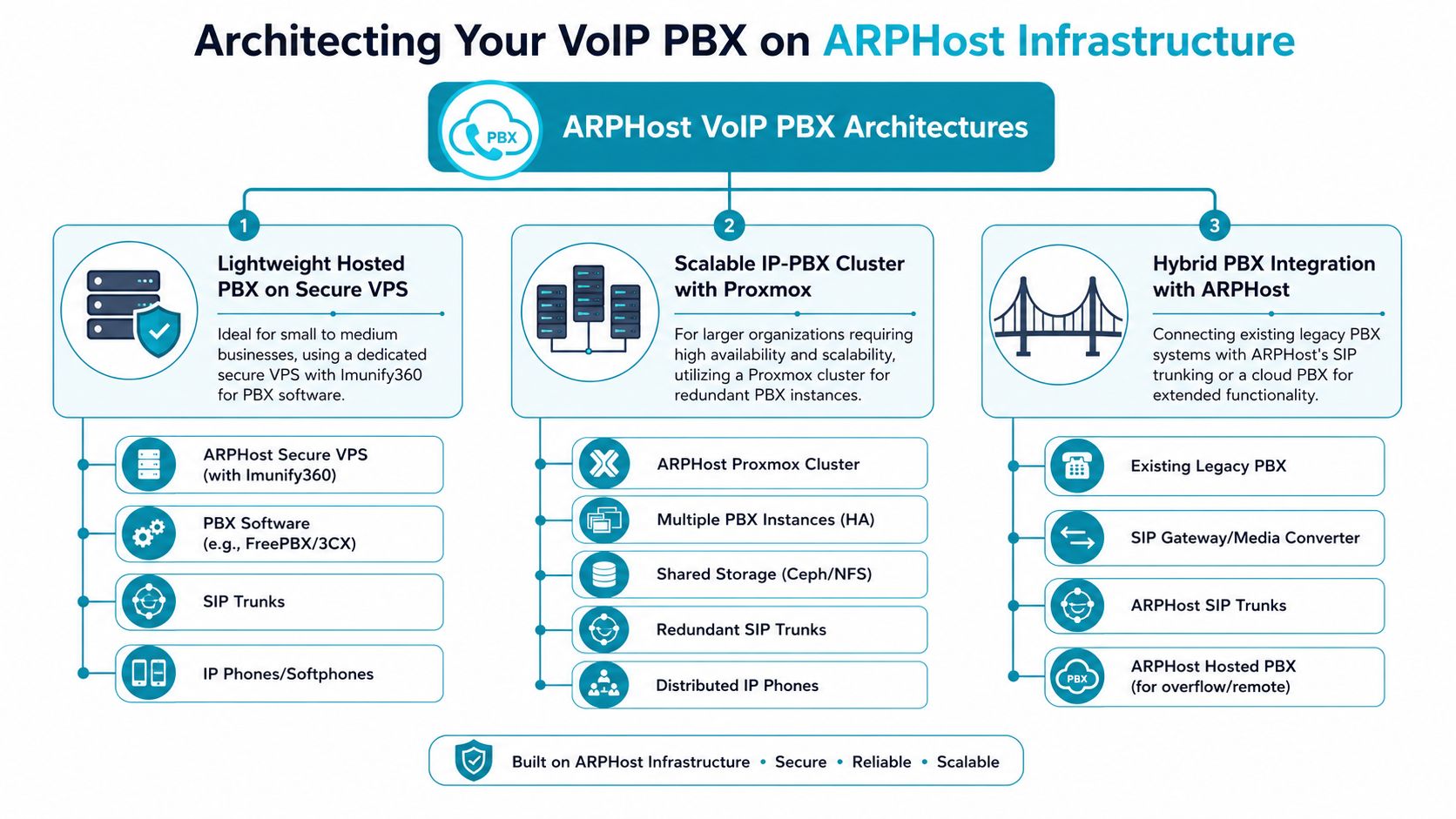
Lightweight hosted PBX on a VPS
A VPS fits branch offices, smaller teams, pilot rollouts, and lab environments. It gives you a fast path to stand up FreePBX, 3CX, or a similar IP-PBX without waiting on hardware procurement or rack space. That speed has value if the goal is to validate call flows, handset provisioning, SIP trunk behavior, and remote user support before committing to a larger design.
A simple package install might start like this:
sudo apt update
sudo apt install 3cxpbx
That is only the starting point. A production PBX still needs hardened access, backups you have verified, certificate management, trunk failover planning, firewall rules that do not break RTP, and a clear extension and dial plan structure.
Managed VPS hosting makes sense when the team wants control of the PBX but does not want to own every part of the underlying platform. The trade-off is capacity headroom. A VPS works well for lighter voice loads, but if call concurrency, recording volume, or attached services keep growing, the hypervisor and storage layer start to matter more.
High-availability IP-PBX on Proxmox private cloud
Once telephony supports sales, support, dispatch, or emergency workflows, a single PBX node becomes a business risk. In those environments, the design should assume host failure, storage issues, maintenance windows, and rollback needs from the start.
A key rule matters here. To establish a Proxmox VE 9 cluster with High Availability, a minimum of three nodes is strictly required to achieve quorum and prevent split-brain scenarios
That requirement changes the whole architecture discussion. The key question is not whether HA sounds attractive. Rather, the essential consideration is whether the business is prepared to fund enough nodes, storage design, backup capacity, and operational testing to make failover credible.
On ARPHost infrastructure, that usually points to dedicated hardware or a private cloud built for virtualization. Bare metal is the cleaner fit when you want predictable CPU access, tighter control over storage behavior, and room for SBCs, monitoring, and recording workloads on adjacent systems. A private Proxmox environment is better when you need snapshots, workload isolation, and the ability to run redundant PBX nodes alongside other internal services without building your own cluster in-house.
ARPHost offers VPS hosting, bare metal servers, dedicated Proxmox private clouds, colocation, instant applications, and managed IT services. For a PBX deployment, that matters because compute, virtualization, and ongoing platform management can stay with one provider instead of being split across separate hosting and operations vendors.
Hybrid with colocated appliances or gateways
Some phone environments still depend on hardware that is expensive to replace or difficult to replicate in software. Analog paging, door entry systems, fax adapters, PRI handoffs, and older PBX features often keep a partial legacy footprint in place longer than anyone expected.
A hybrid design handles that reality without freezing the whole phone system in place.
- Keep the legacy appliance where it still adds value: Use it for the workflows that are stable and costly to rebuild.
- Move external calling to SIP where practical: Reduce carrier lock-in and make remote routing easier to manage.
- Shift remote users and new departments to the hosted PBX: New growth does not need to inherit old hardware limits.
- Colocate gateways or appliances if office conditions are poor: Better power, cooling, and connectivity often improve reliability more than another repair cycle in a back-office rack.
I have seen hybrid deployments work well when teams are honest about what must stay and what should move first. The mistake is trying to virtualize every legacy dependency in one project. A better approach is to place the PBX on infrastructure that can support both old and new call paths while the business retires the fragile pieces in stages.
A good voice architecture improves the failure plan, the support model, and the room to grow. PBX software alone cannot do that.
Migration and Implementation A Practical Checklist
Most telephony migrations go wrong in predictable ways. Teams underestimate number porting lead times, skip network testing, or copy old call flows into the new platform without cleaning them up.
A phased rollout works better than a big-bang cutover.
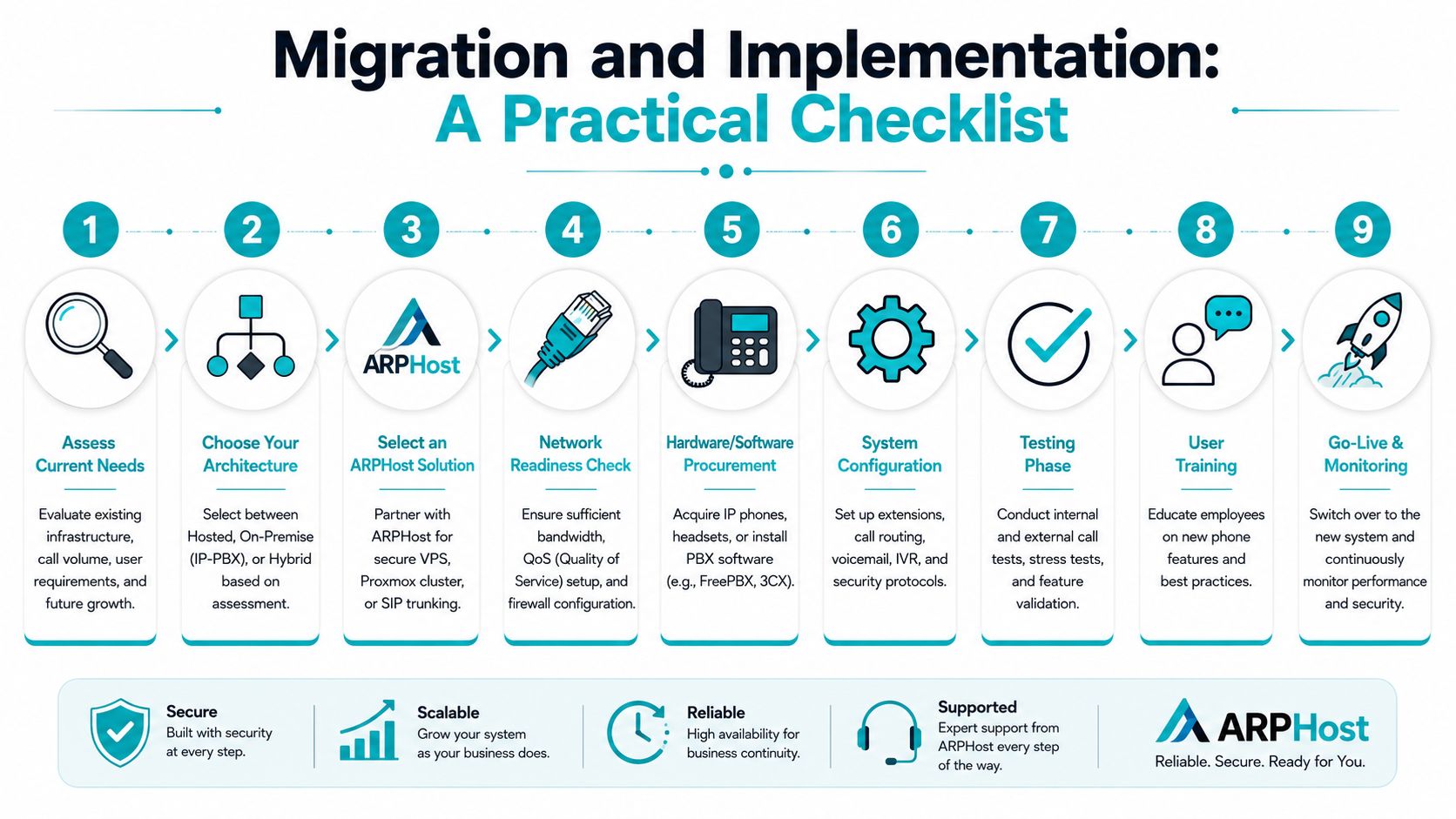
Checklist before cutover
Audit the current phone environment
Document main numbers, direct inward dials, hunt groups, fax lines, conference bridges, call queues, after-hours routing, and emergency calling requirements. If it isn’t written down, it will be missed during migration.Assess the network path for voice
Check switching, firewall behavior, WAN stability, QoS, and segmentation. Voice should not compete blindly with backups, large file sync jobs, or guest Wi-Fi traffic.Choose the target model early
Decide whether the business is moving to hosted PBX, self-managed IP-PBX, or a hybrid design. That decision affects handsets, SIP trunking, failover design, and support ownership.
Build, test, then move users in waves
A practical rollout usually follows this sequence:
- Provision the platform: Build the VPS, private cloud VM, or on-prem host.
- Install and secure the PBX: Create extensions, IVRs, voicemail policies, and admin roles.
- Connect trunks and test routing: Verify inbound, outbound, internal, voicemail, and failover behavior.
- Port numbers carefully: Keep written records of every submitted number and cut date.
- Pilot with a small group: Use staff who will report issues clearly.
- Train users: Show them call transfer, voicemail access, mobile apps, and headset expectations.
- Move department by department: Sales, support, then general office is often cleaner than moving everyone at once.
Operational checks people skip
- Failover behavior: What happens if the PBX VM stops, the office internet drops, or one SIP route fails?
- Endpoint standards: Mixed handset firmware and random softphone settings create support noise.
- Admin boundaries: Too many global admins usually leads to accidental dial-plan changes.
- Backup restores: A backup you’ve never restored isn’t a recovery plan.
Test call flow by role, not just by extension. A receptionist, support queue agent, warehouse phone, and executive assistant all use the system differently.
Critical Considerations Security Costs and Operations
Voice projects often get approved on feature comparisons, then judged later on reliability, support load, and surprise costs. That’s why the long-term view matters more than the initial demo.
Security is mostly a discipline problem
A PBX exposed without tight firewall policy, strong admin controls, and regular patching is asking for trouble. That applies to self-hosted systems and to customer-managed hosted deployments.
Start with the basics:
- Separate voice traffic where practical: Dedicated VLANs or at least segmented policy boundaries make troubleshooting and security easier.
- Restrict management access: PBX admin interfaces should never be casually reachable.
- Harden endpoints: IP phones, softphones, and SBCs need firmware discipline too.
- Review logs: Failed registrations, route abuse, and unexpected call patterns usually show up before they become outages.
Costs are more than licensing
The monthly seat price is the easiest number to compare and often the least useful one.
Real telephony cost includes:
- Staff time: Who handles changes, patching, handset provisioning, and user support?
- Downtime exposure: What does a call outage cost in missed sales or support delays?
- Hardware lifecycle: If you self-host, who replaces failed drives, PSUs, or appliances?
- Backup and recovery tooling: Voice data and configuration still need protection.
- Network work: Sometimes the PBX is affordable, but the switching and firewall cleanup isn’t.
Operations usually decide whether users like the system
A stable voice environment depends on network conditions as much as server sizing. To achieve a mean jitter level below 100ms, a typical SIP/PBX server can sustain only 20 simultaneous calls. That’s a useful reminder that call quality failures often come from jitter and packet handling, not from a lack of CPU.
That changes how you operate the platform. If users complain about clipped audio or one-way speech, don’t start by throwing more cores at the VM. Check WAN behavior, switching congestion, QoS policy, firewall session handling, and whether the network is introducing instability during peak office traffic.
Good VoIP operations start at the network edge. The PBX server is only one part of the voice path.
Conclusion Your Next Steps with ARPHost
The useful way to think about VoIP and PBX is simple. VoIP is the transport. PBX is the call control. Infrastructure is what determines whether the system is dependable.
If you want maximum control, an on-premises or self-hosted IP-PBX can still be the right fit. If you want less operational overhead, hosted PBX is usually the cleaner route. If the business has legacy devices, branch offices, or a gradual migration path, hybrid often makes the most sense.
The decision should come down to a few direct questions:
- Who owns operations after go-live?
- How much downtime can the business tolerate?
- Does the network support voice properly?
- Will this need to scale across sites, remote users, or future systems?
Why ARPHost excels here
The practical advantage is having options that match the maturity of the project. A smaller team can start on a VPS. A larger environment can move to dedicated infrastructure or a Proxmox private cloud. Businesses with limited internal bandwidth can fold voice into fully managed IT services for servers, networks, and phone systems instead of stitching together separate providers.
If you’re still evaluating, start with the infrastructure model first. That will make the software decision much easier, and it will keep you from buying a phone system that looks good in a demo but creates operational friction later.
If you’re planning a new business phone deployment, replacing a legacy PBX, or designing a resilient VoIP stack on VPS, bare metal, or Proxmox, ARPHost, LLC offers infrastructure and managed service options to match different operating models. You can review VPS hosting, explore bare metal servers, check Proxmox private clouds, or request managed services for ongoing support with servers, networks, and phone systems.
