


Missed calls mean missed opportunities. Voicemail to email closes that gap by taking voice messages, converting them into audio files—and often text transcripts—and delivering them directly to your inbox. This isn't a minor tweak; it's a fundamental shift from a clunky, phone-based chore to an integrated workflow that enhances responsiveness and creates a searchable data archive.
Why Voicemail to Email Is a Modern Business Necessity
The days of dialing into a separate system to check messages are over. That legacy process is a communication bottleneck that delays responses to urgent client needs and lets potential sales leads go cold.
Forwarding voicemails to an email inbox solves this by meeting your team where they already work. This simple change allows everyone to respond faster, stay organized, and build a searchable archive of client interactions. A support technician can forward a technical voicemail to the right engineer with a single click. A sales manager can triage new leads between meetings without touching a handset. The efficiency gains are immediate and tangible.
The Growing Demand for Integrated Voice Solutions
The market is shifting because businesses are seeing real results. The global voicemail service market is booming, driven by cloud-based phone systems that include voicemail-to-email as a standard feature.
Valued at roughly $2.5 billion in 2025, the market is expected to hit $4.56 billion by 2029. That growth shows how critical these tools have become, especially for SMBs that need to be nimble. Some businesses have even reported up to a 25% improvement in customer response times after making the switch. You can dig into these voicemail market trends to get the full picture.
Of course, for any communication channel to be effective, it has to be reliable. The tech powering it is what makes or breaks the whole system.
A powerful Virtual PBX phone system—the engine behind voicemail to email—is only as good as its foundation. Without stable and secure hosting, your most critical communication tool is vulnerable to downtime and security risks, defeating the entire purpose.
This is exactly why a dependable solution like a fully managed IT service from ARPHost is so important. You get the proactive monitoring and secure environment needed to keep communications flowing without a hitch, which sets the stage for a system you can actually count on.
How the Technology Actually Works
When a voicemail magically appears in your inbox, it's the result of a slick, automated process orchestrated by a Virtual PBX (Private Branch Exchange). Think of it as the brain of your phone system, managing everything from the moment a call is missed.
When someone leaves a message, the Virtual PBX captures the raw audio and compresses it using a specific audio codec—like G.711 or G.729—to balance sound quality with a manageable file size for email delivery.
This flow chart gives you a bird's-eye view of the journey, from an unanswered call to the email landing in your inbox.
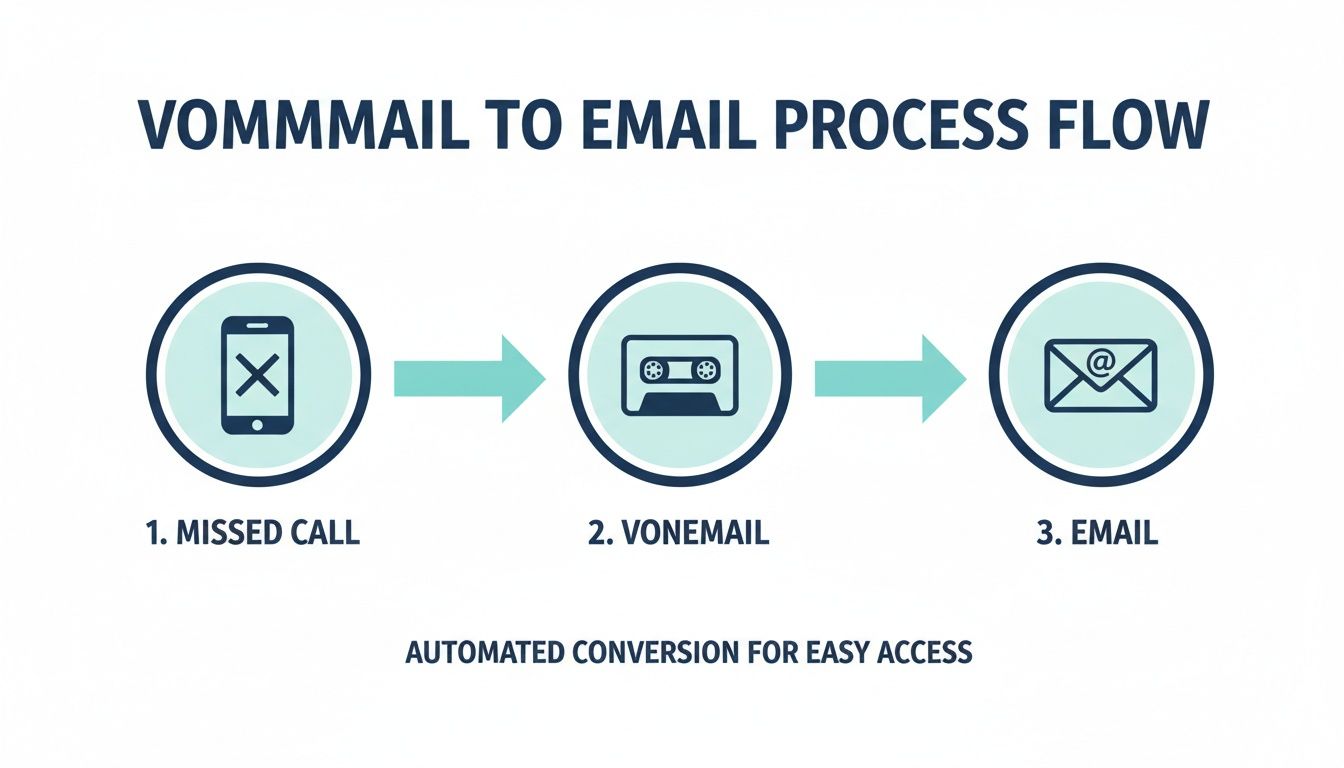
As you can see, the system is designed to turn a traditional phone call into a digital asset you can manage right alongside your other communications.
From Audio File to Inbox
Once the audio is compressed, it's packaged into a universally friendly format like MP3 or WAV, playable on any computer or smartphone.
Next, the system's mail client takes over. Using SMTP (Simple Mail Transfer Protocol), it connects to your email server, drafts a new message, and attaches the audio file.
To get a clearer picture of what makes this all possible, let's break down the key players in the system.
Table: Key Components of a Voicemail to Email System
| Component | Role in the System | ARPHost Solution Example |
|---|---|---|
| Virtual PBX | The software brain that manages calls, routes voicemails, and starts the conversion process. | ARPHost’s Virtual PBX phone systems manage the entire call flow. |
| VoIP Server | Handles the reception of the incoming call and voice data over the internet. | Our secure managed VPS hosting provides the reliable backbone for the PBX. |
| Audio Codec | Compresses the raw voice data into a smaller, more efficient digital audio file. | Standard codecs like G.711 or G.729 are used for optimal quality and size. |
| SMTP Gateway | The mail server responsible for sending the final email with the voicemail attachment. | Our fully managed IT services for servers ensure the SMTP gateway is always online. |
| SIP Trunk | The digital pathway that connects your phone system to the public telephone network. | We provide and configure SIP trunks to handle all call signaling and media. |
| STT Engine (Optional) | A speech-to-text service that transcribes the audio into text for the email body. | Integrated third-party services provide transcription capabilities. |
Each of these components must work in perfect harmony. A hiccup in any one of them can bring the whole process to a halt.
The Role of SIP and Transcription
The unsung hero of this operation is SIP (Session Initiation Protocol). SIP trunks are the digital phone lines that make VoIP calls possible, connecting your Virtual PBX to the wider telephone network.
When transcription is part of the package, a speech-to-text (STT) engine analyzes the audio file and converts the spoken words into plain text. This transcript is then dropped right into the body of the email, giving you a quick, scannable version of the message. The quality of this text depends heavily on the engine; understanding the nuances of AI voicemail transcription can help you set the right expectations.
From the first ring to the final email, the whole process usually takes less than a minute. This seamless handoff transforms a missed call into an actionable piece of information.
Unlocking Strategic Business Advantages
Getting voicemails in your inbox is convenient, but the real win is how a voicemail-to-email system drives tangible ROI.
Imagine a sales lead calling after hours. Instead of that inquiry sitting in a voicemail box until morning, it lands directly in the sales team's shared inbox. Within minutes, it can be assigned and followed up on—the kind of speed that closes deals. Or picture a support desk: a customer leaves a detailed voicemail about a technical glitch. Instead of someone scribbling it down, they can forward the audio file and transcript straight to the right engineering queue, cutting out the middleman and reducing human error.
Enhancing Team Collaboration and Responsiveness
The benefits ripple out far beyond one person's productivity. For remote or distributed teams, having a central email archive of every voice message creates a single source of truth that everyone can access.
Here’s where it really shines:
- Drastically Improved Response Times: Voicemails become actionable emails you can flag, categorize, and push through existing workflows.
- Seamless Remote Collaboration: A team member in a different time zone can act on a client message without needing to be near a physical office phone.
- Creation of a Searchable Archive: All your voice communications are logged and indexed right inside your email system, creating an invaluable record for compliance checks and quality assurance.
While voicemail-to-email is a game-changer, you can take it even further. Check out this a complete guide to a virtual phone number for business to see how it can amplify these advantages with even more flexibility.
The Foundation of Reliable Communication
None of these strategic wins matter if the system is down. This is where your infrastructure comes in. A high-availability KVM VPS from ARPHost ensures your communications hub is always online. With a rock-solid hosting foundation, your Virtual PBX can do its job consistently.
And that reliability is critical. Email marketing delivers a median 122% ROI—four times higher than other digital channels. Forwarding voicemails directly into email taps into a channel that already drives a reported 25% of overall revenues for many companies. You can dig into more compelling email stats at porchgroupmedia.com to see just how central it is.
By integrating voice into the proven efficiency of email, you create a powerful, unified communication strategy. The key is building it on a platform designed for 100% uptime and security.
Ultimately, a well-implemented voicemail-to-email system, supported by robust infrastructure like ARPHost's Secure Web Hosting Bundles, turns every missed call into a documented, actionable opportunity.
Your Step-By-Step Setup Guide on a Virtual PBX
Theory is great, but let's get hands-on. Here's how to get voicemail to email running on a common platform like FreePBX, which you can deploy instantly on ARPHost’s secure managed VPS hosting (starting from $5.99/month).
First, you'll enable voicemail for a user or extension. Next, you'll configure email delivery options. Finally—and most importantly—you'll configure your system to send emails securely so they don't get lost in spam filters.
Step 1: Configure Voicemail for an Extension
The first move is to activate the voicemail box for the person who needs email notifications, all within your PBX admin panel.
- Navigate to Applications > Extensions: Find the specific extension you want to set up (e.g., Extension 101 for John Doe).
- Select the Voicemail Tab: Once you're editing the extension, find the voicemail section.
- Enable Voicemail: Set the voicemail status to "Enabled."
- Enter Email Address: In the "Email Address" field, type the recipient's full email address (e.g., john.doe@yourcompany.com).
- Set Up a Voicemail PIN: Assign a secure numeric password.
Here's a command-line example for Asterisk (the engine behind FreePBX) to check if an extension's voicemail is configured with an email address:
# Access the Asterisk CLI
sudo asterisk -rvvv

# Show voicemail user details for extension 101
voicemail show user 101
This will output the configuration details, including the email address you've set.
Step 2: Set Email Attachment and Format Options
Next, tell the system to include the audio file in the email. Skipping this defeats the purpose.
- Enable Email Attachment: Find the setting labeled "Email Attachment" and make sure it’s set to "Yes."
- Choose an Audio Format: You’ll likely see options like WAV or MP3. MP3 is often the best choice for its balance of quality and small file size.
- Delete After Emailing: Consider enabling the "Delete Voicemail" option. This automatically clears the message from the phone after it’s emailed, preventing mailboxes from filling up.
This screenshot shows a typical FreePBX dashboard, which is your command center for managing extensions and system settings.

From here, an administrator can dive into all the different modules needed to tweak voicemail, SMTP settings, and other key communication tools.
Step 3: Configure System SMTP Settings
Finally, your PBX must know how to send an email. Setting up an authenticated SMTP relay is essential to prevent your voicemail alerts from landing in spam folders.
Using an authenticated SMTP user is non-negotiable for reliable delivery. It proves to receiving email servers that your PBX is a legitimate sender, not a spam bot. This single step can prevent countless missed messages and support headaches.
The exact location for these settings varies, but you’ll usually find them under "Admin" > "System Admin" > "Email Setup." This is where you'll plug in your SMTP server details, port number, and login credentials.
Our managed Virtual PBX services shine here. Our experts handle this secure configuration for you, ensuring your system works with your email provider from day one. If you're managing your own setup, our guide on choosing a PBX system for small business has more great tips on system administration.
Navigating Security and Compliance Risks
When your voicemail to email system handles sensitive client information, security and compliance are fundamental. Sending audio files across the internet opens the door to risks, from eavesdropping to serious data privacy violations.

The entire communication chain must be secure. It starts with encrypting the SMTP connection with TLS/SSL, which acts like a secure tunnel for the email and its audio attachment in transit. The PBX server itself is also a prime target. Hardening that server is non-negotiable.
Hardening Your Virtual PBX Environment
A secure Virtual PBX requires multiple layers of proactive defense.
Here are the server hardening practices that matter:
- Proactive Firewall Management: Lock it down. Your firewall rules should be incredibly strict, permitting traffic only from trusted IP addresses and necessary ports. This is your first line of defense.
- Regular Security Audits: Constantly scan for vulnerabilities and patch them immediately to close security holes.
- Secure Storage: Ensure any archived voicemails are stored in an encrypted format. That way, the data is useless even if a server is compromised.
- Access Control Policies: Limit administrative access to authorized personnel and enforce strong, unique passwords.
A compromised PBX is more than a service disruption—it can be a backdoor for attackers to pivot into your entire business network. For any business handling sensitive calls, managed firewalls and continuous monitoring are absolute must-haves.
Meeting Compliance Obligations
For businesses in regulated fields like healthcare or finance, rules like HIPAA and GDPR add another layer of complexity. Casually forwarding a voicemail containing Protected Health Information (PHI) to an unsecured email account is a violation that can lead to crippling fines.
To stay compliant, every component—from the PBX to the email server and long-term storage—must meet strict regulatory standards. This is where a managed solution really shines.
ARPHost’s Secure Web Hosting Bundles give you the solid, secure foundation you need. With Imunify360 malware protection and managed firewall services built right in, we help you harden your infrastructure. For total peace of mind, our fully managed IT services for servers mean your Virtual PBX is monitored, patched, and secured 24/7, letting you meet compliance duties with confidence.
Why ARPHost Excels Here: Infrastructure for Voice Solutions
Your VoIP system is only as good as the server it runs on. A feature like voicemail-to-email might seem simple, but if the hosting environment is shaky, the whole thing falls apart. Frequent downtime, slow processing, or security holes can turn your communication strategy into a liability. The underlying infrastructure isn't just an afterthought—it's everything.
Your Virtual PBX is a high-performance engine, and it needs a stable, powerful, and secure foundation. A generic hosting plan just won't cut it when critical client calls are on the line.
Scaling This with ARPHost
At ARPHost, we build the exact infrastructure that robust voice solutions demand. From high-availability KVM VPS hosting that guarantees uptime to bare metal servers for enterprise deployments, our architecture is engineered for the real-time nature of VoIP traffic.
This isn't just convenience; it's a strategic edge. Innovations like voicemail-to-email are delivering ROIs up to 80% as the market grows, with 73-75% of companies rating email as a top ROI channel. When you pair SIP trunks with a reliable hosting environment, you translate features into real wins. Read more about these business growth strategies.
Our managed IT services team takes this a step further. We handle proactive monitoring, security patching, and expert VoIP administration so you don't have to. It's a hands-off approach that ensures your communications just work, letting you focus on your business instead of your phone system. With our team managing your infrastructure, you can confidently build an enterprise-grade communication system.
Find out more about how ARPHost saves businesses money with Virtual PBX solutions. For demanding workloads, our Dedicated Proxmox Private Clouds (starting at $299/month) offer isolated, high-performance environments perfect for mission-critical PBX systems.
Your Questions, Answered
When moving to a voicemail-to-email system, a few common questions always pop up. Here’s what IT managers and business owners want to know.
Can Voicemail to Email Work for a Shared Phone Number?
Yes, and this is one of its biggest strengths. When a call comes into a shared line—like your main sales or support number—you can configure it to forward that message to a distribution list or shared inbox (e.g., support@yourcompany.com). The first person available can grab it, create a ticket, and respond. No more messages getting buried in a single inbox while a customer waits.
How Quickly Are Voicemails Delivered to Email?
It’s almost immediate. In most setups, the entire process—converting the audio, attaching it, and sending the email—takes less than a minute. You can expect the message to be in your inbox practically by the time the caller has hung up. The exact speed can depend on the length of the voicemail or the current load on your PBX server, but for day-to-day use, "instant" is a fair description.
Is It Possible to Get a Text Transcript with the Audio File?
Absolutely. Most modern Virtual PBX systems have speech-to-text (STT) capabilities built-in or can integrate with them. When enabled, the system first records the audio, then sends that file to an STT engine to be transcribed. The email you receive will have the audio file attached and the text transcript in the body, giving you the best of both worlds.
Pro Tip: While transcription tech is incredibly good these days, it’s not flawless. A thick accent or a bad connection can trip it up. Always treat the audio file as the definitive source, especially when numbers, names, or critical details are involved.
At ARPHost, we specialize in providing the rock-solid infrastructure and expert management needed for reliable business communications. Explore our Virtual PBX phone systems to build a communication solution that just works. For a custom quote on a fully managed solution, request a managed services quote at arphost.com/managed-services/.