

A lot of teams reach the same breaking point the same way. The phone system still works, but everything around it has changed. Agents need to work remotely. Supervisors want queue visibility from anywhere. Sales wants CRM context on every call. Security wants tighter control over who can access recordings, admin panels, and customer data.
Legacy PBX hardware usually fails at that moment. It wasn't designed for distributed agents, cloud-native monitoring, or fast scaling. Every change feels invasive. Every upgrade window creates risk. Every temporary workaround becomes permanent technical debt.
That pressure is part of a much larger shift. Remote customer operations have expanded quickly, with a projected 60% increase in remote call center agents from 2022 to 2024 and cloud-based contact center platforms projected to reach $82.43 billion by 2030. If you're weighing old telephony against a more flexible model, this business phone system comparison is a useful starting point.
A virtual call center fixes the physical limitations, but it doesn't remove engineering responsibility. You still need clean call routing, stable media paths, proper segmentation, secure remote access, backups, and a hosting layer that won't collapse under peak usage. The difference is that you can now build those pieces deliberately instead of inheriting them from an appliance rack in a back room.
Introduction From On-Premise Limits to Cloud Flexibility
A virtual call center isn't just a phone system hosted somewhere else. It's a communications stack built around software control, internet transport, and remote access. That changes what IT can optimize.
With a traditional on-premise setup, scaling often means ordering hardware, scheduling maintenance, and hoping the next firmware update doesn't break call flows. In a virtual model, you can separate workloads, automate provisioning, and treat telephony like any other production service. That matters when queues change weekly, departments need separate routing logic, or a seasonal spike hits without warning.
What changes operationally
The biggest operational change is decoupling users from location. Agents connect through softphones or managed endpoints. Supervisors work from dashboards instead of wallboards in one office. Admins handle policy, routing, recordings, and updates from centralized systems.
That flexibility doesn't mean every environment should be fully public cloud and vendor-managed. In practice, many teams need more control than generic SaaS gives them. They want access to logs, the ability to tune VM resources, choice over backup strategy, and ownership of the security model around voice, recordings, and CRM-linked data.
A virtual call center works best when voice is treated as infrastructure, not as a black-box subscription.
Why infrastructure matters more than brochures suggest
Many buying guides stay at the feature-list level. They compare IVR, analytics, callbacks, and omnichannel support. Those features matter, but they don't help when RTP quality drops because the host node is oversubscribed, storage stalls during recording writes, or a remote agent's endpoint drifts out of policy.
The technical path is usually straightforward. Choose the hosting model. Deploy the PBX layer. Connect SIP trunks. Secure the edge. Monitor everything that can affect call quality. Then build redundancy where failure would hurt the business most.
That sequence sounds simple because it is simple. Getting it resilient is the hard part.
The Core Technical Components of a Virtual Call Center
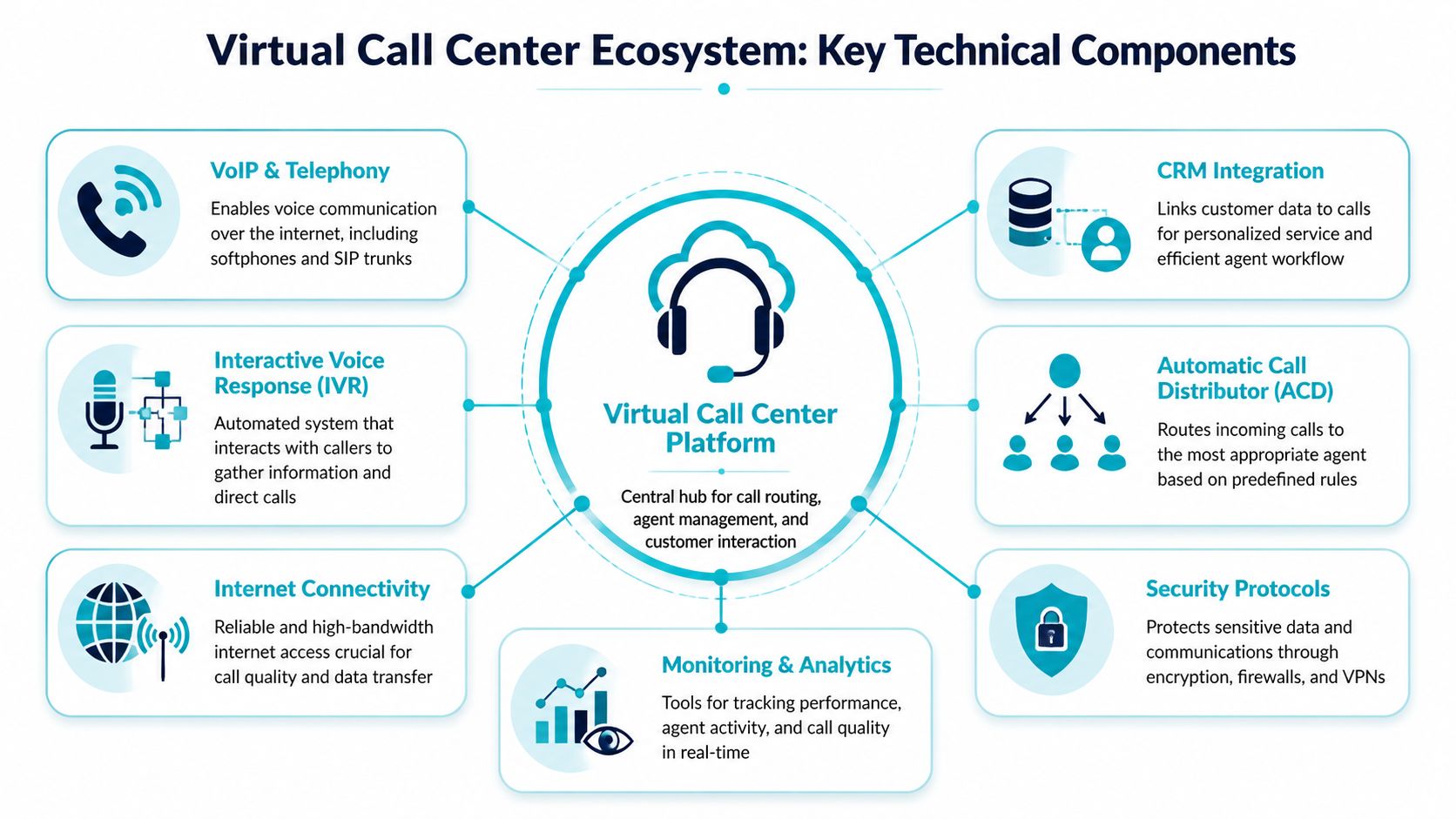
A reliable virtual call center is an ecosystem. Envision it as a house: the hosting and network are the foundation, the PBX is the frame, SIP trunks are the utility lines, and endpoints and integrations are the rooms people use.
The PBX is the control plane
The virtual PBX handles the logic that makes the call center function. It decides what happens when a call arrives, who hears it, how it moves through queues, when voicemail picks up, and which actions are logged against the customer record.
On a technical level, you configure:
- Inbound routing: DIDs, time conditions, failover destinations, and queue behavior.
- Queue management: Ring groups, hunt strategies, agent states, and overflow logic.
- IVR workflows: Menu trees, prompt playback, business-hours handling, and escalation options.
- Recording policy: Per-queue, per-extension, or compliance-driven rules.
A good PBX design keeps routing logic readable. If your inbound path requires multiple undocumented exceptions, you don't have a phone problem. You have a configuration management problem.
SIP trunks carry the calls
SIP trunks are the connection between your PBX and the outside telephone network. They replace traditional PRI-style thinking with software-defined call capacity and routing flexibility.
That doesn't mean trunking is "set and forget." It requires careful work around codec selection, failover routes, authentication, registration strategy, and concurrent call planning. Bad SIP design shows up fast. Calls fail intermittently, one-way audio appears, or inbound routes behave differently under load than they did in testing.
Endpoints are where quality becomes visible
Agents experience the system through softphones, browsers, headsets, laptops, and network links. At this stage, elegant backend design can still be undone by weak endpoint control.
In most environments, I prefer standardization over theoretical flexibility. Pick a supported headset list. Pick a small number of softphone clients. Define update policy. Document Wi-Fi limitations. Require wired connections for roles that handle heavy call loads or sensitive workflows. The more endpoint variation you allow, the harder root-cause analysis becomes.
Practical rule: If agents can choose any laptop, any USB headset, any browser, and any home network arrangement, your support queue becomes part of the call center stack.
Hosting and integrations determine maturity
A modern virtual call center also depends on the surrounding systems. CRM integration, call recording storage, speech analytics, reporting pipelines, and identity controls are part of the same service whether buyers think of them that way or not.
AI is now becoming part of that operational layer rather than a bolt-on experiment, 80% of customer service organizations are expected to use generative AI by 2025 to improve agent productivity and customer experience, with projected global labor savings of $80 billion. For infrastructure teams, that matters because AI features add compute demand, API dependencies, storage growth, and security review requirements.
The telephony side also benefits from a clean trunking foundation. For teams evaluating how voice transport fits into a broader deployment, VoIP with SIP trunks is the architectural model to understand.
Choosing Your Hosting Foundation for Peak Performance
Where you run the PBX matters as much as which PBX you choose. I've seen stable software behave badly on the wrong hosting layer and average software perform well on a disciplined one. For a virtual call center, your hosting choice affects latency consistency, storage behavior, change control, backup design, and how gracefully you can recover from failure.
What each hosting model is good at
A KVM VPS is usually the right starting point for a small or growing team. It gives you root access, fast provisioning, and enough isolation to run a PBX, light reporting, and support integrations without buying dedicated hardware on day one. This model works well when the environment is simple and the team can tolerate planned growth steps.
A bare metal server makes sense when performance must stay predictable under sustained load. If you're writing lots of recordings, running heavier analytics, or supporting a larger concurrent call footprint, removing the hypervisor layer and neighbor-noise concerns often simplifies troubleshooting. You get the whole box, but you also inherit more responsibility around redundancy, maintenance windows, and hardware lifecycle planning.
A Proxmox private cloud is the most flexible of the three because it lets you separate PBX, database, reporting, and utility services into dedicated virtual machines on dedicated hardware. That separation is a major operational advantage. It improves fault isolation, supports cleaner backups, and gives you room to build clustering, snapshots, and staged upgrades without turning one PBX VM into a monolith.
Virtual PBX Hosting Comparison VPS vs Bare Metal vs Private Cloud
| Attribute | KVM VPS Hosting | Bare Metal Server | Proxmox Private Cloud |
|---|---|---|---|
| Best fit | Small teams, pilots, branch deployments | High-volume single-environment workloads | Multi-service environments with growth and isolation needs |
| Provisioning speed | Fast | Slower than VPS in most cases | Moderate, depends on cluster design |
| Performance consistency | Good when resources are sized correctly | Strong, with no shared compute neighbors | Strong, especially with dedicated nodes and careful VM placement |
| Operational complexity | Lowest of the three | Moderate | Highest, but also the most controllable |
| Scalability path | Vertical first, then migrate or redesign | Vertical until hardware limits are reached | Vertical and horizontal, depending on cluster design |
| Fault isolation | Limited if many services share one VM | Limited if everything sits on one host | Strong, because roles can be split across VMs or nodes |
| Backup flexibility | Good | Good | Excellent when paired with platform-aware backup strategy |
| Ideal use case | Cost-conscious deployments needing quick launch | Performance-heavy voice and recording workloads | Mature virtual call center platforms with HA and segmented services |
Trade-offs that actually matter
The wrong question is "Which is best?" The right question is "Where will this environment break first?"
If your likely bottleneck is budget and speed, start with VPS. If it's disk throughput and deterministic performance, look hard at bare metal. If it's lifecycle management, service separation, and future HA, private cloud is usually the cleaner long-term answer.
A lot of teams underestimate how much operational clarity they gain from splitting functions. The PBX shouldn't compete with reporting jobs, recording management, or other unrelated workloads if you can avoid it. Once telephony becomes business-critical, shared-resource shortcuts stop being cheap.
Build for the failure mode you expect. Don't buy a platform for the happy path.
For teams comparing deployment control and tenancy models, this breakdown of private cloud vs public cloud is useful because voice workloads often have different risk tolerance than general web apps.
A Practical Implementation Checklist
This is the part where planning turns into build work. A virtual call center doesn't need mystery. It needs order. Provision the server cleanly, install the PBX deliberately, attach SIP trunks carefully, lock down the edge, then onboard agents with a standard endpoint profile.

Step 1 provision the base infrastructure
Start with a fresh Linux VM or server instance. Keep the first build minimal. Don't install unrelated admin tools, mail services, random dashboards, or package sets you might need later. Voice systems benefit from predictability.
A clean baseline usually includes:
- OS updates applied immediately after deployment.
- Time synchronization so logs and recordings align properly.
- Restricted administrative access with named accounts and least privilege.
- Storage planning for system files, logs, and recordings as separate concerns.
- Backup enrollment before production traffic is allowed.
Example baseline commands on a Debian or Ubuntu system:
apt update
apt upgrade -y
apt install -y curl wget vim htop chrony unzip
systemctl enable chrony
systemctl restart chrony
If the platform will support more than one voice-related role, split them early. Put the PBX on one VM. Place reporting, recording archival, or support utilities on another. You'll thank yourself the first time you need to patch or roll back one service without touching the others.
Step 2 install and harden the PBX
Whether you choose 3CX, FreePBX, or another supported telephony stack, don't accept the default posture as production-ready. Install from the vendor's documented repository or appliance image, then harden the host before exposing it.
Focus on these items first:
- Disable unused services: If the host doesn't need them, remove them.
- Enforce strong admin authentication: Separate admin and operator roles.
- Limit management exposure: Restrict web UI and SSH access to approved sources or VPN-only paths.
- Set TLS correctly: Voice encryption is only as good as the certificate and transport policy around it.
- Document every trunk, route, and queue change: PBX sprawl starts with undocumented exceptions.
A very basic firewall posture on the host might begin like this:
ufw default deny incoming
ufw default allow outgoing
ufw allow OpenSSH
ufw enable
ufw status verbose
You'll still need to allow the exact voice and application flows your PBX requires, but start with deny-by-default and add only what the deployment needs.
Most PBX compromises don't begin with exotic zero-days. They begin with exposed management interfaces, weak admin habits, and broad firewall rules.
Step 3 connect SIP trunks and validate call paths
Once the PBX is installed, create the SIP trunk configuration with your carrier's required authentication and routing details. Keep the first test simple. One inbound route. One extension. One outbound rule. One codec policy. One recording policy.
Then test in this order:
- Registration state: Confirm the trunk authenticates as expected.
- Inbound routing: Verify calls land where the DID should send them.
- Outbound dialing: Check caller ID presentation and route behavior.
- Two-way audio: Confirm media flows both directions.
- Fail scenarios: Test what happens when an agent is unavailable or the route is closed.
Don't move on until the path is boringly predictable.
Step 4 place the PBX behind a real firewall
If you're managing the edge on a Juniper device, keep the policy tight. Voice traffic should be allowed intentionally, not because the PBX lives in a broadly trusted segment.
At a high level, the firewall design should include:
- A dedicated voice zone or VLAN
- Explicit rules for SIP signaling and approved management access
- Separate handling for admin access versus media
- Logging on deny rules for troubleshooting
- Rate controls and intrusion protections where appropriate
Pseudo-style CLI examples vary by Junos version and design, but the policy thinking is consistent:
set security zones security-zone voice interfaces ge-0/0/1
set security policies from-zone untrust to-zone voice policy allow-sip match source-address approved-carrier
set security policies from-zone untrust to-zone voice policy allow-sip match destination-address pbx-host
set security policies from-zone untrust to-zone voice policy allow-sip then permit
Use your actual object names, interfaces, and approved source definitions. Avoid broad any-to-any rules just to get the PBX online faster. Those shortcuts stay in production far too often.
Step 5 onboard agents with a standard operating profile
Remote agent rollout fails when IT treats every workstation as a unique exception. Publish a single support profile for laptops, audio devices, browsers, and connectivity requirements.
That profile should define:
- Approved softphone or browser client
- Supported USB headset models
- Minimum endpoint security controls
- VPN or secure access method if required
- What the help desk will and won't troubleshoot
If you're staffing distributed teams, regional recruiting matters too. For operations building bilingual or nearshore coverage, resources like LatAm VAs can help hiring teams think more practically about remote talent pipelines.
For organizations that want a faster launch path, one-click deployment options can reduce the early build burden. The key is still to review and harden the result before production traffic touches it.
Implementing Robust Security and Compliance
Security in a virtual call center isn't an optional add-on. It's part of the phone system. If attackers can reach the PBX admin panel, pivot through a weak remote endpoint, or intercept unprotected signaling and media, you've already lost control of the environment.
Segment voice like a production service
The first discipline is network segmentation. Voice services, management access, recording storage, and general office traffic shouldn't live in the same flat network if you can avoid it. Put the PBX and related services in a dedicated zone. Restrict east-west movement. Make admin access deliberate and logged.
This matters even more when remote agents connect from unmanaged home networks. The more hostile and variable the edge becomes, the more disciplined the core has to be.
A sound design usually includes:
- Separate voice and management paths
- Tightly scoped firewall rules
- VPN or identity-gated admin access
- Minimal public exposure of web interfaces
- Dedicated logging for authentication and policy violations
Encrypt signaling and media
Many teams enable secure transport late. That's backwards. TLS for signaling and SRTP for media should be part of the initial build decision, not a future improvement item.
Without transport protection, call setup and media streams are easier targets for interception or tampering. Encryption won't fix bad routing or poor QoS, but it does reduce the risk of exposing customer conversations and internal telephony metadata.
If the PBX is reachable, recordings exist, and agents are remote, assume someone will eventually test the edges of your security model.
Protect endpoints and web interfaces
Remote agents are part of the attack surface. So are browser-based dashboards, self-service portals, and admin interfaces exposed for convenience. That means you need endpoint controls, patch discipline, role-based access, and protection for any web-facing component tied to the platform.
This is also where hardened web hosting practices matter if your environment includes support portals, knowledge bases, or admin utilities adjacent to the call center stack. Anything reachable through a browser needs the same seriousness as the PBX itself.
Compliance starts with data handling
Compliance requirements depend on what the call center does. If agents take payments, PCI-related controls belong in the design conversation early. If sensitive health information is involved, access controls, retention policy, and auditability become central.
The practical questions are always the same:
- Where are recordings stored?
- Who can export them?
- How long are they retained?
- Which admins can change routing or user permissions?
- What evidence exists when something changes?
Compliance failures are usually operational failures first. Weak access control, sloppy retention, undocumented exceptions, and shared admin accounts create most of the pain.
Monitoring Performance and Ensuring High Availability
A virtual call center can look healthy right up until users start hearing jitter, silence, failed transfers, or delayed queue joins. That's why monitoring has to begin below the application layer. You need visibility into compute, storage, telephony, and network behavior before users tell you something is broken.
Watch the infrastructure that affects calls
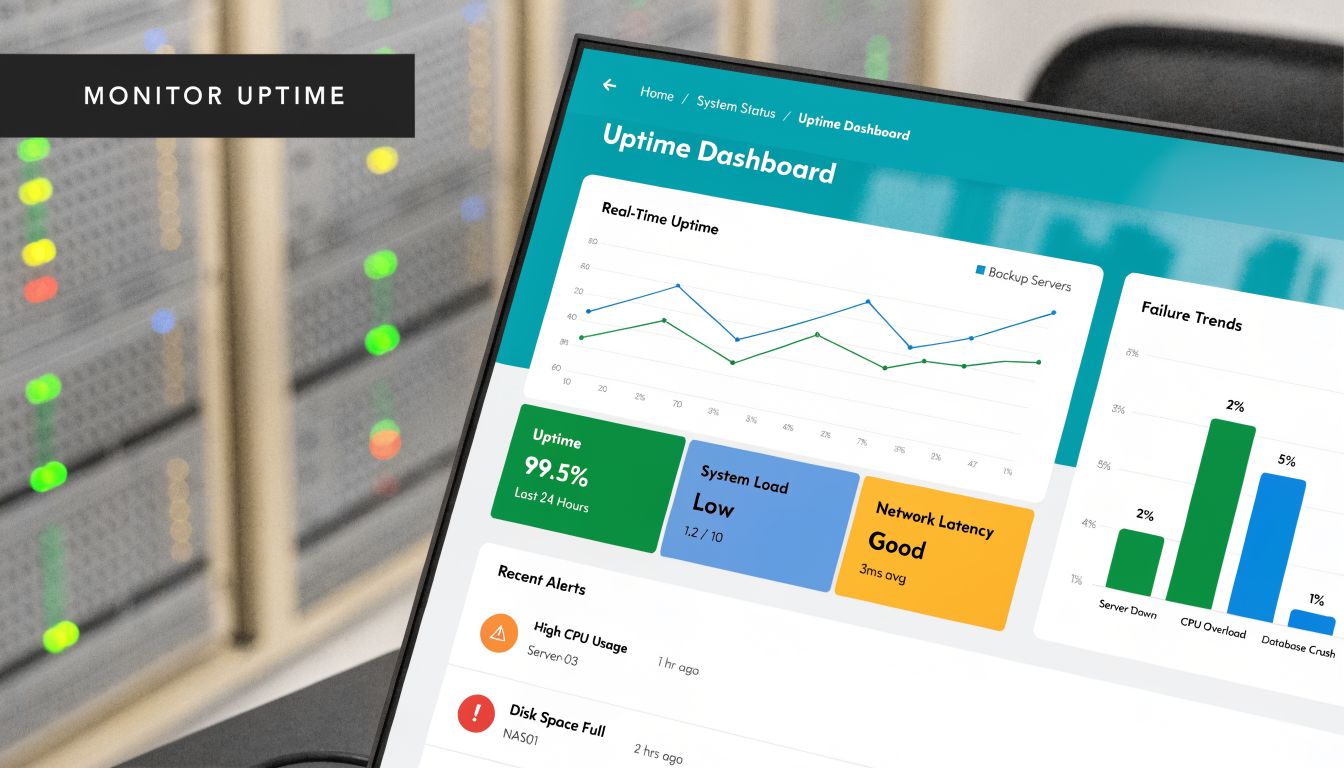
The most useful monitoring stack for a call center includes host metrics, service status, trunk health, and quality indicators in one operational view. At minimum, track CPU, memory, storage pressure, process state, interface health, and network latency. If the PBX is healthy but the host is saturated, users still experience an outage.
RMM tooling earns its place. According to AWS on remote monitoring and management, RMM tools can reduce mean time to resolution by up to 70% by identifying issues like SIP trunk congestion or high CPU usage on a VPS before they damage call quality. That single capability changes the support model from reactive firefighting to controlled operations.
Automate the first response
Good monitoring doesn't just create alerts. It handles routine remediation safely. If a service stops, restart it. If disk pressure rises, trigger investigation before recordings fail. If a host crosses a sustained resource threshold, move quickly before packet handling degrades.
The best use cases for automation are repetitive, well-understood, and low-risk:
- Restarting failed services
- Opening a ticket when trunk registration changes
- Flagging abnormal resource growth
- Running diagnostics when quality metrics dip
- Triggering escalation based on repeated failures
Reliable operations come from short feedback loops. Detect fast, respond fast, and keep the response consistent.
High availability needs both failover and recovery
A lot of teams talk about HA when they really mean backups. Those are different protections. Failover helps the service keep running during a host or node problem. Backups help you recover when bad changes, corruption, deletion, or compromise occurs.
For telephony, both matter.
A stronger design usually includes:
| Capability | What it protects against | Operational note |
|---|---|---|
| HA clustering | Host or node failure | Best when PBX-adjacent services are split cleanly |
| Immutable backups | Ransomware, deletion, configuration mistakes | Backups should be tested, not just scheduled |
| Off-platform recovery path | Major platform incidents | Keep restore runbooks current |
| Configuration versioning | Human error in routing and policy changes | Small PBX changes can have large blast radius |
If you're building on Proxmox, clustering plus disciplined VM separation gives you a far cleaner HA story than a single large telephony server carrying everything. Keep the PBX lightweight. Move support services out. Back up frequently. Test restores on a schedule your team can maintain.
Why ARPHost Excels for Virtual Call Center Hosting
At 9:00 a.m, a queue spike exposes every weak infrastructure decision at once. CPU contention starts clipping audio, storage latency slows call recordings, and nobody can tell whether the problem sits in the PBX, the hypervisor, or the network edge. A provider is useful here only if it can support the full stack behind the call flow.
ARPHost fits that requirement well for teams building a privately managed virtual call center. Smaller deployments can start on VPS infrastructure if the PBX scope stays tight and supporting services are split out instead of piled onto one instance. Higher-volume environments usually need dedicated servers or Proxmox private cloud capacity, where reserved resources, cleaner isolation, and predictable I/O matter more than headline vCPU counts. Managed services are also available for teams that want help with patching, monitoring, migrations, and day-to-day infrastructure operations.
The main advantage is continuity of architecture. IT teams can start with a modest deployment, then expand into dedicated or clustered environments without rebuilding the operating model around a different vendor every time requirements change. That reduces handoff problems, keeps accountability clearer, and makes it easier to standardize backup policy, segmentation, and change control across each stage of growth.
This also matters for hiring. If the business needs to add distributed agents quickly, infrastructure choices should support that growth instead of forcing a platform redesign halfway through recruiting. Teams expanding remote support operations can also use job boards focused on distributed work to find remote jobs and build staffing plans around a stable technical foundation.
For call centers, that combination of flexible hosting options and operational support is the practical value. It gives IT managers room to choose the right footprint now, while keeping a credible path to stricter isolation, higher call volume, and tighter control later.
Frequently Asked Questions About Virtual Call Centers
Is a virtual call center only for large companies
No. Small teams often benefit first because they feel on-premise limitations earlier. A hosted or privately managed virtual call center lets them add remote agents, improve routing, and centralize administration without committing to a full hardware refresh.
Can I run a virtual PBX on a VPS
Yes, if the workload is sized correctly and the deployment stays disciplined. A VPS is a practical fit for smaller environments, test platforms, branch sites, or tightly scoped production systems. The mistake is treating one VM as the home for every related service forever.
What usually breaks first in a poorly designed deployment
Infrastructure assumptions. That's why this matters so much. A common pitfall is underestimating server and network requirements. 68% of virtual call center disruptions stem from network instability and inadequate server resources, according to Zoom's virtual call center guidance.
How do I support remote hiring without weakening operations
Standardize the technical profile first, then hire into that model. Define approved endpoints, access methods, and training expectations before the first wave of remote agents starts.
Should I choose SaaS or private infrastructure
That depends on how much control you need. SaaS is faster to adopt. Private or self-managed infrastructure gives you deeper control over routing, logs, backups, integrations, and security boundaries. If compliance, customization, or operational visibility are high priorities, private infrastructure is often the better fit.
Do I need HA on day one
Not always. You do need a recovery plan on day one. HA becomes important when the business impact of downtime exceeds the cost and complexity of clustering, failover design, and operational testing.
If you're planning a virtual call center and want infrastructure that's built for voice workloads, ARPHost, LLC offers VPS hosting, dedicated Proxmox private clouds, bare metal servers, and fully managed IT services to support everything from a first PBX deployment to a resilient multi-VM private cloud.
