

A familiar point arrives sooner than anticipated. The site that ran fine on shared hosting starts timing out during backups, cron jobs overlap with customer traffic, and one plugin update now feels risky because there’s no room to test anything safely. At that point, a VPS stops being a nice upgrade and becomes the next operational decision.
That decision is often oversimplified. One path offers raw control. The other offers relief from maintenance. In practice, unmanaged vs managed VPS hosting is less about ideology and more about who will handle actual server work at 2 a.m. when a patch breaks PHP-FPM, disk usage spikes, or a failed backup turns into a restore exercise.
I’ve seen teams choose unmanaged because the monthly price looked attractive, then discover they’d signed up for patching, hardening, monitoring, backup validation, service recovery, and incident response. I’ve also seen teams buy fully managed service when what they really needed was infrastructure-level help plus root access for their own application stack.
The right answer depends on technical depth, time, security expectations, and how expensive distraction is for your team. That’s where the distinction matters.
The Crossroads of Growth Choosing Your Next Hosting Path
A growing business usually reaches this fork after the same sequence of events. Shared hosting gets crowded. A staging site becomes necessary. Email, web, and database workloads start stepping on each other. Someone on the team says, “We should just move to a VPS.”
That’s the easy part.
The harder part is deciding whether you want a server to build on or a service that stays healthy while you build the business. Those are different purchases, even when both are called VPS hosting.
One common example is an ecommerce store with a small internal team. The developers want root access, custom Nginx rules, Redis, and tighter control over PHP workers. The owner wants stable checkouts, backups that are restorable, and someone accountable for security updates. Both concerns are valid. They just point to different operating models.
Another example is a software team moving off a low-cost shared plan because they need isolated resources for a staging environment, CLI tooling, and scheduled jobs. If that team already manages Linux systems daily, unmanaged may fit. If they don’t, the first month often turns into a crash course in package management, SSH hardening, firewall rules, backup tooling, and service supervision.
That’s why this isn’t only a hosting decision. It’s an ownership decision. You’re choosing where infrastructure responsibility lives, and that choice affects cost, risk, speed, and sleep.
Beyond the Binary Unmanaged Managed and Hybrid Models
Most comparison pages still pretend there are only two boxes: managed and unmanaged. That’s outdated. The market now works more like a spectrum, and understanding that spectrum prevents a lot of bad purchases.

What unmanaged actually means
With unmanaged VPS, the provider handles the underlying platform. That typically means the hardware, network, and hypervisor. The server above that layer is yours to build and maintain.
That includes the operating system, package updates, firewall rules, intrusion prevention, web stack installation, database tuning, mail handling if you run it, log rotation, backup jobs, and troubleshooting. If Apache won’t start after a package conflict, or MySQL fills the disk with binary logs, you own the fix.
Unmanaged hosting gives you freedom because it gives you responsibility first.
For experienced admins, that’s often a benefit. A clean KVM VPS with root access lets you deploy exactly what you want, whether that’s a lean Docker host, a custom LEMP stack, or a test node for automation. If that’s your model, it’s worth reviewing options built for that use case, such as unmanaged VPS configurations for hands-on admins.
Why managed no longer means no control
A persistent fear keeps some buyers away from managed plans. They assume managed means the provider locks everything down and treats the server like shared hosting with a bigger bill. The data says that misunderstanding is widespread. 65% of SMBs choose unmanaged VPS because they believe managed means they control nothing, while 40% of managed providers now offer hybrid tiers where the provider handles security and OS updates but the client retains full root access for app configuration
That hybrid model matters. It separates infrastructure hygiene from application ownership.
The practical middle ground
Hybrid or tiered managed service is often the best fit for teams that know their application but don’t want to own every kernel patch and security update. One provider may offer OS-only management. Another may monitor infrastructure and handle patching while leaving your application stack untouched. A third may support the full stack, including web server, database, backups, and panel-level tasks.
That’s why “managed” isn’t a sufficient buying term by itself. You need to ask specific questions:
- What layer is managed. Infrastructure only, operating system, control panel, or application stack.
- Who handles patching. OS packages, kernel updates, web stack, and security remediations.
- Whether root access remains available. Many hybrid plans still allow it.
- What support excludes. WordPress debugging and Magento module issues are not the same as OS management.
If you skip those questions, you don’t just risk overpaying. You risk buying the wrong boundary of responsibility.
A Side-by-Side Comparison of Technical Responsibilities
The day-to-day difference between unmanaged and managed VPS becomes obvious once you stop thinking in product labels and start thinking in tasks.
| Operational area | Unmanaged VPS | Managed VPS |
|---|---|---|
| Initial build | You install the OS, harden SSH, add users, configure web and database services | Provider usually delivers a ready baseline with core services prepared |
| Security | You maintain firewall rules, patch cadence, malware tooling, and access controls | Provider handles core security work included in the service scope |
| Monitoring | You set up checks, alerts, logs, and response workflows | Provider watches the node and reacts within the managed scope |
| Backups | You design, schedule, verify, and test restores | Backups are typically included and operated for you |
| Troubleshooting | You investigate service failures and performance issues | Provider assists with server-side issues covered by management |
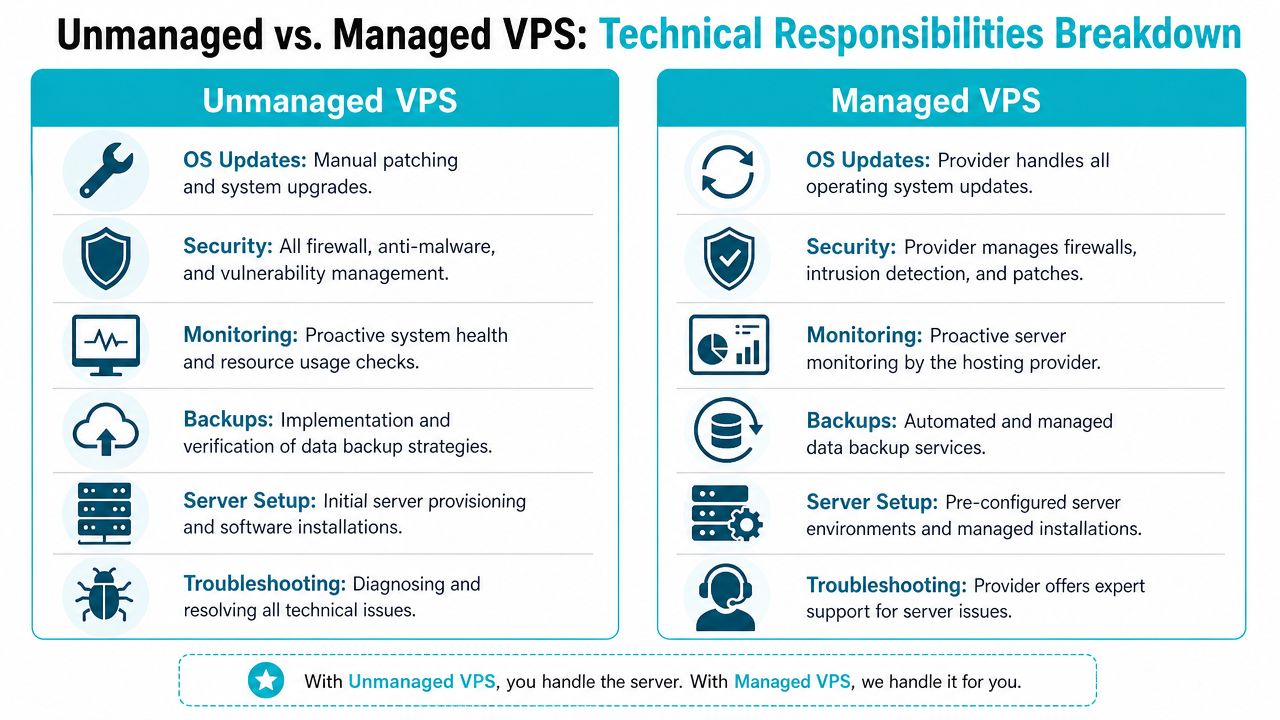
Initial setup and provisioning
With unmanaged VPS, the first hour after deployment is work. You select the OS image, update packages, create administrative users, disable weak defaults, configure SSH policy, install the web stack, tune PHP or Node.js runtime settings, secure database access, and decide how logs, cron jobs, and temporary files should be handled.
A simple Ubuntu build might start like this:
apt update && apt upgrade -y
apt install nginx mariadb-server php-fpm ufw fail2ban -y
ufw allow OpenSSH
ufw allow 'Nginx Full'
ufw enable
systemctl enable nginx mariadb fail2ban
That’s only the baseline. It doesn’t cover backup tooling, monitoring agents, runtime tuning, or deployment automation.
Managed VPS usually starts from a more prepared state. You’ll often receive a provisioned environment with a control panel or a standard stack already in place. For web workloads, secure bundles that include tools such as Imunify360, CloudLinux OS, and Webuzo remove a lot of repetitive setup and reduce the chance that an inexperienced admin leaves obvious gaps.
Security and patch management
Security is where many unmanaged deployments often go unnoticed. Teams remember to install the app. They forget to maintain the server around it.
KnownHost’s breakdown is direct: with unmanaged VPS, the provider is responsible only for the physical infrastructure, including hardware, network, and hypervisor, while the customer must install and configure the OS, set up web servers and databases, apply OS updates and security patches, monitor performance, and troubleshoot failures independently
Practical rule: If nobody on your team owns monthly patching, log review, backup verification, and service monitoring, you don’t have an unmanaged strategy. You have an unmanaged risk.
Managed service changes the default. OS updates, security maintenance, service watching, and baseline hardening become part of the provider’s job. The exact scope still varies, but the burden moves off your calendar.
Maintenance and troubleshooting
In unmanaged environments, maintenance is where hidden toil accumulates. A kernel update might require a reboot window. A package change can alter config behavior. A backup may complete successfully and still be useless because restore testing never happened.
Typical recurring tasks include:
- Service health checks. Confirming Nginx, Apache, PHP-FPM, MySQL, Redis, or Docker are healthy after updates.
- Disk and filesystem review. Tracking log growth, old backups, package cache, and inode pressure.
- Performance tuning. Adjusting worker counts, opcache, database buffers, and swap behavior as traffic changes.
- Recovery work. Rebuilding configs after mistakes, rolling back failed changes, and documenting what happened.
Managed hosting doesn’t remove all admin judgment. It removes a large share of repetitive operational labor.
Performance and scaling
Unmanaged gives maximum tuning freedom. That matters if you need custom kernels, unusual packages, specific container layouts, or app-level behavior a managed template won’t support. It’s often the right fit for labs, custom SaaS stacks, and DevOps teams with established automation.
Managed works better when scaling needs to happen without turning every capacity increase into a mini-project. A provider-managed VPS, secure web hosting bundle, or even a dedicated Proxmox private cloud can give teams room to grow without assigning another engineer to babysit the operating system.
Analyzing the True Total Cost of Ownership
The sticker price is the least useful number in this decision.
A low-cost unmanaged VPS can look efficient on paper because the monthly fee is small. The problem is that server administration doesn’t disappear just because the invoice is lower. It moves onto your payroll, your backlog, and your incident queue.
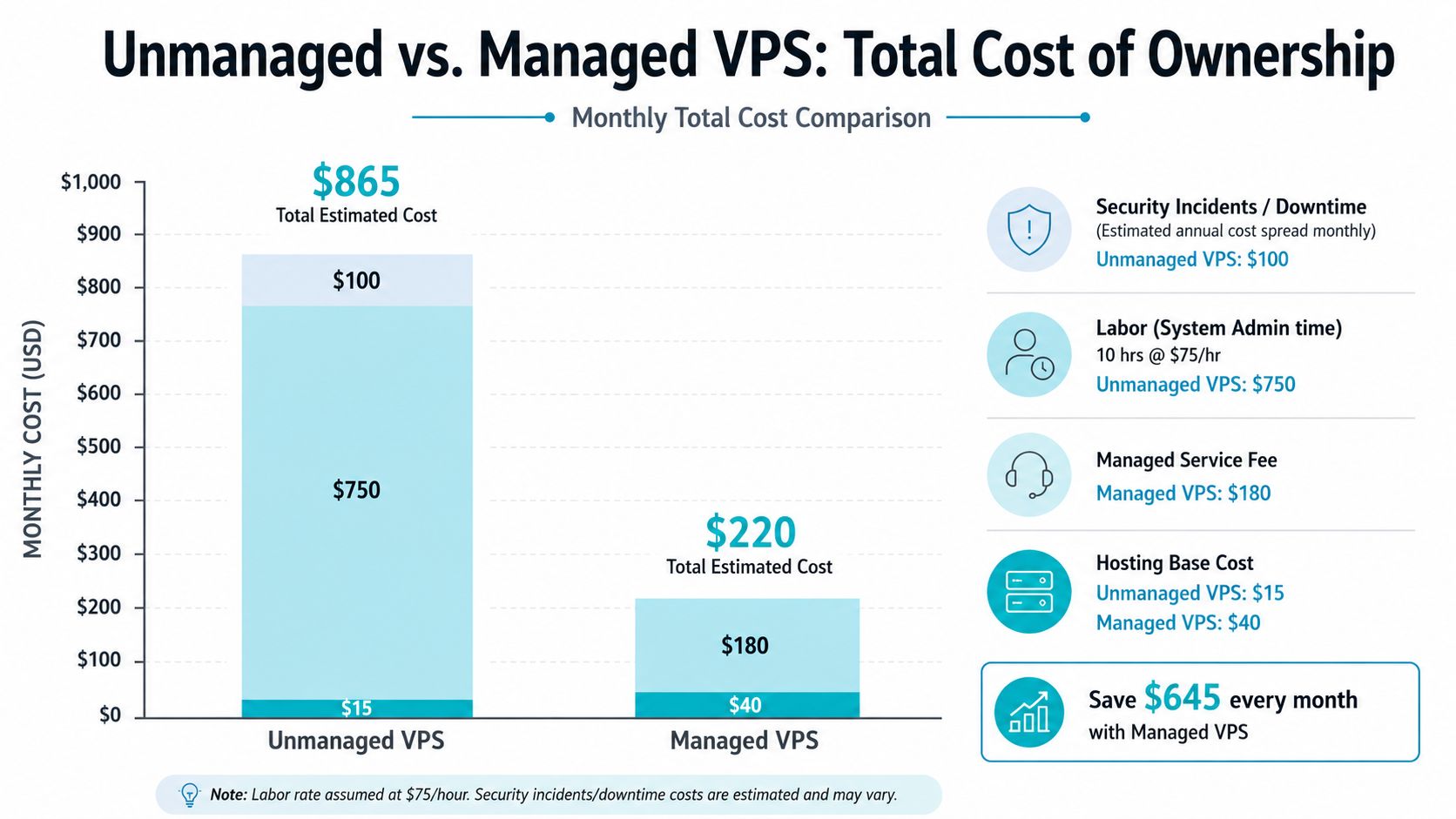
A useful starting point is the broad market range. For 2026, mid-tier managed VPS commonly runs about $30 to $60 per month, while unmanaged plans with comparable resources sit around $15 to $40 per month. The same analysis notes that managed VPS plans are typically 20% to 100% more expensive than unmanaged plans with similar resources
That price gap is real, but it’s incomplete.
The hidden costs behind a cheap unmanaged plan
Liquid Web makes the key point plainly. While unmanaged plans may appear cheaper at $15 to $40 per month compared to $30 to $60 per month for mid-tier managed services in 2026, the true cost of unmanaged hosting often exceeds the advertised price because you still need third-party control panel licenses, enterprise security tools, and backup solutions that managed providers often include
Those add-ons matter because most production servers need more than compute and disk. They need a control surface, malware protection or hardening tools, backup workflows, monitoring, and someone accountable for updates.
For a broader planning exercise, I’d also recommend reviewing a more detailed server cost breakdown across infrastructure and operations. It helps frame hosting as an operating model instead of a line item.
Later in the buying process, a visual comparison can help stakeholders who don’t live in terminal windows every day.
Labor is usually the deciding cost
The clearest example in the provided data comes from the UK SME market. Unmanaged VPS base prices can be as low as £10 per month, but that low entry cost is offset by about £1,600 per month in staff time for server administration. Managed hosting, typically £65 to £150 per month for SMEs, delivers an estimated annual savings of £18,840 compared to unmanaged options when labor and operational efficiency are included
That same analysis says 60% of UK SMEs are better served by managed hosting than unmanaged VPS, largely because manual administration costs outweigh the apparent savings.
Cheap infrastructure gets expensive fast when your developers become part-time sysadmins.
The practical takeaway is simple. If your team already operates Linux systems, automates builds, and owns support workflows, unmanaged may still be the cheaper route. If they don’t, the lowest VPS invoice often produces the highest total cost.
Who Is Each VPS Option Best For
A team usually learns its real hosting preference at 2 a.m. If an update fails, a database fills the disk, or PHP-FPM stops answering, someone has to own the fix. The best VPS choice is the one that matches who will handle that work, how fast they need to respond, and how much control they need over the stack.
The mistake is treating managed and unmanaged as a simple yes-or-no decision. In practice, support sits on a spectrum. Some teams want the provider to maintain the OS and hardening baseline, but keep application deployment in-house. Others need a fully managed environment because nobody on staff should be patching kernels or tracing service failures. That distinction matters more than company size.
Developers and DevOps teams
Unmanaged VPS fits teams that already run Linux systems as part of normal operations. If they can patch packages, read logs, tune services, rotate backups, and recover from a bad deploy without waiting on provider support, full control usually outweighs the convenience of management.
That does not mean every technical team should default to unmanaged. Some engineering groups want root access and deployment freedom, but do not want to spend time on host maintenance, kernel updates, firewall baselines, or hypervisor-level issues. In that case, a managed KVM VPS plan is often the better middle ground. The provider handles the infrastructure layer, and the team keeps control of the application stack.
Dedicated hardware enters the picture when noisy neighbors, custom virtualization, heavy CI workloads, or strict performance consistency become operational problems rather than preferences.
Small and midsize businesses
SMBs usually need clear ownership more than maximum flexibility. If nobody on the team is responsible for server administration, unmanaged hosting becomes a deferred labor bill. It starts as a cheaper invoice and turns into emergency troubleshooting, delayed patches, broken mail delivery, or a weekend spent cleaning up after a compromised plugin.
Managed VPS is usually the safer fit for business sites, customer portals, ecommerce stores, and line-of-business apps. The value is not abstract. It shows up in routine tasks getting handled consistently: OS updates, control panel issues, malware response, service restarts, SSL renewal problems, and baseline hardening. A secure hosting stack with tools like Webuzo, CloudLinux OS, and Imunify360 can reduce repetitive admin work if someone is available to use and maintain those tools properly.
Enterprises and virtualization-heavy environments
Larger environments rarely choose between managed and unmanaged for every workload in the same way. They split responsibilities. Internal teams may keep ownership of network design, IAM, backup policy, monitoring, and change control, while handing off parts of the host layer or hardware operations.
For enterprises, the better question is not “managed or unmanaged?” It is “managed by whom, and up to which layer?” A database cluster, VDI farm, game hosting fleet, or internal VM platform may belong on dedicated nodes or private cloud infrastructure because tenancy, recovery targets, and resource isolation matter more than the VPS label. Those are operating model decisions tied to risk, staffing, and recovery requirements.
MSPs and IT service providers
MSPs usually need both service models in the same portfolio. Some clients want a provider-managed base so the MSP can focus on user support, application changes, compliance tasks, and business continuity. Other clients expect the MSP to own the full stack, which makes unmanaged infrastructure or bare metal the cleaner fit.
The practical test is simple. Buy only the layer your team does not want to run every day.
That approach avoids two common mistakes. The first is overpaying for management that duplicates what your staff already does well. The second is buying unmanaged capacity without budgeting for patching, monitoring, incident response, documentation, and after-hours support.
Navigating Your Migration and Onboarding
Migration is where the operational difference between unmanaged and managed becomes obvious immediately.
The unmanaged route
With unmanaged VPS, the migration runbook belongs to you. In broad terms, the sequence looks like this:
- Take full backups of files, databases, application configs, and any scheduled task definitions.
- Build the new server from scratch. Install the OS, add packages, harden access, configure services, and verify application dependencies.
- Restore data and validate behavior. Check application permissions, background jobs, queue workers, cache layers, SSL handling, and service startup order.
- Cut traffic over carefully. Reduce risk by validating the application under the new stack before making the server live.
That route works when the team already knows the stack well and has rollback discipline.
The managed route
Managed onboarding is less about copying files and more about transferring responsibility cleanly. The provider can prepare the baseline, align package versions, harden the instance, and coordinate the cutover around the application’s needs.
That matters even more for virtualization moves. VMware to Proxmox migrations, for example, benefit from planning around storage formats, guest drivers, boot behavior, and recovery testing. A provider-led migration reduces the number of moving parts your internal team has to own during the switch.
A simple migration rule
Don’t treat migration as a hosting purchase plus a file transfer. Treat it like a change window.
If the move involves custom services, background jobs, legacy PHP versions, mail handling, or a hypervisor transition, document dependencies before the new server goes live. Most migration pain comes from forgetting one operational detail, not from copying the application itself.
Your Decision Checklist Which Path Is Right for You
A bad VPS choice usually shows up a month later. The team is either paying for support it never uses, or spending nights patching, debugging, and restoring a server nobody really had time to own.
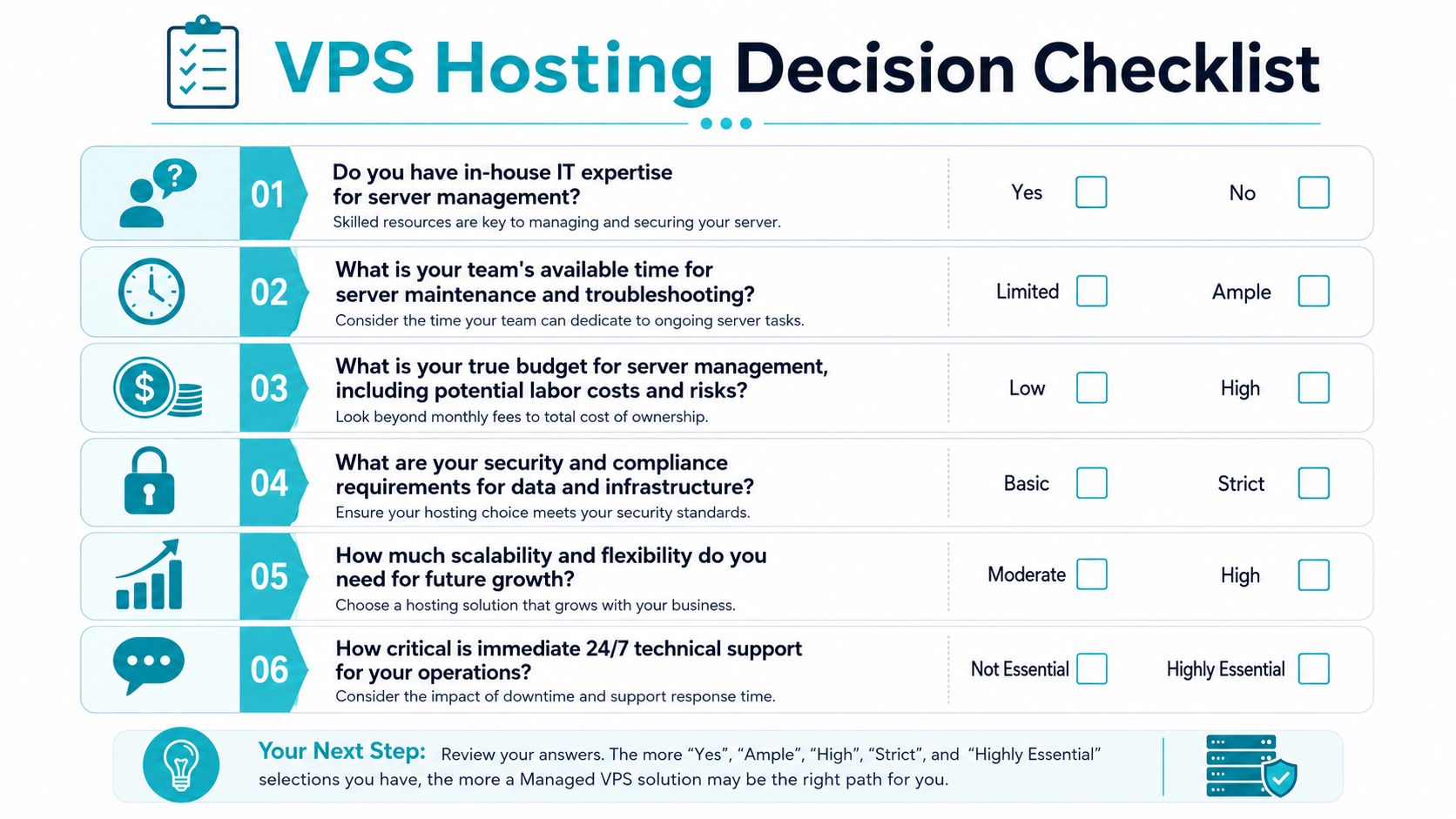
Use this checklist to define the level of responsibility your team can carry. That matters more than the label on the plan, because “managed” can mean anything from basic monitoring to full operating system administration.
Unmanaged is usually the right fit if these are true
- Your team already handles Linux administration as an ongoing function. Someone owns patching, SSH hardening, firewall rules, logs, backups, and restore testing.
- You need stack-level freedom. Custom packages, unusual service layouts, kernel tuning, or non-standard runtime versions are easier to run when no provider support boundary gets in the way.
- Root access solves real problems for you. Teams that regularly tune services, inspect failures at the OS level, or automate provisioning with their own standards get clear value from full control.
- After-hours incidents are operationally acceptable. If the application can tolerate your team being the first and only responder, unmanaged can save money.
Managed or hybrid makes more sense if these are true
- Your internal team is stretched already. Server maintenance competes with shipping product, supporting customers, and handling application work.
- An outage has direct business cost. Lost sales, delayed internal operations, missed customer SLAs, and emergency recovery time are usually more expensive than monthly management fees.
- You want selective control, not full ownership. Hybrid plans fit teams that want root access or application control while offloading patching, monitoring, backups, or baseline security work.
- Your support needs are specific. Some teams only need OS updates and monitoring. Others need incident response, backup management, performance help, and migration assistance. Buying the right scope beats paying for a vague “fully managed” promise.
The shortest version
Choose unmanaged if you are prepared to run the server as an operational responsibility, not as a side task.
Choose managed if you want to focus on the application and hand off part of the infrastructure burden.
Choose hybrid if your answer sits in the middle. That is common, and usually more accurate than forcing the decision into a simple managed versus unmanaged split.
ARPHost, LLC offers VPS hosting, bare metal servers, Proxmox private clouds, and managed services for teams that need different levels of infrastructure support.
