

The cheapest onboarding mistake is treating it like paperwork. A weak program drains money in every direction, while a structured one pays back through faster ramp-up, cleaner handoffs, and fewer preventable support escalations. That matters because the average cost to onboard a new hire is about $1,500, the average cost to train an employee is $1,071, and in smaller firms with fewer than 1,000 employees, training costs rise to $1,433 per employee, according to a widely cited benchmark from Zippia's onboarding dataset (Zippia onboarding statistics).
In managed hosting and IT operations, that same logic applies twice. Employee onboarding decides how fast a new technician can safely touch systems, and customer onboarding decides how fast a client can trust the platform without opening unnecessary tickets. Strong onboarding can improve new-hire retention by 82% and productivity by 70% (Zippia onboarding statistics), yet 35% of companies allocate no onboarding budget and 88% of employees say their company does not excel at onboarding (Zippia onboarding statistics). That gap is why a disciplined training and onboarding program belongs in the same conversation as infrastructure, security, and support.
For a useful outside example of how a defined onboarding process shapes learner success, the onboarding process for online courses follows the same pattern of clear expectations, staged access, and guided progress. If you want a practical look at why operational skills gaps keep pushing IT teams toward outside help, the IT skills gap and the outsourcing imperative lays out that pressure in direct terms.
Why Onboarding Is a Critical IT Investment
A lot of teams still treat onboarding as a welcome packet and a calendar invite. That mindset fails in technical environments because real work starts after the first login, when a new hire needs access, context, guardrails, and enough repetition to act without supervision. The same is true for new clients, who do not become self-sufficient just because the contract is signed.
Employee onboarding and customer onboarding solve different problems
Employee onboarding is about role readiness, security behavior, and team integration. Customer onboarding is about service activation, configuration confidence, and support deflection. If you blur the two, you end up either overloading staff with client-style handholding or handing customers a pile of documentation and hoping they self-serve.
Practical rule: if a new person or new client cannot explain the next step back to you, the onboarding process is not finished yet.
The financial case is straightforward. Structured onboarding reduces repeat training, avoidable churn, and slow time-to-value, which is why the benchmark numbers from Zippia onboarding statistics keep coming up in planning meetings. For onboarding design, one widely used model is the 30/60/90-day structure, which sets learning, contribution, and execution milestones with reviews at 30, 60, and 90 days
That model works in IT because it matches how technical trust is earned. In the first month, people learn systems and language. By day 60, they should handle routine tasks with less supervision. By day 90, they should make decisions inside clear limits, not ask for permission on every ticket or provisioning task.
The same structure helps clients. A customer who gets a clean first week, a guided first month, and a scheduled check-in later on is less likely to confuse product behavior with service failure. The lesson is simple. Onboarding is not an HR side project. It is operational capacity planning for humans. For a practical look at why operational skills gaps keep pushing IT teams toward outside help, see the IT skills gap and the outsourcing imperative. For an example of how structured progress works in a different setting, the onboarding process for online courses follows the same pattern of clear expectations, staged access, and guided progress.
The Foundation Defining Goals and Roles
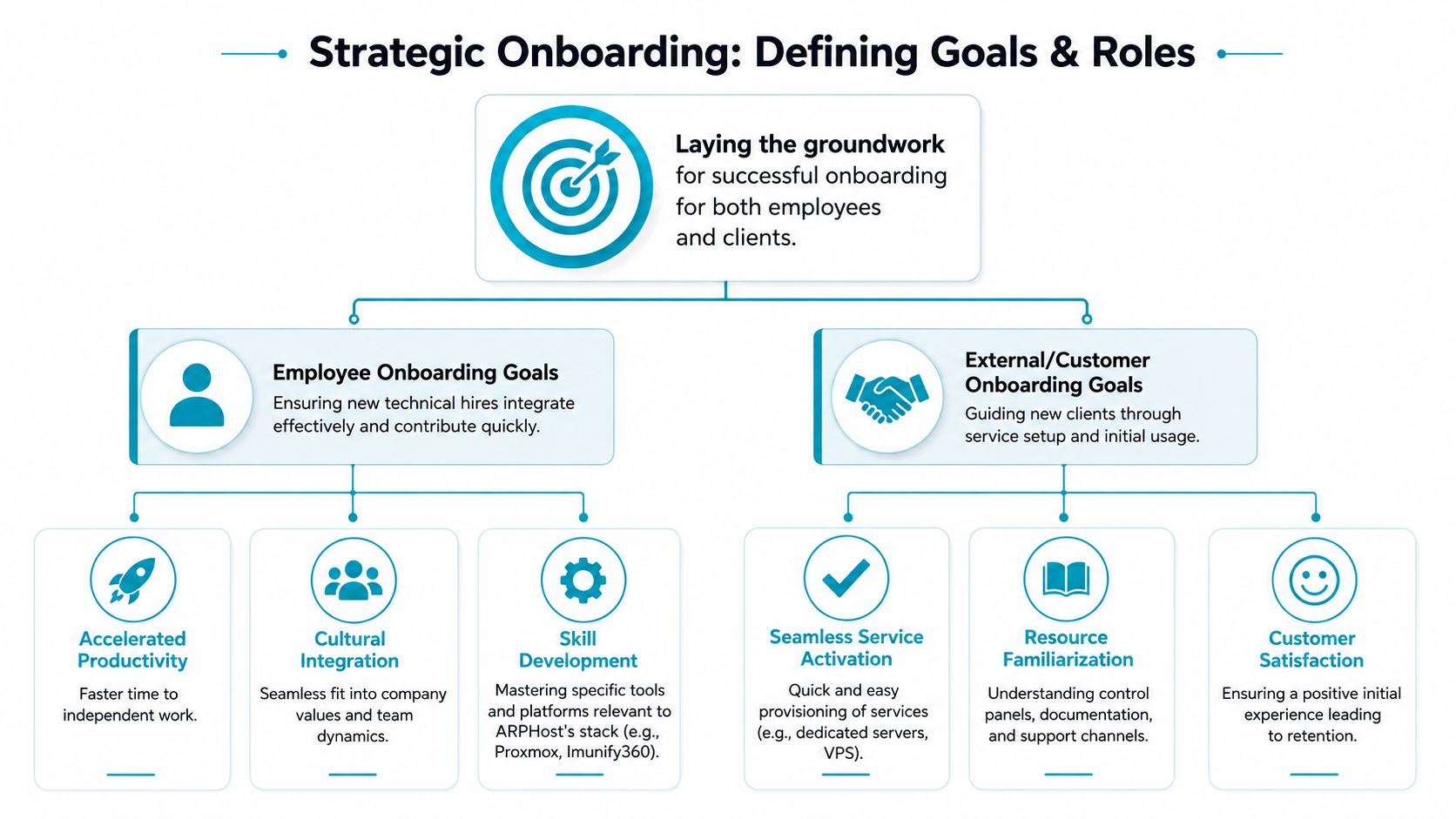
Good onboarding starts before a checklist exists. If the team cannot name the outcome, it cannot design the work, and if it cannot define who owns each step, the process will break the first time someone is out sick. I treat onboarding as a role-design exercise first and a training exercise second, because that is what keeps both hires and customers from stalling in the handoff.
Set separate goals for people and customers
Employee goals should be job-specific and observable. A junior systems admin might need to complete safe access procedures, understand escalation paths, and handle routine work without introducing risk. A virtualization engineer might need to move from supervised tasks to independent Proxmox administration, then to confident incident response. The standard has to match the role, or the training becomes vague and impossible to verify.
Customer goals need to be tied to value delivery. A colocation client should reach successful service activation without confusion over handoff details. A VPS customer should reach first application deployment, then stable use of backups, then predictable support interaction. Those goals are different from staff goals, but they follow the same pattern, clear entry state, clear exit state, and a named owner for each step. For teams that split responsibilities between operations and staffing models, managed IT services vs staff augmentation is a useful reference point for defining where the platform ends and the person begins.
A practical framework is to define three layers:
- Learning goals: what the person or client must understand.
- Action goals: what they must be able to do.
- Confidence goals: what they should be able to do without handholding.
A structured onboarding plan works best when every milestone has an owner, a due date, and a visible sign that the step was completed correctly.
Use the 30/60/90-day model as the spine
The 30/60/90-day model gives you a useful timeline for both staff and customers. At 30 days, focus on basics and supervised execution. At 60 days, focus on repeated performance and exception handling. At 90 days, focus on independence and the ability to handle edge cases without creating downstream cleanup.
That cadence also works for external onboarding because clients move through stages. First they learn the interface and support channels. Then they test their first live workload. Finally, they settle into a steady operating rhythm where tickets are more about optimization than rescue. The work changes, but the structure stays the same, and that consistency reduces risk during the transition.
The internal mirror matters just as much. The goal is not to flood the person with policy. The goal is to make sure they know what part of the system they own and what part belongs to the platform or vendor stack.
Building Your Employee Onboarding Program
Employee onboarding in a technical environment fails when access comes late, training comes detached from the tools, and managers assume shadowing counts as readiness. New hires need structured exposure to systems, not just an HR welcome and a password reset. The fastest way to reduce mistakes is to standardize what every technical hire sees on day one.

Start with access, security, and scope
A good technical onboarding packet should answer three questions before the person logs in. What can they access, what must they protect, and what can they change without approval? That means access provisioning, MFA setup, data handling rules, and a clear map of escalation paths.
For a hosting team, the first list usually includes monitoring systems, ticketing, documentation, internal chat, backup consoles, and any admin interface tied to compute or networking. If a role touches a Proxmox environment, the person also needs to know the boundary between observation and change. If a role touches firewall policies, they need written approval rules before they touch a production rule set.
A practical checklist for the first week looks like this:
- Confirm identity and access: verify account creation, MFA enrollment, and least-privilege permissions.
- Review core policies: data handling, incident reporting, and customer communication standards.
- Walk the stack: monitoring, ticketing, virtualization, backup, and network tools.
- Assign a mentor: one engineer who can answer questions without routing everything through management.
- Schedule weekly manager check-ins: make sure issues surface early instead of turning into silent drift.
The compliance side matters too. A compliant onboarding process should track signed offer letters, I-9 eligibility-to-work documents, W-4 and state withholding forms, background-check consent and results, onboarding checklist timestamps, training completion records, and policy acknowledgments for the handbook, code of conduct, and confidentiality rules (SixFifty). That's not bureaucracy for its own sake. It's the audit trail that proves the process happened and the controls were acknowledged.
Tie training to the work they'll really do
Onboarding is the short-term effort to integrate a new hire into the company's culture and team, typically through the first 90 days, while training is the ongoing process of developing specific job skills and technical competencies (WorkJam). In practice, that means onboarding gets the engineer operational, then training keeps them current as platforms, procedures, and customer needs change.
A concrete example helps. A new virtualization engineer should not start by reading generic policy docs for an hour. They should be assigned a supervised task, such as creating a test VM in a controlled environment, then documenting the steps they took and the checks they used before release. If the environment is backed by dedicated hardware, like a Dual Intel Xeon E5-2690 V3 server in Tampa, FL, the onboarding plan should include storage layout, resource allocation rules, and the approval path for changes that affect other tenants.
I've found that teams learn faster when shadowing is paired with a written outcome. The engineer watches once, performs once with oversight, then repeats the task independently while the manager checks the result.
A brief coaching loop keeps the program honest. The new hire should be able to explain what they did, why they did it, and what would trigger escalation. If they can't, they're still in orientation territory, not onboarding.
Designing an Effective Customer Onboarding Experience
Customer onboarding fails for the same reason employee onboarding fails, nobody owns the first success milestone. In hosting, that means the client may have the service, but not the confidence to use it safely. A well-run experience reduces tickets, prevents avoidable misconfigurations, and gets the customer to actual value before doubt sets in.
Build the first week around proof of use
The first contact should not bury the customer in generic product language. It should tell them how to log in, where to find support, what to do first, and what a successful first week looks like. A new VPS customer should be able to confirm access, create their first account, and understand how backup and restore fit into the service, not just receive a password and a PDF.
The first 45 to 90 days are a critical onboarding window, and SHRM recommends a follow-up check-in between three and six months to catch issues before they become performance or retention problems (SHRM). For customers, that same logic applies, the first month should be watched closely, then the relationship should shift toward stable operations and periodic review.
| Day | Task | Objective | Relevant ARPHost Tool/Feature |
|---|---|---|---|
| 1 | Confirm portal access and login | Prove the customer can reach the service | Secure Web Hosting Bundles |
| 2 | Review welcome notes and support channels | Reduce confusion and ticket churn | 24/7 U.S.-based support |
| 3 | Create the first website or email account | Achieve first meaningful use | Webuzo control panel |
| 4 | Set a backup or restore preference | Establish recovery habits early | Daily backups and one-click restoration |
| 5 | Review security settings and admin users | Limit unnecessary exposure | Imunify360 and CloudLinux OS |
| 7 | Verify first successful workload | Confirm real value delivery | VPS hosting or dedicated cloud service |
If you want a coaching-style view of client handoff and expectation setting, Effective coaching client onboarding is a strong external companion piece.
Reduce friction with the right starting bundle
For hosted websites and smaller application stacks, bundled security and control reduce a lot of first-week setup work. A Secure Web Hosting Bundle with Webuzo, Imunify360, and CloudLinux OS gives the customer a defined management surface instead of a scattered set of tools. That matters because the client is not buying software complexity, they are buying a safe path to launch.
For more hands-on customers, the customer onboarding flow should include a short checklist that covers ownership, access, and backup expectations. It should also define what support will handle and what the customer is still expected to do. When that line is clear, support becomes more efficient and the customer gets less frustrated.
For teams that want a clearer view into device access, incident response, and recurring maintenance, what RMM software does in managed hosting is a useful reference point. It shows how a managed service can standardize routine work without turning the process into a black box.
If the relationship is a managed service rather than a self-service stack, the handoff should be tighter. ARPHost, LLC offers infrastructure and managed hosting options that fit this model, but the same principle holds either way. The service should make the first win easier, not just make the invoice cleaner.
Essential Tools and Automation for Onboarding
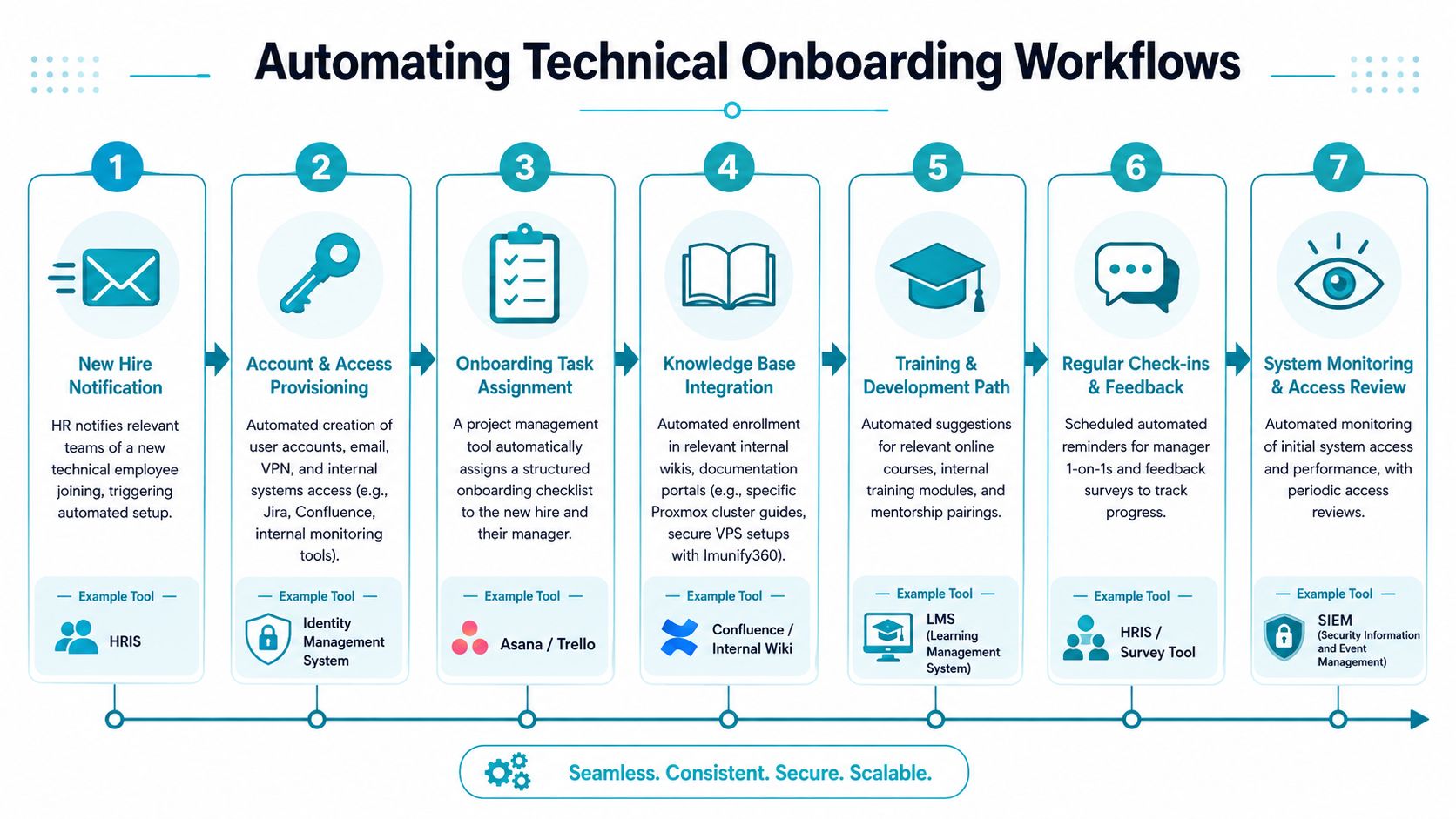
Manual onboarding doesn't scale because humans forget steps, skip handoffs, and rewrite the same guidance in different places. Automation doesn't replace judgment, but it does keep repeatable work from depending on memory. That's especially important in IT, where the first mistake is often an access mistake.
Use tools for coordination, not just documentation
Project management tools like Asana or Trello keep onboarding visible. A knowledge base like Confluence or Notion keeps instructions consistent. An identity management system can create and remove access on schedule, which is a lot safer than a string of manual ticket requests.
For technical onboarding, the biggest win comes from connecting those tools instead of using them in isolation. HR creates the hire record, the task board opens the checklist, the knowledge base links the role guides, and the security team gets notified when access changes need review. That way, the process is traceable end to end.
Standardize where the work repeats
Webuzo is useful for customer onboarding because it reduces the steps needed to install and manage common applications inside a secure hosting bundle. For internal teams, Proxmox templating serves the same purpose. A standardized template lets a new engineer start from a known-good environment instead of building a workstation or dev VM from scratch each time.
That becomes even more useful on dense hardware, such as an AMD EPYC 4584PX server with 192GB of DDR5 RAM and NVMe storage, where fast, repeatable environment setup matters to both productivity and capacity planning. In a similar way, a new hire working inside a virtualization lab should get a consistent environment every time so their learning curve doesn't shift because the base image changed.
Good automation removes toil. It should not hide the steps that matter for security, accountability, or troubleshooting.
For internal operations teams, RMM-style tooling can help with access review, patch visibility, and asset tracking. If you want a practical overview of that category, the explanation of what RMM software is fits neatly into the same workflow.
The strongest process is the one that still works when one person is out. If a checklist lives only in someone's head, you don't have a process. You have a dependency.
Measuring Success and Scaling with ARPHost
Completion rates alone do not prove onboarding quality. A new hire can finish every module and still be unsafe on production systems. A customer can log into the portal and still need repeated help because the service never became usable in their workflow.
Track competence, not just completion
The strongest evidence for successful onboarding comes from structured, supported on-the-job training, which improves role clarity and task mastery. The key is to track job-specific competence, not just module completion (PMC review). In practice, that means watching whether the person can do the work correctly, not just whether they clicked through the training.
Measure whether a technician can complete routine tasks without supervision, whether a client can deploy and maintain the first workload without repeated rescue, and whether first-90-day tickets are mostly how-to questions or true exceptions. Those signals tell you far more than a checklist ever will.
A simple scorecard can separate noise from real progress:
- Employee readiness: independent ticket handling, safe change execution, and escalation accuracy.
- Customer readiness: first successful workload, backup use, and reduced setup confusion.
- Operational health: fewer repeated questions, cleaner handoffs, and faster recovery from mistakes.
Why ARPHost fits this model
Reliable infrastructure makes onboarding easier because it removes distractions. If your team is not fighting uptime problems, they can spend their energy on coaching, documentation, and security habits. That is the value of a stable hosting and managed services base.
ARPHost's mix of 99.99% uptime SLA, 24/7 U.S.-based support, managed infrastructure options, and secure hosting services gives technical teams a platform they can build a real onboarding process around. When the underlying environment is predictable, the onboarding program becomes easier to standardize, easier to measure, and easier to improve.
For organizations that need to ramp people and clients quickly, that stability matters more than flash. If you are ready to tighten your onboarding for both staff and customers, visit ARPHost, LLC to review hosting, private cloud, and managed service options that support secure, repeatable onboarding from day one.
