

A user clicks “checkout,” but the page takes several seconds to respond. At the same time, an API client is retrying requests, a background backup is consuming bandwidth, and a malicious flood is testing the public endpoint. The servers may still have spare CPU, yet customers experience the system as unavailable.
That's the practical problem traffic management solutions address. They decide where requests go, which traffic receives priority, what gets blocked, and how the system responds when demand or risk changes. The same logic applies to an ecommerce platform, a business phone system, a city intersection, or a private cloud running many virtual machines.
Introduction to Traffic Management Solutions and Why They Matter Now
Traffic management is often described as a routing problem, but that description is too narrow. A route can be available and still be unsuitable. One server may be overloaded, a regional path may be slow, a web request may be hostile, or an important voice packet may be competing with a large file transfer.
For an IT manager, the business impact appears as slow pages, failed transactions, unstable APIs, dropped calls, delayed remote access, and difficult incident response. For an SMB owner, the symptom may be simpler: customers leave, employees complain, and nobody can explain why monitoring says the infrastructure is healthy.
The pressure is growing in both digital and physical networks. The global traffic management market estimate values the category at USD 49.23 billion in 2025, with projections of USD 55.07 billion in 2026 and USD 135.03 billion by 2034, implying an 11.86% CAGR over that forecast period. Separate estimates place the segment at USD 55.24 billion in 2026 and USD 106.13 billion by 2032, while intelligent traffic management systems are estimated at USD 13.77 billion in 2025, with projected growth to USD 48.67 billion by 2033 at a 17.8% CAGR. These estimates use different definitions, but together they show that traffic control has become a substantial infrastructure discipline rather than a niche feature.
Why unmanaged traffic becomes a continuity issue
A single-tier design sends every request through the same decision point. That can work while demand is predictable, but it gives the system fewer options when conditions change. A sudden promotion, software deployment, regional outage, or attack can turn a small bottleneck into a customer-facing incident.
The problem also extends beyond enterprise applications. Urban networks face recurring delay, and the INRIX 2025 Global Traffic Scorecard reports that 62% of the world's urban areas experienced increased traffic delay compared with 2024, while 26% saw reductions and 12% showed no meaningful change.
Practical rule: Treat traffic management as a layered business continuity control. Distribution, performance, prioritization, and security must work together.
This guide follows that layered view. You'll learn how a request moves through the system, how the major solution types differ, how architectures fit together, how to select controls for legacy environments, and which measurements prove that an investment improved service rather than merely adding another dashboard.
How Traffic Management Solutions Work from Request to Response
Think of a busy airport. The entrance identifies travelers, security separates safe passengers from threats, the control tower assigns aircraft to usable gates, and ground crews deliver each passenger to the correct destination. Traffic management follows a similar sequence for packets and requests.
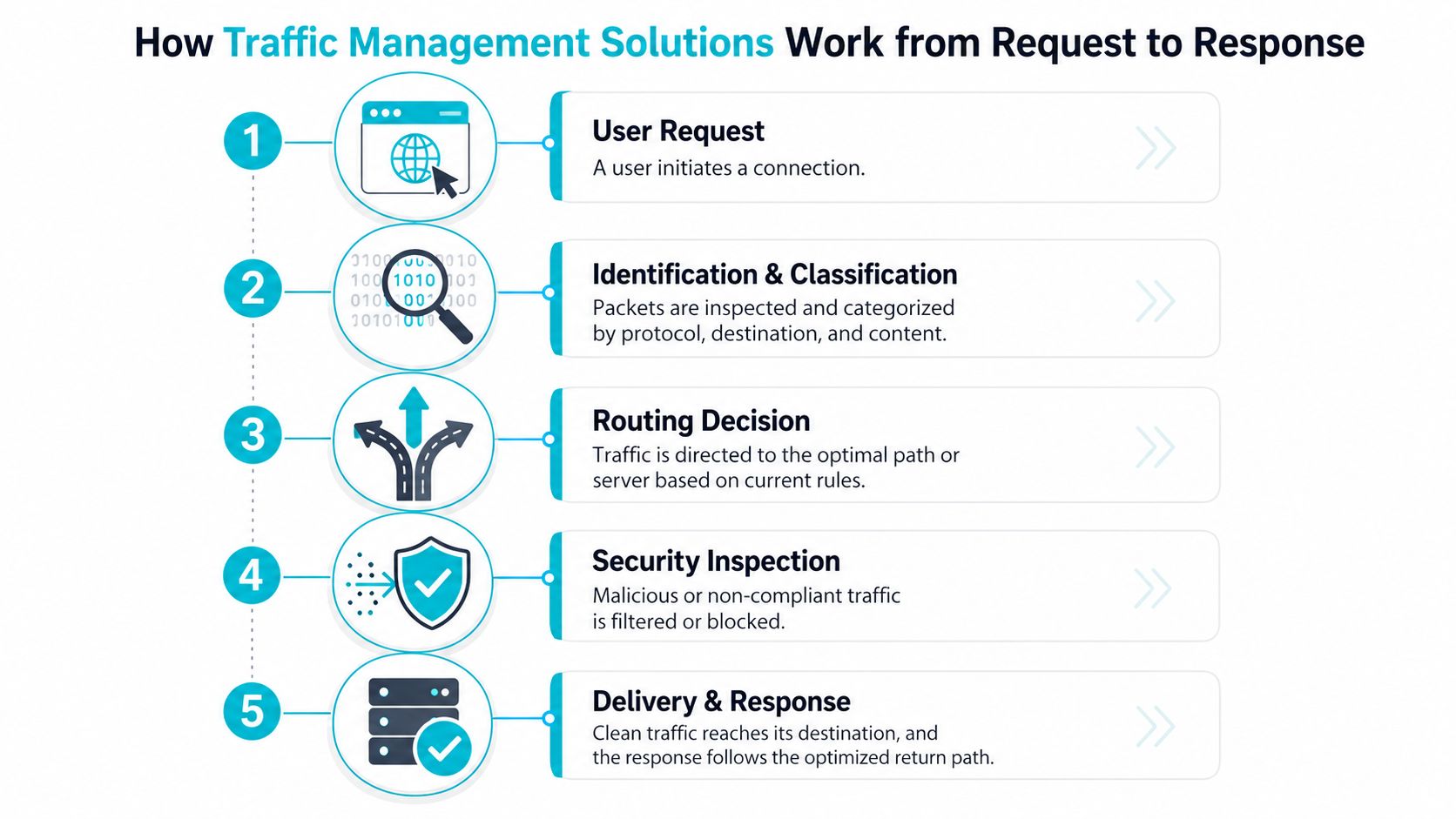
Step one identifies the request
A browser, mobile application, API client, branch office, or sensor initiates a connection. The first layer examines useful context, such as the destination, protocol, source region, application type, and current service health.
The system shouldn't treat every request as interchangeable. A login request, a video stream, a database connection, and a voice packet have different timing and reliability requirements.
Step two classifies traffic
Classification turns raw packets into policy-relevant groups. A network may distinguish interactive web traffic from backups, business-critical APIs from bulk transfers, or trusted management access from public requests.
Application-aware controls become valuable. A load balancer can inspect service health, while a web application firewall can evaluate request behavior. A quality-of-service policy can place latency-sensitive traffic ahead of less urgent transfers.
Step three chooses a route or server
Global traffic management selects an appropriate region, site, or service location. Server-level load balancing then chooses a healthy backend based on rules such as active connections, response time, capacity, or application state.
That hierarchy matters. Research on modern traffic management reports that combining hierarchical global traffic management with server-level load balancing can reduce response latency by 40–60% compared with single-tier distribution, while predictive load balancing can reduce average latency by an additional 15–20% compared with reactive methods because it anticipates demand shifts before overload spreads.
Step four inspects security
Security controls can block malicious, malformed, unauthorized, or policy-violating traffic before it reaches application servers. Inspection might occur at a firewall, WAF, DDoS mitigation layer, reverse proxy, or edge provider.
The placement matters. Filtering too late wastes server resources. Filtering too aggressively can block legitimate users. Good designs combine detection signals with clear exception handling and observability.
Step five delivers the response
Clean traffic reaches the selected service. The response returns through an optimized path, sometimes using connection persistence, caching, compression, or a nearby edge location.
A useful mental model is:
User or device → global distribution → security inspection → server-level balancing → application → optimized response
That sequence isn't always physically linear, but it provides a reliable design test. If a proposed solution only handles one point in the chain, ask what controls manage the other points.
Core Types of Traffic Management Solutions You Should Know
Each traffic management technology solves a different failure mode. A CDN can shorten the path for cached content, but it doesn't replace backend balancing. A WAF can block hostile requests, but it doesn't guarantee that healthy application nodes receive an even workload.
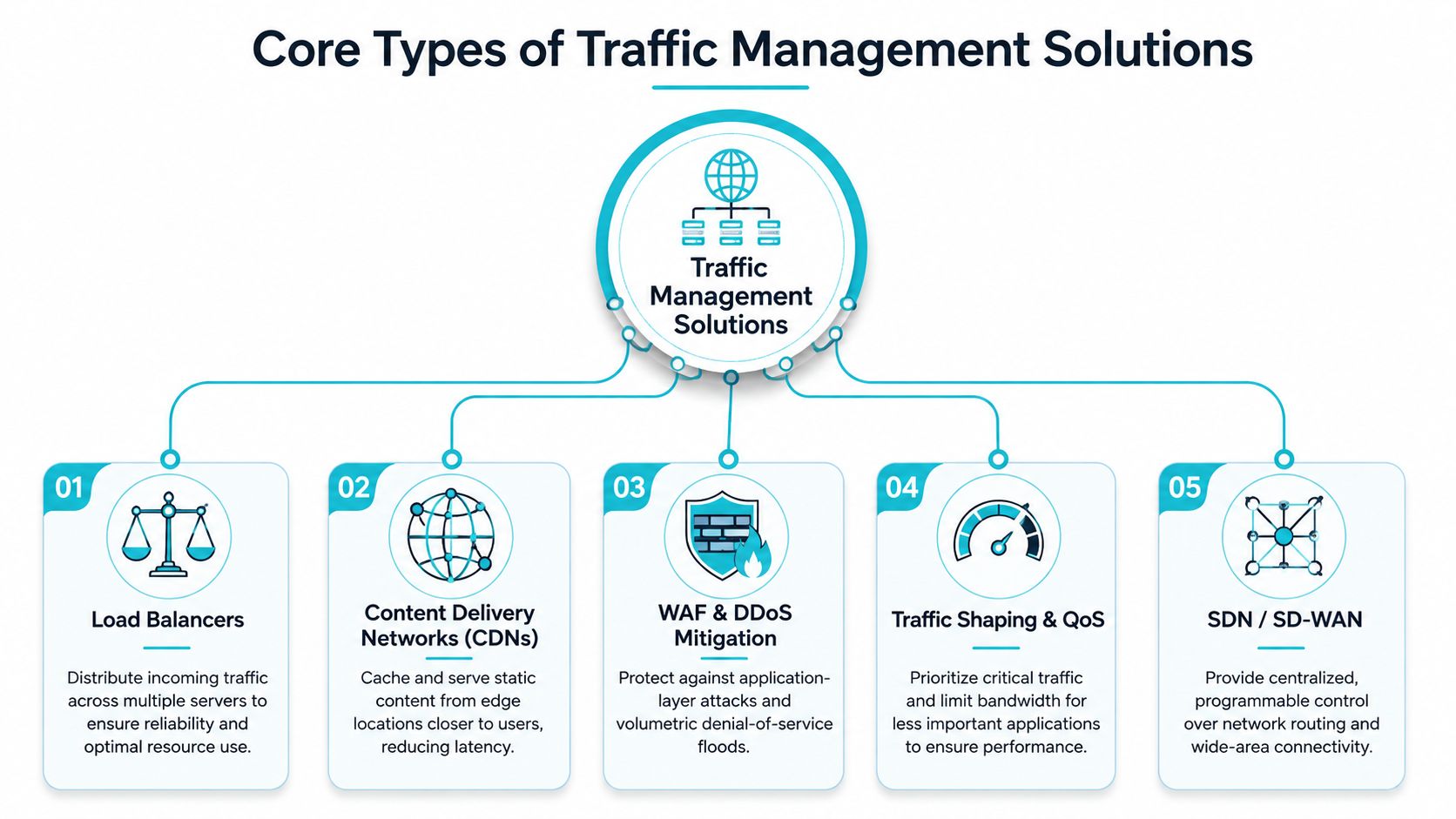
Load balancers
A load balancer distributes incoming connections across servers. It can use health checks, connection counts, response time, weights, or application-specific rules. Hardware appliances, virtual appliances, reverse proxies, and cloud services all fit this category.
Use one when multiple servers provide the same service or when you need controlled failover. ARPHost's guide on configuring load balancing is useful for translating the concept into a practical deployment.
CDNs
A content delivery network caches eligible static content at edge locations. Users receive images, scripts, stylesheets, and other cacheable objects from a location closer to them, reducing repeated trips to the origin.
A CDN is less suitable for highly dynamic transactions that require a live application decision on every request. It works best alongside origin protection, cache rules, and backend capacity planning.
WAF and DDoS mitigation
A web application firewall evaluates HTTP behavior and blocks patterns associated with application attacks. DDoS mitigation handles floods and abusive traffic at a layer designed to absorb, filter, or redirect unwanted volume before it exhausts the origin.
These controls protect different attack surfaces. A WAF is application-aware. DDoS mitigation is concerned with overwhelming traffic and service availability. Many production systems need both.
Traffic shaping and QoS
Traffic shaping controls how bandwidth is allocated. Quality of service policies prioritize voice, business applications, or interactive sessions while limiting less urgent transfers.
This is especially important on branch links, private WANs, and shared infrastructure. Without QoS, a large backup can consume capacity that a phone call or remote desktop session needs immediately.
SDN and SD-WAN
Software-defined networking centralizes policy and separates traffic decisions from individual hardware configurations. SD-WAN applies similar principles across wide-area links, choosing paths according to application policy, link health, and business requirements.
The technology is valuable when an organization operates multiple sites, providers, or transport types. It also introduces a control-plane dependency, so teams should plan for secure management access, logging, and fallback behavior.
| Solution Type | Primary Function | Best For |
|---|---|---|
| Load balancers | Distribute requests across healthy servers | Web applications, APIs, clustered services |
| CDNs | Serve cached content from edge locations | Static assets and geographically distributed users |
| WAF and DDoS mitigation | Filter attacks and abusive traffic | Public websites, APIs, and exposed services |
| Traffic shaping and QoS | Prioritize important flows | Voice, video, branch links, and shared WANs |
| SDN and SD-WAN | Apply centralized routing policy | Multi-site and hybrid connectivity |
The operational layer deserves attention too. Teams managing large telecom environments can review resources about enterprise AI agents for telecom operations when they're evaluating automation for repetitive support and routing workflows.
The right answer is often a combination, not a single product. A CDN handles cacheable content, global distribution chooses a suitable region, a WAF filters application attacks, and a server-level balancer keeps backend nodes usable.
Architectures and Deployment Models for Reliable Traffic Flow
Architecture determines how gracefully the system behaves when a link, server, site, or control component becomes unavailable. A small application may use a reverse proxy and two backend servers. A distributed enterprise may need global routing, regional entry points, site-level security, and local balancing.
Hierarchical and distributed designs
A hierarchical model separates decisions by scope. The global layer selects a region or facility. The regional layer chooses a service pool. The local layer distributes work among servers or virtual machines.
This design limits the amount of state each component must manage. It also creates clear troubleshooting boundaries. If users in one region are slow, the team can inspect regional routing and backend health without treating the entire platform as one undifferentiated system.
A distributed model places control closer to users and workloads. It can reduce dependency on a central appliance, but it requires consistent policy, synchronized configuration, and stronger observability.
Private cloud and virtualized workloads
A Proxmox VE private cloud can host traffic-management components as virtual machines or containers, while dedicated hardware supplies predictable compute and storage. High-availability designs can restart or migrate workloads when a node becomes unhealthy.
Proxmox's published 9.2 release notes describe a dynamic load balancer that continuously observes cluster CPU and memory use, then live-migrates HA-managed guests to reduce imbalance while respecting HA rules and affinity settings. The Proxmox VE 9.2 release announcement documents that behavior.
For storage-intensive clusters, CEPH-backed storage can keep virtual machines accessible across participating nodes, but the design still needs disciplined capacity planning. A traffic controller cannot compensate for insufficient storage performance or poorly sized network links.
A practical topology looks like this:
Users and branches → global entry → security edge → regional reverse proxies → Proxmox HA cluster → application VMs or containers
At the server layer, an administrator might inspect cluster status with:
pvecm status
qm list
The commands don't create resilience by themselves. They help verify quorum and inventory before a change. For reverse-proxy behavior, use ARPHost's documentation on configuring a reverse proxy as a starting point, then validate headers, timeouts, health checks, and failover behavior in a staging environment.
SDN and SD-WAN can sit above the physical paths, applying policy to multiple links while preserving centralized control. That approach can also help with ordinary household or branch congestion.
How to Choose and Implement the Right Traffic Management Solution
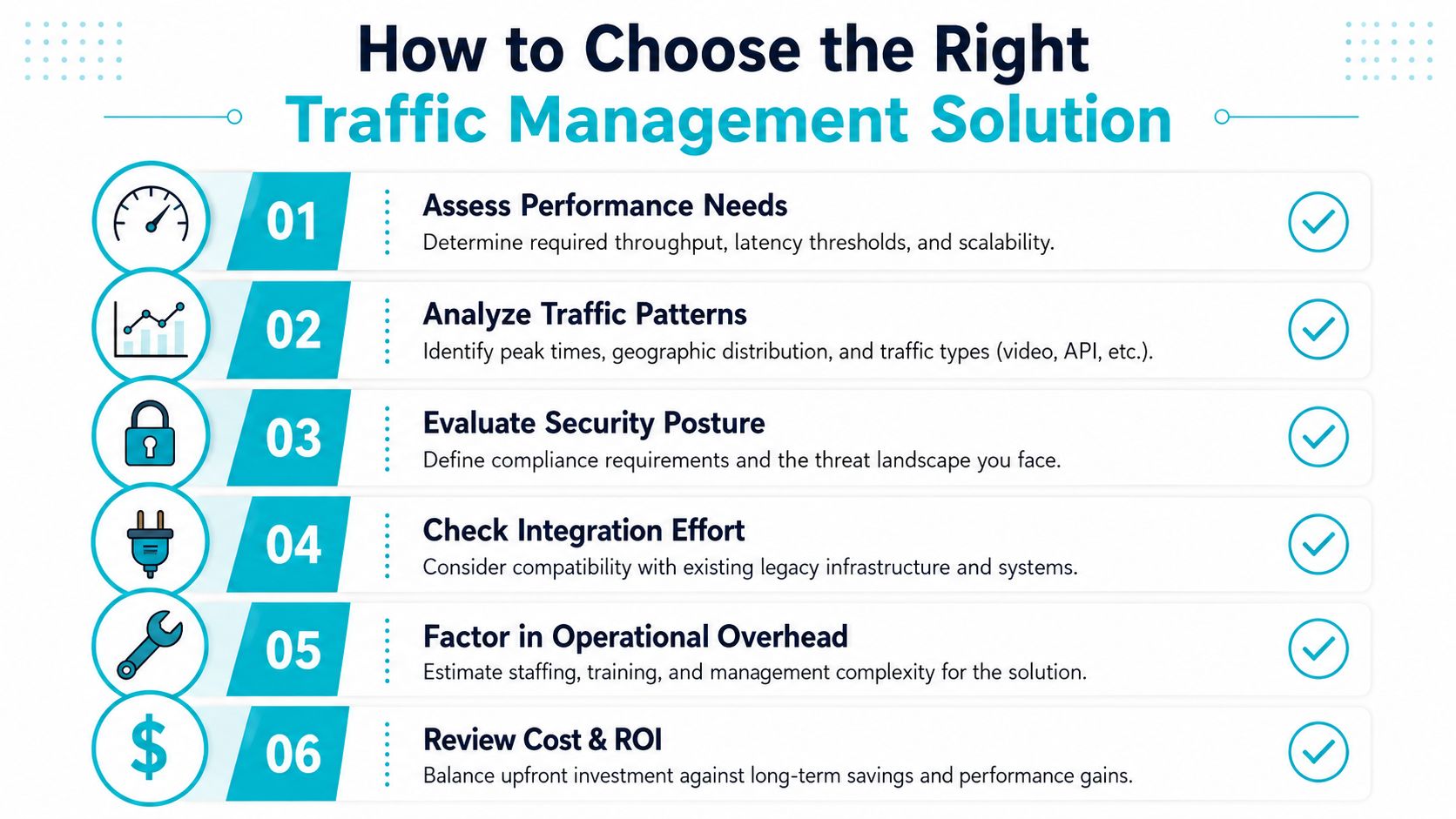
Feature lists don't answer the hardest buying question: will the solution fit the network you already have? Many buyers specifically need traffic management solutions that work across legacy infrastructure, yet market coverage often emphasizes market size and feature checklists instead of deployment constraints, integration effort, and total operational fit. The traffic management market analysis highlights that gap.
Start with the workload, not the appliance
Write down the services that need protection and the experience each service must deliver. An ecommerce checkout has different requirements from a backup repository. A VoIP system needs consistent delivery, while a reporting portal may tolerate more delay.
Then document traffic behavior:
- Peak behavior: Identify predictable busy periods, sudden bursts, and background jobs.
- Geographic behavior: Record where users, branches, and service dependencies are located.
- Protocol mix: Separate HTTP, API, database, voice, video, and management traffic.
- Failure tolerance: Define what can fail over, what can queue, and what must stop safely.
Treat integration as a design constraint
Inventory legacy controllers, existing firewalls, vendor-specific interfaces, certificates, routing policies, and monitoring systems before selecting a replacement. Ask whether the new control can run beside the old one during a transition and whether operators can roll back without rebuilding the network.
A phased implementation reduces risk:
- Assess: Capture baseline latency, errors, utilization, routes, and security events.
- Design: Map each traffic class to a routing, balancing, shaping, or filtering policy.
- Pilot: Use a limited service, branch, or application pool with an explicit rollback path.
- Test: Simulate node failure, link loss, traffic bursts, invalid requests, and administrative failure.
- Roll out: Expand in controlled stages while reviewing logs and user experience.
- Operate: Document ownership, maintenance windows, alert thresholds, and escalation paths.
Calculate operational fit
The purchase price is only one part of the decision. Include licensing, redundant capacity, support, training, configuration management, monitoring, backup, and the time required to maintain integrations.
A virtual traffic-management appliance may suit an SMB with a small application estate. A dedicated server can make more sense for compute-heavy inspection, database-connected services, or a Proxmox cluster with several tenants. ARPHost offers VPS hosting, dedicated bare metal, colocation, and managed infrastructure services that can support different operating models, but the correct choice depends on workload and ownership requirements rather than a generic product label.
Design test: If your team can't explain how the system behaves during a failed node, saturated link, unavailable control plane, and false-positive security event, implementation isn't finished.
Measuring Performance and Security Under Real World Conditions
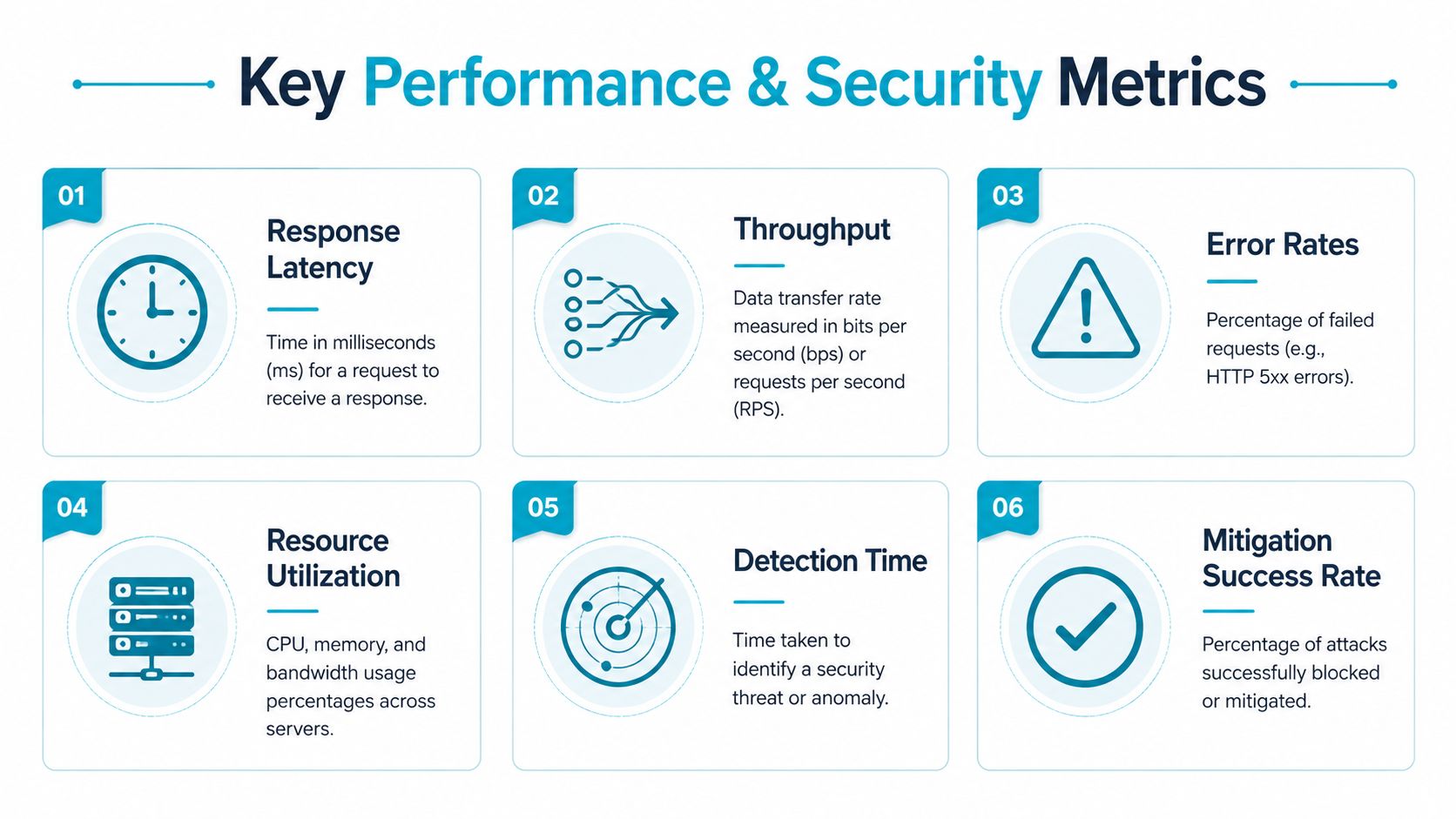
A traffic-management deployment earns its place by changing outcomes. More dashboards and more routing rules don't automatically mean faster applications. Measure the user journey, backend health, and security response together.
Use a baseline that reflects real users
Capture response latency, throughput, failed requests, CPU and memory utilization, connection counts, and queue depth before changing the architecture. Segment the data by region, application, endpoint, and traffic class. A single average can hide a serious problem affecting only one customer group or transaction type.
Track security metrics alongside performance. Detection time shows how quickly the system recognizes abnormal behavior. Mitigation success indicates whether the control blocks or diverts the attack without taking legitimate service offline.
Test the uncomfortable scenarios
Controlled DDoS experiments show why detection without mitigation isn't enough. In one study, baseline latency of roughly 10–12 ms increased to 400–450 ms under UDP and TCP flood conditions. The same research reported HTTP-flood latency falling from 350 ms to 100 ms when mitigation was active, demonstrating that automated steering and filtering can restore service performance during an attack.
The test plan should include:
- Backend failure: Remove a service node and confirm health checks stop new assignments.
- Link degradation: Introduce loss or delay and confirm policy selects a usable path.
- Application abuse: Send malformed or repetitive requests and verify filtering.
- Capacity pressure: Generate realistic concurrency and observe queueing, errors, and recovery.
- Recovery: Restore the failed component and confirm traffic returns without creating a second outage.
A public website needs controls that match its exposure. For practical hosting-oriented protection, review DDoS-protected web hosting as one possible component of a broader design.
The final report should connect technical metrics to business outcomes. Explain whether checkout completion improved, support calls declined, remote workers experienced fewer interruptions, or service recovery became more predictable. If the only result is a larger monitoring inventory, the deployment needs another review.
Common Pitfalls Scaling Tips and How ARPHost Supports Your Deployment
The most common mistake is treating traffic management as one appliance. A single balancer can distribute requests, but it won't solve poor global routing, uncontrolled backups, weak security filtering, or a legacy integration that fails during migration.
Other failures come from missing operational discipline:
- No capacity model: Teams add servers without defining when to scale or how much failover capacity to reserve.
- Weak QoS policy: Critical voice or interactive traffic competes with bulk transfers.
- Unmanaged configuration: Operators change routing rules manually and lose track of the effective policy.
- Incomplete logging: Security and performance events remain split across devices.
- Untested recovery: Backups exist, but nobody has confirmed that restoration works.
Scale by automating repeatable checks, centralizing logs, enforcing least-privilege administration, and testing backups and restoration. Private-cloud security guidance recommends hardening every layer, using MFA and least privilege for administrative access, segmenting management from production networks, centralizing logs in a SIEM, maintaining encrypted segregated backups, and testing restoration and security boundaries.
For smaller workloads, ARPHost VPS hosting starts at $5.99 per month, while dedicated Proxmox private cloud environments start at $299 per month. Dedicated hardware options include a Dual Intel Xeon E5-2690 V3 system with 28 cores and 56 threads, 64GB DDR4 ECC RAM, and enterprise storage in Tampa, an AMD EPYC 4584PX with 16 cores and 32 threads, 192GB DDR5 RAM, and NVMe storage, and an AMD Ryzen 9600X with 6 cores and 12 threads, 96GB DDR5 RAM, and NVMe storage. See the available bare metal servers for workload-specific configurations.
Teams adding AI-generated code or automation to operational tooling should also consider secure review practices. DevArmor's take on AI coding security offers relevant context for reducing security risk in development workflows.
ARPHost, LLC can provide VPS hosting, secure web hosting bundles with Webuzo, Imunify360, and CloudLinux, dedicated Proxmox private clouds, bare metal, colocation, and fully managed IT services for servers and networks. Start by documenting your traffic classes, failure scenarios, and baseline metrics, then contact ARPHost, LLC to discuss a managed design that fits your existing infrastructure and growth plans.
