

Businesses often start looking for small business it solutions after a bad week, not during a calm one. The file server stalls during payroll. A website times out during a promotion. Backups exist, but nobody has tested a restore. An aging firewall is still in place because replacing it keeps getting pushed behind more urgent work.
That pattern isn't just an IT problem. It's a growth problem. When infrastructure stays reactive, every outage steals attention from sales, operations, and customer service. The business ends up paying twice. First in emergency fixes, then again in lost momentum.
I see this most often in companies that have outgrown the setup that got them started. Shared hosting turns into a bottleneck. One overloaded VM starts carrying too many line-of-business apps. A single office network gradually becomes the dependency behind phones, printers, Wi-Fi, cloud apps, cameras, and remote access. Nothing is fully broken, but nothing is stable enough to support growth without constant babysitting.
The fix usually isn't one product. It's a set of better decisions about responsibility, platform fit, security layers, and recovery planning. Some workloads belong on a managed VPS. Some need bare metal. Some are better served by a Proxmox private cloud with room to grow. And in many environments, the highest-value move is shifting routine maintenance and monitoring off the internal team so they can focus on systems that move the business forward.
Good small business it solutions do three things at once. They reduce operational friction, they make costs more predictable, and they give you a path to scale without rebuilding everything six months later.
Moving Beyond Reactive IT Breakdowns
Reactive IT usually looks manageable from the outside. Tickets get closed. Users get back online. Someone reboots the host, clears space, restarts a service, and the day moves on. The problem is cumulative drag. Every short-term fix leaves the underlying design unchanged.
A common example is the small business running email, line-of-business software, phone services, and a customer-facing site across infrastructure that grew by accident. One VM was added for accounting. Another got spun up for a dev project and never retired. Backups land somewhere, but retention isn't clear. Monitoring only tells the team something failed after users complain. The environment works, until one storage issue or patching mistake ripples across everything.
What reactive environments usually get wrong
The issue rarely comes down to effort. Internal teams often work hard. They just don't have enough time to redesign brittle systems while also handling daily support.
Three weak points show up again and again:
- Monitoring starts too late: Alerts fire after a service is already down instead of when disk latency, memory pressure, or failed backups first show risk.
- Recovery is assumed, not tested: Teams have backup jobs, but they haven't run an actual restore into a clean target.
- Infrastructure choices blur together: Lightweight web hosting, production databases, virtual desktops, and internal tools end up sharing platforms that aren't built for the same risk profile.
Practical rule: If your team learns about outages from users, your tooling is documenting failure, not preventing it.
The shift to strategic infrastructure starts by separating business impact from technical convenience. Customer portal down? That's a revenue problem. Phones unreliable? That's an operations problem. Patch management inconsistent? That's a security and compliance problem. Once you classify issues that way, the right solution becomes easier to justify.
What a better operating model looks like
Stable environments aren't necessarily large. They're just designed with intent. Core services have clear owners. Systems are placed on infrastructure that matches their needs. Monitoring watches trends, not just uptime. Backups are restorable. Security is layered instead of delegated to a single appliance or plugin.
That changes the conversation from "How do we stop today's fire?" to "Which platform and support model gives this workload the least operational risk?"
That's where modern small business it solutions start paying off. Not because they eliminate every incident, but because they stop routine issues from turning into business interruptions.
The Modern IT Solutions Landscape
The current market gives small teams more options than they had even a few years ago. That flexibility is useful, but it also creates confusion. Most buying mistakes happen because businesses pick based on price or familiarity before deciding two more important questions. Who manages the environment, and what kind of infrastructure does the workload need?
In 2025, 58% of U.S. small businesses reported using generative AI, and 84% planned to increase their use of technology platforms As usage grows, the foundation matters more than the app list.
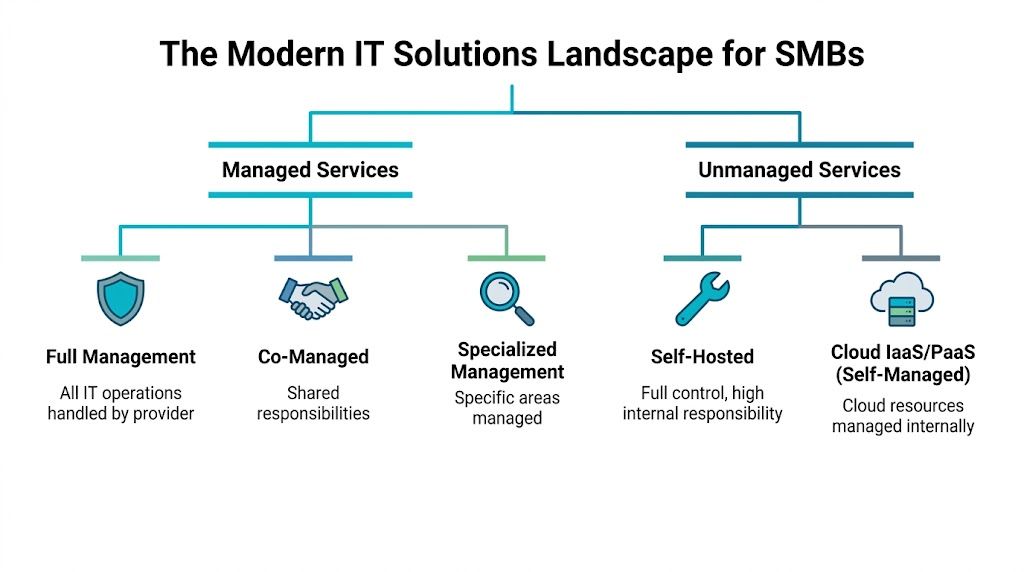
Managed vs unmanaged responsibility
Managed services are the operational model. Unmanaged services are the opposite. That's the first split.
Think of managed infrastructure like hiring a property manager for a commercial building. You still own the business outcome, but specialists handle maintenance, inspections, incident response, and routine upkeep. In IT terms, that can include patching, monitoring, backup verification, firewall administration, endpoint oversight, and escalation handling.
Unmanaged infrastructure fits teams that want full control and already have the staff and processes to operate it. You get the server, VM, or platform, but your team handles hardening, patch cadence, alerting, recovery testing, and performance tuning.
A lot of SMBs don't need a pure version of either model. They need co-managed IT. Internal staff owns applications and business workflows. The provider handles host maintenance, virtualization, backups, network edge services, or after-hours coverage.
Virtualized vs physical platforms
The second split is infrastructure type. The easiest way to explain it is by analogy.
| Platform | Best analogy | Best fit |
|---|---|---|
| VPS | Renting a furnished apartment | Fast deployment, web apps, dev environments, smaller production workloads |
| Bare metal | Owning a custom-built house | Performance-heavy apps, databases, single-tenant control, custom kernel or hardware needs |
| Private cloud | Owning a private apartment building | Multiple workloads, isolation, shared internal resources, custom virtualization policy |
A VPS is efficient when you need flexible compute without managing physical hardware. A bare metal server makes sense when noisy neighbors, hypervisor overhead, or specialized performance requirements aren't acceptable. A private cloud, especially on Proxmox, makes sense when one business needs multiple VMs, role separation, backup integration, and room to expand without moving between unrelated platforms.
Network quality shapes every other IT decision.
Why platform confusion causes expensive mistakes
The wrong model often works at first. That's why teams stick with it too long.
- A self-managed VPS fails when nobody owns patching and monitoring.
- A bare metal box is wasteful when the workload really needs simple scaling and snapshots.
- A SaaS-heavy stack gets rigid when the business needs custom integrations, data locality, or lower long-term infrastructure dependence.
The useful question isn't "What's the most powerful option?" It's "What gives this workload enough control, enough resilience, and the right amount of management overhead?"
That question leads to better small business it solutions than any feature checklist.
The Power of Fully Managed IT Services
A fully managed service is valuable when it removes routine operational risk from your internal team. That's the true benchmark. Not whether someone else can log into the box, but whether problems get prevented, detected early, and resolved in a disciplined way.
Managed service providers can reduce recurring in-house IT costs by up to 40% and improve efficiency by 50-60%, and one-third of companies using MSPs reduced IT costs by over 24%. Those numbers line up with what most IT managers already know from experience. In-house effort gets expensive when senior staff spends mornings clearing alert noise, manually patching systems, or fixing preventable configuration drift.

What fully managed should include
"Managed" is an overloaded term. Sometimes it means the provider will reboot a VM if you ask. That's not enough.
A practical fully managed scope usually includes:
- Host and OS maintenance: Patching hypervisors, guest operating systems, kernels, and core packages on a controlled schedule.
- Monitoring with escalation: Watching CPU steal, disk latency, memory pressure, backup status, service health, and network anomalies instead of just ping checks.
- Security operations at the infrastructure layer: Firewall changes, access review, endpoint policy support, and hardening baselines.
- Backup and recovery workflow: Scheduled backups, retention policy, and restore testing.
- Vendor-style specialization: Support for services like VoIP, Virtual PBX, storage, virtualization, and network equipment without requiring your team to master every stack.
For many SMBs, the strongest model is a partnership. Internal staff owns business systems and priorities. The managed provider owns infrastructure reliability and routine operations. That's much better than making one person in-house the unofficial expert for Windows, Linux, firewalls, phones, backup software, and web hosting all at once.
What works better than reactive support
Break-fix support solves visible issues. It doesn't create a stable operating model. Fully managed services are useful because they move work earlier in the timeline.
That means:
- Patch windows get planned instead of improvised.
- Alert thresholds are tuned around trendlines, not just failures.
- Backup jobs are checked before the restore request arrives.
- Firewall and access changes are documented instead of living in tribal knowledge.
The best managed environments feel quiet. Fewer surprise tickets is usually the sign that the service is doing its job.
Teams that need that kind of coverage can review a practical example of fully managed IT services for small business. The key is to treat managed services as an operating model, not just outsourced help desk labor.
Where managed services usually fail
They fail when the contract is vague, the responsibilities overlap badly, or the provider only reacts to tickets. If patching, backup verification, firewall ownership, and after-hours response aren't clearly assigned, you don't have managed IT. You have ambiguity.
For small business it solutions, clarity matters as much as tooling. A lower monthly bill doesn't help if every outage still turns into a conference call about who owns the problem.
Choosing Your Infrastructure VPS Bare Metal or Private Cloud
The most expensive infrastructure mistake isn't overbuying. It's choosing a platform that forces a migration right after the business starts depending on it. That's why platform selection needs to be tied to workload shape, not just monthly price.
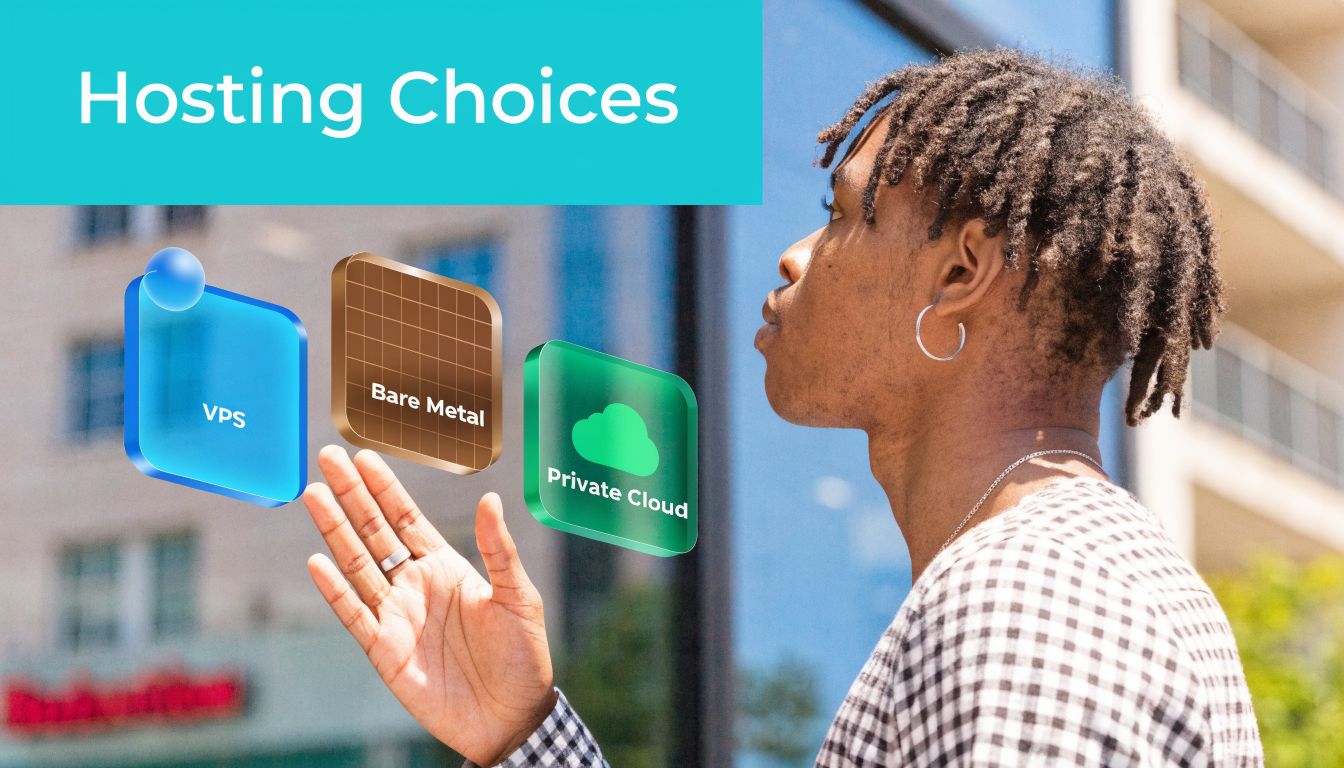
Mid-market companies are often underserved by SaaS because of cost and lack of flexibility. Private clouds and bare metal servers fill that gap by helping businesses avoid vendor lock-in while keeping technical control over complex workloads
When VPS is the right answer
A VPS is usually the best first production platform when the workload is steady, the resource profile is predictable, and the team wants fast deployment. It works well for web applications, small ecommerce sites, staging systems, internal tools, CI runners, and utility services like VPN or jump hosts.
Use VPS when you need:
- Fast provisioning: New instances can be created quickly for test, staging, or branch workloads.
- Reasonable isolation: KVM-based virtualization gives cleaner separation than low-end shared environments.
- Straightforward scaling: More vCPU, RAM, or disk can often be added without a full platform redesign.
VPS becomes the wrong choice when one workload starts demanding guaranteed storage performance, heavy sustained compute, or unusual kernel and hardware access patterns.
When bare metal is the cleaner fit
Bare metal is for workloads that don't benefit from sharing. Large databases, custom appliances, storage-heavy systems, game servers, and latency-sensitive applications often fit here.
A dedicated server also makes sense when compliance, licensing, or performance validation requires a single-tenant host. You avoid hypervisor contention and gain direct control over hardware allocation, RAID strategy, and host-level tuning.
That doesn't mean bare metal is automatically more mature. It also means:
- Capacity planning matters more.
- Hardware recovery planning matters more.
- You need stronger backup and failover thinking because the platform is less elastic than a VM pool.
When private cloud solves the real problem
Private cloud is often the right answer when the business doesn't have one application. It has ten. Domain controllers, app servers, databases, web nodes, utility VMs, test systems, and maybe a few workloads being pulled back from rigid SaaS platforms.
A Proxmox-based private cloud fits well when you need:
| Need | Why private cloud helps |
|---|---|
| Multi-VM segmentation | Separate roles cleanly without buying one physical server per service |
| Controlled growth | Add workloads inside the same cluster model instead of migrating again |
| Administrative flexibility | Full root access, custom networking, and storage policy choices |
| Recovery design | Easier integration with snapshot and backup workflows across multiple VMs |
A lot of IT managers reach this point after trying to stretch a single VPS too far or after discovering that SaaS subscriptions removed too much control from the stack.
This overview of private cloud vs public cloud is useful if you're deciding whether isolation, customization, and workload placement justify a dedicated environment.
A quick decision framework
Use this simple filter:
- Pick VPS if you need agility, low friction, and a clean home for smaller production services.
- Pick bare metal if one workload needs direct access to dedicated hardware and predictable performance.
- Pick private cloud if you're managing several interdependent workloads and want virtualization on infrastructure you control.
The migration path matters too. A business can start on VPS, move a critical database to bare metal, and later standardize multiple systems on a Proxmox private cloud. Good architecture allows that progression without throwing away earlier work.
A short visual walkthrough can help if you're comparing these models in planning meetings:
One provider that supports those paths in practice is ARPHost, LLC, which offers managed and unmanaged VPS hosting, bare metal servers, and dedicated Proxmox private cloud environments. That kind of range matters because infrastructure decisions are easier when you don't have to force every workload into one product category.
Your Infrastructure Migration and Deployment Checklist
Most migration problems happen before any data moves. They start with weak inventory, vague rollback plans, or no agreement on what "done" means. A controlled migration is less about heroics and more about sequence.
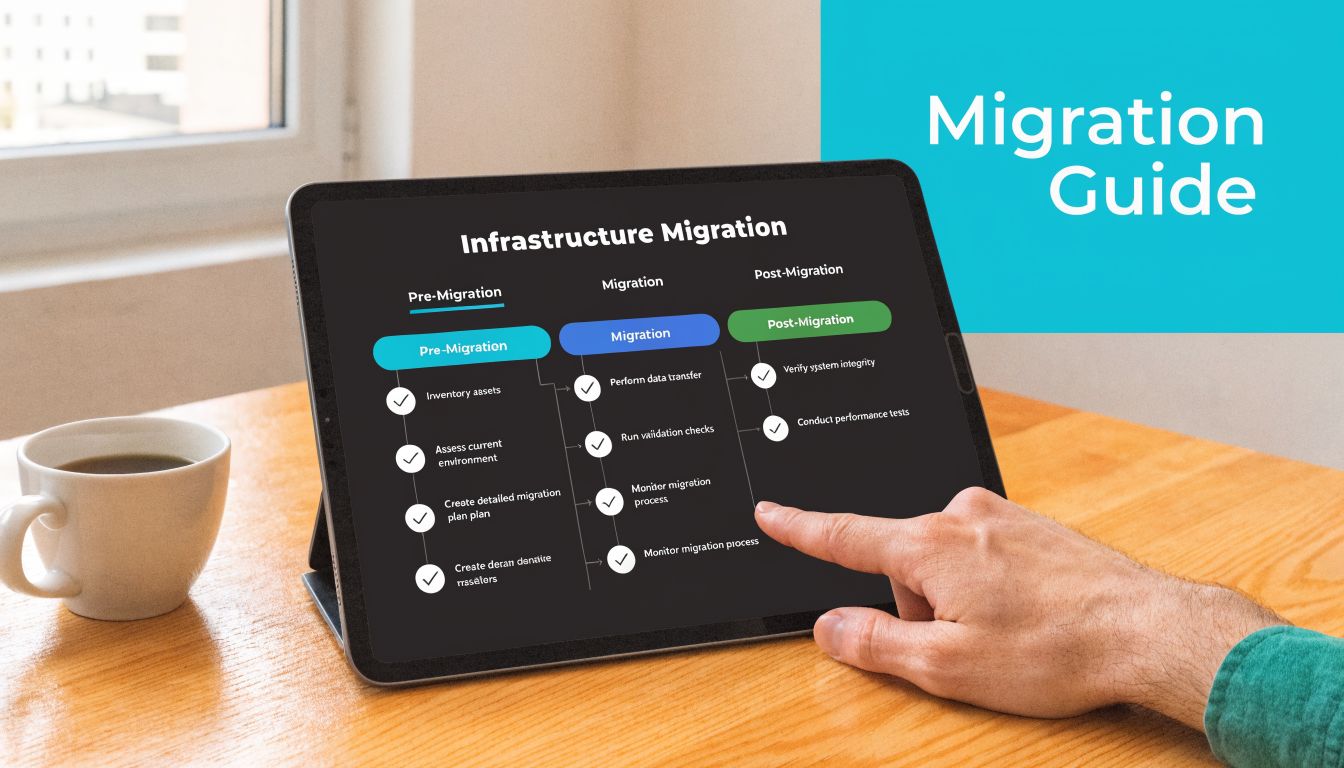
Start with dependency mapping
Before you touch the target platform, identify what the system depends on. That means authentication, storage location, application paths, outbound integrations, certificate handling, scheduled jobs, and user access patterns.
A clean migration plan answers these questions:
- What is moving? VM, database, website, file set, application stack, or full service group.
- What cannot change? Hostname expectations, software version, licensing, maintenance window, or data path.
- What can be rebuilt instead of copied? Reverse proxies, utility servers, test nodes, config-managed components.
- How will you validate? Login tests, app function checks, job completion, performance baselines, and restore verification.
Migrations go badly when teams only track servers. Applications fail because of dependencies, not because a VM file didn't copy.
A practical deployment checklist
Use a checklist that forces technical and operational review together:
- Inventory the source environment: CPU, RAM, storage layout, guest OS, installed services, cron or scheduled tasks, mounted volumes, and boot mode.
- Take a recoverable backup: Keep a point-in-time backup outside the migration workflow so rollback doesn't depend on the same toolchain.
- Build the target first: Create VLANs, storage classes, VM IDs, backup policies, and access controls before importing workloads.
- Test a non-production copy: Import one lower-risk system first and document every issue you hit.
- Define cutover timing: Include DNS TTL planning, user freeze windows, batch job timing, and staff communication.
- Validate after cutover: Service start, authentication, logs, job execution, application transactions, and monitoring visibility.
VMware to Proxmox example
A common small business move is consolidating VMware workloads into a Proxmox environment for simpler long-term control. The exact method varies by guest OS and storage design, but the workflow is usually straightforward.
At a high level:
- Export or stage the source disk.
- Create the destination VM shell in Proxmox with the right CPU, RAM, and firmware settings.
- Import the disk into the target storage.
- Attach the imported disk to the VM.
- Adjust boot order, controller type, and guest agent settings.
- Boot, validate drivers, then test the application.
A simplified import flow can look like this:
qm create 210 --name app-migrated --memory 8192 --cores 4 --net0 virtio,bridge=vmbr0
qm importdisk 210 /mnt/import/app-server.vmdk local-lvm
qm set 210 --scsihw virtio-scsi-pci --scsi0 local-lvm:vm-210-disk-0
qm set 210 --boot order=scsi0
qm start 210
Those commands are only one piece of the job. You still need to verify guest boot behavior, storage alignment, network naming, application bindings, and backup registration after import.
What teams should never skip
Some steps always look optional until the first failed cutover:
- Restore testing
- Rollback criteria
- Application owner signoff
- Monitoring enrollment on day one
- Post-migration patch and hardening review
If the environment is business-critical, managed migration support is often the safer route because it reduces improvisation during cutover. The most reliable migrations are usually boring, and that's exactly what you want.
Implementing Enterprise Grade Security and Compliance
A lot of small businesses assume enterprise-grade security is out of reach because they don't have an enterprise budget. That's the wrong frame. Good security comes from layered controls, consistent administration, and reducing the number of neglected systems. It doesn't require copying a Fortune 500 stack.
Hackers target small businesses because they often lack the same level of IT support as larger organizations, creating a clear need for affordable and scalable protection, as outlined in this review of IT support services every small business needs.
Build security in layers
One firewall isn't a strategy. One antivirus license isn't a strategy either. A working SMB security model usually includes controls at multiple layers:
- Perimeter and network layer: Managed firewall policy, segmentation, remote access controls, and logging.
- Host layer: Patch management, service hardening, limited admin rights, and endpoint protection.
- Application layer: WAF rules where appropriate, plugin hygiene, least-privilege access, and secret management.
- Data layer: Backups, retention policy, encryption where required, and restore procedures.
- Operations layer: Alert review, change tracking, access offboarding, and incident response handling.
That matters because most incidents aren't one dramatic breach. They're a chain of small weaknesses. Old plugin, reused password, broad user permissions, no alerting, untested backup.
What practical security bundles should include
For websites, internal portals, and hosted business applications, the useful baseline is protection that reduces common failure modes without adding huge admin overhead.
A secure hosting stack often includes:
| Layer | Practical control |
|---|---|
| Web workload protection | Malware scanning and reputation defense with tools such as Imunify360 |
| Account isolation | CloudLinux OS to limit cross-account impact in shared or multi-tenant hosting contexts |
| Management interface | Webuzo or another panel that simplifies updates, app installs, and account controls |
| Backup posture | Scheduled backups plus off-platform copies for recovery confidence |
If you're reviewing this kind of model, security in layers is the right design principle to follow. The point isn't adding products at random. It's making sure one missed control doesn't expose the whole environment.
Security maturity starts when you stop asking "Which tool should we buy?" and start asking "Which failure path are we closing?"
Compliance is mostly operational discipline
For smaller teams, compliance pressure often shows up as customer questionnaires, insurance requirements, or vendor due diligence. The answer usually isn't a giant compliance platform. It's better process.
That means clear ownership of patching, documented backup policy, access reviews, MFA where supported, log retention, and auditable change control. Security becomes achievable when the environment is standardized enough that you can prove what was configured, when it changed, and how you'd recover if something broke.
Calculating the Real ROI of Your IT Investment
The cheapest monthly option often produces the highest operating cost. That's the trap. IT managers usually know it, but it helps to explain it in business terms the rest of the company can use.
Real ROI comes from reducing drag. Slow applications waste staff time. Unplanned outages interrupt revenue and service delivery. Weak backups increase risk exposure. Under-managed systems create after-hours work that senior staff should be spending elsewhere.
What belongs in the calculation
A practical TCO view includes more than the invoice from your host or provider.
Count these categories:
- Direct platform cost: Hosting, licensing, support, backup storage, and connectivity.
- Internal labor cost: Admin time for patching, troubleshooting, monitoring review, user support, and incident handling.
- Downtime cost: Lost transactions, delayed operations, support call volume, and staff idle time.
- Security and recovery cost: Cleanup effort, emergency consulting, hardware replacement, and rebuild time after a preventable incident.
- Growth friction: Time spent redesigning around platform limits instead of shipping projects.
A simple ROI framework
Use a before-and-after worksheet with three questions.
| Question | What to measure qualitatively |
|---|---|
| What is the current system costing in hidden work? | Repeated maintenance, troubleshooting, manual backups, repeated user complaints |
| What operational load would a better platform remove? | Less patching, better visibility, cleaner deployment workflow, fewer emergency changes |
| What business process improves when systems stabilize? | Faster order handling, more reliable customer access, cleaner remote work, fewer interruptions |
The numbers don't need to be perfect for the direction to be obvious. If a stable platform removes recurring admin work and reduces service interruptions, it creates measurable business value even if the monthly line item goes up.
Communications is a good example
Voice services are often ignored in ROI discussions, even though phone systems touch sales, support, and operations every day. Modern VoIP can save a small business an average of 68% on usage-based plans, cut costs by 45% versus traditional phones, and increase productivity by 67%, according to the same business technology statistics cited earlier in the managed services section.
That doesn't mean every business should switch tomorrow. It does mean communications should be evaluated like infrastructure, not treated as a separate utility bill. Call routing, business continuity, remote access, and administrative simplicity all have operational value.
A reliable system pays for itself first in time, then in reduced risk, and only after that in obvious budget lines.
Small business it solutions earn their keep when they remove recurring inefficiency. That's the standard worth using in budget conversations.
Building Your Future Ready IT Strategy with ARPHost
A future-ready strategy doesn't start with buying the biggest platform you can afford. It starts with matching the workload to the right level of control, isolation, and operational support. That was the core pattern across every decision in this guide.
Three sensible paths forward
Some businesses need a cleaner web and email foundation. Others need infrastructure that can support internal applications, custom integrations, or virtualization at a higher level of control. The right next step depends on where the friction is.
If your priority is a secure online presence with less admin overhead, start with secure VPS bundles and keep the stack simple. That's often the right move for business websites, client portals, web apps, and email-adjacent services that need stronger security and easier management.
If your team runs development pipelines, custom applications, or databases that need more predictable performance, look at VPS hosting or bare metal servers depending on the workload profile. Use VPS where agility matters most. Use bare metal where resource contention or single-tenant control matters more than flexibility.
If your environment already spans multiple services and VMs, or you're trying to avoid rigid SaaS dependence, move toward a dedicated Proxmox private cloud. That gives you a clearer long-term operating model for segmentation, scaling, backup policy, and migration planning.
What to review before you choose
Use these decision checks internally:
- Operational ownership: Who patches, monitors, backs up, and validates restores?
- Workload profile: Is this lightweight and elastic, or performance-heavy and persistent?
- Recovery expectation: How quickly does the service need to be restorable?
- Control requirements: Are there data handling, compliance, integration, or customization needs that SaaS and basic hosting can't meet?
Those four checks usually expose whether you're dealing with a hosting issue, a management issue, or an architecture issue.
Where to start
If you want to evaluate options directly, review VPS hosting plans, explore secure VPS bundles, compare Proxmox private cloud plans, or request a managed services quote. If you're planning a migration or redesign, it's better to scope the target architecture first and then map the move around it.
The strongest small business it solutions aren't the ones with the longest feature list. They're the ones your team can operate reliably, secure properly, and scale without replatforming every time the business grows.
If you're ready to replace reactive fixes with a cleaner infrastructure plan, talk with ARPHost, LLC about the mix of managed services, VPS, bare metal, private cloud, backups, and business communications that fits your environment.
