

A lot of businesses hit the same wall with voice systems. The old PBX still works, but adding a line takes too long, remote staff need awkward workarounds, and every change seems to require a vendor call. Costs stay stubbornly high while flexibility stays low.
That's usually the point where SIP for VoIP stops being a telecom buzzword and becomes an infrastructure decision. If you're replacing analog lines, retiring PRI circuits, or trying to make an existing PBX work across offices and remote users, SIP is the control layer that makes modern business calling possible. It handles session setup, changes, and teardown so your voice platform can run over IP instead of depending on separate physical voice circuits.
The business shift is not small. One 2025 estimate puts the global VoIP services market at $169.38 billion, with projected growth to $264.27 billion by 2029 according to Zoom's VoIP market overview. That kind of adoption matters because voice teams, sysadmins, and IT managers are no longer dealing with a niche deployment model. They're dealing with a core business service that has to be scalable, secure, and supportable.
Introduction Moving Your Business Voice to the Cloud
A familiar scenario looks like this. A company has a legacy phone system in the server closet, a mix of desk phones and forwarding rules, and a bill that no one likes but everyone tolerates because changing telephony feels risky. Then a new requirement lands. Remote hires need extensions, a second site needs shared call handling, or leadership wants to integrate phones with collaboration tools.
Legacy telephony usually breaks down at the exact point the business needs agility. Physical circuits, rigid channel counts, and vendor-specific hardware don't fit distributed teams or fast operational changes. SIP for VoIP solves that by separating call control from the old one-line-per-circuit model and moving voice into the same IP conversation as the rest of your infrastructure.
What matters in practice isn't just that SIP works. It's how you deploy it so users don't end up with registration failures, one-way audio, choppy calls, or inbound caller identity issues. That's where many migrations go wrong. The PBX may register, calls may pass in a lab, but production traffic exposes firewall problems, NAT behavior, bandwidth limits, and weak failover design.
SIP migrations usually fail at the edges, not in the middle. The PBX software is often fine. The surrounding network, security posture, and carrier integration are where the real work sits.
A cloud-ready voice stack should be treated like any other production workload. It needs capacity planning, path redundancy, hardened endpoints, logging, and a support model that doesn't depend on one person remembering how a dial plan was built three years ago.
Understanding the SIP Protocol
A SIP deployment can look healthy at first glance. Phones register, extensions ring, and test calls connect. Then the first real outage hits, and the distinction between signaling and media starts to matter. Calls may set up normally while audio never arrives, or inbound calls may fail because the carrier rejects identity headers that the PBX is not presenting correctly.
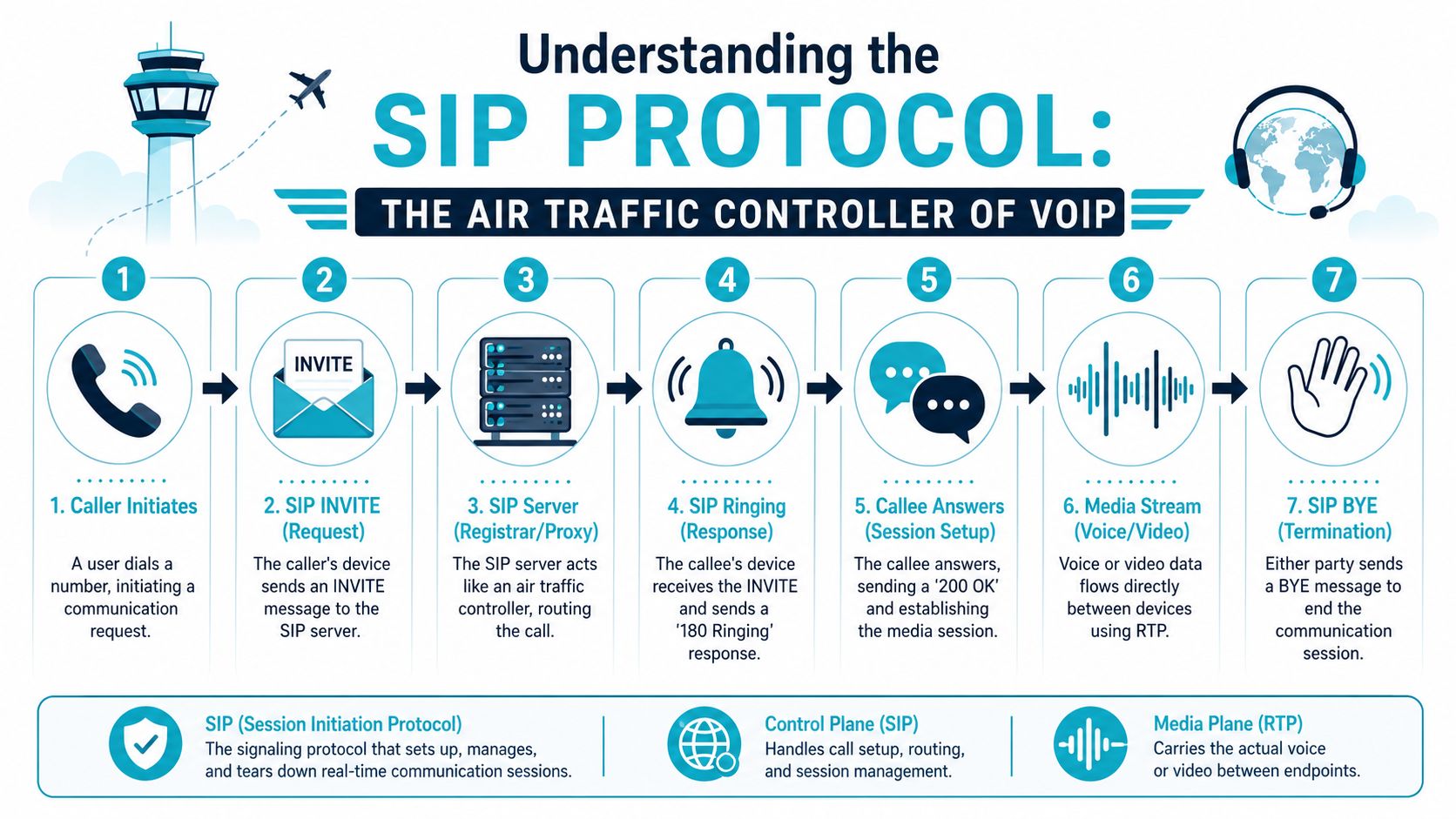
SIP handles session signaling for VoIP. It sets up, modifies, and ends calls, but it does not carry the voice stream itself. The audio usually travels over RTP on separate ports after the endpoints agree on codec, transport, and media details. Vonage's SIP protocol reference gives a useful baseline for the message flow and common ports.
What SIP does
In production environments, SIP is the control plane for voice. It uses messages such as INVITE, ACK, and BYE to start, confirm, and end sessions. Signaling commonly runs on UDP 5060 or TCP 5060, while TLS 5061 is used when the provider and PBX support encrypted signaling.
Media follows a different path. After negotiation, audio usually rides over RTP across a separate UDP port range, often something like 10,000 to 20,000 depending on the PBX, SBC, or firewall policy. That split is operationally important because a phone system can have healthy signaling and broken media at the same time.
It also explains why SIP is flexible enough for modern business telephony. Capacity is no longer tied to a physical pair or a fixed circuit handoff. A single IP-based service can support multiple concurrent calls if the network, firewall rules, session border control, and codec policy are set correctly. If you want a practical service-level view of that model, this overview of how SIP trunking works in business deployments is a useful companion.
A simple call flow
A normal SIP exchange looks roughly like this:
- Call initiation: A phone, softphone, or PBX sends an INVITE to start a session.
- Session acceptance: The far side responds, and the caller confirms with ACK.
- Media exchange: Audio flows over RTP after both sides agree on session parameters.
- Call termination: Either endpoint sends BYE to close the call.
A short visual walkthrough helps if you're mapping this to packet captures or PBX logs:
Why this matters in real operations
The practical value of SIP knowledge shows up during incidents and migrations. If the phone rings but there is no audio, signaling likely worked and media failed. If registration breaks, the fault is more likely in credentials, DNS, transport mismatch, NAT handling, or a blocked signaling path.
Security and compliance add another layer. Many businesses now have to account for STIR/SHAKEN support, caller identity handling, and whether the provider or SBC can preserve the headers needed for trustworthy outbound calling. Legacy PBXs often need extra work here, especially during a staged migration from PRI or analog service. Teams comparing deployment options often pair protocol basics with broader buying guidance such as this 2026 guide to UK business telephony.
A useful rule during troubleshooting is simple: identify whether the failure is in signaling, media, or identity and policy enforcement. That cuts the problem space fast and usually points you to the right logs, captures, or carrier ticket.
SIP Trunking vs Traditional Phone Lines
Businesses usually compare SIP trunking to PRI, ISDN, or analog service as if the decision is only about monthly cost. That's too narrow. The bigger difference is how each model behaves when the business changes.
Traditional lines are fixed by design. SIP trunks are software-defined enough to move with the business, but they also shift more responsibility onto your internet path, routing, and failover planning. If your WAN is weak, SIP will expose it quickly.
Comparison of SIP Trunking and Traditional PSTN
| Feature | SIP Trunking | Traditional PSTN |
|---|---|---|
| Channel delivery | Multiple concurrent channels over an IP connection | Fixed physical lines or circuits |
| Scaling | Add or remove capacity through service configuration | Often requires circuit changes or hardware work |
| Location flexibility | Supports distributed users and multi-site routing more easily | Tied more closely to local line delivery |
| Disaster recovery | Calls can be rerouted more flexibly if the design supports it | Recovery options are usually more rigid |
| Integration | Works more naturally with IP PBX, softphones, and unified communications | Limited integration compared with modern IP systems |
| Failure mode | Internet quality and firewall design matter a lot | Less dependent on local internet performance |
The cost side can be compelling, but it's not universal. One published enterprise example from Lumen reported monthly telecom savings of $39,000, or 65%, compared with an ISDN-based setup. Results like that depend heavily on the legacy baseline, traffic pattern, and what resilience had to be added.
What works and what doesn't
SIP trunking works well when the environment already has:
- Stable internet service: Voice traffic needs consistent packet delivery, not just headline bandwidth.
- A PBX that's maintained properly: Old firmware and ad hoc dial plan changes create avoidable failures.
- A recovery plan: Inbound rerouting and alternate call paths matter when the primary connection degrades.
It works poorly when teams treat it as a drop-in line replacement and skip design work. A PRI can hide a lot of sins. SIP won't.
If you want a more protocol-level explanation of call flow into a PBX, ARPHost's breakdown of how SIP trunking works is worth reading before you plan cutover.
Navigating SIP Network and Codec Requirements
Most VoIP complaints blamed on “the provider” are really network design problems. SIP for VoIP depends on the transport underneath it. If latency, jitter, packet loss, or NAT behavior are poor, your users won't care that the SIP registration technically succeeded.
Bandwidth planning starts with the codec
Codec choice changes how much traffic each call consumes and how much quality headroom you retain under load. A commonly cited planning benchmark is about 85 kbps per concurrent call with G.711. More compressed codecs such as G.729 can reduce that baseline, which directly affects how many simultaneous calls a link can support from the same source.
That doesn't mean you should always choose the most compressed option. Lower bandwidth codecs can help on constrained links, but they also change quality characteristics and interoperability considerations. In production, the right codec is usually the one that fits your WAN reality, handset support, and call path consistency.
A practical planning workflow looks like this:
- Estimate concurrency, not just total users: A company with many extensions may have a much smaller true simultaneous call count.
- Choose the codec intentionally: Don't let defaults decide your WAN consumption.
- Reserve headroom: Voice shares infrastructure with everything else, and real links aren't clean lab environments.
- Prioritize traffic: QoS policy matters when backups, file sync, or guest traffic spikes.
A voice deployment doesn't need massive bandwidth. It needs predictable bandwidth.
NAT is where clean designs get messy
The biggest operational headache in SIP deployments is often NAT traversal. SIP and RTP need endpoints to advertise where they can be reached. NAT rewrites addresses and ports, which can leave the far side trying to send media to the wrong place.
That's why you see symptoms like:
- One-way audio
- No audio after answer
- Phones that register, then drop unexpectedly
- Softphones that work on one network and fail on another
Several tools exist to handle this. STUN helps endpoints discover how they appear from outside the local network. TURN can relay traffic when direct traversal fails. ICE coordinates candidate paths and improves the odds that media lands on a usable route. If your team needs a clean primer on that first piece, ARPHost's explanation of what a STUN server is covers the basic role it plays in SIP environments.
Network habits that prevent pain
The deployments that stay stable over time usually share the same traits:
- Consistent firewall policy: Allow the signaling transport you use, not every possible protocol out of panic.
- Predictable PBX placement: Keep the PBX in an environment where you control latency, routing, and security policy.
- Clear separation of responsibilities: Know whether the carrier, the PBX admin, or the firewall team owns each part of the call path.
If you host PBX workloads on VPS, bare metal, or a private cloud, voice behaves much better when the surrounding network is engineered like an application platform instead of treated like a spare VM.
Essential Security Practices for SIP Communications
Voice systems used to be isolated enough that many companies treated phone security as a carrier problem. That model doesn't hold anymore. SIP for VoIP rides on the same IP reality as every other service, which means it inherits the same exposure to scanning, credential abuse, misconfiguration, and trust issues.
Protect signaling and media
At a minimum, secure deployments should address two separate planes:
- Signaling protection: Use TLS where supported so call setup and registration traffic aren't passed in clear text.
- Media protection: Use SRTP where available so the audio path is protected, not just the session control.
That won't solve every problem, but it closes off the most obvious exposure. Basic hygiene also matters. Strong authentication, endpoint patching, access restrictions on administrative interfaces, and logging are not optional in a public-facing SIP environment.
Caller identity is now an operational issue
A common mistake is assuming SIP security ends with encrypting traffic. It doesn't. Modern business calling also depends on whether downstream networks trust the identity attached to your calls.
Independent FCC guidance around the Robocall Mitigation Database shows that U.S. carriers must register mitigation plans and comply with STIR/SHAKEN-related requirements to remain in the calling ecosystem, as discussed in this FCC-focused STIR/SHAKEN overview. In plain terms, just “using SIP” isn't enough if you care about caller ID integrity and call deliverability.
That changes business telephony in a practical way. You're no longer choosing only a protocol or a trunk provider. You're choosing an identity and trust path for outbound calling.
If your number presentation and call authentication are weak, users may see call failures as a phone problem when it's really a trust problem.
Security controls around the PBX still matter
Even with carrier-side identity controls, local infrastructure can still break a voice environment. Poor firewall segmentation, exposed management portals, and broad outbound permissions make abuse easier.
The key point is simple. Protect the SIP service itself, the hosts that run it, and the network edges that allow it to communicate.
Selecting the Right SIP Deployment Architecture
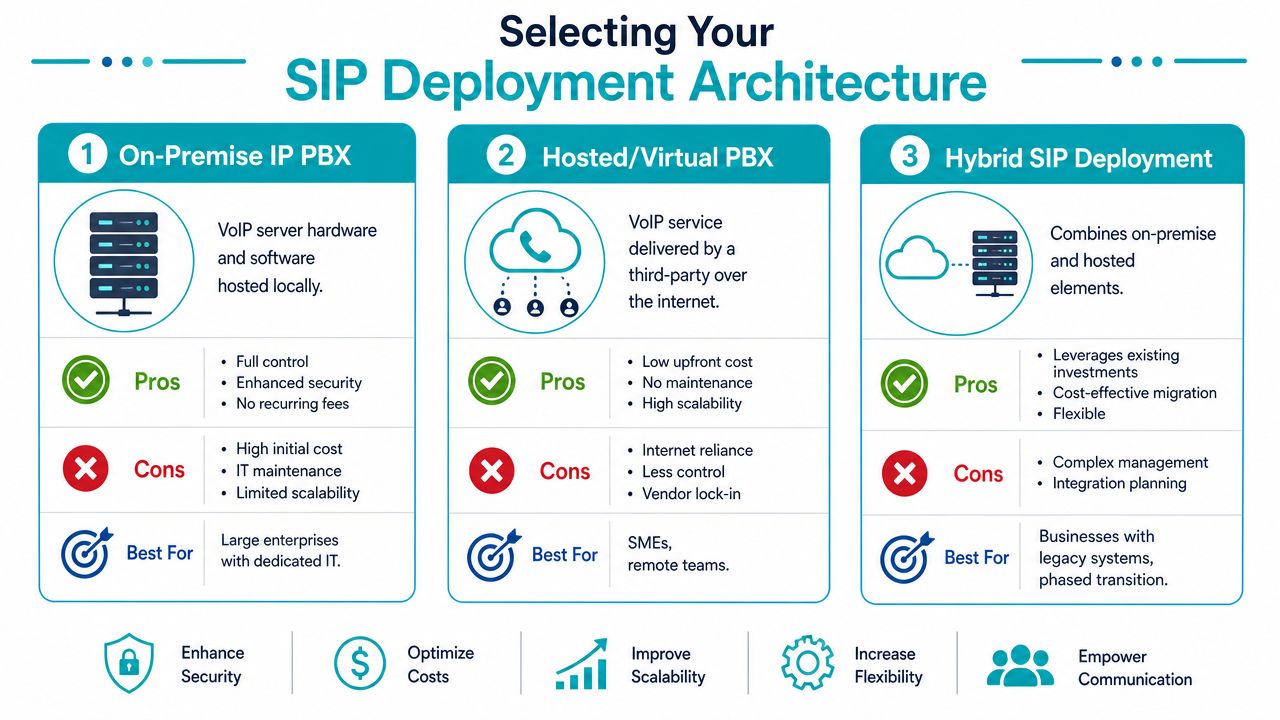
There isn't one correct architecture for SIP for VoIP. The right model depends on what you already own, who will maintain it, and how much control you need over routing, compliance, and feature customization.
On-premise IP PBX
This model keeps your PBX under your control, either on local hardware or in infrastructure you manage directly. Platforms like FreePBX and 3CX fit here.
Where it fits well
- Businesses with in-house telecom or systems staff
- Environments with custom dial plans or unusual routing needs
- Teams that want direct control over upgrades and integrations
Where it struggles
- Change control often depends on one or two knowledgeable admins
- Patch discipline can slip
- Capacity and redundancy become your problem to engineer
This model works best when voice is treated like a serious service, not a side task assigned to whoever “also knows networking.”
Hosted or virtual PBX
A hosted approach shifts more responsibility to the provider. You consume calling as a managed platform rather than maintaining the PBX stack yourself.
The upside is lower operational overhead. The downside is reduced control. If you need deep customization, provider-defined templates and feature boundaries can become limiting. Still, for many SMBs, that tradeoff is sensible because it reduces the number of failure domains they own internally.
Hybrid SIP deployment
Hybrid designs are common during migration. A business may keep an existing PBX, add SIP trunks, move some users to softphones, or split call handling between sites and hosted services.
Design note: Hybrid works well when it's planned. It becomes messy when it's the accidental result of years of partial changes.
A hybrid model is often the least disruptive path because it preserves existing investments while modernizing the edge. It also gives teams time to validate call flows, user behavior, and failover before committing fully to one architecture.
Matching infrastructure to the model
If you want tight control, a PBX can run on a VPS, on bare metal, or inside a dedicated private cloud where networking and snapshots are easier to manage consistently. If you want less operational overhead, a managed hosted voice platform usually makes more sense.
One option in that space is ARPHost, LLC, which offers SIP trunks, DIDs, Virtual PBX, VPS hosting, bare metal servers, colocation, and managed infrastructure that can support PBX deployments depending on how much control you want to retain. The practical question isn't which product sounds better. It's which operating model your team can support at 2 a.m. when a call path breaks.
Choosing a Provider and Troubleshooting Like a Pro
Provider selection gets easier when you stop asking only about price and start asking how the service behaves under stress. A cheap SIP trunk is expensive if troubleshooting is opaque, routing is inconsistent, or support can't distinguish registration problems from media failures.
What to check before you buy
Use a shortlist based on operations, not marketing:
- Security posture: Ask how signaling is protected, how credentials are handled, and what support exists around caller identity trust.
- Support depth: You want engineers who understand SIP traces, codec negotiation, NAT behavior, and PBX interop.
- Deployment flexibility: Some teams need direct trunks to an existing PBX. Others need a hosted voice layer.
- Failure handling: Ask how inbound calls can be rerouted and what happens if your primary path degrades.
- Logging and visibility: Good troubleshooting depends on access to enough detail to isolate the fault domain.
If a provider can't answer those clearly, the relationship will be painful during the first real outage.
Fast diagnosis for common SIP failures
A few recurring issues account for most support tickets:
| Problem | Usual cause | First checks |
|---|---|---|
| Registration failure | Bad credentials, transport mismatch, blocked signaling | Verify account details, transport type, and firewall policy |
| One-way audio | NAT or RTP path issue | Check media address handling, NAT settings, and RTP reachability |
| Calls drop after setup | Session timers, firewall state, unstable path | Review timeout behavior and path consistency |
| Poor audio quality | Congestion, jitter, or codec mismatch | Check QoS, codec policy, and WAN saturation |
One error admins run into during failed setup attempts is timeout behavior during call establishment. If that's showing up in logs, this reference on SIP error 408 is a practical starting point because it maps the symptom back to signaling delays and path issues.
A workable escalation habit
When troubleshooting, don't start by changing everything at once. Use a narrow sequence:
- Confirm whether signaling succeeds.
- Confirm whether media flows both directions.
- Check whether the issue affects one endpoint, one site, or all calls.
- Compare a failing call with a working one.
- Change one variable at a time.
That approach sounds basic, but it prevents the classic VoIP failure spiral where firewall rules, codecs, NAT settings, and PBX options all get modified in the same hour and nobody knows what fixed or broke the call.
If you're planning a SIP migration, replacing legacy lines, or need a safer operating model for business voice, ARPHost, LLC can help you evaluate the right fit across SIP trunks, Virtual PBX, VPS hosting, bare metal, private cloud, colocation, and fully managed IT services. Start with the architecture your team can realistically support, then build in the security, redundancy, and operational visibility that production voice requires.
