

When a VoIP system generates a SIP Error 408, it's a definitive signal of a communication breakdown. This isn't a software bug; it's a network timeout. A client sent a SIP INVITE request to initiate a session, started a timer, and received no response before that timer expired. For IT professionals managing real-time communication infrastructure, from on-premise PBX systems on bare metal servers to complex private cloud deployments, understanding this error is crucial.
What A SIP Error 408 Really Means For Your VoIP Infrastructure
Technically, a SIP 408 is a client-side timeout dictated by the protocol's internal mechanisms. When a User Agent Client (UAC)—such as a SIP phone or PBX—sends an INVITE, it initiates a timer known as Timer B. This timer defines the window the client will wait for any provisional response (e.g., "100 Trying" or "180 Ringing"). If this timer expires without a single packet in response, the client concludes the request was lost or the destination is unreachable and generates the 408 Request Timeout.
This error is a symptom of a deeper issue within the network fabric or its configuration. Something is preventing SIP packets from completing their round trip. It could be anything from Layer 2 packet loss to a misconfigured firewall rule on a Juniper device. For any business that relies on clear communication, like medical call centers, understanding potential VoIP communication issues like this one is absolutely critical for maintaining service uptime.
Key Technical Factors Behind The Timeout
To effectively troubleshoot, a sysadmin must understand the common points of failure that lead to a SIP 408.
- Packet Loss: The most direct cause. The initial SIP INVITE UDP packet never reaches the destination, or the response packet is lost in transit.
- Network Address Translation (NAT): A frequent culprit in virtualized environments. Improper NAT configurations, especially symmetric NAT, can rewrite source ports and IP addresses incorrectly, causing response packets to be misdirected.
- Firewall State Tables: A stateful firewall, whether on a bare metal host or a network appliance, might silently drop SIP packets that don't match an existing session or are blocked by an ACL.
- SIP ALG (Application Layer Gateway): This notorious router feature attempts to dynamically modify SIP headers to solve NAT issues but frequently corrupts the packets, leading to parsing failures at the destination and subsequent timeouts.
Sysadmin Best Practice: The SIP 408 error isn't a failure of the destination to process the request; it's a failure of the originating client to receive a response. This critical distinction shifts the troubleshooting focus from server-side application logic to the network path connecting the two endpoints.
Your VoIP system, be it an Asterisk instance on a virtual server or a large-scale FreeSWITCH cluster, is reporting, "I sent a request, but the network path is silent." This is a fundamental concept for anyone managing a voice network, especially when dealing with the complexities of modern telephony explained in our guide on how SIP trunking works. The next step is to perform methodical network forensics to identify the point of failure.
Uncovering The Root Causes Of SIP 408 Errors
A SIP error 408 is a symptom, not the disease. It's a frustratingly vague signal that a request timed out, but it doesn't point a finger at where the breakdown happened. To fix it, you must trace the entire communication path—from your PBX, through virtual switches, firewalls, and out to the provider—to find where the signal was lost.
This error rarely happens by chance. It’s almost always a direct result of a SIP INVITE getting lost in transit or the subsequent response never finding its way back. Pinpointing the culprit requires a systematic approach.
This quick-reference table outlines the most common issues seen in enterprise environments and the first diagnostic command to run for each.
Common SIP 408 Causes and Initial CLI Checks
| Potential Cause | Common Symptom | First Diagnostic Step (CLI) |
|---|---|---|
| Firewall / SIP ALG | Outbound calls fail intermittently with no response to INVITEs. | Check firewall logs for dropped packets on port 5060/UDP. Disable SIP ALG on the edge router (e.g., Juniper, Cisco). |
| NAT Traversal | One-way audio, failed call setups, registration failures from endpoints in a private cloud. | Use stun-client or a similar tool from the endpoint to verify its public IP mapping. |
| DNS Resolution | Long delays before call failure, especially to new SIP trunk destinations. | Run dig <sip.provider.com> or nslookup <sip.provider.com> from the PBX server to test resolution latency. |
| Unresponsive Service | Calls to a specific provider fail while others work. The remote gateway is silent. | Use sngrep or ngrep to confirm no packets are being received from the destination IP. |
| Transport Mismatch | Immediate timeout or connection refused. | Verify your trunk configuration (UDP, TCP, TLS) matches the provider's required transport protocol. |
This table serves as your initial diagnostic map. Now, let’s perform a deep dive into each of these common failure points.
Aggressive Firewalls And SIP ALG
One of the first places to investigate is the network firewall. A misconfigured firewall or a router with a problematic SIP Application Layer Gateway (ALG) is a leading cause of 408 timeouts. Firewalls are designed to be restrictive, and default security policies are often too aggressive for real-time protocols like SIP. They may silently drop unsolicited UDP packets on port 5060, leaving your client waiting for a response that will never arrive.
Even more notorious is the SIP ALG. In theory, this feature intelligently rewrites SIP packet headers to help traffic traverse NAT boundaries. In practice, it frequently mangles SIP headers (like the Via and Contact fields), corrupting messages to the point that the receiving PBX or provider gateway cannot parse them. The corrupted packet is discarded, and your call times out.
IT Industry Best Practice: A non-negotiable step in any professional VoIP deployment, from small business setups to large-scale private cloud infrastructure, is to disable SIP ALG on all edge devices. It is far more reliable to manage NAT traversal using explicit methods like STUN, TURN, or an SBC than to allow an unpredictable ALG to tamper with SIP traffic.
NAT Traversal Failures
Network Address Translation (NAT) is essential for modern networking but is a known antagonist for VoIP. A SIP 408 error is a classic symptom of failed NAT traversal, creating a black hole where requests go out, but responses can't find their way back.
This occurs because SIP headers contain the IP address and port information the remote end needs to reply. If your NAT device (e.g., a virtual router in a Proxmox VE environment) rewrites this information incorrectly or fails to maintain the connection mapping, response packets are sent to an invalid destination and are dropped.
- Symmetric NAT: A particularly challenging NAT type where the public IP and port mapping changes for each new destination, making it extremely difficult for unsolicited incoming responses to find the original sender.
- Missing STUN/TURN Configuration: Without a mechanism to discover its public-facing IP address, an endpoint behind NAT might advertise its private, non-routable IP (e.g., 192.168.1.100) in its SIP messages. The remote party will attempt to respond to this private address, and the call will inevitably fail.
To get a better handle on how these services work, our guide explains in detail what a STUN server is and the critical role it plays in successful call setup.
Unresponsive Services And DNS Issues
Sometimes, the network path is clean, but the service at the destination is the problem. An overloaded Private Branch Exchange (PBX) may be too saturated to process a new INVITE before the client's timer expires. In other cases, a misconfigured dial plan or routing rule could be sending the request to a non-existent or offline endpoint.
More subtle are DNS resolution delays. If your PBX needs to look up the IP for sip.provider.com, a slow or failed DNS query can consume critical milliseconds. This delay might be just enough to push the total transaction time beyond the SIP timer's limit, triggering a 408 timeout before the SIP request is even transmitted.
A Practical Troubleshooting Workflow For SIP 408 Errors
When hit with a SIP error 408, random configuration changes are counterproductive. An effective resolution requires a methodical process of elimination, starting with Layer 3 connectivity and moving up the stack.
First, confirm the basics. Can your PBX resolve the SIP trunk provider's domain and route traffic to the resulting IP? Simple tools often uncover simple problems.
This flow diagram illustrates the common choke points where a SIP request can fail, leading to a 408 timeout.
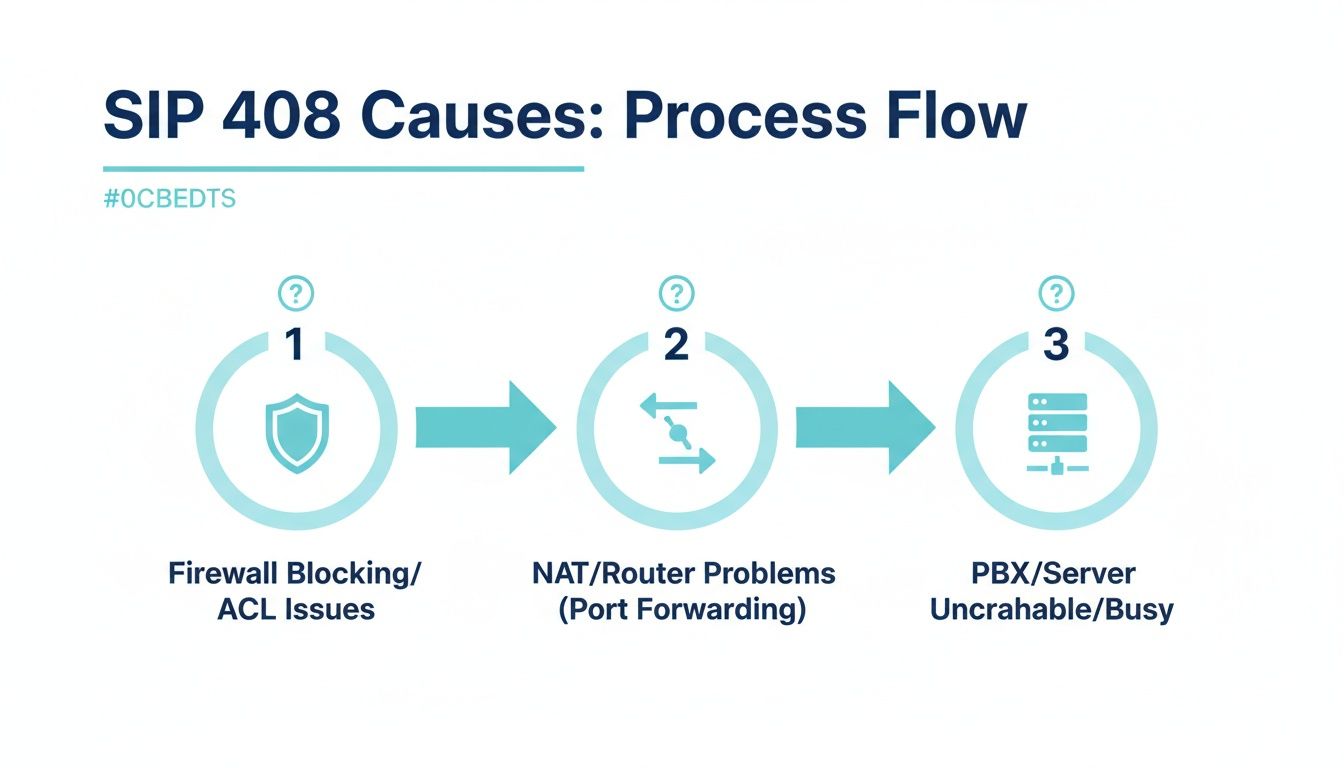
As shown, the failure could be at your network edge (firewall), within the address translation layer (NAT), or at the application level (PBX). You must validate each stage sequentially.
Step 1: Isolate SIP Traffic With Packet Captures
Once basic connectivity is verified, the single most powerful tool is packet capture. This is non-negotiable for serious troubleshooting. Tools like tcpdump on the command line or the graphical interface of Wireshark provide definitive proof of what is happening on the wire, replacing speculation with evidence.
Your capture must answer three key questions:
- Is the SIP INVITE request leaving your PBX's network interface?
- Is a corresponding response packet (e.g., "100 Trying") received at that same interface?
- Are the IP addresses and ports in the SIP headers (Via, Contact) correct post-NAT?
For accurate diagnosis, capture traffic simultaneously at two points: on the PBX server itself and on the external interface of your edge firewall. This allows you to determine if packets are being dropped internally or by the firewall.
On your PBX server, a tcpdump command can isolate the relevant traffic. This command captures all traffic on interface eth0 for the standard SIP port 5060 and saves it to a file for analysis in Wireshark.
# Capture SIP traffic on port 5060 for analysis
tcpdump -i eth0 -n -s0 port 5060 -w sip_capture.pcap
Execute this command while replicating the failed call. Then, analyze sip_capture.pcap in Wireshark. If you see your outgoing INVITE but observe absolutely no inbound packets from the destination IP, you have confirmed the timeout from your network's perspective.
Step 2: Investigate Firewall and Edge Device Logs
If your packet capture shows the SIP request leaving the PBX but receiving no response, the next logical stop is your network's edge device. Enterprise firewalls from vendors like Juniper are configured to drop unsolicited or non-compliant packets silently by default.
Dive into your firewall's traffic logs. Filter for dropped packets where the destination is your SIP provider's IP and the destination port is 5060. A log entry showing a "deny" or "drop" action is the smoking gun that proves the firewall is the root cause.
This is also the point to address the SIP ALG (Application Layer Gateway). As stated previously, this "feature" is a primary cause of SIP 408 errors.
Best Practice: Disable SIP ALG. On a Juniper SRX firewall, for instance, you would use configuration mode commands to disable the SIP ALG service and then clear existing sessions to apply the change immediately.
# Example for Juniper SRX Series
set security alg sip disable
commit
clear security flow session protocol sip
Step 3: Review PBX and Application Logs
If firewall logs are clean and captures indicate the packet is leaving your network, the issue may lie with the PBX application itself. Check the service logs for your platform, whether it’s Asterisk, FreeSWITCH, or a commercial PBX.
Search for log entries corresponding to the timestamp of the failed call. The logs may reveal that the service received the request but failed to process it correctly. Common issues include:
- Misconfigured dial plans or outbound routes: The PBX has no valid route for the dialed number.
- Codec negotiation failures: The PBX and the provider cannot agree on a common codec.
- Service overload: The PBX application is too busy (e.g., high CPU or memory usage) to process new INVITEs in a timely manner.
By following this structured path—from basic connectivity to packet analysis, firewall forensics, and finally application logs—you can systematically isolate the root cause of the SIP error 408 and implement a precise, effective solution.
Digging Deeper: Advanced Fixes for Persistent SIP Timeouts
When you've audited firewalls, validated NAT, and confirmed DNS, but the sip error 408 persists, it’s time to investigate more nuanced issues. Persistent timeouts often point to subtle protocol negotiation failures or architectural weaknesses in the network.
This requires shifting focus from "what is broken?" to "what is sub-optimal?" Let's examine advanced solutions.
Fine-Tuning SIP Timers
At the core of every SIP transaction are timers that dictate retransmission and timeout behavior. While default RFC 3261 values are suitable for most networks, they can be too aggressive in environments with high latency or packet loss (e.g., mobile networks or long-distance WAN links).
- Timer T1: The initial retransmission timer. If no response is received within T1 (default 500 ms), the request is retransmitted.
- Timer B: The transaction timeout timer. If no provisional response is received, the transaction fails when this timer expires (default 32 seconds).
In systems like Asterisk (sip.conf), you can adjust these timers. For instance, slightly increasing T1 can make the PBX more tolerant of network lag. However, this is a delicate balance. Overly long timers can slow down call setup across the board and increase system load.
Warning: Adjusting SIP timers should be a last resort. It's a workaround that masks the symptom (the timeout) without fixing the root cause (network instability). Prioritize fixing the underlying network issue before modifying protocol timers.
Deploying a Session Border Controller (SBC)
For any enterprise running VoIP in a complex or multi-tenant environment, a Session Border Controller (SBC) is the definitive solution to the NAT and security challenges that cause 408 errors. While individual endpoints can use STUN, an SBC provides a controlled, secure demarcation point between your private network and the public internet.
An SBC functions as a back-to-back user agent (B2BUA). It terminates SIP and RTP traffic from one side and re-originates it on the other, creating two distinct call legs. This architecture inherently solves NAT traversal problems, enhances security by topology hiding, and provides a centralized point for monitoring, codec transcoding, and troubleshooting. It is a more robust and scalable solution than relying on endpoint-based NAT traversal methods.
Diagnosing Transport Protocol Mismatches
This is a surprisingly common and often overlooked configuration error. Your PBX may be configured to send SIP requests over UDP (the most common transport), but your provider's gateway is configured to listen exclusively on TCP or TLS. Since UDP is connectionless, your PBX sends the INVITE and receives only silence in return, resulting in a 408 timeout.
The simplest way to diagnose this is with a SIP OPTIONS request, which acts as a lightweight "ping" for SIP services. Use a tool like sipsak to test connectivity.
# Test for UDP response
sipsak -s sip:user@provider.com -vv

# If UDP fails, test for TCP response
sipsak -s sip:user@provider.com -T -vv
If the UDP request times out but the TCP request receives a "200 OK," you have identified the transport mismatch. Align the transport protocol in your trunk configuration to resolve the issue.
How to Engage Your Provider with Actionable Data
If all troubleshooting points to an issue on your provider's end, you must present them with irrefutable evidence. Simply stating "my calls are failing" will likely result in a generic, unhelpful response. To ensure your ticket is escalated and taken seriously, provide a complete data package.
Hand them this trifecta of proof:
- Packet captures from your network edge showing the INVITE successfully leaving your system with correct headers.
- Precise timestamps and Call-IDs of several failed call attempts.
- A traceroute (
mtr) to their SIP gateway showing the network path and any latency or packet loss along the way.
This data transforms the conversation from an unsubstantiated claim to a collaborative, evidence-based troubleshooting session. It proves the problem is not on your side and compels them to investigate their network, routing, or upstream carriers. This approach is a key criterion when selecting from the best SIP trunk providers—a true partner will welcome this level of technical collaboration.
Proactive Monitoring To Prevent Future VoIP Errors
Fixing a SIP Error 408 reactively is a necessary skill. Architecting an infrastructure to prevent it from happening is a strategic advantage. This requires moving beyond simple ICMP ping checks to a monitoring strategy that understands the nuances of VoIP.
Instead of just checking if a server is online, deploy SIP-specific health probes. Monitoring systems like Zabbix, Nagios, or specialized platforms like Homer SIPcapture allow you to automate periodic SIP OPTIONS requests. These lightweight messages act as a constant heartbeat check, sent to your SIP trunks and gateways to validate not just network reachability but the health of the entire SIP application stack.
Setting Up Intelligent, Actionable Alerts
A responsive SIP service is only part of the solution. You must also configure intelligent alerts for the underlying network conditions that are precursors to a 408 timeout.
- Jitter and Latency Thresholds: Configure alerts to trigger when latency on critical VoIP paths exceeds 150ms or jitter exceeds 30ms. High latency is a primary indicator that SIP timers may expire.
- Packet Loss Monitoring: Configure alerts for any sustained packet loss. Even a 1% loss rate is sufficient to cause SIP INVITEs to disappear, leading directly to timeouts.
Proactive monitoring shifts your IT posture from reactive firefighter to strategic architect. It's about identifying and resolving silent misconfigurations and network degradation before they manifest as service-disrupting errors that impact end-users.
This principle extends beyond VoIP. The analogous HTTP 408 Request Timeout error highlights the same challenge in web infrastructure, where a server terminates a connection because a client took too long to send a complete request. With some web server timeouts set as low as 10 seconds, clients on high-latency networks are susceptible to these errors, underscoring the universal need for proactive connection health monitoring.
This approach is the cornerstone of any effective managed IT services strategy. To break the cycle of recurring VoIP issues, it's essential to start transforming reactive IT firefighting into a strategic technology roadmap. Regular, scheduled audits of firewall rules, NAT policies, and network performance metrics are how you find and fix silent problems before they cause a major outage.
Answering Your Questions About SIP Error 408
Let's clarify some common points of confusion surrounding the SIP 408 error. Understanding these distinctions is key to efficient troubleshooting.
How Is SIP 408 Different From A 403 Forbidden Error?
This distinction is critical for diagnosis. Think of it in terms of mail delivery.
- A SIP 408 Request Timeout means your message was lost in transit. It never reached the destination, so no reply was ever sent. This points directly to a network-layer problem like packet loss, routing, or a firewall block.
- A 403 Forbidden error means your message was successfully delivered and opened, but the recipient sent back a definitive rejection. The server actively denied the request, typically due to failed authentication (wrong password), insufficient permissions, or a misconfigured ACL.
Key Takeaway: A 408 indicates a failure of delivery. A 403 indicates a failure of authorization.
Should I Always Disable SIP ALG On My Firewall?
For any professional VoIP deployment, the answer is an unequivocal yes.
SIP ALG (Application Layer Gateway) is a feature on many commercial and consumer-grade routers and firewalls that attempts to dynamically rewrite SIP packets to traverse NAT. In practice, its implementation is notoriously unreliable and frequently corrupts SIP headers, leading to dropped calls, one-way audio, registration failures, and 408 timeouts. It is an industry best practice to disable it and rely on predictable NAT traversal methods like STUN, TURN, or a Session Border Controller (SBC).
When Should I Contact My VoIP Provider About A 408 Error?
Before opening a support ticket, perform your due diligence. To work effectively with your provider, you must come prepared with actionable data.
Execute a packet capture that proves your SIP INVITE requests are leaving your network edge correctly formatted and that you are receiving no response. Why is this crucial? Providers spend significant resources troubleshooting customer-side issues. When you can present them with definitive proof that the traffic is leaving your network and being met with silence, you immediately shift the investigation to their infrastructure. This helps them rapidly focus on potential routing issues, problems with their SBCs, or issues with their upstream carriers. For more on how providers handle these problems, check out this guide from resellerclub.com.
At ARPHost, LLC, we build and manage resilient VoIP infrastructure leveraging high-performance bare metal servers, optimized private cloud environments, and reliable SIP trunking solutions. Our 24/7 expert support team helps clients troubleshoot and prevent errors like the SIP 408 timeout before they impact business operations. https://arphost.com