

A store checkout fails at noon. Customers can browse, but payment pages time out, support tickets spike, and someone on the team says the server must be overloaded. Sometimes that’s true. Often it isn’t.
In hosted environments, a security event rarely announces itself as a clean, obvious breach. It looks like login failures on a WordPress admin panel. It looks like a web process consuming CPU for no clear reason. It looks like a VPS pushing outbound queries that nobody configured. By the time finance notices lost orders or operations notices missing files, the attacker has usually been inside long enough to do more than probe.
That’s why security threats in computer networks matter far beyond the IT team. A network compromise interrupts revenue, damages trust, and forces the business to operate defensively at the worst possible moment. If you host ecommerce, internal apps, databases, email, or customer portals, your network edge is part of your operating model.
Introduction Why Network Security Is Not Just an IT Problem
Most small and midsize companies don’t fail at security because they ignore it. They fail because they treat it as a narrow technical task instead of a business control. The website runs, backups exist somewhere, the firewall is on, and everyone assumes the basics are covered.
That assumption breaks quickly under pressure. A developer opens temporary access during a deployment and forgets to remove it. An admin account keeps an old password because changing it would interrupt an integration. A remote employee clicks a document link that leads to credential theft. None of these start as boardroom issues. They become boardroom issues when ordering, fulfillment, billing, or support stops.
The knowledge gap is part of the risk. A UC Berkeley CLTC survey on underserved populations found that 31% of underserved users were completely unaware of antivirus software. That finding maps uncomfortably well to many busy business owners and small teams who are excellent at running operations but don’t have time to follow malware trends, patch cycles, or access-control hygiene.
What the business actually feels
Security incidents show up in business terms first:
- Revenue loss: Checkout, bookings, or lead forms stop working.
- Operational drag: Teams switch from planned work to emergency cleanup.
- Trust erosion: Customers don’t always distinguish between downtime and compromise.
- Decision paralysis: Without logs, segmentation, and clean backups, recovery becomes guesswork.
Security isn’t a separate layer above the business. For online businesses, it’s part of the delivery path.
A useful way to think about network security is simple. Every exposed service is a business dependency, and every business dependency needs a control strategy. That applies whether you’re running a single VPS for a storefront, a bare metal server for a database workload, or a dedicated Proxmox cluster hosting multiple production tenants.
Where this goes wrong in practice
Teams often buy infrastructure before they define control boundaries. They spin up a server, publish services, add users over time, then discover later that no one has documented what should talk to what, who should have shell access, where logs should land, or how backups are isolated from the production blast radius.
That’s the point where “security threats in computer networks” stops being an abstract phrase and becomes an architecture problem. The good news is that architecture problems can be fixed. They require hardening, segmentation, monitoring, tested recovery, and fewer assumptions.
Understanding the Modern Threat Landscape
Most threat lists are too flat to be useful. They mix phishing, malware, insider mistakes, and infrastructure abuse as if they’re separate events. In production environments, they usually chain together.

A cleaner framework is to sort threats by what they do to your systems.
Interruption interception and modification
Interruption is when an attacker makes a service unavailable. DDoS, resource exhaustion, destructive malware, and lockouts fit here. Your application may be intact, but your users still can’t reach it.
Interception is when someone reads what they shouldn’t. Credential theft, man-in-the-middle activity, session hijacking, and covert exfiltration fall into this category. These threats often stay quiet because they don’t need to break the app to succeed.
Modification is when an attacker changes data, configs, permissions, or binaries. Web shell placement, malicious cron jobs, altered firewall rules, and ransomware all fit. Cleanup gets expensive because trust in the environment is gone.
Defense in depth works because single controls fail
A hosted network should be treated like a building with concentric controls. The outer perimeter filters obvious abuse. Internal partitions stop an intruder from walking everywhere once they get in. Asset-level controls make each server harder to exploit. Monitoring tells you when one of those layers is failing.
That model matters because modern attackers don’t always smash through the front door. The 2025 Verizon DBIR trend summary referenced here notes a 15% year-over-year increase in supply chain breaches, which is a reminder that trusted software, vendors, plugins, and infrastructure relationships now sit directly inside the attack path.
A secure perimeter with weak internal trust boundaries is still a fragile network.
Your hosting model changes your attack surface
Different infrastructure choices create different operational risks.
| Environment | Typical exposure pattern | Security focus |
|---|---|---|
| Shared hosting | Less control, broader platform dependency | Account isolation, application hygiene, least privilege |
| VPS | Stronger isolation, more admin responsibility | OS hardening, patching, SSH hygiene, logging |
| Bare metal | Full control, full blast radius | Network policy, privileged access, segmentation, backup isolation |
| Private cloud | Flexible east-west traffic, multiple trust zones | VLAN design, IAM, IDS, storage and hypervisor controls |
In practice, the attack surface grows when teams add convenience without boundaries. Public management panels, unused services, broad firewall rules, stale admin accounts, and unrestricted inter-VM traffic all expand what an attacker can touch after initial access.
What mature teams do differently
They don’t ask only, “Is this server protected?” They ask:
- What services are exposed, and why?
- If one workload is compromised, what can it reach next?
- Which logs would prove what happened?
- Can we recover without trusting the compromised environment?
Those questions lead to better engineering decisions than generic advice ever will.
A Field Guide to Common Security Threats
Some threats are common because they work. Not because they’re elegant. Attackers keep using the same playbook against web servers, admin panels, mail systems, and virtualized infrastructure because many environments still expose the same weak points.
The field guide below focuses on the threats operators encounter in hosted environments.
Malware and ransomware
Malware is the broad category. Ransomware is the business-ending variant because it turns a technical foothold into an operational crisis. Cybersecurity Ventures reports that businesses faced a ransomware attack every 11 seconds in 2021, with projected global costs exceeding $265 billion annually by 2031.
How it works in hosting is straightforward. An attacker gets credentials through phishing, brute force, exposed admin tooling, or a vulnerable application. They establish persistence, enumerate storage, and encrypt what they can reach. In poorly designed environments, that includes mounted backups, shared storage, and administrative scripts.
What to look for
- Unexpected file changes: Mass renames, new extensions, or inaccessible content.
- Privilege abuse: Service accounts suddenly running administrative actions.
- Persistence artifacts: New scheduled tasks, startup entries, web shells, or altered SSH keys.
- Abnormal storage activity: Sharp spikes in read and write activity without a planned job.
Business impact
A single compromised VPS can take down a storefront. A compromised hypervisor-adjacent credential can affect multiple guests. The technical event becomes a continuity event very quickly.
Practical rule: If backups are writable from the same trust zone as production, they are part of the attack surface.
DDoS and service exhaustion
Not every outage is a breach. DDoS attacks and application-layer abuse often aim to make your service unreliable rather than steal data. For ecommerce and SaaS platforms, the result is still costly. Users see timeouts, carts fail, APIs stall, and the support queue fills.
At the infrastructure level, watch for sudden connection floods, request bursts against expensive endpoints, and upstream saturation that doesn’t match normal customer behavior. On a bare metal server, this can look like load spikes with no corresponding increase in successful transactions. On a VPS, it may look like a healthy OS with an overwhelmed public service.
What works
- Traffic filtering at the edge
- Rate limiting on authentication and search endpoints
- Caching for static assets
- Origin shielding so the application server isn’t the first line of defense
What doesn’t
- Relying on application retries alone
- Keeping management services publicly reachable during an attack
- Treating every spike as “just marketing traffic”
Man in the middle and session theft
MITM attacks matter most when teams assume encrypted transport equals end-to-end trust. If remote admins, contractors, or developers access systems over insecure networks, weak certificate validation, password reuse, and exposed session cookies can still create a practical compromise path.
This hits hosted applications in two places. First, the control plane, such as admin panels, remote access, and deployment tooling. Second, user sessions, especially in web apps with weak cookie handling or incomplete HTTPS enforcement.
Warning signs
- User reports of forced re-authentication
- Logins from new environments immediately after a normal session
- Administrative changes that no authorized admin recalls making
Credential theft and brute force
This is still the most reliable initial access path in many environments. Attackers don’t need a zero-day when password reuse, overprivileged accounts, and exposed login portals remain common.
Phishing gets the credentials. Brute force and credential stuffing test them. Once access succeeds, attackers often behave stealthily at first. They read configs, inspect database connections, and look for reusable secrets in scripts and environment files.
Here’s a practical comparison for hosted systems:
| Threat | Primary impact | Key ARPHost mitigation |
|---|---|---|
| Ransomware | Data encryption and operational stoppage | Immutable backups, patch management, monitored hosting |
| DDoS | Service unavailability | Network protection, traffic filtering, managed firewalling |
| MITM and session theft | Unauthorized access and data exposure | TLS enforcement, segmented admin access, hardened login flows |
| Credential attacks | Account takeover and lateral movement | MFA, login throttling, access reviews, managed monitoring |
The common pattern behind all four
Each threat succeeds faster when infrastructure basics are weak. Exposed admin surfaces, stale software, broad internal trust, and poor backup isolation turn a manageable incident into a severe one. If you want better outcomes, start by shrinking what an attacker can touch, then improve how quickly you can detect abnormal behavior.
Advanced Threats Hiding in Your Network
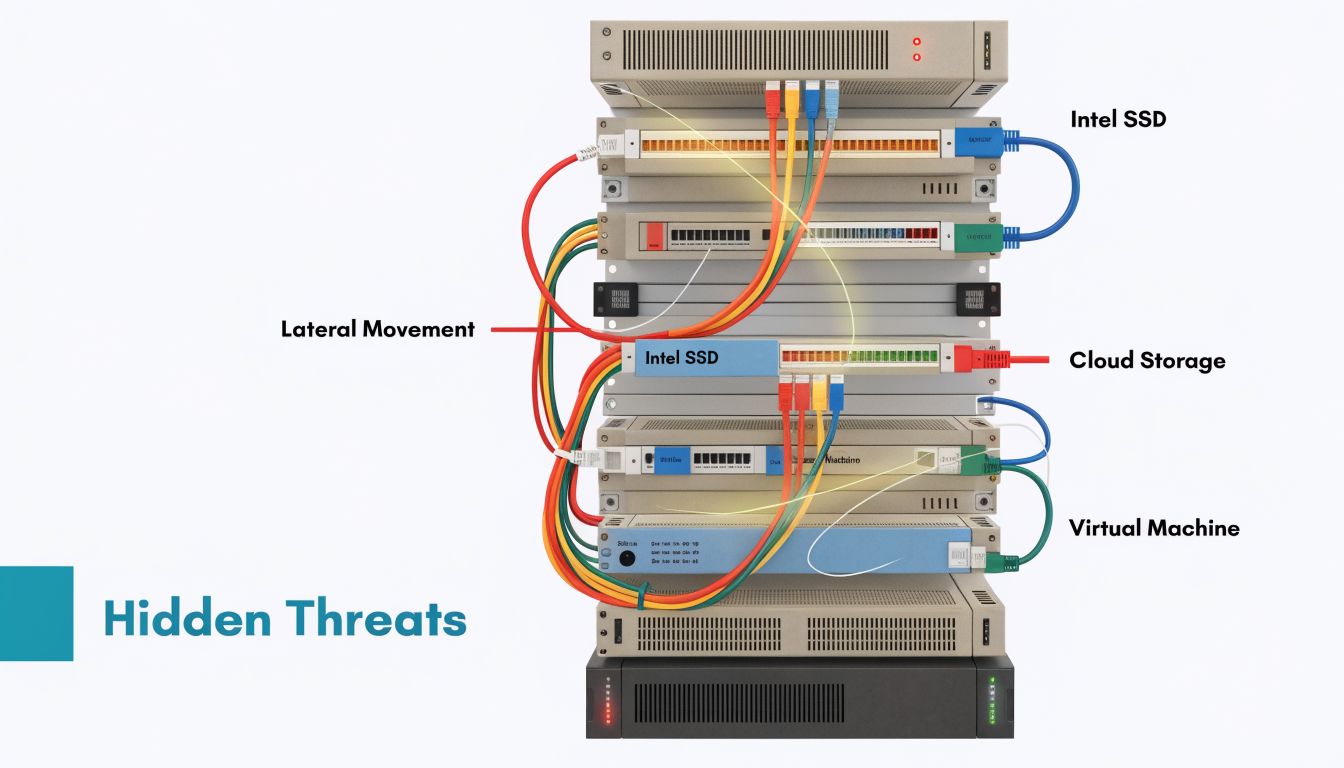
The dangerous attacks aren’t always the loud ones. Once an attacker gets a foothold, the primary objective is usually persistence, internal discovery, and quiet movement toward data, credentials, or management systems.
Lateral movement changes the scope of an incident
A phishing hit on one workstation shouldn’t become access to a database server. In flat environments, it often does.
Lateral movement happens when attackers reuse credentials, exploit trust relationships, or abuse weak segmentation to move from a low-value system to a high-value one. In private cloud environments, that might mean moving from a public web VM to a management network, backup target, or internal application tier. In VPS fleets, it often starts with reused credentials or deployment keys copied across multiple systems.
Virtualized environments need discipline. Management interfaces, storage networks, backup paths, and tenant workloads should not sit in the same broad trust zone just because they live on the same hardware.
DNS tunneling is quiet and effective
DNS tunneling is one of the more practical examples of stealthy exfiltration. Attackers encode data into DNS queries and use that traffic to communicate out of the environment, often bypassing controls that inspect web traffic more aggressively. The same source notes exfiltration rates of 10 to 100 KB/s, and describes how an unmonitored DNS channel played a role in variants of the SolarWinds attack, enabling undetected command-and-control for months.
That matters because DNS often gets trusted by default. Teams lock down web egress, but they let broad resolver access remain open and largely unmonitored.
Operational indicators that deserve attention
- Long encoded query strings: Especially patterns that don’t match normal application behavior.
- High-frequency lookups: Repeated requests from a host that normally generates little DNS traffic.
- Resolver anomalies: Workloads querying unexpected domains or bypassing approved DNS paths.
If you want a useful starting point for network detection tooling, this overview of Snort software for intrusion detection is worth reviewing alongside Suricata and your SIEM workflow.
Quiet DNS abuse often survives because nobody owns DNS telemetry. Security teams watch endpoints. Network teams watch uptime. Attackers exploit the gap.
Insider threats aren’t only malicious
Insider risk includes malicious actors, but negligence is more common in day-to-day hosting operations. An employee uploads production data to an unmanaged tool. A contractor keeps local copies of credentials. An admin disables a control temporarily and never restores it.
The technical effect is similar to an external compromise. Sensitive paths become reachable, logs become less trustworthy, and responders lose confidence in what changed intentionally versus maliciously.
A practical way to reduce this risk is to assume mistakes will happen and design around them:
- Separate duties: Don’t let one account both deploy and alter logging controls.
- Limit standing privilege: Use elevation for tasks rather than permanent admin access.
- Review east-west trust: Internal traffic deserves policy, not assumption.
- Centralize visibility: If actions matter, they should leave logs outside the host being changed.
How advanced attacks chain together
A common sequence looks like this: credential theft creates initial access, misconfiguration enables movement, DNS tunneling provides covert communication, and weak backup separation gives ransomware or sabotage a final payoff. These are not separate problems. They’re linked consequences of design choices.
That’s why defending against security threats in computer networks has to be infrastructure-specific. You can’t solve lateral movement with endpoint tools alone, and you can’t solve covert exfiltration with a basic perimeter firewall.
Your Blueprint for Proactive Defense and Prevention
Prevention works best when it’s built into the stack from the first deployment. Most breaches don’t require extraordinary attacker skill. They require ordinary defender inconsistency.
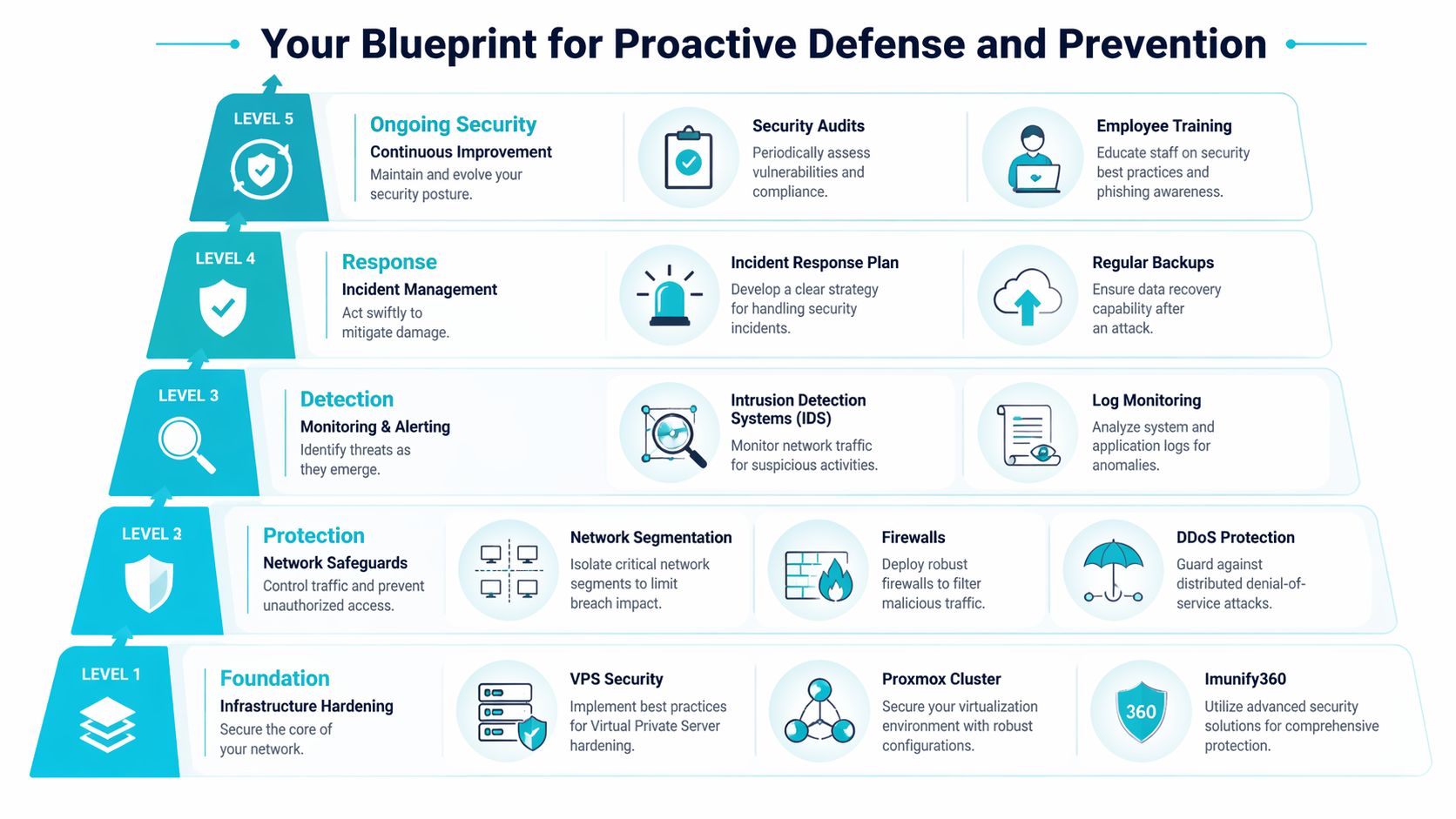
The highest-return work is usually mundane. BitSight research says network misconfigurations are the root cause of 80% of data breaches, and organizations with immature patching cadences face a sevenfold increase in ransomware risk. That lines up with what operators see in production. Weak change control and stale systems create easier paths than complex exploit chains.
Start with infrastructure hardening
For VPS, bare metal, and private cloud guests, begin at the operating system and service boundary.
- Remove what you don’t use. Disable unused daemons, uninstall legacy tooling, and close management exposure that isn’t needed.
- Harden access first. Enforce MFA where supported, reduce shared accounts, and separate human admin access from application service identities.
- Patch on schedule, not on hope. Define maintenance windows and emergency procedures for critical updates.
- Protect the web tier. For public sites, pair application hardening with malware scanning and isolation features such as Imunify360 and CloudLinux where they fit shared or web-hosting stacks.
- Log off-host. If logs live only on the compromised system, they aren’t reliable during investigation.
A practical Linux baseline often includes service review, sudo policy cleanup, SSH tightening, package updates, and outbound restriction rather than just inbound filtering.
sudo systemctl list-unit-files --type=service
sudo ss -tulpn
sudo ufw default deny incoming
sudo ufw default deny outgoing
sudo ufw allow OpenSSH
sudo apt update && sudo apt upgrade
That outbound default-deny stance takes more work, but it exposes hidden dependencies and makes covert traffic much easier to spot.
Build network safeguards that contain failure
Segmentation matters more in virtualized estates than many teams expect. A Proxmox cluster can host cleanly separated trust zones, but only if you design them intentionally. Public workloads, management traffic, backups, and internal applications shouldn’t share unrestricted lateral paths.
For layered strategy, this guide to security in layers is a useful framing reference.
A simple containment model looks like this:
| Zone | Should talk to | Should not talk to |
|---|---|---|
| Public web tier | Load balancer, app tier | Backup storage, hypervisor management |
| App tier | Database, logging, required APIs | Internet at large unless justified |
| Database tier | App tier, backup service | Public clients, admin networks by default |
| Management network | Hypervisors, admin bastion | Public web servers directly |
Use managed firewalls, ACLs, and VLAN boundaries to enforce these relationships. In Juniper-backed environments, keep policies explicit and narrow. “Allow internal” is not a policy. It’s a future incident.
Detection has to be engineered
Monitoring fails when it only checks uptime. You need security telemetry tied to behavior.
Use IDS and SIEM pipelines to catch:
- Authentication abuse: Repeated failures, impossible travel, abnormal admin logins
- DNS anomalies: Encoded queries, unusual request rates, unexpected destinations
- Config drift: Firewall changes, new users, altered startup tasks
- Application abuse: Spikes on login routes, XML-RPC equivalents, admin path scanning
Later in the rollout, add endpoint controls that fit your stack.
A short implementation sequence works better than an oversized wishlist:
- Week one: Lock down access, review exposed services, centralize logs.
- Week two: Segment the environment and apply strict firewall policy.
- Week three: Add IDS, tune alerts, and validate backup isolation.
- Week four: Test response paths with a simulated account compromise.
Here’s a useful primer before selecting sensors and firewall policy workflows.
What managed security actually helps with
Managed service value is often misunderstood. It isn’t magic tooling. It’s disciplined execution of controls teams struggle to maintain consistently.
In practice, one option is ARPHost, LLC, which offers managed hosting, secure web hosting bundles, VPS, bare metal, private cloud infrastructure, and support for ongoing patching, monitoring, and backup operations. That kind of model helps when the internal team knows what needs to happen but doesn’t have round-the-clock operational capacity to keep every control current.
Strong security posture usually comes from fewer exceptions, faster patching, and better visibility. Not from adding another dashboard.
Building Resilience with Incident Response and Recovery
Every environment needs an incident plan that assumes something will eventually get through. The useful question isn’t whether prevention matters. It does. The useful question is whether your team can contain damage fast enough to keep a bad day from turning into a business interruption that lasts for weeks.
Contain first then investigate
Containment means cutting attacker reach before you chase root cause. Disable compromised accounts, isolate affected workloads, block suspect outbound paths, and preserve logs before anyone starts “cleaning up.” In virtualized infrastructure, snapshot decisions need care. Snapshots can preserve evidence, but they can also preserve a poisoned state if taken too late.
Eradication comes after scope is understood. Remove persistence, rotate credentials, rebuild from trusted images where needed, and verify that admin tooling, automation secrets, and scheduled tasks are clean. Recovery starts only when you trust the path back to service.
Backups need isolation not just existence
Backups don’t save you if the attacker can encrypt, delete, or tamper with them from the production plane. That’s why immutable backup design matters. A recovery system should sit outside normal administrative reach, with separate authentication paths and clear retention policy.
For teams evaluating that model, immutable backup solutions are worth reviewing before the next incident forces the decision.
A concise response checklist helps:
- Contain the account path: Revoke active sessions and rotate exposed secrets.
- Contain the network path: Restrict east-west traffic and known malicious egress.
- Verify backup integrity: Test restore points before declaring them usable.
- Recover by trust level: Restore the most critical clean services first.
- Document reporting needs: Regulatory and contractual obligations may require formal cybersecurity incident reporting, especially if customer or cross-border data is involved.
Why support depth matters during recovery
The hardest part of recovery is rarely the restore command. It’s making correct decisions under uncertainty. Which systems are trustworthy, which logs are complete, which credentials were exposed, and what can return to production safely.
That’s where operational support matters.
Recovery is faster when backups are isolated, restore steps are tested, and someone is available to validate the infrastructure path at any hour.
A mature recovery posture combines runbooks, clean images, off-host logs, immutable backups, and people who can execute under pressure without improvising core decisions.
Frequently Asked Questions About Hosting Security
Is a VPS more secure than shared hosting
Usually, yes, if you manage it properly. A VPS gives you stronger isolation and control over the operating system, packages, firewall, and access policy. Shared hosting can still be safe for some workloads, but you inherit more platform-level dependency and have less authority to harden the environment to your standards.
The trade-off is responsibility. A VPS with weak patching and broad admin exposure can be less safe than a well-managed shared plan.
When does bare metal make sense for security
Bare metal makes sense when you need strict workload separation, predictable performance, or direct control over the full software stack. It’s especially useful for regulated workloads, custom security tooling, and environments where you don’t want neighboring tenant activity as part of the equation.
The downside is operational overhead. You have to own the policy design, lifecycle maintenance, and monitoring discipline that abstraction layers sometimes simplify.
How does a private cloud improve security
A private cloud helps when you need internal segmentation, role separation, and multiple trust zones under one architecture. In a Proxmox-based design, you can isolate public services from databases, backup networks, and management planes more cleanly than on a single general-purpose server.
That said, private cloud only improves security if the segmentation is real. If every VM can still talk to every other VM, you’re paying for flexibility without getting containment.
What’s the single most impactful step an SMB can take
Reduce exposed trust. That means fewer public admin surfaces, stronger authentication, disciplined patching, and backups that production systems can’t modify. Teams often look for one tool to solve everything, but the greatest gains usually come from basic control hygiene done consistently.
Do small businesses really need incident response planning
Yes. Small environments often recover more slowly because fewer people understand the system thoroughly, and one compromised account can affect a larger percentage of the estate. A short, tested runbook is far more useful than a long policy nobody has rehearsed.
What should I ask a hosting provider about security
Ask practical questions. How are backups isolated? What monitoring exists beyond uptime? How are patches handled on managed plans? How is administrative access controlled? Can management traffic, tenant traffic, and backups be separated cleanly? Those answers tell you more than a feature list.
If you’re evaluating secure managed VPS hosting, private cloud isolation, bare metal control, or backup architecture for business-critical workloads, ARPHost, LLC provides hosting and managed infrastructure options that can support those designs with VPS, bare metal, Proxmox environments, and managed IT services.
