

The most significant security risks in cloud environments almost always trace back to three core vulnerabilities: misconfigurations, unauthorized access, and insecure APIs. Unlike on-premises infrastructure where you control the entire stack, the cloud operates on a shared responsibility model. This division of duties creates security gaps that adversaries are adept at exploiting.
To mitigate these risks, a proactive, multi-layered security strategy is not just recommended—it's essential for protecting your virtualized infrastructure, whether it's a private cloud built on Proxmox VE or a hybrid deployment.
Understanding the Modern Cloud Threat Landscape
Migrating to the cloud is analogous to moving from a private, on-site vault to a state-of-the-art banking facility. The capabilities are immense, but the security paradigm shifts entirely. The root of most cloud security failures is a misunderstanding of the shared responsibility model.
Your cloud provider (e.g., AWS, Azure, GCP) is responsible for securing the infrastructure—the physical data centers, servers, core networking, and hypervisors. However, you, the customer, are responsible for securing everything you deploy on that infrastructure. This includes your virtual machines, containers, data, applications, and Identity and Access Management (IAM) configurations.
This division of labor is precisely where vulnerabilities emerge. IT teams often assume the provider handles security tasks that are, in fact, their responsibility, leaving critical vectors exposed.
Before we explore technical mitigations, here is a breakdown of the primary risks.
Top Cloud Security Risks at a Glance
This table outlines the most common threats, their root causes, and their potential impact on business operations. Consider it a quick reference for threat modeling your cloud environment.
| Security Risk | Common Cause | Potential Business Impact |
|---|---|---|
| Misconfigurations | Human error, lack of IaC, overly permissive defaults, complex cloud controls. | Data breaches, compliance fines (GDPR, HIPAA), reputational damage, service downtime. |
| Unauthorized Access | Compromised credentials, weak IAM policies, lack of MFA, improper key management. | Data theft, financial loss, system hijacking, ransomware deployment. |
| Insecure APIs | No authentication/authorization, data exposure in responses, insufficient rate limiting. | Data exfiltration, denial-of-service (DoS) attacks, account takeovers. |
| Data Breaches | A culmination of the above risks, leading to unauthorized data exfiltration. | Severe financial penalties, loss of customer trust, legal action, loss of IP. |
| Insider Threats | Malicious or negligent employees with legitimate access to cloud resources. | Data leakage, sabotage of production environments, intellectual property theft. |
These are not theoretical possibilities; they are daily occurrences, often triggered by a single oversight that cascades into a major incident.
The Domino Effect of Common Threats
The most damaging breaches often originate from a simple configuration error, not a sophisticated zero-day exploit. Therefore, the first step in any robust security program is to perform effective risk and analysis to identify these weak points before they are exploited.
It is crucial to view these risks as interconnected components of a potential attack chain.
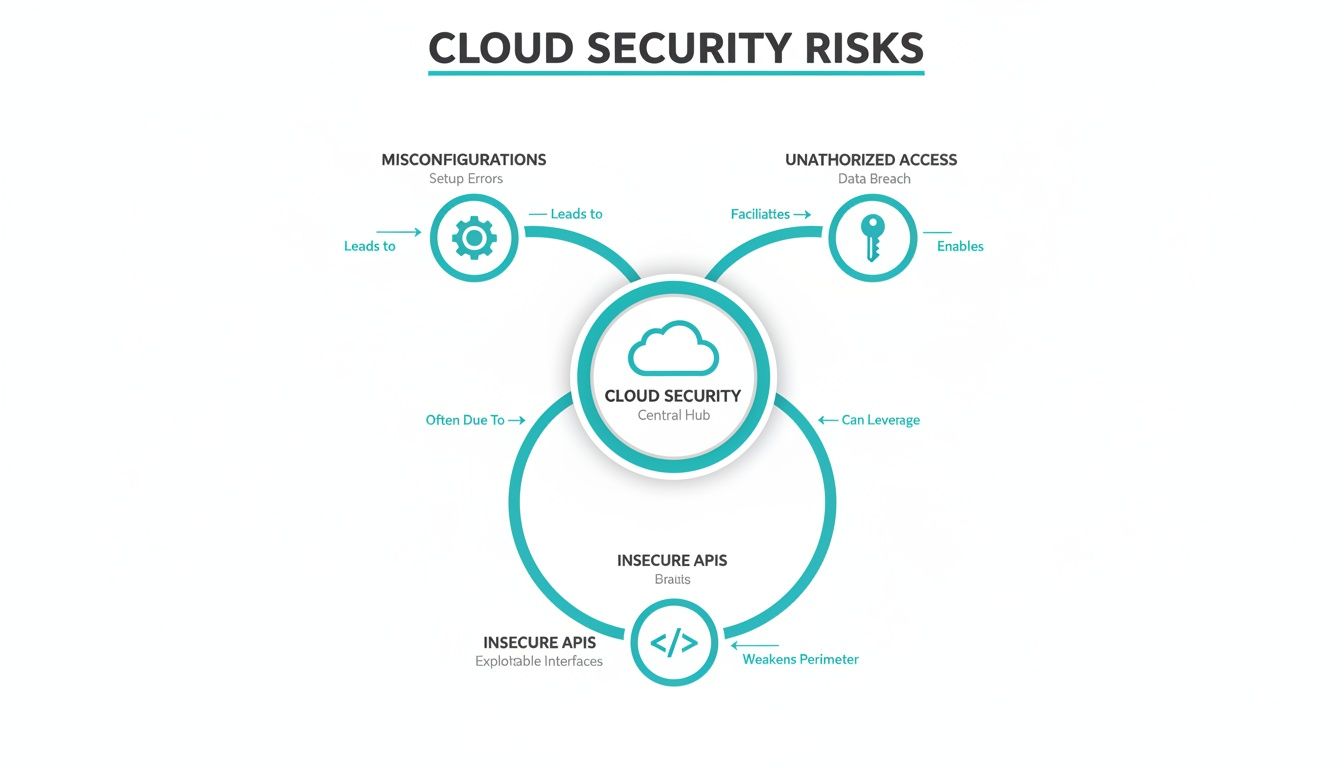
As the diagram illustrates, a single insecure API can provide the entry point for unauthorized access, which can then be leveraged to exploit misconfigurations and exfiltrate data, resulting in a full-blown data breach.
The statistics are stark. Leading up to 2025, an alarming 98% of organizations reported experiencing at least one cloud data breach.
This figure underscores a systemic problem. Of those affected, 83% experienced more than one breach, and a staggering 43% reported 10 or more breaches. This is not an anomaly; it's a clear pattern of repeated security failures.
This data highlights a common attack chain:
- Misconfigurations are the initial vector. An S3 bucket with public read access or a security group allowing unrestricted inbound SSH traffic (port 22 from
0.0.0.0/0) is a classic entry point. - Unauthorized access is the exploitation. Attackers use credential stuffing, phishing, or leaked API keys to escalate privileges and move laterally.
- Insecure APIs are the exfiltration route. APIs lacking proper authentication and authorization become a direct channel for extracting sensitive data.
A proactive, security-first posture is non-negotiable. In the following sections, we will delve into technical, actionable steps to secure these critical vulnerability points in both public and private cloud deployments.
Preventing Misconfigurations and Human Error
Some of the most devastating security risks of the cloud originate not from external threat actors but from internal, unintentional mistakes. Human error is a primary driver of cloud insecurity, with misconfigurations acting as the unlocked doors to your digital infrastructure. These errors are pervasive, cited as a root cause in a significant percentage of cloud breaches.
A misconfiguration can be as straightforward as a system administrator setting a storage bucket's access control list (ACL) to "public-read" instead of "private." While seemingly minor, this exact oversight has led to massive data exfiltrations for major corporations. The complexity of cloud service provider consoles makes these errors easy to commit and difficult to detect without automated tooling.
This demonstrates that effective security is not a one-time setup but a continuous strategy encompassing network controls, data governance, and identity policies—all of which are susceptible to human error.
Common Misconfigurations and How to Fix Them
To mitigate these risks, you must know what to look for. Here are some of the most frequent and critical misconfigurations observed in public clouds and private cloud platforms like Proxmox VE.
- Publicly Exposed Storage Buckets: A canonical example. An administrator might temporarily grant public access for a valid reason and then forget to revert the permission.
- Overly Permissive IAM Roles: Assigning a service account
*:*(full administrator) permissions when it only requiress3:GetObjecton a specific bucket is a catastrophic risk. If the account's credentials are leaked, the attacker gains complete control. - Unrestricted Outbound Access: Default security groups or firewall rules often permit all egress traffic (
0.0.0.0/0). This allows malware to establish command-and-control (C2) connections and enables data exfiltration to arbitrary endpoints. - Disabled Logging and Monitoring: To reduce costs, teams may disable detailed logging (e.g., AWS CloudTrail, VPC Flow Logs). This creates a critical security blind spot, making forensic analysis and incident detection nearly impossible.
The foundational principle for secure configuration is deny by default. Begin with the most restrictive permissions and explicitly allow only the necessary access for a user, service, or network flow to perform its intended function. This dramatically reduces the attack surface.
Hardening Configurations with Actionable Steps
It's time to translate theory into practice. Hardening your environment requires a continuous cycle of auditing, remediating, and automating security controls. For instance, in a private cloud built on Proxmox VE, this involves regularly auditing firewall rules at both the datacenter and individual VM/LXC levels. A simple CLI command to list rules for a specific VM is a good starting point:
# In Proxmox VE, view firewall rules for a VM with ID 101
pve-firewall rules list 101
The most scalable solution is automation. While Cloud Security Posture Management (CSPM) tools continuously scan for these issues, a solid foundation can be built with code. Adopting Infrastructure as Code (IaC) using tools like Terraform or Ansible allows you to define security policies in version-controlled, auditable files, minimizing manual changes and associated errors. Reviewing these Infrastructure as Code best practices is an excellent first step.
Here is a practical, step-by-step audit process for a database server, applicable to both public and private clouds:
- Review Firewall/Security Group Rules: Check for open ports. A database port (e.g., PostgreSQL's
5432) should never be exposed to the internet (0.0.0.0/0). Restrict access to the specific private IP addresses of your application servers. - Audit Database User Permissions: Connect to the database and query the permissions table. For example, in PostgreSQL:
du. Identify and remove accounts with excessive privileges or stale accounts that are no longer in use. - Verify Encryption Settings: Confirm data is encrypted at-rest (e.g., via AWS KMS or LUKS on a bare-metal server) and in-transit (enforcing TLS/SSL connections). In PostgreSQL, this is managed via the
ssl = onsetting inpostgresql.confandhostsslrules inpg_hba.conf. - Check Backup Configurations: Ensure automated backups are configured and running successfully. Critically, verify that backups are encrypted and stored in a logically and physically separate location.
By integrating these checks into standard operating procedures, security transitions from a reactive, event-driven process to a proactive, continuous discipline.
Mastering Identity and Access Management
A single compromised credential can unravel your entire cloud security posture. While misconfigurations create opportunities, it's often stolen or misused access that allows attackers to exploit them. This makes Identity and Access Management (IAM) the absolute cornerstone of cloud defense—and one of its most common failure points.
Weak access controls and inadequate identity verification are low-hanging fruit for attackers. When any identity—human or machine—is granted more permissions than required for its function, it creates an unnecessarily large blast radius. If that identity is compromised, the attacker inherits all its excessive privileges, turning a minor incident into a catastrophic breach.

Drilling down, access-related vulnerabilities are the culprits behind a staggering 83% of these breaches, often stemming from simple oversights like forgotten privileges or lax IAM policies. For small businesses and development teams, this means that without a tight grip on who can access what, your data is just one bad password away from being exposed. You can find more details in these critical cloud security statistics.
Implementing the Principle of Least Privilege
The single most powerful concept in IAM is the Principle of Least Privilege (PoLP). It’s a straightforward security philosophy: any user, program, or process should only have the bare minimum permissions needed to do its job. Nothing more. An application that only needs to read data from a database should never, ever have write or delete permissions.
Implementing PoLP is not a one-time configuration change; it's a fundamental shift in security culture. It requires adopting a "deny by default" model where access is explicitly granted rather than implicitly assumed.
Here is a step-by-step guide to applying this principle:
- Inventory All Identities: Begin by identifying and cataloging all human and machine (service account) identities across your cloud environment. You cannot secure what you do not know exists.
- Define Roles Based on Function: Avoid assigning permissions directly to users. Instead, create roles based on job functions (e.g.,
DatabaseAdmin,WebServerManager,BillingAnalyst). This simplifies management and ensures consistency. - Map Granular Permissions to Roles: For each role, meticulously define the required permissions. Start with no access and add permissions one by one. For example, the
BillingAnalystrole might only needSELECTpermissions on specific tables in the billing database. - Assign Users to Roles: Place each user into the most appropriate, restrictive role. Resist the temptation to assign a user to multiple roles if a single, more specific one suffices.
- Conduct Regular Access Reviews: Schedule quarterly or biannual access reviews to audit permissions and remove unnecessary privileges. This process is critical for combating "privilege creep," where users accumulate access over time.
Enforcing Multi-Factor Authentication Everywhere
If PoLP is the lock on your door, Multi-Factor Authentication (MFA) is the security guard checking IDs. By requiring users to provide two or more verification factors to gain access, it dramatically cuts the risk of a compromised password leading to a breach.
MFA is no longer optional; it's a baseline security requirement. Enforce it on every single user account, especially those with administrative or privileged access. A password alone is simply not enough to protect against modern credential theft tactics like phishing.
When implementing MFA, adhere to these best practices:
- Avoid SMS-based MFA: SMS is vulnerable to SIM-swapping attacks. Prioritize stronger methods like Time-based One-Time Password (TOTP) apps (e.g., Google Authenticator, Authy) or FIDO2/WebAuthn hardware keys (e.g., YubiKey).
- Enforce MFA for API Access: Secure programmatic access with token-based authentication (e.g., OAuth 2.0) for service accounts and APIs wherever possible.
Securing API Keys and Service Accounts
API keys and service account credentials are a major blind spot. These non-human identities are used by applications for inter-service communication. If compromised, they provide an attacker with a direct, authenticated vector into your systems.
Consider a developer who accidentally hardcodes an API key with administrative privileges into source code and pushes it to a public GitHub repository. This is a common occurrence. Automated bots continuously scan public repositories for such secrets, and within minutes, the leaked key can be used to spin up cryptocurrency miners or exfiltrate data from your cloud environment.
To prevent this, you must:
- Use Secrets Management Tools: Never store secrets (API keys, database passwords, certificates) in plaintext within code, configuration files, or environment variables. Utilize a dedicated secrets manager like HashiCorp Vault or the native services offered by your cloud provider (e.g., AWS Secrets Manager, Azure Key Vault).
- Rotate Credentials Regularly: Implement automated rotation of API keys and other credentials. Short-lived credentials significantly reduce the window of opportunity for an attacker if a key is compromised.
- Apply PoLP to Service Accounts: Just like human users, service accounts must adhere to the principle of least privilege. An account for a monitoring service should not have permission to delete production virtual machines.
For a deeper look into locking down your cloud environment, check out our other resources covering advanced IAM best practices.
Securing APIs to Prevent Data Breaches
In modern cloud-native architectures, applications are composed of distributed microservices that communicate via Application Programming Interfaces (APIs). While essential for functionality, insecure APIs represent a significant attack surface and are one of the top security risks of the cloud. Attackers actively probe for misconfigured APIs, viewing them as direct conduits to an organization's most sensitive data.
An insecure API can be compromised through various vectors, from an unauthenticated endpoint that exposes sensitive data to complex business logic attacks. An API is effectively a programmatic doorway to your data. If that door lacks a strong lock (authentication), a security guard to check permissions (authorization), and a surveillance system (logging and rate limiting), it is an open invitation for a breach.
The consequences are tangible. Recent data shows that a stunning 45% of all data breaches now occur in the cloud. Even more alarming, 83% of organizations have dealt with a cloud security incident in just the past 18 months. In 2023, over 82% of breaches involved data stored in the cloud, often stemming from weak credentials or a simple lack of visibility in a complex setup.
A Practical Checklist for Securing APIs
Hardening APIs requires a layered defense that addresses authentication, authorization, traffic management, and data validation. Protecting these digital gateways is non-negotiable for any data protection strategy.
Here is a technical checklist for securing your API endpoints:
- Implement Strong Authentication: Never permit anonymous access to APIs that handle sensitive data. Utilize robust, modern standards like OAuth 2.0 or OpenID Connect (OIDC) to validate the identity of every client making a request.
- Enforce Granular Authorization: Authentication answers who the client is; authorization determines what they are permitted to do. Implement Role-Based Access Control (RBAC) to ensure a user can only access the specific resources and perform the actions defined for their role.
- Use Rate Limiting and Throttling: Protect APIs from Denial-of-Service (DoS) and brute-force attacks by implementing rate limiting. This restricts the number of requests a single client or IP address can make within a specified time window, mitigating abuse. For example, using a tool like NGINX, you could configure it as follows:
limit_req_zone $binary_remote_addr zone=mylimit:10m rate=10r/s; server { location /api/ { limit_req zone=mylimit burst=20 nodelay; # ... } } - Validate All Inputs: Treat all incoming data as untrusted. Implement strict input validation on the server-side to sanitize and reject malformed data that could be used for injection attacks, such as SQL injection (SQLi) or Cross-Site Scripting (XSS).
For a deeper dive into protecting your endpoints, check out these 10 API Security Best Practices.
Encrypting Data At-Rest and In-Transit
Securing the API endpoint is only one part of the equation. The data itself must be protected throughout its lifecycle. This requires strong encryption both when it is traversing the network (in-transit) and when it is stored on disk (at-rest).
Encryption is the last line of defense. If an attacker bypasses all other security controls and gains access to the raw data, strong encryption renders that data useless without the corresponding decryption key.
Here is how to implement this critical control:
- Encryption In-Transit: All communication, both external (client-to-API) and internal (service-to-service), must be encrypted using Transport Layer Security (TLS). Enforce a minimum of TLS 1.2 with strong cipher suites to prevent eavesdropping and man-in-the-middle (MitM) attacks.
- Encryption At-Rest: All data stored in databases, object storage, or on virtual machine block devices must be encrypted. Most public cloud providers offer managed encryption services that handle key management. In private cloud or bare-metal environments, technologies like LUKS (Linux Unified Key Setup) can be used for full-disk encryption. This ensures that even if a physical drive is stolen, the data remains inaccessible.
By combining robust API security controls with end-to-end data encryption, you create a powerful, defense-in-depth strategy against data breaches.
Building a Resilient Cloud Security Strategy
Identifying risks is the first step; building a defense that withstands real-world attacks is the next. A resilient cloud security strategy is not about deploying a disparate set of tools. It's about architecting a proactive security posture that is integrated into every stage of your operations (DevSecOps).
This means shifting from a reactive model to one of continuous threat hunting, automated vulnerability remediation, and a well-rehearsed incident response plan. Security becomes an ongoing discipline, not a periodic audit.

The modern threat landscape is relentless. Cloud servers are a primary target, involved in 90% of security breaches, with web application servers compromised in over 50% of those cases. The problem is escalating; from 2022 to 2023, breaches in cloud environments increased by 75%, impacting 80% of companies in the last year alone. The root causes remain consistent: runtime incidents, unauthorized access, and misconfigurations. You can dig into more of this data by exploring the latest Microsoft data breaches.
Proactive Monitoring and Automated Patching
You cannot mitigate a threat you cannot see. Proactive monitoring provides the necessary visibility to detect anomalous behavior indicative of an attack in progress. This extends beyond simple uptime checks to include log analysis (SIEM), network traffic inspection (IDS/IPS), and configuration drift detection.
Automated patch management is another critical component. With new CVEs (Common Vulnerabilities and Exposures) disclosed daily, manual patching is an untenable strategy. Automation ensures that critical security patches are deployed rapidly and consistently across your entire infrastructure, closing vulnerability windows before they can be exploited.
A mature security strategy operates under the assumption of breach. The objective of proactive monitoring and automated patching is to shrink the attack surface and reduce the mean time to detect (MTTD) and mean time to respond (MTTR) for any incident that does occur.
The Role of CSPM and Incident Response
For complex cloud environments, specialized tooling is required. Cloud Security Posture Management (CSPM) platforms automate the detection of misconfigurations against industry benchmarks (e.g., CIS Benchmarks) and compliance frameworks. They can identify issues like public S3 buckets, overly permissive security groups, or disabled logging, and many can trigger automated remediation.
Even with robust preventative measures, an incident response (IR) plan is essential. A cloud-specific IR plan must clearly define:
- Roles and Responsibilities: A clear chain of command for crisis management.
- Communication Channels: Secure, out-of-band communication methods.
- Containment Steps: Technical procedures for isolating a compromised VM or container to prevent lateral movement.
- Eradication and Recovery: Processes for eliminating the threat and restoring services from verified, secure backups.
A reliable backup strategy is your ultimate safety net. To defend against ransomware, consider immutable backup solutions, which prevent backup data from being altered or deleted.
The Managed Services Advantage
Implementing and managing this comprehensive security stack in-house is a significant undertaking, requiring specialized expertise, 24/7 vigilance, and substantial investment in tooling and personnel. This is where partnering with a managed service provider (MSP) offers a distinct strategic advantage.
An MSP provides a dedicated team of security professionals focused on protecting your infrastructure. They manage the monitoring, patching, and incident response, freeing your internal team to focus on core business objectives. It provides access to an enterprise-grade security operations center (SOC) without the associated overhead.
Let's compare the security posture of a DIY approach versus a managed private cloud partnership.
Public Cloud vs Managed Private Cloud Security Comparison
| Security Aspect | Public Cloud (DIY Approach) | Managed Private Cloud (Expert Approach) |
|---|---|---|
| Responsibility | You are responsible for configuring, monitoring, and securing everything from the OS up. The "shared responsibility" model puts a heavy burden on you. | Security is a shared partnership. The provider manages infrastructure, patching, monitoring, and response, guided by expert-level policies. |
| Misconfigurations | A leading cause of breaches. Easy to make mistakes with complex permissions (IAM), network rules (VPCs), and storage settings. High risk of human error. | Experts configure the environment based on security best practices from day one. Continuous monitoring (CSPM) detects and often auto-remediates drift. |
| Patch Management | Your responsibility. Can be inconsistent or delayed, leaving critical vulnerabilities open for weeks. A major operational headache. | Handled by the provider. Patches are tested and deployed automatically and systematically, closing security gaps fast. |
| Monitoring & IR | Requires you to purchase, configure, and manage multiple security tools (SIEM, IDS/IPS). Response depends on your in-house team's availability and skill. | 24/7/365 monitoring by a dedicated Security Operations Center (SOC). A formal, practiced Incident Response plan is ready to execute immediately. |
| Expertise & Cost | Requires hiring expensive, specialized cloud security engineers. High overhead for both salaries and tooling licenses. | Access to a full team of security experts is included in the service cost. No need to hire, train, and retain a dedicated security team. |
Ultimately, a managed private cloud shifts the operational security burden from your team to dedicated professionals, transitioning from a reactive, often overwhelming DIY model to a proactive, expert-driven partnership.
Common Questions About Cloud Security
When navigating cloud security, several practical questions arise. Here are answers to common queries from IT professionals, system administrators, and decision-makers.
What Is the Single Biggest Security Risk of the Cloud for SMBs?
For small and medium-sized businesses (SMBs), the single greatest security risk is human error leading to misconfigurations.
Unlike large enterprises with dedicated security teams, SMBs often have IT staff who are generalists. This can lead to simple but critical mistakes, such as exposing a database to the public internet, using default credentials, or granting excessive IAM permissions. These oversights are the most common entry points for attackers and the root cause of the majority of cloud data breaches.
Is a Private Cloud Inherently More Secure Than a Public Cloud?
A private cloud offers greater control and isolation, which can result in a more secure environment, but only if it is managed and configured correctly. By eliminating the multi-tenancy risk inherent in public clouds, you reduce the attack surface.
However, security is not an automatic outcome of infrastructure choice. A poorly configured private cloud is just as vulnerable as a public one. The key advantage is complete control over the entire security stack, from the network fabric to the hypervisor (like Proxmox VE or KVM) and the application layer. This is why a managed private cloud is so effective—it combines the control of a private environment with the specialized expertise required to secure it.
How Can I Reduce Cloud Security Costs Without Compromising Protection?
The most cost-effective security strategy is proactive prevention. The cost to prevent a breach is orders of magnitude less than the cost of remediation, which includes fines, reputational damage, and operational downtime.
The cost of preventing a breach is almost always a fraction of the cost of recovering from one. Focusing on foundational security hygiene delivers the highest return on investment by stopping incidents before they start.
Three high-impact, low-cost strategies include:
- Implement Strict IAM: Enforce the principle of least privilege from the outset. Granting appropriate access costs nothing but is one of the most effective security controls.
- Automate Security Audits: Use open-source tools (e.g., Prowler, Checkov) or built-in cloud services to continuously scan for common misconfigurations.
- Invest in Regular Employee Training: A security-aware team is your best defense against phishing and social engineering attacks, which often lead to credential compromise.
What Is the Shared Responsibility Model in Cloud Security?
The Shared Responsibility Model is a framework that delineates the security obligations of the cloud service provider (CSP) and the customer. Misunderstanding this model is a primary source of security gaps.
In an Infrastructure-as-a-Service (IaaS) model, the CSP is responsible for the security of the cloud. This includes securing the physical data centers, networking infrastructure, and the hypervisor. You, the customer, are responsible for security in the cloud. This includes securing your data, operating systems, applications, IAM policies, and network configurations (e.g., security groups, firewall rules).
At ARPHost, we help you navigate these complexities with managed private cloud and secure backup solutions designed to protect your critical infrastructure. Our experts act as an extension of your team, providing the proactive monitoring and management needed to defend against modern threats. Learn how we can secure your environment by visiting https://arphost.com.