

RTO is the maximum acceptable time a service can be down after an outage before the business impact becomes unacceptable. A 24-hour RTO means the team must restore the service before that outage crosses the business's tolerance, and the number has to be set before the incident, not guessed during it.
If you're sorting through “rto meaning” right now, the confusion usually comes from the acronym pointing to different things in different industries. In infrastructure, though, the question is simple, what recovery window can the business live with, and what architecture will hit it without hand-waving?
Table of Contents
- What RTO Means and Which RTO You Are Looking For
- RTO vs RPO vs MTTR vs SLA in the Same Outage
- How to Set an RTO for a Real Workload
- RTO Tiers and the Architecture That Meets Them
- A Worked Example Cutting Recovery Time on a Database
- Engineer-Level Habits That Actually Shorten RTO
- Putting It Together and Quick Answers
What RTO Means and Which RTO You Are Looking For
“RTO” is one of those acronyms that looks obvious until you land on the wrong page. In some contexts it refers to transportation or government office terms, while in others it means Recovery Time Objective, the disaster-recovery definition most engineers and operators need.
That ambiguity matters because searchers often want one answer and get another. If you're looking for the IT meaning, a plain-glossary reference like Cyndra's AI glossary can help separate the acronym from the business continuity term without forcing you through a bunch of unrelated results.
In continuity planning, RTO is the maximum acceptable downtime for a system or service before the business decides the outage is no longer tolerable. NIST defines it as the overall length of time an information system's components can remain in recovery before mission or mission-business processes are negatively impacted, and CMS ties it to the point where unavailable resources start causing unacceptable impact to dependent processes and the MTD, or maximum tolerable downtime. That makes RTO a planning threshold, not a promise, not a vendor SLA, and not a measurement you only discover after the fire starts.
ISO 22301 guidance also says the RTO has to sit below the maximum tolerable period of disruption, so there's room for activation, failed steps, verification, and dependency delays. That's the part teams miss when they set an “optimistic” target on paper and then discover their real restore time includes people, coordination, and the slow parts of infrastructure. The rest of this article stays on the IT meaning of RTO, because that's the one that drives recovery architecture, staffing, and budget.
RTO vs RPO vs MTTR vs SLA in the Same Outage
A useful way to separate the acronyms is to keep one failure in view and label each clock differently. Say a Postgres primary on a Tampa bare-metal host gets corrupted and the app starts throwing errors. Detection, data loss, restoration, and vendor commitment are related, but they're not the same thing.
One outage, five different lenses
RTO is the downtime budget the business approved. RPO is the acceptable data loss window, measured in time. MTTR is the engineering measurement of how long the restoration took. MTPD is the ceiling for tolerable outage. SLA is the contract term, and it may not line up cleanly with any of the internal recovery targets.
Practical rule: treat RTO as the business clock, RPO as the data clock, and MTTR as the stopwatch on what your team really did.
Here's how the same event splits apart. The pager fires after logs and synthetic checks catch the failure. The last good backup or replication point defines how much data is at risk. Failover, cache warm-up, and validation define the recovery time. The hosting contract only matters if the provider breaches the uptime terms, which can happen on a different timeline from your internal target.
| Metric | What it measures | Who owns it | Value in the example outage |
|---|---|---|---|
| RTO | Maximum acceptable service downtime | Business and infrastructure | The agreed downtime budget for the Postgres-backed API |
| RPO | Maximum acceptable data loss in time | Business, app, and data teams | How far back the last usable backup or replica sits |
| MTTR | Actual mean time to restore | Operations and engineering | The real failover and validation time for this incident |
| MTPD | Maximum tolerable outage before unacceptable harm | Business continuity owners | The hard ceiling above the approved recovery objective |
| SLA | Contractual uptime commitment | Vendor or provider | The hosting promise, which may not match internal recovery goals |
The most common mistake is using SLA language as if it were an RTO. They solve different problems. If you want the cleanest foundation for the data side of this discussion, ARPHost also publishes a focused Recovery Point Objective guide, which pairs well with RTO when you're mapping downtime and data loss separately.
How to Set an RTO for a Real Workload
Start with the business impact, not the infrastructure you happen to own today. If the service is down, who can't work, what depends on it, and what breaks next? That's the part that tells you whether a short target is justified or whether you're spending money to recover faster than the business needs.
The four inputs that matter
Business impact per hour of downtime.
Don't estimate from instinct. Walk through lost orders, stalled internal work, delayed support, and blocked integrations.Dependency chains.
A “simple” app often depends on identity, storage, database, DNS, message queues, and a second team's API. Each dependency makes the recovery clock harder to control.Regulatory or contractual pressure.
PCI, HIPAA, and customer commitments can push you toward tighter objectives, but the number still has to reflect actual tolerance rather than marketing language.Cost to achieve the target.
The lower the RTO, the more automation, standby capacity, replication, and rehearsal you need. AWS's disaster-recovery guidance uses rough planning bands of about 15 minutes for mission-critical tier-1 workloads, about 4 hours for tier-2, and 8 to 24 hours for tier-3 applications, which is a useful sanity check against your own target (AWS recovery objectives).
A tight target that nobody can actually restore to is worse than a realistic one that gets tested.
For aggressive targets, synchronous or near-synchronous replication, warm standbys, automated orchestration, and rehearsed runbooks stop being optional. If the workload only hurts the business after a long outage, a simpler architecture is often the better call. The clean decision rule is blunt, Tier 1 if minutes matter, Tier 2 if a short manual step is acceptable, and Tier 3 if hours are tolerable and the restore path is simple enough to rehearse.
RTO Tiers and the Architecture That Meets Them
RTO works best when you match the target to the recovery pattern that can deliver it. In the field, I've seen teams fail not because they picked the wrong number, but because they picked a number that assumed magic. The architecture has to absorb real failure modes, including host loss, storage corruption, operator error, and dependency lag.
The tier that fits the workload
| RTO Band | Architecture Pattern | Typical Workload | Cost Shape | Common Drift Cause |
|---|---|---|---|---|
| Near-zero to under a minute | Hot-active HA cluster with synchronous replication and automated failover | Stateful databases, critical transaction systems | Highest, because standby capacity is always waiting | Split-brain risk, fencing gaps, or quorum mistakes |
| 5 to 15 minutes | Warm replica with monitored failover and controlled cutover | Customer-facing apps, internal APIs | Moderate, because standby is ready but not fully hot | DNS or application routing delays |
| 1 to 4 hours | Snapshot-plus-restore with a tested runbook | Internal tools, reporting, non-customer-critical services | Lower, because restore capacity is only used when needed | Untested restore steps and stale backup assumptions |
| 24 hours or more | Cold offsite restore or archival recovery | Historical records, compliance archives | Lowest, because recovery work is occasional | Media handling delays and missing restore ownership |
For a lot of workloads, the right answer is boring on purpose. A warm replica and controlled cutover are easier to defend than a fantasy “instant” restore that nobody can reproduce during a drill. That's also why teams aiming for shorter windows often pair HA design with a separate review of tier 4 data center requirements, because physical resilience, power, and operational controls matter once uptime targets get serious.
What breaks these tiers isn't always hardware. A stale failover script, bad fencing, or a DNS change held too long in cache can add more delay than the storage layer ever will. In production, the ceiling is usually set by the messiest human step, not the fastest machine step.
A Worked Example Cutting Recovery Time on a Database
A small internal API backed by Postgres on Tampa bare metal is a good test case because the recovery path is concrete. The outage starts with a heartbeat failure and a synthetic probe returning errors. Detection usually lands in the 30 to 60 second range when monitoring is tuned properly, which is fast enough to start action but not so noisy that you page on every blip.
The first recovery jump is failover to a hot streaming replica on a second host. If the replica is healthy and the application pool can repoint cleanly, that part can finish in under a minute. The next cost is validation, not the failover itself, because you still need to check schema, run a checksum comparison, and exercise a smoke-test suite before handing traffic back.
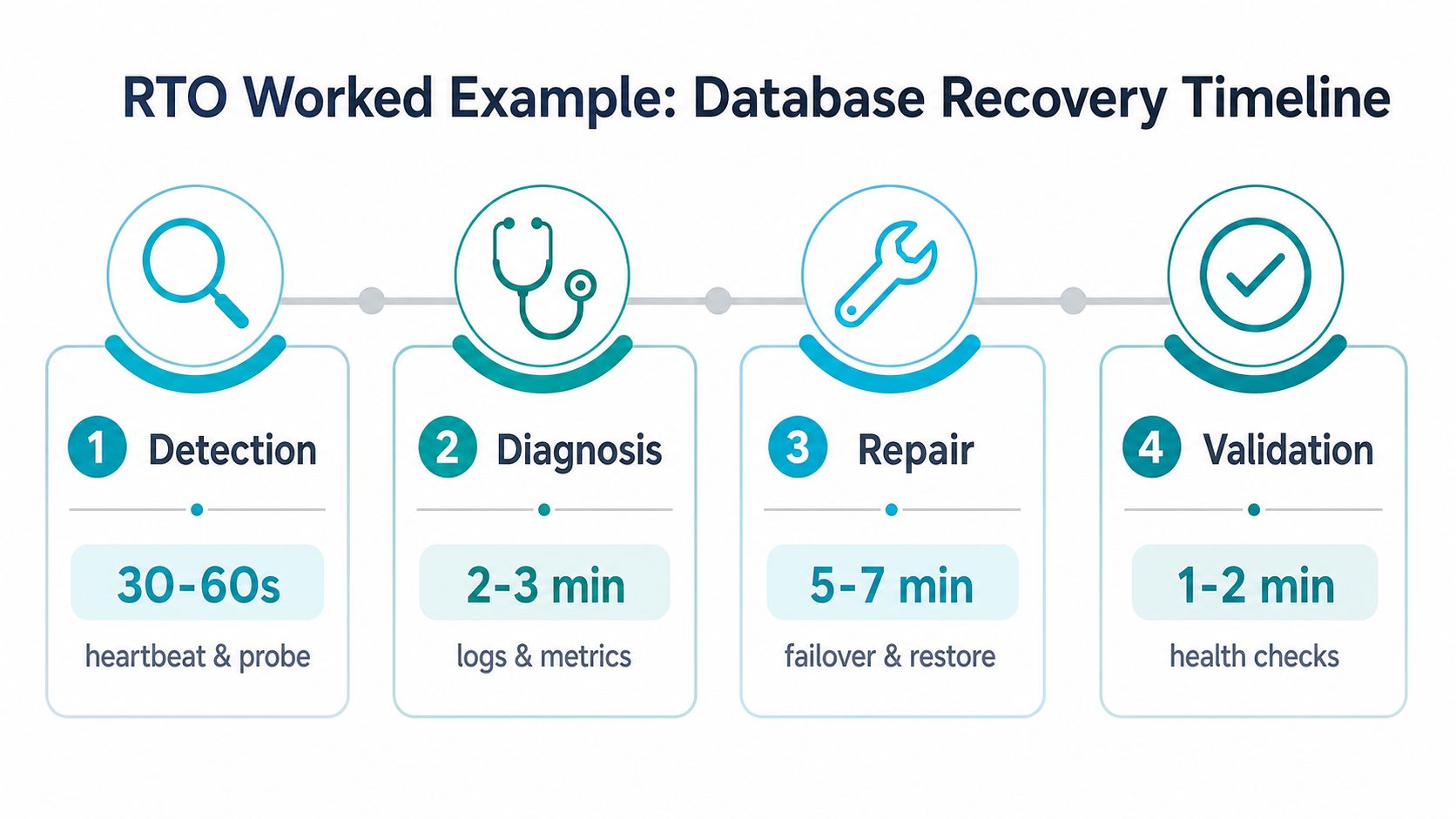
The hidden tax is usually DNS TTL. A 300-second TTL can be the difference between a total recovery around seven minutes and one that drifts toward fifteen, depending on the client mix and how the app reconnects. That's why the timing isn't just “how fast can the database come back,” it's “how many layers have to agree before users stop feeling the outage?”
It lines up well with the sequence here, because recovery speed comes from testable habits, not optimistic documentation.
What actually moves the clock
- Detection: heartbeat and probe timing, which depend on how aggressive your alerting is.
- Diagnosis: log access, metric clarity, and whether the on-call engineer already knows the failure pattern.
- Repair: replica health, failover automation, and whether the app can reconnect without manual intervention.
- Validation: smoke tests, schema checks, and the discipline to refuse traffic too early.
In a multi-tenant environment, clean runbooks matter. One customer's recovery shouldn't block another's, and the fastest teams are the ones that can isolate a problem, fail over cleanly, and verify the service without guessing at the next step.
Engineer-Level Habits That Actually Shorten RTO
Short RTOs come from habits that are repeated before the outage, not improvisation during it. Backups, replication, and clustering only help if the restoration path is known and rehearsed. The teams that consistently recover faster usually sweat the small operational details many ignore.
The practices worth keeping
- Backup cadence: use a weekly full backup, daily incremental backups, and continuous WAL archiving for databases. That gives you more restore points and a cleaner path back to a known state.
- Restore drills: run quarterly restores and measure them against the declared RTO, not against the hope that “it should be fine.” The number only matters if it survives contact with the drill.
- Proxmox HA: fenced nodes and witness quorum keep a cluster from making unsafe assumptions when a host disappears.
- Hot replicas in another failure domain: a second host or site gives you a real failover target, not just a backup file.
- Runbooks with exact commands: name the commands, the validation order, and the rollback trigger so the person on call doesn't have to improvise.
- DNS TTL discipline: keep TTLs in the 60 to 300 second range where fast cutover matters, then verify the app behaves well with that cache window.
Undocumented credentials do more damage to recovery time than most storage bugs do.
The failure modes are usually mundane. A diagram is stale, a snapshot path has never been tested, or the alert routes to someone who no longer owns the service. Those aren't edge cases, they're the normal reasons a “fast” architecture turns into a slow outage when the pressure is real.
If you want the hosting side of that discipline handled by people who run hardware every day, ARPHost, LLC is one option for Tampa bare metal, Proxmox private clouds, colocation, and managed infrastructure on the same recovery principles discussed here. The point isn't branding, it's making sure the physical and virtual layers line up with the RTO you wrote down.
Putting It Together and Quick Answers
RTO stops being abstract once you tie it to recovery choices. If you need a short target, you need pre-staged replicas, automated failover, tested validation, and a recovery site that can take traffic without manual heroics. If the target is longer, snapshot-and-restore pipelines and simpler orchestration may be enough.
For teams running Tampa infrastructure, the decision usually comes down to bare metal, a Proxmox HA cluster, or a backup-driven restore model. The right fit is the one that matches the workload instead of forcing every service into the same design. Use the disaster recovery testing checklist to turn the target into a drill plan.
The term can also mean different things in different systems, so confirm you are using the same definition as your provider or partner. If you need a separate reference point, Resolution Time terms is another place to check how the acronym gets used.
Quick answers
What's a reasonable RTO for a small business?
It depends on how much downtime the business can tolerate and how much it costs to keep the service hot.Does RTO include detection time?
In practice, yes, because the outage is not over until the service is usable again.How is RTO different from MTPD?
MTPD is the maximum tolerable outage, and RTO should sit below it with margin.Is zero RTO achievable?
Not for most systems. Even highly automated designs still have some recovery delay.How often should RTO targets be reviewed?
Review them after drills, major architecture changes, and any meaningful incident so the target stays tied to reality.
If you are tightening RTO for a database or other business-critical workload, test the restore path against the recovery window your team needs before you commit to infrastructure.
