

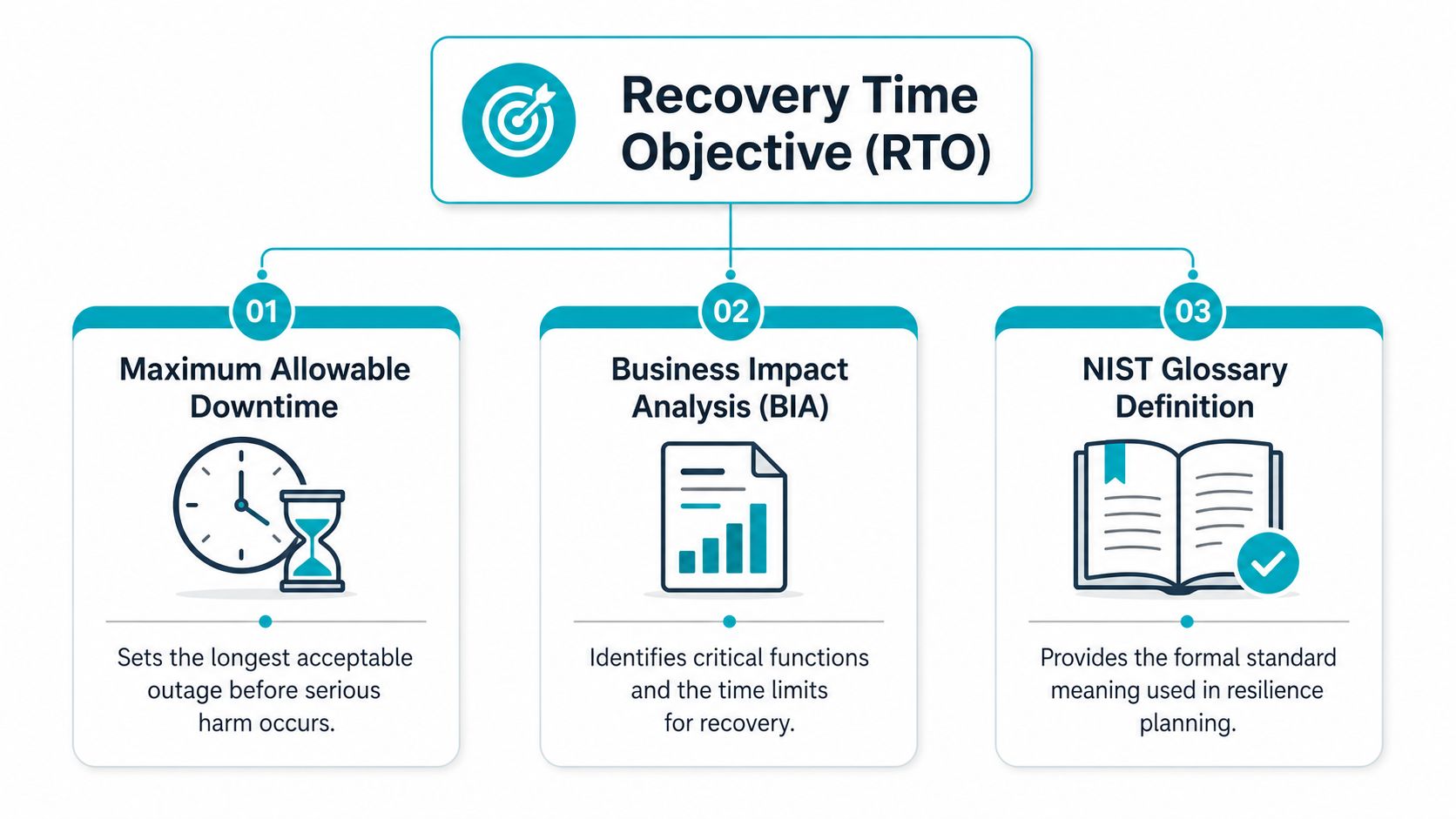
Recovery Time Objective is the maximum acceptable downtime before a business process or system must be restored, measured in seconds, minutes, hours, or days depending on what the business can tolerate. A 1-hour RTO means service restoration has to finish within 60 minutes of failure, while a 1-day RTO gives you 24 hours before the outage becomes unacceptable.
The call usually comes in the worst possible moment. A payment system stalls, a customer portal stops responding, or a database fails during peak traffic, and the first question isn't technical, it's business, how long can we stay down before the damage turns serious? That's why recovery time objective exists, it turns an uncomfortable guess into a deadline you can plan, test, and fund.
A lot of teams discover their real recovery posture only after an outage. The architecture looked solid, the backup schedule was current, and the runbook existed somewhere in a shared folder. Then the clock started, dependencies appeared, and the business found out that “recoverable” and “recoverable within the target window” are very different things.
For broader planning around outages and continuity, business continuity planning steps can help frame recovery as part of a wider operating model, not a one-off IT task. If the physical side of an incident is involved too, commercial restoration tips for business are a useful reminder that people, facilities, and systems all affect how quickly operations come back.
Introduction When Downtime Becomes a Business Crisis
A server outage rarely feels abstract to the people waiting on it. The help desk gets flooded, operations staff start improvising, and leaders begin asking whether the business can still fulfill orders, serve customers, or meet obligations before the day is over. At that point, the question isn't whether the system will come back someday, it's whether it will come back before the business impact crosses the line.
That's the practical purpose of recovery time objective. NIST defines RTO as the total time an information system can remain in recovery before it negatively affects mission or business processes, which makes it a business continuity decision, not just an infrastructure setting. The metric matters because it forces teams to put a time boundary around downtime instead of relying on optimism or vague promises.
RTO also exposes the gap between architecture and reality. A diagram can show replication, failover, and backups, but it doesn't prove how quickly the team can restore service when a real failure affects storage, applications, authentication, and user access at the same time. AWS is explicit that RTO and RPO should be defined by workload, documented, and then tested against actual recovery capability, because the target only means something if the team can meet it under failure conditions.
Practical rule: if a recovery target hasn't been tested, it's a hope, not an objective.
That's why senior IT managers and business decision-makers should treat RTO as part of risk management. It shapes budget, staffing, backup strategy, and the level of redundancy you need, not the level that looks good on a slide deck. When the clock starts, the organization either has a plan that matches the target or it has a story about why the target was missed.
What Recovery Time Objective Actually Means
Recovery Time Objective is the maximum acceptable delay between service interruption and restoration of service. AWS uses that exact operational framing, and TechTarget describes RTO as the maximum tolerable length of time a system, network, or application can be down after a failure or disaster, measured in seconds, minutes, hours, or days. That definition matters because it keeps the conversation focused on the business window, not just the technical recovery method. AWS recovery objective guidance and TechTarget's RTO definition both reinforce the same point, RTO is about how long downtime can last before the damage becomes unacceptable.
Think of RTO as a deadline, not a feature
A 1-hour RTO means the business needs the service back inside 60 minutes. A 1-day RTO gives the operation 24 hours of acceptable downtime before the impact becomes too high. Those are not abstract labels, they're decisions about how much interruption the business can tolerate.
That decision changes the recovery design. NIST's glossary and the CMS benchmark show how wide the range can be, from Tier 1 systems expected to recover in less than 1 day with highly automated takeover and component mirroring, to Tier 4 systems that may tolerate 30-plus days and rely on off-site tape, where recovery may be incomplete and data loss can extend to days or weeks. That spread makes one thing clear, RTO is a business continuity choice tied to maximum tolerable downtime. NIST RTO glossary
Why the target changes the architecture
Shorter RTOs usually require more automation, more redundancy, and more expensive recovery methods. Longer RTOs can rely on slower restoration methods such as backups and rebuilds. In practice, the RTO you choose influences whether you need hot standby infrastructure, replication, or a lower-cost restore process.
A useful way to think about it is simple, the tighter the deadline, the more your design has to remove manual steps and dependency delays. If you're still asking whether the recovery target should be “fast enough,” the better question is whether the business can afford the infrastructure needed to hit the deadline every time.
How RTO Differs from RPO and Other SLA Metrics
RTO gets confused with other recovery terms because they all sound like they're measuring the same thing. They're not. RTO measures how fast service must return, RPO measures how much data loss is acceptable, and an SLA is the service commitment that may include availability, support, or response terms depending on the agreement.
A clean distinction helps planning a lot. AWS defines RPO as the maximum acceptable time after the last data recovery point, which makes it a data-loss threshold, not a speed target. Work Recovery Time adds another layer, the extra time needed to verify system and data integrity after the restart, which means a service can technically come back online and still not be business-ready. Microsoft's recovery guidance and the U.S. CMS definition both support that operational reality.
| Metric | What It Measures | Example Target | Impact of Missing It |
|---|---|---|---|
| RTO | How long service can stay down | 1 hour | The outage lasts too long and business impact grows |
| RPO | How much data loss is acceptable | 15 minutes | Too much recent data must be recreated or re-entered |
| SLA | The promised level of service | Availability or response commitment | Contractual or operational breach may follow |
That table matters because a strong backup plan can still fail the business if the restore is too slow. A frequent mistake is optimizing for RPO while ignoring RTO, or treating both as if one number can cover every workload. They answer different business questions, and a complete recovery plan has to answer both.
For service-level tracking and operational accountability, SLA monitoring helps keep the recovery promise tied to actual performance rather than hope.
Useful shortcut: RTO is about restoring service, RPO is about protecting data, and WRT is about proving the system is actually ready to use.
The best practice is to define both RTO and RPO per workload. A payment platform, internal document system, and reporting tool don't carry the same business cost when they fail, so they shouldn't share the same recovery assumptions.
How to Calculate and Set Realistic RTO Targets
A realistic RTO starts with business impact, not with the storage array or hypervisor. Microsoft describes RTO as the maximum amount of time to bring resources online after an outage, and CMS adds Work Recovery Time as the extra time needed to verify system and data integrity. That means the true recovery window includes more than just booting servers, it includes storage recovery, validation, DNS or traffic cutover, and the point where users can safely resume work.
Start with the workload, not the company
The safest approach is to define RTO per workload or even per component. AWS recommends defining RTO and RPO by business category, documenting the disaster recovery plan, and then testing the design to measure actual recovery capability. That's because a payment service and an internal reporting tool can have completely different tolerance for delay.
A practical workflow looks like this:
- Assess business impact. Identify what breaks first, revenue, operations, compliance, or customer trust.
- Identify critical systems. Separate customer-facing workloads from internal tools.
- Define recovery tiers. Assign different tolerance windows to each tier.
- Set and document target RTO. Make sure the target is written down and measurable.
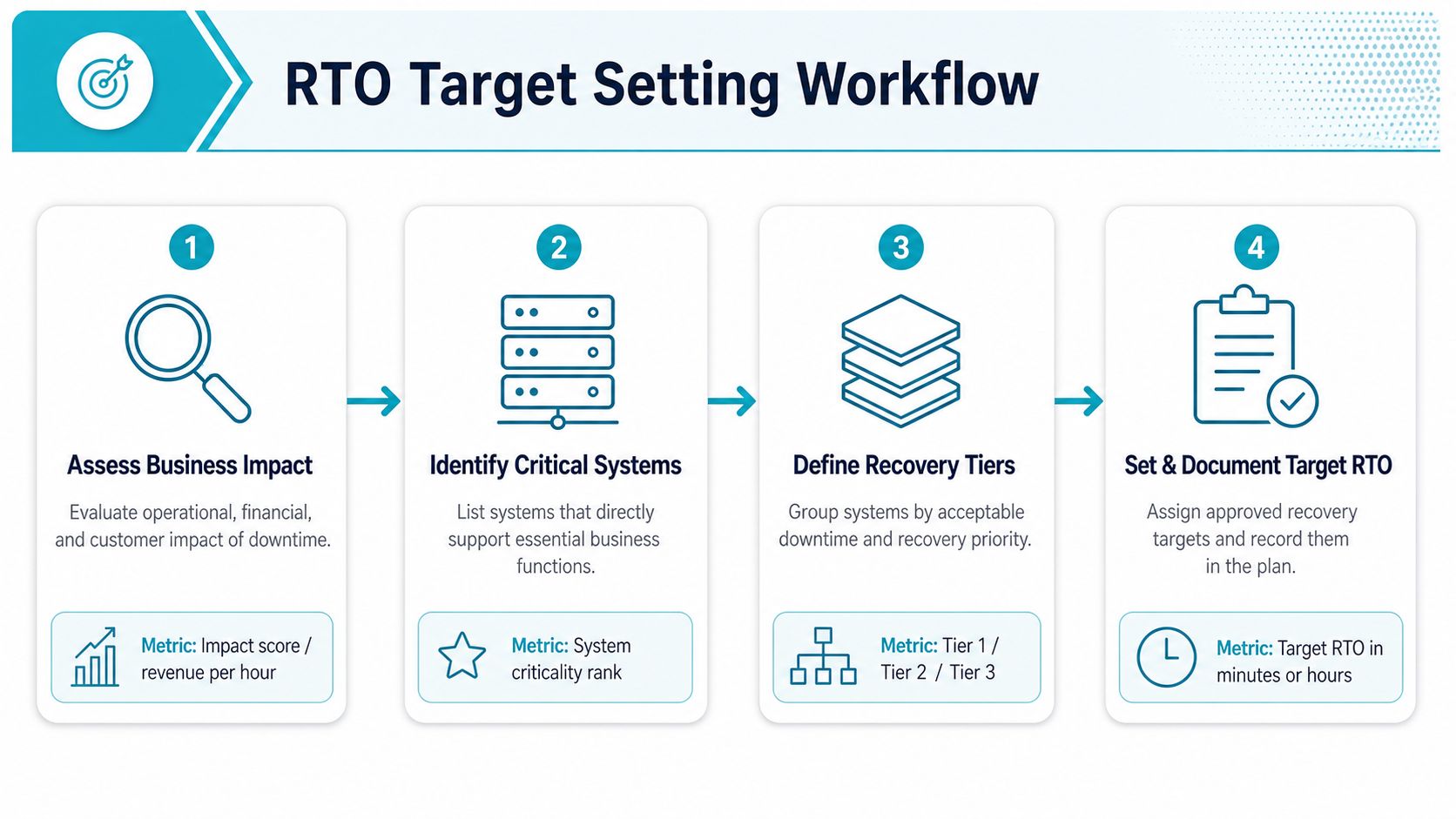
The hardest part is usually not choosing a number, it's agreeing on the dependency chain. A database may restart quickly, but the business still isn't recovered if storage validation, application hydration, or authentication services are still catching up.
Validate the number under failure conditions
An RTO based on architecture diagrams is only an estimate. The number comes from restoring under conditions that resemble an actual outage, because recovery speed depends on the slowest dependency in the chain. Microsoft's guidance makes this clear by treating RTO as the maximum delay to bring resources online, which means the clock doesn't stop when a VM boots, it stops when the service is usable.
Operational rule: if verification takes longer than startup, verification is part of RTO.
That's also where many teams discover that their recovery objective is too aggressive for the current design. At that point, the right choice is either to improve capability or to adjust the objective so it reflects what the environment can really deliver. A strong target is one the team can defend in a test, not one that only works in a planning meeting.
For organizations using managed platforms, restore time can also depend on how quickly the infrastructure layer is brought back into a usable state. In practice, that's where managed backup design, monitored failover, and prebuilt recovery procedures can make the difference between a recoverable outage and a missed objective.
Recovery Strategies That Meet Different RTO Targets
Recovery strategy follows the target, not the other way around. If the business can tolerate a longer outage, backup and restore may be enough. If the target is tight, you move toward replication, warm standby, active-active failover, or high-availability clustering because those approaches compress the time it takes to return service.
Match the method to the window
A backup-and-restore model fits longer RTOs because the process includes locating the copy, restoring data, rebuilding services, and validating the application. Replication shortens the gap by keeping a second copy of the workload closer to current state. Warm standby moves further, because capacity is already partially prepared. Active-active and HA clustering are the closest thing to continuous service, since they're designed to fail over quickly.
Oracle's MySQL HA guidance is a good example of why architecture changes the clock. A standalone database may have downtime tolerances of minutes to hours, while a high-availability database system can reduce single-instance-failure downtime to seconds to minutes with zero data loss. The business takeaway is straightforward, clustering and failover design can compress RTO by orders of magnitude when the application stack is built for it.
Decide whether ultra-low RTO is worth the cost
Many projects go wrong here. Teams chase the fastest possible recovery target even when the business wouldn't benefit from it. Current guidance from Cloudian notes that recovery methods vary widely in speed and cost, and the bottlenecks can be infrastructure, network capacity, storage, or staff readiness, so ultra-low RTO is a tradeoff, not a universal best practice. Cloudian RTO guidance
One way to test the economics is to ask a simple question, does the business lose more from the outage than it would spend to close the recovery gap? TechTarget's framing helps here too, since acceptable downtime is tied to how much revenue is lost per unit time. If the answer is no, the smarter move may be a longer but still acceptable RTO.
That matters when resilience plans involve always-on capacity, duplicated systems, and higher power use.
Practical rule: use the simplest architecture that can still hit the target with margin.
Where managed infrastructure helps is in reducing the operational drag around the recovery design. ARPHost, LLC offers Proxmox private clouds, VPS hosting, bare metal servers, colocation, and managed services, which are all relevant when the plan calls for faster restore paths, dedicated hardware, or a controlled recovery environment.
Testing and Monitoring Your Recovery Capabilities
An untested RTO is just a wish. Teams often believe they can recover within a certain window because the environment looks ready, but the only proof comes from measuring the actual restoration time under realistic conditions. That's why regular testing matters more than the written policy.
Test the way you expect to fail
Tabletop exercises help leaders make decisions before an outage, failover drills test orchestration and staff coordination, and full disaster recovery simulations reveal where the process breaks under pressure. The point isn't to pass every test, it's to expose where the clock is being burned, whether that's storage bring-up, authentication, app warmup, or manual approval steps.
Monitoring matters too, because recovery time starts when the incident is detected, not when someone notices it an hour later. If alerting is slow, the business loses time before the recovery process even begins. That's one reason operational teams need health checks, alert routing, and escalation paths that match the importance of the workload.
Measure, compare, and adjust
A disciplined recovery program should follow a simple rhythm:
- Schedule regular drills. Keep the recovery process familiar to the people who'll use it.
- Measure actual recovery time. Record when each phase starts and ends.
- Compare against target RTO. Identify the exact gap, not just the final miss.
- Update documentation and process. Fix the steps that slowed recovery.
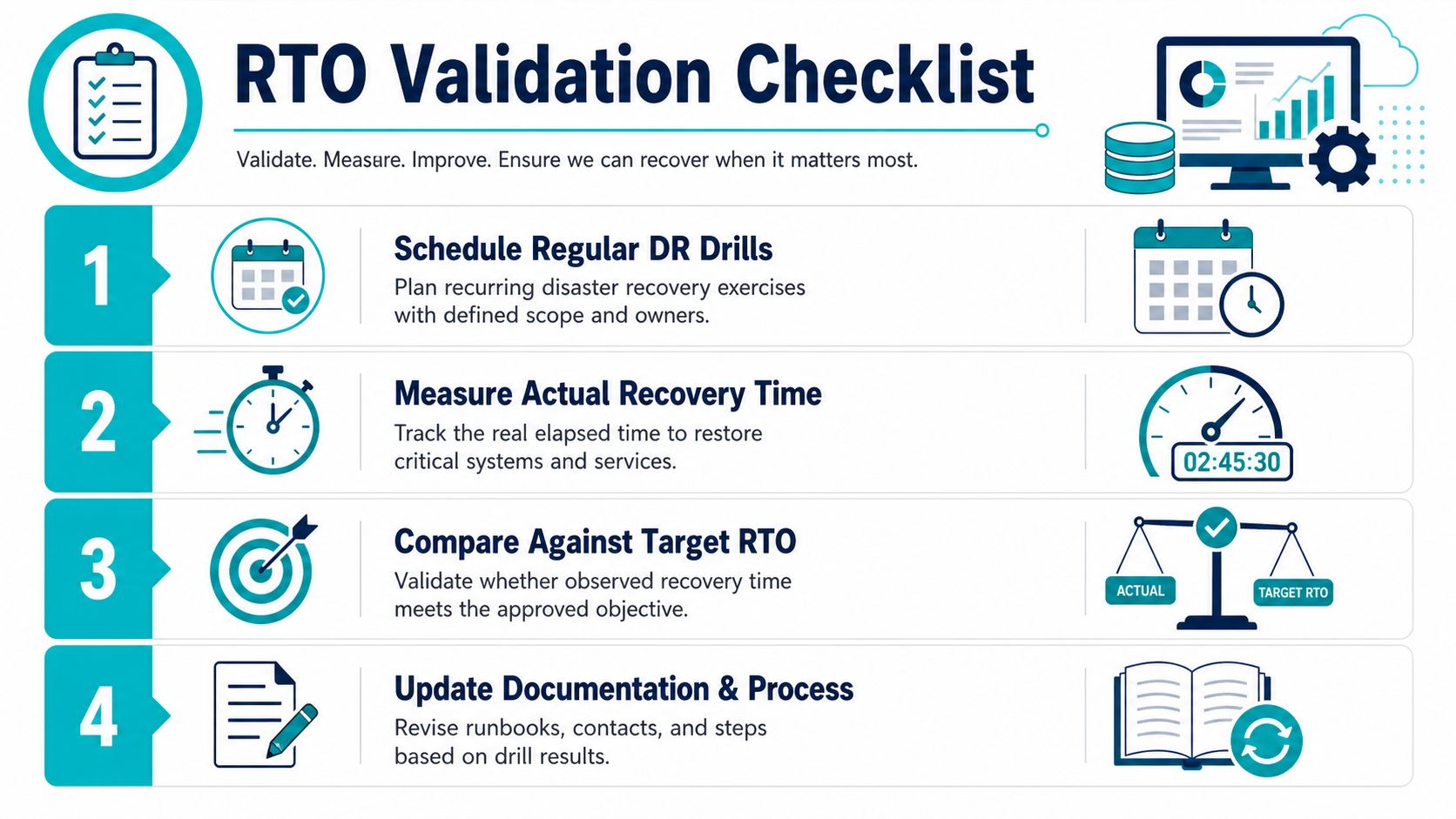
That checklist is only useful if the team acts on the results. If the restore took longer than planned because storage resync lagged or the app team needed manual intervention, the response is either a stronger architecture or a revised objective. Anything else leaves the same gap in place.
For a structured test program, disaster recovery testing checklist can help organize the steps before the next exercise. The larger point is simple, RTO becomes trustworthy only when it's continuously checked against reality, not once a year in a forgotten spreadsheet.
Sample RTOs by Workload and How to Move Forward
A practical way to approach this is to group workloads by how long the business can live without them. A customer-facing ecommerce platform usually needs a tighter target than an internal reporting app, while a file archive may accept a longer restore window if the data stays safe and the organization can keep operating. The main shift is to stop treating RTO as a company-wide slogan and assign it by tier and dependency chain, because a single target often creates false confidence.
A few common workload groups make that easier to see.
- Web applications. These often sit in the middle, because customers notice downtime quickly, but some disruption can be absorbed with limited manual work.
- Databases. These usually need tighter attention, because the application is only as available as the data layer behind it.
- Internal tools. These can sometimes tolerate a longer window if they do not block revenue or customer operations.
- Email systems. These affect communication and coordination, so the right target depends on how much the organization relies on them during an incident.
- Ecommerce platforms. These tend to need the strictest planning because downtime directly interrupts sales and order flow.
Each of these categories also depends on what sits underneath it. A web app might look recoverable on its own, but if the database, identity service, or storage layer comes back slowly, the recovery time follows the slowest link in that chain. That is why workload-level planning matters more than a single enterprise target.
The next step is to document both RTO and RPO per category, then map each workload to a recovery method that can deliver the result. If the target is modest, backup and restore may be enough. If the target is tight, consider HA clustering, failover design, or dedicated infrastructure that shortens the dependency chain and reduces the manual work during recovery.
Managed hosting and infrastructure services can help when the recovery plan needs monitored backups, prebuilt virtual environments, or hardware that is already prepared for faster failover. The right choice depends on workload sensitivity, not on a generic enterprise standard. A database that backs a sales system needs a different design from an internal file share, even if both live in the same environment.
When you are ready to turn RTO from a policy into an operating plan, start by auditing your critical workloads, writing down the acceptable downtime for each one, and testing the actual recovery path. Then choose the infrastructure, backup, and support model that can realistically meet those targets under pressure.
ARPHost, LLC provides the infrastructure pieces that commonly sit behind recovery plans, including VPS hosting, bare metal servers, Proxmox private clouds, colocation, secure web hosting bundles, and managed services. If you want to align workload-specific RTO targets with a practical recovery design, visit ARPHost, LLC and review the hosting and support options that fit your environment.
