

A database server fails at 9:14 AM. The last confirmed good backup finished at 8:00 AM, so the business may have lost customer orders, updates, and operational records created during the 74-minute gap. The technical team can restore the server, but restoration alone doesn't answer the harder question: which version of the data is safe and acceptable to the business?
That question defines the practical role of a recovery point objective, or RPO. RPO isn't how often a backup job runs. It's the maximum amount of data loss an application can tolerate, expressed as elapsed time between the disruption and the latest usable recovery point. A sound target must account for the workload, the failure type, and whether the recovered copy is clean.
What Recovery Point Objective Means in Real Outages
NIST defines RPO as “the point in time to which data must be recovered after an outage” in its recovery point objective glossary entry. In operational terms, it tells the infrastructure team how old the recovered data may be when service resumes.
In the opening outage, an 8:00 AM recovery point for a 9:14 AM failure creates a potential loss window of 74 minutes. The database might be recoverable, but transactions after the last valid copy aren't guaranteed to exist. RPO measures that time window rather than the number of gigabytes involved, because a small amount of missing transaction data can matter more than a large archive that rarely changes.
Working definition: RPO is the maximum age of information a business can accept losing after a specific failure.
RPO belongs to the workload
A company shouldn't assign one RPO to its entire environment. An order database, an internal file share, a development server, and an archive have different update patterns and business consequences. Applying the same aggressive target everywhere wastes storage, bandwidth, and administration effort, while applying a relaxed target to a transaction system leaves the most important data exposed.
The architecture must also distinguish between a valid recovery point and a recent copy. A snapshot created seconds ago may contain application inconsistency, corruption, or malicious changes. The useful target is therefore the latest usable point that satisfies the workload's data-loss tolerance.
The cost of a tighter target
A shorter RPO usually requires more than changing a scheduler setting. The team may need more frequent snapshots, continuous change tracking, asynchronous replication, synchronous storage, extra network capacity, longer retention, and more involved recovery procedures. Those mechanisms also introduce operational dependencies, such as monitoring replication lag and confirming that secondary storage has enough capacity.
A broader continuity plan can help teams document these decisions, including resources that help businesses find disaster recovery plans. The important design choice is still local to each application: identify what can be lost, select a recovery mechanism that can produce that point, and test whether the restored workload behaves correctly.
Recovery Point Objective Versus Recovery Time Objective
RPO and RTO measure different outage outcomes. RPO answers how much recent data can be lost. RTO answers how long the service can remain unavailable. A recovery design must meet both, because restoring quickly from an old copy still violates the data-loss target.
| Dimension | Recovery Point Objective (RPO) | Recovery Time Objective (RTO) |
|---|---|---|
| Primary question | How much data can the business lose? | How long can the service remain down? |
| Measured by | Time between the incident and the latest usable recovery point | Time from service interruption to restored operation |
| Main design drivers | Backup frequency, replication cadence, journal retention, snapshot design | Failover automation, standby capacity, restore speed, runbook maturity |
| Validation method | Inspect recovery-point age and data integrity | Time a complete recovery workflow from detection to service availability |
| Typical failure | The system restores, but recent changes are missing | The right data exists, but users wait too long for service |
A tier-2 application with a 2-hour RPO and a 1-hour RTO can tolerate losing up to two hours of changes, while the service should return within one hour. Scheduled snapshots, off-site replication, and a tested restore workflow may fit that requirement.
A tier-1 e-commerce workload may target a near-zero RPO with a 15-minute RTO. AWS Well-Architected reliability pillar guidance for recovery objectives describes recovery objectives that require a different architecture, such as frequent or continuous data movement and a rapid failover path. Synchronous replication can reduce the nominal recovery point, but it also demands suitable storage, network performance, and failure handling. Asynchronous replication accepts some lag in exchange for lower distance and infrastructure constraints.
A fast RTO does not guarantee a tight RPO. A prebuilt standby server can start quickly from an outdated backup. Continuous replication can preserve recent writes while application dependencies, database consistency, or manual recovery steps still delay service restoration. Validate both objectives with a complete recovery exercise, not separate component tests.
Document the targets separately in vendor discussions. The recovery time objective planning guide helps keep availability requirements distinct from data-loss requirements. For platform comparisons, review Azure backup options for businesses while checking whether the proposed design provides point-in-time recovery and a verified restore path. A low nominal RPO is not useful if ransomware or corruption has already reached every replicated copy.
Calculating RPO and Tiering Workloads by Risk
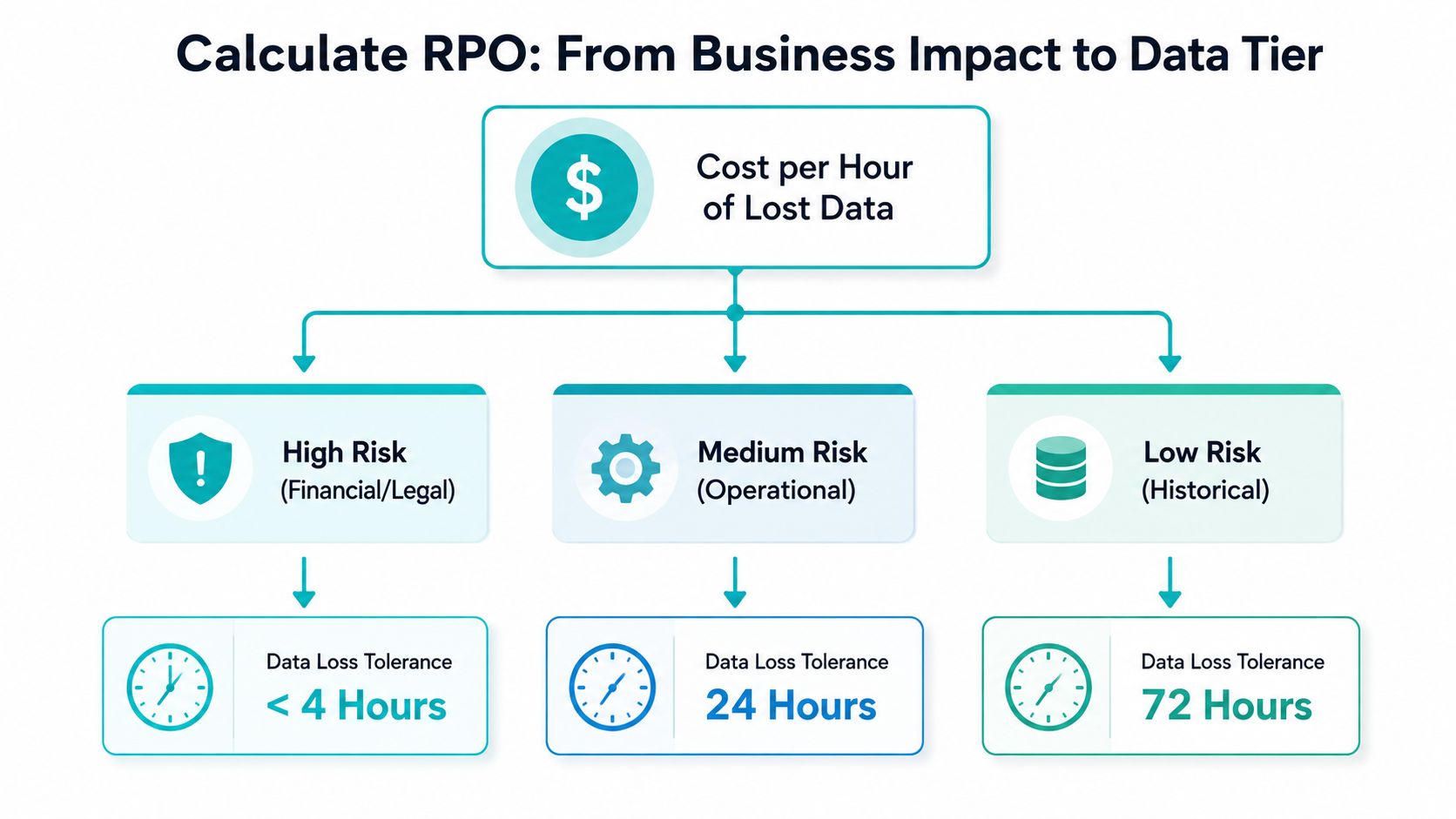
An RPO is defensible when the business can explain the loss it accepts and the protection it will fund. Start with the workload's recent-change exposure, then choose an architecture that can produce and restore recovery points within that limit.
Published continuity examples place mission-critical applications near a near-zero RPO, while lower tiers may use a 2-hour RPO or 4-hour RPO. Other guidance uses a 15-minute RPO for tier-1 systems, with tier-2 at 2 hours and tier-3 at 4 hours, as summarized in BCMpedia's RPO reference). Treat these figures as starting points, not universal defaults. A workload's dependencies, write rate, replication distance, and restore method determine whether the target is achievable.
A five-step method
Classify the workload. Identify whether it handles transactions, supports daily operations, stores historical material, or serves development. List dependencies, including databases, queues, file shares, identity services, and external integrations.
Estimate recent-loss impact. Ask what losing one hour of changes would do to orders, invoices, compliance records, customer commitments, or staff productivity. Base the decision on transaction volume and business impact, not storage capacity.
Check obligations and recovery commitments. Regulations, contracts, service levels, and internal continuity policies may require a tighter tolerance than the department expects. Define the information that must be restored before work can resume.
Price the protection method. Compare scheduled backups, point-in-time snapshots, asynchronous replication, synchronous replication, and continuous protection. A tighter target can require more bandwidth, storage, hardware, monitoring, and testing. Document those trade-offs instead of selecting a target without an implementation plan.
Write the target per application. Record the RPO, RTO, owner, recovery mechanism, retention policy, and last successful test. The BCI continuity guidance defines RPO as the point to which information must be restored for an activity to resume and describes it as maximum data loss measured in time.
Replication design sets the practical ceiling. Synchronous replication can preserve acknowledged writes across supported failures, while asynchronous replication introduces lag. Continuous or point-in-time systems may offer frequent recovery points, but only if retention, application consistency, and restoration are tested.
A backup schedule is not a guaranteed RPO. Failed jobs, replication lag, corrupted snapshots, or an unusable application state leave the target on paper. For ransomware, a low nominal RPO also needs an immutable, verifiable restore point.
Matching Backup and Replication Strategies to RPO Targets
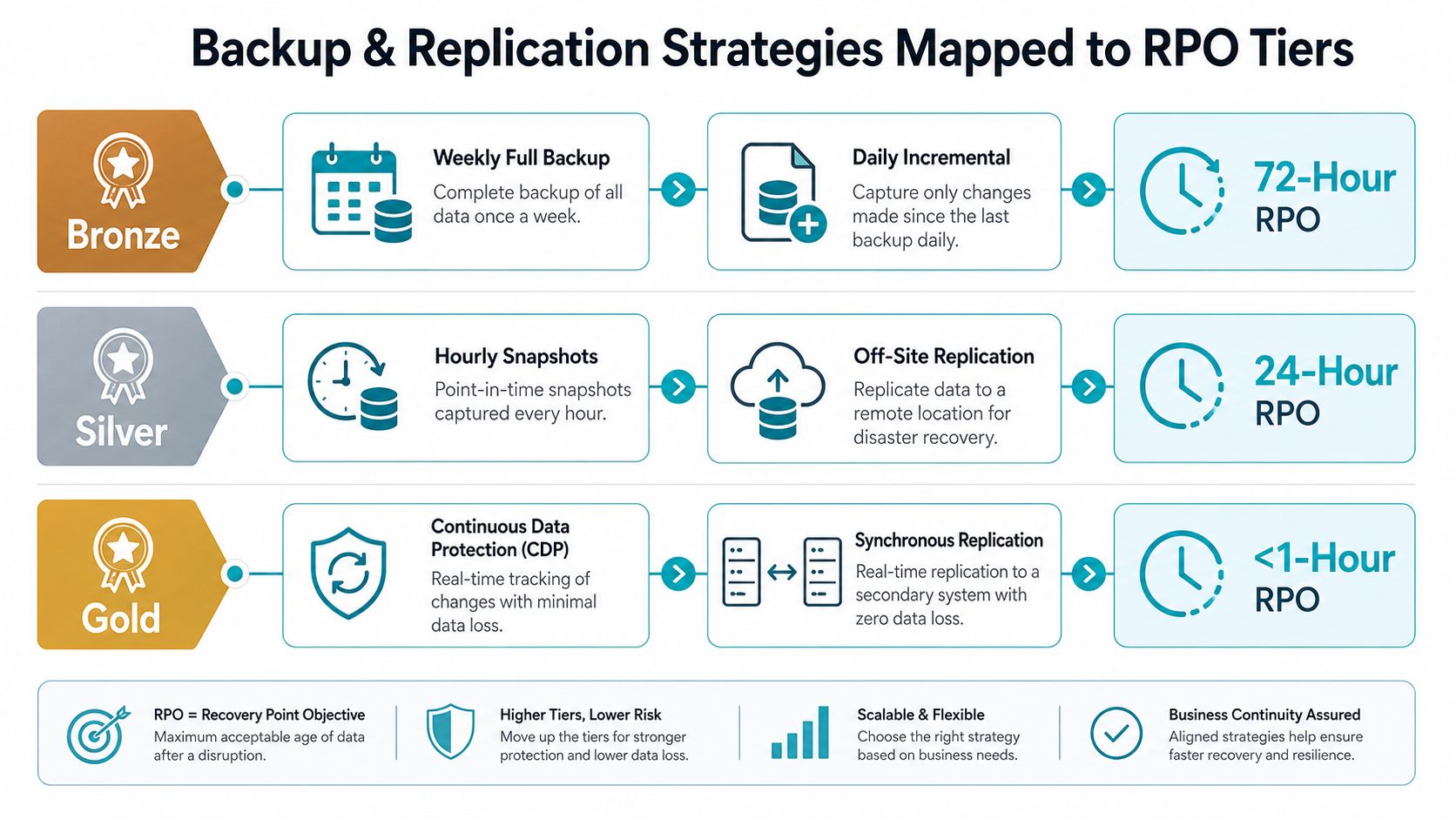
The recovery mechanism determines what RPO a workload can achieve. A daily snapshot can't support a workload that can tolerate only minutes of lost changes, even if the storage platform is fast and the restore process is well documented.
| Strategy | How it works | Practical fit |
|---|---|---|
| Scheduled backup | Full, incremental, or snapshot jobs create discrete recovery points | Suitable for workloads that accept a broad recovery window |
| Asynchronous replication | Changes move to another system after the primary writes them | Useful for multi-minute or longer targets, but replication lag must be monitored |
| Synchronous replication | The write is acknowledged across the participating storage design before completion | Can approach zero data loss for supported localized failures, with greater latency and infrastructure complexity |
| Continuous protection | Change streams or journals preserve frequent recovery points | Supports tight targets when the interval, retention, and restore process are engineered correctly |
| Point-in-time restore | The operator selects a recovery moment from stored snapshots or journals | Useful for selecting a consistent point, especially when the latest copy is damaged |
AWS describes RPO as a per-workload requirement and explains that shorter objectives require more frequent backups or continuous replication. Its recovery-objective planning guidance also reinforces that RPO must be considered alongside RTO.
Failure scope changes the result. A point-in-time restore may provide a very tight recovery point for a localized application failure, while a regional outage, storage loss, or maintenance event can create a different result because the required copy or replication path may not be available. Oracle documentation similarly maps different failure events to different RPO outcomes, including zero-loss cases for some high-availability designs and up to five minutes when point-in-time restore is used, as described in the referenced cloud recovery guidance.
Practical rule: Set the target against the failure modes you intend to survive, not only against the best-case behavior of the storage platform.
A backup service can simplify scheduling and off-site retention, but it doesn't remove the need to measure completion, replication lag, recovery-point age, and restore integrity. Teams evaluating Backup as a Service should ask which workloads are protected, how recovery points are isolated, and how a full application restore is validated.
Why Ransomware Quietly Breaks the RPO Promise
A business runs continuous replication from its production site to a secondary site. The monitoring dashboard reports a recovery point measured in seconds, so the team assumes the secondary environment can provide nearly current recovery.
Then ransomware encrypts shared files and database records. The replication system faithfully copies those changes to the secondary site. The business now has a very recent copy, but the copy contains the same malicious state. Its nominal RPO is tight, yet its usable RPO is unacceptable because the latest recovery points can't support a clean restore.
This is why RPO should include restore integrity, not only timestamp freshness. A recovery point is valuable when the data is consistent, accessible, and free from the incident that caused the outage. Continuous synchronization without historical versions can reduce the time gap while also reducing the team's ability to return to an earlier clean state.
Build a clean recovery path
Use multiple controls together:
- Immutable storage: Prevent protected recovery points from being altered or deleted during the retention period.
- Versioned snapshots: Keep earlier states so operators can select a clean point instead of restoring only the newest copy.
- Retention isolation: Separate backup administration and storage access from the production credentials that an attacker may compromise.
- Restore validation: Open databases, verify application dependencies, and confirm that restored services work, rather than checking only whether files copied successfully.
- Incident-aware selection: Search backward through recovery points when encryption, corruption, or unauthorized changes may have existed before detection.
The distinction matters in vendor evaluations. A provider may advertise minute-level RPOs, but the buyer still needs evidence about immutable retention, isolation, application consistency, and restore testing. ARPHost's immutable backup solutions address this part of recovery planning by focusing on protected versions and identifying a last known good point before restoration.
A low RPO is a useful engineering target. It isn't a guarantee that the latest copy is safe. Teams should report both the age of the latest recovery point and the age of the latest verified clean recovery point.
Choosing Hosting and Infrastructure to Hit Your RPO
RPO targets live in the storage, compute, network, and operating procedures beneath the application. A VPS with scheduled snapshots and off-site copies can suit a workload that accepts a broader recovery window. A high-availability KVM VPS with replicated NVMe storage and frequent snapshots can support more demanding operational systems, provided the provider documents the actual cadence and restore process.
Private cloud designs add control over placement, storage, and failover. A Proxmox VE cluster with dedicated hardware, journaled storage, and synchronous replication can target very small recovery windows for supported localized failures, but the design must account for network latency, quorum, storage behavior, and failure-domain separation. That architecture isn't automatically appropriate for every workload.
Match the platform to the workload
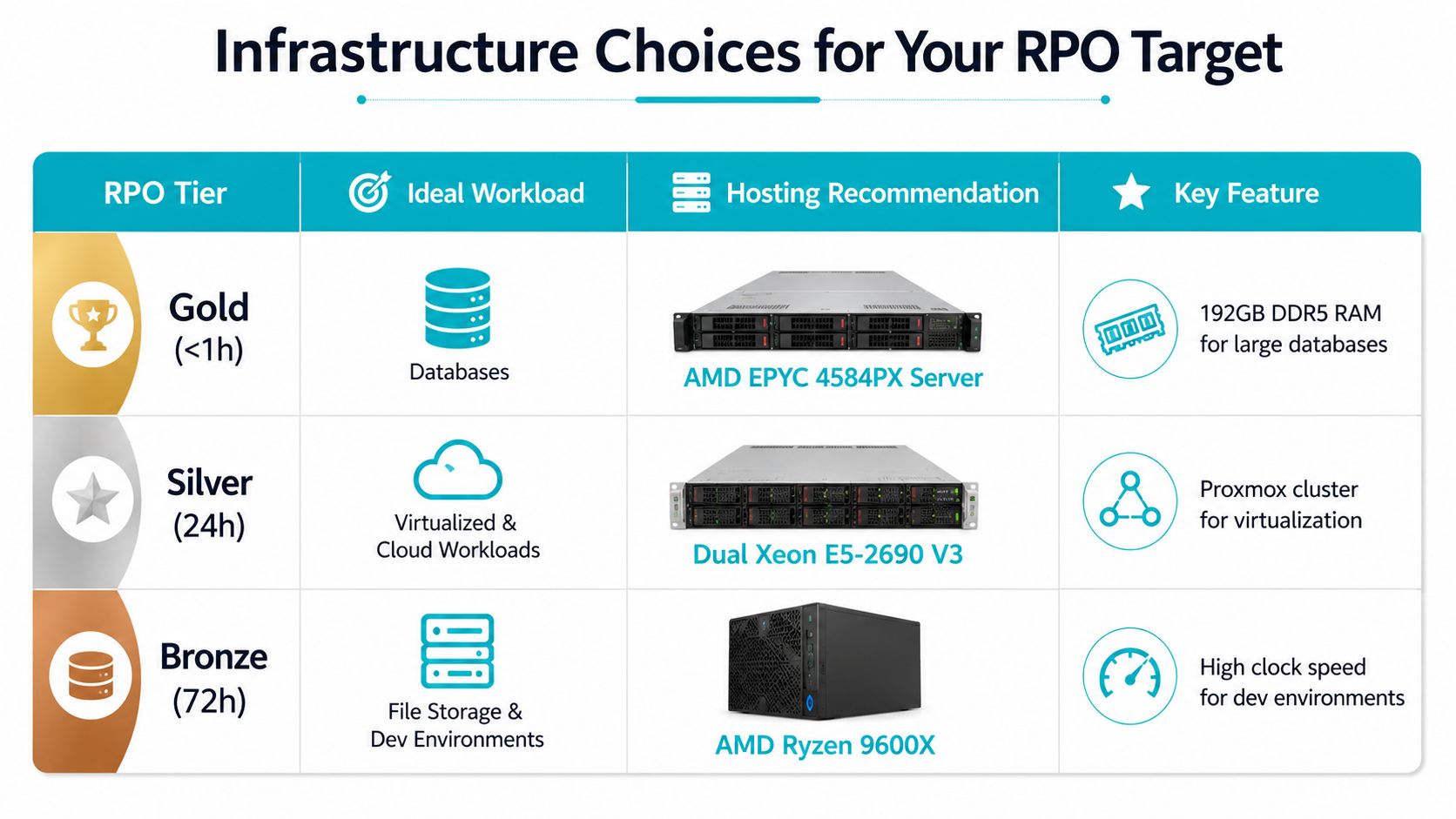
Tier-3 workloads: General websites, development environments, and historical data can use scheduled backups when the business accepts a longer recovery window. The AMD Ryzen 9600X bare metal configuration, with 6 cores, 12 threads, 96GB DDR5 RAM, and NVMe SSD storage, is suited to single-tenant applications and development environments. Details are available on ARPHost bare metal servers.
Tier-2 workloads: Multi-tenant virtualization, internal applications, and operational databases benefit from replicated storage, frequent snapshots, and monitored failover. The dual Intel Xeon E5-2690 V3 configuration provides 28 cores, 56 threads, 64GB DDR4 ECC RAM, and enterprise storage, making it a practical option for Proxmox clusters and VPS nodes.
Tier-1 workloads: Memory-intensive databases and dense virtualization need stronger storage and memory design, plus a recovery mechanism capable of producing the required point. The AMD EPYC 4584PX system includes 16 cores, 32 threads, 192GB DDR5 RAM, and NVMe SSD storage, which fits large databases and high-density virtual machines. The architecture still needs application-aware protection and tested recovery.
ARPHost offers managed VPS hosting, Proxmox private clouds, bare metal, colocation, and managed infrastructure operations. Its dedicated Proxmox private cloud plans start at $299 per month for high-performance clusters, while VPS hosting starts at $5.99 per month, with pricing shown on the relevant product pages.
Operational resilience also includes physical controls, access management, power design, and facility safeguards.
Scaling this with ARPHost
Start with the workload's documented RPO, then choose the least complex platform that can meet it under the intended failure scenario. You can start with ARPHost VPS hosting for workloads that need configurable compute and NVMe storage, view dedicated Proxmox private cloud plans when cluster control and high availability matter, or request fully managed IT services when your team needs monitoring, patching, backup operations, and recovery coordination handled by an infrastructure provider.
RPO Implementation Checklist for IT Teams
Run this checklist against every production workload, not just the systems already labeled critical. The result should be a short operational record that an engineer can use during an incident without interpreting vague policy language.
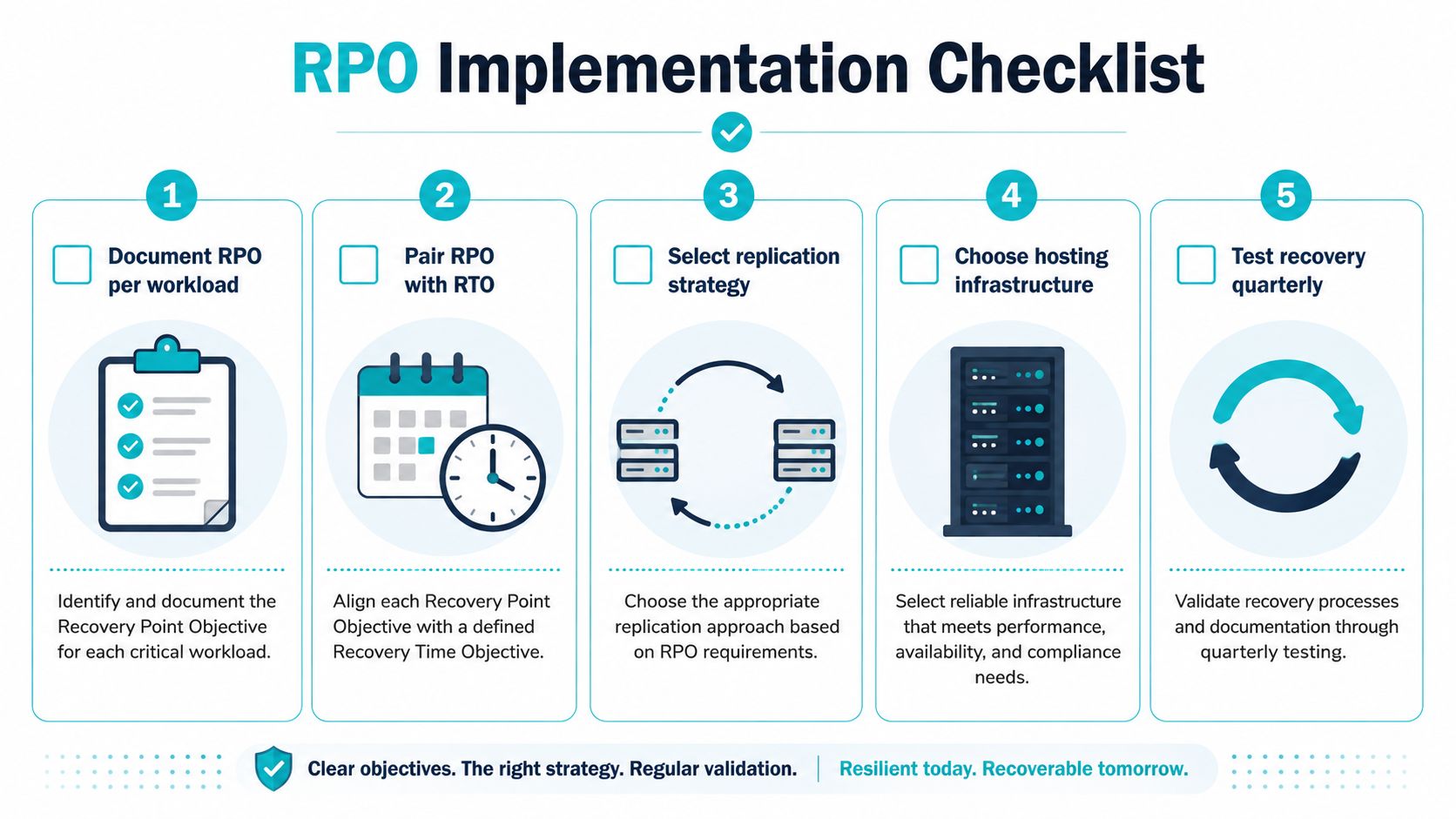
Document RPO per workload. Name the application owner, data sources, dependencies, acceptable loss window, and latest approved recovery point. Don't record one environment-wide number.
Pair RPO with RTO. Write down how much data may be lost and how quickly the service must return. A recovery plan that states only one of these targets is incomplete.
Select the replication strategy. Match scheduled backups, asynchronous replication, synchronous replication, or point-in-time protection to the target. Monitor backup completion, replication lag, available retention, and failed jobs.
Choose hosting infrastructure. Verify that the VPS, bare metal, Proxmox cluster, storage layer, and network path can produce the intended recovery point under the declared failure scenario. Include credentials, runbooks, and escalation contacts.
Test recovery routinely. Restore a representative workload, validate the database and application, measure the actual recovery-point age, and record defects. Repeat the exercise as systems and dependencies change.
Operational test: If the team can't identify the latest verified clean recovery point during an incident, the documented RPO isn't being met.
ARPHost provides a 99.99% uptime SLA, NVMe-backed infrastructure, Proxmox Backup services, and 24/7 U.S.-based support. Those capabilities can support different RPO designs, but the final result still depends on workload classification, backup configuration, retention, isolation, and tested restoration.
For infrastructure teams that need hands-on operation, ARPHost managed services can cover monitoring, patching, backup administration, network management, and recovery coordination. Teams planning dedicated virtualization or database capacity can review ARPHost bare metal inventory and map the hardware to their application-specific RPO requirements.
ARPHost, LLC provides managed VPS hosting, bare metal servers, Proxmox private clouds, backup services, colocation, and fully managed IT operations for teams that need recovery objectives tied to real infrastructure. Visit ARPHost, LLC to discuss your workload-level RPO, replication design, and recovery testing requirements with a U.S.-based infrastructure provider.
