

Your backup dashboard is green. Jobs complete overnight, replication reports success, and the storage appliance still has plenty of capacity. Then a compromised remote-access account reaches the backup console, recovery points disappear, and the hypervisor environment is encrypted before anyone understands what happened. The organization had backups, but it didn't have a recovery path it had recently proved.
That distinction defines a useful ransomware backup strategy. The question isn't how many copies exist. It's whether a clean, authorized team can restore the right workloads within the business's actual tolerance after an attacker has tried to destroy the backup system first.
When Backups Become the Target
A 60-person SaaS firm once looked reasonably prepared on paper. It ran nightly Veeam jobs to a NAS and replicated those jobs offsite. During an incident, attackers used a compromised VPN account to reach administrative systems, pivoted into the backup console, deleted 14 days of recovery points, and encrypted the vCenter environment before the operations team noticed.
The backups existed. The restore did not.
That failure pattern is more common than many infrastructure reviews assume. Attackers can use stolen privileged credentials, abuse vCenter APIs, push Group Policy changes that delete Volume Shadow Copy Service snapshots, and search for backup encryption keys during reconnaissance. A backup server that shares the production identity plane or sits on the same permissive network becomes another workload to compromise, not a safe recovery boundary.
A major 2023 survey found that ransomware actors targeted backup repositories in 93% of incidents. The same research reported that 75% of victims lost at least some backups, while 39% lost backup repositories completely. It also found that 60% of organizations said backup and cyber teams were insufficiently aligned, and only 16% avoided paying ransom because they could recover from backups.
Practical rule: Treat the backup console, repository credentials, encryption keys, and restore runbooks as a separate Tier-0 system.
The alternative outcome looks different. An immutable object-lock copy remains outside the attacker's deletion path. A separate backup control plane prevents a compromised production administrator from changing retention. A restore drill has already identified the correct recovery point and documented the sequence. Recovery can start within hours because the team isn't discovering its architecture during the crisis.
That is why immutability alone isn't a recovery strategy. It protects a copy from deletion or overwrite, but it doesn't prove that the data is clean, that the application will boot, or that the restore will meet the required RTO. A resilient design combines isolated storage, separated authority, malware validation, and timed recovery tests.
Define RPO, RTO, and What You Can Afford to Lose
RPO and RTO belong in an approved recovery plan, not only in a disaster-recovery presentation. Build a one-page spreadsheet and have each workload owner approve the assumptions.
| Workload | RPO (data loss) | RTO (downtime) | Recovery source | Priority tier |
|---|---|---|---|---|
| Customer-facing application | 5 minutes | 1 hour | Transactional replica and immutable VM backup | Critical |
| Internal ERP | 1 hour | 4 hours | Application-consistent image backup | High |
| File shares | 4 hours | 8 hours | Immutable file backup | High |
| Source repositories | 1 hour | 4 hours | Offsite repository export | High |
| Archive data | 24 hours | 24 hours | Nightly image or object backup | Standard |
These values are planning examples, not universal targets. For a deeper explanation of recovery-point decisions and their effect on infrastructure design, use this recovery point objective guide.
Build the matrix with workload owners
Column A, workload: List customer-facing applications, databases, ERP systems, file shares, source repositories, identity services, and management platforms. Record dependencies as well. A web application restored without DNS, authentication, or its database is not recovered.
Column B, RPO: Ask how much recent data the business can lose. A PostgreSQL workload with transactional replication might target a five-minute RPO. Archive data may tolerate a nightly image job and its associated 24-hour exposure.
Column C, RTO: Ask how long the service can remain unavailable. A warm standby may support a one-hour RTO for a revenue-producing application, while a file archive may wait longer.
Column D, recovery source: Name the exact copy and location. “Backup system” is too vague. Write “Proxmox Backup Server repository in isolated object storage” or “warm PostgreSQL standby plus immutable log archive.”
For a 40-VM Proxmox cluster hosting a B2B platform, rank systems by revenue exposure per hour, contractual commitments, dependency order, and regulatory retention. The customer portal, database, identity service, and payment integration may require different RPO and RTO targets. A recovery sequence could start with identity, continue with the database, then application services, reporting, and internal tools.
Let objectives drive design
RPO sets the required replication frequency, log-shipping interval, snapshot cadence, and immutable-tier capacity. RTO sets compute capacity, network throughput, orchestration requirements, and whether an offsite copy can be restored fast enough.
A timed restore drill turns these assumptions into evidence. Measure how much data the chosen recovery point loses, how long each dependency takes, and whether the complete service meets its target. Repeat the test often enough to expose configuration drift before an incident.
Do not choose a backup product first and force the business into its defaults. Define acceptable loss and downtime, select a recovery source that can meet them, then prove the result under a timer. That validation connects the backup design to measurable RPO and RTO outcomes.
Build the 3-2-1-1-0 Architecture
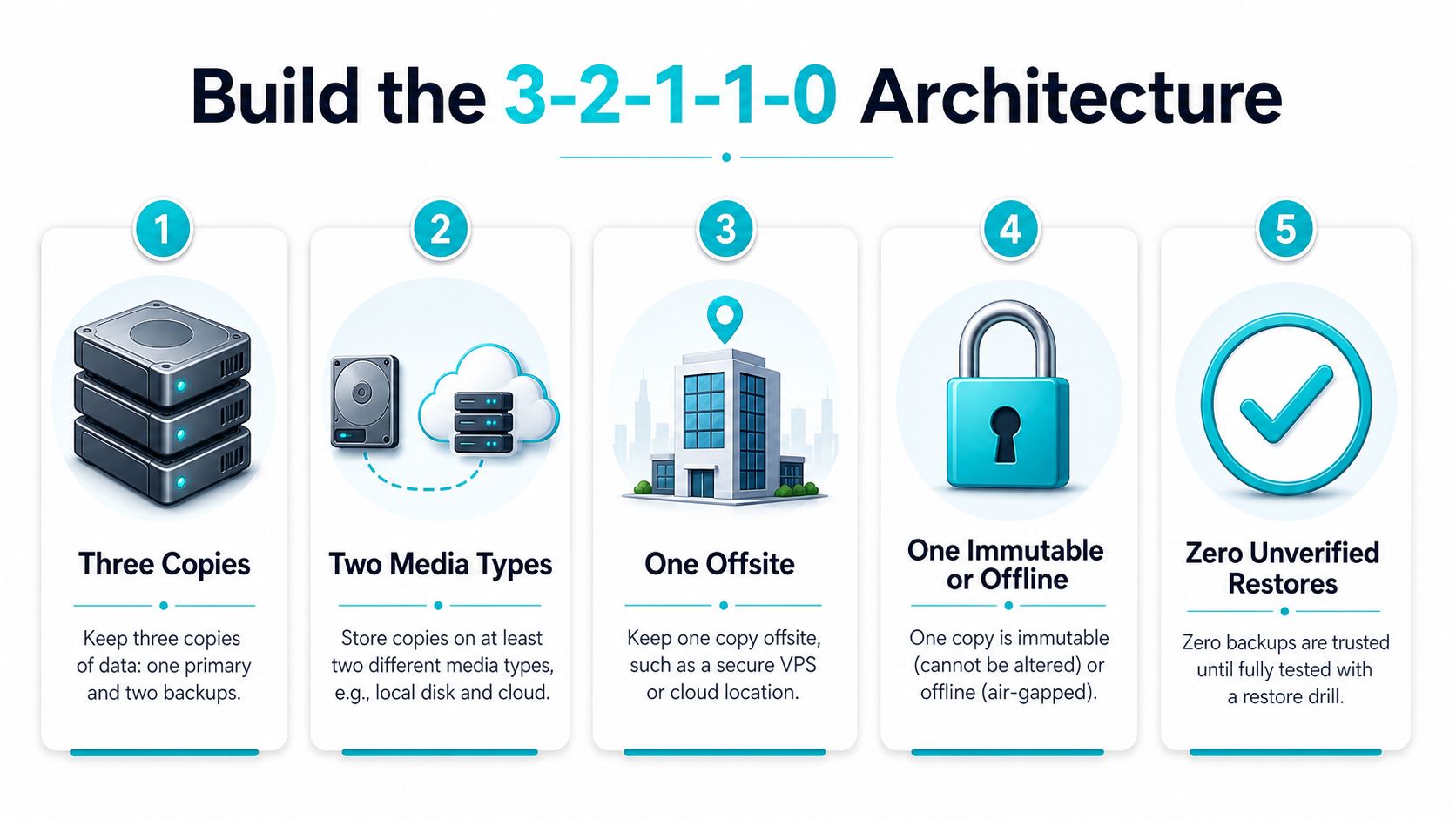
The classic 3-2-1 model needs an additional protected copy and a proof requirement for ransomware. The practical model is 3-2-1-1-0, meaning three copies, two media types, one offsite copy, one immutable or offline copy, and zero unverified restores.
Add each protection layer deliberately
Three copies: Keep production data plus two backup copies. Production storage supports a fast local restore, while independent copies provide options after deletion, corruption, or encryption.
Two media types: Don't place every copy on the same storage platform. Combine local disk, object storage, tape, or another independently administered target. A second copy on different hardware can avoid an attack that searches for familiar VMware or Proxmox datastore paths.
One offsite copy: Replicate to a separate facility, region, or cloud account. Offsite placement protects against site loss and gives the response team a recovery location that doesn't depend on the compromised production network.
One immutable or offline copy: Use WORM retention, S3 Object Lock, an immutable object-storage bucket, or physically disconnected media. The retention policy must prevent deletion, overwrite, and premature shortening during the approved window. Review ARPHost's immutable backup solutions when evaluating an offsite protected tier.
Zero unverified restores: A completed job is only a transport event. Count the copy as usable after a recent restore test proves that the backup mounts, the VM boots, the database opens, and the application responds.
Match the design to the platform
For Proxmox, Proxmox Backup Server can create image-level backups that replicate toward S3-compatible storage with immutability. Keep the backup management plane separate from the cluster's production administration path.
For VMware, a Veeam Hardened Repository on Linux provides a practical target for protected backup chains. Use independent administrative access and test restores with Veeam SureBackup or an equivalent isolated workflow.
For cloud-native workloads, combine cross-region snapshots with exports to a separate AWS or Azure account. The application account shouldn't have permission to delete the recovery account's protected copies.
A local snapshot can shorten recovery, but it shouldn't be the only recovery source. A cloud copy can provide geographic separation, but it still needs identity isolation and retention controls. Air-gapped media is highly resistant to network compromise, although it introduces handling and restore logistics that must be tested.
Lock Down Backup Access and Credentials
The backup console deserves the same care as a domain controller. A production Active Directory administrator should not automatically be able to log in, alter retention, or delete repositories.
Use a separate identity provider or administrative domain, MFA-bound individual accounts, and role separation between operators who run jobs and administrators who change repositories. Store break-glass credentials offline in a vault that only two named responders can open. Service accounts should be limited to the tasks they perform, should not allow interactive logon, and should not be reused on workstations.
Place backup servers and storage in a dedicated VLAN or VPC. Use deny-by-default firewall rules, permit only required backup flows, and force administrative access through a monitored jump host. Rotate service-account secrets on a defined schedule and review every privileged action, especially retention changes and deletion attempts.
Organizations building broader protection programs can also use Reworx Recycling's breach prevention resource to complement technical controls with practical data-handling considerations.
| Failure Mode | What Goes Wrong | Mitigation |
|---|---|---|
| Shared Active Directory credentials | A production compromise reaches the backup console | Separate backup identity, MFA, and role-based access |
| Reusable SSH keys | One leaked key grants access across hosts and repositories | Short-lived keys, vault storage, host restrictions, and rotation |
| SaaS admin tokens on personal devices | Token theft enables remote changes outside normal administration | Hardware-bound MFA, managed devices, and conditional access |
| Backup storage on the user VLAN | Attackers move laterally from endpoints to repositories | Dedicated VLAN or VPC with restrictive firewall rules |
| Retention controlled by the same administrator | An attacker shortens retention before deleting copies | Object Lock or WORM policy controlled outside production authority |
Enable object-lock retention before writing backup data. Test the policy with a noncritical object and confirm that deletion and retention-shortening attempts fail for ordinary administrative identities. Immutability is useful only if the actual account compromise scenario cannot bypass it.
Restore Drills That Prove Recovery
A backup becomes operationally useful when a clean restore completes against a timer. The test should resemble the incident, not a screenshot review of successful jobs.
Run a repeatable monthly cycle
Day 1, select: Choose a workload without letting the application owner prepare a special copy. Rotate between virtual machines, databases, file services, and the systems that support recovery itself.
Day 2, restore: Recover into an isolated VLAN, sandbox account, or clean-room environment. Keep the restored system away from production credentials and network paths.
Day 3, inspect: Scan restored data with endpoint detection and response tooling. Add YARA rules that look for indicators associated with known ransomware families. A backup can be intact yet still contain malicious content, so integrity and cleanliness are separate checks.
Day 4, validate: Boot a VM, mount a test database, replay a transaction log, and exercise application transactions. Confirm that services respond, dependencies resolve, and the recovery account can perform the required administrative actions.
Track the actual RPO and RTO achieved, the recovery point selected, storage throughput, operator time, and defects. A restore that completes technically but misses the business target needs an infrastructure change, not a congratulatory status update. Use this disaster recovery testing checklist to formalize evidence collection.
Test cold paths and automation
Run an unplanned quarterly drill that retrieves the actual air-gapped copy. That test exposes failures in media rotation, encryption-key access, documentation, and physical handling that a connected test won't reveal.
For VMware, Veeam SureBackup can orchestrate isolated startup and application checks. For Proxmox, use an equivalent recovery job that restores selected guests into a separate network and records boot and service validation. Linux teams can maintain scripted recovery paths with BorgBackup and restic, then execute those scripts against disposable hosts.
A simple restic validation workflow might look like this:
restic snapshots
restic check
restic restore latest --target /srv/restore-test
The commands don't prove application recovery by themselves. Pair them with checksum validation, malware scanning, service startup checks, and a documented owner who signs off on the result.
A failed drill is a defect report. Root-cause it, assign an owner, and rerun the scenario after the fix.
Wire Backups Into Incident Response and SaaS
Backups belong inside the incident-response runbook, not in a parallel document that nobody consults during containment. Publish a single-page decision tree with named authority.
The first decision is who declares the incident. The next is whether the team quarantines backup systems to preserve evidence, who authorizes a clean-room restore, and when legal, compliance, insurance, and communications teams join the response. Don't reconnect a restored system merely because it boots. Confirm that the threat has been contained and that the recovery copy has passed malware and application checks.
SaaS workloads need the same scrutiny. Microsoft 365 retention features, for example, don't automatically provide a complete independent backup for every deletion scenario. Salesforce and Google Workspace often require export-based protection or a partner synchronization service when the business needs retention outside the platform's normal recovery surface. Managed databases need point-in-time recovery plus off-host snapshot exports, with credentials that the application cannot use to erase the recovery account.
Write an application-specific runbook
For each service, record the primary and secondary owner, dependencies, clean recovery sources, validation steps, and escalation contacts. Include the sequence for identity, networking, databases, application servers, and user access. Keep an offline copy of the runbook and the encryption-key recovery procedure.
A legal and operational response plan should also define notification decisions, evidence preservation, and authority boundaries.
Score vendors on recoverability
A vendor review should examine more than backup job frequency. Ask for:
- Control evidence: SOC 2 Type II coverage, access logs, retention-policy documentation, and proof that immutable storage is enforced.
- Recovery evidence: Ransomware recovery examples, clean-room procedures, and recent restore-test records.
- Portability: Export formats, repository ownership, encryption-key handling, and the process for leaving the service.
- Contractual commitments: Defined RTO and RPO responsibilities, support escalation, and what happens when recovery misses the agreed target.
- Operating model: Whether the provider supplies only storage or also monitoring, incident coordination, restore execution, and runbook maintenance.
A backup tool, hosting partner, and incident-response retainer should operate as one recovery layer. If each vendor assumes another party owns the restore, the business owns the gap.
A 30-60-90 Rollout and Where Hosting Helps
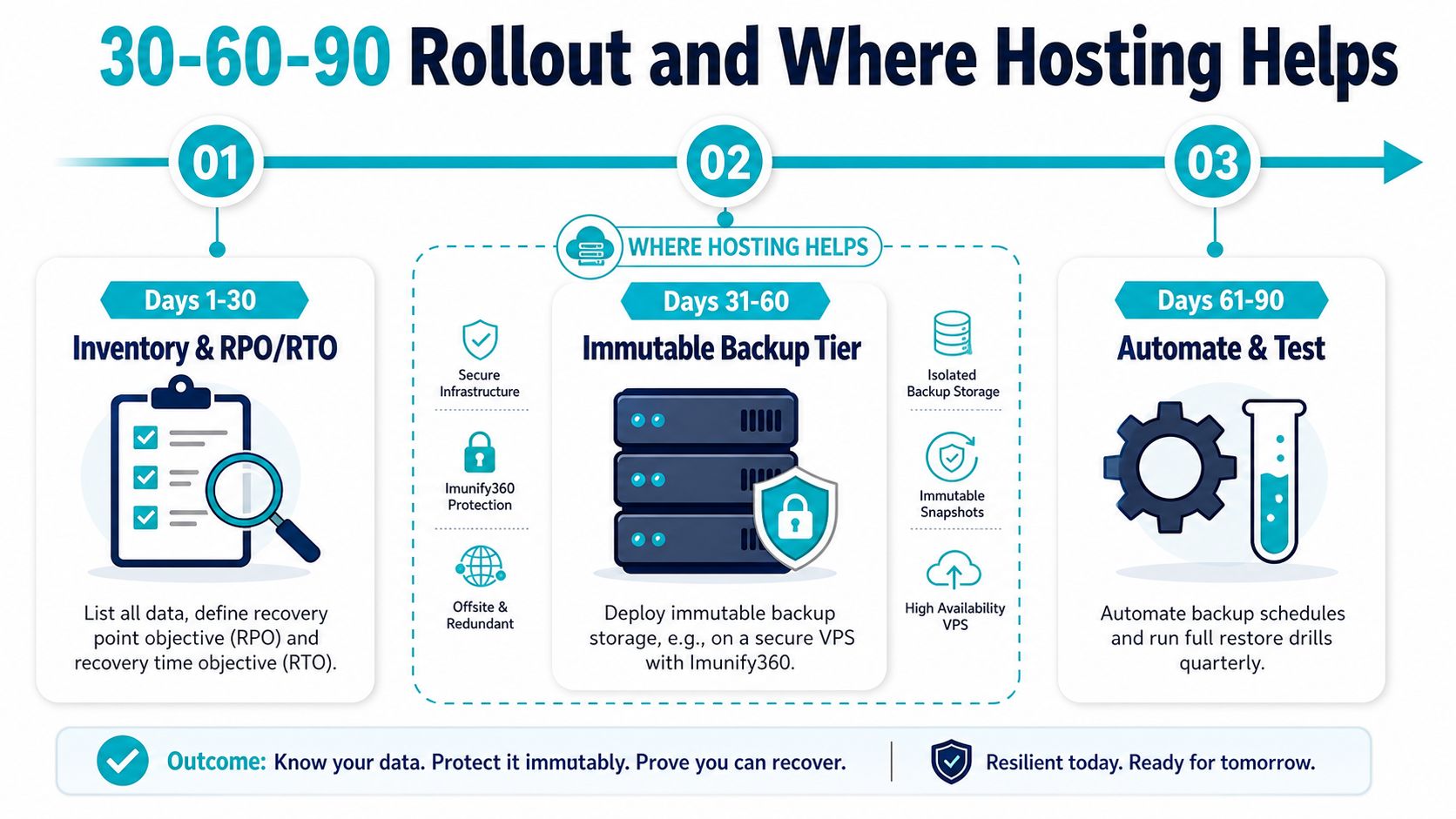
A small or mid-sized team doesn't need to redesign every system before improving ransomware recovery. It needs a sequence that creates a protected recovery path early, then adds evidence and operational discipline.
Days 1 through 30
Inventory workloads, owners, dependencies, backup locations, and encryption keys. Set RPO and RTO targets in the matrix, then protect at least one critical workload with an immutable tier. Remove backup administration from domain-admin credentials and enable MFA on the console.
A DIY team can use Veeam, Nakivo, Acronis, Proxmox Backup Server, or native cloud snapshots, but the integration work includes repository permissions, retention policy, alerting, key recovery, and network isolation. Managed backup services can reduce that plumbing, while still requiring the customer to approve recovery priorities.
Days 31 through 60
Add a cross-region or air-gapped copy. Script the first isolated restore drill and record elapsed time from authorization to usable application service. Test the failure path, not just a file-level restore.
A dedicated hosting environment can provide separate compute and storage for clean-room recovery. Proxmox-based private cloud infrastructure is useful when a team needs full root access, dedicated hardware, and a controlled place to restore multiple virtual machines. Bare metal also fits dense virtualization, database, and recovery workloads. ARPHost, LLC offers VPS, bare metal, Proxmox private clouds, Proxmox Backup as a Service, colocation, and managed infrastructure operations as deployment options for these patterns.
Days 61 through 90
Formalize monthly recovery testing, alert on unusual backup-size or encryption-activity changes, and run a tabletop exercise using the incident-response decision tree. Review RPO and RTO drift after every drill, then update capacity, replication, or runbooks where the measured result misses the target.
For web workloads, a secure managed VPS hosting bundle with CloudLinux, Imunify360, and Webuzo can separate sites and simplify operational administration, but hosted backups still need independent retention and restore verification. For larger environments, dedicated Proxmox cloud pricing should be evaluated against the cost of building isolated management, storage, monitoring, and recovery capacity internally. Teams with high-density virtualization or database requirements can review ARPHost's bare metal server inventory alongside private-cloud expansion options.
The rollout is successful when the team can answer four questions without searching: what was affected, which copy is clean, who authorizes recovery, and how long the business will wait.
ARPHost, LLC can help you design isolated backup paths, Proxmox recovery capacity, secure managed VPS hosting, and fully managed IT services for servers and networks. Visit ARPHost, LLC to review hosting and managed infrastructure options, then bring your RPO, RTO, and restore-test requirements to the conversation.
