

A lot of IT teams run into the same problem. A single server looks fine on paper, the web apps deploy cleanly, email stays responsive at first, and then normal business load starts stacking up. A backup kicks off, a database query spikes, one admin opens a remote session, and suddenly the whole box feels slow.
That’s usually the point where CPU choices stop being abstract. The processor isn’t just a spec line anymore. It becomes the difference between smooth multitasking and noisy support tickets.
Introduction to Quad Core Processors
A quad core processor gives the system four separate execution cores to work with. For hosting and virtualization, that matters because real workloads rarely arrive one at a time. A web server handles requests while a database processes queries, scheduled jobs run in the background, and the hypervisor keeps virtual machines responsive.
If you choose too little CPU, every other infrastructure decision gets harder. You start compensating with aggressive limits, tighter maintenance windows, and more troubleshooting than the platform should need. If you choose the right CPU class early, capacity planning gets simpler and costs stay more predictable.
Why IT teams get tripped up
Many buyers still reduce CPU selection to a single question: “How many cores do I need?” That’s too narrow. Core count matters, but so do clock speed, architecture, and the way your workloads behave under concurrency.
A useful way to think about it is this:
- One busy task may care most about fast per-core performance.
- Several moderate tasks often benefit from multiple cores sharing the work.
- Virtualized environments need a balance, because many small workloads overlap rather than peak at the same instant.
It pairs well with infrastructure planning because it frames performance as a productivity and reliability issue, not just a hardware purchase.
Practical rule: Don’t buy a CPU for the biggest spike alone. Buy for the mix of steady load, burst behavior, and the number of services that compete for time on the same machine.
For SMBs running VPS nodes, internal apps, or a small private cloud, quad core systems sit in an interesting middle ground. They’re often enough to support multiple roles cleanly, but only if you understand where quad core architecture helps, and where it doesn’t.
Understanding Quad Core Processors
A quad core processor places four independent processing cores inside one CPU package. A helpful way to read that is simple: one physical processor can work on four instruction streams at the same time, provided the operating system and the application can split the work across those cores.
That distinction matters in hosting. A web server, a database process, a backup task, and a control panel do not always peak together. Four cores give the system room to keep those jobs responsive instead of forcing every task through one execution lane. For teams evaluating VPS nodes or small infrastructure hosts, that headroom is often more useful than raw marketing claims about clock speed alone.
Intel helped move quad core into the mainstream with the Core 2 Quad launch at CES on January 8, 2007. The first mainstream model, the Core 2 Quad Q6600, shipped at 2.4GHz with 8MB cache and a 1066MHz FSB, according to Intel’s Core 2 Quad release.
Two early paths to quad core design
Early quad core chips did not all reach the same result in the same way. Intel’s first mainstream design brought four cores to more buyers quickly, while AMD emphasized a native quad core layout. AMD demonstrated the world’s first native quad-core x86 processor in December 2006, integrating four cores on a single die for lower inter-core latency compared to Intel’s first Kentsfield approach according to Phys.org’s report on AMD’s native quad-core Opteron.
Why should an IT buyer care about that old design split? Because the label “quad core” only tells you how many workers are present. It does not tell you how efficiently they share data, how quickly they coordinate, or how strong each worker is by itself. That is the first hint of the IPC versus core count trade-off that still shapes modern CPU buying.
For a quick refresher on that foundation, ARPHost’s guide to CPU cores and threads in modern systems pairs well with quad core planning.
Why quad core still matters
Quad core became a practical baseline because it sits in a useful middle zone. It gives enough parallel capacity for real multitasking and light virtualization, but it also keeps platform cost, power draw, and licensing exposure more controlled than stepping into much larger CPU classes.
That balance is easy to miss in mainstream CPU comparisons. A higher core count can win synthetic charts, yet many hosting workloads still depend on per-core speed and IPC. In ARPHost-style environments, a well-chosen quad core often has more value than an older many-core chip if the actual job mix includes control panels, light databases, web services, and a few modest virtual machines sharing the same host.
Four cores changed CPU buying from sizing for one heavy process to sizing for several overlapping services with enough spare capacity for virtualization.
That underappreciated spare capacity is why quad core systems remain relevant for SMB hosting and edge infrastructure. They often provide the first meaningful level of consolidation without pushing buyers straight into enterprise-class hardware.
How Quad Cores Work
A practical hosting scenario makes quad-core behavior easier to see. One server is handling web requests, answering database calls, creating a backup archive, and keeping a small virtual machine responsive for an internal tool. Those jobs do not arrive in a neat line. They overlap, pause on I/O, wake up again, and compete for CPU time.
The factory analogy that actually helps
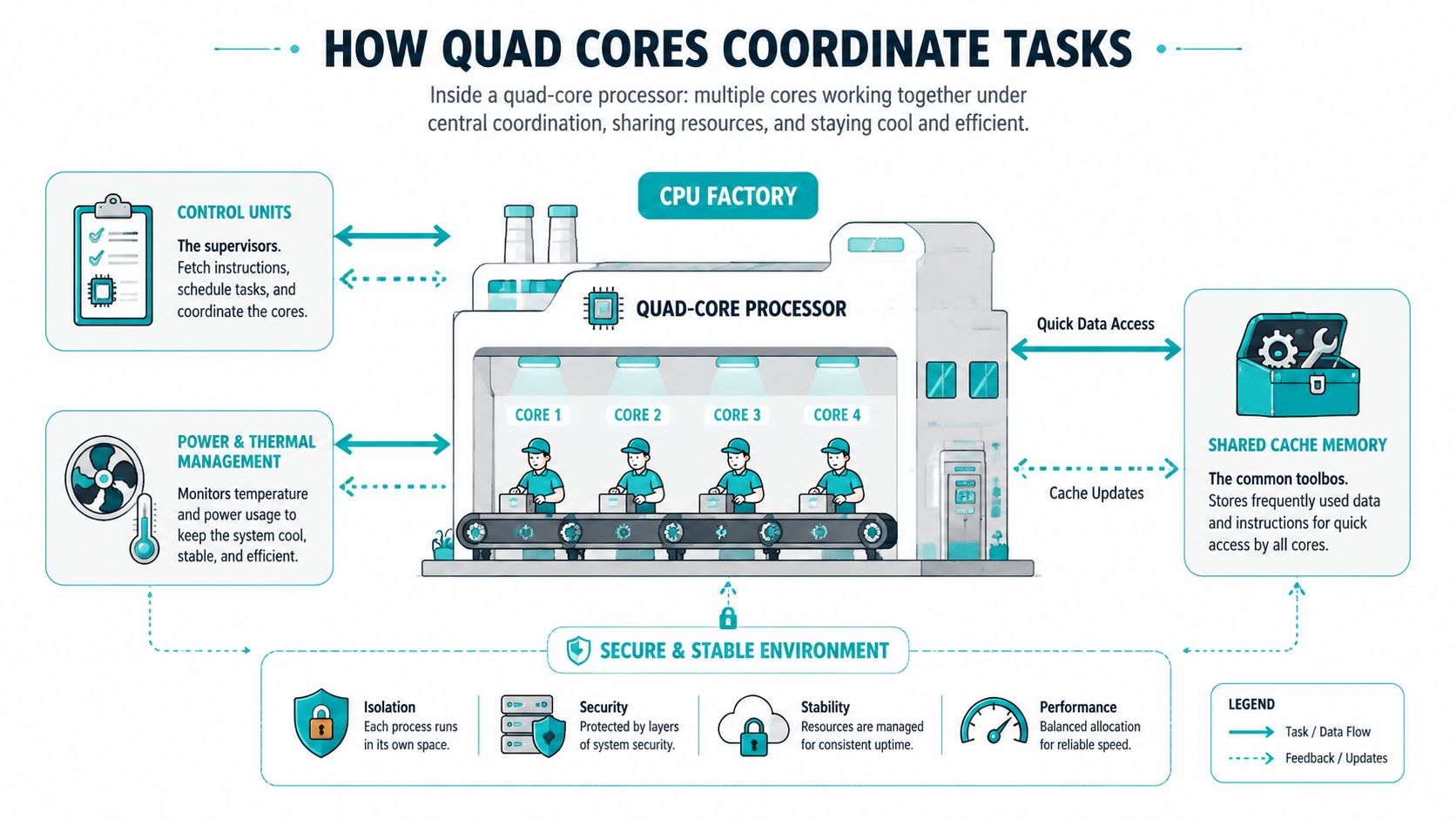
A quad core processor works like a small factory with four skilled workstations inside one building. Each workstation can process its own stream of instructions. They still depend on shared rules, shared pathways to memory, and a shared thermal budget.
That matters because parallel work is never just about having four execution lanes. It is also about how well those lanes share nearby data, how quickly the operating system schedules threads onto them, and how much performance each core delivers per clock cycle.
Here is the mapping:
- The four workstations are the four CPU cores.
- The nearby parts shelf is cache memory, which keeps frequently used data close to the cores.
- The floor manager represents the scheduling and control logic that keeps work moving.
- The building power and cooling system represents power delivery and thermal management, which affect sustained performance.
A common point of confusion is thread assignment. Applications are not usually pinned to one core forever. The operating system or hypervisor keeps shifting runnable threads between cores to keep the processor busy and to avoid one overloaded core while others sit idle.
What task splitting looks like in practice
Consider an ARPHost-style deployment with several modest services on one machine:
- Serving website traffic
- Processing database activity
- Compressing or encrypting backups
- Running a lightweight virtualization layer or one or two small guest instances
On a single-core processor, all of that work must queue on one execution engine. The CPU switches between tasks rapidly, but only one task executes at any instant. On a quad core, several of those jobs can make progress at the same time, which reduces waiting and keeps latency spikes more contained.
That is where quad cores start to show their underappreciated virtualization headroom.
A small host does not need dozens of cores to benefit from consolidation. Four competent cores can give a hypervisor enough room to schedule host tasks and guest workloads together, especially when the guests are light but active. For IT teams sizing a VPS node, edge server, or mixed-use SMB host, that extra headroom often matters more than headline core count charts suggest.
Here’s a good visual explainer for readers who want to see the concept animated:
Why shared resources matter
Shared cache is one of the easiest places to underestimate quad-core behavior. If multiple cores can pull needed data from cache instead of waiting on system memory, useful work finishes sooner and the processor spends less time stalled. That benefit shows up in related services that touch overlapping code paths or datasets.
Thermals matter too. Four busy cores create more heat than one busy core, and modern processors adjust frequency to stay inside power and temperature limits. Two quad-core CPUs with the same core count can feel very different under sustained hosting loads because their per-core efficiency, cache design, and power behavior are different.
A quad core processor is a coordinated system of four cores, shared cache, scheduling logic, and thermal controls. The result depends on how well those parts work together, not on core count alone.
That is why IT buyers should read quad-core behavior from two angles at once. First, ask how many tasks can run in parallel. Second, ask how much work each core completes while those tasks are running. That IPC versus core count balance is easy to miss in mainstream comparisons, yet it strongly affects ARPHost-style hosting, where mixed workloads and light virtualization often benefit more from balanced quad-core design than from an older CPU with more but weaker cores.
Performance Trade Offs with Quad Core Processors
A quad core processor can be the right choice, but only if you read the specs correctly. The primary trade-off is usually between core count, clock speed, and IPC or instructions per clock. More cores help with parallel tasks. Higher clock speed helps short, bursty, single-threaded tasks. Better IPC helps both, because each core gets more done in the same amount of time.
Why old quad cores and new quad cores aren’t equal
Buyers often get misled. They compare two processors with four cores and assume they’ll be close. They won’t.
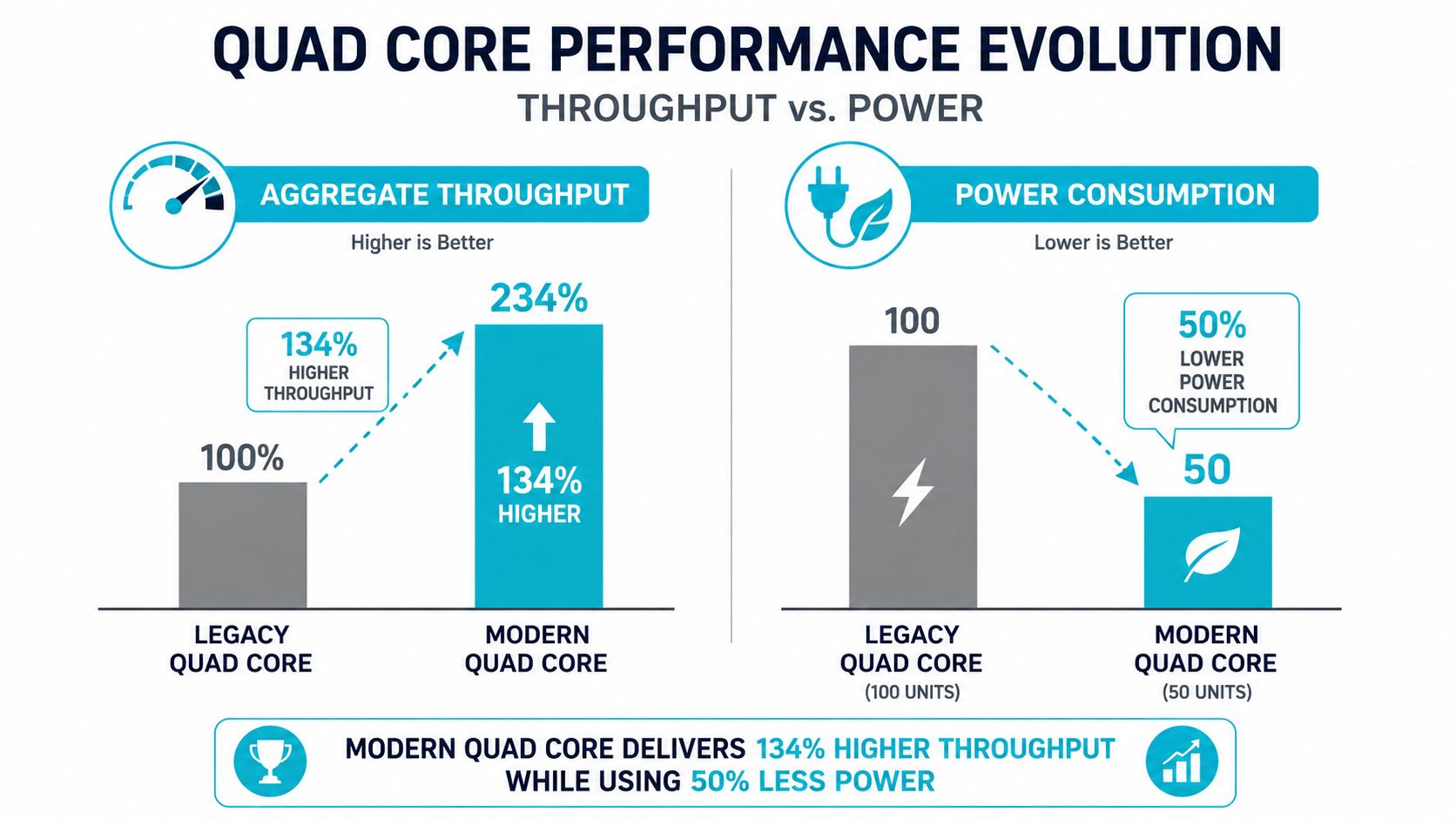
Modern quad-core processors deliver a 134% aggregate performance increase over legacy quad cores like the Core 2 Quad Q6600, while cutting power consumption by over 100%, thanks to lithography and architectural gains
That source also notes the older Q6600 ran at 105W, while the newer comparison point runs at 51W. The practical takeaway is simple. Core count alone doesn’t tell you enough.
When more cores don’t help first
A web control panel, a line-of-business app, or a lightly loaded mail service often cares more about quick response on active threads than maximum parallel throughput. In those cases, a newer CPU with stronger per-core behavior can feel faster even if the headline core count doesn’t change much.
Use this quick framework:
- Prioritize clock speed first when users complain about lag in lightly threaded software.
- Prioritize core count first when several services run concurrently all day.
- Prioritize IPC and architecture when comparing CPUs from different generations.
Decision shortcut: If your workload spends most of its time waiting on one busy thread, extra cores won’t rescue it. If your workload runs many overlapping threads, a better multi-core layout usually wins.
For VPS hosts and small virtualization clusters, this trade-off matters every day. The most cost-effective system is rarely the one with the biggest headline number. It’s the one whose cores match the behavior of the applications you’re running.
Comparing Core Counts for Different Workloads
A quad core processor sits in the middle of the CPU market for a reason. It’s often the sweet spot between cost and concurrency. But it isn’t always the best answer.
Dual core versus quad core
For light office software, small utility servers, or simple web roles, a fast dual-core chip can still make sense. That’s because not every workload scales cleanly across more cores.
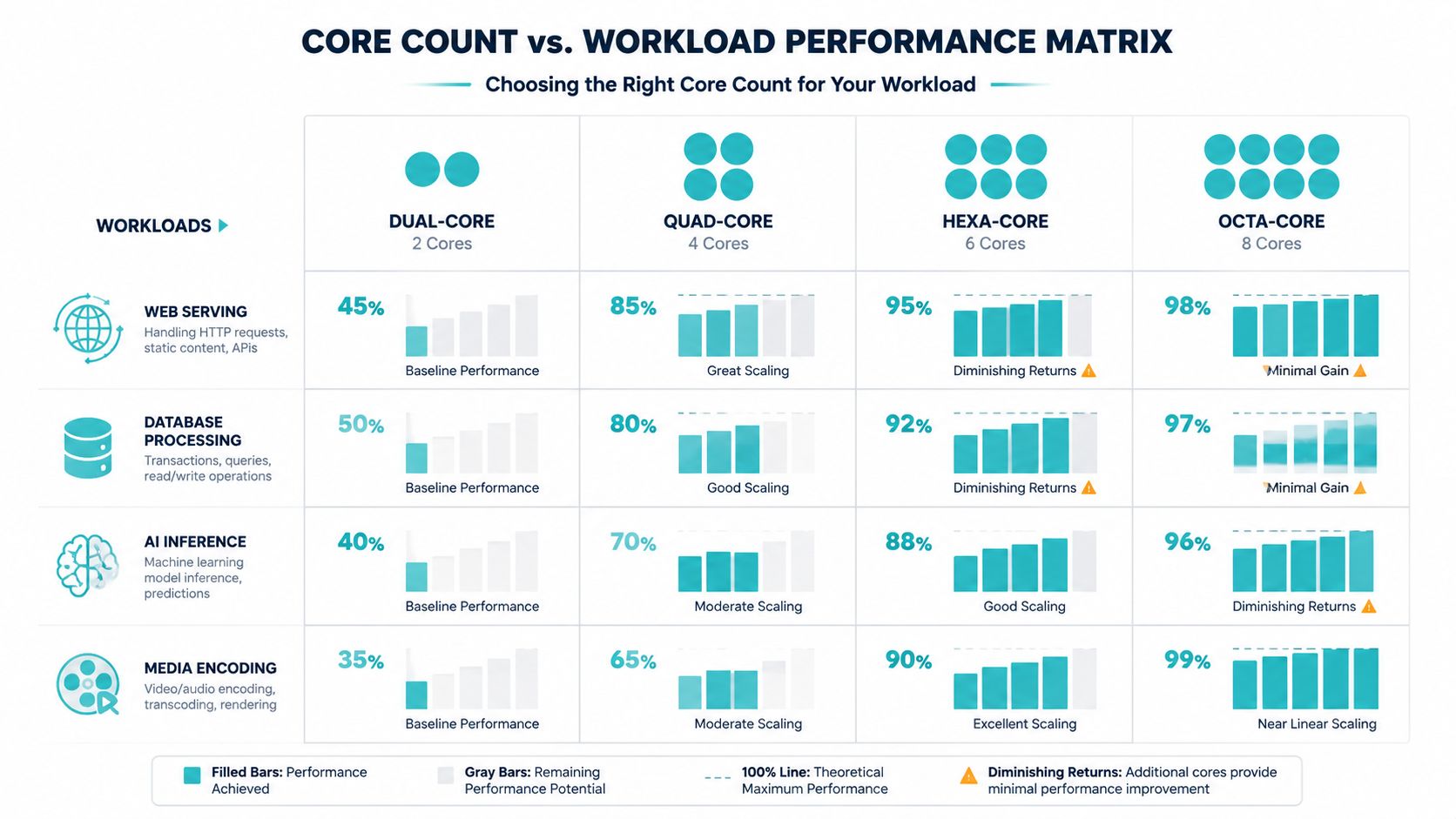
Data indicates that for non-rendering tasks, faster dual-core CPUs can outperform slower quad-cores by up to 25% due to clock speed advantages, revealing diminishing returns on core count alone
That doesn’t make quad core a bad choice. It means you should match the CPU to the work.
A practical workload matrix
| Workload | Best fit | Why |
|---|---|---|
| General office apps | Fast dual core or quad core | These tasks often favor responsiveness over heavy parallel scaling |
| Small web hosting node | Quad core | Enough headroom for web, database, and admin tasks together |
| Database-heavy environment | Hexa core or more | Parallel queries and background jobs benefit from added cores |
| Media encoding | Hexa core or octa core | Encoding scales more effectively across many threads |
| AI inference host | Depends on memory and software stack | CPU choice needs to align with model size, memory pressure, and acceleration path |
Where quad core fits best
Quad core usually works well when the server handles a mixed workload instead of one giant compute job. Think:
- Hosting stacks with web, database, and scheduled tasks
- Small hypervisors running several low-duty guests
- Branch-office infrastructure with multiple modest services on one host
Buying more cores than the workload can use is just another form of overprovisioning. The system looks impressive and still wastes budget.
If you run rendering, heavy encoding, or dense compute jobs all day, move beyond quad core. If you run mostly lightweight services with overlapping activity, quad core often stays in the efficiency sweet spot.
Virtualization and Hosting Benefits of Quad Core Processors
One of the biggest misconceptions in virtualization is that a quad core processor can only support four virtual machines. That sounds intuitive, but it isn’t how modern hypervisors work.
Modern hypervisors allocate CPU threads dynamically rather than enforce a one-to-one core-to-VM mapping, allowing a quad-core CPU to host 8–12 light VMs based on actual load, according to HP’s explanation of how many CPU cores you need.
Why over-subscription works
Most small business workloads don’t pin a core at full utilization all the time. A DNS utility VM waits. A web app sees bursts. An internal wiki sits mostly idle until someone logs in. Hypervisors take advantage of that uneven demand.
That’s why a quad core host can support more guests than its physical core count suggests. The scheduler gives time where it’s needed rather than reserving one whole core for each machine at all times.
If you’re mapping out consolidation strategies, these benefits of virtualized servers line up well with the practical value of dynamic CPU allocation.
Practical tuning tips
When running a small KVM or Proxmox environment on quad core hardware, keep these habits in place:
- Set realistic vCPU allocations: Don’t give every tiny VM multiple virtual CPUs just because the option exists.
- Avoid unnecessary pinning: Core pinning can help niche workloads, but it often reduces flexibility on smaller hosts.
- Watch contention windows: Backup jobs, updates, and antivirus scans often collide. Schedule them deliberately.
- Separate noisy tenants: If one workload is consistently bursty, isolate it before it disrupts quieter guests.
Hosting examples that fit quad core well
A quad core virtualization host is usually a good fit for:
- Light website clusters
- Small mail and collaboration stacks
- Development and staging labs
- Internal business services
- Container-heavy but low-duty environments
On small hosts, virtualization success depends less on raw core count and more on how predictable the guests are.
That’s the underappreciated strength of quad core systems. They often have more virtualization headroom than mainstream buying guides admit, especially when the guest mix is light and carefully scheduled.
Benchmarking and Real Workload Insights
A benchmark matters only if it answers an operations question. Start with a familiar hosting scenario. A small node handles web traffic, scheduled backups, database activity, and one or two light virtual machines. The useful question is whether the CPU keeps response times predictable when those jobs overlap, not which chip posts the prettiest chart.
That distinction matters with quad cores because they often sit in the middle ground that generic rankings miss. A higher core count can absorb more parallel work, but a faster core can finish short tasks sooner. In practice, IT teams need to measure both sides of that trade-off: aggregate capacity and per-thread responsiveness.
A practical benchmarking workflow
Use a process you can repeat on every test system.
- Run one synthetic benchmark such as Geekbench or Phoronix Test Suite to get a broad baseline for CPU behavior.
- Run one service-level benchmark that matches production work, such as HTTP requests, database queries, package builds, or compression jobs.
- Test under controlled conditions so thermal limits, background updates, and storage noise do not distort the comparison.
- Capture latency and throughput together because a server that serves more total work can still feel slower to users if tail latency climbs.
- Repeat with light contention by adding routine background activity such as monitoring, logging, or backups.
A quad core often performs better than expected in these mixed tests because many business workloads arrive in bursts, not as a constant full-core load. That is where the IPC versus core count trade-off becomes visible. A CPU with fewer, faster cores may handle interactive tasks better, while a broader CPU pool may stay calmer during concurrent batch work.
Sample benchmark comparison
| Workload | E5-2690 V3 | EPYC 4584PX | Ryzen 9600X |
|---|---|---|---|
| Database queries | Strong for broad parallelism and multi-tenant use | Strong fit for memory-heavy query sets | Best when query responsiveness depends heavily on fast individual cores |
| HTTP serving | Good for many concurrent hosted workloads | Good for denser mixed application stacks | Good for fewer high-speed application roles |
| AI inference | Better for general server-side orchestration than specialized inference density | Better fit when memory footprint is large | Better for smaller single-tenant inference tasks and supporting services |
How to read those results
Read the table like a traffic study, not a race result. Throughput shows how many cars pass through the intersection. Latency shows how long each driver waits at the light. Hosting performance depends on both.
If your SLA is built around concurrency, favor the platform that stays stable while several jobs run at once. If your SLA is built around fast completion of small requests, inspect per-thread behavior and tail latency closely. If your environment mixes both, test with live traffic patterns plus background noise, because that is where weaker scheduling or lower IPC starts to show.
For ARPHost-style planning, this is especially useful on smaller nodes and entry server builds. A dual quad core processor hosting setup can provide more practical headroom than a simple core-count comparison suggests, especially when workloads are spread across moderate concurrency instead of extreme density.
One more operational point matters. Budget affects benchmarking choices because it shapes the hardware short list before testing even begins. Teams focused on optimizing IT budgets with refurbished tech often compare older multi-core platforms against newer high-IPC CPUs, and that is exactly where real workload testing prevents expensive mistakes.
Benchmark the server in the condition it will actually run. Include management overhead, monitoring agents, backup activity, and at least one competing workload.
That approach usually reveals the underappreciated value of quad cores. They may not top every synthetic chart, but in light virtualization, mixed hosting, and bursty business services, they often provide better usable headroom than mainstream comparisons suggest.
Selecting the Right CPU for VPS Bare Metal and Cloud
A common hosting mistake starts the same way. An IT team sees a high core count, assumes it is the safest option, then later finds that the application still feels slow, or that the virtualization node runs out of comfortable headroom sooner than expected. The better approach is to choose the CPU by workload behavior, especially by how much parallelism you can really use and how much per-core speed your busiest tasks still need.
Match the processor to the deployment
For multi-tenant virtualization and cluster-focused roles, the Dual Intel Xeon E5-2690 V3 fits best when your goal is to spread many VMs, background services, and management tasks across a wider pool of threads. The value is not just the raw core total. It is the extra scheduling room you get when several guests become busy at once. In practical terms, that means more tolerance for the noisy-neighbor effect that smaller CPUs can expose sooner.
For memory-heavy databases, larger working sets, and denser private infrastructure, the AMD EPYC 4584PX makes more sense. Its balance of cores and memory capacity helps when resident workloads stay active for long periods and compete for cache, RAM, and storage access at the same time. This is often the better middle ground when you need more than quad core style responsiveness, but you do not want to trade too much per-core efficiency for extreme thread count.
For single-tenant applications, dev environments, CI jobs, control panels, and latency-sensitive business software, the AMD Ryzen 9600X stands out because higher IPC changes the user experience directly. A fast core works like a more capable worker on each request. If the application spends much of its time in a few active threads, stronger IPC can beat a larger core pool that sits partly idle.
Where quad core logic still improves bigger buying decisions
Quad core planning remains useful even when you are selecting hardware above the quad core class. It teaches the right mental model. Ask how many tasks can run in parallel, how often they burst together, and whether response time depends on one fast thread or many average ones.
That framework helps explain why some smaller or mid-range CPUs feel better than expected, while some larger CPUs disappoint outside heavy consolidation. A platform with fewer, faster cores can serve a lightly virtualized application stack very well. A platform with many slower cores can host more tenants, but only if the workload spreads cleanly across them.
If you are comparing socket layouts and concurrency options, this breakdown of a dual quad core processor for virtualization planning gives a useful reference point.
If budget discipline is part of the decision, the trade-off is not only purchase price. Lifecycle value matters too, especially for labs, secondary clusters, and cost-sensitive deployments.
Buying guidance by scenario
Choose broader core availability when you are building Proxmox nodes, shared infrastructure, or VM-dense environments where several guests may demand CPU at the same time.
Choose a memory-rich platform with balanced compute for database servers and private cloud stacks that keep a large working set in RAM and need steady behavior under mixed pressure.
Choose higher IPC and stronger per-core responsiveness for customer-facing applications, internal line-of-business services, and development systems where a few busy threads often shape the whole user experience.
Why ARPHost fits these decisions well
ARPHost is most useful here because the server options line up with the trade-offs that matter, rather than forcing every workload into the same core-count story.
A Ryzen 9600X based deployment is a good example. If you run a single-tenant app, a build server, or an admin toolchain that depends on fast request completion, higher IPC can produce better real responsiveness than a larger CPU with weaker per-core behavior. That is the subtle comparison many mainstream CPU lists miss.
The Xeon platform shows the other side of the decision. For Proxmox clusters and denser VPS roles, more cores create practical virtualization headroom. That headroom is easy to underestimate. It is the room for hypervisor overhead, backup activity, monitoring agents, and sudden guest bursts without immediate contention. In other words, extra cores are not only about fitting more VMs. They help the node stay predictable when real hosting noise appears.
The EPYC option sits in the middle where many business deployments live. It can support heavier resident workloads while still keeping enough thread capacity for private cloud growth, staging environments, and mixed service stacks.
The short version is simple. Select CPUs by workload shape, expected consolidation level, and IPC needs. Quad core thinking remains valuable because it teaches you to look past headline core counts and measure the headroom your environment will use.
