

A lot of teams reach the same point with infrastructure. A few VMs turn into a mix of line-of-business apps, internal tools, staging systems, file services, and backup jobs. The original hosting plan still works, but it no longer fits. You start fighting noisy-neighbor behavior, limited network design, awkward backup workflows, and the constant feeling that the platform owns you more than you own it.
That’s usually when a Proxmox bare metal server stops being an experiment and starts making operational sense. You get direct control of the hardware, a virtualization stack built for consolidation, and a path to turn one server into a clean private infrastructure layer, or several servers into a proper cluster.
Why Choose a Proxmox Bare Metal Server
A Proxmox deployment on dedicated hardware makes sense when you’ve outgrown simple VPS hosting but don’t want the complexity and licensing baggage that often comes with larger virtualization stacks. The appeal isn’t just that it’s self-hosted. It’s that the platform combines virtualization, containers, storage, networking, and recovery workflows in one place.
According to Proxmox VE feature documentation, Proxmox VE is built around KVM for virtual machines and LXC for containers, with features that include high availability, software-defined storage, networking, and disaster recovery. On bare metal, those capabilities run directly on host hardware rather than inside another hypervisor layer, which is why Proxmox positions this as a single-tenant model with dedicated resources.

What you gain from bare metal
If you’re coming from shared hosting or commodity virtual servers, the difference is immediate:
- Dedicated compute means your workloads aren’t competing with unrelated tenants on the same host.
- Cleaner storage choices let you design around local ZFS, LVM-Thin, or clustered storage depending on the job.
- Real network control gives you bridges, VLANs, trunking, firewalling, and role separation that basic hosting plans often hide.
- One control plane reduces tool sprawl when you’re managing VMs, containers, snapshots, and backup jobs.
That last point matters more than people expect. Proxmox also states that Proxmox Backup Server can back up VMs, containers, and physical hosts from the same interface, which is a strong fit for teams building clustered virtualization and backup workflows on the same foundation.
Where it fits best
A Proxmox bare metal server is a strong match for environments like these:
- Private cloud consolidation: Replace several single-purpose servers with one managed virtualization platform.
- Lab-to-production growth: Start with one node, then expand into a cluster when uptime requirements tighten.
- Mixed workloads: Run Windows VMs under KVM, Linux services in LXC, and isolate each service properly.
- Infrastructure roles: Host internal platforms, application servers, dev/test environments, and backup tooling under one roof.
Practical rule: If your team needs to control storage layout, hypervisor networking, and recovery policy, a dedicated Proxmox host is usually the right next step.
What doesn’t work is treating it like a desktop hypervisor with enterprise expectations. Once a Proxmox host is responsible for critical applications, it needs disciplined planning around hardware, network boundaries, backups, and operational ownership.
Hardware Planning and Server Preparation
A Proxmox host can survive bad hardware decisions for a while. It usually fails under load, during maintenance, or at the first storage problem. That is why production planning starts with the server, not the installer.
The right way to size a Proxmox bare metal server is to map hardware to workload behavior. A host built for dozens of light Linux guests looks different from one that will carry SQL Server, backup repositories, or a few latency-sensitive application VMs. Buy for the bottleneck you expect first, then leave headroom for growth and failure handling.
Match the server to the workload
A few examples make the trade-offs clearer.
A Dual Intel Xeon E5-2690 V3 system with 28 cores and 64GB DDR4 ECC RAM fits mixed virtualization, internal infrastructure services, and lab environments where guest count matters more than per-core speed. It is a reasonable starting point for consolidation, but the memory ceiling can become the limit before CPU does.
An AMD EPYC 4584PX with 16 cores and 192GB DDR5 RAM makes more sense for dense virtualization, larger databases, and hosts where memory pressure will be constant. This class of server gives you more room for cache-heavy guests, larger ZFS ARC usage, and fewer painful compromises later.
An AMD Ryzen 9600X with 6 cores and 96GB DDR5 RAM is a better fit for smaller single-tenant deployments, test environments, or application stacks that respond better to strong single-thread performance than to high core counts.
If you want dedicated hardware prepared for this role instead of sourcing, staging, and validating it yourself, bare metal server provisioning for Proxmox-ready deployments can shorten the path to a usable platform.
CPU, memory, and storage decisions
Choose by operational risk, not by brand preference.
- CPU: More cores help with guest density. Higher clocks help with application VMs, databases, and Windows workloads that punish slow single-thread performance.
- Memory: Memory pressure is one of the fastest ways to make a virtualization host feel unreliable. Budget RAM for the host, for guest growth, and for the storage stack you plan to run.
- Storage: Fast NVMe changes day-to-day behavior. Guests boot faster, backups complete sooner, snapshots hurt less, and maintenance windows become easier to manage.
The storage choice needs more thought than many first deployments get. If you plan to use ZFS, buy disks and memory with ZFS in mind and keep the controller path simple. If the host will rely on shared storage later, LVM-Thin may be easier to operate. The point is not to pick the feature-rich option by default. The point is to choose the layout your team can recover at 2 a.m. without guessing.
That is also where the DIY versus managed decision starts to matter. If your team is comfortable validating firmware, disk topology, controller mode, and recovery procedures, building it yourself is reasonable. If those checks are likely to get rushed, a managed Proxmox platform often prevents expensive mistakes before the first VM is created.
BIOS and preinstall checks
Good Proxmox deployments are usually quiet because the prep work was done properly.
- Update firmware before installation. Include system firmware, RAID or HBA firmware, SSD firmware, and NIC firmware.
- Set the storage controller mode deliberately. ZFS generally wants direct disk access through an HBA or IT mode controller. Hardware RAID changes the failure and recovery model.
- Enable virtualization features in BIOS. Turn on Intel VT-x or AMD-V and IOMMU if you expect PCI passthrough or more advanced virtualization use cases.
- Confirm out-of-band access. IPMI, iDRAC, or iLO saves time during install, kernel issues, and failed boot events.
- Map physical NIC ports before cabling. Know which ports are for management, guest traffic, storage traffic, and future cluster communication.
- Run a memory and disk health check on new hardware. Bad DIMMs and questionable SSDs are easier to replace before production data lands on them.
Prepare for the system you expect to operate
A single-node host with local storage should not be wired and partitioned the same way as a node that will later join a cluster. If clustering is even a likely outcome, reserve NICs, switch capacity, and disk bays now. Retrofitting those choices later usually means downtime, awkward workarounds, or a partial rebuild.
I usually tell teams to answer four questions before they boot the ISO: Will this host stay standalone or join a cluster? Will local disks hold production data or only the hypervisor? Will backups live off-host from day one? Who owns recovery when the primary admin is unavailable?
Those answers drive the hardware plan more than any vendor spec sheet. A production-ready Proxmox server is not just a machine that can install the hypervisor. It is a machine that can be patched, backed up, recovered, and expanded without redesigning everything a month later.
Proxmox VE Installation and Initial Hardening
The install itself is the easy part. The first production mistake usually happens right after the first login, when the web UI comes up, the node looks healthy, and someone starts building VMs before the host has been locked down.
Boot the Proxmox VE ISO, complete the installer, assign the management IP carefully, and verify you can reach the web interface on port 8006. At that point, resist the urge to treat the server as ready. A Proxmox host becomes production-ready only after you confirm the storage choice, apply updates, restrict access, and create an admin model that does not depend on day-to-day root logins.
Filesystem choice on day one
The installer asks you to make a storage decision early, and it is one of the few choices that is painful to redo later.
ZFS fits teams that want snapshots, integrity checks, and stronger local-disk recovery options. I usually recommend it for serious standalone hosts and small deployments where local storage will carry real workloads. The trade-off is operational overhead. You need to understand pool layout, memory use, replacement procedures, and what recovery looks like when a disk fails at the wrong time.
LVM-Thin is simpler. It works well for single hosts that prioritize straightforward provisioning or for systems that will place most production data on external storage. The trade-off is fewer built-in data-management and integrity features than ZFS.
The right question is not which option sounds more advanced. The right question is which option your team can support during a bad night, with a failed disk, a restore deadline, and no time to relearn the storage stack.
Hardening before the first VM
Once the node is reachable, treat it like infrastructure, not a test bench.
Use a short hardening pass before any guest workload goes live:
- Change deployment credentials immediately. Temporary install passwords have a habit of surviving longer than intended.
- Create a named administrative account. Reserve root for tasks that demand its use.
- Patch the host before onboarding workloads. A clean install is not the same as a current system.
- Enable the Proxmox firewall and review allowed management access. Limit exposure to the management plane first.
- Check listening services and repositories. Remove what you do not need and confirm the update path you intend to use.
For teams that need a stronger model around admin access, host filtering, and exposure control, layered infrastructure security controls show the kind of protections that become useful once Proxmox is carrying business systems instead of lab VMs.
Keep management off the public edge
A common early design mistake is placing the Proxmox GUI on the same network path used for public-facing guest traffic. It works, but it increases risk without giving you much operational benefit.
A better baseline is simple. Put the host on a dedicated management VLAN or management subnet. Limit GUI and SSH access to VPN users, jump hosts, or fixed source IPs. Review firewall rules from the hypervisor inward, not just at the edge.
If you are building a single node today but expect this environment to grow, set that boundary now. Clean separation between management access and tenant or application traffic makes later clustering, auditing, and incident response much easier.
This is also the point where the DIY versus managed decision becomes real. Installing Proxmox is well within reach for a capable IT team. Hardening, patch discipline, access control, and recovery planning are where self-managed environments often drift. If the business cannot tolerate mistakes in those areas, a managed Proxmox platform can remove a lot of avoidable risk.
Configuring Storage and Advanced Networking
A lot of Proxmox environments fail long before hardware gives out. The root cause is usually a rushed storage choice, a flat network, or both. If you want a host that can survive maintenance, growth, and an operator mistake at 2 a.m., this is the part to design carefully.
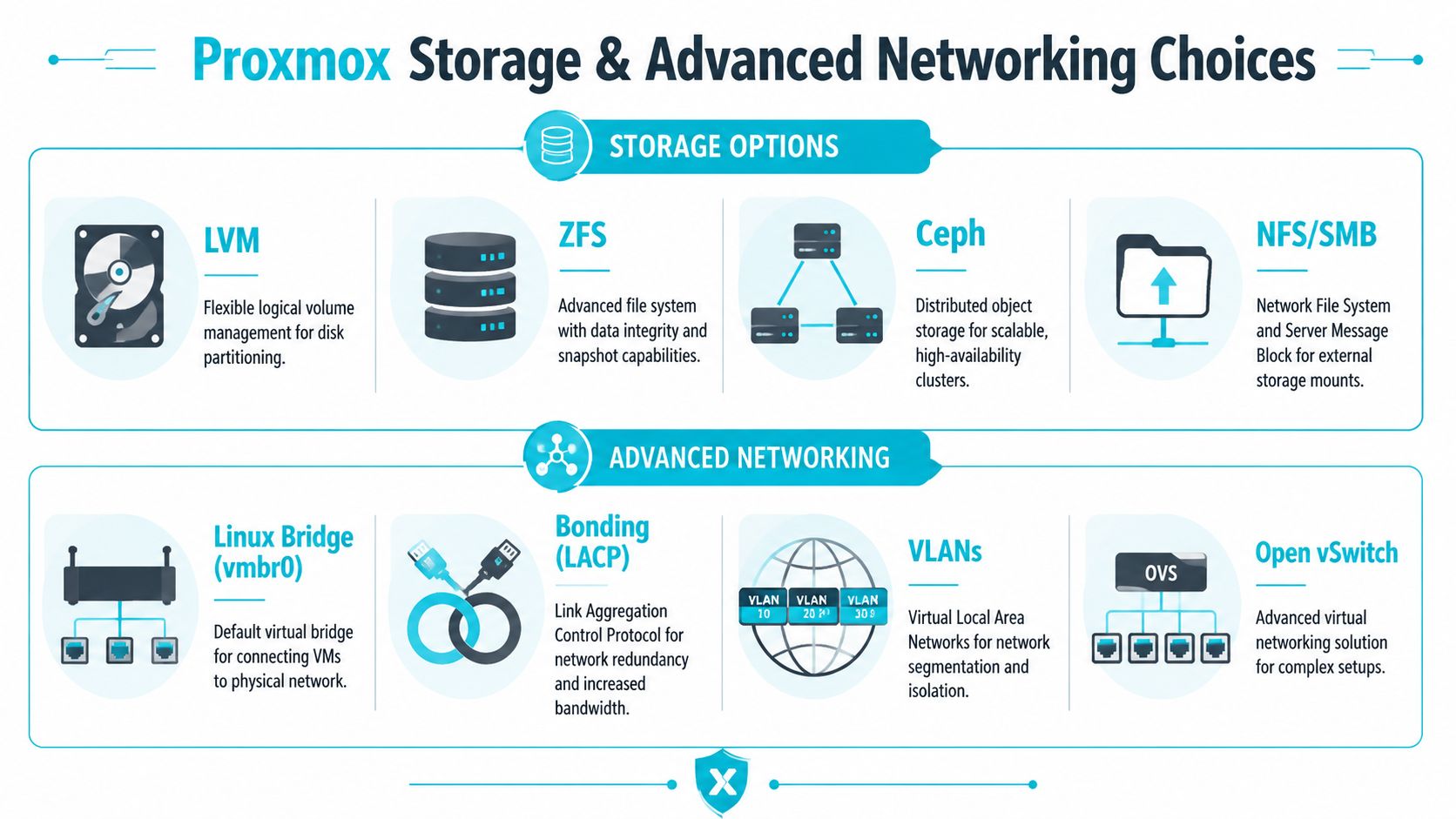
Choosing the right storage model
Storage should match the operating model, not just the install screen options. A single host with local disks has different priorities than a cluster meant for live migration and shared failure domains.
| Feature | ZFS (RAID-Z or mirrors) | LVM-Thin | Ceph |
|---|---|---|---|
| Best fit | Single hosts and small local-storage deployments | Simple virtualization hosts, often with external backup or storage decisions made elsewhere | Multi-node clusters built around shared, distributed storage |
| Core strength | Snapshots, checksumming, local resilience | Simplicity and thin provisioning | Scale-out storage aligned with clustering |
| Trade-off | Memory use, pool design, slower rebuild choices if planned poorly | Fewer native data protection features than ZFS | Operational overhead, network sensitivity, more moving parts |
| Recovery style | Strong local recovery workflows if pool layout is sound | Straightforward on simpler hosts | Works best when the cluster, network, and failure handling are designed together |
| Operational burden | Moderate | Low to moderate | High |
ZFS
For a serious single-node Proxmox server, ZFS is often the right default. It gives you snapshots, end-to-end integrity checks, and predictable local storage behavior if the disks and RAM are sized properly.
The trade-off is real. ZFS rewards disciplined hardware planning and punishes vague assumptions about disk replacement, ARC memory use, and boot layout. I usually recommend mirrored vdevs for virtualization before RAID-Z, because mirrors rebuild faster and perform better for mixed VM workloads. RAID-Z can still fit, but it needs a clear reason.
Choose ZFS if you want:
- Snapshot-heavy VM workflows
- Better protection against silent corruption
- A storage design you can operate locally without adding a distributed stack
Skip ZFS if the team is not ready to document pool layout, spare strategy, replacement procedures, and host recovery steps.
LVM-Thin
LVM-Thin is the simpler option. It fits smaller production environments, test systems, and hosts where local storage is not doing much beyond holding guests and templates.
That simplicity is useful, but it is not a substitute for a storage plan. If you pick LVM-Thin, do it because you want fewer moving parts and you are covering resilience somewhere else, usually with strong backups or external storage.
Ceph
Ceph belongs in environments that are already thinking like a cluster. It can solve shared storage and failure-domain problems well, but only if the network, hardware consistency, and operational discipline are there.
A common mistake is deploying Ceph too early because it sounds more enterprise-grade. In practice, it increases the number of components your team has to monitor, patch, and troubleshoot. For many first deployments, a clean local-storage design plus a tested backup and restore process is the better starting point. Teams planning later failover and storage expansion should review how Proxmox high availability is typically structured in production before deciding that Ceph belongs in phase one.
Decision rule: Use local storage to make one node reliable. Use distributed storage to make a cluster survive node loss.
Build the network around traffic roles
A production Proxmox host needs traffic separation with a purpose. The cleanest layouts treat management, guest, and storage traffic as different trust zones with different failure and performance concerns.
At minimum, define these traffic classes:
- Management network: Proxmox GUI, SSH, monitoring, and admin access
- Guest ingress network: Application traffic for VMs and containers
- Storage network: Replication, backend transfers, and storage east-west traffic
- Service or tenant VLANs: Optional segmentation for internal apps, DMZ workloads, or customer environments
If the environment will later join a cluster, leave room for cluster communication and storage replication from day one. Readdressing a host after guests are live is possible, but it creates avoidable downtime and configuration drift.
Practical bridge and bond design
A common baseline looks like this:
- vmbr0 for management
- vmbr1 for guest or public-facing application traffic
- vmbr2 for storage or replication
- bond0 under selected bridges when the switch side is configured for LACP
That layout is simple enough to support and clear enough for the next administrator who has to troubleshoot it.
VLAN trunking is usually the right choice on bare metal. Tag at the bridge or at the guest NIC level, then stay consistent. Problems show up during outages when one VM is tagged at the bridge, another is tagged inside the guest definition, and nobody wrote down the standard.
Bonding helps with link redundancy and bandwidth aggregation, but it does not remove single points of failure on the switch side. If both uplinks land on the same switch stack, call that out in the design. If storage traffic shares the same physical path as guest ingress, expect contention during replication, backup windows, or rebuild events.
Validate from the shell, not just the GUI
The Proxmox interface is useful, but production checks should include the host itself.
pvesm status
Use it to confirm which storage backends are active and whether Proxmox can see them.
ip -br link
Use it to verify NIC names, bond state, and whether the expected interfaces are up.
cat /etc/network/interfaces
Review the final network config directly. The file tells you what the host will do after a reboot, which matters more than what the GUI looked like during setup.
Good Proxmox deployments are usually boring. Storage behaves the way you expected. Networks are easy to trace. Failure modes are documented before they happen. If your team cannot commit to that level of design and operational follow-through, managed Proxmox infrastructure is often the safer choice.
Building a High-Availability Proxmox Cluster
A cluster changes the operating model. You stop planning around single-host maintenance and start planning around node failure, quorum, restart order, and storage access under stress. That is the difference between a lab build and a production platform.
The right first step is boring on purpose. Build one node to your target standard, put real workloads or realistic test VMs on it, and verify that the design holds up through patching, reboots, and routine admin work. After that, replicate the pattern across the remaining nodes. Cloning a proven design is faster than troubleshooting three slightly different servers at once.
Build order matters
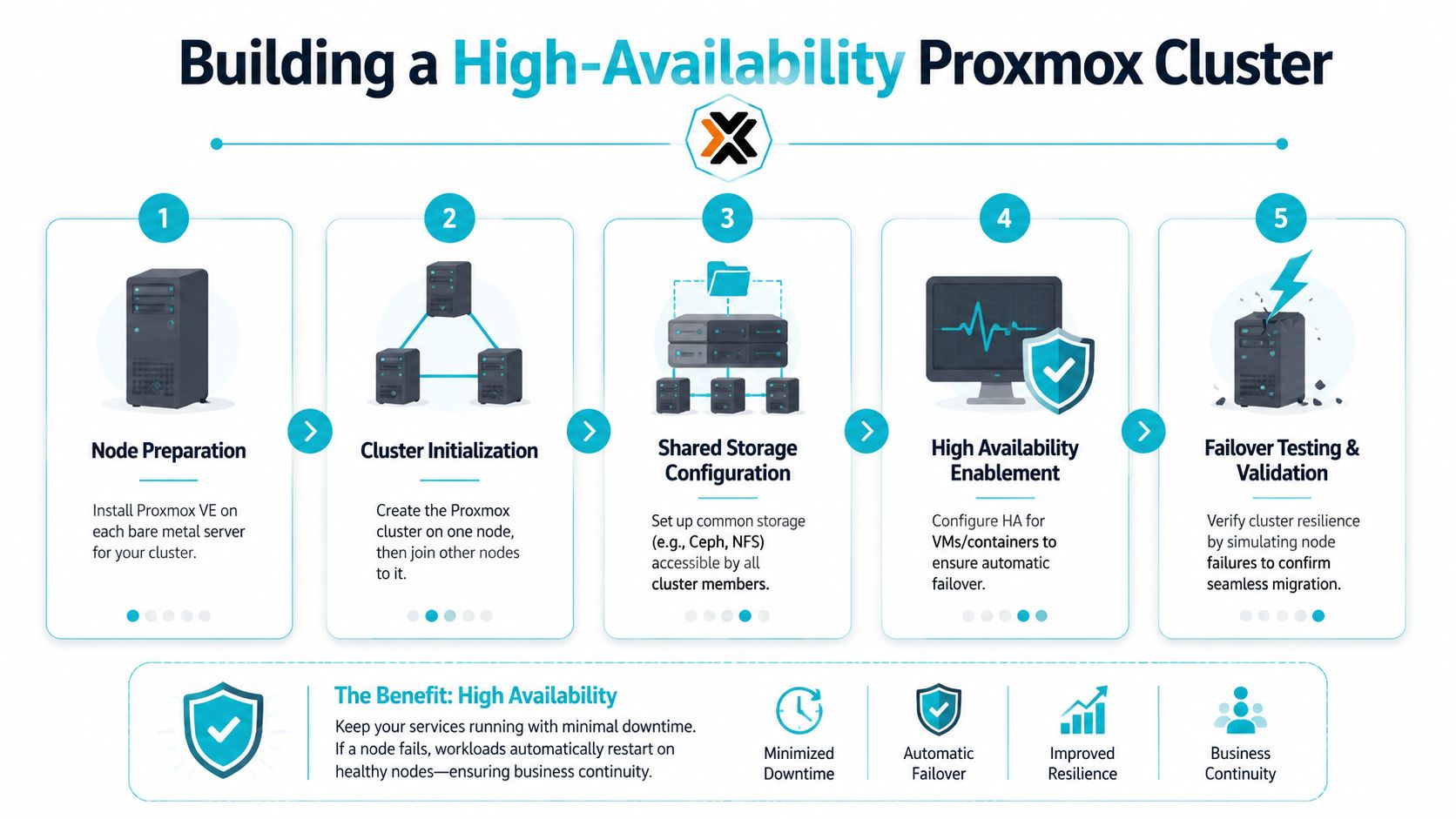
A practical sequence usually looks like this:
- Install Proxmox VE on each server with matching versions and time sync
- Create the cluster on the first node
- Join the additional nodes over a stable management network
- Add storage that supports the failover model you want
- Place selected guests under HA management
- Test failure, recovery, and maintenance workflows
That fourth step is where many first deployments go sideways. HA for Proxmox is not just a cluster service. It depends on where VM disks live and whether another node can start the workload without manual repair. Shared storage can make failover straightforward, but it adds cost and storage design work. Hyperconverged approaches reduce external dependencies, but they raise the stakes for network quality and disk layout. Local storage with no replication can still support migration for planned maintenance, but it does not give you automatic restart on another node after a host loss.
Teams that want that design delivered with the platform instead of assembled and tested in-house often compare their options against managed Proxmox high availability deployments.
Here’s a helpful walkthrough to pair with your own lab work:
Quorum and fencing decide whether HA behaves well
Three nodes are the usual starting point because quorum is simpler and failure handling is cleaner. Two-node clusters can work, but they need careful quorum design and are easy to misconfigure. If this is your first enterprise-grade Proxmox build, start with three nodes unless budget or rack limits force a different choice.
Fencing also deserves attention early. If a node becomes unstable and still has partial network access, the cluster needs a reliable way to decide whether that node is out of service before restarting guests elsewhere. Without that discipline, you can end up with split-brain behavior, duplicate services, or corrupted application state. Databases, directory services, and write-heavy application servers are where those mistakes get expensive.
Put real workloads through failure tests
Do not validate HA with empty Linux VMs and call it done.
Use guests that reflect actual demand. Include a VM with steady disk writes, one with startup dependencies, and one service your team considers critical for fast restoration. Then test the cluster under controlled conditions:
- Reboot a node and confirm guests restart where expected
- Simulate an unplanned node loss
- Verify storage remains available to the recovery target
- Check boot order for services with dependencies
- Confirm monitoring and alerting report the event correctly
- Review how long recovery took, not how long you hoped it would take
Those tests usually expose trade-offs. Shared storage may fail over cleanly but create a storage bottleneck during contention. Replicated local storage can recover well but consume bandwidth and lengthen rebuild windows. DIY clustering gives you flexibility, but it also makes you responsible for quorum design, storage behavior, and proving recovery before production users do it for you.
Choose HA targets carefully
Not every VM belongs in an HA group. Start with services where automated restart on another node is worth the extra design and testing effort. Infrastructure services, internal application tiers, and line-of-business systems are common candidates. Low-value utility VMs, disposable test systems, or workloads with awkward licensing constraints often stay outside HA on purpose.
A Proxmox cluster is ready for production when failure behavior is predictable, storage access is consistent, and the team knows exactly what happens during a node loss. If that level of validation is hard to fund or staff internally, a managed Proxmox platform can reduce the risk of learning those lessons during an outage.
Implementing a Bulletproof Backup Strategy
Backups aren’t an accessory to a Proxmox deployment. They’re part of the platform design. If the backup plan is vague, the whole environment is still unfinished.
One of the most useful design questions is where Proxmox Backup Server should live. Community discussion around that topic keeps coming back to the same conclusion: there isn’t a universal right answer. As reflected in this Proxmox community discussion about PBS on a VM or bare metal, the better fit depends on boot-pool redundancy, passthrough strategy, and whether the service is infrastructure-critical enough to warrant hardware isolation.
Bare metal PBS or virtualized PBS
That decision should be driven by recovery behavior, not ideology.
Put PBS on bare metal when it’s a central recovery service, storage access needs to be direct, or you don’t want the backup platform to depend on the same virtualization layer it protects.
Run PBS in a VM when the environment is smaller, operational simplicity matters more, and you’ve already designed the underlying host and storage layers for clean recovery.
Neither approach is automatically superior. The wrong move is placing backup services in the same failure domain as the systems they’re supposed to rescue, then calling that disaster recovery.
The backup pattern that actually holds up
A dependable Proxmox backup design usually includes several layers:
- Frequent platform-native backups: Protect VMs and containers in a format that supports real restoration.
- Separate backup infrastructure: Keep the backup target outside the immediate blast radius of the primary host or cluster.
- Restore drills: A backup that hasn’t been restored is still unproven.
- Offsite copy: Local backups are operationally useful. Offsite backups are what save you after facility loss, severe hardware failure, or ransomware.
This is also where many DIY deployments hit their limit. Running backup jobs is easy. Designing storage retention, replication, encryption, offsite movement, and recovery runbooks is where the work becomes ongoing.
What usually fails first
In smaller environments, backup strategy often breaks in familiar ways:
- The backup server lives on the same host as production.
- Backup jobs succeed, but nobody tests a restore.
- Retention exists, but no one checks whether it matches business recovery needs.
- Storage is large enough for normal growth, but not for emergency retention after an incident.
- Firewall and routing changes inadvertently break backup reachability.
The strongest operational habit is simple. Schedule restore drills and treat the result as part of platform health, not as a special project.
If you’re evaluating managed options for offsite backup handling, one path is to use a provider-managed Proxmox backup service with separate infrastructure and immutable retention controls rather than building every moving part yourself.
Why ARPHost Excels Here The Managed Proxmox Alternative
A lot of Proxmox projects reach the same point. The install works. VMs are running. Then ownership questions show up at 2 a.m., during a failed update, a storage alert, or a cluster fault that crosses hypervisor, network, and backup boundaries.
That is the line between a lab build and a production platform.
Building Proxmox on bare metal is often the right decision if your team wants full control over storage layout, network design, hardware selection, and change timing. I recommend that path when there is clear operational ownership and enough internal depth to handle hypervisor administration, incident response, and lifecycle maintenance without improvising under pressure.
Self-managed usually fits teams that already have:
- Strong virtualization and Linux administration skills
- Written procedures for patching, rollback, and host replacement
- Clear ownership for storage, networking, and backup operations
- After-hours coverage for outages and failed maintenance windows
- Enough time to test changes before they hit production
If those pieces are in place, a Proxmox bare metal server gives you flexibility that many packaged platforms do not.
Managed infrastructure makes more sense when the business needs Proxmox as a dependable service rather than another system your staff has to design, monitor, patch, and recover. That usually means you want dedicated hardware, controlled management access, monitored infrastructure, backup handling, migration support, and a team that has already worked through the failure cases.
ARPHost, LLC is one option for that model. The practical value is not just hosted Proxmox. It is reducing the number of decisions your team has to get right the first time, especially around cluster design, storage choices, backup architecture, hardening, and operational response.
That matters because Proxmox is never only a hypervisor. In production, it is also storage engineering, network design, security policy, patch management, and recovery planning. A mistake in any one layer can take down services that looked stable the day before.
The useful decision framework is simple:
- Choose DIY if your team wants control and can support the full stack consistently
- Choose managed if downtime risk, staffing limits, or project speed matter more than building every layer internally
- Choose managed earlier if this environment will host revenue-generating, customer-facing, or compliance-sensitive workloads
I have seen teams save money with self-managed Proxmox, and I have seen the same teams lose that savings in a single weekend spent rebuilding a node, tracing a bridge misconfiguration, or recovering from weak management-plane controls. The trade-off is not ideological. It is operational and financial.
If your staff can own architecture, maintenance, troubleshooting, and recovery with discipline, build it yourself. If you need production-ready Proxmox without carrying every ongoing risk, a managed option like ARPHost is often the better call.
