

If your small business is still operating on legacy phone lines, you’re familiar with the technical limitations. Spiking call volumes hit a hard capacity limit, stalling growth and leading to dropped packets—or in this case, dropped calls. Missed calls equate to lost revenue, while disjointed support channels reduce team efficiency and increase operational overhead.
This legacy model is a recipe for inefficiency.
- Revenue is lost with every unanswered call due to line capacity issues.
- Customer experience suffers from inconsistent and manual call handling.
- Manual call forwarding introduces human error and configuration drift.
Consider a retail store’s IT infrastructure during a holiday sales event. With a fixed number of POTS lines, incoming orders can easily be lost to busy signals. Instead of reaching an available agent, customers are dropped, leading to direct revenue loss. Furthermore, legacy systems cannot adapt to remote workforces or new office deployments without significant hardware investment and complex network re-configurations.
Why a Modern PBX Is a Core Component of Your IT Infrastructure
A modern PBX functions as the network switch and router for your business’s voice communications. It is the centralized control plane that intelligently routes every incoming and outgoing call based on user-defined rules, ACLs, and routing tables.
This shift ensures calls are routed to the correct endpoint—be it a desk phone, a softphone client, or a mobile device—at the right time, every time. It also enables remote team members to connect seamlessly to the corporate voice network from any location, without requiring complex VPN configurations or dedicated hardware.
How a PBX Transforms Your Business Communications
At its core, a PBX (Private Branch Exchange) creates a central command center for all your communications. It handles everything from professional IVR menus (“Press 1 for Sales, Press 2 for Support”) to auto attendants and call queues with the efficiency of a well-configured server. Suddenly, your small team projects the polished image of a much larger enterprise, all unified under a single business number.
A PBX replaces scattered, individual phone lines with a streamlined, unified communication hub. It’s the difference between network chaos and controlled, manageable traffic.
There are three primary deployment models for PBX systems:
- On-Premise PBX: Gives you full control with hardware you own, manage, and maintain on-site.
- Hosted/Cloud PBX: A SaaS model offering plug-and-play simplicity, managed entirely by a provider.
- Virtual PBX (VPBX): A flexible IaaS/PaaS hybrid, providing dedicated PBX software on a virtual machine within a private cloud environment.
Each option is designed to integrate with your existing network infrastructure, ensuring you’re not building from scratch.
Aligning a PBX with Your IT Strategy
Choosing the right model depends entirely on your existing infrastructure, technical resources, and growth strategy. An On-Premise system requires dedicated servers and an IT team proficient in telephony hardware and software management. A Hosted Cloud solution abstracts away all maintenance but limits deep customization and direct control. A Virtual PBX strikes a strategic balance, offering dedicated virtual resources and root-level control with minimal hardware overhead.
This guide provides technical walkthroughs for each deployment path. We’ll show you how to align your PBX with bare metal servers, private cloud environments like Proxmox, and KVM/LXC virtualization. The goal is to architect a scalable solution that is as robust and redundant as your core business applications.
What to Expect Next
In the following sections, we will perform a deep dive into the technical specifics. We’ll compare deployment models, detail essential features, and provide a practical migration checklist with CLI examples. You’ll walk away with actionable insights to select, deploy, and manage the optimal PBX system for your small business.
- First, we’ll compare deployment options based on cost, control, and technical requirements.
- Then, we’ll dive into the essential features and underlying protocols every small business PBX needs.
- Finally, you’ll get a hands-on migration checklist and best practices for managed vs. unmanaged deployments.
ARPHost supports all PBX deployment models with high-performance bare metal servers, secure Proxmox private clouds, and expert 24/7 technical support. We ensure your PBX deployment is secure, compliant, and perfectly aligned with IT industry best practices.
Let’s begin architecting your communication command center.
Choosing Your PBX Model: On-Premise vs. Cloud vs. Virtual
Selecting the right PBX system for a small business is a foundational architectural decision, akin to choosing between bare metal and virtualization. Your choice of On-Premise, Hosted/Cloud, or Virtual PBX will dictate budget allocation, scalability potential, and the required in-house IT expertise. Each model represents a distinct approach to managing your corporate voice infrastructure.
Think of it in terms of server deployment. An On-Premise PBX is the equivalent of running your own dedicated bare metal server in a private data center. You own the hardware, control the OS and software stack, and are responsible for every update, security patch, and hardware replacement. This offers maximum control and customization but places the entire maintenance burden on your IT staff.
A Hosted/Cloud PBX, in contrast, is a multi-tenant SaaS application. It’s a fully managed, turn-key service delivered by a third-party provider. This model offers rapid deployment and predictable monthly costs (OpEx), making it ideal for businesses without dedicated IT personnel. The trade-off is a loss of granular control and limited customization options.
The Virtual PBX: A Private Cloud for Your Voice
The Virtual PBX (VPBX) is analogous to a Virtual Private Server (VPS) or a VM within a private cloud. It’s a dedicated instance of PBX software running in a virtualized environment like Proxmox VE, KVM, or VMware. This model provides the dedicated resources and root-level control of an on-premise system without the capital expenditure and maintenance of physical hardware.
For businesses already leveraging virtualization, a VPBX offers powerful integration. You can deploy a VPBX VM alongside your existing application servers, managing resources, backups, and network security from a unified management interface like Proxmox VE. For example, you could create a new KVM virtual machine for a 3CX or FreePBX instance with the following command:
# Example: Creating a new KVM VM in Proxmox for a PBX
qm create 101 --name "pbx-server-01" --memory 4096 --cores 2 --net0 virtio,bridge=vmbr0 --scsi0 local-lvm:32,ssd=1
This ensures your voice infrastructure adheres to the same IT best practices and disaster recovery protocols as the rest of your technology stack.
Feeling overwhelmed by phone system issues? This flowchart breaks down the common pain points that push businesses to find a new PBX, helping you pinpoint exactly where your current setup is letting you down.
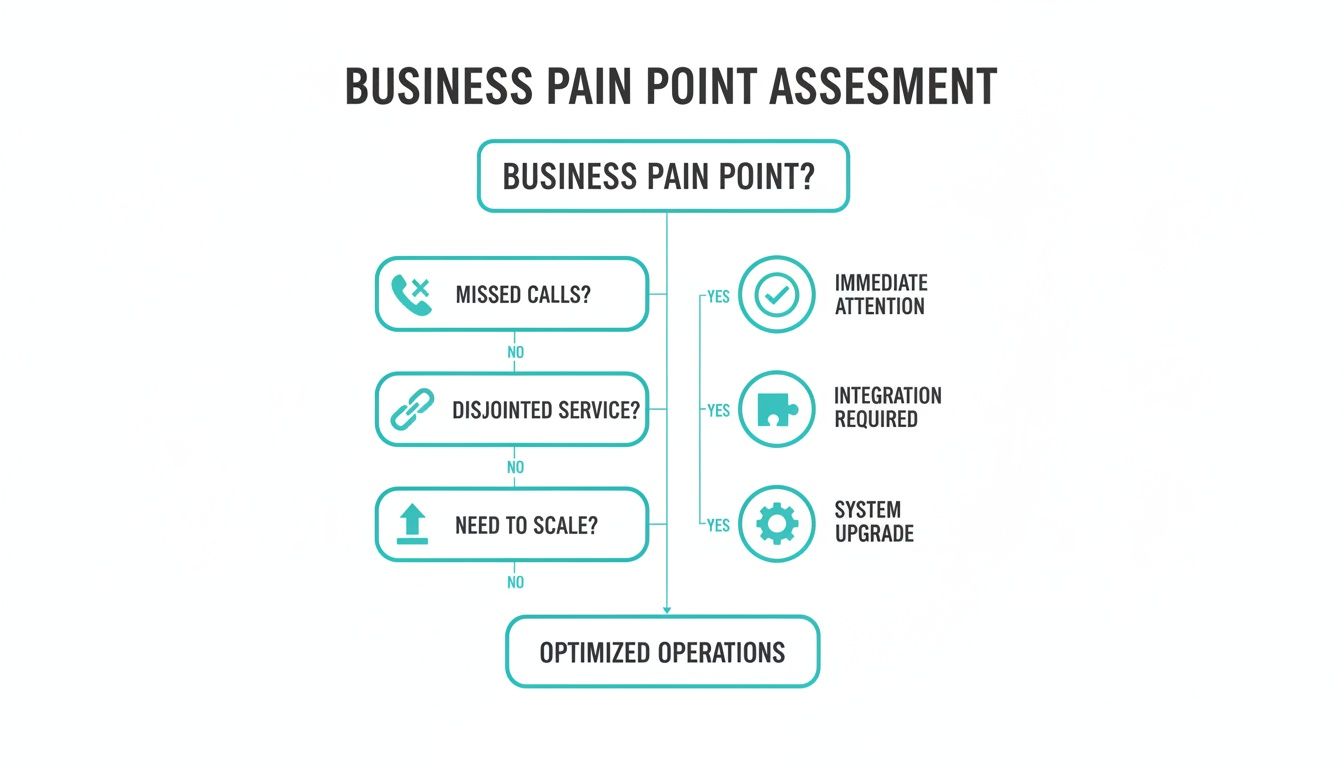
As you can see, problems like missed calls, disjointed customer service, and an inability to scale are often the biggest drivers for making a switch.
Understanding the Market and Your Place in It
The demand for more flexible communication systems is exploding. The global PBX market is on track to grow from USD 44.26 billion in 2025 to a staggering USD 124.54 billion by 2035, fueled by a 10.9% compound annual growth rate. Small and medium-sized businesses are the engine behind this growth, particularly in North America, where service-based solutions are expected to capture 52% of the market in 2025. Businesses want agility, and they want it now.
This trend is all about operational speed—the ability for a dev team to deploy a new server one day and for the sales team to add a dozen phone lines the next, without any friction.
Before you make a final call, it’s a good idea to look at a comprehensive comparison of small business phone systems to get a feel for all the options out there.
A Virtual PBX offers a strategic middle ground, providing the robust control of an on-premise system with the operational efficiency of the cloud. It’s an ideal solution for IT teams that want to maintain control without managing physical hardware.
Comparing Your Options: On-Premise, Cloud, and Virtual
Let’s put these three models side-by-side to help you figure out the best fit. The right choice really comes down to your team’s technical skills, your budget, and how you plan to grow. Our own guide on selecting a cloud PBX provider dives even deeper into what to look for when vetting vendors.
To simplify your decision, here’s a table that breaks down the key differences between On-Premise, Hosted/Cloud, and Virtual PBX systems. Each model has its strengths, and seeing them compared directly makes it easier to align a solution with your business needs.
Comparing PBX Deployment Models for Small Businesses
| Attribute | On-Premise PBX | Hosted/Cloud PBX | Virtual PBX (VPBX) |
|---|---|---|---|
| Initial Cost | High (CapEx) for hardware & licenses. | Low. Minimal to no setup fees. | Low (if virtual host exists). |
| Ongoing Cost | OpEx for maintenance, power, staff. | Predictable monthly fee (OpEx). | OpEx for server resources & licensing. |
| Control | Full control over hardware & software. | Limited. Provider-dependent features. | High control over software & resources. |
| Maintenance | In-house IT team required. | Handled entirely by the provider. | In-house team manages the VM instance. |
| Scalability | Difficult & costly. Requires new hardware. | Very easy. Add/remove users via a portal. | Easy. Adjust VM resources as needed. |
| Security | Your full responsibility. | Provider’s responsibility. | Shared responsibility. You secure the VM. |
| Best For | Firms with strict compliance needs & IT staff. | Small businesses needing simplicity & low startup cost. | Tech-savvy businesses wanting control & flexibility. |
As the table shows, there’s no single “best” option—only the best option for you. If you value simplicity and predictable costs above all else, a Hosted/Cloud solution is a strong contender. But if you have an IT team that craves control without the burden of physical hardware, a Virtual PBX offers an unbeatable combination of power and efficiency.
What’s Actually Under the Hood? Key PBX Features and Tech
A modern PBX system for a small business is a sophisticated communication application stack, not just a digital switchboard. To make an informed decision, IT professionals must understand the core features and the underlying protocols that enable them. These components are critical for building a smart, secure, and resilient communication infrastructure.
The features you select will directly impact operational productivity and customer experience, transforming a basic phone service into a strategic business asset.
Interactive Voice Response and Smart Call Routing
An Interactive Voice Response (IVR) system is an automated menu that processes dual-tone multi-frequency (DTMF) inputs to navigate callers (“Press 1 for Sales…”). A well-architected IVR is the first line of defense against inefficient call handling, ensuring inbound traffic is routed correctly without human intervention.
Modern systems extend this with advanced routing logic:
- Time-of-Day Routing: Utilizes conditional logic to route calls based on business hours. Calls after 17:00 UTC can be automatically routed to a voicemail box or an after-hours support queue.
- Skill-Based Routing: An essential feature for technical support teams. It directs callers to agents based on predefined skill sets (e.g., ‘Tier 2 Support,’ ‘Juniper Certified’), increasing first-call resolution rates.
- Find Me/Follow Me: Implements a sequential or simultaneous ring strategy across multiple endpoints (desk phone, mobile app, softphone) to ensure high availability for key personnel.
Beyond standard voicemail, many PBX solutions now integrate APIs for advanced functions, such as creating dynamic, personalized automated voicemail messages with AI.
SIP Trunks and DIDs: The Technical Backbone
The core technology enabling modern PBX functionality is Voice over Internet Protocol (VoIP). Its two primary components are Session Initiation Protocol (SIP) Trunks and Direct Inward Dialing (DIDs). This technology stack replaces legacy PSTN copper lines with a more flexible, scalable, and cost-effective IP-based alternative.
A SIP Trunk is a virtual connection to the Public Switched Telephone Network (PSTN) that can carry multiple simultaneous call sessions, or channels, over an internet connection. Instead of a 1:1 ratio of physical lines to calls, a single SIP trunk’s capacity is limited only by available bandwidth. This architecture allows a small business to scale call capacity without physical infrastructure changes. Our guide on how SIP trunking works provides a detailed protocol-level breakdown.
DIDs are the virtual phone numbers assigned to your SIP trunks. These numbers can be mapped to specific users, hunt groups, or automated services, providing direct access to internal resources without traversing a main switchboard.
SIP Trunks and DIDs are the foundational elements that decouple phone numbers from physical lines, providing the architectural flexibility and scalability required by modern IT environments.
Small and medium businesses are leading this charge. The Virtual PBX market is set to jump from USD 7.40 billion in 2024 to an expected USD 8.35 billion in 2025—a 13% leap. Why? Because businesses can slash hardware costs and scale instantly using SIP and DIDs.
Security and Call Quality Protocols
When voice traffic traverses public or private IP networks, security and reliability become paramount. A professional PBX system for a small business must implement robust protocols to ensure confidentiality, integrity, and clear audio quality.
Two security protocols are mission-critical:
- Secure Real-time Transport Protocol (SRTP): Encrypts the RTP payload (the actual voice data), rendering intercepted calls unintelligible.
- Transport Layer Security (TLS): Encrypts the SIP signaling messages (call setup, teardown, management), preventing session hijacking and unauthorized call manipulation.
These protocols work in tandem to establish a secure, end-to-end communication channel. Finally, Quality of Service (QoS) is a network-level configuration that prioritizes voice traffic. By implementing QoS policies on routers and switches (e.g., classifying voice packets as EF – Expedited Forwarding), you ensure that voice data receives priority bandwidth, mitigating latency, jitter, and packet loss that cause poor audio quality.
Planning Your PBX Budget and Scaling Strategy
A proper financial assessment of a PBX system for a small business extends beyond the initial quote to the Total Cost of Ownership (TCO). This includes all capital expenditures (CapEx) and recurring operational expenditures (OpEx) over the system’s lifecycle. A precise TCO analysis is essential for making a sound investment.
With a traditional on-premise PBX, the budget is heavily front-loaded with CapEx for physical hardware: servers, IP phones, PoE switches, and telephony cards. However, the recurring OpEx can be unpredictable and substantial, encompassing software license renewals, power consumption, and the significant allocation of IT staff hours for maintenance, security patching, and troubleshooting.
The Predictable OpEx Model of Cloud and Virtual PBX
Cloud and virtual PBX systems fundamentally shift the financial model from CapEx to a predictable OpEx structure. This is a strategic advantage for small businesses, as it eliminates the large, upfront hardware investment. Instead of purchasing a server, you pay a recurring subscription fee, typically on a per-user, per-month basis.
This model simplifies budgeting and financial forecasting. Ongoing costs are transparent and typically include:
- Per-User Licensing: A fixed monthly fee for each active extension.
- SIP Trunking Costs: Based on the required number of concurrent call channels.
- DID Number Fees: Small monthly charges for each provisioned phone number.
- Number Porting Charges: A one-time fee for migrating existing numbers to the new provider.
This pay-as-you-go model ensures that expenditures are directly aligned with usage, providing financial agility for businesses with seasonal demand or fluctuating team sizes. It removes the financial risk associated with unexpected hardware failures and simplifies capacity planning.
Mapping a Clear Path for Scalability
A critical consideration for any small business is whether its infrastructure can scale in lockstep with growth. A communications platform that is difficult to expand becomes a strategic bottleneck. Here, the architectural differences between PBX models are most apparent, especially when leveraging virtualization.
A truly scalable PBX system adapts to business needs in minutes, not months. The objective is to align your communication infrastructure with your growth trajectory, ensuring technology is an enabler, not a roadblock.
Consider a small business running a Virtual PBX on a Proxmox private cloud. Scaling from five users to fifty is not a major capital project; it’s a simple resource allocation task. An IT administrator can hot-add vCPUs or RAM to the PBX virtual machine with a single command or GUI click and then provision the additional user licenses via the provider’s portal. The entire process can be completed in minutes with zero downtime.
To add two vCPUs to a running VM (ID 101) in Proxmox, you would use:
# Example: Hot-plugging 2 CPU cores to a running PBX VM
qm set 101 --cores 4
Compare this to scaling an on-premise system. Expanding a physical PBX requires a lengthy procurement and implementation cycle: specifying and purchasing a more powerful server or additional telephony cards, scheduling maintenance windows for installation, and performing complex configuration changes. This process can take weeks and incurs significant costs, hindering the organization’s ability to react to new opportunities. The agility of a virtualized solution is a distinct strategic advantage.
A Technical Checklist for PBX Deployment and Migration
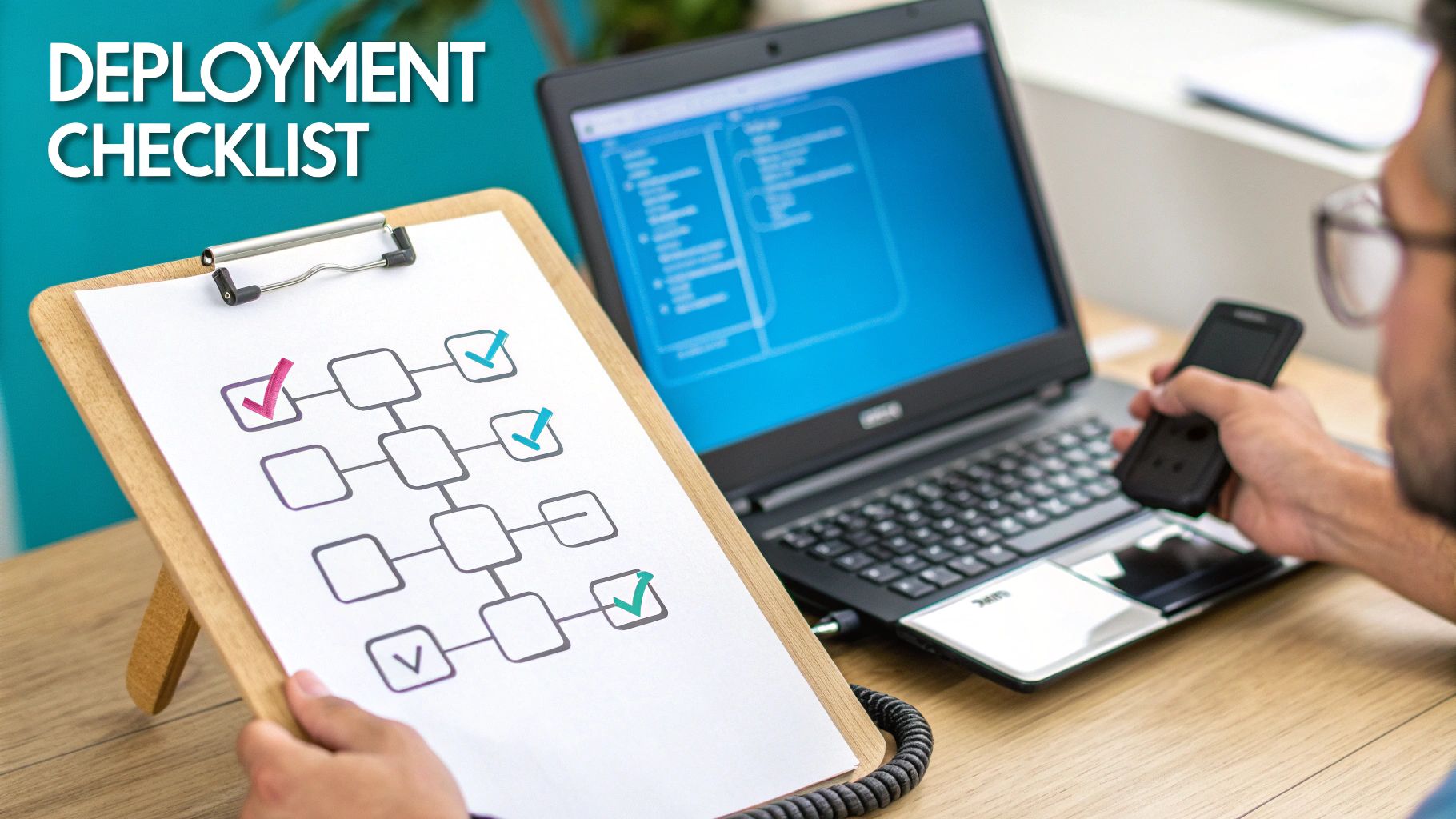
A successful PBX implementation is the result of meticulous planning and a systematic, phased approach, not a “flick of a switch.” For IT managers and system administrators, a structured technical checklist is essential for mitigating risks like downtime, poor call quality, and security vulnerabilities. This guide outlines the critical stages, from network assessment to post-launch monitoring.
Adhering to a detailed deployment plan ensures your new PBX system for a small business is built on a stable foundation, avoiding service interruptions and ensuring user adoption from day one.
Pre-Flight Network Assessment
Before deploying any PBX software or hardware, a comprehensive network readiness assessment is mandatory. VoIP traffic is highly sensitive to network impairments like latency, jitter, and packet loss.
First, verify sufficient bandwidth. A standard G.711 codec requires approximately 100 Kbps of dedicated, symmetrical bandwidth per concurrent call. For an office expecting 10 simultaneous calls, you must reserve at least 1 Mbps of stable bandwidth for voice traffic.
Next, implement Quality of Service (QoS) policies on your network hardware (routers, switches). This is non-negotiable for ensuring high-quality audio. QoS prioritizes RTP packets over less time-sensitive data. For example, on a Juniper device, you would classify voice traffic and assign it to a high-priority forwarding class:
# Example Juniper JUNOS QoS Configuration
firewall {
    family inet {
        filter prioritize-voice {
            term voip-traffic {
                from {
                    source-port 5060; # SIP Port
                }
                then {
                    forwarding-class expedited-forwarding;
                    accept;
                }
            }
        }
    }
}
This single configuration is the most critical factor in preventing choppy, robotic-sounding calls.
A PBX is only as reliable as the network it runs on. Neglecting the pre-flight network assessment is the single most common cause of failed deployments.
Number Porting and Endpoint Provisioning
With a validated network, the next phase involves migrating telephone numbers and provisioning endpoints. The number porting process—transferring your Direct Inward Dialing (DID) numbers from the legacy carrier—must be precisely coordinated to prevent service disruption.
Initiate this by submitting a Letter of Authorization (LOA) to your new provider. Critical best practice: do not terminate service with your old carrier until receiving explicit confirmation that the port has been successfully completed. Premature cancellation can result in the permanent loss of your business numbers.
While porting is underway, provision your endpoints:
- IP Phones: Utilize zero-touch provisioning (ZTP) if supported. The phone downloads its configuration automatically upon connecting to the network via DHCP options or a redirection service.
- Softphone Clients: Deploy the software client to user workstations via standard software distribution methods. Ensure local firewall rules permit traffic on required SIP and RTP ports.
- Mobile Apps: Distribute installation instructions and login credentials to users for their mobile devices.
Core System Configuration and Training
The final technical phase involves configuring the PBX application logic to align with business workflows. This is where you implement features that drive efficiency and create a professional caller experience.
Your core configuration checklist must include:
- IVR and Auto Attendants: Architect the call flow logic that greets and routes inbound callers.
- Ring Groups and Call Queues: Configure hunt groups (e.g., simultaneous ring) for departments and FIFO (First-In, First-Out) queues for high-volume teams like technical support.
- Voicemail-to-Email: Enable this feature to forward voicemail audio files as email attachments, integrating voice messaging into the standard business workflow.
Finally, conduct user training focused on core functionality: call transfers, conferencing, and voicemail access. Provide clear documentation and establish a point of contact for support. Post-launch, continuously monitor call quality metrics (MOS scores, jitter, packet loss) to identify and resolve any residual network issues.
Choosing Between a Managed and Unmanaged PBX
A critical decision in deploying a business phone system is determining the management model. The choice between a managed or unmanaged PBX directly impacts IT workload, operational costs, and overall system resilience. Each approach presents a different balance of administrative control versus operational convenience.
An unmanaged PBX, typically self-hosted on a bare metal server or a private cloud VM, grants you complete root-level control over the system. You dictate every configuration parameter, update schedule, and security policy. However, this power comes with total responsibility.
Your IT team assumes the full operational burden: initial installation and configuration, daily monitoring, security patching, performance tuning, troubleshooting, and implementing a comprehensive backup and disaster recovery strategy. This model is best suited for organizations with deep in-house expertise in telephony and system administration who require granular control for compliance or integration purposes.
The Value of a Managed PBX Service
Conversely, a managed PBX service offloads the entire operational lifecycle to a specialized provider. This is analogous to managed hosting, where a team of experts assumes responsibility for the infrastructure, ensuring security, reliability, and optimal performance. This frees your internal IT resources to focus on strategic initiatives rather than routine system administration.
A managed service provider (MSP) delivers:
- Proactive Monitoring: 24/7/365 monitoring of system health and performance metrics to detect and resolve issues before they impact service.
- Security Patch Management: Timely application of security updates and patches to protect the system against emerging vulnerabilities.
- Automated Backups: Regular, automated backups of the PBX configuration and data, ensuring rapid restoration in a disaster recovery scenario.
- Expert Support: Access to specialized technicians with deep expertise in voice protocols and systems for rapid issue resolution.
Choosing a managed service transforms your PBX from a complex piece of infrastructure you must maintain into a reliable, high-availability utility. It is a strategic decision to offload operational risk and leverage specialized expertise.
This hands-off approach is quickly becoming the new standard. Over 70% of small businesses in the U.S. have already moved to VoIP systems, and the global hosted PBX market is on track to hit US$39.4 billion by 2033, largely thanks to the rise of hybrid work. This trend, highlighted on globenewswire.com, shows a clear demand for powerful features without the maintenance headaches.
Ultimately, the choice depends on your organization’s technical capabilities, risk tolerance, and strategic focus. If you lack a dedicated IT team with telephony expertise, or if you prefer your staff to focus on revenue-generating activities, a managed PBX is the more efficient and resilient solution. You can learn more about how hosted VirtualPBX saves businesses thousands by reducing administrative overhead and eliminating large capital expenditures.
Common Questions About PBX Systems
When evaluating a PBX system for a small business, several technical questions consistently arise among IT managers and decision-makers. Here are concise, technically-focused answers.
What Is the Main Difference Between PBX and VoIP?
Think of the relationship as application versus protocol. The PBX is the application server (software and hardware) that provides call control, routing logic, and user features like extensions and voicemail. VoIP (Voice over Internet Protocol) is the transport layer protocol stack used to digitize voice and transmit it as IP packets over a network.
Essentially, a modern PBX is an application that runs on top of VoIP technology. The two are complementary components of a modern voice communication system.
How Many Phone Lines Can a Small Business PBX Handle?
In a modern VoIP-based PBX, the concept of “phone lines” is replaced by “concurrent call channels.” This capacity is not limited by physical hardware but by software licensing and available network bandwidth.
With a cloud or virtual PBX, scalability is virtually unlimited. Capacity can be increased dynamically by provisioning additional SIP trunk channels through a software portal. This architecture is ideal for businesses with fluctuating call volumes or rapid growth trajectories.
The real beauty of a modern VoIP-based PBX is that your communication system grows with you. You’re no longer stuck with the physical limits of copper wires and can add resources whenever you need them.
Is It Difficult to Switch from a Landline to a PBX System?
With proper planning and a methodical approach, the migration is a low-risk, streamlined process. The most critical phase is number porting, the regulated process of transferring your existing telephone numbers (DIDs) from the incumbent carrier to the new VoIP provider.
A reputable provider will manage the entire porting process, coordinating with the losing carrier to ensure a seamless cutover with zero downtime. Post-porting, endpoint configuration can often be automated using zero-touch provisioning (ZTP).
Can I Use My Existing Phone Numbers with a New PBX?
Yes, absolutely. The process of number porting is a federally regulated right in the United States (and many other countries), ensuring that you can retain your existing local and toll-free numbers when changing service providers.
This is a non-negotiable requirement for business continuity, as it preserves your established business identity and eliminates the need to update contact information across all client-facing materials.
Ready to build a reliable and scalable communication hub for your business? ARPHost offers managed Virtual PBX solutions built on high-performance private cloud infrastructure, complete with expert 24/7 support to guide you every step of the way. Explore our Virtual PBX solutions today.