

A lot of small business owners reach the same point at roughly the same time. The office internet drops during a busy morning. One employee can’t access email. Another gets a suspicious login prompt. The website feels slow, backups are a question mark, and the person “handling IT” is also running operations, sales, or development.
That setup works until it doesn’t. Once technology starts interrupting revenue, customer service, or staff productivity, IT stops being a side task and becomes an operational risk. Good outsourced IT support for small business isn’t about handing problems to a vendor. It’s about putting the right people, processes, and infrastructure behind systems your business depends on every day.
Why Smart Businesses Outsource IT Support
Small companies rarely decide to outsource because IT is interesting. They do it because constant reactive work steals time from the business itself. A slow file server means staff wait. A missed patch means security exposure. A failing backup means the owner lies awake wondering what happens after ransomware or a hardware fault.
That’s why outsourcing has become normal, not exceptional. Approximately 37% of small businesses globally now outsource at least one core business function, with IT support being among the most common. In the US, 66% of all companies outsource some IT requirements, with businesses that do so saving an average of 20-30% on operational costs compared to maintaining in-house teams.
For a small business, the shift is strategic. Instead of waiting for something to break, you move to a model where someone is responsible for patching, monitoring, backup health, endpoint protection, access control, and support coverage. That changes IT from a recurring interruption into a managed business function.
Practical rule: If your team spends more time chasing recurring tech issues than improving systems, you’ve already outgrown ad hoc IT.
A good provider should operate like an extension of your business, not a ticket-taking middleman. That’s the difference between occasional outsourced labor and a structured IT outsourcing service for growing businesses. The first helps when something breaks. The second reduces how often things break in the first place.
Core Services Included in Outsourced IT Plans
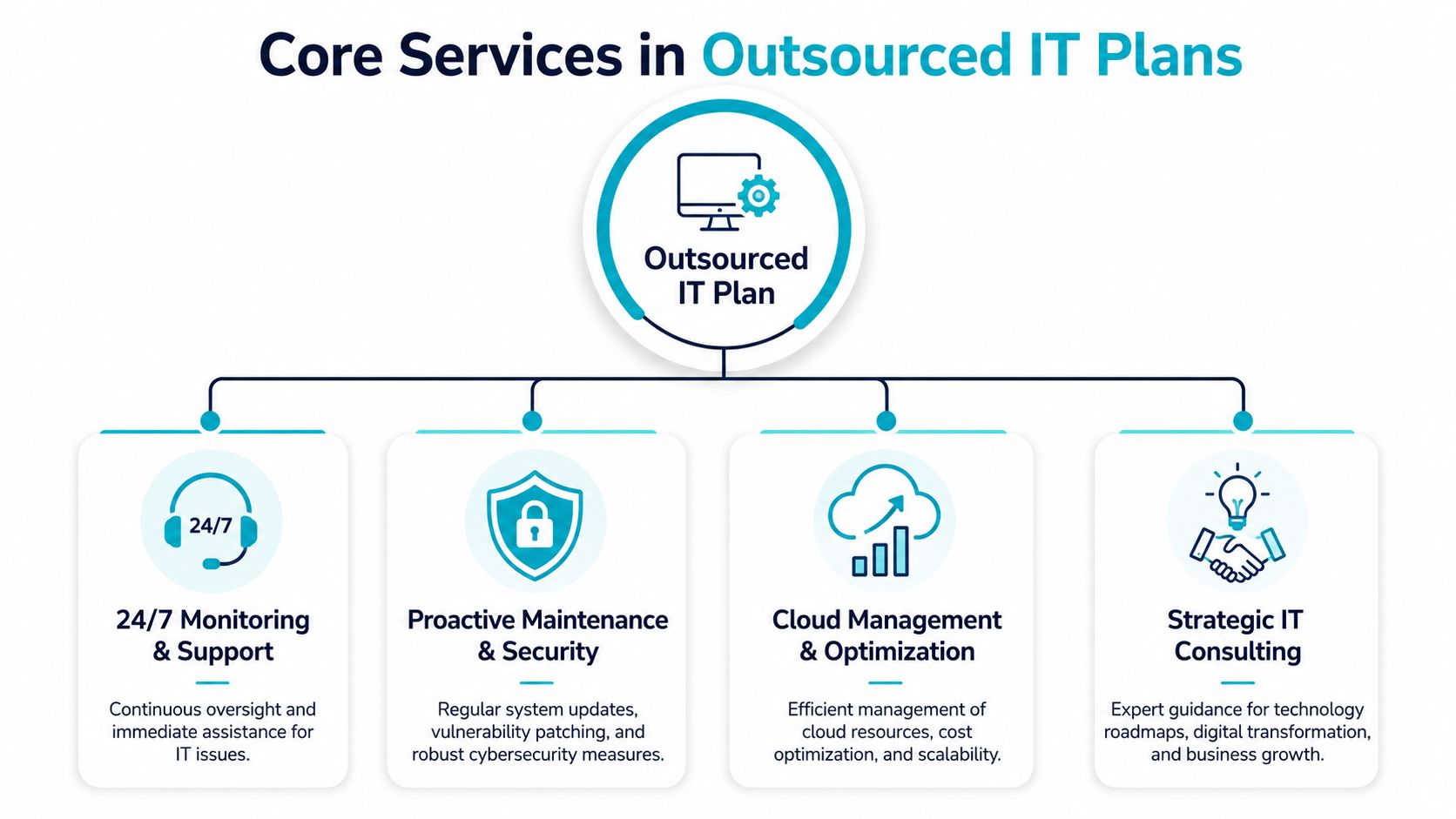
Most business owners hear “managed IT” and think helpdesk. Helpdesk matters, but it’s only one layer. A useful outsourced plan covers support, prevention, recovery, and planning.
Helpdesk and daily user support
This is the visible part. Employees need password resets, printer troubleshooting, mailbox fixes, workstation support, and application access restored fast. If nobody owns those requests, they stack up and pull your best internal people away from revenue work.
The key question isn’t whether a provider offers a helpdesk. Almost all of them do. The question is whether they can support the mix you run, such as Microsoft 365, line-of-business software, VoIP handsets, remote laptops, or website administration.
Proactive maintenance and security
Reactive support only treats symptoms. The more valuable work happens in the background.
That includes things like:
- Patch management: Keeping operating systems, applications, and firmware current so known vulnerabilities don’t remain exposed.
- Endpoint protection: Watching desktops and laptops for suspicious behavior, malware activity, and policy violations.
- Firewall and network administration: Reviewing rules, tightening access, and reducing attack surface instead of leaving old exceptions in place.
- Server health monitoring: Catching storage pressure, service failures, or resource contention before users feel the impact.
If your business runs websites, customer portals, or internal apps, this layer is what prevents a sales event or busy workday from turning into a support emergency.
Good outsourced support should lower noise for your staff. If users keep reporting the same issue every week, the provider is maintaining tickets, not maintaining systems.
Backup recovery and cloud operations
Backups aren’t a checkbox. They need monitoring, retention planning, restore testing, and clear ownership. The same goes for cloud resources. Someone needs to review usage, permissions, and performance so costs don’t drift and systems don’t sprawl.
A typical small business plan often includes:
- Backup oversight: Monitoring job success, storage health, and recovery readiness.
- Disaster recovery planning: Defining what gets restored first and who makes decisions during an outage.
- Cloud administration: Managing hosted workloads, user access, and resource allocation.
- Strategic guidance: Advising when a workload belongs on shared hosting, VPS, dedicated hardware, or a private cloud.
For companies that need a provider to cover these layers under one operating model, small business IT services generally bundle support desk, patching, security operations, and infrastructure management into one plan.
Choosing Your Service Model Managed vs Co-Managed
Fully managed and co-managed IT solve different problems. Treating them as interchangeable usually creates friction.
A fully managed model fits businesses that don’t have internal IT staff or don’t want day-to-day IT ownership spread across office managers, developers, or founders. In that setup, the provider owns user support, systems administration, patching, backup oversight, vendor coordination, and escalation. Accountability is simpler because there’s one operational owner.
A co-managed model works when you already have someone technical in-house. That might be an IT generalist, a senior developer, or a systems-minded operations lead. The outside provider fills skill gaps, handles after-hours coverage, manages security tooling, or takes ownership of infrastructure that your internal person shouldn’t carry alone.
Where co-managed setups fail
The failure point is usually scope, not effort. Data shows 63% of SMBs with internal tech staff struggle to define which tasks belong to the MSP versus internal teams. This ambiguity is a primary reason why 58% of co-managed SMB contracts fail to meet SLA targets.
That shows up in practical ways:
- Patching confusion: Your internal developer assumes the MSP updates servers. The MSP assumes the developer handles app stack changes.
- Identity management gaps: Nobody is clearly responsible for account offboarding, MFA enforcement, or access reviews.
- Cloud admin overlap: Both sides make changes in the same environment, and neither side owns documentation.
A simple decision framework
Use this split when deciding what stays internal and what gets outsourced:
| Keep in-house | Outsource |
|---|---|
| Business application ownership | Helpdesk coverage |
| Internal process knowledge | Patch management |
| Vendor-specific workflow decisions | Security monitoring |
| Product development tasks | Backup administration |
| Department-specific approvals | Firewall and network maintenance |
If a task requires business context, keep ownership close to the business. If it requires consistency, coverage, or specialist tooling, outsourcing usually makes more sense.
For many small teams, co-managed works well only after responsibilities are written in plain language. “Cloud support” is vague. “Provider manages host patching, hypervisor alerts, backups, and user escalations after hours” is workable.
The Right Infrastructure for Your Business Needs
Support quality matters, but outsourced IT is only as strong as the platform underneath it. If your workloads sit on mismatched infrastructure, you’ll keep paying for performance problems, security workarounds, or migration pain.
When secure VPS hosting makes sense
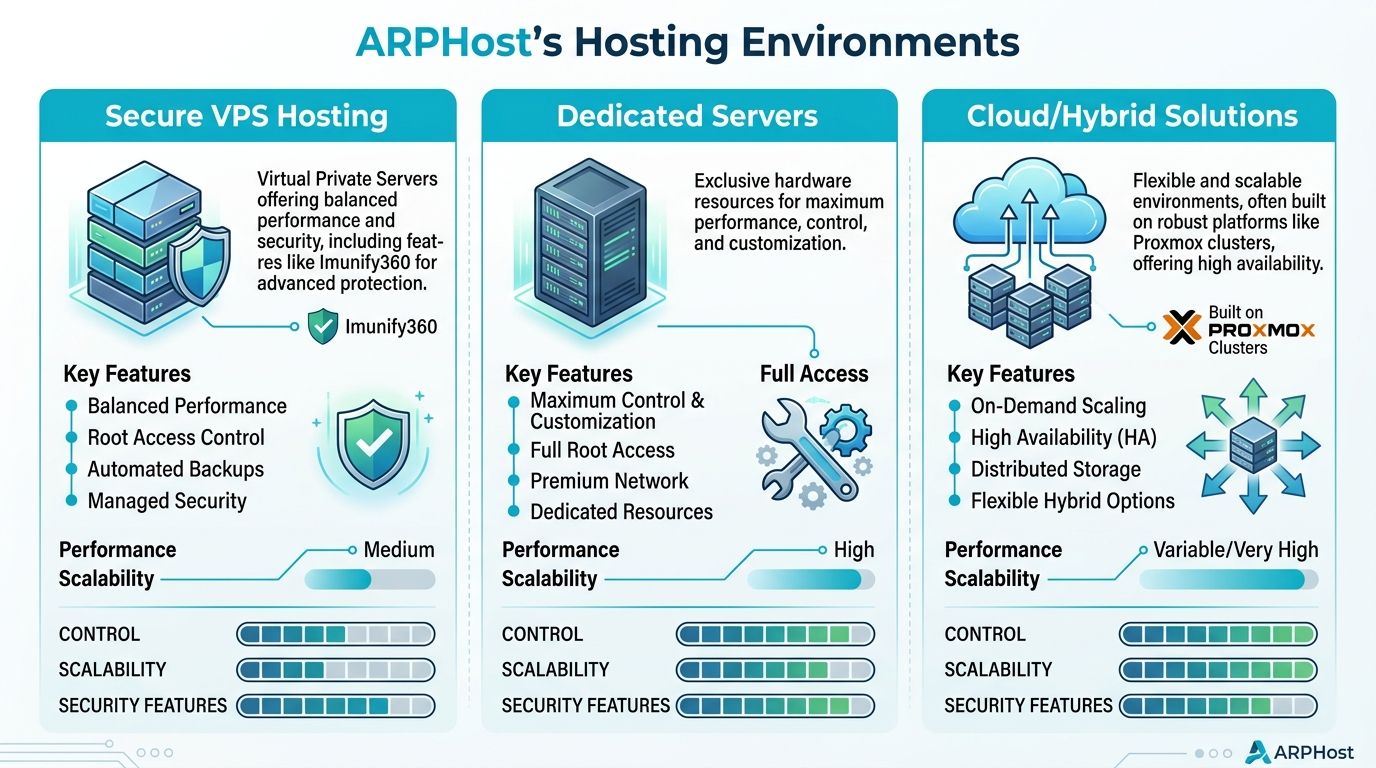
A managed VPS is usually the right starting point for websites, light application servers, development environments, small databases, and business services that need predictable cost and easy scaling. It gives you isolated resources without the complexity of owning the full hardware layer.
This model is especially useful when you need:
- Fast deployment: Launching a new application or replacing aging shared hosting quickly.
- Simpler management: Centralized backups, patching, and monitoring on a smaller footprint.
- Controlled growth: Adding resources without rebuilding the whole environment.
If your main pain point is a slow website, unreliable email-adjacent services, or a basic line-of-business application, a secure managed VPS hosting plan is often enough.
When bare metal is the better fit
Some workloads don’t belong on a VPS. Large databases, high-volume application stacks, media processing, virtualization hosts, and resource-heavy internal systems benefit from dedicated hardware.
A few examples from current inventory make the decision concrete:
- Dual Intel Xeon E5-2690 V3 in Tampa, FL: A practical choice for Proxmox clusters, multi-tenant VPS nodes, and game server hosting.
- AMD EPYC 4584PX in Tampa, FL: Better suited to memory-intensive databases, AI or inference workloads, and high-density virtualization.
- AMD Ryzen 9600X in Tampa, FL: A solid option for single-tenant business apps and high-clock-speed development environments.
For businesses comparing options, bare metal server configurations are the point where you stop sharing compute layers and start designing around your own workload profile.
When a Proxmox private cloud is justified
A dedicated private cloud is for businesses that need stronger isolation, multi-VM architecture, controlled networking, or high-availability design. That includes internal business apps, client-hosted environments, ERP stacks, and regulated systems where architecture control matters.
For Proxmox specifically, the design details matter. Proxmox VE 9 high-availability clusters require a minimum of three nodes for proper quorum and failover capability, and latency between nodes must not exceed 2 ms for single-site deployments or 10 ms for multi-site extended clusters.
A basic hardening baseline also matters. This Proxmox VE 9 security walkthrough recommends disabling root SSH access, using SSH keys instead of passwords, enabling 2FA, restricting exposed ports, isolating management on a dedicated VLAN, and using client-side encryption for Proxmox Backup Server storage.
One practical option in this category is ARPHost’s Proxmox private cloud platform, which is built for businesses that need dedicated hardware, root access, and managed support around clustered virtualization.
The Business Case In-House vs Outsourced IT
The in-house versus outsourced decision usually starts with salary, but salary is only the visible line item. Small businesses also absorb training time, tool costs, recruitment friction, sick leave coverage, vacation gaps, and the risk that one person doesn’t know a specialty area your systems now depend on.
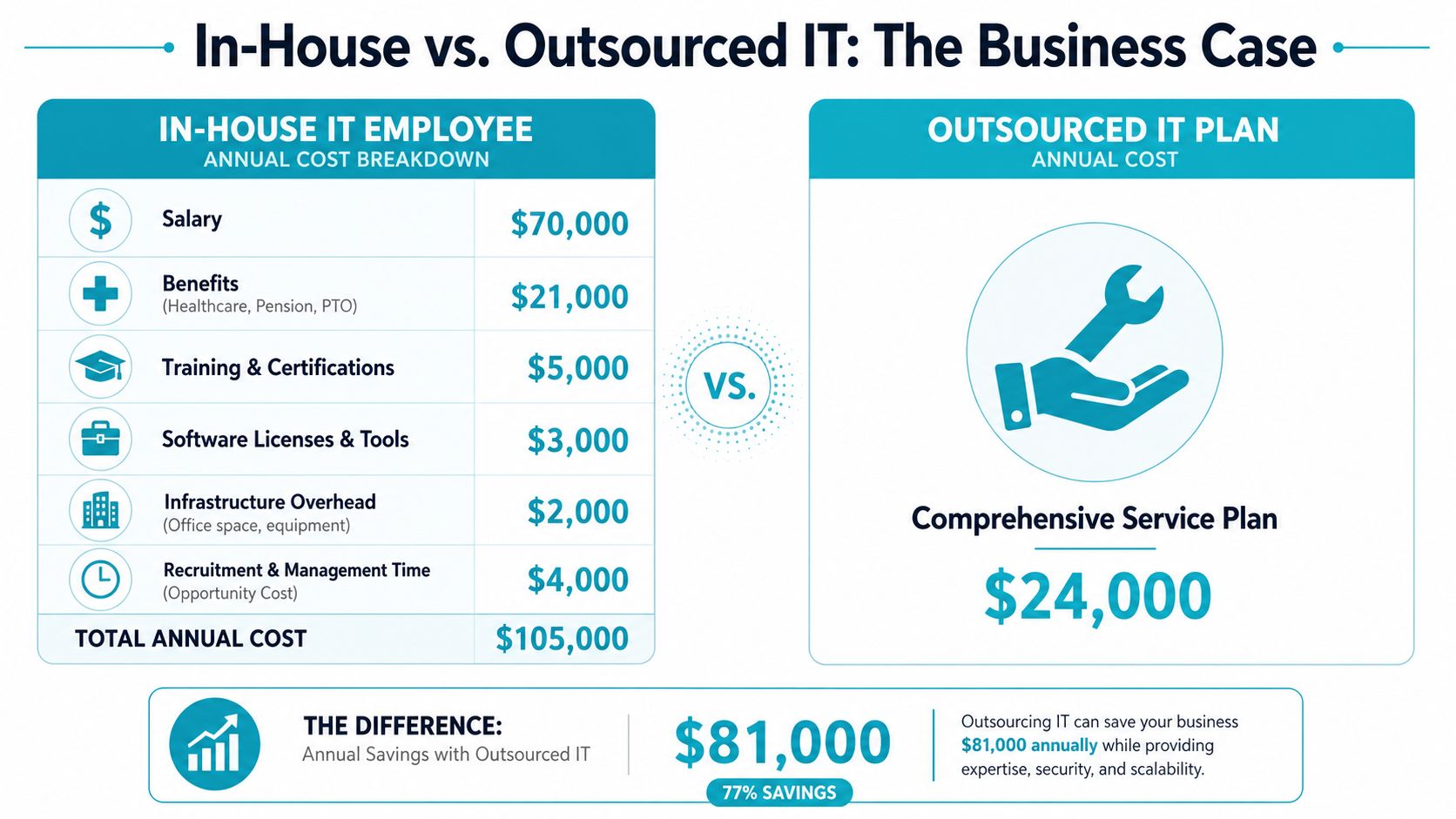
The core financial point is straightforward. For small businesses with 11–50 employees, outsourced IT support typically costs $1,500–$7,500 monthly, which is only 30–50% of the total expense of hiring a single in-house IT staff member when factoring in salary, benefits, and training. Outsourcing provides access to pooled expertise and 24/7 coverage that a single employee cannot match.
That pooled model changes what you’re buying. You’re not hiring one generalist and hoping they can cover desktop support, networking, backups, patching, cloud administration, vendor escalation, and security response. You’re paying for access to a team structure.
This short video frames the budgeting side well:
What in-house usually misses
An internal hire can be excellent and still leave gaps. Common weak spots include after-hours incidents, niche infrastructure work, documentation discipline, and projects that need more than one set of hands.
A support model becomes expensive when:
- Coverage depends on one person: If they’re unavailable, work waits.
- Specialist work gets improvised: Firewall changes, virtualization tuning, or backup design are handled outside anyone’s core skill set.
- Tooling stays fragmented: Monitoring, security, backup, and reporting sit in separate systems with no consistent owner.
Why ARPHost excels here
For businesses comparing service structures, managed services pricing models help clarify whether you want flat monthly coverage, project-based work, or a hybrid arrangement.
ARPHost, LLC is one example of a provider that combines managed IT support with infrastructure options such as VPS, bare metal, Proxmox private cloud, backups, and business communications. That matters because small businesses often run into trouble when support and hosting sit with separate vendors who blame each other during outages.
The cheapest IT option is often the one that delays cost, not the one that removes it.
How to Choose the Right IT Partner
Choosing a provider is less about sales language and more about operational clarity. You need to know what they’ll own, how they’ll measure service, how they secure systems, and what happens if you leave.
Read the SLA like an operator
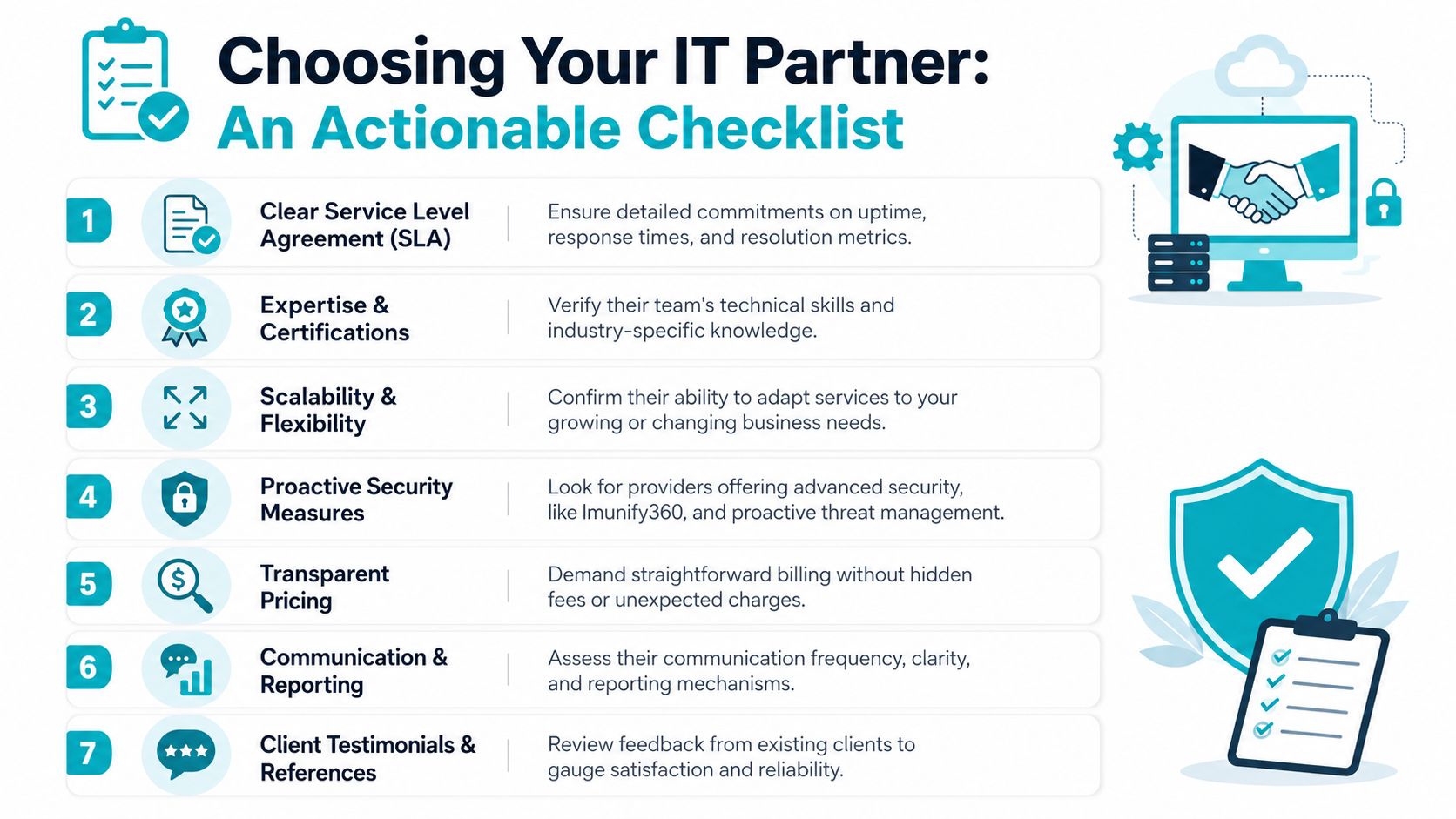
A decent proposal can still hide a weak service model. Read the SLA for specifics, not reassurance.
Look for:
- Critical response commitments: The plan should state how fast urgent issues are acknowledged.
- Escalation paths: You should know who takes over when first-line support can’t solve the issue.
- Defined scope: Endpoints, servers, backups, cloud platforms, and network devices should be listed clearly.
- Reporting cadence: You need regular visibility into ticket trends, patch status, backup health, and security events.
If the SLA says “best effort,” “as available,” or “support as needed” without service definitions, push back.
Check for lock-in before you sign
Savings can disappear during provider changes. While outsourcing can save 30–50%, 42% of SMBs switching providers face unexpected data migration costs averaging $8,500 due to vendor lock-in from proprietary tools.
That’s why you should ask direct questions:
- Who owns the backups and in what format can they be exported?
- Are monitoring agents, backup systems, or security tools tied to proprietary platforms?
- What happens to documentation, credentials, and configuration data at termination?
- Are there separate migration or data extraction fees after the contract ends?
Ask this directly: “If we leave in a year, what data, documentation, and system access do we receive, in what format, and at what cost?”
Review security posture and onboarding discipline
A provider should explain how they handle identity security, endpoint policy, backup validation, and administrative access. Vague answers here are a bigger concern than a missing feature on a brochure.
Use this quick scorecard during evaluation:
| Area | What good looks like |
|---|---|
| Security | MFA enforcement, patching process, endpoint oversight, access controls |
| Onboarding | Asset discovery, documentation, risk review, transition plan |
| Communication | Named contacts, regular reporting, clear escalation |
| Flexibility | Ability to support fully managed or co-managed setups |
| Exit readiness | Data portability, documented systems, no surprise extraction barriers |
If they can’t explain their onboarding process in plain English, they probably can’t run it cleanly either.
FAQs and Getting Started with ARPHost
A few questions usually come up late in the buying process. They’re worth answering plainly.
Is my business too small for outsourced IT
Usually, no. Small businesses often benefit the most because they have the least margin for downtime, staff distraction, and security mistakes. Even a lean environment still needs patching, backup oversight, access control, and someone accountable when systems fail.
Can I keep my existing software and vendors
Usually, yes. A good provider should work with the applications your business already depends on unless there’s a clear security, support, or performance reason to replace something. The first step should be documenting what you have and identifying what’s causing risk or drag.
What should I verify before signing
Check the SLA for service quality measures. Expert benchmarks for outsourced IT quality mandate First Call Resolution rates of 70–80% and Customer Satisfaction scores of 90%+, and businesses should verify those KPIs in a provider’s SLA to avoid hidden costs from inefficient support.
What does onboarding usually involve
Expect an inventory of users, devices, servers, cloud services, backups, and admin access. Then expect cleanup. Most businesses have old accounts, undocumented systems, inconsistent patching, and unclear ownership somewhere in the environment. A serious onboarding process finds those issues early so support is stable later.
The right time to fix IT isn’t after the next outage, ransomware scare, or failed migration. It’s when your business is stable enough to choose a model deliberately. If you need fully managed IT services for servers, networks, websites, or user support, start with a scoped conversation. If your immediate problem is infrastructure, it can also make sense to begin with managed services or review secure VPS plans for the workloads you already know need a better home.
If you’re evaluating outsourced IT support for small business and want a practical starting point, ARPHost, LLC offers managed services, VPS hosting, bare metal servers, Proxmox private clouds, colocation, and secure hosting bundles that can be matched to the way your business operates. The useful next step is to scope the problem first, then choose the service model and infrastructure that remove risk without adding unnecessary complexity.
