

Most buyers assume NVMe is automatically the right upgrade. That isn’t always true. A 2025 industry analysis found that 68% of small-business VPS users saw less than 15% improvement in TTFB on non-intensive workloads when moving to NVMe, which is a sharp reminder that storage speed only pays off when the workload can use it (industry analysis summary).
Where NVMe does fit, it changes the shape of performance problems. Database stalls, slow build pipelines, queue backlogs, and bursty application response often trace back to storage latency long before teams notice CPU saturation. That’s why NVMe VPS hosting deserves a workload-first evaluation, not a marketing-first one.
What Is NVMe VPS Hosting and Why It Matters
NVMe VPS hosting is a virtual private server built on storage that talks to the CPU over PCIe instead of the older SATA path. That sounds like a low-level implementation detail, but in practice it’s often the difference between a platform that feels responsive under load and one that starts stalling when many small disk operations stack up.
The important distinction isn’t just “faster SSD.” NVMe was designed for flash storage from the start. SATA was inherited from an earlier storage era, so even good SSDs can get boxed in by that older interface. In a VPS environment, where multiple workloads may compete for storage access, that bottleneck becomes visible quickly.
For IT teams, the practical question is simple. Does your application spend meaningful time waiting on storage? If the answer is yes, NVMe can improve page generation, search responsiveness, database query handling, CI jobs, and backup windows. If the answer is no, then you may be paying for headroom you won’t feel.
Where it usually matters
- Database-heavy apps: MySQL, PostgreSQL, and similar workloads hit storage constantly.
- Busy CMS stacks: WordPress, WooCommerce, and Magento benefit when plugin activity and database calls pile up.
- Development pipelines: Build servers, package installs, and container layer operations often expose I/O limits.
- Virtualization layers: Dense KVM environments benefit when storage queues don’t choke under concurrent activity.
Practical rule: If your monitoring shows wait time around disk activity, NVMe is a performance decision. If your site is mostly static and lightly used, it may be a pricing decision.
Teams comparing plans should start with an actual virtualization offering, not just a generic “cloud” label. A KVM-based platform such as ARPHost KVM VPS hosting is the right baseline for evaluating storage, CPU allocation, and isolation together.
The NVMe Performance Revolution Explained
NVMe changes storage behavior under load, not just benchmark screenshots. The practical difference is queue handling. On a busy VPS, that determines whether requests keep moving or pile up behind disk waits.
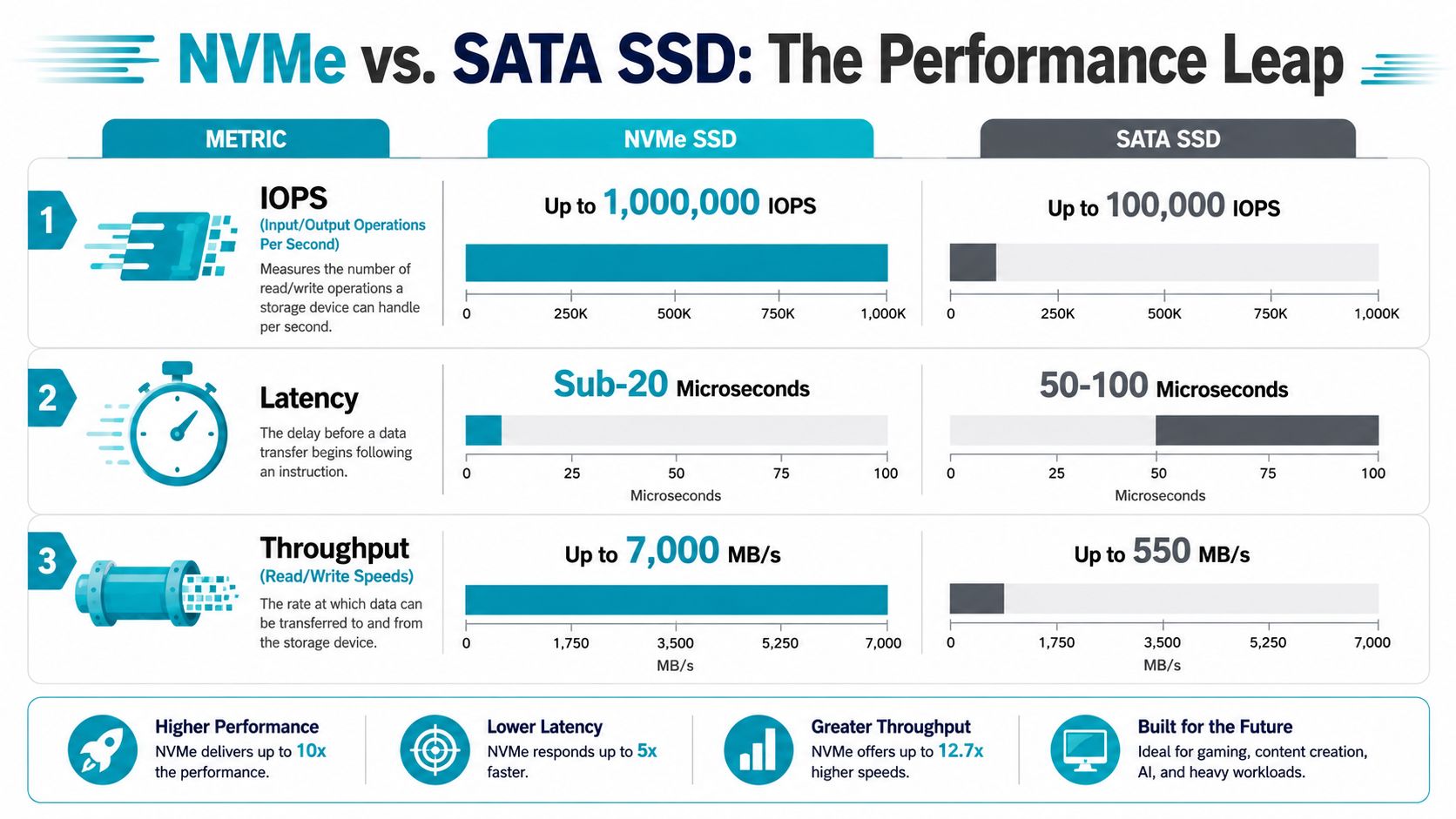
Storage performance comes down to three signals: IOPS, throughput, and latency. Each one affects a different class of workload, and that is why raw “NVMe” labeling is never enough on its own.
IOPS and why transactional apps respond first
IOPS measures how many read and write operations storage can finish per second. It matters most for small, random operations, which are common in databases, search indexes, session stores, and plugin-heavy web applications.
Published comparisons show NVMe far ahead of SATA SSDs for 4K random reads, often by several multiples rather than a small margin (NVMe vs SSD VPS performance comparison). In production terms, that usually means less queue buildup during bursts of logins, cart activity, cache misses, and write-heavy API traffic.
That improvement is real, but it is not automatic. If the host node is oversold, the CPU is weak, or the storage layer is shared too aggressively, advertised IOPS will not translate cleanly into application speed.
Throughput and bulk data movement
Throughput is sustained transfer rate. It matters when the job is moving large volumes of data instead of servicing thousands of tiny requests.
NVMe also has a clear advantage in sequential reads and writes. Teams tend to notice it during backup restores, image processing, artifact movement in CI pipelines, large database imports, and log export jobs. If that work is part of your daily operations, faster throughput can cut waiting time in a very visible way.
If your VPS mainly serves small pages from memory and rarely touches large files, throughput matters less than latency and CPU scheduling.
A short technical overview is useful if you want to visualize how the protocol works in practice:
Latency and consistency under concurrency
Latency is the delay before storage starts completing an operation. Lower latency improves dynamic applications because each page view or API call often depends on multiple storage-backed steps.
NVMe helps here because it uses PCIe and supports much deeper parallel command queues than SATA. Under concurrency, that architecture is often more important than peak transfer rate. A stack with frequent reads and writes feels more consistent because fewer requests get stuck waiting for the storage path to clear.
This is also where provider engineering matters. Fast NVMe drives paired with older CPUs, poor NUMA layout, or congested network storage can still deliver uneven results. Good NVMe VPS performance comes from the full platform, not the drive label alone.
| Metric | Application Impact | NVMe effect |
|---|---|---|
| IOPS | Small random reads and writes in databases, search, sessions, and busy CMS stacks | Handles more concurrent operations with less queueing |
| Throughput | Backups, restores, imports, media processing, and large artifact transfers | Moves bulk data faster |
| Latency | Dynamic pages, APIs, and multi-step application requests | Reduces delay and improves responsiveness under load |
NVMe is a significant step forward for workloads that hit storage constantly. For lightly used static sites, the difference may be modest. For transactional apps and mixed I/O pipelines, it is often one of the first upgrades users actually feel.
Real-World Payoffs Where NVMe Shines
NVMe pays off only when the workload can use it. The biggest gains show up in stacks that generate constant small reads and writes, build queues under concurrency, or recover large datasets on a schedule.

Workloads that usually benefit fast
E-commerce is one of the clearest examples. Product filtering, cart updates, session storage, order writes, inventory checks, and payment callbacks create steady disk activity across the application and database layers. Under real traffic, lower storage wait time often shows up as faster cart actions and fewer slow requests during busy periods.
CI/CD platforms also respond well to NVMe, especially when multiple builds run at once. Package installs, dependency caches, container image layers, test databases, and artifact generation all hit storage in short bursts. Teams usually notice the difference in pipeline consistency. Jobs spend less time stalled on extract, write, and cleanup phases.
Database-heavy services get the most value. Search indexes, event-driven back ends, analytics dashboards, message queues, and API platforms with frequent reads and writes tend to benefit immediately. The effect is even stronger when the provider pairs local NVMe with sensible storage resilience. If you are comparing plans, ARPHost’s guide to RAID configuration options for VPS and dedicated servers is useful because the drive type alone does not tell you how the platform behaves during rebuilds, failures, or sustained write pressure.
Multi-tenant SaaS is another strong fit. A platform serving many small customer workloads often suffers from noisy hour-to-hour I/O patterns rather than one huge transfer. Admin panels, background jobs, exports, audit logs, and customer-specific databases all compete for storage. Teams evaluating adjacent stack decisions such as billing or reseller tooling often compare white-label platform features alongside infrastructure, because operational sprawl can erase the speed gains of a fast VPS.
When a VPS stops being the bottleneck and the host starts being one
At some scale, NVMe is still the right storage layer, but the limiting factor shifts to CPU allocation, RAM size, and virtualization density. Large in-memory databases with frequent persistence, heavy Elasticsearch nodes, busy Proxmox clusters, and inference workloads often land here.
That is the point where provider engineering matters more than the NVMe label. A well-built NVMe VPS can outperform a poorly balanced larger plan if the CPU is not oversold, memory is adequate, and storage is local instead of routed through a congested shared layer. ARPHost’s higher-performance plans are relevant in this range because the value comes from the full platform design, not from quoting drive specs in isolation.
Where NVMe is often overkill
Some applications barely touch disk after startup. A low-traffic brochure site, a cached CMS, a small internal wiki, or a lightweight API with most data in memory may see only modest improvement from premium NVMe storage.
In those cases, money is often better spent on more RAM, stronger support, cleaner backups, or better geographic placement. Buyers get better results by matching NVMe to the parts of the stack that wait on storage, not by assuming every VPS workload needs the fastest disk available.
Evaluating NVMe VPS Provider Specifications
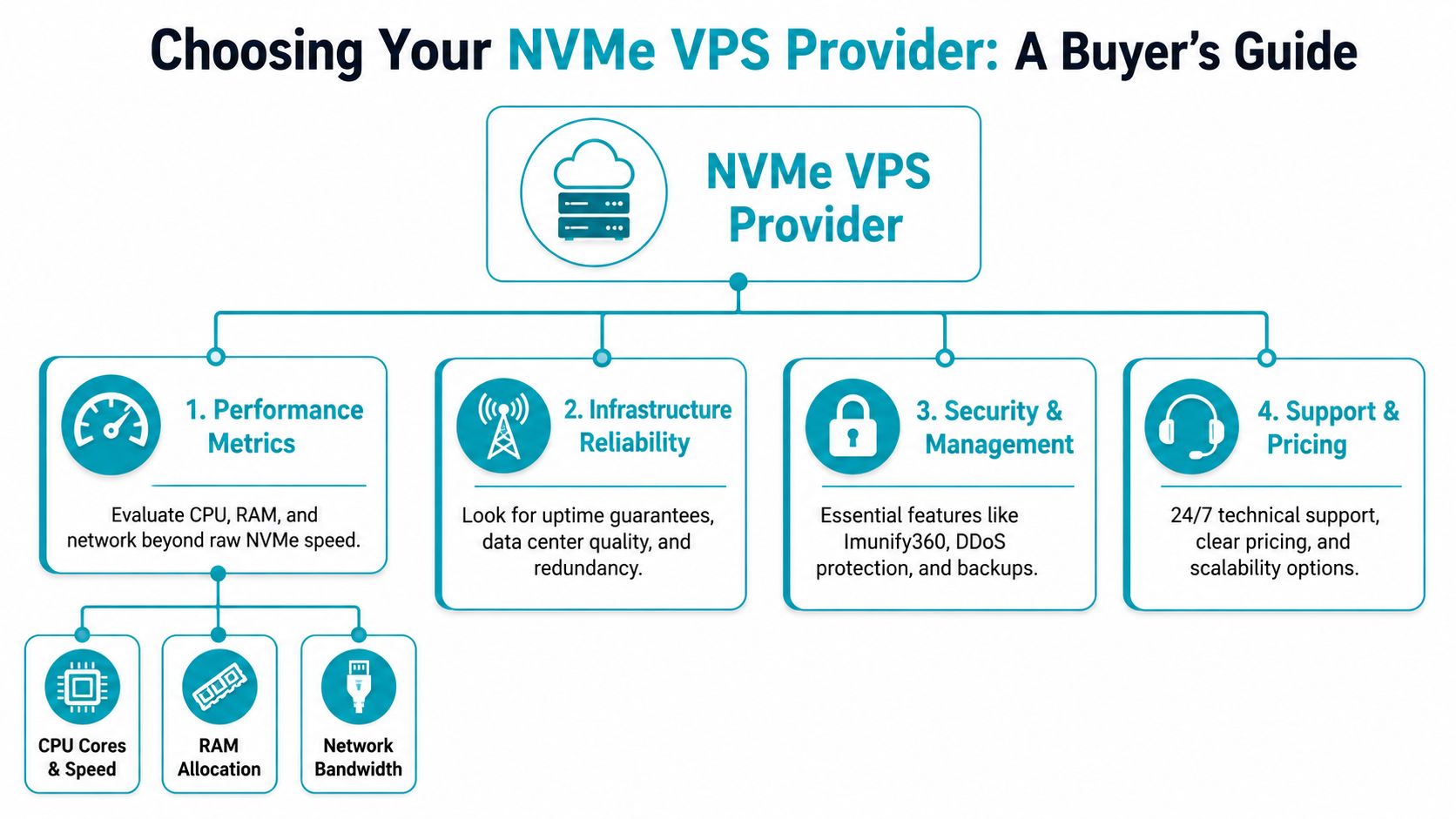
A provider can advertise NVMe and still deliver a mediocre result. Storage is only one layer in the path. If the CPU is oversubscribed, memory is thin, networking is congested, or the storage design is weak, the logo on the spec sheet won’t save you.
Read the stack, not just the drive type
Start with the host itself. CPU matters because storage operations still depend on the system’s ability to process interrupts, schedule virtual machines, and handle application logic. RAM matters because insufficient memory pushes more activity back onto disk. Network matters because remote backups, distributed storage, and customer-facing throughput all compete for bandwidth.
Use this quick review model when comparing plans:
| Layer | What to inspect | Why it matters |
|---|---|---|
| CPU | Core allocation and clock characteristics | Weak CPU pairing can waste fast storage |
| RAM | Adequate allocation for cache and working set | Memory pressure increases disk churn |
| Network | Port speed and traffic design | Congestion can hide storage gains |
| Storage design | Local NVMe, RAID, or distributed storage | Architecture determines consistency and resilience |
If a provider’s pricing page gives you “NVMe” and almost nothing else, ask harder questions. The same logic applies to reseller and MSP platforms.
Storage architecture separates good from excellent
Single-node local NVMe can be very fast. It can also create a narrow failure domain if the design doesn’t account for resilience. For virtualization clusters and high-availability VPS environments, the architecture matters as much as the media.
Enterprise Proxmox guidance recommends running the hypervisor on a dedicated, RAID-protected boot drive separate from VM data stores, which prevents OS and log activity from competing with guest workloads. The same guidance also points to NVMe/TCP as a modern storage approach for replacing older iSCSI-style bottlenecks in performance-focused environments (Proxmox storage architecture guidance).
If you need a refresher on redundancy basics before you compare host designs, a practical review of RAID configuration concepts helps anchor the discussion.
What serious Proxmox and Ceph deployments require
For demanding virtualized workloads, distributed storage isn’t optional. It’s the only way to combine performance with resilience across nodes.
A four-node hyperconverged Proxmox VE 9 cluster with Ceph requires a dedicated 25 Gbps private fabric for storage traffic, current-generation AMD EPYC 9004/9005 or Intel Xeon 4th to 6th Gen Scalable processors, and 512 GB DDR5 ECC RAM per node
That doesn’t mean every buyer needs a cluster at that level. It does mean you should treat provider claims carefully. “NVMe-backed” can describe anything from a lightly provisioned single node to a properly isolated hyperconverged platform.
Ask providers how storage traffic is isolated, how the hypervisor is separated from guest data, and what happens during a node failure. Those answers matter more than a badge that says NVMe.
Securing and Managing Your High-Performance VPS
NVMe exposes weak operations fast. If the server is quick but backups are inconsistent, patches slip, or recovery is untested, the storage tier is no longer the bottleneck. Your process is.

Performance without protection is incomplete
Higher IOPS and lower latency improve application responsiveness, but they also make operational mistakes easier to notice. A slow disk can hide some inefficiency. A fast VPS cannot. When a deployment fails, a database corrupts, or a kernel update breaks networking, users see the outage immediately.
For production use, teams should treat the following as standard practice:
- Automated backups: Scheduled backups reduce reliance on manual exports and missed maintenance tasks.
- Snapshots before risky changes: Kernel updates, control panel installs, and major application upgrades need a clean rollback point.
- Monitoring and alerting: Watch disk usage, memory pressure, service health, load averages, and unusual I/O behavior before they turn into incidents.
- Patch management: Fast infrastructure does not compensate for outdated packages or exposed services.
The right recovery target depends on the workload. A content site may tolerate nightly backups. A write-heavy database, CI runner, or transactional application usually needs more frequent snapshots, tighter backup intervals, and a documented restore sequence. If you are planning a cutover or redesign, build those steps into your server migration checklist for rollback, backup validation, and acceptance testing before data moves.
Security controls that fit shared hosting and VPS realities
Public-facing VPS instances deal with repetitive, predictable threats. SSH probing, credential stuffing, vulnerable plugins, poisoned uploads, and noisy neighbors are common operational problems, not edge cases.
Perimeter filtering helps, but it is not enough on its own. Malware scanning, account isolation, brute-force controls, least-privilege access, and application-layer hardening are more effective than simple perimeter thinking. That is especially true on multi-site servers, reseller setups, and mixed Linux hosting environments where one weak application can become the entry point for the rest of the stack.
A practical baseline usually looks like this:
- Harden the base image. Remove unused services, lock down SSH, restrict administrative access, and keep the OS build consistent across instances.
- Protect the runtime. Use continuous malware scanning, file integrity checks, rate limiting, and service monitoring instead of occasional manual reviews.
- Test recovery. Restore backups to a separate environment, verify application integrity, and document the exact steps required to recover service.
Teams with in-house Linux experience can run this model themselves. SMBs and mixed-skill teams often get better results from managed operations because patching, monitoring, and incident response happen on schedule instead of after a problem surfaces.
“The fastest VPS in your fleet becomes the least useful one the moment recovery is uncertain.”
Actionable Checklist for Choosing and Migrating
To avoid common pitfalls, focus on operational details, not just synthetic speed.
An NVMe VPS purchase usually fails in one of two places. The first is workload fit. Teams buy fast storage for applications that are mostly cached, lightly used, or limited by CPU and memory instead of disk latency. The second is migration discipline. They cut over before defining rollback, testing restore paths, and agreeing on what success looks like in production.
Use the checklist below before signing a contract or scheduling a move. If you need a formal runbook, keep this server migration checklist for VPS cutovers with your change record.
Pre-purchase checks
- Match NVMe to the application profile: Prioritize NVMe for write-heavy databases, busy WooCommerce or Magento stores, CI runners, log processing, search indexes, and multi-tenant app stacks with frequent small I/O. Treat it as optional for brochure sites, static content, or low-volume internal tools.
- Inspect the full platform, not just the drive type: Fast storage under paired with weak vCPU allocation, oversubscribed RAM, or a thin network uplink will not deliver the latency gains you expect.
- Ask how storage is built: Local NVMe usually gives the lowest latency. Clustered or network-backed storage can improve resilience, but it may add jitter. That trade-off matters for databases and queue workers.
- Verify backup, snapshot, and restore behavior: Recovery speed matters as much as IOPS. Confirm retention windows, snapshot frequency, restore scope, and whether restores are self-service or ticket-based.
- Check scaling and downgrade policy before purchase: Upgrades are usually straightforward. Downgrades, storage reductions, and term changes are where billing and migration friction often appear.
- Test support with technical questions: Ask about RAID level, hypervisor stack, noisy-neighbor controls, and migration method. The quality of the answers usually tells you more than a benchmark screenshot.
Migration steps that reduce risk
- Baseline the current environment. Record page response times, query latency, batch job duration, disk wait, and peak-hour behavior.
- Move a representative workload first. Pick the application that suffers from storage delay, not the least important one.
- Validate the new bottleneck. After migration, check CPU steal, memory pressure, database configuration, and upstream API latency. NVMe often exposes limits that slower storage used to hide.
- Test rollback before cutover. A rollback plan is only real when DNS, data sync, and restore steps have been timed and documented.
- Cut over during a controlled change window. Assign one decision-maker for go or no-go, and define the acceptance checks in advance.
- Watch the first 24 to 72 hours closely. Queue depth, cache hit rate, database connections, and background jobs often reveal issues after live traffic returns.
Common mistakes
- Buying on the NVMe label alone
- Ignoring whether the workload is storage-bound
- Assuming local NVMe and clustered NVMe behave the same
- Skipping downgrade and exit-path review
- Expecting storage speed to compensate for poor database or application tuning
- Migrating without a measured baseline and rollback test
A practical rule: if the application spends its time waiting on disk, NVMe can produce a clear improvement. If it spends its time waiting on PHP workers, CPU time, or third-party APIs, pay for those fixes first.
Start Your High-Performance Journey with ARPHost
NVMe is a strong fit when storage latency is the thing holding your application back. That usually means databases, high-concurrency web stacks, CI/CD systems, analytics platforms, and dense virtualized environments. It’s much less compelling when the workload is light, heavily cached, or mostly static.
The right buying process is straightforward. Confirm the workload needs faster storage. Verify the provider’s CPU, RAM, network, and storage architecture. Make sure backups, downgrade policy, and migration support are clear before you commit. That’s how you avoid paying for speed you won’t feel, or worse, buying speed that’s trapped inside a poorly designed platform.
If you’re comparing entry-level virtual infrastructure, start with a VPS plan. If security and website operations are part of the requirement, review secure web hosting bundles. If the workload is outgrowing shared infrastructure, look at bare metal server options. And if your team needs clustered virtualization with root control, evaluate dedicated Proxmox private clouds.
The value in NVMe VPS hosting isn’t the acronym. It’s the ability to line up storage performance with the actual behavior of the application, then support it with disciplined operations and a platform that won’t become the next bottleneck.
If you’re planning a move to faster infrastructure, ARPHost, LLC can help you choose the right fit across VPS, bare metal, Proxmox private clouds, secure hosting bundles, and managed services, with practical guidance before and after migration.
