

Your network usually looks fine right up until it isn't. The office Wi-Fi works for weeks, the VPN stays quiet, the phones sound clear enough, and then a router reboots at the wrong time, a firewall update goes sideways, or a switch port starts flapping during your busiest hour. What looked like a small technical issue turns into a sales problem, a support problem, and a credibility problem.
That's why smart buyers don't treat network maintenance services as a background IT line item. They treat them as a control system for uptime, change risk, and recovery. If you're comparing providers, building an internal checklist, or trying to decide whether to keep this work in-house, the key question isn't “Do we need maintenance?” It's “What kind of maintenance process will keep the business running when something changes?”
The Hidden Cost of Network Neglect
A common failure pattern looks boring at first. An e-commerce store slows down during a promotion. Staff assume it's just traffic. Then checkout timeouts start. At the same time, the office team can't access the inventory platform because a core device is overloaded, and no one has reviewed logs, firmware age, backup status, or recent config drift in weeks.
That kind of outage rarely begins with one dramatic event. It usually starts with skipped maintenance. Old firmware stays in place. Device configs aren't backed up after changes. Fans get noisy and nobody checks them. The firewall is still “working,” so patching gets deferred again. By the time the network fails, the business is no longer choosing a maintenance window. The outage chooses one for them.
Network maintenance services exist to prevent that exact scenario. In practical terms, they cover the recurring work that keeps business connectivity stable: monitoring, troubleshooting, hardware inspection, software and firmware updates, security enforcement, documentation, and recovery preparation. The point isn't just fixing what breaks. The point is reducing the chance of failure in the first place and shortening recovery when something still goes wrong.
A useful market signal shows how important this work has become. The adjacent data center maintenance and support services market was estimated at USD 7.39 billion in 2025 and projected to reach USD 15.77 billion by 2033, with a 10.0% CAGR from 2026 to 2033. That isn't the entire network maintenance market, but it reflects how much organizations are investing in keeping infrastructure available and supportable.
Practical rule: If your only maintenance plan is “call someone when the internet goes down,” you don't have a maintenance plan. You have an escalation plan.
The hidden cost of neglect isn't only downtime. It's rushed decision-making, emergency vendor calls, poorly tested fixes, staff productivity loss, and a growing gap between what your network diagram says and what's deployed.
The Six Pillars of Effective Network Maintenance
Good maintenance doesn't happen as a single monthly check box. It works as a repeatable operating rhythm.
This visual summarizes the operating model.
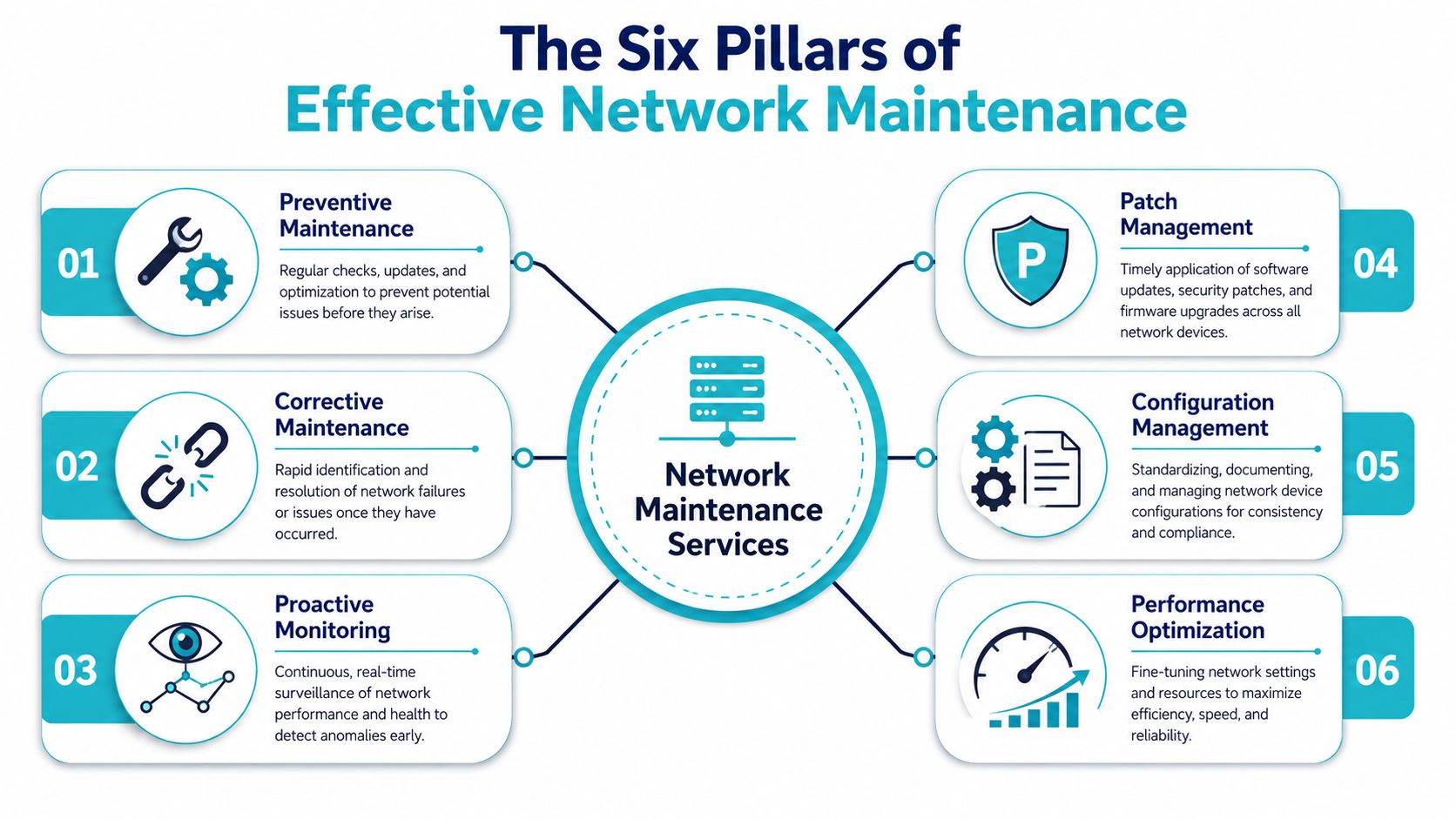
Preventive and corrective work
Preventive maintenance is the scheduled work you do before users notice anything. That includes checking interface errors, reviewing power and cooling health, validating failover paths, and cleaning up stale rules or unused ports. It's the network equivalent of changing oil before the engine complains.
Corrective maintenance begins after something has already failed. A dead switch PSU, a bad transceiver, an unstable access point, or a corrupted config all fall into this bucket. Corrective work matters, but if that's all your provider sells, you're buying a break-fix contract, not a real maintenance service.
A practical split looks like this:
| Pillar | What it should include | What weak providers do instead |
|---|---|---|
| Preventive maintenance | Recurring checks, hardware inspection, capacity review, config validation | Wait for tickets |
| Corrective maintenance | Root cause analysis, rollback, replacement workflow, incident notes | Reboot and close the case |
Monitoring and patch cadence
Proactive monitoring means someone is watching device health, interface state, logs, and service behavior continuously enough to catch drift early. Monitoring by itself isn't maintenance, but without monitoring, maintenance becomes guesswork.
Patch management deserves its own pillar because it's where many SMBs get burned. The lesson is simple. Patch by exposure and business impact, not by habit.
A firewall that's online but unpatched isn't “stable.” It's just waiting for the wrong kind of traffic.
This is also where network design quality matters. If your edge, switching, and segmentation strategy already has weak points, maintenance gets more expensive and more dangerous over time. Teams reviewing providers should look closely at whether they can support planning as well as upkeep, especially around network design services.
Later in the maintenance cycle, it helps to see a walkthrough of how disciplined change work is handled in practice.
Configuration and performance discipline
Configuration management is where mature providers separate themselves. Every meaningful network change should be documented, versioned, and recoverable. If a switch fails and nobody can confirm the last known good configuration, recovery takes longer than it should.
Performance optimization isn't “tuning for speed” in the abstract. It's practical work like reviewing duplex mismatches, checking port utilization patterns, validating QoS behavior, trimming noisy broadcast domains, and confirming that WAN, Wi-Fi, and voice traffic aren't fighting each other. That's how maintenance protects user experience, not just device health.
A complete maintenance service should stand on all six pillars. Drop one, and the others carry more risk.
Boosting Uptime and Security While Reducing Risk
The business case for maintenance gets stronger once you stop viewing incidents as isolated events. Most outages don't come from one root cause alone. They come from layers of neglected control. A missed firmware update creates exposure. An undocumented change complicates diagnosis. A missing backup turns a simple rollback into a longer restoration effort.
That's why the layered model matters. Each control addresses a different failure mode. Together, they create resilience.
What a layered approach looks like
Consider a branch office with a firewall, a managed switch stack, a few wireless access points, and a voice system. A strong maintenance routine would usually include:
- Firmware and software upkeep to close known vulnerabilities and maintain compatibility across edge devices.
- Verified configuration backups so a bad change or hardware loss doesn't force engineers to rebuild from memory.
- Physical inspection of cables, fans, power supplies, and port states so hidden wear doesn't become a business interruption.
- Change records that show who changed what, when they changed it, and how to back it out.
That last point matters more than many buyers realize. If your provider can't tell you what changed before an outage, they'll spend the first part of the incident reconstructing history instead of restoring service.
Security and user experience are tied together
Many managers think about uptime and security as separate concerns. They aren't. Weak patch discipline increases breach risk. Poor traffic visibility can also create user-facing problems long before a full outage appears. For example, voice and video complaints often start with unstable latency variation, not complete link loss.
A mature maintenance provider doesn't stop at ping checks. They review the behavior underneath the complaint.
The fastest recovery work usually starts before the outage. It starts with backups, baselines, and clean documentation.
Buyers should also ask how a provider handles visibility across servers and network devices together. If your hosting, edge, and internal systems are monitored in separate silos, incident response becomes slower and noisier. A strong operational baseline often starts with better infrastructure monitoring practices so alerts reflect real degradation, not a flood of unactionable noise.
The practical takeaway is straightforward. Maintenance reduces risk in two ways. It makes serious incidents less likely, and it makes the unavoidable incidents easier to contain.
Decoding Service Level Agreements and KPIs
Many service agreements sound reassuring until you ask one question: “What happens in the first hour of a real incident?” That's where the difference between marketing language and operational discipline shows up.
A good SLA tells you how the provider behaves under pressure. It should define severity levels, response expectations, escalation paths, maintenance windows, communication cadence, and what counts as service restoration. If those details are vague, the contract is vague where it matters most.
This infographic highlights the metrics buyers usually examine first.
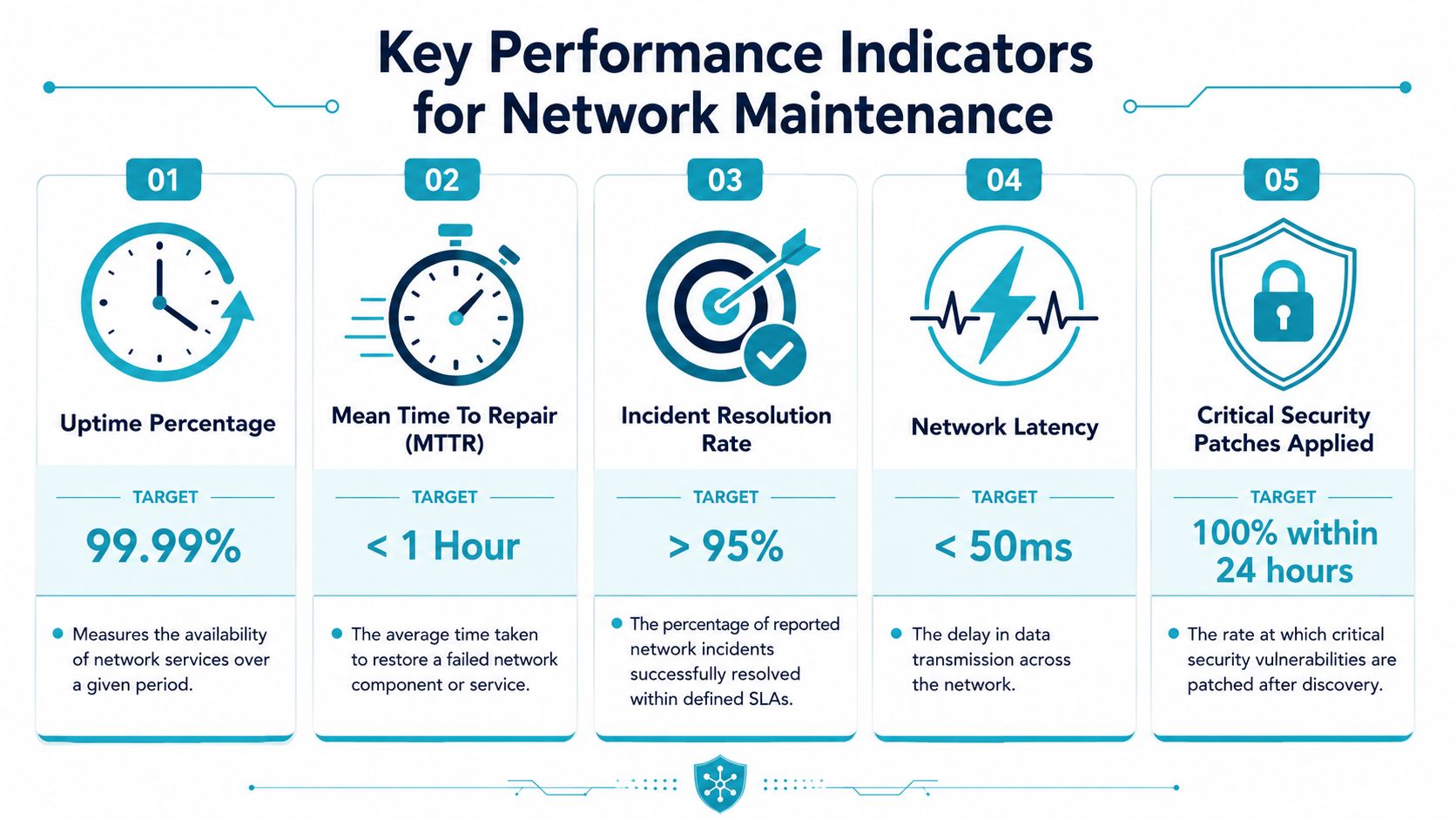
Read the operational definitions, not just the targets
Providers love headline metrics. The problem is that a metric without a definition can hide weak service.
For example:
| KPI | What to ask | Why it matters |
|---|---|---|
| Uptime | Does it apply to the network, the hosted workload, or only provider-managed hardware? | Scope changes the value of the promise |
| Response time | Is this first human acknowledgement or actual engineer engagement? | An auto-reply isn't incident handling |
| Resolution time | Does “resolved” mean restored, stabilized, or permanently fixed? | Temporary workarounds may still carry risk |
| Patch compliance | Which assets are included, and how are emergency exceptions handled? | Critical devices often need different cadence |
| MTTR | How is it measured during multi-device incidents? | Aggregated reporting can mask weak performance |
The visual target values in many KPI examples are useful for discussion, but the contract language is what determines your actual outcome. Ask providers to define every metric in plain language.
Maintenance windows and change control matter more than slogans
A weak provider focuses on “24/7 monitoring” as if that alone proves maturity. It doesn't. During maintenance, what matters most is controlled execution. How do they pre-stage changes? When do they take backups? Who approves the rollback point? How do they validate service after the change?
Major outages often come from human action during maintenance, not from hardware failing on its own. If a provider can't explain its change method clearly, the SLA is only describing support posture, not operational quality.
Use these questions in vendor calls:
- Ask for severity mapping. What qualifies as critical, high, medium, and low?
- Ask for escalation ownership. When a first-line technician can't resolve the issue, how fast does it move upward?
- Ask for maintenance reporting. Will you receive change records, patch summaries, and post-incident notes?
- Ask for exclusions. What devices, circuits, third-party systems, or customer-owned assets fall outside the SLA?
A strong SLA makes the provider accountable. A weak one gives them room to say they responded on time while your users still sat idle.
A Practical Checklist for Evaluating Providers
A provider looks polished during the sales call. The critical test is whether they can patch a firewall, document the change, catch side effects, and keep your staff working the next morning. That is the standard to evaluate against.
Use this checklist in discovery calls, proposal reviews, and renewals. It helps SMBs compare providers on operating discipline, not sales language.
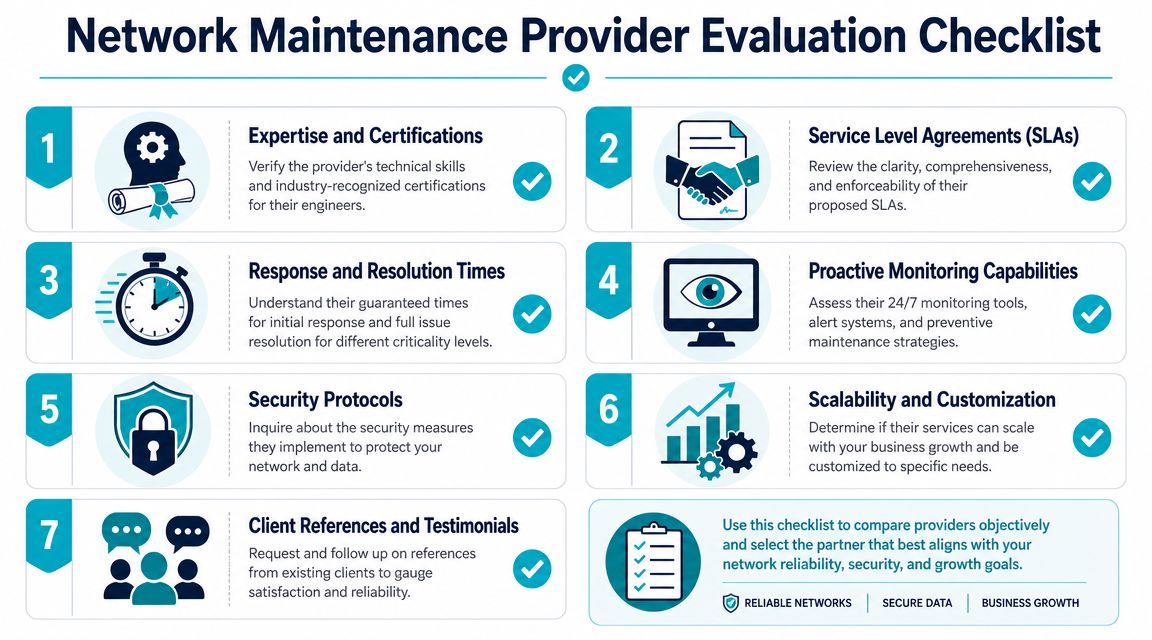
Questions that expose how the provider actually works
Start with scope. Ask which platforms the team actively maintains every week, not which ones they can "support" in theory. There is a big difference between answering tickets on a product and running stable change cycles on firewalls, switching, wireless, virtualization, and hosted systems that look like yours.
Then test process. Ask them to walk through a firmware update on an internet-facing firewall from start to finish. A capable provider will describe config backup, version review, maintenance timing, validation checks, rollback criteria, and post-change monitoring in a clear order. If the answer is vague, the work will be too.
Monitoring deserves the same scrutiny. Good providers can explain what creates an alert, what gets suppressed, what waits for trend confirmation, and what triggers a human to investigate right away. If every issue produces noise, technicians miss the alerts that matter.
Documentation is another dividing line. Inventory, config history, topology notes, maintenance logs, and known dependencies cut recovery time during an incident. If those records only exist in a technician's memory, you are buying avoidable delay.
What to ask about patching and risk
Patching tells you whether the provider works from business risk or from a calendar. Monthly updates are fine for low-exposure systems. They are not enough by themselves for VPN gateways, firewalls, remote access tools, and other internet-facing assets.
Ask these directly:
- How do you rank patch priority across edge devices, servers, and internal network gear?
- What triggers an out-of-band security update?
- How do you test for service impact before and after a patch?
- What is your rollback method if the device becomes unstable or a dependency fails?
The quality of the answer matters more than the promise. A mature team will talk about exposure, maintenance windows, dependency mapping, backup state, and verification steps. A weak one will keep returning to a generic patch schedule.
Buyer shortcut: Ask for a redacted maintenance report and a redacted post-incident summary. If a provider manages environments well, they usually have both ready to share.
Commercial fit matters too
Technical skill alone does not make the relationship work. SMBs also need clear ownership, predictable billing, and support that matches how the business operates. A provider may be competent and still be a poor fit if every request turns into a scope dispute or every after-hours issue depends on a mailbox no one watches closely.
| Evaluation area | Good sign | Warning sign |
|---|---|---|
| Support coverage | Named escalation path, after-hours process, accountable owner | Generic inbox, unclear handoff, no named responsibility |
| Pricing model | Assets, tasks, and exclusions are documented clearly | Low fee paired with vague scope and frequent add-ons |
| Security handling | Individual access, approval records, documented admin changes | Shared credentials, informal access, weak audit trail |
| Growth fit | Can handle branch expansion, hybrid infrastructure, and refresh planning | Comfortable only with static environments |
The best buying decision usually comes down to one question. Can this provider show how they maintain systems, reduce operational friction, and keep accountability clear when something breaks? That is why many SMBs choose a managed model. It shortens the path to disciplined operations because the provider already has the process, tooling, and reporting structure in place.
How ARPHost Delivers Managed Maintenance
A typical SMB failure pattern looks like this. The firewall is managed by one vendor, backups sit with another, the server host points to the network team, and nobody owns the full chain from alert to recovery. That setup works until a routine change breaks access, backups fail unnoticed, or a resource spike turns into an outage. At that point, response time depends less on technical skill and more on who has authority to act.
ARPHost's value is straightforward. It brings infrastructure and day-to-day operations under one operating model, so maintenance is tied to accountability instead of vendor coordination.
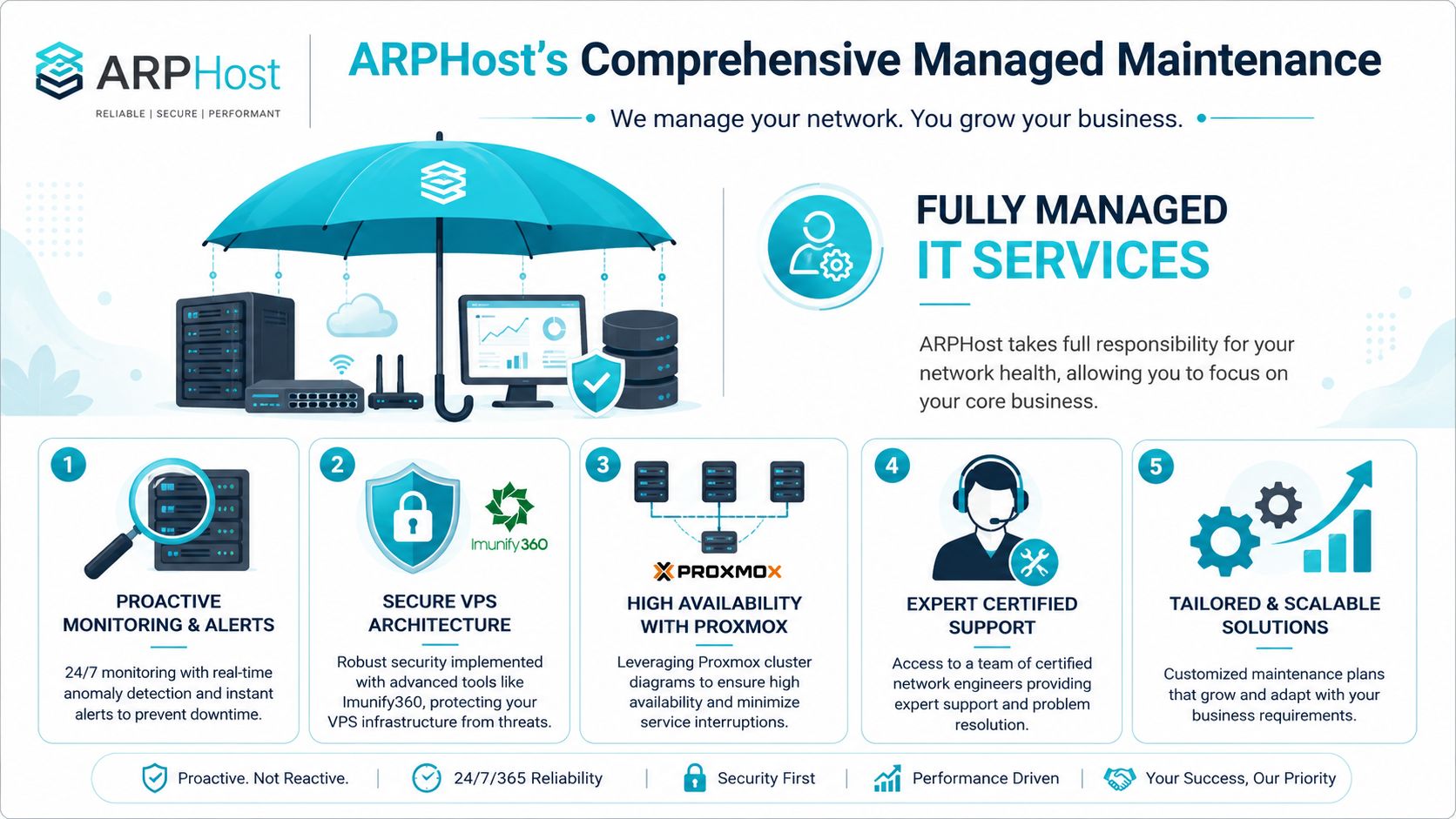
What a managed scope should include
A useful managed maintenance plan covers the systems that directly affect uptime together, not as separate purchases. For most SMBs, that means the provider is responsible for monitoring, patch execution, configuration control, security upkeep, and recovery readiness across the network and server stack.
| Service area | Typical managed responsibility |
|---|---|
| Monitoring | Device health, resource alerts, service checks, anomaly review |
| Patch operations | Scheduled updates, emergency patch handling, validation, rollback prep |
| Configuration control | Backup capture, change documentation, baseline tracking |
| Security upkeep | Firewall review, exposure reduction, account hygiene, alert triage |
| Recovery readiness | Backup verification, restore planning, failover testing support |
This matters most in mixed environments. An SMB might run customer-facing workloads on hosted infrastructure, internal applications on dedicated servers, and line-of-business systems inside a virtual cluster. Maintenance has to cover the whole path. If it stops at the hypervisor or ignores the edge network, gaps show up fast.
Why change orchestration matters
Routine maintenance causes more trouble than many teams expect. The problem usually is not the patch itself. It is poor sequencing, weak validation, or no rollback path when a dependency fails.
That is why experienced providers treat maintenance windows as controlled changes. The discipline is simple, but it takes process to do well.
- Pre-change capture of backups, current configs, and known-good state
- Staged rollout rather than broad simultaneous updates
- Validation steps tied to service function, not just device reachability
- Rollback readiness before the first command is executed
For SMBs buying managed services, this is one of the clearest evaluation points. Ask how the provider stages updates, who approves production changes, and what evidence they keep after the work is done. Teams comparing tooling should also understand how RMM software supports ongoing monitoring and remote maintenance workflows.
Where the infrastructure choices help
Good maintenance gets easier when the underlying platform is built with repeatable operations in mind. Clean server baselines, controlled access, sensible backup design, and predictable update paths reduce both labor and risk. Poorly assembled environments do the opposite. Every maintenance window turns into discovery work.
That trade-off is not unique to IT. Planned checks and documented change control cost less than emergency repair.
A lightweight example from a Linux-based maintenance workflow might look like this:
# Check interface errors
ip -s link

# Review recent system events
journalctl -p warning -b

# Confirm pending package updates
apt list --upgradable

# Test backup job status
systemctl status proxmox-backup
The commands are the easy part. The harder part is running them on schedule, knowing what normal looks like, recording exceptions, and acting before users notice.
Why ARPHost is a practical fit
ARPHost fits SMB environments well because the company can host the workload and handle the operational discipline around it. That shortens handoffs and makes responsibility clearer during incidents, maintenance windows, and recovery testing.
For buyers, the practical advantage is consistency. One provider can support hosted applications, dedicated infrastructure, virtualization, and managed IT operations under a shared process. That does not remove every risk. It does remove a common source of delay, which is trying to coordinate changes across providers with different tools, support queues, and priorities.
The business case is simple. Fewer ownership gaps usually means faster diagnosis, cleaner maintenance work, and less time spent arguing over scope when something breaks.
Stop Reacting and Start Preventing
A switch fails at 10:15 on a Monday, and the underlying problem turns out to be six months of skipped firmware, no current config backup, and no clear change record. That is how reactive IT gets expensive. The outage is only the visible part. The bigger cost is the time your staff loses while someone rebuilds context under pressure.
Teams that keep networks stable treat maintenance as an operating routine with owners, schedules, and rollback plans. They do not wait for a ticket queue to reveal what should have been caught during a planned review. They know which devices can be patched during business hours, which changes need a maintenance window, and which risks are acceptable in a small environment versus a multi-site one.
That same logic applies outside IT. Planned work lowers avoidable failures and makes repair faster when something still breaks.
For SMBs, the buying decision matters as much as the technical definition. A provider should be able to show how they monitor, patch, document, escalate, and verify changes after the fact. If they cannot explain the workflow clearly, they probably cannot run it consistently. Teams comparing options should also understand how RMM software supports recurring maintenance tasks across endpoints, servers, and network infrastructure.
The goal is not perfection. It is fewer preventable outages, shorter incidents, and less dependence on one overextended internal admin. That is usually the point where managed maintenance starts making financial sense. It turns scattered admin work into a repeatable service with clear accountability.
Frequently Asked Questions About Network Maintenance
What's the difference between network monitoring and network maintenance
At 2:13 a.m, a router starts reporting packet loss on the WAN. Monitoring records the event and raises the alert. Maintenance is the scheduled work that should reduce the chance of that same alert firing again next week.
That difference matters during procurement. Monitoring shows what is happening. Maintenance covers the work that keeps the network stable over time: firmware updates, configuration backups, log review, hardware health checks, change control, failover testing, and recovery validation.
SMBs often buy visibility and assume they bought prevention. They did not. A polished dashboard has value, but it does not replace ownership, patch cycles, remediation, and post-change verification. If no one is assigned to those tasks, the service is watching risk accumulate.
Can a small business handle network maintenance in-house
Yes, if someone owns it and has enough uninterrupted time to run it properly.
That is usually the breaking point. Small IT teams often know what good maintenance looks like. The problem is execution under constant interruption. User issues, vendor escalations, onboarding work, and one-off requests keep pushing routine maintenance to next week. Then next week turns into next quarter.
I see the same failure pattern in small environments. The firewall gets patched eventually. Switch configurations are not backed up after every change. A VPN change goes in without a rollback note. Documentation stays in one administrator's memory until that person is out sick or leaves.
In-house maintenance works best where the environment is stable, the device count is manageable, and leadership accepts that recurring maintenance time is protected time, not spare time. If that discipline is missing, outsourcing becomes a practical way to add coverage and accountability without adding another full-time hire.
How much should network maintenance services cost
Price follows scope, response targets, and the cost of downtime to the business.
A single office with a firewall, a few switches, wireless access points, and cloud applications should not be priced like a multi-site company with VPN dependencies, voice traffic, compliance requirements, and after-hours support. If two very different environments get nearly identical proposals, look for exclusions.
Most providers use one of four pricing models:
| Pricing model | Best for | Watch out for |
|---|---|---|
| Per device | Small, stable environments | Patching, documentation, and after-hours work may be excluded |
| Flat monthly retainer | Predictable budgeting and ongoing support | Scope can drift if device counts or responsibilities change |
| Tiered plans | SMBs comparing service levels | Lower tiers often strip out response commitments or change management |
| Project plus support | Businesses making periodic upgrades | Routine upkeep often slips between projects |
A quote is only useful if it maps to operating reality. Ask what is included every month, what triggers extra billing, who handles vendor coordination, and how changes are documented. Cheap support that skips firmware planning, backup verification, or rollback support gets expensive during the first preventable outage.
What should be included in a basic maintenance contract
A usable contract should define responsibility, schedule, and evidence that the work was done.
At a minimum, it should list covered devices and systems, monitoring scope, patching responsibility, incident response targets, maintenance windows, change approval, documentation standards, and backup or configuration retention. If those points are vague, the contract is probably selling reactive support under a maintenance label.
The better question is whether the contract answers decisions your team will face under pressure:
- Who can approve planned and emergency changes?
- How are maintenance windows scheduled and communicated?
- What gets documented after updates, outages, and vendor escalations?
- Who handles ISP issues, warranty claims, and third-party support cases?
- What testing happens after a patch, configuration change, or failover event?
Providers that answer those questions clearly during evaluation usually operate more consistently after signing. Providers that stay vague tend to improvise when the network is already under stress.
How often should network maintenance happen
Monitoring runs continuously. Maintenance should run to a calendar.
Daily work often includes alert review, service checks, and confirmation that backups completed. Weekly tasks can include log review, account review, and follow-up on recurring warnings. Monthly or quarterly work usually covers firmware planning, patch rollout, hardware health review, and documentation updates. Annual reviews should cover lifecycle planning, recovery testing, and whether the current design still matches business needs.
The right cadence depends on risk. A quiet office with few changes can run a lighter schedule than a business with remote staff, public-facing applications, site-to-site VPNs, and strict uptime requirements.
Consistency beats ambition. A simple plan executed every month is better than an aggressive plan that gets skipped whenever the help desk gets busy.
If you are selecting a provider, ask how they prove task completion, how they classify change risk, and what happens when routine maintenance exposes a design problem instead of a simple fix. That is usually where the difference between generic support and a managed service becomes obvious. ARPHost, LLC is a fit for teams that want maintenance handled as an operating discipline with clear accountability, documented process, and fewer avoidable outages.
