

If your business has grown faster than your network design, you already know the symptoms. Teams complain about slow file access, cloud apps feel inconsistent, remote users keep opening tickets, and every small change seems to break something unrelated. Often, the issue isn't a single switch, firewall, or ISP circuit. It's that the network evolved one urgent fix at a time.
That pattern is common in small and midsize environments. A company starts with a simple office LAN, adds a firewall, connects a few remote workers, adopts cloud software, spins up some virtual servers, then bolts on VPN, VoIP, guest access, backups, and security tooling. A year later, nobody has a clean diagram, nobody wants to touch the firewall policy, and every outage turns into a hunt across multiple vendors.
Network IT services matter because they turn that patchwork into an operating model. Instead of asking who configured which box years ago, you define ownership, visibility, change control, escalation, and recovery before the next incident hits.
Why Your Network Performance Is Holding Your Business Back
A lot of companies think they have a bandwidth problem when they really have a design problem.
I've seen environments where the internet circuit was fine, but traffic still crawled because core switching was oversubscribed, firewall rules had grown into a maze, wireless segmentation was inconsistent, and cloud traffic backhauled through the wrong site. From the user side, it looked like "the network is slow." From the architecture side, it was accumulated technical debt.
The bottleneck usually isn't one device
A growing business often runs into the same wall:
- Ad hoc growth: New offices, SaaS apps, remote users, and servers were added without a full redesign.
- Reactive security: Firewall and access rules were written to solve incidents, not support a long-term model.
- No redundancy plan: One failed uplink, switch, or host turns into a broad outage because failover was never tested.
- Split ownership: The ISP manages the circuit, one consultant manages the firewall, internal staff manage servers, and nobody owns end-to-end service quality.
That last point hurts the most. When responsibility is fragmented, troubleshooting gets slow and expensive. Every vendor says their piece is healthy while your users are still down.
Practical rule: If your team can't identify the fault domain in minutes, your network is too dependent on tribal knowledge.
This is one reason service-based networking has expanded so quickly. The global network as a service market rose from USD 11.5 billion in 2022 to USD 18.0 billion in 2024, with a projected 26.7% CAGR through 2032 according to Market.us Scoop's network-as-a-service statistics. That shift tells you something important. More organizations are deciding that flexible, operationally managed networking beats building and babysitting every layer alone.
Downtime costs more than the invoice shows
Most network pain doesn't show up as a line item called "bad architecture." It shows up as delayed projects, stalled onboarding, missed calls, failed backups, security exceptions, and engineers spending their day on avoidable incidents instead of planned improvements.
If you're reviewing your current design, it helps to start with fundamentals like network redundancy planning before you start shopping for platforms or providers. Redundancy isn't just duplicate hardware. It's clear failover behavior, tested recovery paths, and sensible traffic engineering.
The businesses that scale cleanly usually make one shift early. They stop treating networking as a pile of devices and start treating it as a service with defined outcomes: stable access, secure segmentation, recoverable failure domains, and predictable support.
Defining Network IT Services and Their Modern Scope
People still use "network services" as if it means internet access and maybe a firewall. That's too narrow for current environments.
Modern network IT services cover the full path between users, applications, and data. That includes campus and branch connectivity, WAN transport, cloud edge access, VPN and identity-aware access, routing, switching, firewalling, monitoring, performance analysis, backup traffic design, and the operational processes that keep all of it reliable.
The scale behind that complexity is massive. The International Telecommunication Union estimates that about 6 billion people, or 74% of the world's population, were using the Internet in 2025, and global spending on data centers was projected to reach USD 260 billion in 2024 according to the ITU statistics overview. Networks now sit between more users, more hosted applications, and far more distributed infrastructure than they did a few years ago.
What sits inside the scope
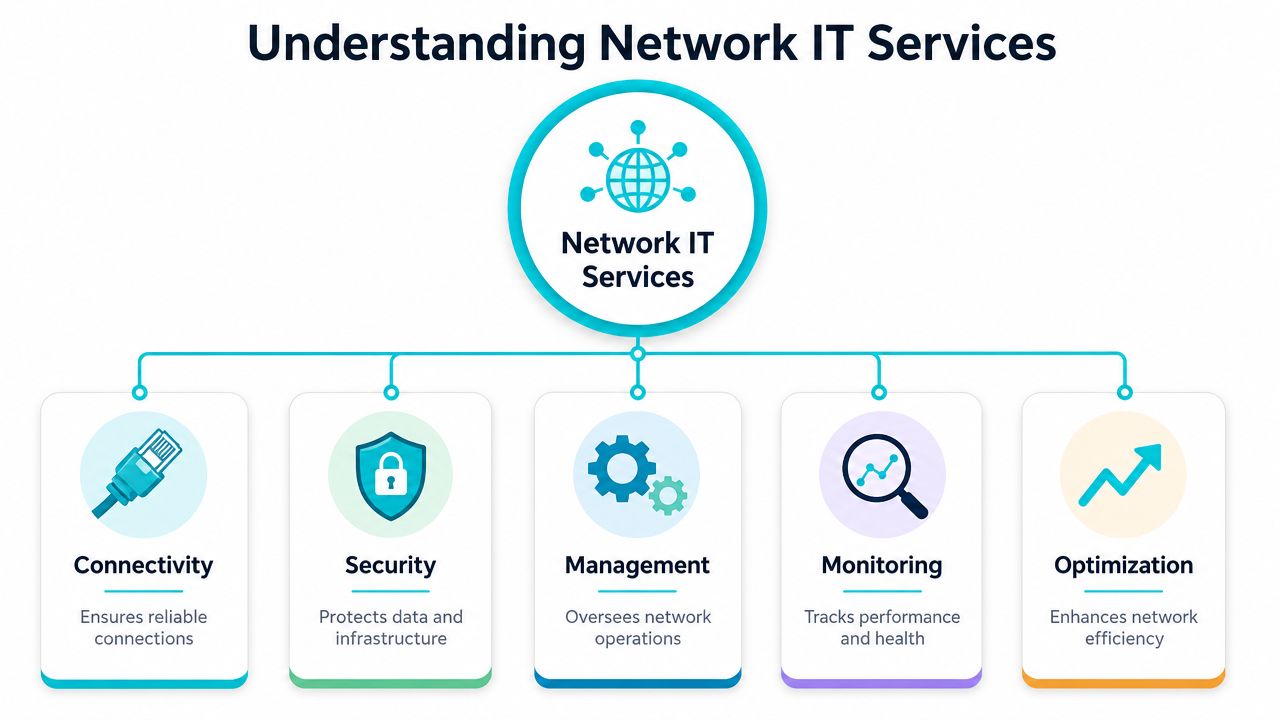
At a practical level, network IT services usually include five operational layers:
- Connectivity: Internet access, private links, inter-site transport, wireless coverage, and remote access.
- Security: Firewalls, segmentation, policy control, secure access, and traffic inspection.
- Management: Configuration control, device lifecycle, change review, firmware strategy, and documentation.
- Monitoring: Uptime checks, interface health, route state, packet loss, latency, and alerting.
- Optimization: Capacity planning, path selection, QoS, topology cleanup, and service tuning.
That's the right lens. If your compute, storage, identity, and application layers are modern but your network operations are improvised, the whole stack feels fragile.
The network is now an integrated platform
This is why design decisions have changed. You're no longer supporting only office desktops and a local server room. You're connecting SaaS, public cloud, hosted voice, private virtualization, edge devices, and remote users who expect the same experience from anywhere.
For many organizations, that means combining multiple service models:
- On-premises infrastructure for low-latency or compliance-sensitive workloads.
- Private cloud platforms for virtualization and controlled resource allocation.
- Hosted environments for public-facing services and rapid application deployment.
- Managed operations for monitoring, patching, and incident response.
If you're trying to formalize that architecture, network design services are often the right starting point. Good design work isn't just a topology diagram. It maps traffic flows, trust boundaries, failure domains, and operational ownership.
A healthy network isn't defined by whether packets pass. It's defined by whether the business can change, grow, and recover without drama.
Key Categories of Network IT Services Explained
The cleanest way to evaluate network IT services is by function, not by vendor brochure. Most environments need several categories working together. The weak point is usually the seam between them.

According to the ITU's Network 2030 framework, modern network services are an integrated, highly automated combination of communication, compute, storage, and network resources across domains, not just a single box or path, as defined in the Network 2030 terms and definitions document. That's exactly how you should assess them in practice.
Managed networking
This is the operational layer that keeps routers, switches, firewalls, and edge services stable over time. It includes provisioning, configuration changes, firmware planning, incident response, and documentation.
What works: clearly assigned ownership, version-controlled configs, and formal change windows.
What doesn't: "the firewall guy handles that" with no runbook, no backup config validation, and no service map.
A common example is a multi-site business that needs VLAN consistency, trunk validation, branch standardization, and central policy control. Managed networking gives that environment repeatability.
Monitoring and alerting
Good monitoring answers three questions fast: what's broken, where is it broken, and who owns the fix.
Useful monitoring covers more than ping. It should track interface state, tunnel status, route changes, hardware health, capacity pressure, and service dependencies. Alerts also need context. An email that says a port went down isn't useful if that port was intentionally disabled during maintenance.
Don't pay for monitoring that only tells you a site is down after users tell you first.
Network security services
Security services sit at the center of network operations now. That includes next-generation firewall policy, segmentation, access control, secure remote access, traffic filtering, rule review, and log analysis.
The practical trade-off is always between control and complexity. Fine-grained segmentation improves containment, but badly planned policy sets become hard to troubleshoot. Broad "allow any" rules reduce admin friction, but they create long-term exposure and make audits painful.
Juniper-based firewall and routing stacks are often a good fit where policy clarity, performance, and disciplined change control matter. The value comes from architecture and operations, not from brand alone.
VPN and remote access
Remote access has to support users without turning your core network into a flat extension of every unmanaged device on the internet.
Strong remote access design usually includes:
- Role-based access: Users reach what they need, not whole subnets by default.
- Reliable authentication: Access should align with your identity and security processes.
- Client stability: A secure tunnel that constantly drops is an operational problem, not just a user annoyance.
- Traffic policy: Decide when to split traffic and when to force it through inspection points.
WAN and SD-WAN services
Traditional WAN services focus on inter-site connectivity and routing stability. SD-WAN adds policy-driven path selection, application-aware steering, and more flexible use of multiple uplinks.
This helps most when you have several branches, mixed circuit quality, cloud-heavy traffic, or voice workloads that suffer during congestion. It helps less when you have one site and simple requirements. Some businesses buy SD-WAN because it sounds modern and end up adding complexity they didn't need.
Cloud connectivity
Cloud connectivity links your internal resources to hosted platforms without treating the internet as a generic transport path for everything.
Typical use cases include:
| Need | Service approach | Why it matters |
|---|---|---|
| Private virtualization | Dedicated private cloud | Keeps east-west traffic controlled and predictable |
| Application hosting | VPS or hosted instances | Speeds deployment for public workloads |
| Hardware-specific workloads | Bare metal servers | Preserves performance isolation and device control |
| Facility-level control | Colocation | Supports custom hardware and network policies |
The integration question holds importance. A private cloud running Proxmox, attached to dedicated compute and tied into managed routing, behaves very differently from a pile of independently purchased services. One example in that space is ARPHost, which offers Proxmox private clouds, VPS hosting, bare metal, colocation, and managed infrastructure under the same operational umbrella.
Backup and disaster recovery networking
Backups fail for network reasons more often than teams admit. Replication traffic contends with production workloads, firewall policies block restore paths, or the backup platform was never tested across a real outage scenario.
The network side of backup planning should define bandwidth policy, replication windows, storage reachability, and restore-path validation. If you can't restore across the same paths your failure scenario requires, your backup architecture isn't finished.
SIP trunks and voice networking
Voice still exposes weak networks quickly. Jitter, packet loss, poor QoS, and asymmetric routing show up immediately in call quality.
A business with hosted PBX or SIP trunks should isolate voice traffic appropriately, validate path quality, and avoid uncontrolled changes on edge devices during business hours.
Colocation and hybrid infrastructure
Colocation makes sense when you need physical control, custom hardware, or predictable hosting for equipment your team already understands. It doesn't make sense if your staff doesn't want to own the hardware lifecycle.
Hybrid infrastructure often lands in the middle: colocated core systems, private cloud for virtual workloads, VPS for bursty public apps, and managed network services to tie them together cleanly.
Managed vs Unmanaged Networking Which Is Right for You
The wrong management model creates more pain than the wrong hardware platform.
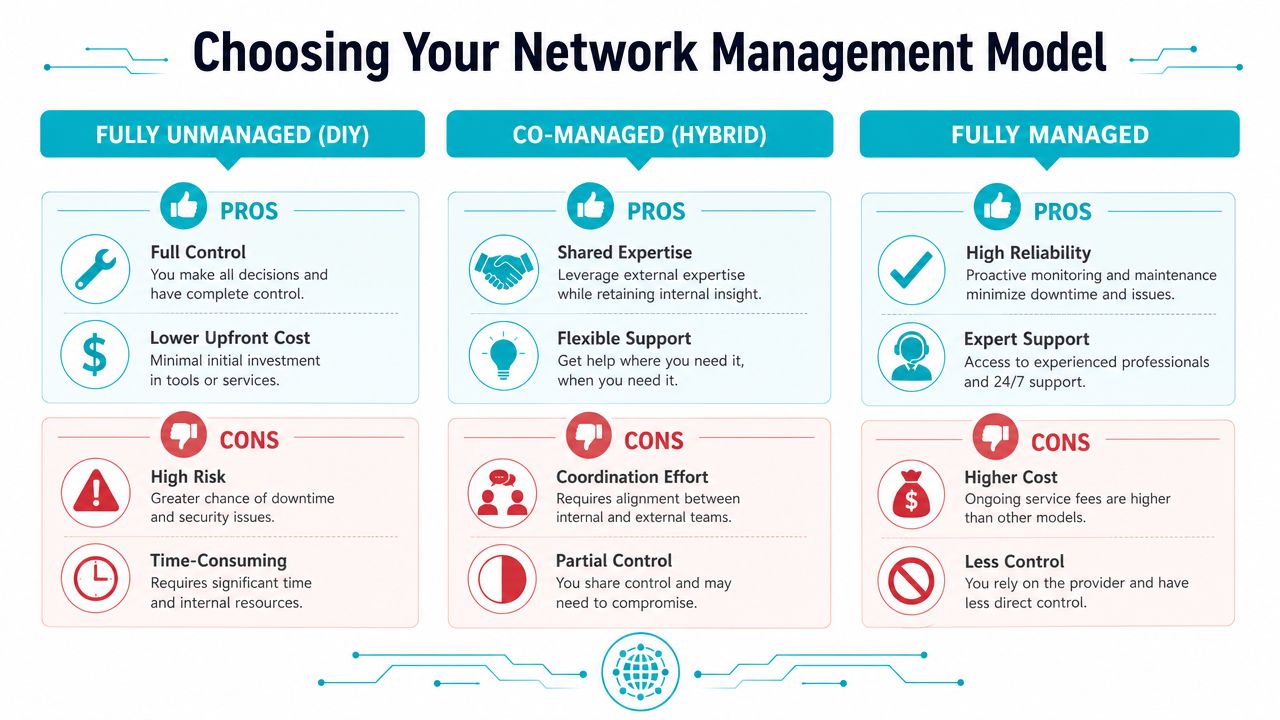
Some teams buy unmanaged infrastructure because they want control, then realize nobody has time to maintain configs, review logs, patch devices, and test failover. Others buy fully managed services, then get frustrated because they expected direct keyboard access and instant change freedom. The right answer depends on staffing, risk tolerance, and how fast your environment changes.
To ground the discussion, O*NET describes network support specialists as people who analyze, test, troubleshoot, and evaluate LAN, WAN, and cloud systems, perform maintenance, and handle tasks such as load balancing, server capacity, and firewall configuration in its network support specialist role summary. That's what "managed" should mean. Not just opening tickets with a carrier.
The three operating models
| Attribute | Unmanaged (DIY) | Co-Managed (Hybrid) | Fully Managed |
|---|---|---|---|
| Ownership of day-to-day tasks | Internal team | Shared between internal team and provider | Provider handles routine operations |
| Upfront cost profile | Usually lower service spend, higher internal effort | Balanced | Higher service spend, lower internal workload |
| In-house expertise required | High | Moderate to high | Low to moderate |
| Change speed | Fast if internal team is available | Depends on coordination quality | Depends on provider process and scope |
| Operational visibility | Full, if tooling is mature | Shared visibility | Must be contractually defined |
| Incident response burden | Internal team carries it | Shared | Provider leads within scope |
| Best fit | Strong network teams | Lean IT teams that still want control | Businesses prioritizing stability and outsourced operations |
Unmanaged works when you have the staff
DIY networking makes sense if you already have experienced network engineers, a disciplined change process, monitoring, documentation, and after-hours coverage. In that model, unmanaged bare metal, colocated gear, or self-run virtualization can be efficient.
It fails when a generalist sysadmin is expected to be firewall admin, WAN engineer, VoIP troubleshooter, and virtualization operator at the same time.
Co-managed fits most growing businesses
This is the most practical model for many SMBs and mid-market teams. Internal IT keeps architectural control and handles business-specific changes. The service provider covers monitoring, escalation support, platform maintenance, and specialized work such as routing, firewall review, or migration support.
That split works well when internal teams know the applications but don't want to own every network task around the clock.
A short walkthrough can help frame the difference in operational responsibility:
Fully managed is about risk transfer
Fully managed networking is the right choice when downtime hurts more than service fees, or when your internal team is focused on applications, users, and business systems instead of infrastructure plumbing.
Use it when:
- Your environment spans multiple sites or platforms
- You need formal response processes
- Security policy changes require specialist review
- Your team can't support 24/7 operational ownership
If your network has become business-critical but still depends on one or two people remembering how it was built, you're already overdue for a managed model review.
Evaluating Network Service Providers A Technical Checklist
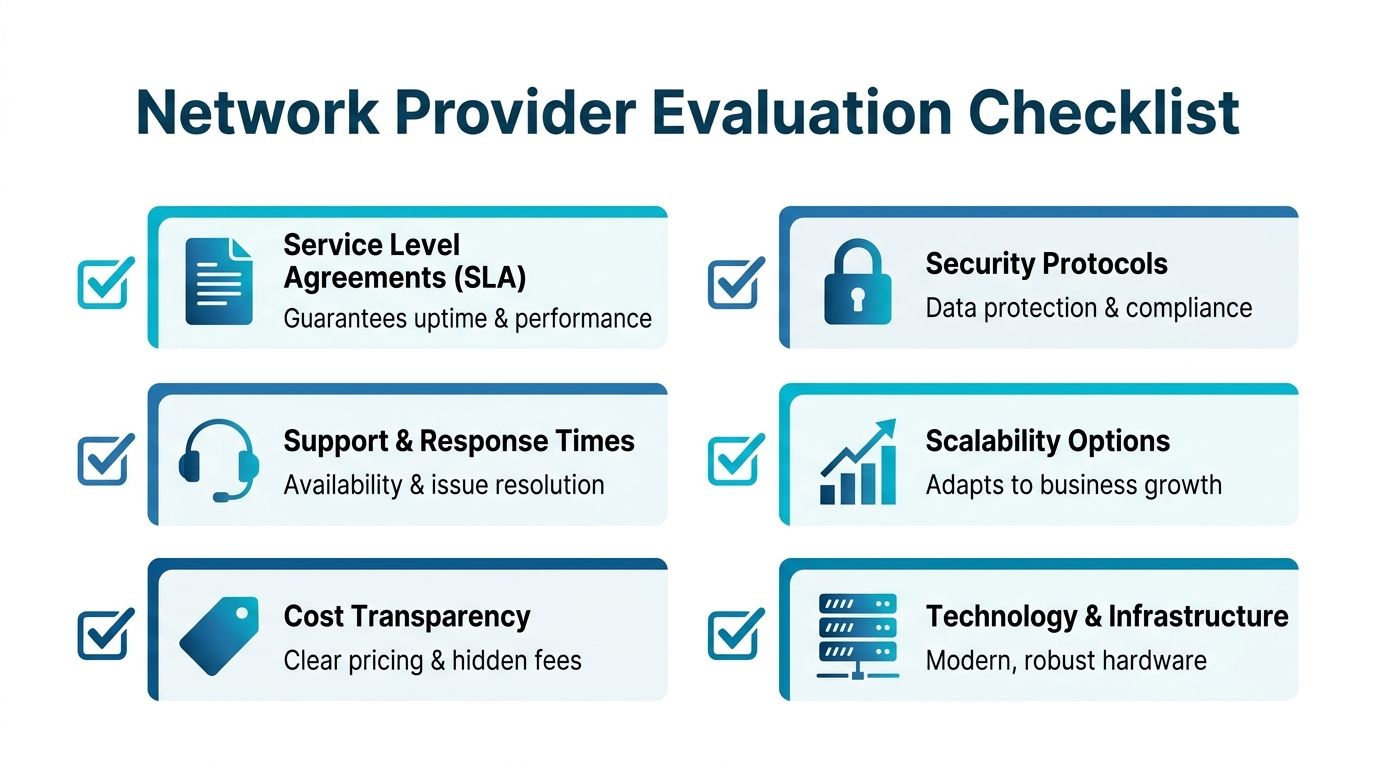
Most buyers ask the wrong first question. They ask, "What's the monthly price?" before they ask how incidents are handled, what tooling the provider uses, how changes are reviewed, or whether support is staffed by engineers who can fix the issue.
Healthcare IT guidance gets this right. Leaders are told to define business requirements, assess required skills, consider capital and operating investment, involve non-IT stakeholders, and look beyond headline price because stronger support can reduce long-term operating cost, as discussed in this network upgrade planning article from HealthTech. That advice applies well beyond healthcare.
Questions worth asking on the first call
Bring these into every provider conversation.
- Who supports the network after sale? Ask whether front-line support can perform routing, firewall, switching, and virtualization troubleshooting, or whether every technical issue is escalated.
- What does the SLA cover? Separate infrastructure availability from response time, restoration targets, and maintenance windows.
- How do you handle change control? You want to hear about approvals, rollback planning, config backups, and post-change validation.
- What monitoring stack do you use? A serious provider should describe how they watch interfaces, device health, service state, and alert thresholds.
- How do you secure management access? This should include administrative controls, access boundaries, and auditability.
- Can you support hybrid environments? Many providers are comfortable with only one model. You may need colocation, hosted servers, private cloud, and managed network operations working together.
Technical depth separates providers fast
A provider doesn't need to be all things to all buyers, but they do need competence in the stack they're selling. If they offer private cloud, ask about hypervisor operations. If they offer network management, ask who reviews firewall rules, who validates failover, and who owns documentation.
For security validation beyond standard provider claims, it can also help to review what compliance-focused external security testing looks like in practice. Even if you don't buy that service directly, the framework is useful because it forces you to think beyond checkbox firewalling and into exposed attack surface.
The contract matters as much as the architecture
A technically sound design can still become painful if the agreement is vague. Review:
- Scope boundaries so you know whether LAN, WAN, firewall, wireless, cloud edge, and backup networking are included.
- Escalation paths so critical issues don't sit in the wrong queue.
- Change ownership so nobody argues about who approves production-impacting work.
- Exit terms so you can recover configs, documentation, and access cleanly if the relationship ends.
A good benchmark is whether the provider is comfortable discussing the details you'd expect in a managed IT services agreement. If a vendor stays vague on responsibility, tooling, or escalation, assume operational friction later.
Cheap support often means expensive incidents. The invoice is only part of the cost.
Implementation and Migration Planning Best Practices
Migration failures usually come from skipped discovery, not from the cutover itself. Teams rush into "moving the network" before they know which dependencies matter.
A stable rollout follows four phases. You can compress them for a simple environment, but you shouldn't skip them.
Discovery and audit
Start by documenting what exists now. That means circuits, hardware roles, VLANs, wireless networks, VPN dependencies, firewall policy intent, monitoring coverage, and application paths.
At minimum, collect:
- Topology documentation: Current links, uplinks, edge devices, virtual hosts, and storage paths.
- Policy inventory: Firewall rules, access requirements, NAT behavior, and remote access dependencies.
- Operational records: Existing alerts, recurring incidents, maintenance windows, and support contacts.
- Business dependencies: Which systems must not go down, and which ones can tolerate a maintenance window.
This phase also exposes bad assumptions. Many teams discover they have rules nobody can explain, stale VPN objects, old circuits still in configs, or undocumented failover behavior.
Solution design
Once the current state is clear, define the target state around business outcomes. That usually means cleaner segmentation, standardized routing policy, documented failover, better monitoring, and more predictable hosting placement.
For a hybrid design, a practical pattern often looks like this:
- Bare metal for workloads needing direct hardware control
- Proxmox private cloud for clustered virtualization
- VPS instances for external services and fast deployment
- Managed firewall and routing at the edge
- Colocation when you need physical equipment under your own policy
The key isn't using all of those. It's deciding why each workload belongs where it does.
Migration execution
Don't move everything at once unless the environment is tiny and rollback is easy. Phase migrations by service boundary.
A typical order is:
- Stand up monitoring first
- Deploy parallel edge or core components
- Migrate low-risk services
- Move critical applications during approved windows
- Validate failover before declaring success
For teams working on Juniper-based environments, basic operational checks should be part of every cutover checklist. For example:
show bgp summary
That one command won't prove the network is healthy, but it quickly tells you whether expected peers are established and whether route exchange looks normal after a change.
Validation and optimization
Post-cutover work is where mature teams separate themselves. They don't stop at "users can log in again." They verify latency-sensitive apps, voice quality, backup paths, cloud reachability, management access, and alert behavior.
Use a validation list that includes:
- Path testing: Confirm expected routing and failover behavior.
- Security review: Verify segmentation and access rules against the approved design.
- Monitoring confirmation: Make sure alerts fire to the right people with useful context.
- Documentation cleanup: Update diagrams, inventories, and change records while details are fresh.
A migration isn't complete when traffic passes. It's complete when operations are predictable.
If the project includes hypervisor moves, platform consolidation, or a VMware-to-Proxmox transition, managed migration support often reduces avoidable risk. Those projects aren't just server moves. They involve storage behavior, networking changes, firewall policy alignment, backup redesign, and rollback planning.
Building a Future-Proof Network Strategy with ARPHost
A future-proof network strategy doesn't start with a product. It starts with operational clarity. Decide what your internal team should own, what needs specialist coverage, where your workloads belong, and how failure should behave before you buy more infrastructure.
The strongest designs usually combine several service models without forcing everything into one box. That might mean unmanaged bare metal for an experienced DevOps team, co-managed edge networking for a lean IT department, private cloud for controlled virtualization, and colocation for hardware that needs physical control. That business-first view aligns with Purple's approach to delivering business value through network design, where the network supports measurable operational outcomes instead of existing as an isolated engineering project.
If you need a provider that can support that mix, look for one that offers VPS hosting, secure web hosting bundles, bare metal servers, dedicated Proxmox private clouds, colocation, instant applications, and fully managed IT services under clearly defined operational terms.
If you're comparing providers or deciding between unmanaged, co-managed, and fully managed infrastructure, ARPHost, LLC is one option to review for VPS hosting, secure web hosting bundles, bare metal servers, dedicated Proxmox private clouds, colocation, instant applications, and managed IT services. Start with VPS hosting for smaller deployments, review Proxmox private cloud plans for dedicated virtualization environments, or request a managed services quote if you need help designing and operating a broader network stack.
