

Managed VPS hosting has moved from a niche upgrade to the default choice for many U.S. businesses. One market report puts managed VPS at nearly 55% of deployments in North America, while another estimates 67.85% of the global VPS market in 2025 belongs to managed services, which tells you where the buying center already is: organizations want server performance without becoming their own sysadmins market report Mordor Intelligence. That shift makes sense. Teams that moved off shared hosting wanted more control, more isolation, and less surprise maintenance work, not just another box with a different name.
Why Managed VPS Dominates the U.S. Market
The buying pattern is easy to see in production. A U.S.-focused report says about 65% of U.S. enterprises use VPS hosting for cloud-based operations and website performance, 58% moved off shared hosting for more customization and control, and 67% prefer VPS for secure, scalable platforms market report. That is the profile of a mainstream operations decision, not a niche technical upgrade. It is what businesses choose after shared hosting starts constraining growth, but before they want the overhead of a full infrastructure team.
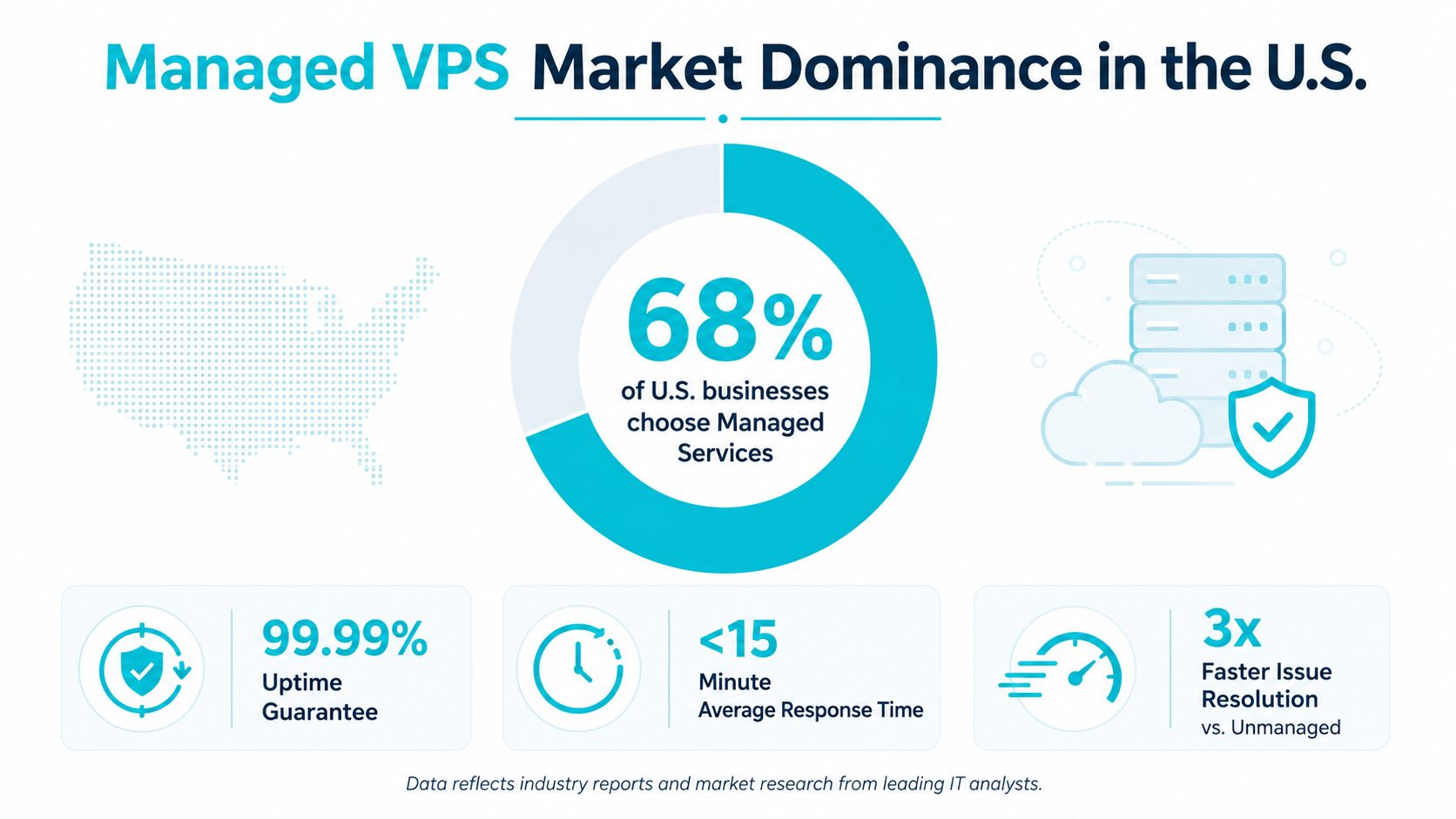
What drove the move
Shared hosting holds up until concurrency, plugins, database load, or compliance pressure start to matter. After that, the question is whether the business wants the isolation and flexibility of VPS without taking on day-to-day server administration. Managed VPS answers that by handling routine server work while keeping the application owner focused on the stack that drives revenue.
Practical rule: if downtime, login delays, or slow database pages are affecting the business, managed VPS usually makes more sense than a cheaper self-managed setup.
The reason this category keeps taking share is straightforward. Buyers are not chasing the lowest monthly bill. They are buying time, reliability, and a support path when something breaks.
What it actually buys you
Managed VPS fits organizations that have outgrown shared hosting but still need a predictable operations model. Agencies with multiple sites, e-commerce stores, and small IT teams often end up here because they need server control without the workload that comes with full-time system administration. The value is not abstract. It is labor substitution.
The operational boundary matters. A provider may manage the OS, monitoring, backups, and core server health, but the customer often still owns application updates, plugin conflicts, restore testing, and workload tuning. That split is why buyers should compare plans against a clear scope, then read a guide like managed vs unmanaged VPS hosting before assuming every “managed” offer covers the same ground.
U.S. data center placement also changes the result. Lower latency to domestic users can improve page response times, database calls, and support responsiveness, especially for sites serving regional buyers. Global locations can still work, but they add distance, and distance shows up in application behavior before it shows up in marketing copy.
For buyers comparing options, the question is whether the workload needs more control than shared hosting and less operational burden than unmanaged infrastructure. That is why managed VPS keeps winning in the U.S. market.
What Managed Coverage Includes and Excludes
The phrase managed VPS gets used loosely, and that's where buyers get burned. A provider may say “managed” and still leave you responsible for application updates, plugin conflicts, backup restores, or control panel licensing. The only way to compare plans is to separate the provider's operating scope from your own.
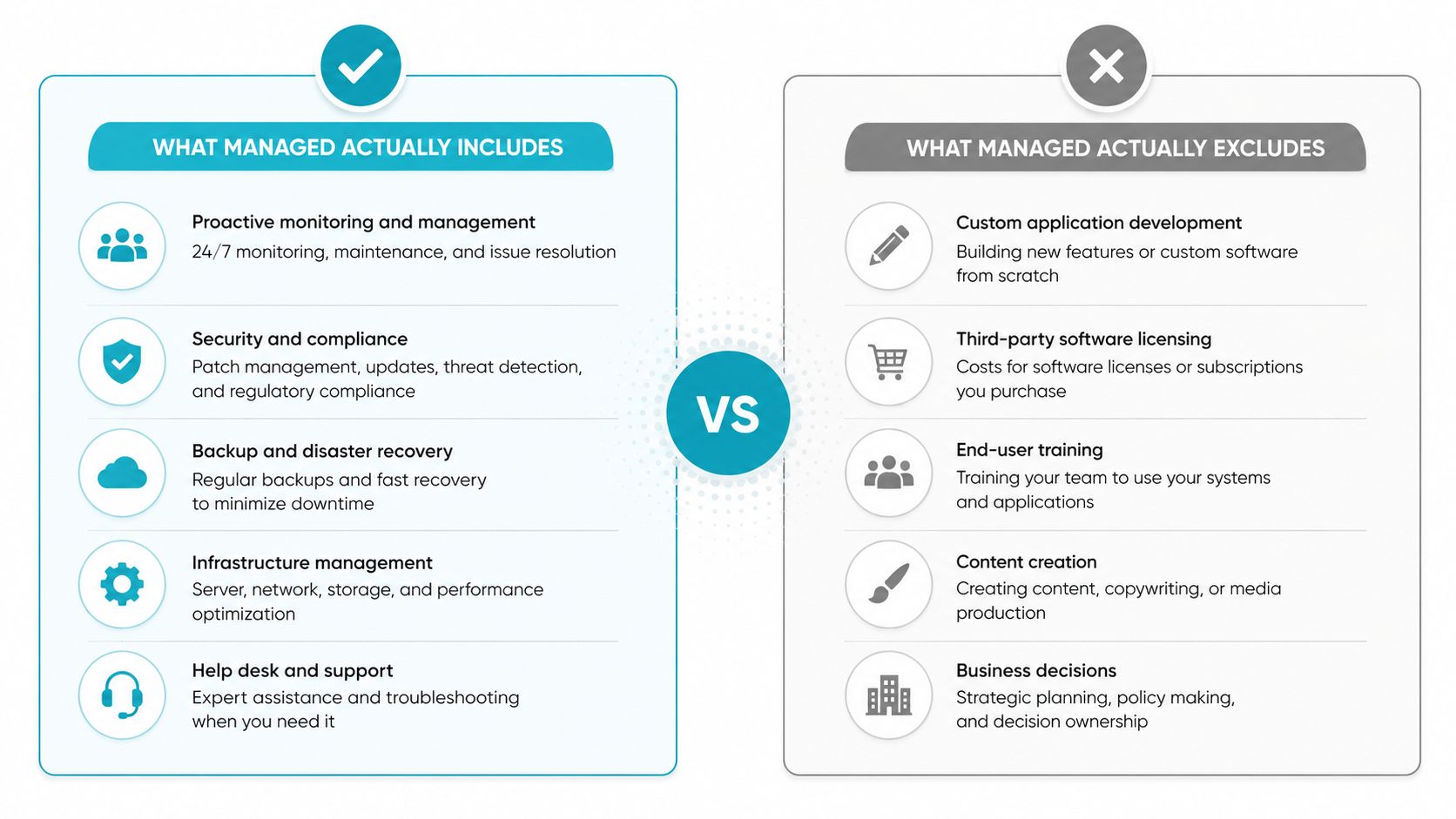
The layers that usually belong to the provider
A real managed plan usually covers the base operating system, security updates, monitoring, troubleshooting, and some form of backup handling. Independent guides describe managed VPS in those general terms, but provider pages often vary on the details, and that's the part buyers need to press on managed VPS guide. Ask whether patching includes only the OS, whether snapshots are included or extra, and whether the support team stops at the server boundary or helps when the application stack misbehaves.
The cleanest way to evaluate scope is to ask for specifics:
- OS patching scope: confirm whether kernel and package updates are included, and whether third-party software is also maintained.
- Backups and restores: confirm frequency, retention, and whether restoration is self-service or ticket-based.
- Control panel licensing: confirm whether cPanel, Plesk, or another panel is bundled or billed separately.
- Support boundary: confirm whether the provider helps with the server only, or also assists with site-level issues.
For buyers comparing managed KVM options, the same scope questions apply, and the operating model is easier to compare against a clearly defined service boundary. See ARPHost managed KVM VPS for the kind of service description that should spell out where provider responsibility ends.
What remains your job
Application changes, plugin conflicts, custom deployments, and business logic remain yours unless the provider says otherwise. That distinction matters because a small business owner can easily assume “managed” means every task is covered. It usually doesn't.
A managed VPS should reduce operational friction, not erase the need for application ownership.
Restore testing is another line item buyers miss. Backups only help when someone verifies that the data comes back cleanly, the application starts correctly, and the server state matches what the workload needs. If the provider does not spell out that process, you are buying storage for copies, not certainty.
For buyers comparing options, the best test is simple. If the vendor can't explain the boundary in plain language, they probably don't have a tight operational definition either. A plan that looks cheap on paper can become expensive the moment you discover that backups, patching, or panel licensing are separate line items.
Evaluating Providers Across Critical Decision Criteria
A U.S. managed VPS provider should be judged on more than RAM and monthly price. The useful comparison is operational, because that is where the differences show up after the invoice is paid. I look at infrastructure, security, recovery, support behavior, scaling path, and whether the provider can explain its own service without hand-waving.
Managed VPS Provider Evaluation Matrix
| Criterion | What to Verify | Red Flags |
|---|---|---|
| Performance infrastructure | NVMe storage, CPU-to-memory balance, and network capacity | Flat claims about “high speed” with no storage or CPU detail |
| Security stack | DDoS filtering, firewall handling, and intrusion response | Security listed as a buzzword, not a process |
| Backup and recovery | Backup frequency, retention, and restore procedure | Backups mentioned, but restores aren't explained |
| Support quality | Response path, escalation behavior, and actual support hours | “24/7” support with no proof of real human availability |
| SLA commitments | Uptime terms and what compensation means | SLA language that sounds strong but is operationally vague |
| Scalability options | Vertical growth, migration support, and upgrade timing | Needing a full rebuild just to get more headroom |
| Compliance fit | Data handling, audit readiness, and documentation | No clear answer for regulated workloads |
A provider that cannot discuss storage IOPS, restore speed, and escalation paths is not ready for serious production use. NVMe matters more than many buyers expect, especially for database-backed systems and busy PHP applications, because storage latency becomes the bottleneck before raw CPU does managed VPS sizing NVMe performance note. The same applies to support. If the answer is “open a ticket and wait,” you are not buying managed service in any meaningful sense.
What good looks like
Strong providers explain trade-offs, not just features. They will tell you where the plan fits, where it does not, and what needs to happen when traffic grows. That honesty matters more than a glossy feature grid because it helps you avoid a migration you should have done six months earlier.
A final filter is operational realism. If the provider cannot show how its support team handles a restore, a failed update, or a scaling request, assume the marketing page is doing more work than the staff.
The Performance and Compliance Case for U.S. Data Centers
U.S. location choice is about more than patriotism or procurement preference. OVHcloud states that hosting a VPS in the U.S. can reduce latency for U.S.-based users, improve application responsiveness, and support data-locality preferences That matters because interactive traffic, checkout flows, and authenticated sessions feel slower when packets travel farther, even if the application code itself hasn't changed.
When domestic placement pays off
If your users are mostly in the United States, domestic hosting usually makes the most practical sense. The benefit is clearest for businesses that run customer portals, e-commerce, scheduling systems, or internal applications where every extra round trip shows up in user behavior. The same is true for organizations with data-locality requirements, because keeping data in-country simplifies part of the compliance conversation.
When a global region can still win
A U.S. region isn't automatically the right answer. If your audience is spread internationally, or if you're relying heavily on CDN caching for static delivery, a global or edge-oriented architecture can make more sense. OVHcloud's U.S. positioning is also useful here, because it shows how providers now think beyond a single country label and toward broader regional placement options OVHcloud U.S. VPS. For some workloads, the question isn't “U.S. or not,” it's “which users need the origin to be close.”
Operational takeaway: place the origin where the dynamic workload lives, then use caching and routing to cover everyone else.
That's the practical way to think about location. U.S. hosting is the right fit when the user base, regulation, or response-time sensitivity is centered here. It's not automatically the cheapest or the broadest option, but it often is the cleanest one for American businesses that need predictable performance.
Migration Planning and Execution Without Downtime
Most VPS migrations fail because teams rush the cutover, not because the target server is weak. The fix is discipline. Start with inventory, not installation, because the hidden dependencies are usually what hurt you later.
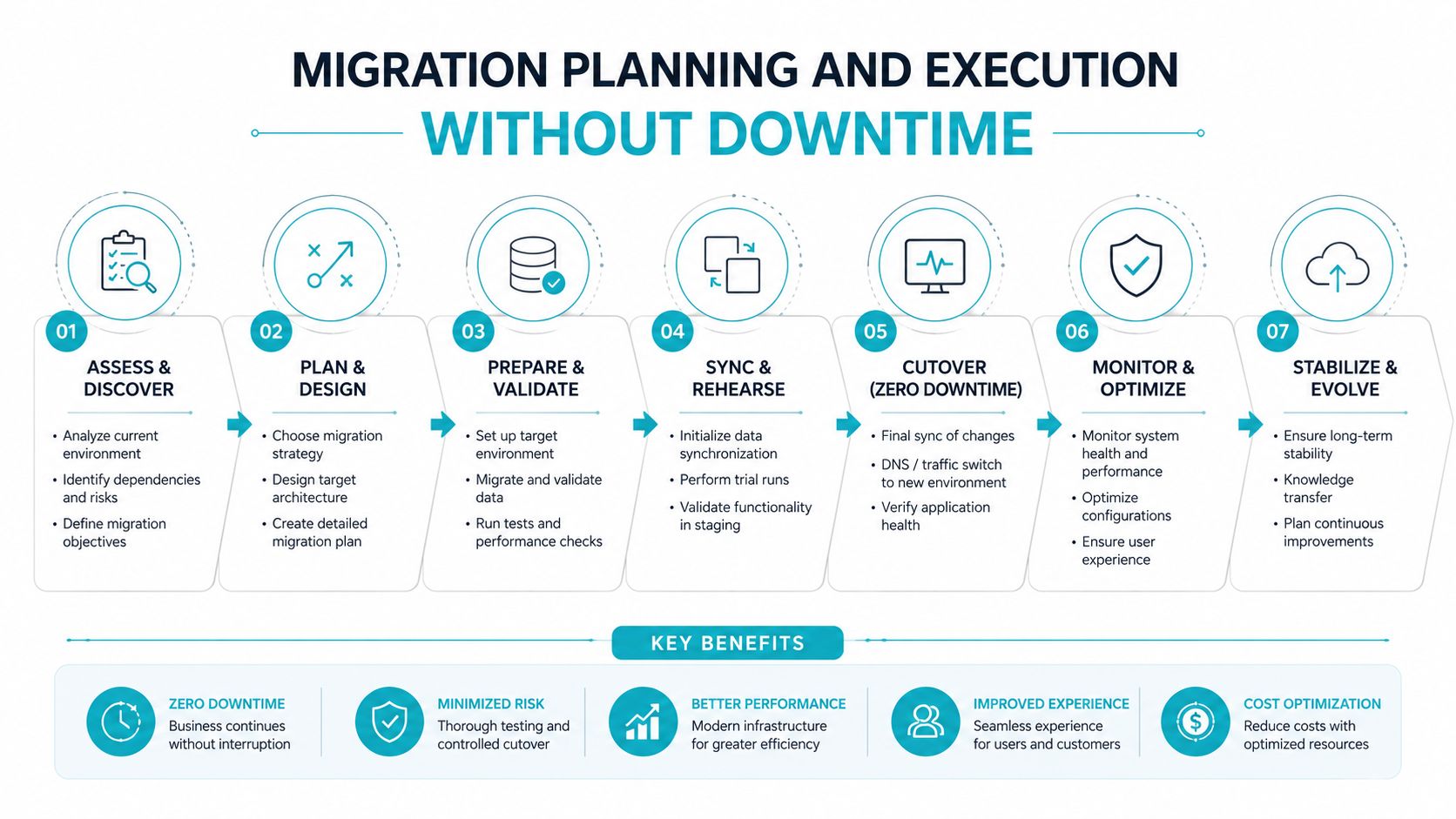
The sequence that keeps migrations sane
- Audit the current stack. List every application, database, scheduled task, mail flow, and external service that depends on the server.
- Size the target. Match CPU, memory, and storage to current load, then leave headroom for traffic spikes.
- Prep the data move. Use staged synchronization so you're not relying on a single last-minute copy.
- Run parallel where possible. Keep the old environment active while testing the new one under real traffic patterns.
- Cut over with rollback ready. Keep a clear backout path if authentication, uploads, or background jobs fail after the switch.
That workflow sounds obvious, but the details matter. SSL certificates, cron jobs, email routing, and third-party integrations are the items teams forget most often. If one of those breaks, the migration is technically complete and operationally incomplete.
What I check before any cutover
- Configuration parity: verify the target environment mirrors the old one on versions, extensions, and permissions.
- Backup verification: confirm you can restore before you need to.
- Application testing: log in, create records, upload files, and run scheduled jobs before traffic moves.
- DNS timing: keep the transition window controlled so stale caching doesn't drag out the switch.
The best migrations I've done were boring. They involved checkpoints, rollback notes, and a support person who stayed available while the old and new systems overlapped. That's the standard to aim for. If a provider can't help with the move, you're not buying managed infrastructure, you're buying a server and a headache.
Right-Sizing Your VPS for Workload Requirements
VPS sizing usually fails in one of two ways. Buyers either overpay for CPU and storage they never use, or they starve the application of memory or I/O and then blame the host for slow behavior. The right plan comes from the workload profile, not from the biggest option in the pricing table.
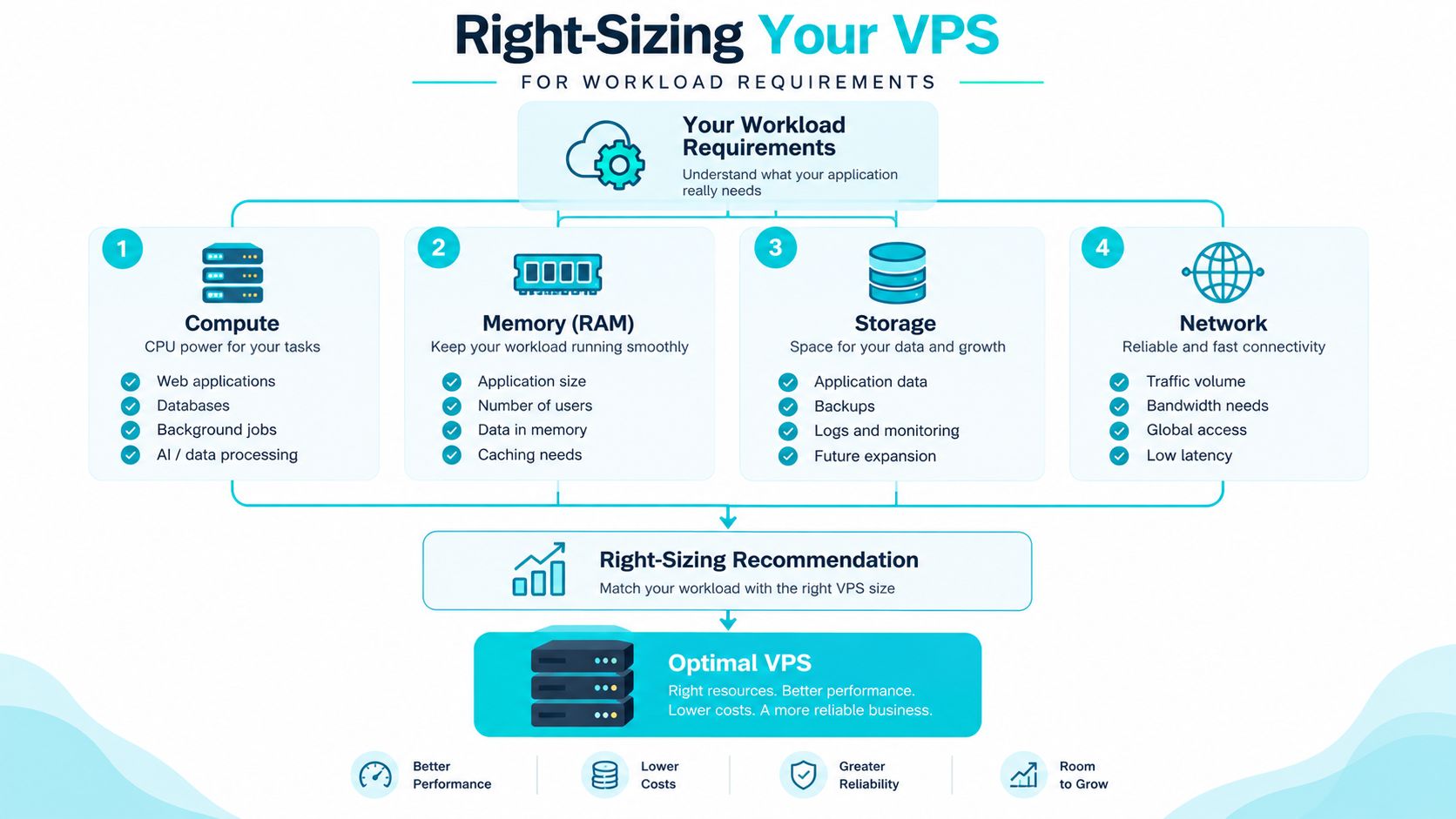
What to size first
Compute matters when the workload has concurrent requests or background processing. Memory matters when the application needs cache and working room. Storage IOPS matter when the app hits the database constantly, which is why NVMe is such a strong differentiator in managed VPS environments NVMe performance note. Network matters when traffic volume or user geography becomes the limiter.
Small WordPress sites and email workloads can run comfortably on lower tiers if they are cleanly built and not overloaded with extras. Database-heavy stacks, plugin-heavy sites, and containerized services need more breathing room, especially once disk reads start competing with application work. U.S. businesses also need to account for where the server sits relative to their users. A well-placed domestic data center usually lowers latency for U.S. traffic, while a distant region can add delay even if the specs look similar on paper.
The operational boundary matters here too. Managed VPS support can cover monitoring, OS patching, backups, and provider-side infrastructure issues, but it does not remove the customer's responsibility for application code, database tuning, plugin hygiene, or resource-heavy jobs. If the stack is inefficient, no support plan turns a poorly built workload into a light one.
A sensible planning order
- Profile the workload: identify whether the bottleneck is CPU, memory, storage, or network.
- Set the minimum viable tier: choose the smallest plan that handles normal traffic with room left over.
- Reserve headroom: leave space for launches, campaign spikes, and growth.
- Test the I/O path: if the app feels sluggish, storage latency may be the issue.
The market commonly groups plans into entry-level 1 to 2 vCPU tiers for lighter workloads and higher-resource options for more demanding stacks managed VPS sizing. That is a useful starting point, but workload shape still decides the final choice. A well-sized VPS stays quiet under load. A poorly sized one looks fine until the first traffic spike, then everything starts queuing.
How ARPHost Solves Common Managed VPS Pain Points
A managed VPS provider is only useful if the operational gaps are closed. ARPHost, LLC offers U.S.-based VPS hosting from Tampa, Florida, with 24/7 U.S.-based support, 99.99% uptime SLA, NVMe storage, and daily backups with one-click restoration, which maps directly to the problems buyers keep running into: downtime, slow storage, and limited internal capacity 24/7 monitoring. For teams that want a secure managed VPS hosting setup, the relevant part isn't the marketing language, it's whether the provider can keep the platform stable while you stay focused on the application.
Where the fit is strongest
The best fit is usually the business that needs a practical server, not a science project. WordPress sites with security pressure, development environments that need quick provisioning, and production workloads that need a support path all benefit from a setup that combines monitoring, backups, and straightforward scaling. NVMe and optimized server stacks help with latency-sensitive workloads, while Tampa placement gives U.S. customers a domestic origin point without adding unnecessary complexity.
How to think about growth
When a VPS outgrows its first role, the next step isn't always another VPS. Some workloads are better served by bare metal, especially memory-intensive databases, AI inference, or dense virtualization. ARPHost's AMD EPYC 4584PX bare metal option, for example, is a practical fit for high-memory workloads, while the Dual Intel Xeon E5-2690 V3 suits Proxmox clusters and multi-tenant nodes bare metal servers. That matters because the right managed path sometimes ends at a bigger server, not a more complicated one.
If your current VPS is stable but cramped, the correct move is to measure the bottleneck first, then scale the platform that actually solves it.
For buyers comparing providers, the useful question is whether support, backups, monitoring, and recovery are treated as core service or as optional extras. ARPHost's model is one workable answer to that problem, especially for teams that want managed services without adding another administrator to payroll.
ARPHost, LLC provides managed VPS hosting, secure web hosting bundles, bare metal servers, and fully managed IT services from U.S. facilities in Tampa, Florida. If you're comparing managed VPS hosting USA options and want a provider that can handle monitoring, backups, and infrastructure support under one roof, visit ARPHost, LLC to review the current VPS, security, and private cloud offerings.
