

Your busiest sales day is going fine until checkout slows down, email stops syncing, and the one person who “usually handles IT” is in a meeting, on vacation, or already buried in tickets. That's the moment many business owners realize they don't have an IT strategy. They have a collection of tools, a few smart people, and a lot of hidden risk.
That problem gets worse as the business grows. A single web server becomes a web server plus backups, patching, endpoint security, firewall rules, SSL renewals, user onboarding, storage planning, and recovery procedures nobody has tested recently. Most small and midsize teams don't fail because they made bad decisions. They fail because they're trying to run production systems with reactive habits.
A managed service provider changes that equation. Instead of waiting for something to break, the provider treats infrastructure, security, and support as ongoing operational work tied to uptime, cost control, and business continuity. That shift has become mainstream. The global managed services market is projected to grow at a 13.6% CAGR from 2023 to 2030 according to managed services market statistics. Businesses aren't outsourcing IT because it's fashionable. They're doing it because the complexity is real and the consequences are significant.
Why In-House IT Can Be a Losing Battle
A familiar pattern shows up in growing companies. The website lives on one platform. Email is somewhere else. Files are scattered across cloud apps and a local NAS. A firewall was set up years ago and hasn't been reviewed since. The internal IT person is competent, but they're handling support tickets, vendor calls, and urgent issues all at once.
Then a small warning gets missed.
A backup job fails overnight. Disk usage spikes. A database query starts dragging response times down. Nobody notices until customers complain, staff can't work, or orders stop flowing. At that point, the business isn't paying for technology. It's paying for downtime, distraction, and rushed decision-making.
Reactive support breaks at the worst time
In-house teams often know the environment well. That's their advantage. Their weakness is coverage. If your company doesn't have people watching systems around the clock, your monitoring is only as good as whoever sees the alert first. If nobody sees it, users become the monitoring system.
That's why a lot of SMB IT feels like firefighting. Problems aren't managed at the earliest signal. They're handled at the loudest failure.
Good IT operations don't start when a server goes down. They start when a warning appears early enough to prevent the outage.
There's also a staffing reality. The business might need help desk support, server management, security maintenance, patching, virtualization knowledge, cloud administration, and vendor coordination. That's not one job. It's several disciplines packed into one role.
Why more businesses are shifting to managed services
A managed service provider gives a business structured coverage, documented processes, and broader technical depth than most SMBs can maintain internally. The value isn't only technical. It's operational. Owners and managers stop making emergency decisions about infrastructure when they should be focused on revenue, hiring, and customer experience.
Teams thinking seriously about automation should also look at Halo AI's view on IT automation, especially if they want to reduce repetitive support work before it turns into backlog and downtime.
Achieve Strategic Cost Control and Predictable Spending
The strongest business case for managed services usually starts with one question. “What is IT really costing us right now?”
Most companies answer that too narrowly. They count salaries, software, maybe hardware. They don't count after-hours emergencies, delayed projects, downtime during patching, rushed replacement purchases, or the management time spent coordinating vendors and solving recurring problems.
A managed service model changes the cost structure. Instead of treating IT as a series of surprise purchases and emergency fixes, it moves more of the spend into planned monthly operating expense.
Why OpEx is easier to manage than surprise CapEx
Organizations adopting managed services can reduce IT costs by 25-45 percent while boosting operational efficiency by 45-65 percent, driven by fixed monthly operational expenditure models. That's the core financial reason MSPs appeal to SMBs. They reduce volatility.
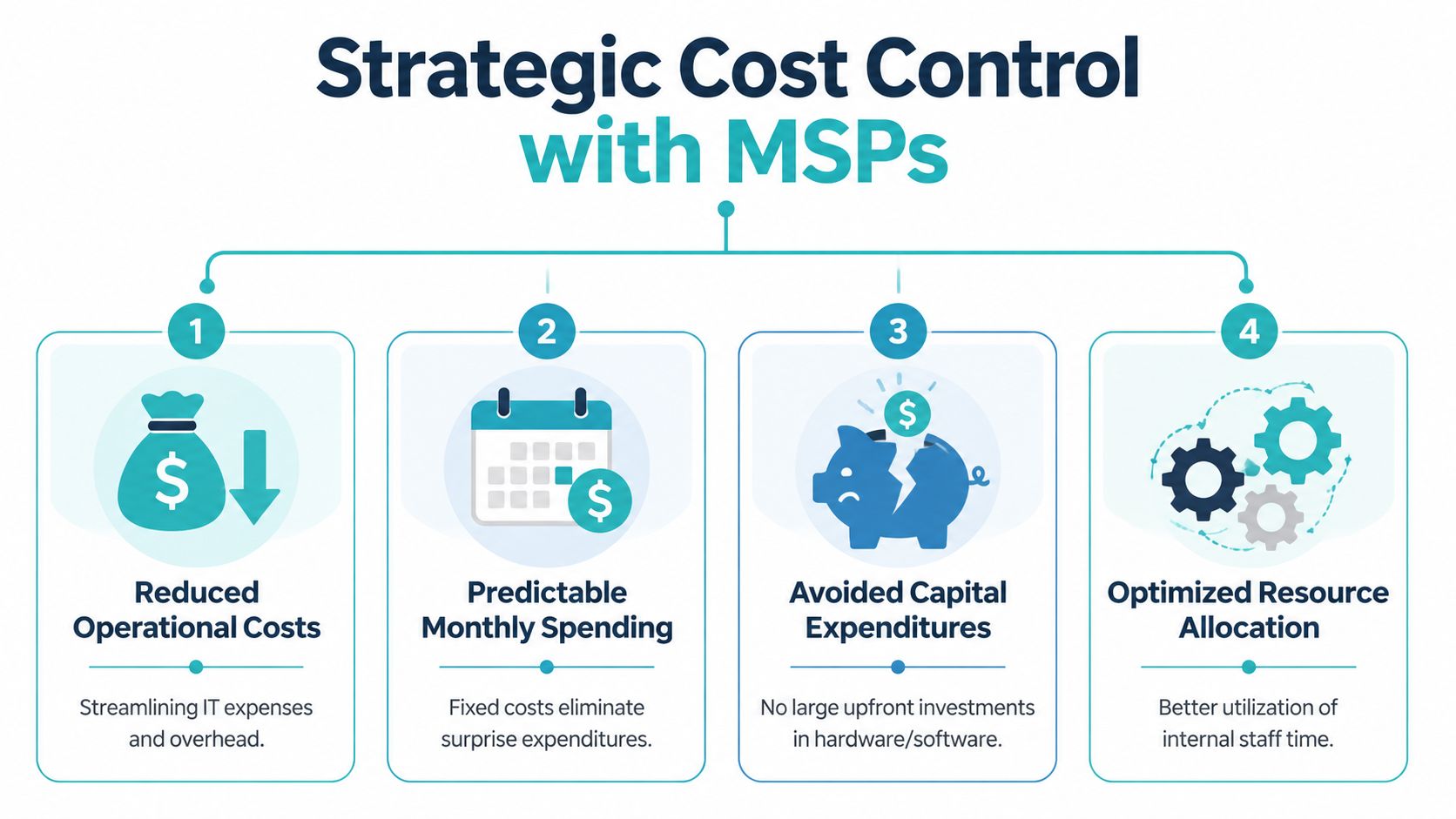
When you buy and manage everything yourself, costs arrive unevenly:
- Hardware failures create urgent replacement purchases.
- Growth spikes force fast capacity decisions.
- Specialist work turns into expensive one-off consulting.
- Maintenance debt builds, then lands all at once.
With managed infrastructure, the spending pattern is simpler. You pay for the service level and capacity you need, then adjust as the business changes.
A practical hosting example
Say a startup is launching a new application. Buying hardware up front might give them control, but it also locks capital into equipment before product-market fit is proven. A private cloud or managed VPS model is often more practical because the company can deploy now, tune performance as demand becomes clear, and avoid tying up cash in infrastructure planning too early.
The same logic applies to ecommerce. A retailer may need more compute and storage during holiday peaks, then less afterward. Paying for scalable infrastructure is usually healthier than owning hardware sized for the highest possible load all year.
Practical rule: If your IT budget is repeatedly shaped by emergencies, deferred upgrades, or one-time specialist work, you don't have a predictable cost model yet.
A good provider should also explain the pricing model clearly. If you're comparing options, review managed services pricing models and map them against your internal costs, including labor, vendor sprawl, and downtime exposure.
What works and what doesn't
Here's a straightforward comparison:
| Approach | Usually works well when | Usually fails when |
|---|---|---|
| Fully in-house | You have stable workloads and real bench depth | One or two people hold too much system knowledge |
| Hybrid MSP model | Internal staff own business apps while provider manages infrastructure | Responsibilities are vague and tickets bounce between teams |
| Fully managed | You need predictable spending and broad technical coverage | The provider offers generic support with no environment-specific process |
The mistake isn't choosing internal IT or outsourcing. The mistake is choosing a model without defining ownership, escalation, and budget boundaries.
Enhance Operational Reliability with Proactive Support
Reliability is where managed service provider benefits become obvious to nontechnical stakeholders. Nobody cares about your monitoring stack until a critical service stays online because someone caught the warning signs early.
MSPs use 24/7/365 remote monitoring to detect issues like CPU spikes or failed backups before they turn into visible service degradation, which improves mean time to resolution compared with reactive in-house support.
That difference matters because most outages don't begin as dramatic failures. They begin as small signals. Storage latency creeps up. A service stops restarting correctly after updates. A backup job starts failing intermittently. If nobody is looking at those signals continuously, the first alert often comes from your customers or your staff.
What proactive support looks like in practice
Consider a bare metal host running several production virtual machines. A reactive team may not notice trouble until users report slowness or a VM becomes unavailable. A proactive team watches SMART warnings, I/O latency, filesystem alerts, hypervisor resource pressure, and backup status together.
That gives them options:
- Move workloads early if a disk or node shows failure symptoms
- Throttle or rebalance services when one VM starts consuming abnormal resources
- Validate backups before maintenance instead of assuming yesterday's job succeeded
- Patch during planned windows with rollback steps already documented
This is the practical benefit of managed support on Proxmox, KVM VPS platforms, and bare metal environments. Reliability comes from process, visibility, and disciplined response. Not from hoping problems happen during office hours.
A simple example from the command line
On Linux systems, a technician may start with basic checks before making larger decisions:
uptime
df -h
free -m
systemctl --failed
journalctl -p err -n 50
Those commands are simple, but they only help if someone runs them early enough and knows what “abnormal” looks like in your environment. Monitoring platforms and remote management tools close that gap by surfacing those changes before users feel them.
If you want to see how providers structure that visibility, review RMM tools for MSP operations. The toolset matters less than the response discipline behind it.
Later in the workflow, resilience also depends on recovery orchestration, not just alerting.
The real uptime advantage isn't that nothing ever goes wrong. It's that the response starts before the issue becomes a business outage.
What to expect from a mature provider
Ask for evidence of operating habits, not marketing language.
- Monitoring scope should cover servers, services, backups, and resource thresholds.
- Escalation paths should be documented, not improvised.
- Maintenance windows should include rollback plans.
- Recovery procedures should be tested, not assumed.
A provider that can't explain how they detect, triage, and recover from common infrastructure failures probably won't improve your uptime much.
Strengthen Your Security and Simplify Compliance
Security becomes expensive when it's treated as a product purchase instead of an operating discipline. Buying endpoint software or a firewall doesn't solve much if patches lag, backups aren't verified, admin access sprawls, or one compromised website can affect neighboring accounts.
That's where managed services are useful. They turn security into repeated work with ownership attached to it.

The layers that matter most
For SMB infrastructure, the most practical security stack usually includes these layers:
- Patch and update management so operating systems, control panels, and applications don't sit exposed longer than necessary.
- Workload isolation so one compromised site or app doesn't spread laterally across the server.
- Malware and threat detection that catches suspicious behavior before cleanup becomes a major incident.
- Firewall and network policy management so exposed services, access rules, and segmentation stay intentional.
- Backup and recovery controls so ransomware or operator mistakes don't become catastrophic.
In hosting environments, those layers become tangible quickly. CloudLinux OS helps isolate accounts in shared web hosting. Imunify360 adds malware scanning and active defense. Managed firewall administration on network appliances helps enforce policy consistently instead of relying on one-time setup.
Compliance gets easier when operations are documented
Most compliance pain comes from inconsistency. Security policies exist, but nobody can show who patched what, who has access, when logs are reviewed, or whether backups can be restored. A provider that already works with documented processes can make those conversations much easier.
Scope matters. So do shared responsibilities.
Security improves when someone owns the routine work. Alerts reviewed. Patches scheduled. Exceptions documented. Backups tested.
A practical hardening flow
A solid managed security workflow often looks like this:
- Inventory the environment. List servers, websites, user roles, backup jobs, and internet-facing services.
- Reduce exposure. Disable what isn't needed, tighten access, and review administrative accounts.
- Apply layered controls. Isolation, malware defense, patching, and network rules should complement one another.
- Test recovery. Restoring a backup is part of security, not a separate topic.
- Document ownership. Every task needs a person or provider responsible for it.
Businesses often underestimate how much follow-through this takes. That's why managed security support tends to outperform ad hoc internal effort, especially in mixed environments that include websites, email, servers, and remote users.
Unlock Business Agility and Specialist Expertise
Many companies don't need a large IT department all year. They need bursts of capability at the right moment. A migration. A security review. A virtualization redesign. A new ecommerce deployment. A temporary expansion in compute capacity.
That's why one of the most practical managed service provider benefits is agility.

Hiring for every specialty usually doesn't scale
Providing 24×7 support for a single technology requires at least 4 engineers to rotate shifts, and outsourcing that coverage costs a fraction of staffing full-time headcount for specialized skills like cloud architecture or cybersecurity.
That doesn't mean internal teams lack value. It means there are limits to what most SMBs can reasonably hire for. You may need:
- a Proxmox administrator for cluster design,
- a Linux engineer for performance tuning,
- a security specialist for hardening and incident response,
- and a migration expert for VMware exit planning.
Most businesses don't need all of those people full time. They need access to that expertise when the project or problem appears.
Compare the two models side by side
| Need | Hiring internally | Using specialist managed support |
|---|---|---|
| Virtualization redesign | Slow if no one has deep platform experience | Faster when expertise already exists |
| Short-term compute expansion | May require buying hardware you won't need later | Provision, use, and scale down when the project ends |
| Security hardening | Often competes with daily ticket work | Can be handled as planned operational work |
| Migration projects | Learning curve slows execution | Experienced teams reduce avoidable mistakes |
A good example is temporary infrastructure for development, analytics, or model training. If a team needs a powerful bare metal server for a short project, renting managed infrastructure is usually more sensible than buying hardware that may sit idle afterward.
Another common example is migration work. Moving from VMware to Proxmox, or from overloaded shared hosting to a private cloud, involves architecture choices, data movement, testing, rollback planning, and post-cutover monitoring. The technical steps are manageable. The risk comes from trying to learn and execute them during production deadlines.
Why agility also affects governance
Specialist support isn't only about speed. It also improves control. Teams can define who owns the hypervisor, who owns the guest OS, who handles backups, and who signs off on change windows. That structure matters when systems become more distributed.
A Practical Checklist for Choosing Your MSP Partner
A managed service provider can reduce risk and sharpen operations, but only if the relationship is structured well. Many bad MSP experiences come from vague scope, generic support, and unclear ownership.
Use this checklist when you evaluate providers.
Questions that reveal operational maturity
Ask direct questions and push for specifics.
What do you monitor by default
You want a clear list. Servers, services, storage, backup jobs, virtualization hosts, and security alerts should all be addressed.What is included in patch management
“We handle updates” isn't enough. Ask how updates are scheduled, tested, approved, and rolled back.How do you handle backup verification and restores
Backup success messages don't prove recoverability. Ask how restore testing is done and who performs it.What security tools are standard versus optional
This matters in web hosting, VPS, and dedicated server plans. If malware defense, account isolation, or firewall management are separate add-ons, you need to know that before an incident.
Questions about control and transparency
Some businesses want full outsourcing. Others want co-managed support with internal admins still involved. Both models can work if permissions and responsibilities are defined.
Ask these next:
- Can we keep root or administrative access where appropriate
- Can your team support hybrid environments with internal staff still owning applications
- How are tickets escalated after hours
- Do we get documentation for changes, assets, and procedures
- What are the terms in the service agreement
For the last point, review a sample managed IT services agreement structure before you sign anything. The agreement should clarify scope, exclusions, escalation, and responsibilities on both sides.
If an MSP can't explain exactly what it manages, what it won't manage, and how it handles exceptions, the relationship will become expensive confusion.
Red flags worth taking seriously
Here are the signs I'd treat carefully in any vendor review:
- Generic proposals that don't reflect your stack, business hours, or recovery needs
- No shared responsibility model for hybrid environments
- No change documentation after maintenance work
- Security language without tooling details
- Support promises that depend on one technician's personal knowledge
The best provider for your business isn't the one with the broadest service list. It's the one that can explain how those services will operate inside your environment day to day.
Frequently Asked Questions About Managed Services
What's the difference between managed hosting and managed IT services
Managed hosting usually focuses on the infrastructure you rent. That can include server provisioning, uptime monitoring, OS updates, backups, and platform-level support. Managed IT services are broader and can include endpoint management, firewall administration, VoIP support, user operations, security oversight, and recovery planning across your environment.
If your pain is mostly website, application, or server reliability, managed hosting may be enough. If your pain includes users, devices, network policy, compliance requests, and day-to-day IT operations, you're usually in managed services territory.
Will we lose control if we use an MSP
Not if the relationship is designed properly. Some businesses want a fully managed model. Others want co-managed support where the provider handles infrastructure, patching, monitoring, and escalation while internal staff keep control over applications, vendors, and business workflows.
Loss of control usually happens when permissions, responsibilities, and escalation rules were never agreed clearly. Good MSP relationships are documented partnerships, not handoffs into a black box.
Are managed services affordable for small businesses
They can be, especially when compared against fragmented spending and avoidable downtime. Small companies often don't need a full internal bench covering infrastructure, security, backups, and after-hours response. They need right-sized support that matches current complexity and can grow later.
That's why flexible hosting plus optional management tends to work well. A company might begin with a small VPS, secure web hosting bundle, or a managed dedicated server, then add deeper support as systems and customer expectations grow.
What does onboarding usually look like
A competent onboarding process starts with discovery. The provider reviews systems, workloads, dependencies, users, backup status, access methods, and current pain points. Then they define scope, monitoring, maintenance windows, escalation paths, and documentation standards.
The best onboarding isn't flashy. It's disciplined. You should know what's being managed, how alerts are handled, when changes happen, and what your team still owns.
When does a hybrid model make more sense than fully outsourcing
Hybrid works well when your internal team understands the business applications thoroughly but doesn't want to spend its time on infrastructure maintenance, monitoring, backups, and platform-level security. That split is common in growing firms with one or two strong technical employees who need support depth without surrendering architectural control.
In that model, one option businesses evaluate is ARPHost, LLC, which offers managed and unmanaged infrastructure across VPS, bare metal, private cloud, colocation, secure web hosting, and related services so teams can divide responsibilities according to their skills and growth stage.
What should we prepare before talking to a provider
Bring a simple inventory:
- Current systems including servers, websites, email platforms, and network gear
- Known pain points such as backup gaps, slow response, recurring outages, or security concerns
- Internal ownership so everyone knows who approves changes and who uses admin access
- Business priorities like uptime, compliance, ecommerce stability, remote work support, or migration planning
That preparation makes the first provider conversation much more useful and usually exposes whether the vendor is listening carefully or pushing a canned package.
If you're weighing managed infrastructure, security support, or a co-managed IT model, talk to ARPHost, LLC about the environment you run today and the one you expect to run next. A clear scope, practical support model, and infrastructure that fits your workload will do more for ROI than any generic “all-in-one” promise.
