

Managed server support pricing usually falls between $100 and $400 per server per month. This represents the starting point, but the number only makes sense once you separate per-server infrastructure support from generic MSP pricing and define the scope of work.
You’re probably in one of three situations right now. A server issue hit after hours and nobody on your team wanted to be the one rebuilding services at midnight. Your environment has grown beyond “one box and a backup script,” and now you’ve got patching, backups, security hardening, and escalation risk to manage. Or you’re comparing quotes and realizing half the market talks in per-user terms even though what you need is someone to own the servers.
That confusion wastes time and leads to bad buying decisions. Developers, DevOps teams, ecommerce operators, and SMBs with real infrastructure don’t need a generic help desk pitch. They need a clear answer on managed server support pricing, what drives it, where the hidden costs sit, and which pricing model fits bare metal, VPS, or private cloud environments.
Why How Much Is the Wrong First Question
The wrong way to buy managed support is to ask for a monthly number before you define the operational problem.
If your production database stalls at night, the issue isn’t the invoice. The issue is whether someone can detect the fault, triage it, recover service, and stop it from repeating. That’s what you’re paying for. A low monthly price attached to weak coverage is just cheap downtime.
The broader market confirms this shift. The global managed services market was valued at USD 401.2 billion in 2025 and is projected to grow to USD 847.4 billion by 2033, expanding at a CAGR of 9.9% according to Grand View Research’s managed services market analysis. Companies aren’t outsourcing infrastructure management because it sounds fashionable. They’re doing it because server operations are expensive, unforgiving, and easy to under-resource internally.
Generic IT support and server management are not the same thing
A lot of buyers get trapped by pricing pages built for office IT. Those pages talk about users, laptops, email, and endpoint support. That’s fine if your main problem is employee devices.
It’s the wrong lens if your real concern is:
- Production infrastructure: Linux or Windows server administration, patching, service monitoring, and incident response.
- Virtualization: Hypervisors, clustered workloads, VM placement, and storage behavior.
- Root-level work: Kernel issues, application stack tuning, web services, database dependencies, and backup validation.
- Availability: Recovery after failures, not just “someone answered the phone.”
Practical rule: If your business risk lives on servers, buy a server-focused service model first. Don’t start with per-user MSP pricing and hope it maps cleanly to infrastructure.
The better first question
Start here instead:
- What systems are in scope
- What response window can your business tolerate
- Do you need monitoring only, or full proactive administration
- Are you buying support for one server, a fleet, or a clustered platform like Proxmox
Once those answers are clear, pricing gets much easier to compare. Until then, “how much?” is too vague to be useful.
Decoding the Four Main Pricing Models
Most of the confusion around managed server support pricing comes from providers mixing very different billing models on the same page.
Here’s the visual version first.
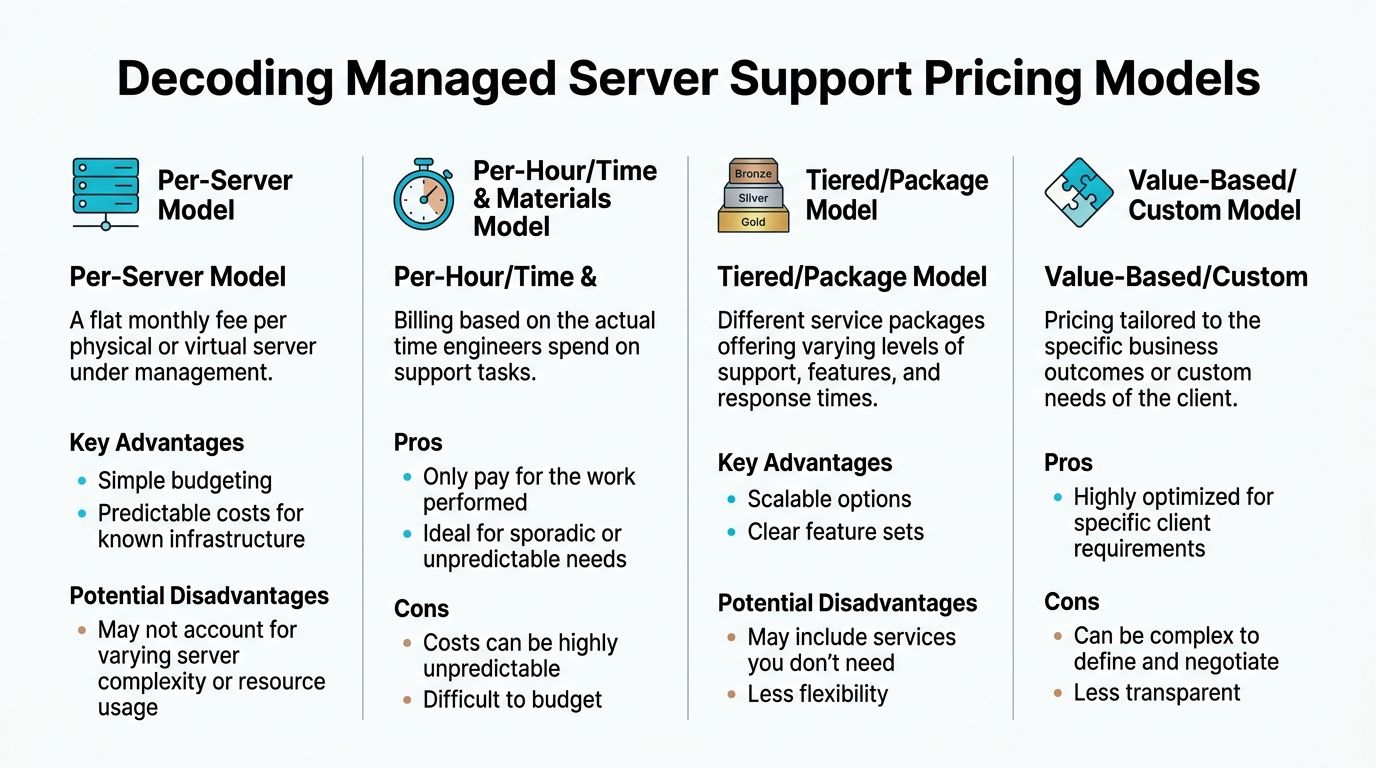
Per-server pricing
This is the model technical buyers should usually start with. Common per-device pricing runs $100 to $400 per server.
That structure is clean. You have a known number of servers. The provider manages each one under a defined scope. It’s the best fit for:
- dedicated servers
- VPS fleets
- application nodes
- database servers
- small Proxmox environments
- infrastructure where employee headcount has nothing to do with support demand
If you run two production servers and five employees, per-user pricing can distort your cost model. If you run one infrastructure-heavy workload with a small team, per-server billing is far more honest.
Per-user pricing
The same VC3 pricing guide notes that per-user charges typically range from $150 to $175 per user. This model works for broad outsourced IT where users drive ticket volume and service scope.
It doesn’t map well to infrastructure-led teams. A ten-person engineering company with a serious backend environment might need much more server expertise than a fifty-person office with basic SaaS tooling. User count doesn’t tell you how hard the servers are to manage.
For buyers trying to compare billing structures and packaged software access, it can help to review tools that bundle capabilities under membership-style access models, such as Access Saaspa.ge features, then contrast that logic with infrastructure support where the server, not the seat, is the cost center.
You can also review a structured breakdown of provider billing approaches on ARPHost managed services pricing models.
Hourly support
Hourly work is the fallback when you don’t want a monthly agreement. According to the same VC3 pricing guide, hourly rates can range from $175 to $350 per hour.
That’s useful for:
- one-off troubleshooting
- audits
- migration prep
- emergency intervention
- specialist consulting
It’s a poor fit for anything production-critical that needs continuous ownership. Hourly support looks flexible until the incident queue starts stacking up.
Hourly support is fine for projects. It’s a bad foundation for operations.
Tiered and custom models
Some providers package support into service tiers or custom bundles. That can work well when your environment includes multiple layers, such as server administration, firewall ownership, backup management, and strategic planning.
These models are reasonable if the quote clearly states what’s included and what isn’t. They become a problem when “fully managed” means little more than patching and a ticket portal.
Key Cost Drivers That Influence Your Final Price
Ask two companies for “managed server support” and you can get two quotes that are nowhere near each other. That usually happens because one quote covers real operational ownership and the other covers basic hosting with a support inbox attached.
A monthly fee reflects labor, risk, environment design, and who is accountable when production breaks.
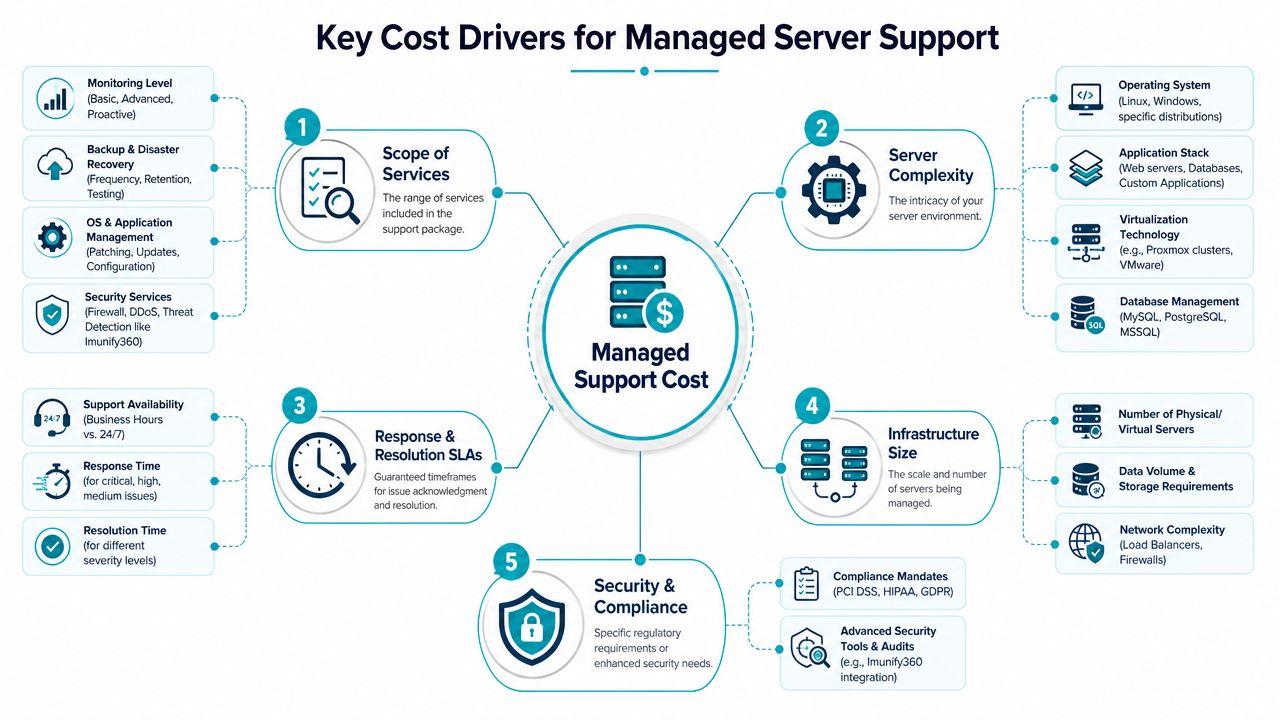
Scope is the first pricing driver
Managed server support is not priced like general IT helpdesk support. You are not paying per employee. You are paying for engineering time tied to a server, a stack, or a piece of infrastructure that needs continuous care.
VC3’s managed support pricing analysis says managed support often carries a premium over unmanaged hosting because the provider is taking on monitoring, response coverage, and technical ownership. That premium makes sense if the service includes actual operations work.
Here is what should be in scope before you accept a managed rate:
- service-aware monitoring
- OS patching and update planning
- firewall and access control management
- backup review and restore support
- incident response by an engineer
- performance troubleshooting
- change execution for routine admin work
If the quote excludes half of that list, the problem is not the monthly number. The problem is that you are buying too little coverage.
Architecture complexity raises the bill fast
A single Linux VPS with one application is straightforward. A multi-server application stack is not. Add a database node, a reverse proxy, background workers, object storage, VPN access, and scheduled jobs, and support stops being simple system administration. It becomes infrastructure management.
That is why per-server pricing alone can be misleading. Two environments with the same server count can have very different support costs because the dependencies are different. One server might host a brochure site. Another might be part of a revenue-critical stack with failover requirements, deployment workflows, and strict recovery targets.
For teams comparing options like a managed IT services plan for business infrastructure, this is the point to focus on. Ask whether the provider is pricing a machine, or pricing ownership of the workload running on it.
Virtualization and clustering add specialist work
Virtualization platforms cost more to support because mistakes affect multiple workloads at once. Storage design, snapshot policy, host maintenance, live migration, cluster quorum, and recovery planning all require experience.
That is especially true in clustered Proxmox environments. The support burden rises with it.
Proxmox’s own High Availability documentation makes the same point from an operations angle. HA is not a box you tick. It depends on correct configuration, sane failover behavior, and a team that understands what the cluster will do under stress.
If your provider cannot explain quorum, fencing risk, storage dependencies, or failover order, do not pay cluster-level rates.
Security work is ongoing work
Hardening is billable because it takes engineering time every month. Access reviews, firewall updates, patch validation, backup policy checks, log review, and response planning are part of the job. They are not extras.
For Proxmox environments, that includes host-level controls, container policy, MFA, storage access restrictions, and firewall rules that fit a default-deny approach, as covered in this Proxmox VE 9 hardening walkthrough.
Security costs more because neglect costs more.
A simple comparison
| Environment type | What support usually involves | Pricing pressure |
|---|---|---|
| Single VPS | patching, monitoring, backups, web stack support | lower |
| Dedicated server | hardware-aware admin work, security, service recovery | moderate |
| Multi-server app stack | dependency mapping, coordinated maintenance, escalation runbooks | higher |
| Proxmox cluster | HA behavior, migration planning, storage, cluster health, failover | highest |
Real-World Pricing Scenarios From SMBs to Enterprises
Quotes get easier to evaluate when you map them to a real operating model.
SMB ecommerce store with one critical application stack
A small online store usually doesn’t need a sprawling managed IT contract. It needs one reliable hosting platform, fast recovery when something breaks, and security controls that stop common web stack problems from becoming business problems.
In this case, I’d push the client toward a secure managed VPS hosting setup with predictable monthly support around the lower end of the per-server range if the stack is simple, and higher if the provider also owns backups, patching cadence, and application troubleshooting. If the site is built around common web workloads, a hardened hosting bundle with CloudLinux OS, Imunify360, and Webuzo is often the right fit.
A simple operational checklist for this buyer looks like this:
- Protect the web layer: use a secure web hosting bundle for malware isolation and account-level containment.
- Keep admin work small: don’t rent more infrastructure than the application needs.
- Buy restores, not promises: ask who validates backups and who performs the restore when the site fails.
- Escalate cleanly: require one owner for hosting and support, not three vendors pointing at each other.
For this type of business, ARPHost managed IT services for businesses is one example of a service category that aligns infrastructure support with broader operational coverage.
DevOps team running dedicated infrastructure
This buyer usually has different priorities. They care about root access, performance isolation, and the ability to scale without turning every server issue into an internal fire drill.
A practical fit here is bare metal paired with managed support. For virtualization-heavy work, the Dual Intel Xeon E5-2690 V3 configuration is suitable for Proxmox clusters and multi-tenant VPS node use. For memory-heavy database or high-density virtualization workloads, the AMD EPYC 4584PX is the stronger choice. For smaller single-tenant applications or development environments, the AMD Ryzen 9600X keeps things lean while still giving you dedicated hardware.
Here, the monthly support decision usually comes down to one blunt question: are your engineers supposed to build product, or are they supposed to spend nights doing infrastructure janitorial work?
If your senior engineers are handling routine server maintenance, you’re paying premium wages for support tasks.
Enterprise migration from VMware to Proxmox
Buyers often underestimate the actual cost. The monthly support quote is only part of the spend. The migration project itself can be the bigger budget item, especially when the target design includes HA, clustering, and a hardened private cloud.
A Proxmox-oriented enterprise plan needs architecture work before cutover. You have to decide cluster boundaries, failover policy, storage design, and whether your team will self-manage or hand off operational ownership after migration. If the organization wants dedicated Proxmox cloud pricing with managed continuity, a private cloud on dedicated hardware is usually the cleanest model.
For teams pricing a DIY route, Proxmox VE 9 Enterprise subscription pricing is €550 per year per CPU socket and includes features tied to production operations such as High Availability, Live Migration, and Clustering, with 10 support tickets annually, according to Proxmox VE pricing. That doesn’t replace managed service labor. It just covers the software subscription layer.
A very basic cluster workflow might look like this:
# Check cluster status
pvecm status

# List HA-managed resources
ha-manager status

# Review virtual machines on a node
qm list
Scaling this with ARPHost
If you’re evaluating fit by workload, not just price tag, start with the infrastructure first.
- Need low-friction app hosting: explore VPS hosting
- Need dedicated hardware for databases, virtualization, or isolated production workloads: review bare metal servers
- Need Proxmox-based private cloud capacity: see Proxmox private clouds
- Need secure website and email hosting: check secure VPS bundles
Comparing Apples to Apples When Evaluating Quotes
A cheap quote is often just an incomplete quote.
Most providers know buyers compare the monthly headline first. That’s why the differences get buried in exclusions, onboarding terms, migration assumptions, and what “managed” means in practice.
This checklist helps.
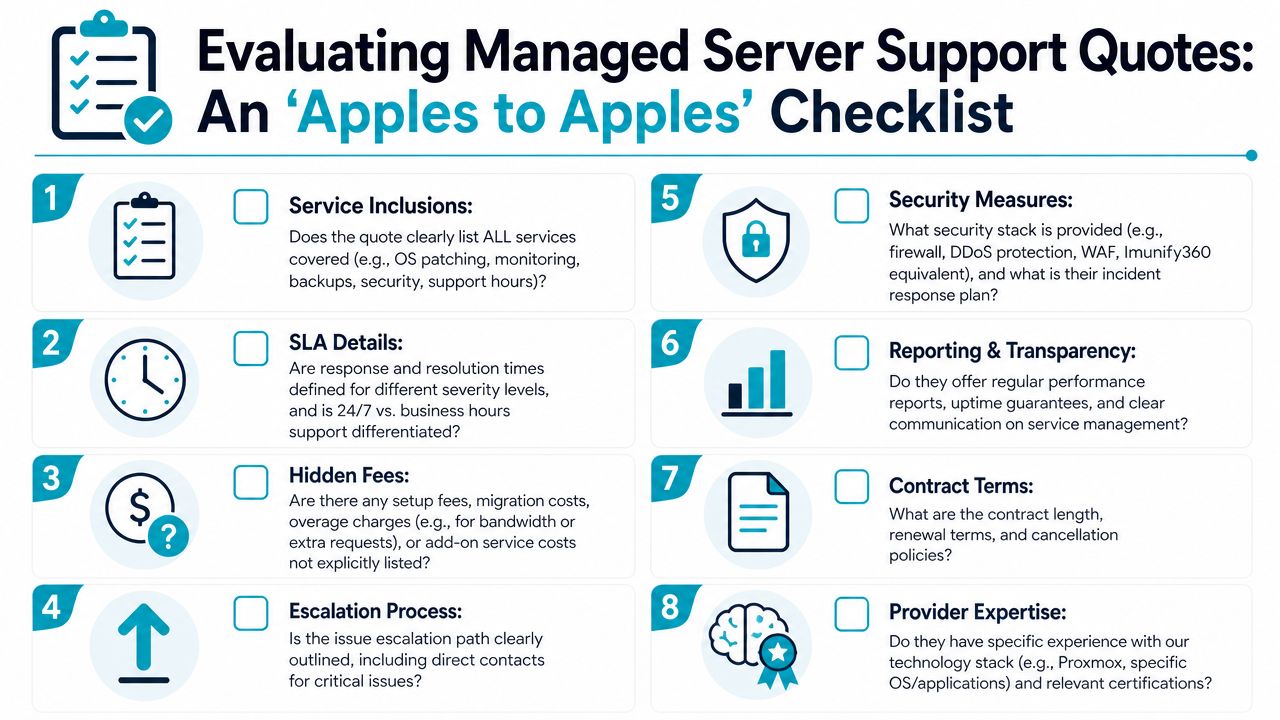
The hidden cost trap
7tech’s review of managed IT costs for small businesses notes that setup, migration, and data transfer work can add $2,500 to $15,000 to the initial investment, and that 30 to 40 percent of SMBs underestimate these costs.
That lines up with what I see in real quotes. The monthly fee might look reasonable, but then you find separate charges for:
- onboarding
- environment discovery
- VMware to Proxmox migration work
- backup seeding
- after-hours project execution
- emergency work outside the contract scope
Questions that force clarity
Ask these before you sign anything:
What is included in the monthly fee
Don’t accept “monitoring and management” as an answer. Ask for patching, backup handling, security tasks, escalation, and after-hours coverage in writing.What’s excluded
Migration work, application troubleshooting, and restore operations are common carve-outs.Who owns the incident
You want one accountable team, not a support relay race between hosting, software, and network vendors.How are onboarding and cutover billed
A flat monthly contract can still hide a painful upfront project fee.What happens during a major outage
If the answer sounds vague, the service probably is.
Buy the quote that exposes the most detail, not the one that hides the most assumptions.
A short quote comparison table
| Quote element | Strong quote | Weak quote |
|---|---|---|
| Scope | itemized tasks and support boundaries | vague “fully managed” label |
| Onboarding | stated clearly | omitted or deferred |
| SLA language | severity-based and specific | generic response promise |
| Escalation | named process | “open a ticket” |
| Stack expertise | platform-specific | broad but shallow |
Beyond Price Calculating the True ROI and TCO
Smart buyers don’t stop at monthly cost. They look at what the service replaces and what risk it removes.
TCO is the full operating cost of keeping servers healthy. That includes internal labor, after-hours interruptions, tooling, process gaps, and the mistakes that happen when nobody clearly owns the environment. ROI is what you get back when managed support removes those burdens and lets your team focus on product, customers, and revenue work.
Where managed support usually pays off
A provider fee often replaces fragmented internal effort. Your developers stop being on-call sysadmins. Your operations team stops improvising maintenance windows. Your business stops discovering that “someone thought backups were running” isn’t the same as recovery readiness.
This shows up beyond servers too. Compare total service ownership, not just the advertised monthly line item.
Why ARPHost excels here
One practical option in this market is ARPHost server cost planning, especially if you want to compare unmanaged infrastructure against a managed layer that includes hands-on administration rather than just raw compute.
What matters most is the operating model:
- 24/7 support paths: so incidents don’t wait for business hours
- Managed security work: patching, hardening, and service review
- Infrastructure breadth: VPS, bare metal, private cloud, colocation, and migrations in one stack
- Operational continuity: one team can manage hosting, support, backups, and recovery motion
That’s the part buyers often miss. Managed support isn’t just a service add-on. It’s a transfer of operational responsibility.
The Final Decision A Checklist for Your Team
A lot of teams get stuck here. They compare monthly support line items as if managed server support were the same thing as help desk pricing. It isn’t. You are buying ownership of servers, services, patching, backups, recovery, monitoring, and incident response around infrastructure that can break at 2 a.m.
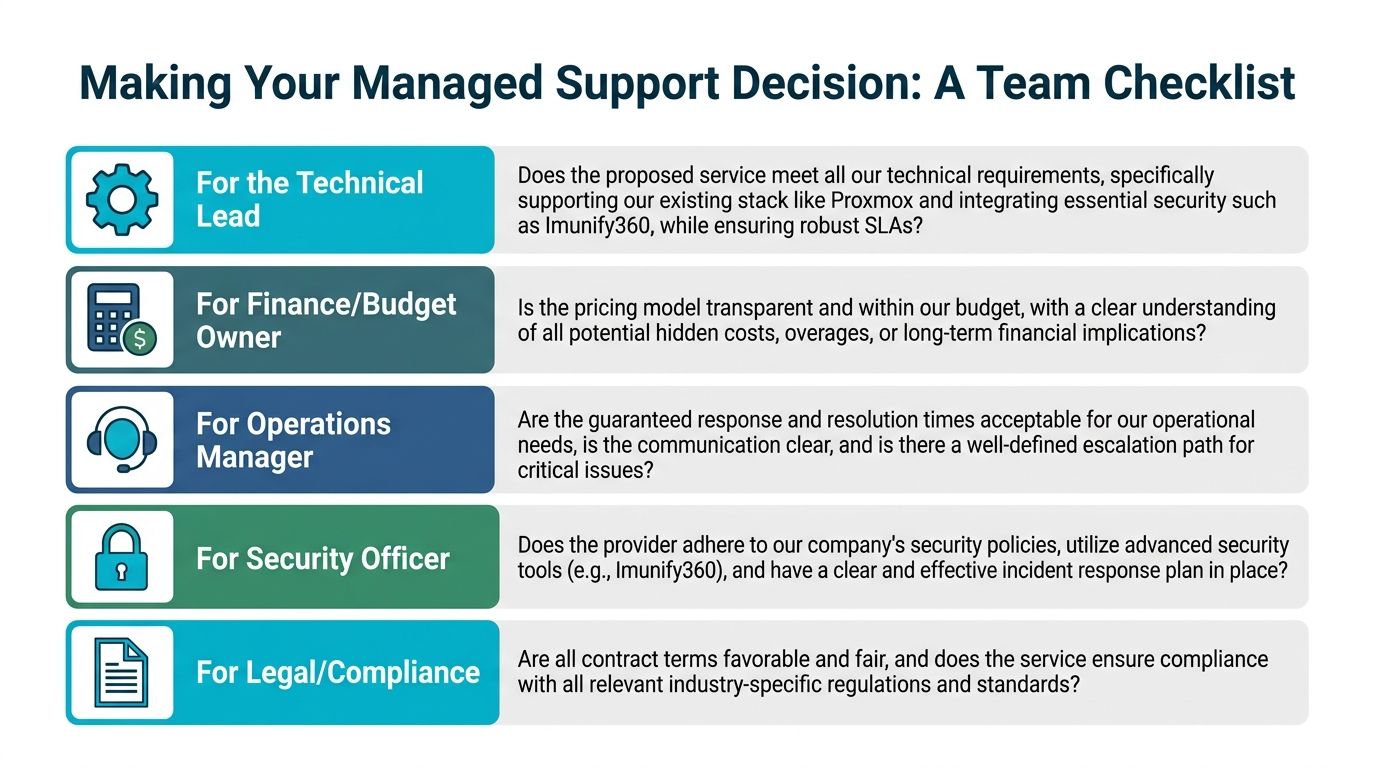
Use this checklist to make the call.
For SMBs
Choose managed support if one or two business-critical systems carry a large share of your revenue and no one on staff should own Linux administration, patching, backup checks, and outage response after hours. In that situation, a managed VPS or managed hosting plan is usually the right starting point.
Do not buy more platform complexity than you can realistically operate.
For DevOps teams
Choose per-server or custom infrastructure pricing if you run multiple VPS instances, dedicated servers, clusters, or environments that need root access and operational control. That pricing model maps to the actual work. Per-user support pricing does not.
Ask one direct question. “What exactly are you managing at the server and infrastructure layer?” If the provider cannot answer that clearly, the quote is padded or incomplete.
For enterprises
Choose a structured managed plan if you are standardizing operations across teams, migrating platforms, or running private cloud and virtualization stacks that need consistent change control and escalation paths. Software subscriptions are only one line item. The larger cost is the people and process required to run the platform properly.
That is the mistake enterprise buyers make most often. They budget for licensing and hardware, then leave patching, HA testing, backup verification, and incident ownership half-assigned across internal teams.
The right managed support decision matches the operational burden you need someone else to own.
If you want a direct recommendation from a provider that handles VPS, bare metal, Proxmox private clouds, migrations, colocation, secure web hosting, and fully managed IT services, talk to ARPHost, LLC. Bring your current quote, your server count, your escalation expectations, and the systems that cannot fail. You will get a better answer if you price the operational responsibility, not just the server itself.
