

A Linux server rarely fails at a convenient time. It breaks during a product launch, a checkout rush, a client demo, or right after everyone with production access has gone offline. The technical fault matters, but the bigger problem is what follows: developers stop shipping, managers start escalating, and a routine infrastructure issue turns into a business interruption.
That’s the case for managed Linux server hosting. You’re not paying someone to reboot a daemon. You’re paying to keep infrastructure from consuming your engineering time, your sleep, and your operating margin.
Introduction When Your Server Becomes Your Problem
A familiar pattern looks like this. Disk latency spikes, the database starts stalling, PHP workers pile up, and the website becomes intermittently available. The immediate response is reactive: check load averages, inspect logs, restart services, hope the backlog clears. Meanwhile, revenue work stops because the same people building the application are now acting as emergency sysadmins.

That’s where managed hosting changes the equation. It shifts server operations from an internal distraction to an externalized discipline. The business benefit isn’t abstract. Teams get back to application work, release cycles stay intact, and incidents stop derailing the week.
Why this is becoming the default
This isn’t a niche corner of hosting anymore. The global dedicated server hosting market, which underpins managed Linux services, was valued at USD 23.96 billion in 2025 and is projected to reach USD 80.49 billion by 2032, growing at a CAGR of 18.9%, according to Maximize Market Research’s dedicated server hosting analysis. That growth reflects a simple reality: businesses increasingly outsource infrastructure management because reliability and scale are hard to maintain casually.
Practical rule: If your developers are still the first line of response for production infrastructure, you’re underinvesting in operations.
What managed hosting actually fixes
Managed hosting doesn’t remove the need for architecture decisions. It removes the day-to-day operational tax that comes with keeping Linux systems stable.
A good managed setup reduces risk in three ways:
- Operational focus: Product and engineering teams stay on application logic, deployments, and customer-facing work.
- Risk containment: Monitoring, patching, and routine maintenance happen consistently instead of whenever someone has time.
- Recovery speed: When something does fail, there’s already a process and an operations team attached to the environment.
That’s why this decision belongs in a business discussion, not just a server discussion. Infrastructure that constantly demands attention is expensive even when the monthly invoice looks low.
What Is Managed Linux Server Hosting
Managed Linux server hosting is best understood as a service partnership. Unmanaged hosting gives you compute, storage, network access, and credentials. Managed hosting gives you those resources plus an operations layer that handles the health of the system.
The distinction matters because Linux isn’t a niche platform. Linux powers 96.3% of the world’s top 1 million websites and 80% of all enterprise workloads, according to FOSSPost’s Linux server market share roundup. If your business depends on web applications, APIs, databases, containers, or internal services, Linux is probably already carrying more of your stack than you think.
You rent infrastructure, but you also rent competence
A managed Linux provider typically takes responsibility for the server foundation:
- Operating system care: Security updates, package maintenance, and baseline hardening
- Hardware and virtualization oversight: Fault response, host health, and platform stability
- Monitoring and alerting: Visibility into CPU, memory, disk, network, and service failures
- Support during incidents: Someone other than your app team is accountable for troubleshooting infrastructure behavior
Your team still owns the application, data model, release process, and business logic. That division is healthy. It keeps accountability clear.
The property manager analogy is closer than most hosting analogies
Imagine owning a building but hiring a property manager. You still decide what the building is for. You still control what tenants or operations go inside. But you don’t want to personally handle every plumbing issue, electrical fault, or emergency call at odd hours.
Managed Linux server hosting works the same way. You keep the strategic control. The provider handles the operational discipline.
The best managed environments don’t replace your team. They remove the repetitive systems work that keeps your team from doing higher-value work.
This is why strong Linux specialization matters. Managing Ubuntu, Debian, AlmaLinux, or enterprise Linux distributions well takes hands-on experience with package ecosystems, service managers, kernel behavior, storage performance, firewalling, backup routines, and failure recovery. Generic hosting support often misses that nuance. Good managed Linux support doesn’t.
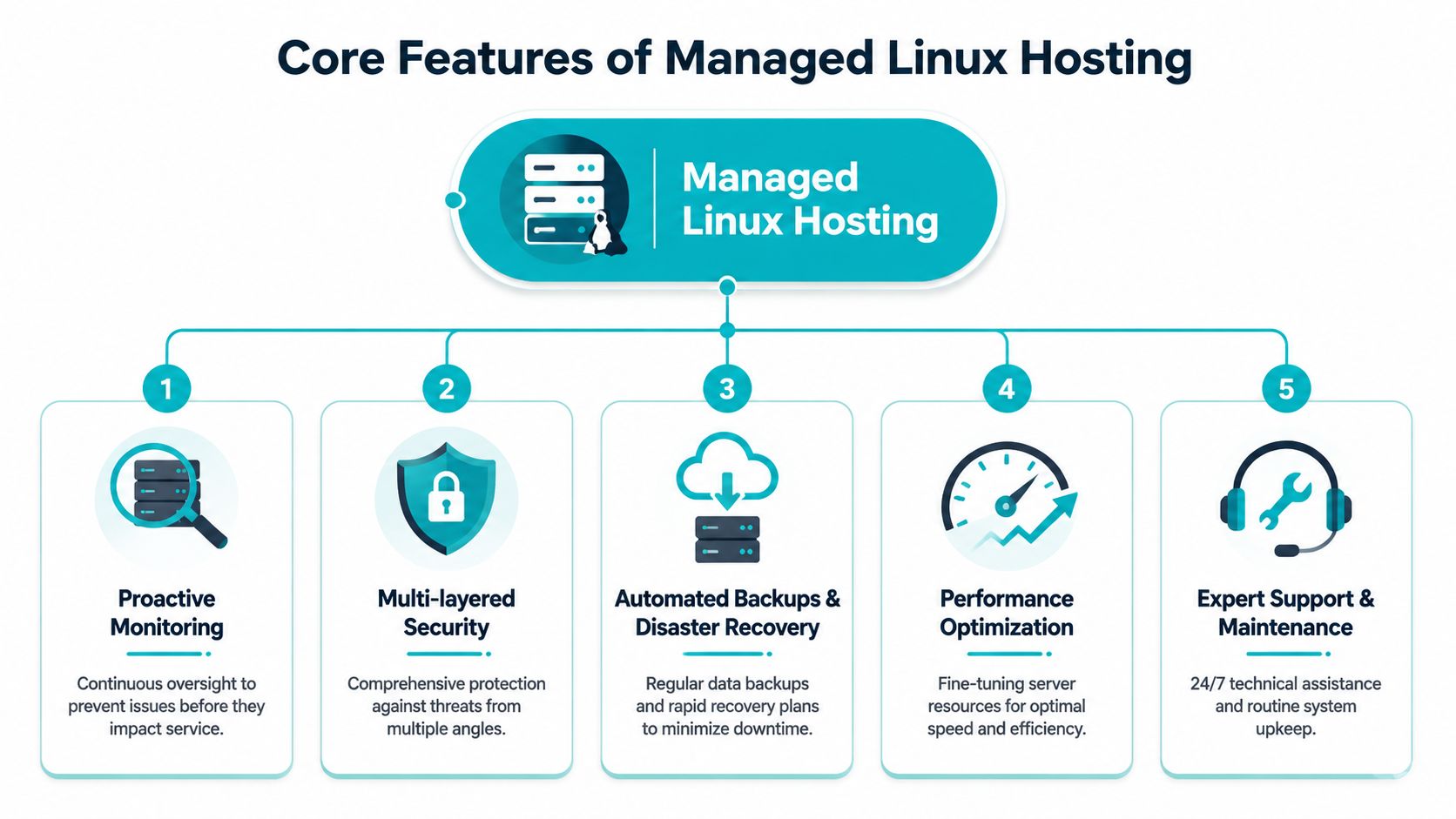
Core Features of a Managed Hosting Service
A real managed hosting service isn’t a list of add-ons. It’s an operating model. The pieces have to work together, otherwise you end up with “managed” in the sales copy and manual firefighting in production.
Proactive monitoring
Monitoring is useful only when it helps you catch deterioration before users feel it. That means watching trend lines, saturation, and abnormal behavior over time, not waiting for a full outage.
For Linux systems, practical monitoring should cover:
- CPU pressure: Sustained load, steal time in virtualized environments, and runaway worker behavior
- Memory pressure: Swap activity, OOM events, and cache pressure
- Disk behavior: Queue depth, random IOPS, throughput, and latency drift
- Network health: Throughput, packet behavior, and service-level error anomalies
The baseline matters just as much as the alert. For benchmarking and validation, it’s good practice to collect lscpu, sysbench, fio, and iperf3 results and store them in /root/benchmarks/. That gives you a reference point before tuning, scaling, or troubleshooting.
Security that isn’t just a firewall
Security in managed hosting has to be layered. OS patching alone doesn’t solve malware exposure, weak isolation, abusive processes, credential misuse, or vulnerable web stacks.
For website-heavy environments, tools and controls often include:
- Imunify360: Malware scanning, reputation defense, and web-layer protection
- CloudLinux OS: Resource isolation for shared or multi-tenant hosting
- Firewall policy management: Tighter ingress and service segmentation
- Routine hardening: SSH policy, package hygiene, and service minimization
What doesn’t work is treating security as a one-time setup task. Linux servers drift. Packages change. Applications evolve. A managed plan should account for that.
Backup and recovery that operators can trust
Backups aren’t complete because a job says “success.” They’re complete when restore workflows are tested and the storage design supports recovery under stress.
A solid managed service should define:
- What gets backed up
- How often it’s protected
- Where backups live
- Who performs the restore
- What happens during a partial failure versus full-node loss
For virtualized environments, snapshot-aware backup systems and immutable storage are especially valuable because they reduce the chance that a ransomware event or operator mistake destroys both the workload and its recovery path.
Backups protect data. Recovery planning protects the business.
Performance optimization and routine maintenance
Performance work isn’t just “make it faster.” It means matching hardware behavior to workload patterns.
Single-threaded CPU speed and random disk I/O matter heavily for PHP applications such as WordPress, WooCommerce, and similar request-driven stacks. Multi-threaded CPU and sequential throughput matter more for API layers, queue workers, and background processing. Database workloads often live or die by random IOPS and low latency. Those distinctions are operationally important because they affect server sizing, virtualization choices, and storage design.
Why the service only works with expert support
The final layer is support quality. Many plans often fail here. If support can only reboot a service or hand you a canned article, you still own the hard part.
A competent managed team should be able to read Linux logs, interpret resource contention, separate application faults from infrastructure faults, and act without wasting a crisis window. That’s the difference between support as a ticket queue and support as operations coverage.
Managed vs Unmanaged Hosting A Clear Comparison
Managed versus unmanaged isn’t really about good versus bad. It’s about who carries operational responsibility when production gets messy.
The unmanaged model works if you have experienced Linux operators with available time, disciplined patching habits, tested backup workflows, and a willingness to absorb after-hours incidents. Many teams don’t have all four at the same time.
The root access concern is valid
One reason some teams delay managed hosting is fear of losing administrative freedom. That concern is real. Research shows 68% of SMBs hesitate to adopt managed hosting because they fear losing root-level control needed for custom software or configurations.
The problem is that many providers blur two very different models. One is a tightly controlled managed VPS where customization is limited. The other is a managed dedicated or bare-metal environment where you still retain root access while the provider handles the infrastructure work around it. Those aren’t the same service.
Managed vs. Unmanaged Linux Hosting Who is Responsible
| Task | Unmanaged Hosting | Managed Hosting (with ARPHost) |
|---|---|---|
| OS patching | Your team | Provider handles routine maintenance |
| Security hardening | Your team | Shared model with provider-led baseline controls |
| Monitoring setup | Your team | Provider-configured and maintained |
| Incident response | Your team or outside consultant | Provider participates in infrastructure response |
| Hardware issues | Provider replaces hardware, you diagnose impact | Provider handles hardware and platform response |
| Backup policy and restore process | Usually your team | Provider helps define and support the process |
| Root-level customization | Usually full control | Depends on plan, and should be clarified before purchase |
The most important buying question isn’t “Is it managed?” It’s “What exactly remains under my control, and what exactly will the provider do for me?” If you want a deeper side-by-side breakdown, review this managed vs unmanaged VPS hosting comparison.
When unmanaged still makes sense
Unmanaged hosting can be the right call when:
- You already have Linux depth in-house: Someone can own patching, backups, tuning, and incident response.
- Your environment is disposable: Development sandboxes and short-lived labs don’t always need managed coverage.
- You need total freedom with no outside process: Some advanced teams prefer that trade-off and accept the risk.
When managed hosting is the stronger decision
Managed hosting usually wins when uptime has business weight, the stack is revenue-facing, or the internal team’s time is more valuable than the monthly savings from self-managing.
A good managed service doesn’t have to strip control away. The best versions preserve root access where needed and take over the repetitive, failure-prone operational layer that businesses shouldn’t leave to chance.
How to Choose the Right Managed Linux Server
To choose the right managed Linux server, start by analyzing your workload, growth pattern, and failure tolerance.
A busy WooCommerce store, a Proxmox node, and a private API backend can all run on Linux. They do not fail the same way, and they do not need the same hardware, storage layout, or support model. The buying mistake I see most often is selecting a plan by label instead of matching the server to the operational reality behind the application.

Match the server to the workload
Some pairings are predictable once you look at resource behavior instead of marketing terms.
- Multi-tenant virtualization and Proxmox nodes: A Dual Intel Xeon E5-2690 V3 with 28 cores and 64GB DDR4 ECC RAM fits dense VM hosting, lab clusters, and game server consolidation.
- Memory-heavy databases and high-density virtualization: An AMD EPYC 4584PX with 16 cores and 192GB DDR5 RAM is better for database-heavy stacks and workloads that depend on memory bandwidth and virtualization efficiency.
- Single-tenant apps and high clock speed tasks: An AMD Ryzen 9600X with 6 cores and 96GB DDR5 RAM suits development environments, application servers, and workloads that benefit more from per-core speed than broad parallelism.
Linux tuning is workload-specific. A database-backed ecommerce server spends its time in different bottlenecks than a queue-heavy Laravel stack or a Node.js API with background workers. If the provider cannot explain how they size CPU, RAM, disk IOPS, and cache behavior for your application class, they are selling a package, not a managed service.
Control matters as much as hardware
Managed hosting should reduce operational risk without trapping you in a locked-down environment. That trade-off gets misunderstood.
Some providers call a server “managed” only because they patch the OS and reboot on request. Others remove root access, restrict package installs, and force every change through support. That may work for a static web stack. It becomes a problem if your team needs custom agents, kernel tuning, Docker changes, or application-specific troubleshooting.
The better model keeps administrative access available while the provider owns the repetitive operational work that causes outages and weekend interruptions. Ask direct questions. Can you keep root access? Which changes remain your responsibility? Which alerts trigger provider intervention? How far does support go when the issue is not the kernel but a service, a failed deploy, or a bad storage pattern?
That boundary affects both risk and labor cost.
The platform layer deserves scrutiny
CPU model and RAM count are only part of the decision. The virtualization stack, storage design, and baseline validation process matter just as much.
Independent benchmarking has found that Proxmox VPS environments built on AMD EPYC processors performed better on memory-intensive workloads than poorly optimized virtualization setups. For teams running databases, analytics jobs, or dense application tiers, that difference shows up in query times, worker throughput, and noisy-neighbor exposure.
Even with a managed provider, ask how they validate a fresh system. Repeated fio and iperf3 tests, plus checks with htop, iotop, and nethogs, give you a baseline before application complexity hides the underlying issue.
Questions worth asking before you buy
Use a technical checklist that gets past sales language.
- Root access boundary: Do you retain full administrative access, and are there hard restrictions on configuration changes?
- Managed scope: Does support stop at OS health, or will they help with service-level troubleshooting?
- Performance validation: Will they provide baseline metrics or help collect them after provisioning?
- Backup design: Are restores tested, and is backup storage separated from the production failure domain?
- Virtualization details: Are you on KVM, Proxmox VE, LXC, bare metal, or a mixed platform?
- Scaling path: Can you move from VPS to dedicated infrastructure or private cloud without rebuilding the stack?
- Migration support: Will they help plan the move, validate dependencies, and test cutover steps against a documented server migration checklist?
A short walkthrough of infrastructure choices helps frame those questions well:
For clustered and private cloud workloads
If your target environment includes Proxmox clustering, ask about quorum design before you ask about price. High availability in Proxmox VE requires at least three nodes for proper quorum, and a two-node design should add an external QDevice to reduce split-brain risk.
Network design matters too. The Proxmox team notes in these SMB deployment best practices that 1 GbE is a minimum for shared storage and cluster traffic, while 10 GbE is the stronger choice, with Corosync isolated on its own VLAN or physical link.
Buy for the failure mode you can least afford. In practice, managed Linux hosting pays off when it lets your team keep the control they need while handing routine maintenance, monitoring, patching, and recovery work to people who do it all day. That is where managed service lowers risk, reduces hidden labor cost, and gives developers more time to ship changes instead of babysitting infrastructure.
Your Migration and Onboarding Checklist
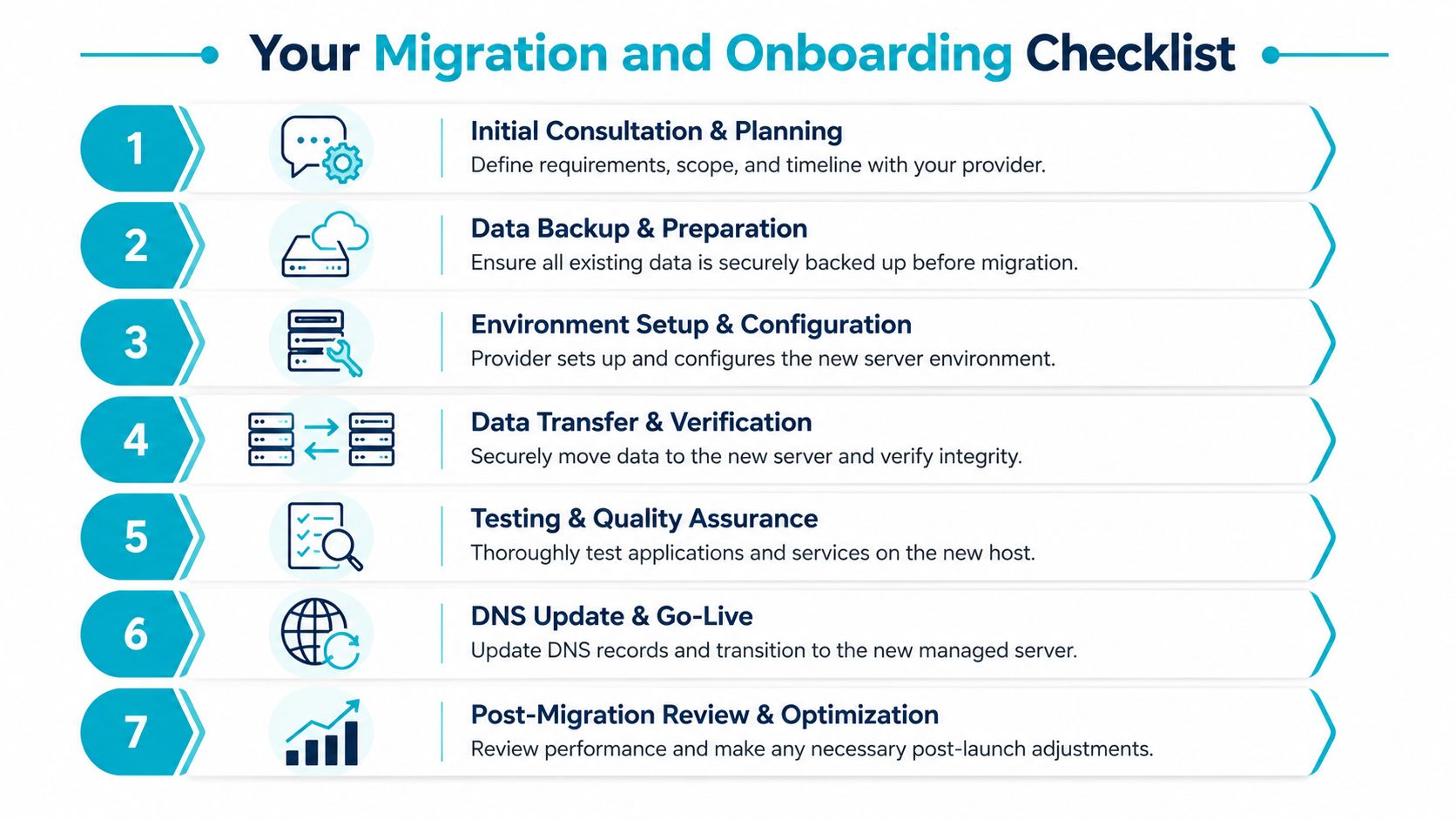
Migration is where many teams overcomplicate the process. The cleanest moves happen when the old environment is documented well, the new one is prepared before data moves, and validation is treated as a formal step instead of a quick spot check.
Start with an audit, not a copy job
Before anything moves, document what exists.
- Inventory the services: Web server, database engine, PHP or runtime version, queues, cron jobs, SSL handling, backup jobs, and scheduled tasks.
- List dependencies: Local paths, package requirements, external APIs, mail relays, and storage assumptions.
- Record current behavior: Resource usage patterns, maintenance windows, and known failure points.
A migration checklist is much easier to execute when the source environment isn’t being rediscovered live. This is also the point where many teams realize they don’t want a generic host. They want a provider that will help plan and validate the move. A practical reference point is this server migration checklist.
Build the target environment before the cutover
The new Linux server should be operational before any final sync happens.
That means:
- Provisioning the base system: Package updates, service installs, user policy, and security baseline
- Restoring application prerequisites: Runtime versions, modules, extensions, and web stack configuration
- Preparing rollback options: Keep the old environment intact until validation is complete
For clustered Proxmox migrations, version discipline matters. All nodes in a cluster need the same major version, and accurate time synchronization should be maintained with chrony or another NTP approach so quorum and replication stay stable.
Validate before you point users at it
Don’t cut over because the login page loads. Validate the full application path.
- Test the app functions: Authentication, uploads, background jobs, outbound mail, and scheduled tasks
- Compare performance behavior: Check baseline CPU, memory, disk, and network patterns against expectations
- Review HA settings where relevant: In Proxmox VE, settings such as
Max RestartsandMax Relocateshould be conservative, and hardware compatibility between nodes should be confirmed to avoid migration failures, as discussed in this Proxmox HA configuration walkthrough
A migration isn’t done when data arrives. It’s done when the application behaves correctly under normal and failure conditions.
After that, complete the DNS cutover, monitor closely, and keep the old system available until post-migration checks are finished.
Understanding the True Cost and ROI
The monthly price of unmanaged hosting often looks attractive because it isolates one line item and hides the rest. The total cost shows up later, in the form of engineer time, emergency consulting, delayed feature work, and outages handled under pressure.
The financial gap becomes obvious during incidents. A significant 42% of SMBs on unmanaged plans face unexpected emergency costs averaging $1,200 to $3,500 per incident because “24/7 monitoring” doesn’t always include the engineer intervention itself. That’s where cheap hosting gets expensive.
What self-managing really costs
The hidden cost categories are usually the same:
- Interrupted development: Developers stop shipping features to troubleshoot infrastructure
- Unplanned response spend: Emergency migrations, consultant hours, and outage recovery work aren’t budget-friendly
- Operational inconsistency: Backups, patching, and hardening slip when no one owns them formally
- Business risk: A preventable incident can affect customer trust, internal confidence, and future delivery timelines
The return on managed hosting comes from predictability. You replace scattered operational risk with a defined service boundary and a known monthly cost. That improves planning, shortens incident paths, and protects engineering time for work that moves the business forward.
If you’re pricing that trade-off, review managed server support pricing options.
The strongest argument for managed Linux server hosting isn’t convenience. It’s control over risk, cost, and attention. Teams grow faster when infrastructure stops competing with the product for time and budget.
If you’re weighing secure managed VPS hosting, dedicated Proxmox cloud pricing, bare metal servers, or fully managed IT services for servers, ARPHost, LLC is worth a close look. You can start small with VPS hosting, review secure web hosting bundles, compare bare metal servers, explore Proxmox private clouds, or request a managed services quote. Their stack also extends to colocation, instant applications, and broader managed infrastructure support when you need a provider that can operate as part of your team.
