

You’re probably in one of two places right now. Shared hosting has become a ceiling, or an unmanaged server has become a part-time job you never meant to take on. The first leaves you fighting resource limits and inconsistent performance. The second gives you root access, but also patching windows, backup failures, alert fatigue, and late-night troubleshooting.
That’s where a Managed KVM VPS fits when it’s done properly. It gives you isolated compute, root-level control, and room to grow, without forcing your developers or IT staff to own every operational task on the server. For growing web apps, ecommerce stores, internal tools, and development environments, that balance matters more than feature lists.
The problem is that the label “managed” gets stretched far beyond what it should mean. Some plans include little more than OS updates and control panel setup. That may be enough for a brochure site. It isn’t enough for performance-sensitive workloads, compliance-driven deployments, or teams that expect infrastructure support to reduce risk instead of just shifting tickets around.
A good managed KVM VPS should give you control without fragility. It should help you keep performance stable, security tight, and operations predictable.
The Search for Control Without Complexity
Teams usually outgrow entry-level hosting in stages. First, pages slow down during busy periods. Then background jobs compete with web traffic. After that, significant friction starts. You need custom packages, better logging, stricter firewall rules, or a deployment workflow that shared hosting won’t support.
An unmanaged VPS fixes the flexibility problem, but it introduces a new one. Someone now owns package maintenance, service restarts, SSH hardening, intrusion response, backup validation, and every bad surprise that appears after hours. If your team already runs applications, databases, and customer-facing services, that extra burden adds up fast.
Where a managed KVM VPS makes sense
A managed KVM VPS is often the practical middle ground for:
- Business websites that can’t tolerate flaky neighbors and need consistent resources
- Magento, WordPress, Joomla, or custom PHP stacks that need root access, caching changes, and plugin isolation
- DevOps teams that want control over the stack without owning all routine server maintenance
- Compliance-minded environments where isolation and documented operational practices matter
The key difference is operational responsibility. With the right service, you still control the software stack. You don’t have to personally babysit every patch cycle, kernel-related issue, or storage anomaly.
Practical rule: If your application needs VPS-level control but your team doesn’t want to become a 24/7 infrastructure desk, managed KVM is usually the right direction.
What to look for early
Before comparing plans, answer three questions:
- Is your workload sensitive to latency or storage consistency?
- Do you need root access for custom packages, runtimes, or tuning?
- Do you want management to include performance oversight, not just ticket-based support?
If the answer is yes to most of those, you’re not shopping for “cheap VPS.” You’re shopping for a hosting model that can carry production work without consuming your week.
Deconstructing the KVM Virtualization Powerhouse
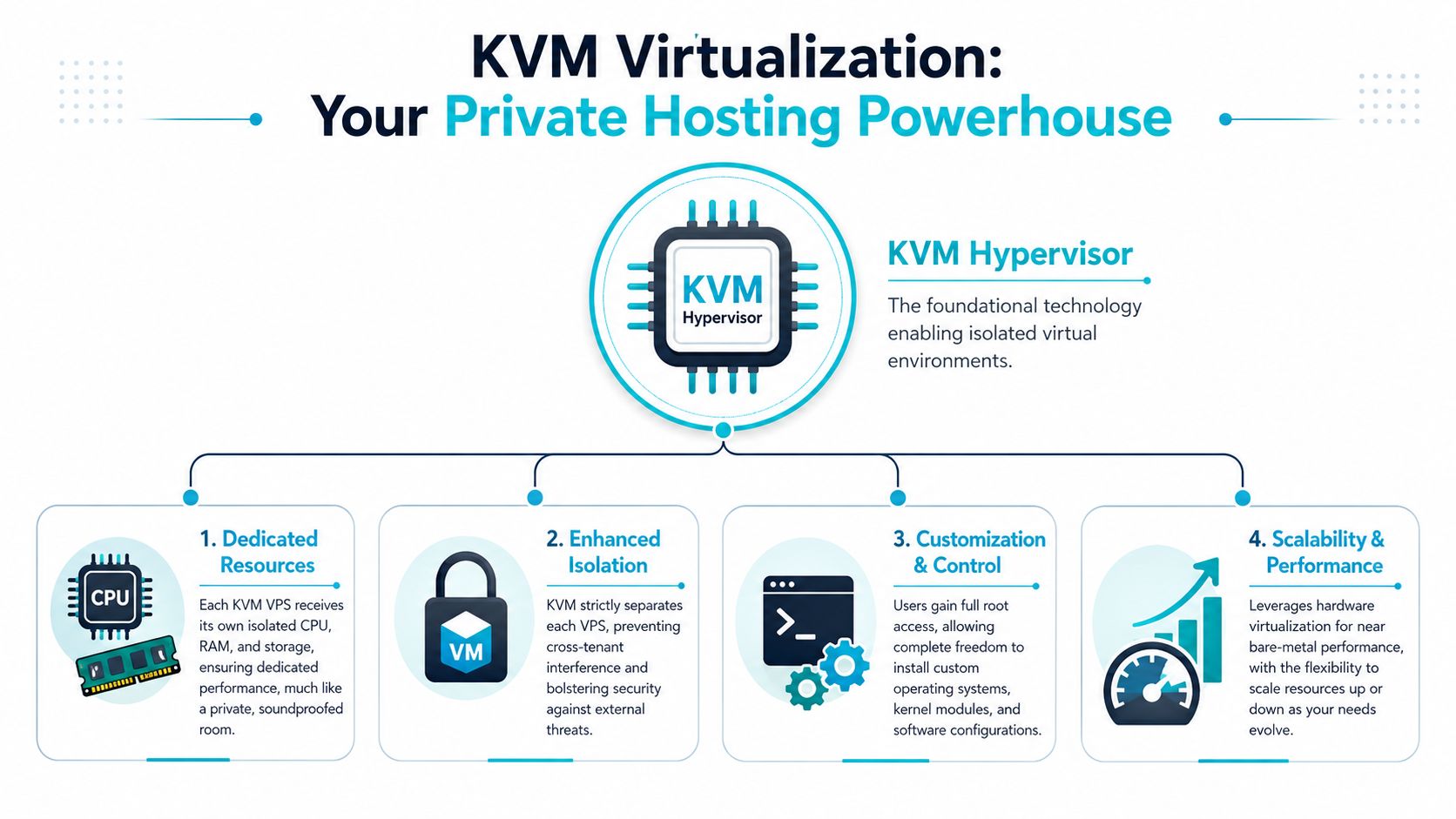
KVM works because it behaves like real virtualization, not a lightly isolated slice of a shared operating system. Each virtual machine gets its own kernel space, its own allocated resources, and its own operating environment. For production workloads, that architectural difference matters more than most marketing pages admit.
A simple analogy helps. Think of lower-isolation hosting like a crowded dorm. Everyone shares the same building systems, and one noisy tenant can affect everyone else. KVM is closer to private hotel rooms. Each guest gets a defined space, a locked door, and fewer ways to interfere with the next room.
Why KVM holds up under production load
KVM is integrated directly into the Linux kernel and functions as a native hypervisor. That design is one reason a managed KVM VPS can deliver approximately 75–90% of raw bare-metal performance while avoiding much of the emulation overhead seen in weaker virtualization approaches. The same benchmark discussion notes up to 20% better I/O efficiency and lower latency for database or AI workloads because KVM uses hardware-assisted virtualization rather than relying on looser OS-level sharing.
That doesn’t mean every KVM plan performs well. It means the underlying model is capable of strong, stable results when the host is built and managed correctly.
What you gain in day-to-day operations
Here’s what KVM changes for an operator:
- Dedicated resource boundaries help keep CPU and memory behavior more predictable.
- Kernel independence gives you freedom to run the OS and tooling you need.
- Stronger tenant isolation reduces the blast radius of issues on neighboring workloads.
- Platform flexibility makes it easier to run development stacks, container hosts, VPN software, or custom agents.
KVM is one of the few VPS foundations that can satisfy both developers and operations teams. You get control at the guest level without giving up the discipline of real isolation.
If you’re comparing plan architecture in practical terms, review a KVM VPS hosting environment with attention to storage type, resource guarantees, and management scope, not just core count and price.
What Fully Managed Truly Means for Your VPS
Often, confusion begins here. “Managed” often sounds all-encompassing, but in practice it may only mean the provider installs the OS, updates some packages, and helps with a control panel. That’s support. It isn’t full operational management.
For a performance-critical VPS, management has to include active oversight of the environment itself. If the provider doesn’t watch for host pressure, CPU contention, storage latency, and workload drift, the service may still be technically managed while your application remains operationally exposed.
The gap between promise and delivery
That gap shows up in real complaints. Recent data from sysadmin communities indicates that 60–70% of KVM VPS complaints stem from CPU steal time and I/O latency spikes during peak hours, and basic management focused on patching or cPanel setup doesn’t prevent it, as discussed in this KVM managed VPS FAQ analysis.
That’s the point buyers miss. A provider can manage the guest OS and still leave you on an oversubscribed host where performance swings under contention.
What proper management should include
A serious managed KVM VPS should cover at least these areas:
- Proactive monitoring of service health, load behavior, and storage anomalies
- Security hardening beyond default installs
- Backup operations that are automated and regularly reviewed
- Performance tuning at the OS and application layer
- Incident support from people who can troubleshoot infrastructure, not just restart services
Below is a practical comparison.
| Feature or Task | Unmanaged VPS | Basic Managed VPS | ARPHost Fully Managed |
|---|---|---|---|
| OS installation | You handle it | Included | Included |
| Routine patching | You handle it | Usually included | Included with ongoing oversight |
| Control panel setup | You handle it | Usually included | Included if needed |
| Root access | Yes | Usually yes | Yes |
| Performance monitoring | You build it | Often limited | Proactive and ongoing |
| CPU steal time investigation | You diagnose it | Often excluded | Treated as an operational issue |
| I/O latency review | You diagnose it | Often excluded | Reviewed as part of service health |
| Security hardening | You implement it | Partial | Built into managed workflow |
| Backup oversight | You validate it | Sometimes limited | Managed with operational review |
| Escalation depth | Your team only | Mixed | Extension of your ops function |
That’s why buyers should compare managed vs unmanaged VPS hosting models based on ownership boundaries, not labels.
What works: management that includes tuning, monitoring, and escalation.
What doesn’t: management that stops at package updates while host-level contention keeps hurting the workload.
Fortifying Your Server Performance and Security
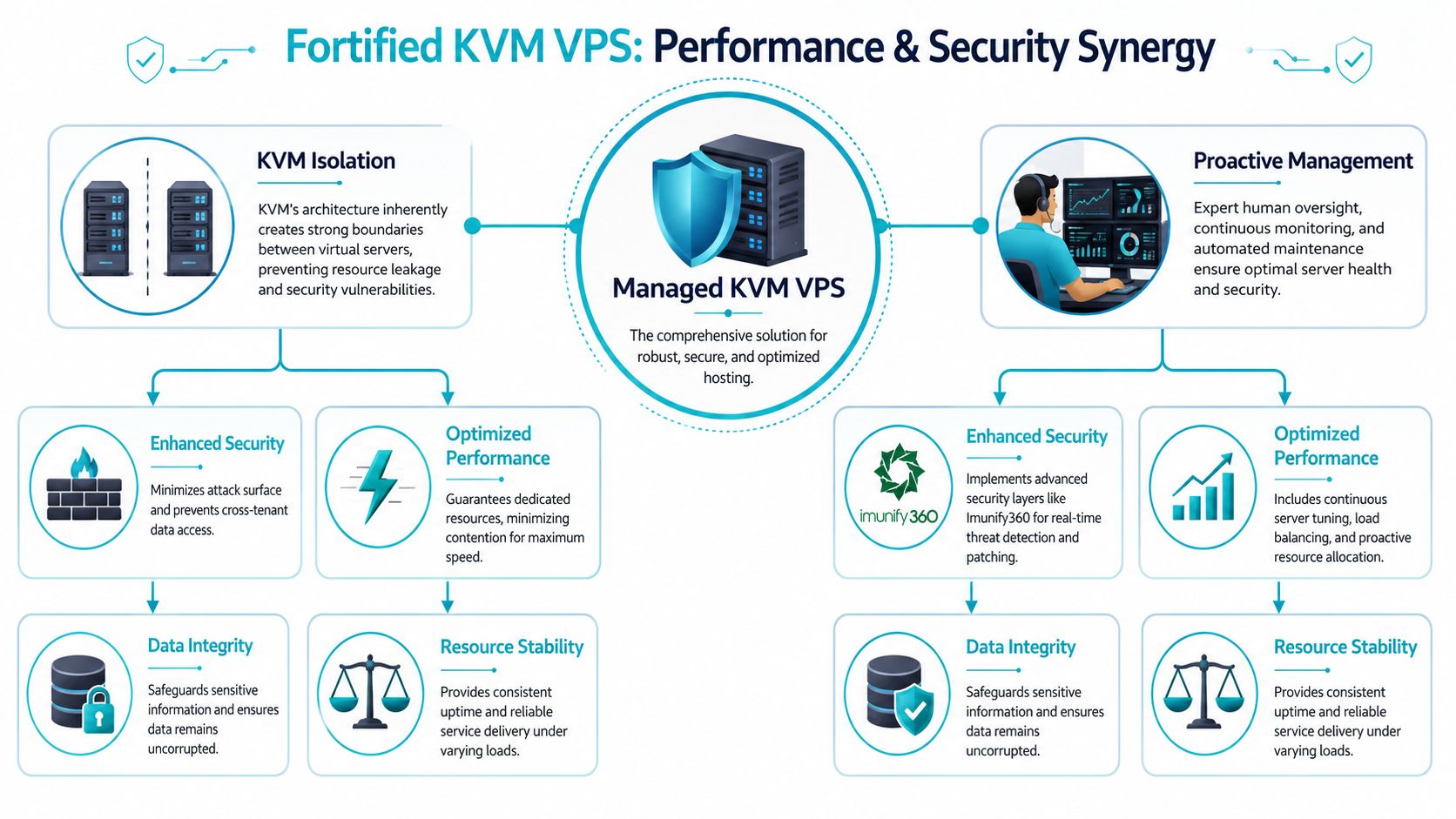
KVM gives you a strong baseline because virtual machines are isolated from each other. That matters for both security and stability. One tenant’s process crash, software choice, or risky package install is less likely to spill into your environment.
But isolation alone isn’t a complete defense. Secure operations come from layering that baseline with disciplined administration, access control, monitoring, and patch hygiene.
Hardening steps that matter
For Proxmox VE 9 environments, one useful hardening baseline is simple and effective. Best practices include disabling root SSH access entirely, creating a normal user with pseudo-privileges, and enforcing SSH key-only authentication instead of password-based login, according to Proxmox VE 9 hardening guidance. Those measures reduce brute-force exposure on management access and force cleaner operator habits.
A managed service should apply the same mindset to VPS administration. The exact toolset may vary, but the principles don’t.
- Access control first. Don’t leave direct root login exposed when a privileged user workflow is available.
- Key-based authentication only. Password logins create avoidable risk.
- Service minimization. Remove what the workload doesn’t need.
- Patch discipline. Don’t let security updates pile up until they become outage windows.
Performance protection is part of security
Many teams split “security” and “performance” into separate conversations. That’s a mistake. A server that stalls under disk pressure, spikes on CPU wait, or runs with poor visibility is harder to secure because operators react late and make rushed changes.
Start with visibility. On a Linux VPS, this quick check helps identify whether CPU steal time is becoming a problem:
top
In the CPU summary, watch the st value. If steal time rises during busy periods, the issue may be upstream of your application. That’s exactly why passive support isn’t enough for a managed service.
You can also use:
vmstat 1
That gives a live view of runnable processes, CPU state, and wait behavior. It’s basic, but it catches a lot.
Good managed hosting doesn’t just block attacks. It keeps the server in a state where operators can see problems early and fix them cleanly.
For web-facing stacks, many providers also pair VPS management with security bundles that include tools such as Imunify360, CloudLinux OS, Webuzo, and managed firewall policy. On the network side, experienced providers may also fold Juniper-backed firewalling or managed edge controls into larger environments. The exact product matters less than the operating discipline behind it.
Choosing Your Path KVM VPS vs Bare Metal
The right answer depends on workload shape, not ideology. A managed KVM VPS is often the correct platform when you want fast provisioning, isolated resources, root access, and lower operational overhead. Bare metal becomes the better choice when shared virtualization economics stop making sense for your workload.

When KVM VPS is the better buy
Choose managed KVM when you need flexibility and clean isolation for workloads such as:
- Production websites and ecommerce stores running WordPress, Joomla, or Magento
- Application servers where root control matters more than full physical tenancy
- Development and staging environments that need repeatable provisioning
- Smaller database-backed services where performance consistency matters but absolute hardware ownership doesn’t
This is usually the strongest fit when you want controlled growth without committing to dedicated hardware too early.
When bare metal wins
The economics shift once memory demand and storage throughput become central. For workloads requiring more than 20GB RAM or persistent high-throughput NVMe storage, bare metal often delivers 30–40% better I/O performance per dollar than a high-end managed KVM instance.
That’s where dedicated hardware becomes the smarter purchase for:
- Large databases
- AI or ML inference
- Media transcoding
- Dense Proxmox cluster nodes
- Private cloud infrastructure that needs predictable storage behavior
If you’re making the decision commercially, it helps to compare dedicated server vs VPS hosting trade-offs in terms of memory pressure, storage intensity, and tenant isolation.
A quick architecture walkthrough helps show where those lines appear in real environments:
Matching hardware to the job
Some workloads justify named hardware choices immediately:
| Workload type | Better fit | Example hardware profile |
|---|---|---|
| Small to mid-size web apps | Managed KVM VPS | Isolated VPS with managed backups and monitoring |
| Memory-heavy databases | Bare metal | AMD EPYC 4584PX, 16 cores, 192GB DDR5 RAM, NVMe SSD |
| Proxmox cluster node | Bare metal | Dual Intel Xeon E5-2690 V3, 28 cores, 64GB DDR4 ECC RAM |
| High clock development box | Bare metal | AMD Ryzen 9600X, 6 cores, 96GB DDR5 RAM |
| Mixed production services | Either, depending on growth | Start on managed KVM, move to dedicated when resource shape hardens |
For dedicated infrastructure, reviewing available bare metal server configurations is usually the fastest way to identify whether your bottleneck is really virtualization overhead or host sizing.
A Provider Evaluation Checklist
Price gets attention first, but it’s one of the least useful ways to judge a managed KVM VPS. A low monthly number can hide weak operations, shallow support, and noisy infrastructure. Evaluate the service the way you’d evaluate any other production dependency.
The checklist that actually matters
Use this list when comparing providers:
- Ask what “managed” includes. If the answer stops at patching and panel support, it’s a basic support plan, not a fully managed service.
- Confirm root access and isolation. In managed KVM deployments, that combination matters for DevOps workflows and compliance-sensitive setups.
- Ask how they monitor performance. You want active attention on load, service health, and storage behavior.
- Review backup design. Look for managed backup operations, ideally with encrypted and immutable options where appropriate.
- Check the support model. You need escalation paths staffed by people who understand systems, not only front-line script readers.
- Look at the surrounding stack. Secure web hosting bundles, Webuzo, Imunify360, Proxmox Backup as a Service, and migration support all matter if you expect the provider to act like part of your operations function.
- Understand growth paths. A good provider should support VPS, bare metal, Proxmox private clouds, colocation, and managed IT services so you don’t outgrow them the moment your architecture changes.
What good KVM operations look like
One benchmark-backed indicator of a healthy managed KVM environment is this: with full root access and dedicated resource isolation, 90th-percentile CPU utilization can stay below 85% under load while NVMe latency averages under 0.3ms, confirming that a well-managed KVM setup can support high-density virtualization without degradation.
That kind of result doesn’t happen by accident. It reflects host discipline, storage quality, and active operations.
Operator check: Ask providers what they do when a VPS performs poorly but the guest OS looks healthy. Their answer will tell you whether they manage infrastructure or only answer tickets.
Why ARPHost excels here
For buyers who want one provider that can support the full journey, ARPHost stands out in a few practical ways:
- Broad platform coverage across VPS hosting, secure web hosting bundles, bare metal servers, dedicated Proxmox private clouds, colocation, instant applications, and fully managed IT services
- Real support options through chat, phone, and ticketing
- Tampa-based infrastructure options with KVM VPS, enterprise NVMe, and dedicated server inventory ready for heavier workloads
- Upgrade paths that make operational sense, including Proxmox private clouds, backup services, VMware migration support, and managed network or voice services
If you’re evaluating providers, the right conversation isn’t “what’s your cheapest plan?” It’s “what happens when this workload becomes important?”
Take Control with a Managed Foundation
A managed KVM VPS is worth paying for when it removes operational drag without taking control away from your team. That’s the balance most businesses need. You keep root access, customization, and isolated resources. The provider handles the repetitive, high-risk, easy-to-neglect work that turns simple hosting into a source of outages.
The biggest buying mistake is assuming all managed plans solve the same problems. They don’t. Some reduce setup time. Better ones reduce incidents, performance drift, and security exposure. That distinction matters most when the VPS is running revenue-generating websites, customer applications, or internal services your team depends on every day.
If your workload is still in the flexible growth phase, a secure managed VPS hosting plan is usually the right starting point. If your environment is moving toward larger databases, private cloud infrastructure, or dense virtualization, it may be time to look at dedicated hardware or a Proxmox-based private cloud instead.
Use the platform that matches the job, then choose a provider whose management model covers the hard parts.
For a practical next step, explore secure VPS bundles, compare dedicated Proxmox cloud pricing, or talk to an engineer about fully managed IT services for servers and surrounding infrastructure.
ARPHost, LLC gives you a clear path whether you need to start small or scale into dedicated infrastructure. Explore secure VPS bundles starting at $5.99/month, review VPS hosting plans, get a quote for custom Proxmox Private Cloud deployments, or request a customized assessment through managed services. If you want hands-on guidance, contact ARPHost, LLC for a free infrastructure consultation.
