

Fully managed IT support averages $145 per user per month in 2026, with most plans between $110 and $185. That number only makes sense when you know whether it includes help desk coverage, monitoring, patching, backups, security administration, and a defined response window.
A cheap quote can be expensive if it excludes the work your environment needs. A higher quote can be justified when the provider operates servers, cloud tenants, backups, security tooling, and after-hours incidents instead of forwarding tickets. I've reviewed enough MSP proposals to know that the headline rate is rarely the deciding factor. The contract scope and operating model determine the bill.
Table of Contents
- What Managed IT Support Costs in 2026
- The Five Common Managed IT Support Pricing Models
- Key Factors That Move a Managed IT Quote Up or Down
- Realistic Price Ranges by Business Size and Need
- How to Compare Managed IT Support Proposals
- Red Flags and Hidden Costs to Watch For
- Practical Ways to Reduce Managed IT Support Costs
What Managed IT Support Costs in 2026
Fully managed IT support averages $145 per user per month in 2026, according to a survey of 412 MSPs and buyers across the United States and Canada. Most plans fall between $110 and $185, while 63% of MSPs used per-user pricing and 24% used per-device pricing. Review the 2026 MSP pricing benchmark for the methodology and model breakdown.
That figure applies to a defined service package, not a bare help desk. A credible plan can include ticket support, endpoint monitoring, operating system patching, backup administration, security controls, Microsoft 365 or Google Workspace administration, and a response target. Confirm whether the provider monitors alerts continuously, maintains policies, tests restores, and covers incidents outside business hours. Those labor and SLA decisions often move the quote more than the software stack.
The benchmark is a starting point, not a quote
Per-device pricing can look cheaper because it counts laptops, desktops, servers, or network appliances instead of people. It suits environments with shared workstations, kiosks, or significant infrastructure. It also changes the cost calculation: one user with several devices may cost more, while a shared terminal may cost less than under a per-user plan.
For 50 to 150 person businesses, one 2026 pricing guide places managed IT services between $110 and $400 per user per month, with standard programs clustering between $120 and $220. Its broader investment range spans $70 to $400 per user per month, reflecting differences in package depth and operational complexity.
| Pricing Model | Low | Average | High | Best Fit |
|---|---|---|---|---|
| Fully managed, per user | $110/user/month | $145/user/month | $185/user/month | Standard knowledge-worker offices |
| Co-managed, per user | Not listed | $85/user/month | Not listed | Businesses with internal IT staff |
| Small-business managed service | $110/user/month | Not listed | $190/user/month | Small offices with defined scope |
| Broader small-business range | $100/user/month | Not listed | $250/user/month | Complex or security-heavy SMB environments |
| Onboarding for a 25-seat business | Not listed | $1,200 | Not listed | Initial discovery and transition |
Small-business guidance commonly places managed services around $110 to $190 per user per month, with broader ranges of $100 to $250 as scope, security requirements, and environment complexity change. Use these figures to screen proposals, then audit every inclusion, exclusion, response promise, monitoring boundary, and backup responsibility. A low rate is meaningless if the contract leaves restore testing, after-hours response, or security administration outside scope.
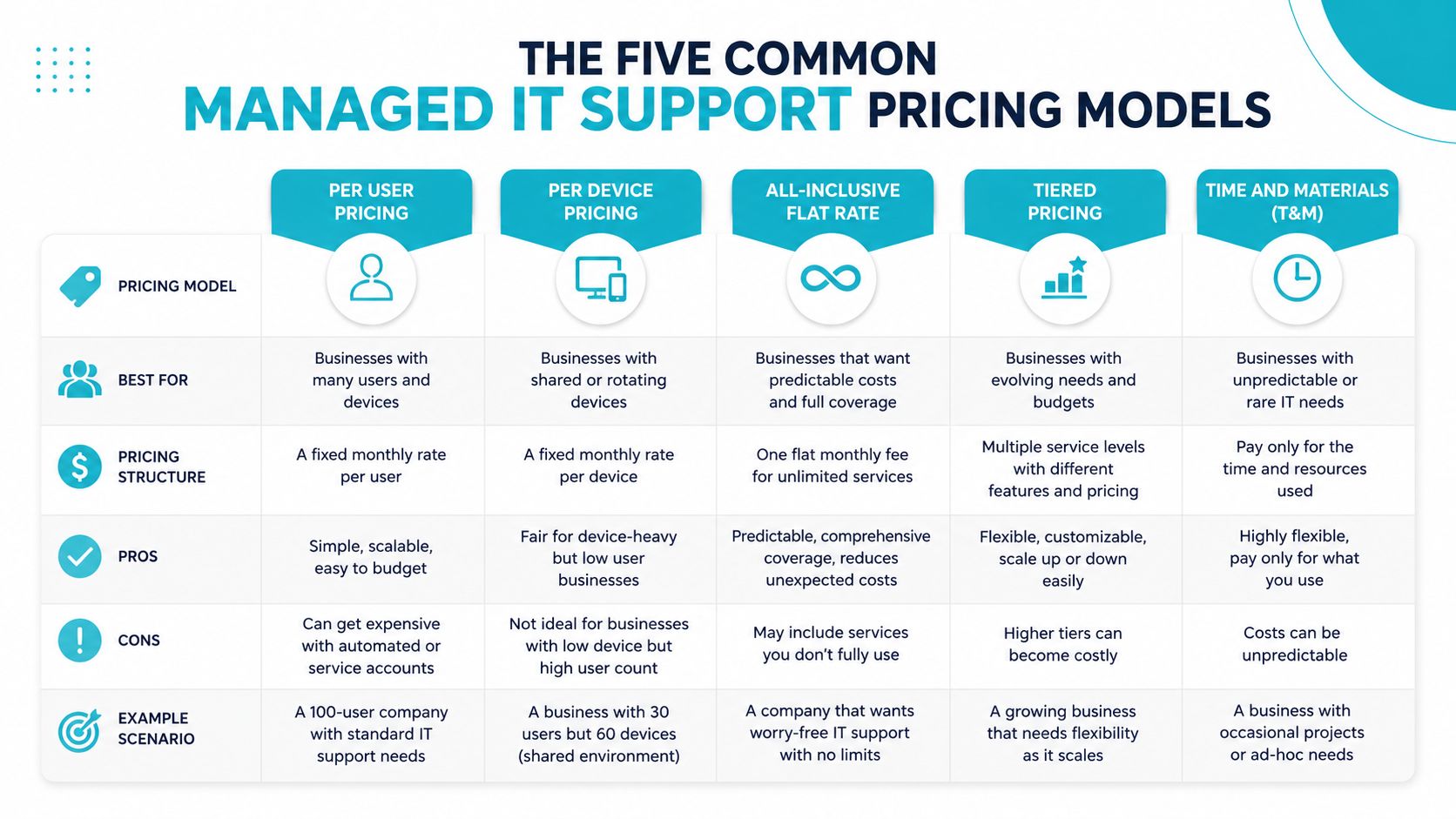
The Five Common Managed IT Support Pricing Models
The right pricing structure depends on what the provider is managing. A law office with one laptop per employee has a different cost shape from a manufacturer with shared terminals, servers, and industrial devices.
Per-user pricing
Per-user billing charges for the people receiving support, often regardless of how many approved devices they use. It works well for offices built around laptops, Microsoft 365, identity management, standard applications, and remote work.
The benchmark range is $110 to $185 per user per month, with the survey average at $145. Per-user pricing is easy to budget, but check whether shared accounts, contractors, seasonal employees, and executives with multiple devices are handled separately.
Per-device pricing
Per-device billing charges for each managed endpoint or infrastructure component. It can suit warehouses, clinics, retail operations, and engineering environments where the device count doesn't track the user count.
The problem is allocation. A shared workstation may serve several people, while one engineer may use a laptop, desktop, virtual machine, and specialized workstation. Per-device billing can overcharge shared systems or leave servers outside the standard package.
Tiered packages
Bronze, Silver, and Gold packages make proposals easier to scan. They also hide scope limits unless the contract defines every tier precisely.
One package may include business-hours monitoring, another may add after-hours alerting, and the top tier may add security operations or compliance reporting. Ask for a feature matrix, not marketing labels. “Proactive support” means nothing unless the proposal identifies the monitored systems, review process, and escalation path.
Block hours
Block-hour agreements reserve a pool of engineering time for a fixed charge. The model fits stable, project-heavy organizations that need planned migrations, server work, or periodic consulting more than constant help-desk coverage.
It punishes growth. New users, recurring incidents, and undocumented systems consume the pool faster. A block arrangement also creates an incentive to debate whether routine maintenance counts as project work. Review managed server support pricing structures when your environment depends more on infrastructure engineering than end-user tickets.
Flat-fee fully managed support
A flat-fee model absorbs defined reactive work into a predictable monthly charge. It's the cleanest option when the provider accepts responsibility for a documented environment and the exclusions are narrow.
That last condition matters. “Unlimited support” can still exclude onboarding, major projects, third-party application failures, on-site work, backup storage, or after-hours incidents. For firms with 5 to 50 people, per-user billing usually offers the clearest fit. Infrastructure-heavy shops often do better with per-device coverage combined with a block retainer.
Key Factors That Move a Managed IT Quote Up or Down
Two providers can quote different amounts for the same user count because they're pricing different operating responsibilities. The biggest cost lever is service scope. Count users, endpoints, servers, cloud tenants, sites, applications, and support hours before comparing the rates.
A provider that only watches endpoint availability has a lighter duty than one that monitors performance, security events, backup jobs, identity changes, and application health around the clock. The tools may sit in the same dashboard, but the labor required to investigate and act on alerts is different.
SLA response time is not resolution time
A credible SLA separates the time before a technician engages from the time required to restore service. A common benchmark calls for 15 to 30 minutes for critical outages, about 1 hour for high-priority incidents, and roughly 4 business hours for standard requests.
Don't accept “rapid response” without definitions. Ask whether the clock runs during business hours only, whether automated acknowledgments count, and whether the provider promises restoration or merely communication. A 15-minute callback with no resolution target can still leave a production system down for an unacceptable period.
Monitoring and backup coverage
Business-hours event-log review costs less than continuous monitoring with anomaly detection and a staffed escalation process. The proposal should identify which systems generate alerts, who reviews them, what triggers a ticket, and how the provider handles false positives.
Backup scope deserves the same scrutiny. The 3-2-1 rule remains a practical baseline: keep three copies of data, use two different media, and store one copy offsite. A backup job that completes isn't proof of recoverability. Require restore testing, retention details, recovery ownership, and clarity about storage or egress fees.
Complexity beats headcount
Legacy line-of-business applications, multi-site VPNs, HIPAA or CMMC requirements, custom identity workflows, and mixed cloud platforms increase engineering effort. Microsoft 365 with Entra ID and a small set of standard applications is easier to operate than a tenant tied to legacy file servers, custom authentication, and poorly documented integrations.
Provider staffing also changes the quote. Onshore and offshore coverage, local remote hands, escalation depth, and the location of the operations team affect both cost and incident handling. A proposal that saves money by shifting support offshore may be acceptable for routine tickets, but it can create communication and escalation problems during a serious outage.
| Cost Driver | Impact on Price | Why It Matters |
|---|---|---|
| Users and endpoints | Can raise or lower the base | Determines the volume and type of supported assets |
| Servers and cloud tenants | Often raises the engineering component | Requires deeper administration than endpoint support |
| SLA response targets | Higher targets increase staffing requirements | Fast engagement requires monitoring and escalation coverage |
| Monitoring depth | Broader coverage costs more | More systems create more alert review and remediation work |
| Backup and restore testing | Adds operational work | Recovery requires more than scheduled backup jobs |
| Security and compliance | Raises tooling and documentation needs | EDR, MDR, reporting, and audit evidence require ownership |
| Legacy applications | Raises troubleshooting effort | Vendors may need specialist knowledge and custom procedures |
| After-hours coverage | Increases staffing cost | Nights and weekends require a real escalation model |
Practical rule: Pay more for a measurable response and recovery process, not for vague words such as “premium” or “proactive.”
Realistic Price Ranges by Business Size and Need
Headcount sets a starting budget, not a technically sound quote. A 25-person office with standard laptops and Microsoft 365 is a light environment. A 25-person architecture firm with GPU workstations, large project files, and specialized applications requires a different service tier.
Small-business managed IT commonly costs $110 to $190 per user per month. Broader guidance places complex environments between $100 and $250. Use those figures as proposal benchmarks, then test the engineering behind the quote. The monthly totals below are arithmetic illustrations based on the stated per-user ranges, not universal prices.
Match the tier to the stack
A 10-person professional services firm at $115 to $135 per user per month produces a monthly support total of $1,150 to $1,350. A 25-person business at the same rate produces $2,875 to $3,375. That standard tier should cover endpoint support, Microsoft 365 administration, patching, routine monitoring, and documented business-hours response.
The scope changes sharply once the provider adds 24/7 monitoring, compliance-grade logging, faster SLA response, broader alert coverage, and a tested 3-2-1 backup posture. A 50-user regulated company should therefore sit above basic office support. Ask the provider to price those controls separately if the proposal hides them inside a single “managed” fee.
For 25 to 50 employee businesses, one pricing guide reports fully managed monthly totals commonly landing around $3,500 to $7,500. For a 100-person business, the same guide reports $10,000 to $20,000 monthly.
| Company Size & Profile | Per-User Range | Monthly Total Range | Typical Service Tier | Stack Complexity |
|---|---|---|---|---|
| 10-person professional services firm | $115 to $135 | $1,150 to $1,350 | Standard business-hours support | Microsoft 365, laptops, cloud applications |
| 25-person real estate office | $110 to $190 | $2,750 to $4,750 | SMB managed support | Microsoft 365, identity, standard endpoints |
| 25-person architecture firm | Broad SMB range | Broad SMB range | Higher-touch managed support | AutoCAD, GPU workstations, large project storage |
| 50-user regulated business | Higher than basic tier | $8,000 to $11,000 target range | 24/7 monitoring and compliance logging | Microsoft 365, Entra ID, line-of-business applications |
| 100-person business | $100 to $250 broad range | $10,000 to $20,000 reported range | Fully managed program | Multiple sites, servers, cloud, security controls |
| 150-person mid-market operation | $110 to $400 broad market range | Depends on scope | Tiered or fully managed | Hybrid infrastructure and formal SLA requirements |
A 150-user operation can span a wide range because service depth controls the quote. Before requesting proposals, model users, endpoints, servers, applications, sites, backup requirements, monitoring coverage, and response targets. That worksheet shows whether a low monthly price reflects efficient service or merely omitted responsibilities.
How to Compare Managed IT Support Proposals
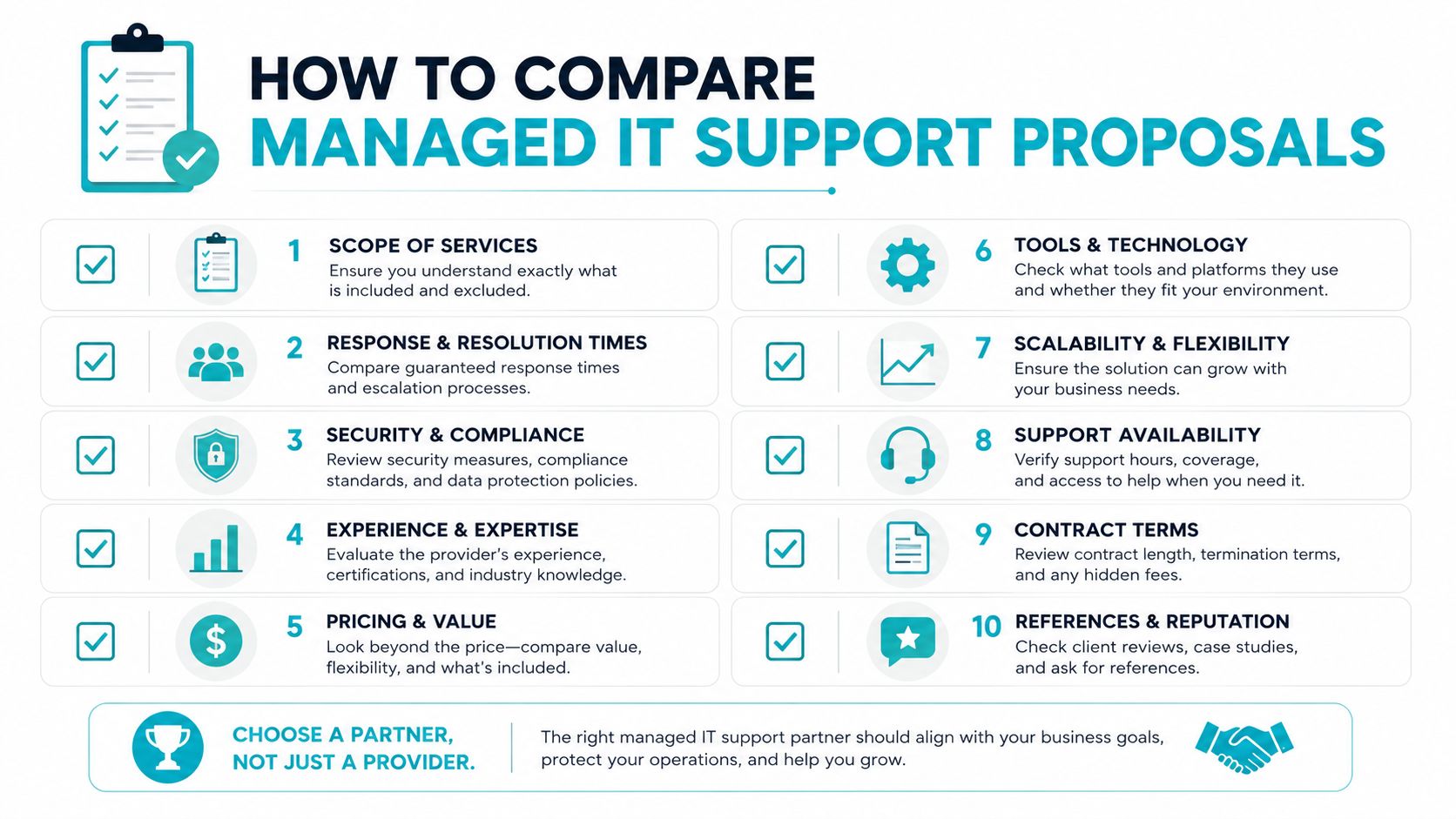
Put every proposal into the same four-block worksheet. Don't compare the monthly total until the provider has documented what it will operate.
Start with coverage
List every supported user, endpoint, server, virtual machine, cloud tenant, network device, and application. Mark each item as included, excluded, or billable separately. A proposal that covers “the environment” without an asset list leaves the provider room to reinterpret scope later.
Then check responsibilities. Who manages Microsoft 365 licensing? Who owns Entra ID conditional access? Who patches Linux servers? Who handles vendor calls for a line-of-business application? Co-managed arrangements fail when both parties assume the other owns the task.
Score the operating commitment
Use a simple weighted score rather than choosing the lowest headline price:
- SLA response and escalation, 30 points. Separate acknowledgment, technician engagement, restoration, and resolution targets.
- Monitoring coverage, 25 points. Identify monitored systems, alert review, escalation, and remediation.
- Backup and recovery, 20 points. Confirm 3-2-1 posture, retention, restore testing, and recovery ownership.
- Security operations, 15 points. Document EDR, MDR, patch deadlines, vulnerability handling, and incident response.
- Commercial clarity, 10 points. Review exclusions, onboarding, projects, after-hours work, and cancellation terms.
This weighting deliberately gives operational coverage more influence than price. A cheaper contract can transfer the liability back to your team through exclusions, delayed response, or untested recovery.
The software doesn't replace technical review, but it can reduce ambiguity in the proposal process.
Read the backup and security clauses
Don't accept “backups included” as a complete answer. Ask where copies reside, whether the offsite copy is isolated, how restores are tested, and whether storage growth or data transfer creates separate charges.
Security language needs the same precision. Identify whether the provider supplies EDR, MDR, security awareness training, vulnerability management, compliance reporting, and incident response. If those tools are optional, record the additional charge before comparing proposals. A managed IT services agreement should assign ownership for each control.
The proposal should tell you what happens at 2 AM, not just what happens when someone opens a ticket at 10 AM.
Ask every provider these five questions:
- What exactly is covered? Request an asset and responsibility schedule.
- What does the SLA measure? Separate response, engagement, restoration, and resolution.
- Who watches alerts? Confirm staffing, hours, escalation, and remediation authority.
- Can you demonstrate recovery? Request the restore procedure and test record.
- What creates an extra invoice? Demand a complete list of projects, exclusions, licenses, storage, travel, and after-hours work.
Red Flags and Hidden Costs to Watch For
A low monthly rate is meaningless if the contract turns routine operations into billable exceptions. Read the exclusions before you read the service summary.
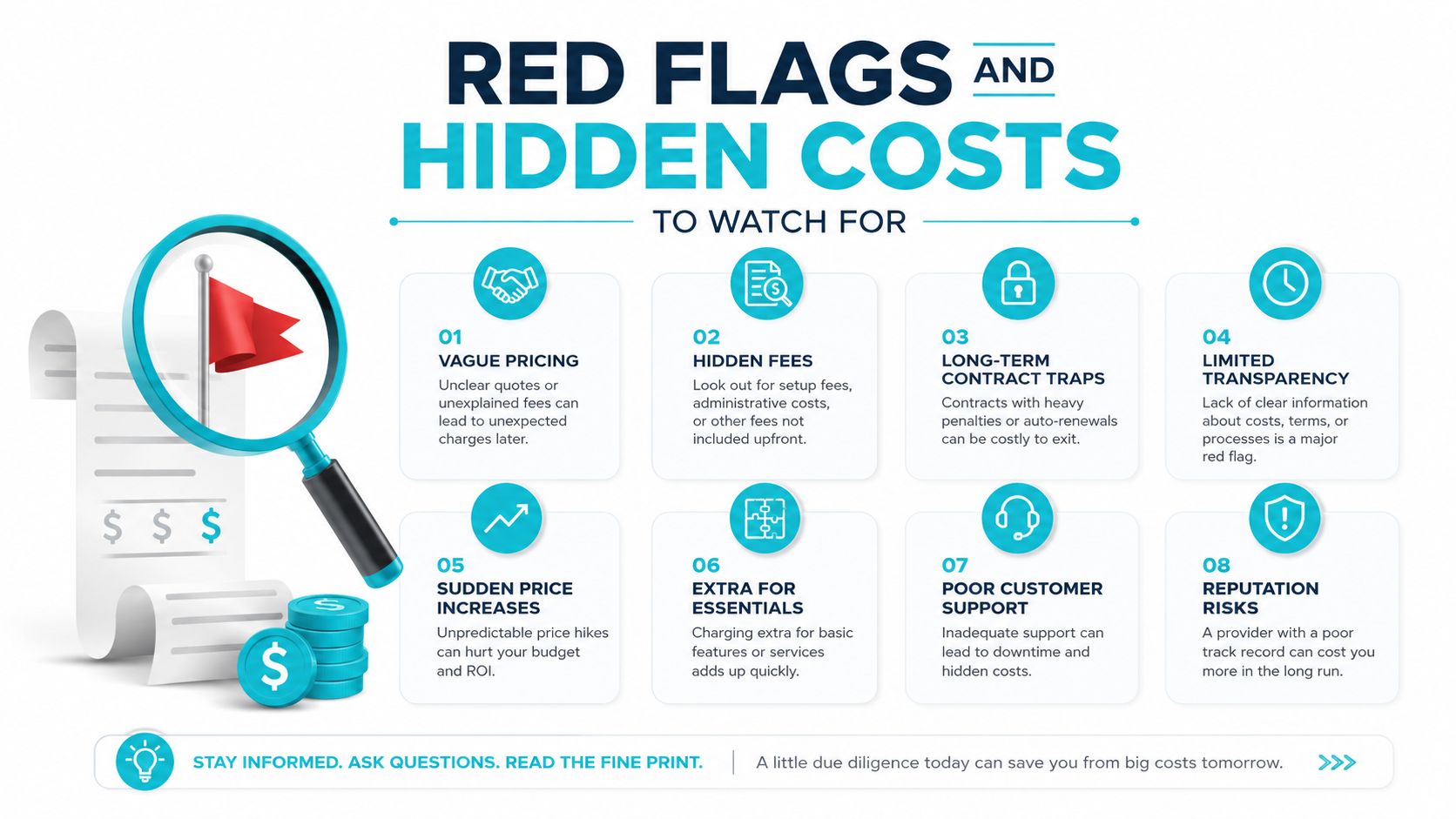
Ask these questions directly:
- What does “as needed” mean for on-site work? Require a rate, travel rule, and approval process.
- Is after-hours billing capped? If not, one incident can create an unpredictable invoice.
- Are onboarding and migration included? Discovery, documentation, tooling deployment, and cleanup require labor.
- What happens when backup storage exceeds the included limit? Get the capacity rule and recovery charges in writing.
- Does the SLA promise resolution or only response? Acknowledgment isn't restoration.
- Which cloud licenses are excluded? Microsoft 365 administration may be included while licensing, security add-ons, or tenant changes remain separate.
- Are compliance reports extra? Audit evidence and recurring documentation aren't free just because monitoring exists.
- What counts as a project? Network changes, new offices, migrations, and application upgrades often sit outside “unlimited” support.
A $99 per-user quote may acquire $15 to $25 per user in add-ons once cloud license management, security awareness training, and compliance reporting are itemized.
The production pattern is predictable. A provider wins on the headline number, the buyer assumes routine work is included, and the first migration or recovery exercise exposes the exclusions.
Practical Ways to Reduce Managed IT Support Costs
Control the engineering variables before negotiating the monthly rate. These actions move a proposal toward the lower end of its legitimate range:
- Standardize hardware. Fewer supported models reduce troubleshooting time and simplify patch validation.
- Consolidate vendors. Remove overlapping security, backup, monitoring, and license tools before asking an MSP to price them.
- Document onboarding and offboarding. Clear identity and access procedures reduce preventable tickets and security exceptions.
- Right-size monitoring and backup. Apply deeper coverage to production servers, critical applications, and regulated data. Confirm that backup follows a 3-2-1 posture before cutting capacity.
- Set the SLA before the contract term. Define response, recovery, exclusions, escalation, and monitoring coverage before accepting a longer commitment.
These choices also affect billing structure. Standardized environments fit per-user or per-device pricing. Complex infrastructure may justify managed-server or block-retainer pricing. Use this IT cost optimization guide to identify consolidation opportunities before requesting bids.
Businesses with Tampa-based infrastructure should benchmark current operational costs against ARPHost's managed services before signing. Compare server administration, monitoring, backup operations, and infrastructure optimization as separate scope items, then verify which SLA tier covers each one.
ARPHost, LLC offers managed IT, VPS, bare metal, Proxmox private clouds, colocation, and secure web hosting from its Tampa, Florida infrastructure. Use your asset list and SLA requirements to assess whether consolidation can make support pricing more predictable.
