

A lot of Tampa businesses reach the same point at roughly the same time. Revenue is up, headcount is up, and the old way of handling IT no longer holds together. One office manager resets passwords, a developer patches a server when someone remembers, and the owner gets copied on every internet outage, backup alert, and phishing scare.
At first, that setup feels scrappy and efficient. Then it starts costing time every week.
Remote access gets unreliable. Staff work from home during storms and can’t reach files cleanly. A firewall rule change breaks a line-of-business app. Someone assumes backups are running, but no one is checking restores. Hurricane season adds another layer of pressure because “we think it’s backed up” is not a continuity plan.
That’s usually when companies start searching for managed IT services in Tampa, Florida. Not because they want another vendor, but because they need an operating model that’s more stable than ad hoc support. If that’s where you are, the key question isn’t whether to outsource some IT. It’s how to compare providers without getting lost in vague proposals and bundled promises.
Is Your Tampa Business Outgrowing Its IT
A common pattern looks like this. A growing Tampa company has ten, twenty, or fifty employees. It has cloud apps, a few on-prem systems, vendor-managed software, phones, Wi-Fi, remote users, and compliance concerns that weren’t on the radar a few years ago. Nobody planned for that environment as a whole. It just happened.
The business owner feels the symptoms before they see the architecture problem. Staff complain that systems are slow. A new hire waits too long for account setup. Cybersecurity conversations happen only after suspicious emails hit inboxes. Leadership wants better reporting and stronger controls, but the internal team is already overloaded.
The breaking point usually isn’t dramatic
Most companies don’t switch because of one catastrophic outage. They switch because of repeated friction:
- Support is inconsistent when one person or one small internal team handles everything from printers to security alerts.
- Important work gets postponed because reactive tickets always beat infrastructure cleanup.
- Risk keeps rising as more devices, SaaS tools, and remote connections get added without clear ownership.
- Business continuity stays theoretical until a storm, power event, or ransomware concern forces the issue.
If your team spends more time chasing IT problems than improving systems, you’ve already outgrown break-fix thinking.
In Tampa, that pressure gets sharper because local businesses often need both office reliability and remote flexibility. Teams may work across multiple sites, travel between client locations, or shift operations quickly during weather disruptions. That means your IT model has to support day-to-day operations and exceptions at the same time.
What owners usually need at this stage
They need standardization. They need accountability. They need one group responsible for patching, endpoint management, backup oversight, user support, and vendor coordination. For many SMBs, that starts with a structured partner instead of another internal hire.
If you’re in that transition, a useful next step is reviewing practical small business IT solutions built around ongoing support rather than occasional rescue work.
What Managed IT Services Actually Include
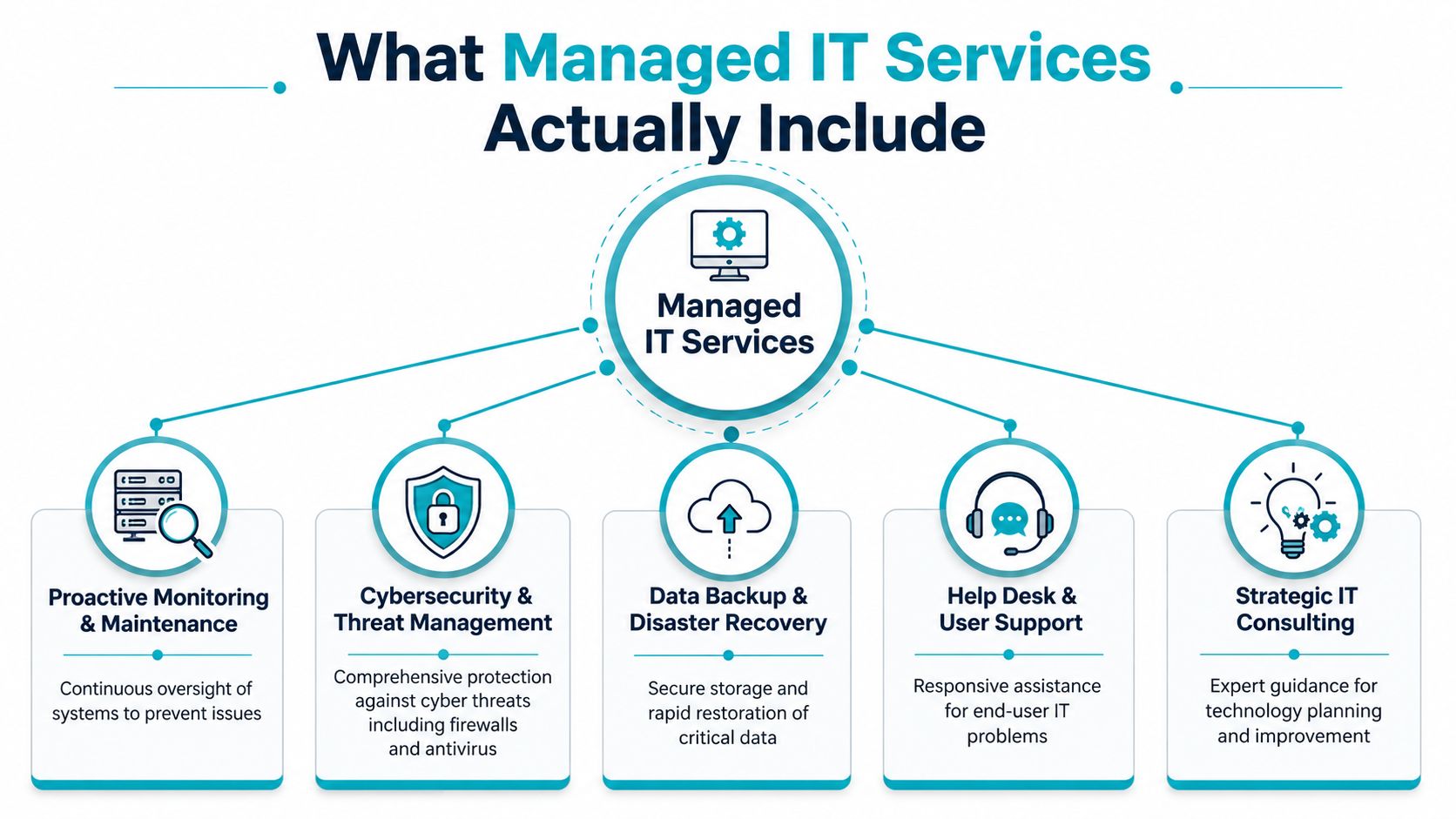
A real managed service agreement should cover much more than a help desk number. In Tampa, the market has matured around bundled offerings, with providers commonly combining managed IT, cybersecurity, cloud migrations, VoIP, and backup and disaster recovery under one contract, which reflects the move toward one central technology partner rather than several disconnected vendors.
A simple visual helps clarify the model.
The core service pillars
The foundation is usually a combination of these functions:
- Proactive monitoring and maintenance. Systems are watched continuously so issues can be addressed before users start opening tickets.
- Help desk and user support. Staff need a path for login problems, device issues, software errors, and day-to-day troubleshooting.
- Cybersecurity operations. That typically includes endpoint protection, patching, access controls, firewall oversight, and suspicious activity review.
- Backup and disaster recovery. Not just backup jobs, but recovery planning and validation.
- Strategic IT planning. It involves roadmaps, lifecycle decisions, and vendor coordination.
The difference between a weak provider and a strong one usually shows up in how these pieces connect. A provider may offer backup, for example, but not test restores. They may sell security tools, but not tie them into patch policy and user access controls. They may answer tickets quickly, but never reduce the ticket volume.
What businesses often miss in the contract
A managed IT plan should answer operational questions clearly. Who patches endpoints? Who reviews backup failures? Who owns after-hours escalation? Who works with your internet provider, software vendor, or phone system vendor when issues cross boundaries?
That’s where many agreements get fuzzy. Buyers hear “fully managed” and assume coverage is broader than it really is.
Practical rule: If a provider can’t explain what’s included in plain language, the problem won’t get better after you sign.
Video walkthroughs can help non-technical owners understand the delivery model before comparing proposals.
Security is part of managed IT, not an add-on mindset
A serious provider should treat security as an operating discipline, not a bolt-on product. That includes account hygiene, device posture, logging, backup integrity, and user awareness.
If you’re comparing service scope, review what’s included in managed IT services for businesses and compare it line by line against any local proposal.
The Strategic Benefits of Proactive IT Management
Reactive IT feels cheaper until you add up what it disrupts. A user can’t work for half a day. A software update is delayed because no one owns testing. A backup warning sits unread. An owner spends time coordinating vendors instead of running the business.
Managed service works better when you treat IT like preventive maintenance, not emergency repair. The goal isn’t to eliminate every issue. The goal is to reduce surprise, shorten recovery, and make responsibilities explicit.
Why the proactive model changes business decisions
With break-fix support, spending is tied to failure. Something breaks, then you pay. That model often trains businesses to postpone maintenance because every improvement looks optional until the next outage.
With a managed arrangement, leadership gets a more stable operating rhythm. The provider is expected to monitor, patch, document, support users, and keep systems aligned with a plan. That changes budgeting and accountability. It also changes conversations in leadership meetings, because IT stops being a list of random incidents and becomes an operating function.
Here’s the simplest comparison:
| Model | How it behaves in practice | What usually gets missed |
|---|---|---|
| Break-fix | Work starts after a problem is noticed | Maintenance, documentation, prevention |
| Managed IT | Work includes ongoing oversight and support | Requires clear scope and provider discipline |
The business outcomes that matter
The biggest gains are usually operational, not flashy.
- Budget control improves because leadership can plan around recurring service instead of unpredictable repair events.
- Security posture gets tighter because patching, monitoring, and access reviews are assigned to someone.
- Internal staff gain capacity when an MSP handles commodity support and infrastructure hygiene.
- Growth gets easier because onboarding, standardization, and vendor coordination are no longer improvised.
A good MSP doesn’t just close tickets. They reduce the number of bad tickets your team ever sees.
That matters in Tampa companies with lean teams. Many SMBs don’t need a full internal department for every infrastructure, security, cloud, and support function. They need reliable execution and a partner who can handle daily operations without creating more management overhead.
What doesn’t work
A provider that only reacts faster is not necessarily proactive. Faster ticket closure is useful, but it doesn’t replace lifecycle planning, backup verification, or infrastructure cleanup.
A low-cost plan also doesn’t help if every meaningful task is out of scope. If your provider says yes to monitoring but no to remediation, yes to backups but no to recovery testing, and yes to support but no to vendor coordination, you’re still left managing the hard parts yourself.
Decoding Managed IT Service Pricing in Tampa
Most buyers encounter frustration. Tampa proposals often look similar on the surface, but the pricing logic underneath them can be very different.
The clearest local benchmark is this: managed IT services in Tampa are commonly priced at recurring per-user rates, with one Tampa provider reporting managed IT at $99 to $250 per user per month, while local market materials also list fully managed IT at $105 to $180 per user per month. By comparison, break-fix support is listed at $120 to $195 per hour, with a median of $160 per hour. Those numbers matter because they show the market has moved toward predictable monthly operating expense rather than purely hourly repair work.
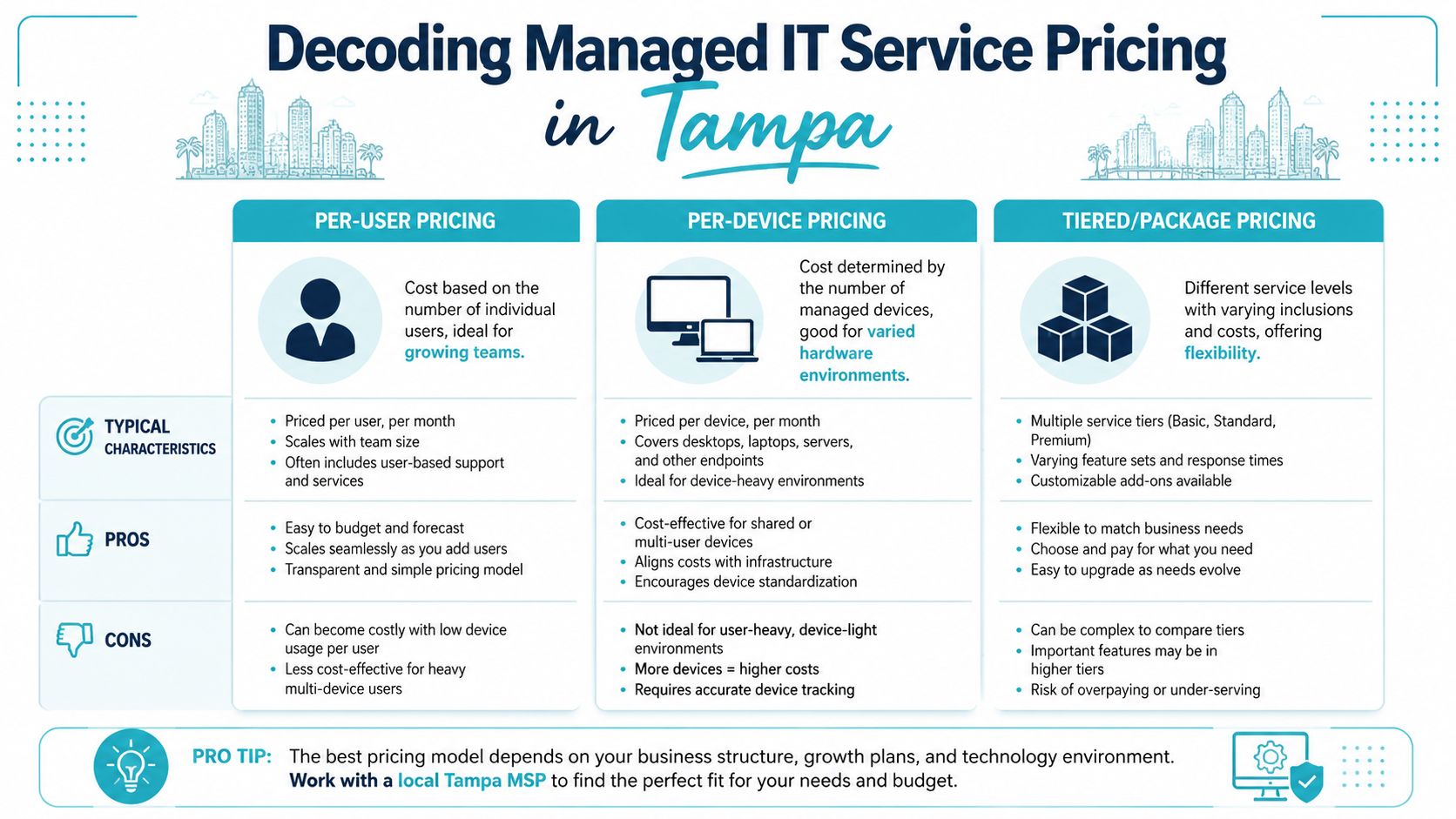
The pricing models you’ll actually see
Most proposals fall into one of three structures:
| Pricing model | How it works | Best fit | Main risk |
|---|---|---|---|
| Per-user | Fee follows employee count | Office environments with predictable user support | Scope may exclude infrastructure work |
| Per-device | Fee follows laptops, desktops, servers, network gear | Mixed environments with variable device types | User support can become ambiguous |
| Tiered package | Provider bundles service levels | Companies comparing service depth | Easy to hide exclusions inside tiers |
Per-user pricing is common because it aligns with support demand. More people usually means more onboarding, more tickets, more endpoints, and more security overhead. It’s often easier for SMBs to budget.
Per-device pricing can work well in operational environments with shared workstations, specialized hardware, or relatively few users with many systems. But it becomes messy if no one defines which devices count and which services ride on top.
Why the cheapest quote can cost more
Tampa buyers run into the same trap repeatedly. A provider quotes a lower monthly fee, but leaves out things the business assumed were included.
A better comparison asks:
- Does the plan include patching, or only alerting?
- Is backup oversight included, or just backup software?
- Are after-hours incidents covered, or billed separately?
- Is strategic planning included, or only ticket support?
- Will the provider coordinate with other vendors, or stop at “not our system”?
Local market commentary points to this exact issue. Many providers offer overlapping bundles without standardizing what’s inside them, so apples-to-apples comparison gets difficult, and a lower fee can be misleading when key services are excluded. If you want a structured way to compare these contract types, review managed services pricing models.
The right question isn’t “What’s your monthly rate?” It’s “What work stops being my problem under this contract?”
Your Checklist for Vetting Tampa IT Providers
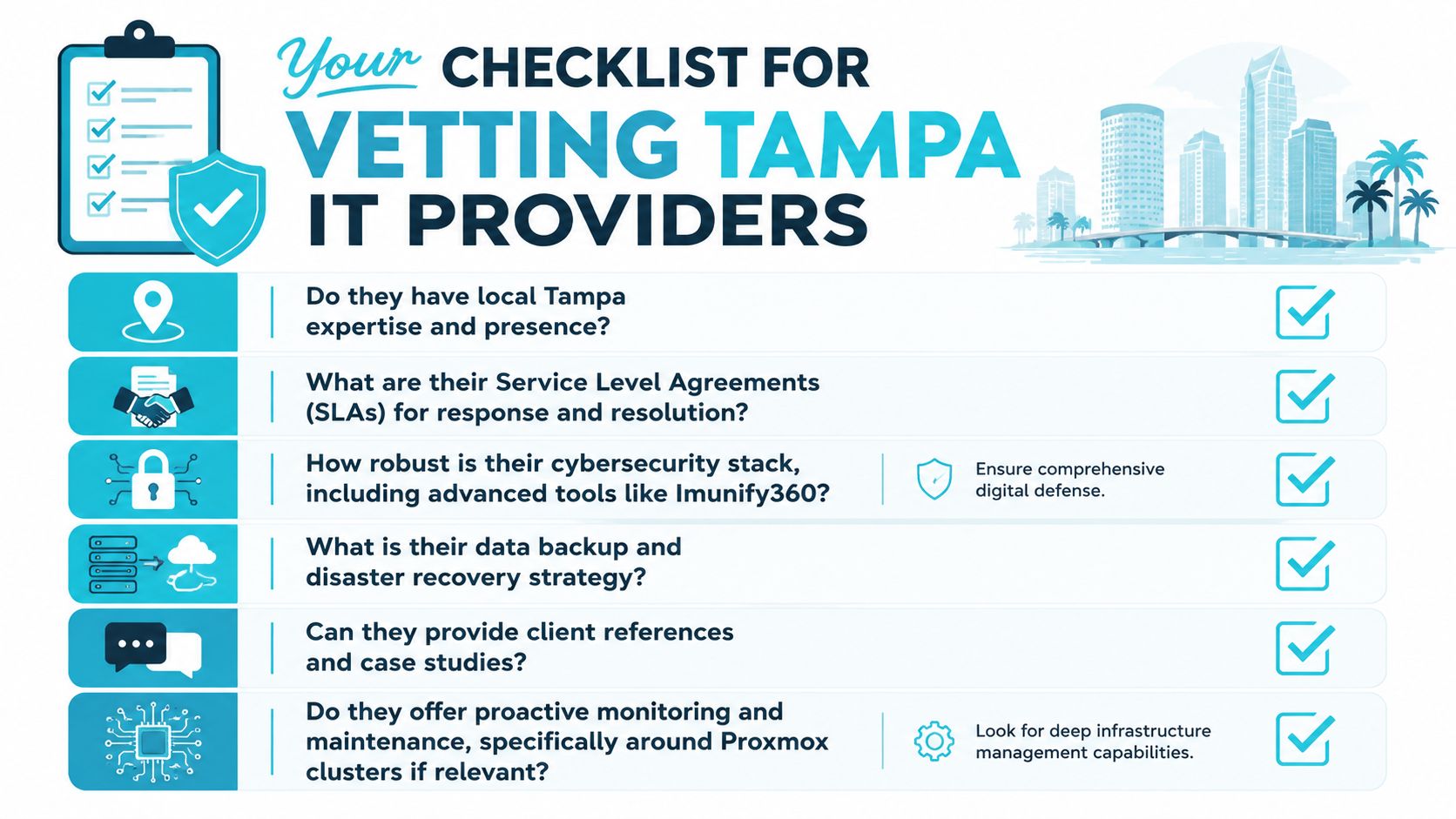
A proposal can look polished and still be operationally weak. Vetting a managed IT provider means forcing specificity before the contract starts. You’re not buying software. You’re choosing who will own daily technology execution when something goes wrong, or better yet, before it does.
Ask about scope before you ask about sales promises
Many Tampa providers bundle similar categories of service, but what’s included often isn’t standardized, and a lower monthly fee may leave out proactive patching, backup oversight, or strategic planning. That should shape every question you ask.
Start here:
- What exactly is managed every month. Ask them to list recurring operational tasks, not just service categories.
- What triggers extra billing. Projects, after-hours support, onsite visits, vendor coordination, and remediation work should be defined.
- What tools do they manage directly. If they deploy a security stack, ask who reviews alerts and who acts on them.
Verify local fit and technical depth
Tampa companies should care about local operating reality. Weather events, distributed work, aging office infrastructure, and line-of-business applications create service demands that generic support desks often mishandle.
Use questions like these:
- Can your team provide onsite support in Tampa when remote work isn’t enough?
- How do you handle business continuity during storm-related disruptions?
- Do you support modern virtualization and private cloud environments such as Proxmox if we need them?
- How do you manage firewalls, switching, and vendor escalations when the problem crosses systems?
If a provider only speaks in product names and never in operational workflows, they probably don’t run a disciplined service desk.
Pressure-test the service model
A good MSP should be able to explain response expectations, escalation paths, and ownership boundaries without hiding behind jargon.
| Vetting area | What to ask | What a solid answer sounds like |
|---|---|---|
| Support | Who answers after hours? | Clear process, named escalation path |
| Security | Who owns patching and alert review? | Defined tasks and responsible roles |
| Backup | How do you verify recoverability? | Restore validation, not just job completion |
| Strategy | Who helps plan upgrades and renewals? | Recurring review process, not ad hoc advice |
Vendor management is another overlooked category. If your phone vendor, ISP, software vendor, and copier vendor all touch your operations, somebody has to coordinate them.
Ask for evidence of maturity
Some providers are built around one or two key technicians. That can work for a while, until vacations, turnover, or growth create gaps. Ask how they document environments, how they transition tickets, and how they preserve continuity if a technician leaves.
The strongest providers answer these questions comfortably. Weak ones pivot back to “friendly support” and “years of experience” without showing how the service is run.
How ARPHost Delivers High-Performance Managed IT
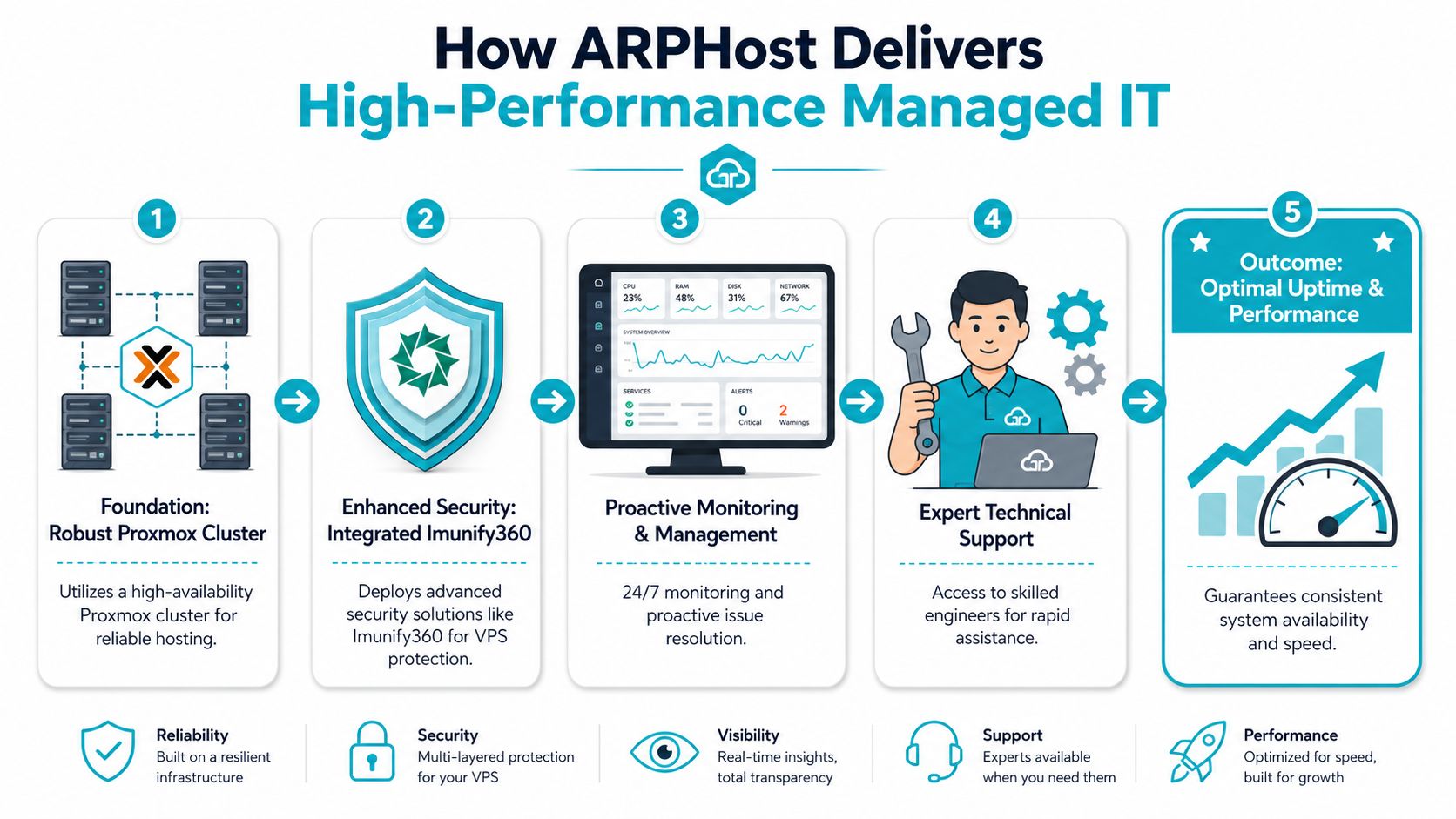
A Tampa business usually feels the difference between a standard MSP and an infrastructure-led provider during a stressful week. An application slows down, backups need to be verified, a vendor points at the server, and nobody wants to own the full stack. ARPHost, LLC is built for companies that want managed IT tied directly to the hosting and infrastructure layer, not split across separate providers.
Infrastructure-first service model
This matters most for Tampa companies with heavier technical requirements. A law office running Microsoft 365 and a few cloud apps has one support profile. A manufacturer, healthcare group, or multi-location company running databases, virtual machines, and specialty software has another.
ARPHost’s stack covers managed IT, Proxmox environments, bare metal, VPS, colocation, and backup. That structure changes the support conversation. Instead of paying one vendor for user support and another for the servers underneath it, businesses can align service responsibility with the systems that drive performance, recovery, and uptime.
That also affects cost control.
A lower monthly support rate can become expensive fast if the provider has limited authority over the firewall, hypervisor, backup platform, or hosting environment. By contrast, an infrastructure-centric model can reduce finger-pointing, shorten troubleshooting time, and make contract scope easier to compare against operational risk.
Matching the platform to the workload
The right fit depends on what the business is trying to run and what level of control it needs.
- VPS hosting fits lighter application workloads, development systems, and hosted services where flexibility matters more than dedicated hardware.
- Bare metal servers fit database-heavy applications, private virtualization, and workloads that need stronger resource isolation.
- Dedicated Proxmox private clouds fit organizations that need structured virtualization, segmentation, and room to grow across clustered environments.
- Colocation fits companies that want to keep ownership of hardware while placing it in a managed facility.
Those choices are not interchangeable from a budgeting standpoint. VPS is usually easier to start with. Bare metal and private cloud options carry more infrastructure cost, but they can reduce performance bottlenecks and give clearer control over noisy-neighbor issues, storage design, and recovery planning. If your business is comparing dedicated infrastructure options, review the current bare metal server inventory.
Backup design matters more than backup wording
Backup is one of the easiest areas to oversimplify in a managed IT contract. “Backups included” does not tell you whether the copies are isolated, immutable, encrypted, or fast to restore.
ARPHost’s managed services include immutable, encrypted Proxmox Backup as a Service. The practical value is straightforward. If backup storage is protected against tampering and the restore process is built into the service model, recovery is more predictable during ransomware events, accidental deletion, or failed updates.
Backups only matter if the restore path survives the same incident that hit production.
That is the standard Tampa businesses should use when comparing providers. Ask where backups live, who can modify them, how restores are tested, and whether recovery times are defined in writing.
Practical fit for Tampa companies
A company replacing aging VMware hosts may want a managed move into a Proxmox-based private environment with monitoring, backup, and support under one contract. Another business may only need secure VPS capacity for line-of-business apps and web services. A third may want colocation plus managed oversight because internal staff still wants hardware control.
Those are different service models, and they should be priced differently. The pricing models you will see in Tampa often depend on where responsibility starts and stops. A provider managing endpoints and tickets only is selling a different service than one that also owns the hypervisor layer, backup architecture, and hosting platform.
If your environment is infrastructure-heavy, it also makes sense to compare Proxmox private cloud plans and VPS hosting options against the service levels, recovery expectations, and contract boundaries your team needs.
Managed IT Services Tampa FAQs
What’s the difference between co-managed and fully managed IT
Co-managed IT means your internal team still handles part of the environment, while the provider fills gaps. That might include help desk overflow, server management, backup oversight, or security tooling. Fully managed IT means the provider takes primary responsibility for the ongoing operation of the covered systems and user support.
Co-managed works well when you already have an IT manager or systems administrator but need deeper bench strength. Fully managed works better when the business wants one accountable partner for day-to-day execution.
How long does onboarding usually take
It depends on the condition of the environment and how well documented it is. A clean Microsoft 365 tenant, standardized endpoints, current backups, and organized vendor records make onboarding much easier. Environments with inherited admin accounts, unknown backup status, aging firewall rules, or scattered vendors take longer because the provider has to discover and stabilize before they can improve.
The smart move is to ask for an onboarding checklist in writing.
Can a managed service provider help with industry-specific software
Yes, but the right question is how they help. Most MSPs don’t rewrite your line-of-business application. What they should do is support the infrastructure around it, coordinate with the software vendor, troubleshoot connectivity and device issues, maintain backups, and document dependencies.
For healthcare, legal, logistics, and field-service firms in Tampa, this matters a lot. Specialized software usually fails at the intersections. Authentication, networking, printing, remote access, database hosting, or vendor-side updates.
Should a Tampa business choose local onsite support or remote-first support
Usually both. Remote support handles a large share of daily issues quickly. Onsite capability still matters for network changes, office moves, hardware failures, Wi-Fi problems, and any situation where hands on equipment are needed.
A provider doesn’t need to lead with onsite work. They do need a credible plan for when remote access won’t solve the problem.
What should I ask before signing a contract
Ask what is included, what is excluded, what creates extra charges, who owns backups, who owns patching, how after-hours support works, and who coordinates third-party vendors. Also ask how the provider documents your environment and how you get that documentation if the relationship ends.
Those answers tell you more than the sales deck ever will.
If you’re evaluating managed IT services in Tampa, Florida and want a clearer view of contract scope, infrastructure options, and support models, contact ARPHost, LLC to discuss your environment and get a practical quote built around what your business needs.
