

You’re probably dealing with one of two situations right now.
Either your team keeps getting dragged into small IT problems that never stay small, or you’ve reached the point where technology is directly affecting sales, scheduling, customer service, and staff productivity. A slow file server, flaky Wi-Fi, email issues, backup uncertainty, and constant security worry can eat a business alive. In Pasco County, that gets worse when you add storm risk, distributed offices, remote users, and fast local growth.
That’s why managed IT services in Pasco County, Florida aren’t just about fixing computers. They’re about giving your business a stable operating environment so you can stop babysitting technology and get back to running the company.
The Hidden Costs of DIY IT in Pasco County
A lot of Pasco County businesses run IT by habit, not by design. The office manager resets passwords. The owner calls a freelance technician when the server acts up. Somebody’s nephew set up the firewall years ago. Backups exist, supposedly. That setup works right up until it doesn’t.
The cost problem isn’t just the repair bill. It’s the chain reaction. Your phones get choppy. Your CRM stalls. Staff wait around. Clients notice. You lose time twice, first during the outage and then again while everyone catches up.
The real expense is distraction
If you own a medical office, law practice, contractor, manufacturer, retailer, or multi-location service business in Pasco County, your job is to move work through the business. IT should support that. It shouldn’t become your second full-time job.
Common DIY symptoms look like this:
- Slow systems become normal: Employees stop reporting issues because they assume nothing will change.
- Security stays unfinished: Patching, endpoint protection, account cleanup, and offboarding slip behind.
- Projects never get done: The network upgrade, cloud migration, and backup testing stay on the “later” list.
- Old hardware lingers too long: Equipment keeps running until failure forces an emergency decision.
Practical rule: If your team only touches IT when something breaks, you don’t have an IT strategy. You have a recurring interruption.
There’s another blind spot most owners miss. Old devices, retired drives, and replaced servers create compliance and liability questions. If your business handles customer records, employee files, or regulated data, disposal matters as much as protection. Secure disposal should be part of your IT lifecycle, not an afterthought.
Why this hits harder in growing markets
Pasco County isn’t a sleepy market anymore. Businesses here are adding staff, opening locations, relying more on cloud apps, and expecting phones, files, and line-of-business systems to work from anywhere. That means the old break-fix model collapses faster.
If your business is growing, unmanaged IT turns into a tax on growth. Every new employee, laptop, phone, app, and vendor connection adds complexity. Without someone owning that system proactively, your business eventually pays in downtime, confusion, and rushed decisions.
What Are Managed IT Services Really
A managed IT service is an outsourced IT operations model. You pay a provider to keep your systems stable, secure, supported, and planned for, every day, not just when something breaks.
That changes the business outcome. Instead of paying for random repairs and rushed decisions, you get a team responsible for uptime, security standards, vendor coordination, and technology planning. For Pasco County companies that are adding staff, opening locations, or relying more heavily on cloud apps, that structure matters.
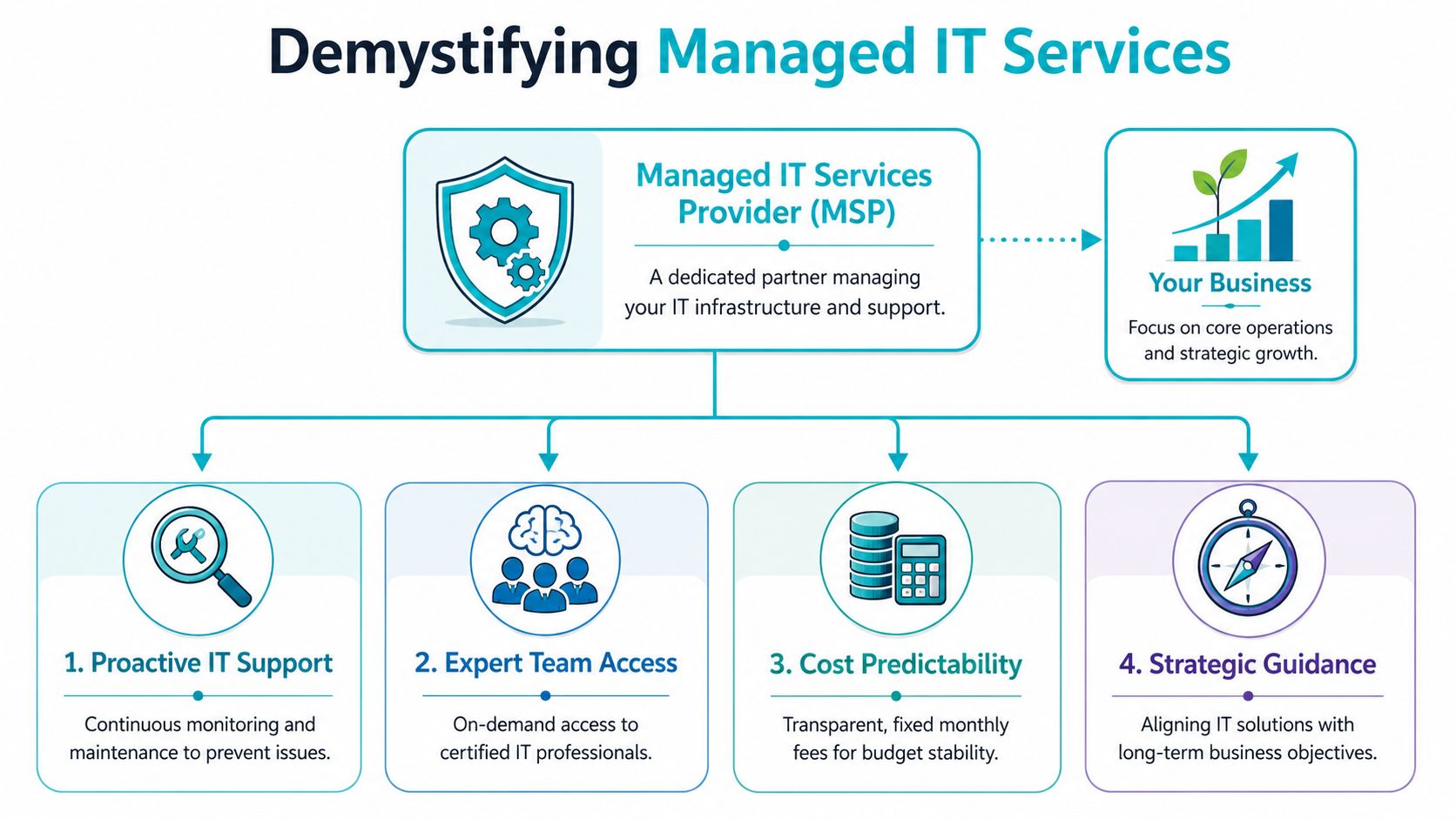
A useful comparison is building operations
A commercial property runs better when someone handles inspections, preventive maintenance, safety checks, and service coordination on a schedule. Business IT works the same way. Waiting for failures is expensive. Ongoing management is cheaper and more predictable.
A managed service provider handles the operating layer behind the scenes:
- Monitoring systems: Servers, endpoints, networks, internet connections, and critical services are watched for early signs of trouble.
- Routine maintenance: Patches, firmware updates, cleanup, backup checks, and performance reviews happen on a schedule.
- User support: Staff get help with devices, Microsoft 365, permissions, printing, connectivity, and day-to-day problems that slow work down.
- Security operations: Endpoint protection, firewall oversight, identity controls, access reviews, and suspicious activity response stay under active management.
- Planning and lifecycle management: Hardware refreshes, cloud changes, vendor coordination, budget planning, and recovery procedures get documented before they become emergencies.
That is why Florida providers often position managed services as a way to simplify IT and boost security. The phrase fits because the service is not just support. It is operational ownership with clear accountability.
What a good MSP should deliver
Good managed IT should feel boring in the best way. New hires get set up correctly. Backups get checked. Security settings stay consistent. Internet and Wi-Fi issues get handled fast. Budget surprises drop because equipment and licensing are tracked instead of guessed at.
You also gain something many small and midsize Pasco businesses do not have in-house. Depth. One person can reset passwords and troubleshoot printers. A managed provider should also cover cloud administration, cybersecurity, vendor escalation, disaster recovery planning, and long-range budgeting. That is the benchmark to use when reviewing managed IT services for businesses.
Use a simple test. If a provider mostly talks about tickets, they are selling support hours. If they talk about standards, documentation, backup testing, hurricane readiness, response times, replacement schedules, and growth planning, they are selling an operating model.
Managed IT is outsourced IT operations with accountability.
That distinction matters in Pasco County. Local businesses need more than generic help desk coverage. They need an IT partner that can keep daily operations running, protect data, and support growth without forcing the owner to manage technology by crisis.
Key Managed Services for Pasco Businesses
In the Tampa Bay market, a full MSP stack including proactive monitoring, cybersecurity, cloud services, and backup/disaster recovery is standard. The value is not just ticket resolution, but continuous management of endpoints, servers, and connectivity to reduce downtime and security risks for distributed businesses.
That’s the baseline. If a provider in Pasco County is still selling only remote support and antivirus, keep looking.
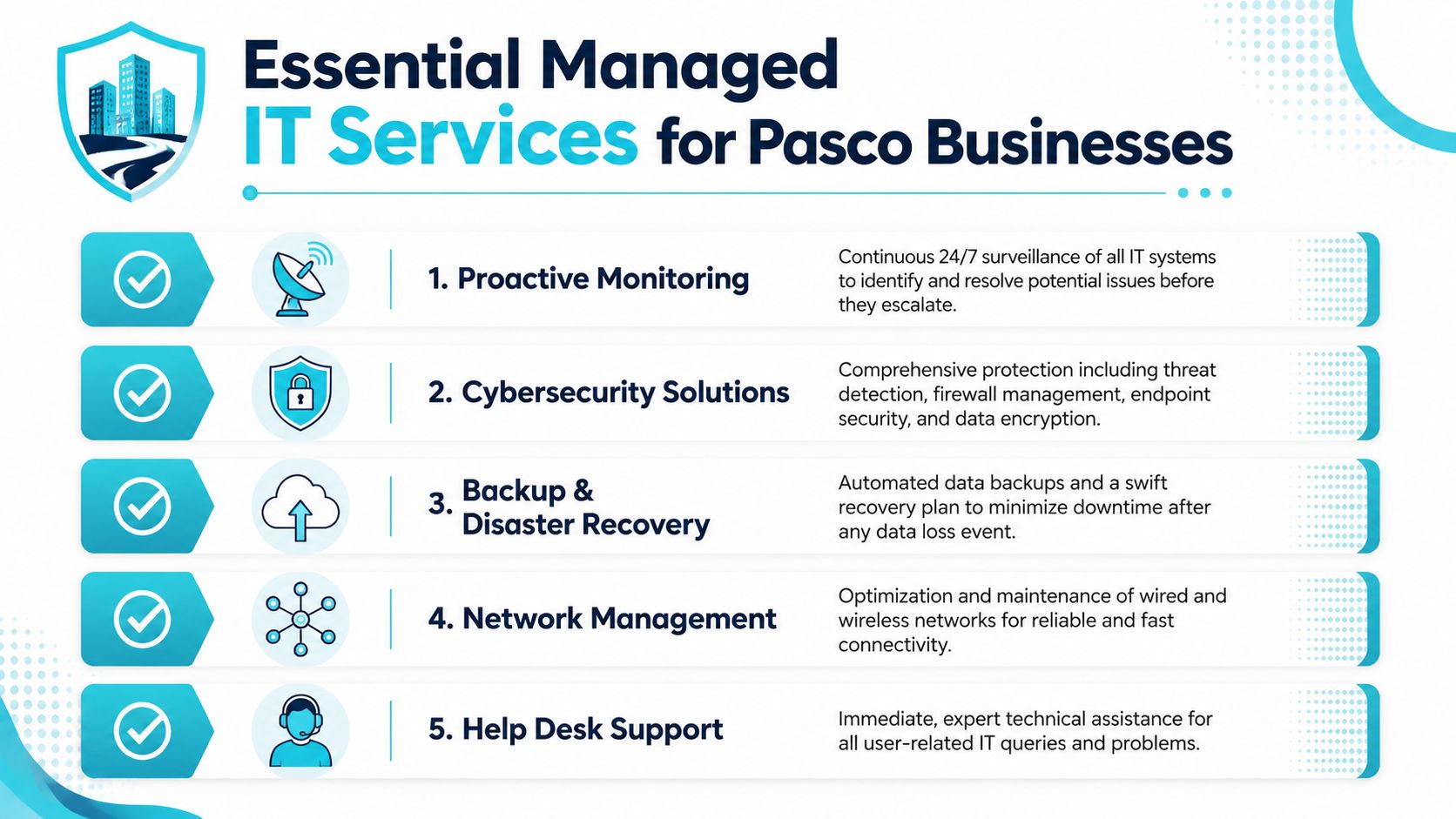
What should be included
A solid managed service stack covers several layers at once.
- Proactive monitoring: This means watching servers, endpoints, storage, network devices, and key services for warning signs. Good monitoring catches failed backups, low disk space, unhealthy hardware, and service interruptions before users start calling.
- Cybersecurity operations: This includes endpoint protection, firewall management, patching, identity hygiene, access controls, and suspicious event review. Security is not one tool. It’s a managed process.
- Backup and disaster recovery: Backups need verification, retention planning, restore testing, and off-site resilience. A backup you’ve never tested is hope, not recovery.
- Help desk support: Your users need a real escalation path for email issues, login failures, printing problems, line-of-business application errors, and device setup.
- Network management: Switches, wireless, VLANs, firewalls, VPN access, and internet failover all affect business performance directly.
Here’s a quick visual summary before we go deeper.
The services owners should ask about specifically
Many proposals tend to become vague. Don’t let that happen.
Ask how the provider handles these items in plain English:
- After-hours coverage: If your phones fail at night or remote staff can’t connect early in the morning, who responds?
- Firewall ownership: Who reviews rules, firmware, VPN access, and suspicious traffic?
- Patch discipline: Who approves, schedules, and confirms operating system and application updates?
- Backup validation: Who checks whether backups completed and whether recovery functions?
- Cloud account management: Who owns Microsoft 365, Google Workspace, identity controls, and licensing cleanup?
- VoIP administration: If your business relies on phones for revenue, call routing and service continuity must be treated as critical infrastructure.
A provider that can’t explain how they handle backups, identity, firewall changes, and after-hours incidents is not ready to run your environment.
Security should be tested, not assumed
A mature MSP doesn’t just install security tools and move on. They verify exposure. That includes internal risk, not just internet-facing threats. It’s a useful reminder that trust boundaries inside your network matter just as much as perimeter controls.
For Pasco businesses, the essential requirements are straightforward. You want layered security, dependable support, documented recovery, and someone actively managing your systems all month long, not just when an employee opens a ticket.
Why Pasco County’s IT Needs Are Unique
Pasco County needs a more specific IT strategy than the generic “we manage your computers” pitch most providers use. Local conditions change the equation.
A county environment with wide geographic spread and many service functions already demonstrates why centralized monitoring and resilient infrastructure matter. A Dynatrace customer profile describes Pasco County as serving roughly 600,000 residents across 750 square miles and supporting 57 departments through multiple service functions, which points to the need for coordination rather than ad hoc IT management in distributed environments, according to the Pasco County customer profile.

Hurricane exposure changes backup strategy
If you operate in Pasco County, business continuity can’t be an abstract document sitting in a shared folder. Storm risk, power issues, internet outages, and building access problems are all real operating concerns.
That means your MSP should build for interruption, not just convenience.
- Off-site backup matters: Local-only backup is not enough in a regional event.
- Cloud access matters: Your staff may need to work remotely if your office is unavailable.
- VoIP continuity matters: Calls should be able to reroute if one site goes down.
- Recovery workflow matters: Someone must know who restores what, in what order, and under whose approval.
Local infrastructure still matters
A lot of businesses moved to cloud apps and assumed location no longer mattered. That’s wrong. Regional hosting and nearby infrastructure still affect latency, support responsiveness, and operational comfort, especially when your team depends on file access, hosted applications, remote desktops, or voice systems.
For businesses that want a nearby provider option, managed IT services in Tampa, Florida is relevant because Tampa-area infrastructure aligns well with Pasco County’s geography. If low-latency regional hosting, nearby engineering access, or keeping workloads closer to home matters to you, ask providers exactly where systems are hosted and who has hands-on access.
The closer your provider is to your operating reality, the fewer assumptions they make about weather, travel time, connectivity, and recovery priorities.
Growth pressure punishes weak systems
Pasco County businesses are hiring, opening second sites, adopting more SaaS tools, and depending more on remote connectivity than they did a few years ago. That stresses every weak point in your environment. Identity sprawl, inconsistent device setup, poor wireless coverage, and undocumented vendor accounts all get exposed as you scale.
A local government modernization example makes the business case clearly. Pasco County’s own IT modernization project reported 60% savings versus a traditional computer room, $80,000 in installation cost savings, and a $28,000 reduction in potential fire-suppression costs, while supporting 4,000 users.
That doesn’t mean your business should copy a county deployment. It means smart infrastructure choices can produce measurable savings when they’re engineered well. In Pasco County, local context matters. Storm resilience matters. Regional performance matters. Scalable design matters.
An Actionable Checklist for Choosing Your Vendor
Most business owners ask the wrong first question. They ask, “What’s your monthly price?” The better question is, “What exactly are you taking responsibility for?”
A critical question for any Florida MSP is how they integrate cybersecurity and disaster recovery into their core offering, not just as add-ons. Resilience against threats like ransomware should be a baseline, meaning your evaluation should focus on what controls are included to minimize downtime and loss, as emphasized in this Florida managed IT guidance.
The questions you should ask in the first meeting
Use these questions and insist on plain answers.
What do you monitor all the time
Ask whether they monitor endpoints, servers, backups, network devices, cloud services, and critical applications. If they only mention “alerts,” that’s too thin.
What security controls are included by default
You need clarity on endpoint protection, patching, firewall oversight, MFA support, account reviews, and incident response.
How do you handle backup verification and restore testing
Not backup setup. Verification and testing. Those are different things.
What happens after hours
Ask who responds, what qualifies as an emergency, and how escalation works.
Can you support my actual stack
If you run virtual environments, line-of-business software, VoIP, remote access, or industry-specific systems, the provider should speak comfortably about them.
Where are the service boundaries
A lot of disputes happen because proposals sound broad but exclude key tasks.
Comparing Managed IT Service Tiers
| Feature | Essential Monitoring | Proactive Management | Fully Managed Partnership |
|---|---|---|---|
| System monitoring | Basic alerting on selected systems | Broad monitoring with active review | Broad monitoring with ownership and response workflows |
| Help desk | Limited or reactive | Business-hours support | Business-hours plus after-hours escalation path |
| Patching | Partial or scheduled on request | Routine patch management | Full lifecycle patch planning and validation |
| Security | Basic endpoint coverage | Layered controls with routine oversight | Security-first operations integrated into daily management |
| Backup | Backup job presence | Backup review and issue response | Backup review, recovery planning, and restore accountability |
| Vendor coordination | Usually excluded | Partial support | Included as part of operational management |
| Strategic planning | Minimal | Periodic recommendations | Ongoing roadmap and budgeting guidance |
Red flags that should end the conversation
Some vendors disqualify themselves fast.
- They lead with tools, not outcomes: You need to know what they own and how they operate.
- They separate security from core service: That usually means gaps and finger-pointing later.
- They can’t explain onboarding: If transition sounds improvised, support will too.
- They avoid documentation questions: Poor documentation creates recurring downtime.
- They promise everything for everyone: Mature providers define scope clearly.
If a provider says cybersecurity, backup, or disaster recovery are “optional extras,” they’re telling you they still think like a break-fix shop.
What to review before you sign
Before you commit, review the contract language carefully. A useful reference point is a formal managed IT services agreement. You’re looking for clarity around scope, response expectations, exclusions, access rights, termination, documentation ownership, and responsibility during incidents.
Then verify these practical items:
- Asset ownership: Make sure you control your domains, cloud tenants, licensing accounts, and admin access.
- Documentation rights: You should be able to obtain network diagrams, system inventories, and configuration records.
- Exit process: If you ever switch providers, there should be an orderly handoff path.
- Change management: Ask how firewall changes, admin requests, and software rollouts are approved.
Choosing a vendor isn’t about finding the cheapest monthly rate. It’s about finding the provider least likely to leave you exposed when something important breaks.
Understanding the Onboarding and Migration Process
Switching providers feels risky because most business owners assume the handoff will be chaotic. A competent MSP avoids that by treating onboarding like a controlled project, not a scramble.
The process usually begins with groundwork. There’s an assessment period where they gather accounts, systems, hardware lists, backups, vendors, users, and dependencies. They should be asking annoying but necessary questions. That’s a good sign.
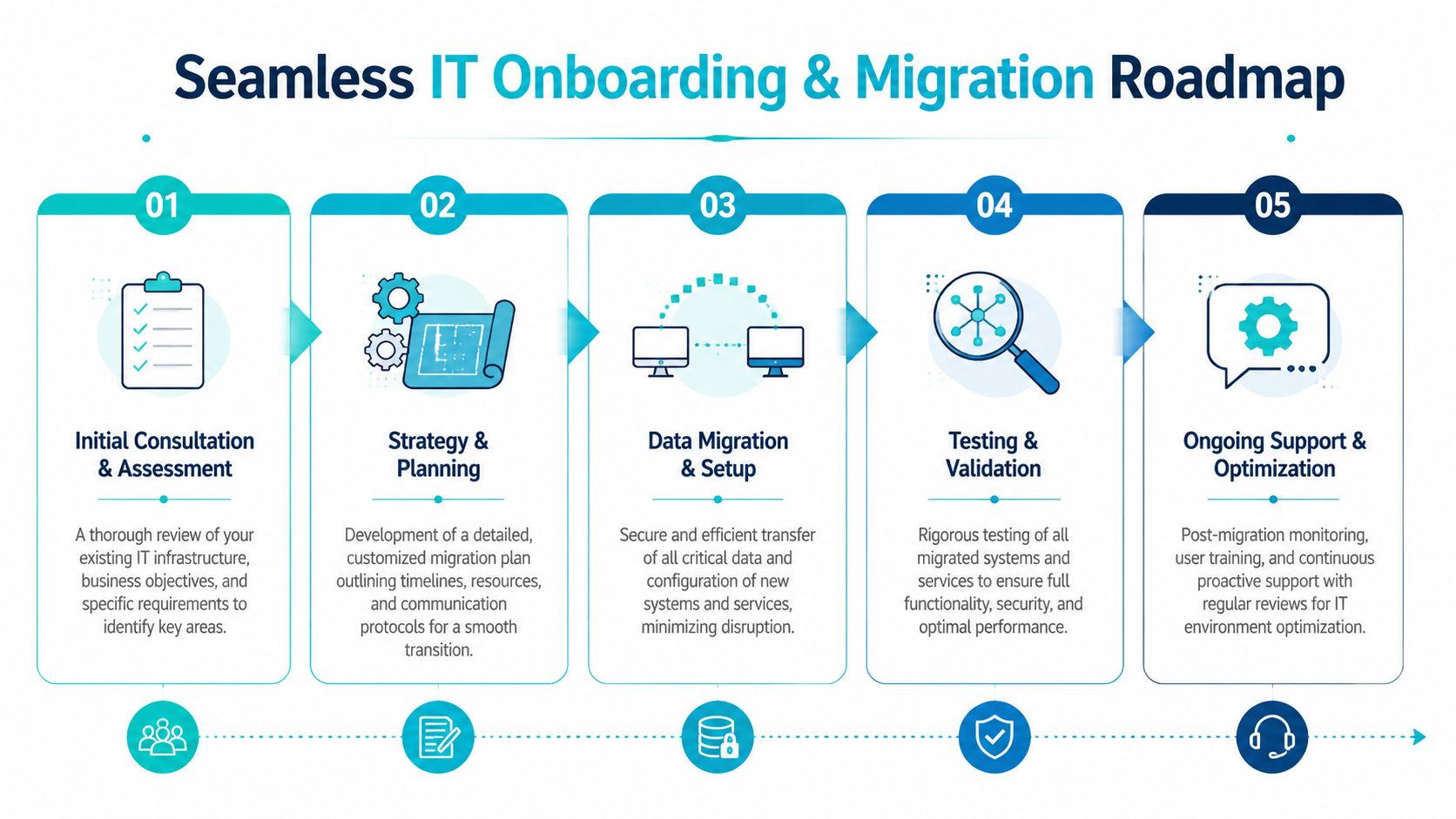
What the rollout should look like
A clean onboarding usually follows this pattern:
- Assessment first: Inventory devices, users, servers, cloud services, licenses, line-of-business apps, and current pain points.
- Risk review next: Identify weak backups, shared passwords, unsupported hardware, stale accounts, and internet or firewall weaknesses.
- Tool deployment after that: Monitoring agents, endpoint tools, backup checks, and remote support systems get rolled out in stages.
- Documentation and standardization: Naming, permissions, support workflow, and vendor records get cleaned up.
- Stabilization period: The provider watches for recurring issues and starts removing the causes instead of just closing tickets.
Migrations don’t need to be dramatic
If you’re moving from an old server, changing hosting, consolidating vendors, or replacing a virtual environment, the key is sequencing. Don’t let anyone force a big-bang cutover unless there’s no alternative. Good migration work breaks risk into manageable pieces.
That can include:
- Server moves: Shift one workload at a time and validate each dependency.
- Cloud cleanup: Fix identity and licensing sprawl before adding more services.
- Phone transitions: Test routing, voicemail, devices, and failover before full cutover.
- Virtualization changes: If you’re moving from one hypervisor stack to another, insist on rollback planning and validation checkpoints.
The best onboarding projects feel almost uneventful to staff because the provider did the hard work before users noticed the change.
A professional team should also train your staff on support workflow. People need to know where to submit issues, what qualifies as urgent, and what changed from the old setup. That’s what turns a migration into a manageable transition instead of a recurring mess.
Why ARPHost is the Right IT Partner for Pasco County
A Pasco County business does not need another vendor that only resets passwords and closes tickets. It needs an IT partner that can keep operations running through storms, internet outages, growth spurts, vendor sprawl, and the security problems that follow all of them.
That is the ultimate test.
ARPHost, LLC fits that role because it combines managed IT support with infrastructure services many local businesses end up buying from separate providers anyway. That includes managed services, Tampa-area infrastructure, VPS hosting, bare metal servers, private cloud options, colocation, backup services, and business communications. For a Pasco company, that matters for two reasons. You cut coordination costs, and you reduce the number of failure points during an outage or migration.
A provider with local-region infrastructure also gives you better control over where systems live, how fast recovery happens, and who is responsible when something breaks. In a fast-growing county like Pasco, where many companies are adding staff, opening locations, or shifting more work into cloud apps and VoIP, that control turns into lower downtime and fewer expensive handoff problems.
Where ARPHost makes practical sense
ARPHost is a strong fit for businesses that want one provider to manage both day-to-day support and the underlying platform. That is a better model than splitting support, hosting, backups, phones, and security across multiple vendors who blame each other during an incident.
Here is where that approach pays off:
- Small and midsize businesses: VPS hosting works well for internal apps, websites, jump boxes, and light business systems without overbuying hardware.
- Security-sensitive web environments: Managed hosting with tighter isolation helps reduce website risk and lowers admin overhead.
- Virtualization-heavy operations: Private cloud or dedicated infrastructure makes more sense when you need stronger isolation, room to scale, and direct administrative control.
- Demanding application workloads: Bare metal is the right choice for larger databases, dense virtualization, or applications that do not belong on shared resources.
That mix matters in Pasco County because many businesses are not starting from scratch. They are carrying some combination of old servers, Microsoft 365, line-of-business software, remote users, phones, backup jobs, and compliance pressure. A provider that can support the whole environment is easier to manage and usually cheaper than stitching together four or five separate contracts.
Infrastructure choices should match business risk
If your company runs a serious internal virtualization environment, a properly sized dedicated host or private cloud node is the right move. If your main concern is web security and easier administration, managed hosting is the cleaner fit. If your revenue depends on phone availability, business communications and failover planning belong in the same decision, not in a separate project six months later.
That is where ARPHost stands out. The company is positioned to support infrastructure decisions and the operational side after deployment. Pasco businesses need both. Buying hardware or cloud capacity is easy. Running it well, backing it up, securing it, documenting it, and supporting users is where costs rise or stay under control.
For companies leaving older virtualization platforms, consolidating vendors, or fixing weak backup coverage, that combined support model is especially useful. You avoid the common MSP problem where one firm manages desktops, another hosts servers, a third handles backup, and nobody owns recovery outcomes.
Why that matters in Pasco County
Pasco County’s business environment is not generic. Hurricane risk changes backup and recovery planning. Regional growth changes hiring, office expansion, and bandwidth demand. Some owners also want systems hosted closer to home instead of scattered across providers with no local accountability.
ARPHost aligns well with those priorities because it can support nearby infrastructure options, recovery planning, and a mixed environment without forcing every client into the same template. That is the right approach for a county with medical offices, contractors, law firms, multi-location service businesses, and growing companies that need better IT without building an internal team from scratch.
If you are choosing a provider in Pasco, use a simple filter. Pick the one that can reduce vendor count, tighten recovery planning, support your actual workloads, and give you a clear operating model for growth. ARPHost, LLC deserves a serious look on that basis alone.
If you want a practical review of your environment, talk to ARPHost, LLC. Ask for a managed IT assessment, a hosting and backup review, or a quote that maps your current risks to a support plan your business will utilize.
