

A lot of Kansas City businesses hit the same wall at roughly the same stage of growth. The team adds people, adopts more cloud apps, relies on shared files, pushes more work through email, and suddenly technology stops feeling like a support system. It starts feeling like friction.
One week it's a printer issue that burns half a morning. The next week it's a laptop that missed patches. Then someone asks whether backups are actually recoverable, whether remote staff are secured properly, or whether the firewall rules still reflect how the business works now. At that point, the problem isn't one broken device. The problem is that IT has become reactive.
That shift is exactly why so many owners start looking into managed it services kansas city. They aren't always trying to outsource everything. Many are trying to get back control, reduce disruption, and build an environment that can support growth without making every new hire, office change, or software rollout harder than it should be.
Is Your IT Keeping Pace with Your Kansas City Business
A common local pattern looks like this. A company begins with a few workstations, a basic internet connection, some off-the-shelf SaaS tools, and one person who is "good with computers." That setup works until the business adds headcount, depends on uptime, stores more client data, or gets asked harder security questions by customers and insurers.

When I talk with owners in Kansas City, the frustration usually isn't about one dramatic outage. It's about repeated interruptions. Password resets are slow. New employee setups are inconsistent. Aging servers get left alone because nobody wants to touch them. Backups exist, but nobody feels fully confident in them. Security becomes a collection of tools instead of an operating discipline.
Reactive support stops scaling
The old break-fix mindset sounds cheaper because you only call when something fails. In practice, it often means you pay for downtime twice. First in the repair itself, then again in lost staff time, delayed sales activity, and distracted leadership.
Kansas City managed IT has moved far beyond basic outsourced support. Local providers now position it as a broader infrastructure and security platform with 24/7 support, proactive management, and strategic planning, rather than traditional on-site break-fix work.
That distinction matters. Modern managed services are built around operational continuity, not emergency heroics.
Businesses outgrow informal IT long before they think they do.
Growth exposes weak spots
The warning signs are usually operational, not technical:
- Hiring slows down: New users don't get a clean, repeatable onboarding process.
- Security questions pile up: Clients ask about backups, access controls, and incident response, and nobody has a clear answer.
- Leaders become the escalation path: Owners and department heads spend time chasing vendors, approvals, and recurring tech issues.
- Infrastructure drifts: Systems stay online, but nobody is steering them toward a clear standard.
If that sounds familiar, the answer usually isn't "buy one more tool." It's to put structure around your environment. That may mean a fully outsourced model. It may mean co-managed support. It may mean better server hosting, backup discipline, and tighter operational ownership.
For businesses reviewing what a stable small-business environment should include, this guide to small business IT infrastructure is a useful starting point.
What Are Managed IT Services Really
Managed IT services are a recurring operational partnership for your business technology. Instead of waiting for something to break and then paying to repair it, you put systems, devices, support workflows, and security controls under ongoing management.
The easiest way to understand it is to compare two models.
Break-fix versus managed service
| Model | What triggers work | Cost pattern | Typical result |
|---|---|---|---|
| Break-fix IT | Failure, outage, user complaint | Irregular and hard to predict | Problems get addressed after business impact begins |
| Managed IT services | Continuous monitoring, scheduled maintenance, support requests, policy enforcement | Usually monthly and more predictable | Issues get caught earlier and systems run under a defined process |
That budget predictability is one of the biggest reasons businesses make the switch. The managed services model is designed to move IT spending away from unpredictable emergency costs and into a flat-rate structure. In Kansas City, providers commonly base monthly pricing on users, devices, and compliance requirements.
What the business is actually buying
A solid managed service relationship isn't just "tech support on retainer." You're usually buying some combination of these outcomes:
- Consistency: Devices are enrolled, patched, monitored, and documented the same way.
- Faster support flow: Help desk issues move through a ticket process instead of hallway conversations and guesswork.
- Security discipline: Antivirus alone gets replaced by layered controls, access reviews, backups, and response planning.
- Operational planning: Hardware lifecycle, cloud changes, renewals, and risk decisions become scheduled work instead of last-minute scrambles.
Practical rule: If your current setup depends on one person remembering everything, you don't have an IT system. You have institutional memory with failure points.
What managed services are not
They aren't magic. They don't remove the need for business decisions. They don't fix weak internal ownership overnight. And they don't automatically mean every function should be outsourced.
That's where many guides fall short. They frame managed IT as an all-or-nothing handoff, when a lot of Kansas City companies need something more precise. A manufacturer might want outside management for backups, server maintenance, and firewall oversight, while keeping ERP application ownership in-house. A professional services firm may want hosted infrastructure and patching handled externally, but user training and software approvals managed internally.
If you're evaluating the underlying server, network, and operations layer that typically sits behind a managed engagement, this managed IT infrastructure services page shows the kind of scope businesses should expect to discuss.
A Breakdown of Common Managed Service Offerings
The phrase "managed IT services" gets used broadly, so it's worth unpacking what businesses are usually paying for. In practical terms, the service bundle should cover support, control, recovery, and planning.
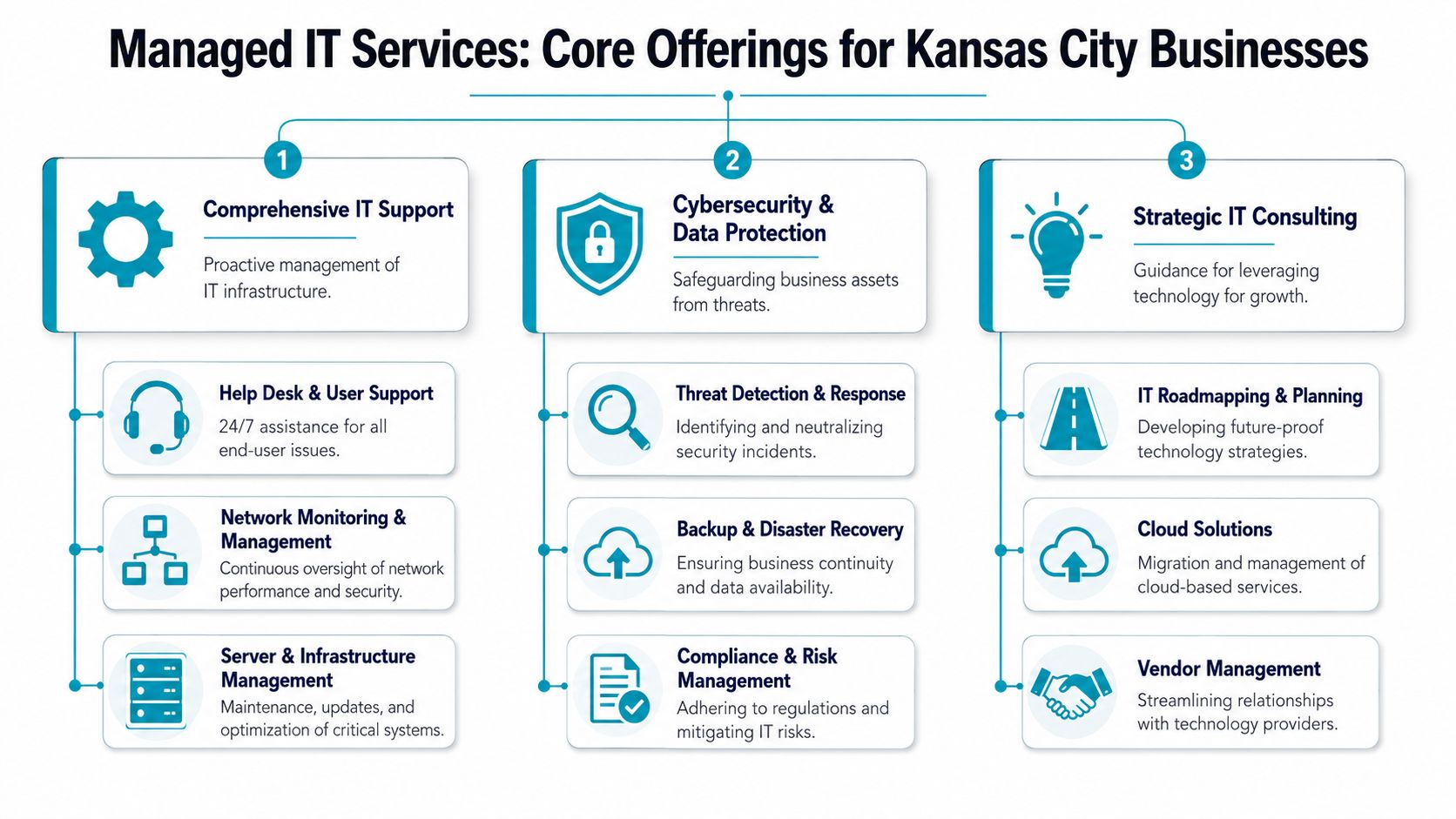
Proactive monitoring and incident response
The managed model starts paying off operationally at this stage. Kansas City providers commonly define managed services around proactive monitoring, automated patching, remote access, and rapid response
That sounds abstract until you map it to real work:
- A workstation starts failing patches: The issue gets flagged before the user reports wider problems.
- A server runs low on storage: Someone sees the trend and acts before applications stop writing data.
- A network device degrades: Monitoring catches the condition before staff start calling about slowness.
What doesn't work is "we'll wait until users complain." Once users feel the outage, productivity is already gone.
Help desk and end-user support
Help desk quality depends less on marketing promises and more on workflow discipline. Tickets need clear intake paths, prioritization, escalation rules, and ownership. If you're comparing service desks or trying to improve your internal process, it helps to compare ticketing platforms for modern communities and think beyond email inbox support.
A mature support operation should handle:
- Daily user friction: Password resets, application access, printer mapping, device enrollment
- Remote troubleshooting: Secure remote sessions for fast remediation
- Escalation discipline: Desktop issues shouldn't disappear into silence when they touch identity, networking, or cloud systems
Backup and disaster recovery
Backups are one of the most misunderstood line items in managed services. Many businesses hear "we have backups" and assume that means recovery is solved. It isn't.
A useful backup service includes more than scheduled jobs. It needs retention policy, offsite protection, restore testing, and a clear understanding of which systems matter most first. For virtualized environments, that usually means image-level protection for core servers plus file-level recovery options where appropriate.
Recovery planning is less about whether a backup exists and more about whether your team can restore the right system, in the right order, under pressure.
For infrastructure-heavy environments, dedicated virtualization platforms, backup appliances, and private cloud design start to matter.
Cybersecurity and hardening
A managed cybersecurity layer should reduce the chance that one compromised endpoint turns into a larger business interruption. That means security isn't just a product installed on laptops. It's a set of enforced controls across endpoints, servers, user accounts, email, and network boundaries.
Typical managed security work includes:
- Endpoint protection and patching: Closing common exposure points on workstations and servers
- Access control reviews: Reducing unnecessary privilege and tightening administrative paths
- Security policy enforcement: Standardizing encryption, updates, and account protection
- Awareness support: Helping staff recognize suspicious activity and report it correctly
For public-facing sites and hosted applications, secure hosting bundles can also play a role. Tools such as Imunify360, CloudLinux OS, and Webuzo are especially useful when the problem space includes website malware, account isolation, and simplified admin access.
Cloud and Microsoft 365 administration
Cloud management gets underestimated because cloud platforms feel self-maintaining. They aren't. Businesses still need account lifecycle controls, permission reviews, mailbox protection, shared data governance, and support for the growing sprawl of SaaS and line-of-business tools.
This is also where infrastructure decisions branch. Some workloads belong in Microsoft 365 or another SaaS platform. Others need a controlled virtual environment with full administrative access. A business running specialized applications may be better served by a KVM VPS, a bare metal server, or a dedicated Proxmox private cloud rather than forcing everything into a generic cloud tenant.
Servers, virtualization, and network management
This is the layer many SMBs ignore until it hurts. Firewalls, switching, Wi-Fi, host nodes, storage, virtualization clusters, and backup targets all need regular care. If your server estate includes aging hardware or a messy mix of virtual machines and cloud workloads, you want a provider that can work at the infrastructure level, not just remote into desktops.
One example is ARPHost, which offers managed options across VPS hosting, secure web hosting bundles, bare metal servers, Proxmox private clouds, colocation, and backup services. For businesses that need a partner to manage both user-facing support and the infrastructure underneath it, that breadth can be useful because it reduces handoffs between separate vendors.
Calculating the ROI of Managed Services for Your Business
The return on managed services usually shows up in places owners don't initially put on a spreadsheet. It's not only about replacing one IT invoice with another. It's about reducing interruption, avoiding tool sprawl, and letting staff do the work you employ them to do.

Start with the hidden costs
A reactive environment creates expenses that don't always get labeled as IT:
| Hidden cost area | What it looks like in practice |
|---|---|
| Downtime | Staff wait on login issues, file access problems, unstable apps, or network outages |
| Leadership distraction | Owners mediate vendor disputes, approve emergency purchases, and chase recurring fixes |
| Security drift | Devices miss updates, user permissions stay too broad, and backup standards become inconsistent |
| Tool duplication | Separate vendors sell overlapping support, security, backup, and monitoring products |
Those costs accumulate over time. They also hit unevenly, which makes them easy to underestimate. A business might tolerate small disruptions for months, then get forced into a rushed project after one preventable incident.
Resilience has financial value
One of the stronger business arguments for managed services is resilience. Stack consolidation around cloud, backup, and security services improves resilience because centralized monitoring, managed patching, and backup policy enforcement reduce downtime. Offsite and immutable backup planning also lowers recovery time objective risk after ransomware, hardware failure, or site loss, as outlined in this regional managed services discussion of backup and resilience.
That matters because recovery speed changes the economics of an incident. If systems are documented, monitored, and recoverable under a plan, interruptions tend to be smaller and more contained.
An MSP fee is easier to evaluate when you compare it against disruption avoided, not just labor replaced.
What good ROI usually looks like
The strongest ROI cases usually come from businesses in one of these situations:
- A growing team: Support demand is increasing, but not enough to justify building a larger internal department.
- A regulated or security-conscious client base: The business needs cleaner controls, better documentation, and faster answers to risk questions.
- Infrastructure that has become business-critical: Core apps, web systems, VoIP, file services, and remote access can no longer be managed casually.
This video gives a useful high-level framing for thinking about managed support as an operational decision, not just a technical one.
Why infrastructure depth changes ROI
A provider that can support hosted workloads, virtualization, backups, and network management from the same operational model usually creates less friction than a chain of disconnected vendors. That doesn't automatically mean one provider should do everything. It does mean ownership should be clear.
Why ARPHost excels here
- Managed infrastructure options: Businesses can align support with VPS, bare metal, private cloud, or colocation needs instead of forcing every workload into one pattern.
- 24/7 assistance: Chat, phone, and ticket support fits companies that can't wait until normal business hours to respond.
- Backup and migration support: That helps when ROI depends on making change safer, not just cheaper.
How Managed IT Services Pricing Works
Pricing is usually less mysterious than it first appears. The confusion comes from comparing plans that look similar on the surface but include very different levels of coverage underneath.
The three pricing patterns you'll see most often
Most managed it services kansas city proposals fall into one of these structures:
Per-user pricing
This works well when each employee uses multiple devices and cloud apps. The price tends to reflect the support burden tied to the person rather than each asset individually.Per-device pricing
This is common in environments with a mix of shared devices, servers, specialty systems, or operational technology. It can work well in warehouses, healthcare offices, and firms with front-desk or kiosk equipment.Tiered service plans
Some providers package services into levels. One tier may cover help desk and patching, while another adds security tooling, backup oversight, cloud administration, or after-hours support.
The right model depends on how your business operates. A law office with uniform laptops and Microsoft 365 use has different economics than a manufacturer with shared stations, servers, firewalls, and plant-floor systems.
What changes the price
Even without quoting exact numbers, these factors usually move a proposal up or down:
- Support scope: Are after-hours calls, on-site visits, and vendor coordination included?
- Security depth: Basic endpoint protection is different from a more layered security program.
- Compliance demands: Regulated environments need tighter controls, reporting, and process discipline.
- Infrastructure complexity: A simple office network costs less to manage than a hybrid estate with servers, hosted workloads, and site-to-site connectivity.
A useful way to compare options is to review sample structures like these managed services pricing models and then ask which functions are included versus billed as projects.
Why co-managed IT deserves more attention
Many Kansas City companies already have an IT manager, systems administrator, or operations lead. They don't need to outsource judgment. They need capacity, specialty expertise, or infrastructure support.
That's where co-managed IT fits. It lets internal staff keep ownership of the business-specific pieces while the outside provider handles selected functions such as server monitoring, patching, backup administration, firewall management, escalation coverage, or vacation backup.
A local gap in the market is that many providers focus on full outsourcing and don't explain hybrid models clearly. The co-managed model is a key solution for businesses that want to integrate managed services with existing staff and avoid duplicate tooling.
If your provider wants to replace your internal team instead of extending it, the fit may be wrong.
What does not work in pricing discussions
Two mistakes show up often.
First, buyers compare monthly fees without mapping who owns what. Second, they sign for broad "support" language and discover later that projects, security changes, and vendor coordination are outside scope.
A good proposal should answer these plainly: what is covered, what is excluded, which tools are replacing current tools, and where your internal team still leads.
Your Checklist for Choosing the Right KC IT Partner
A provider should be able to explain their operating model in plain English. If they can't, the service relationship usually gets harder after the contract is signed, not easier.

Ask about ownership and depth
Some firms are strong at end-user support but thin at infrastructure. Others can handle servers and hosting but don't run a disciplined support desk. You need to know which type you're talking to.
Use questions like these:
- Who owns the infrastructure relationship? If something fails in the stack, do they control the platform or escalate through several third parties?
- Can they support multiple deployment models? A provider should be comfortable with hosted virtual machines, bare metal, colocation, and cloud-connected environments when needed.
- How do they handle backup validation? Not just backup jobs, but restore readiness.
Test for operational maturity
You can usually tell within one conversation whether a provider runs on process or personality.
A mature partner should answer clearly on:
| Question | What a strong answer sounds like |
|---|---|
| How do you onboard a new client? | They describe discovery, documentation, access review, tooling alignment, and stabilization work |
| How are tickets prioritized? | They explain severity, escalation, and communication expectations |
| How do you reduce overlap with existing tools? | They review what you already own before forcing a replacement stack |
| What happens if we keep part of IT in-house? | They can describe co-managed boundaries without hesitation |
Probe the security layer
A lot of businesses ask only whether a provider "does cybersecurity." That's too vague. Ask what controls they manage directly, how incidents get escalated, and how often standards are reviewed.
Security should be managed as an operating process, not sold as a checkbox.
Watch for red flags
Some warning signs are obvious once you know to look for them:
- They avoid specificity: If everything is "custom" but nothing is documented, expect scope confusion later.
- They push one model only: Businesses with internal IT often need hybrid support, not a complete handoff.
- They can't discuss infrastructure choices: If your growth may require moving from simple hosting into virtualization, private cloud, or colocation, that limitation will surface later.
- They talk tools before business process: Good providers ask how your company works before prescribing software.
The simplest decision test
At the end of the evaluation, ask one practical question. If your primary IT contact left tomorrow, would this provider give you more stability or more dependency?
The right partner should leave you with cleaner documentation, better controls, and a more manageable environment. Not a black box.
Common Questions About Kansas City Managed Services
Can I use managed services if I already have an IT person
Yes. In many cases, that's the strongest use case.
A good managed relationship can take recurring operational load off an internal person or small IT team. That might include patching, backup oversight, hosted infrastructure, security monitoring, or after-hours response. Internal staff can then stay focused on business systems, department workflows, and projects that need company context.
What's the difference between managed IT and secure hosting
Secure hosting protects and operates the infrastructure where an application or website runs. Managed IT is broader. It can include help desk, endpoint standards, identity controls, network oversight, backups, cloud administration, and strategic planning.
If your main issue is a public-facing website or application stack, secure hosting may solve the immediate problem. If your issue is that the whole business depends on inconsistent technology practices, you need a wider managed service model.
How hard is it to switch providers
That depends on documentation quality and access hygiene.
Transitions are easier when systems are inventoried, admin credentials are controlled, backup jobs are documented, and vendor relationships are visible. They get harder when one outgoing provider owns every password, every tool, and all the historical knowledge. A careful onboarding plan should start with discovery, access review, and service stabilization before major changes are made.
Should every business fully outsource IT
No. Full outsourcing makes sense for some firms, especially smaller organizations without internal IT capacity. Other businesses do better with co-managed support.
The right model depends on where your internal knowledge is valuable. If your team understands your ERP, line-of-business apps, manufacturing systems, or compliance workflow better than any outside provider could, keep that ownership. Hand off the layers that benefit from standardization and constant operational attention.
What should I look for first in a provider
Look for clarity.
You want a provider that can define scope, explain escalation, discuss recovery priorities, and show how support connects to the infrastructure underneath. If those answers are vague during the sales process, they won't get clearer once service begins.
When does it make sense to add private cloud or bare metal instead of staying with shared tools
It makes sense when your workloads need more control, better isolation, or infrastructure that matches application requirements more closely. Shared platforms are fine for many use cases, but specialized apps, virtualization clusters, and recovery-sensitive workloads often need a more deliberate design.
That doesn't mean every company needs a private cloud. It means your provider should know when hosted SaaS is enough and when a virtualized or dedicated environment is the better operational choice.
If your business is weighing fully managed support, co-managed IT, secure hosting, or a more controlled server environment, ARPHost, LLC is one option to evaluate. The company provides managed IT, VPS hosting, bare metal servers, Proxmox private clouds, colocation, backups, and migration support, which makes it a practical fit for Kansas City businesses that need both day-to-day support and dependable infrastructure under the same umbrella.
