

If you're searching for managed it services fresno, you're probably not looking for a theory lesson. You're trying to stop the daily interruptions.
A controller can't print checks. The warehouse system slows down in the middle of receiving. Microsoft 365 permissions are a mess after an employee leaves. Backups exist, but nobody's sure whether they can successfully restore. Then a vendor says the firewall firmware is behind, your line-of-business app needs a server upgrade, and somehow that all lands on the owner, office manager, or the one internal IT person already stretched thin.
That pattern is common in Fresno businesses because operations here are practical and time-sensitive. Agriculture, logistics, healthcare, and field-service companies can't afford fuzzy accountability. They need systems that stay up, recover cleanly, and don't create more work every week.
Is Your Fresno Business Drowning in IT Problems
Most Fresno business owners don't wake up wanting to troubleshoot VPNs, patch servers, or chase down email delivery issues. But that's exactly what happens when technology is handled reactively.
A typical week looks familiar. Someone reports a slow workstation. Your file share starts lagging. A software update breaks a workflow nobody documented. Then a suspicious email hits accounting, and now you're deciding whether to call your copier vendor, your internet provider, your software company, or whoever set up the network years ago.

Fresno's market adds another wrinkle. Fresno County has only 3 active MSPs listed as of 2026, which makes it a concentrated local market for SMB support. That small provider pool can leave businesses choosing between legacy support models, limited specialization, or a provider that can handle desktops but not deeper infrastructure.
The real cost of bad IT isn't the invoice. It's the owner time, staff interruption, and stalled operations that follow every unresolved issue.
What this feels like inside the business
When IT is unstable, the symptoms show up outside the server room:
- Staff lose momentum: Employees stop trusting systems and create workarounds.
- Managers become dispatchers: They spend hours coordinating vendors instead of running departments.
- Projects get delayed: Cloud migrations, phone upgrades, and security improvements stay on the "someday" list.
- Risk gets normalized: Old backups, shared passwords, and unsupported hardware start to feel acceptable.
Managed services exist to stop that drift. Done well, they move IT from a string of interruptions to an operating discipline. That means documented systems, monitored infrastructure, controlled changes, and one team accountable for the environment instead of five vendors blaming each other.
Why Fresno businesses need a more modern model
Older support models were built around tickets and site visits. That still matters for some issues, but most business risk now sits in identity, endpoint security, cloud apps, backups, virtualization, and vendor coordination. A modern provider has to manage those pieces together, not treat them as separate problems.
For Fresno companies with branch offices, remote users, hybrid cloud apps, or compliance pressure, that's the difference between "we have IT support" and "our IT works effectively."
What Are Managed IT Services Really
Managed services aren't just outsourced helpdesk. They're an ongoing operating model for your technology.
The simplest way to think about it is this. A break-fix provider gets paid when something fails. A managed provider is supposed to keep failure from reaching users in the first place. That shift changes the incentives, the tooling, and the business outcome.
In Fresno, a standard managed IT engagement in 2026 typically includes user support, endpoint management, software patching, Microsoft 365 or Google Workspace administration, backups, core security controls, and network oversight. The point isn't just coverage. It's to reduce recurring issues and make the environment easier to operate.
Break-fix versus managed service
Here's the practical difference.
| Model | How it works | What usually happens |
|---|---|---|
| Break-fix | You call after something breaks | Problems repeat, documentation stays thin, priorities stay reactive |
| Managed service | Provider monitors, patches, secures, and supports continuously | Fewer recurring issues, cleaner accountability, steadier operations |
A lot of business owners think managed service means, "someone to call when a laptop fails." That's only one piece. A real plan also covers the systems behind the laptop: user identity, security policies, backup jobs, network dependencies, application access, and change control.
What you're actually buying
You're buying three things at once:
Operational coverage
Someone owns the day-to-day hygiene. Patches get reviewed and deployed. Accounts get audited. Backup failures get noticed.Technical depth
You gain access to skills that most SMBs can't justify hiring full-time, especially around Microsoft 365, virtualization, security tooling, and disaster recovery.Planning discipline
Good providers don't just close tickets. They identify recurring failure points, aging hardware, risky permissions, and upcoming projects before they become urgent.
Practical rule: If a provider only talks about response time and never talks about standards, documentation, patching, backup testing, or roadmap decisions, you're not buying managed service. You're buying outsourced chaos.
A strong engagement also fits different staffing models. Some Fresno businesses need a full external IT department. Others have an internal admin or operations lead and need co-managed support for escalation, platform management, and strategic projects. That's where service design matters more than marketing.
If you want to compare what a structured engagement should include, review the scope on managed IT services for businesses. Use it as a checklist, not as a slogan.
The Core Components of a Modern Managed Service Plan
The words "fully managed" don't mean much unless you can see the operating layers underneath. A modern plan has to monitor systems continuously, secure them aggressively, protect data in a way that's recoverable, and still handle user support without turning every request into a project.
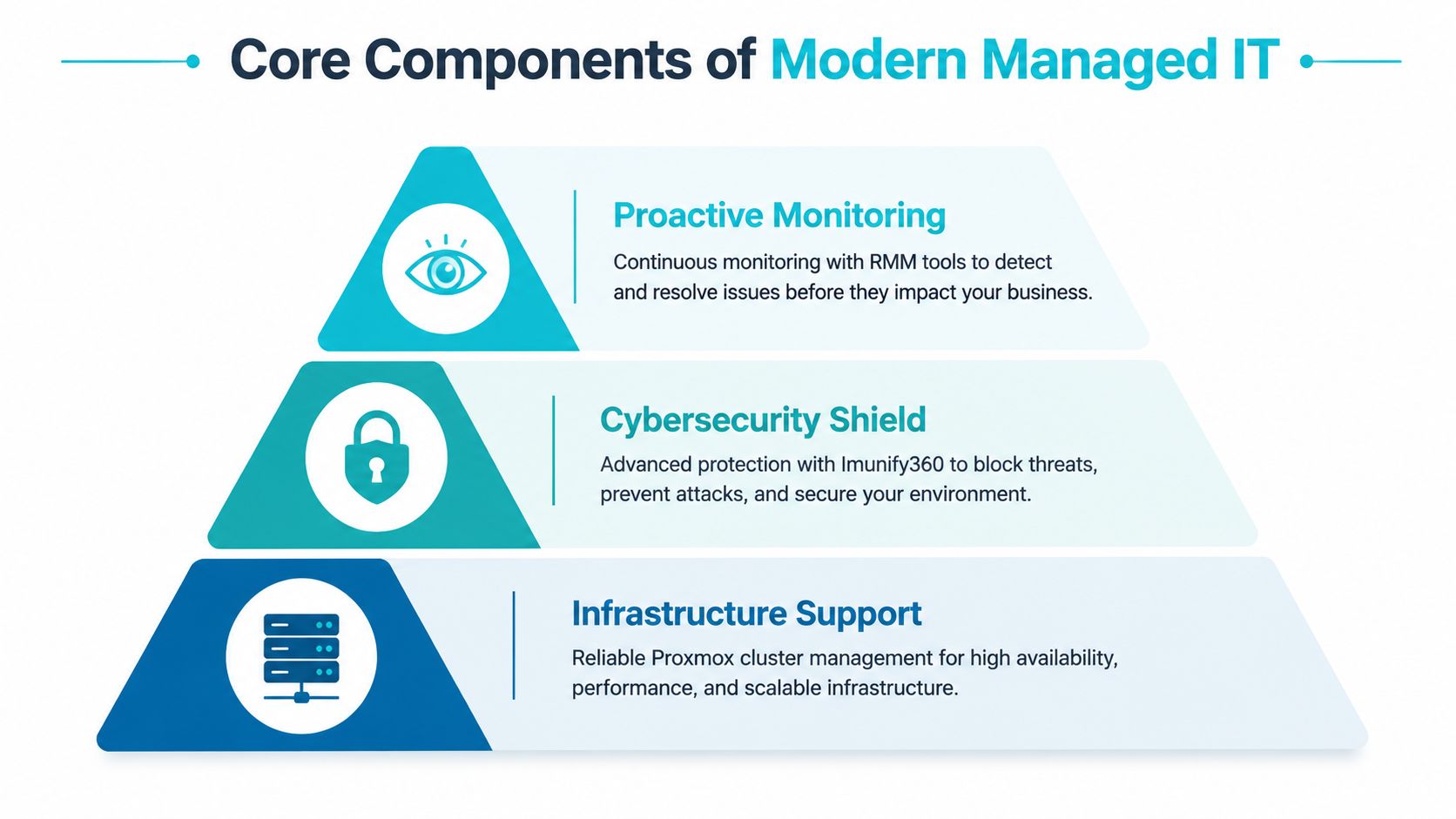
Proactive monitoring that catches issues early
Remote Monitoring and Management, usually shortened to RMM, is one of the most important layers in managed services. It uses agent-based monitoring to collect telemetry from endpoints and servers so the provider can see failing services, abnormal resource usage, patch drift, and hardware health before users feel the impact.
Industry benchmarks cited in this managed IT overview note that RMM can detect issues 72 to 96 hours before users are impacted and can reduce unplanned outages by 40% to 60% when it catches anomalies like high CPU use or latency spikes early. In practice, that means a technician should be responding to warning signs, not waiting for your accounting team to report that "the server feels weird."
What works:
- Threshold-based alerting: CPU, memory pressure, disk health, failed services, and patch compliance should create meaningful alerts.
- Escalation rules: A failed backup on a test box isn't the same as a failed line-of-business database backup.
- Noise control: Too many alerts train teams to ignore the important ones.
What doesn't work is a monitoring stack that sends thousands of notifications nobody triages.
If you want to understand the tooling side, RMM tools for MSP operations are the backbone that turns support from reactive to disciplined.
Cybersecurity that protects the whole environment
Security isn't a separate add-on anymore. It's part of the base service.
That starts with endpoint protection, but it doesn't end there. Good managed security includes patching, MFA enforcement, firewall policy review, suspicious activity investigation, email security, account offboarding, and segmentation where needed. For businesses running hybrid infrastructure, the provider also needs to understand where identities live, how remote access is controlled, and which systems can talk to each other.
A lot of Fresno SMBs now have mixed environments. Some users live in Microsoft 365. Some apps still run on local servers. Some websites sit on VPS or bare metal platforms. Security has to cover all of it.
A firewall won't save a business from weak identity controls, and endpoint software won't fix an exposed admin workflow. Security fails at the seams.
Backup and recovery that assumes something will fail
Backups are often described as if the job ends when data is copied somewhere else. It doesn't. The critical test is whether the business can restore quickly, cleanly, and with the right order of operations.
For infrastructure-heavy environments, immutable backups matter because they make it much harder for ransomware or human error to tamper with restore points. That's especially useful for virtual machines, application servers, and web workloads running in Proxmox or similar platforms. In those cases, snapshot discipline, backup retention, off-platform storage, and restore testing all matter more than the dashboard saying "successful."
This is also where automation pays off operationally. Standardized patching, onboarding, backup checks, and workflow triggers free up internal staff for revenue-producing work. The business side of that is well explained in how automation improves cash flow, especially for companies trying to reduce avoidable manual overhead.
Support that users will actually use
The final layer is still human support. Users need fast help with access issues, application errors, new device setup, and the small daily blockers that kill productivity.
The mistake many providers make is treating helpdesk as the whole service. It isn't. Helpdesk is the visible tip of the system. The deeper value comes from the standards behind it.
A useful plan should include:
- Clear ticket ownership: Users shouldn't have to chase updates.
- Documented environments: Support quality improves when systems, credentials, and dependencies are organized.
- Vendor coordination: Your ISP, phone vendor, copier vendor, and software vendor won't coordinate themselves.
One provider model that fits infrastructure-led businesses is ARPHost, which offers managed services around servers, monitoring, patching, troubleshooting, and hosted environments including VPS, bare metal, and Proxmox-based infrastructure. That kind of stack is often a stronger fit for companies that need both user support and deeper platform management.
Local Presence vs Global Expertise in Fresno
A Fresno business owner usually asks a fair question first. Do I want someone local who can drive over, or a specialist who can manage more of the environment remotely?
The answer depends on what causes your outages and risk. For most businesses in 2026, the highest-impact issues aren't physical. They're tied to identity, patching, firewall policy, cloud administration, virtualization, backup integrity, and application dependencies. Those problems are solved with expertise and process first, not mileage.
Where local support still matters
There are cases where local presence helps:
- Hands-on hardware work: Failed switches, office moves, cabling changes, and workstation swaps still benefit from on-site support.
- Multi-site coordination: A provider familiar with your locations can simplify vendor visits and local logistics.
- User-facing change events: New office openings, wireless redesigns, or phone rollouts often go smoother with someone physically present.
Those are real advantages. They just aren't the whole story.
Where specialized remote expertise matters more
For Fresno businesses in logistics and healthcare, security architecture often matters more than having a truck nearby, EDR agents paired with managed firewalls can block 98% of exploits and reduce breach probability by 75%, which is especially relevant for regulated data and hybrid cloud workloads. That kind of outcome depends on stack design, policy quality, and ongoing management.
A generalist local MSP may be fine for desktop support and basic Microsoft 365 administration. But if your environment includes virtualized workloads, hosted websites, on-prem servers, SIP services, or a move from legacy VMware into Proxmox, you need a provider that understands infrastructure thoroughly.
The best fit isn't the closest office. It's the team that can secure, recover, and scale the systems you actually depend on.
Here's the trade-off in plain terms:
| Option | Strength | Limitation |
|---|---|---|
| Local-only MSP | Easier on-site dispatch, local familiarity | May be shallow on private cloud, bare metal, or migration work |
| Remote infrastructure specialist | Deeper platform knowledge, stronger scalability | May require scheduled remote-hands support for physical tasks |
| Hybrid partner model | Strong remote engineering plus coordinated on-site work | Requires clear ownership and documentation |
If your business runs modern workloads, the winning model is often hybrid. Use specialists for the systems that carry the most risk and operational weight. Treat geography as one factor, not the deciding factor.
Understanding Managed IT Services Pricing
Pricing confuses a lot of business owners because two providers can describe "managed services" in similar language while including very different levels of work.

In Fresno, market benchmarks for 2026 show providers commonly charging $100 to $199 per hour with minimum project sizes from $1,000 to $5,000+, depending on provider profile and engagement scope, as summarized in this Fresno pricing and provider overview. Those numbers don't tell you the whole story, but they do tell you one thing clearly. Expertise and scope vary, and cheap support often excludes the hard parts.
Common pricing models
Most quotes fall into one of these structures:
- Per-user pricing: Good for office-centric teams where each employee uses a similar set of tools.
- Per-device pricing: Better when shared workstations, servers, firewalls, and specialty equipment drive support load.
- Tiered plans: Useful if you want a base package for support and patching, then separate tiers for security, backup, compliance, or after-hours coverage.
The problem isn't the model itself. The problem is hidden exclusions.
A low quote may leave out backup testing, firewall management, security tools, server patching, after-hours response, vendor coordination, or cloud tenant administration. Then the "affordable" plan turns into change orders and emergency invoices.
What to compare besides the monthly number
Before you sign, compare these items line by line:
- Security stack included: Is endpoint protection bundled, optional, or absent?
- Backup scope: Are servers, Microsoft 365 data, and critical endpoints all covered?
- Infrastructure coverage: Does the provider manage only desktops, or also hypervisors, firewalls, switches, and hosted workloads?
- Escalation depth: Who handles complex issues involving virtualization, storage, or migration work?
For a quick visual explanation of pricing differences, this video is useful:
Transparent infrastructure pricing also helps. If you know exactly what a VPS, bare metal node, secure hosting bundle, or private cloud resource costs, it's easier to separate hosting charges from management charges and avoid bundled mystery math.
Your Checklist for Choosing the Right MSP
Most MSP sales conversations sound polished. That's why the right questions matter more than the polished answer.
A strong provider should be able to explain its operating model in technical terms, not just promise "fast support." If you're evaluating managed it services fresno options, use the checklist below during discovery calls and insist on direct answers.
MSP Vetting Checklist
| Area of Concern | Question to Ask | Why It Matters |
|---|---|---|
| Recovery planning | What recovery time objective do you commit to for a full server failure? | This tells you whether the provider has a real disaster recovery process or just generic backup language. |
| Backup integrity | How do you verify backups are restorable, and how often do you test restores? | A backup that hasn't been tested is a hope, not a recovery plan. |
| Patch management | What is your process for critical security patches on endpoints, servers, and firewalls? | You want a disciplined workflow, not ad hoc updates after a scare. |
| Security tooling | Which endpoint detection or protection platform do you use, and is it included in the agreement? | Security add-ons can create major gaps if they're sold separately and never deployed. |
| Identity management | Who manages onboarding, offboarding, MFA enforcement, and admin role review? | Most business risk now touches identity, not just hardware. |
| Virtualization expertise | Do you actively support Proxmox, VMware, Hyper-V, or mixed virtual environments? | If your workloads are virtualized, platform depth matters immediately during outages and migrations. |
| Network ownership | Do you manage firewalls, switches, wireless, and vendor coordination? | Problems often sit at the boundary between providers. Someone needs clear ownership. |
| Documentation | What documentation do you maintain for systems, vendors, licenses, and recovery procedures? | Good support gets faster and safer when the environment is documented. |
| Escalation path | Who handles complex incidents after hours? | A vague after-hours model usually becomes a slow response when the issue is serious. |
| Co-managed fit | How do you divide responsibilities when we already have an internal IT person? | You need a clean line between internal work and provider responsibility. |
What strong answers sound like
Good answers are specific. The provider should explain alerting, escalation, patch approval, backup retention, restore testing, firewall change control, and how tickets move from helpdesk to engineering.
Weak answers sound broad. "We handle that." "It depends." "We'll be there when needed." Those aren't operating details. They're placeholders.
Ask the provider to walk through a real incident. A failed server, a compromised account, a broken VPN, or a failed backup job. The quality of that answer tells you more than the sales deck ever will.
The questions most buyers forget
A few issues get skipped too often:
- Vendor coordination: Who owns the call when your software vendor blames the firewall and the firewall vendor blames the server?
- Asset lifecycle: How do they identify aging hardware or unsupported systems before failure?
- Change control: What happens before they push updates to critical systems?
- Exit readiness: If you leave, will documentation and configs be portable, or are you locked into their stack?
If a provider handles those well, you're dealing with an operator, not just a ticket desk.
Why ARPHost is the Modern Choice for Fresno
A lot of traditional MSPs were built around endpoint support first. That works for password resets, workstation issues, and routine user requests. It becomes less effective when the business depends on virtual infrastructure, hosted applications, web workloads, private cloud resources, and predictable recovery from real incidents.
That gap matters more now because ransomware recovery expectations are changing, Central Valley ransomware incidents surged 42% year over year, yet many local providers still don't offer quantifiable recovery guarantees. The same source notes that top-tier providers globally target an RTO of under 4 hours, which highlights how weak vague "on-site when needed" language really is when a business is down.
Where an infrastructure-led model fits better
An infrastructure-focused provider is a better fit when your environment includes any of the following:
- Virtualized application stacks: Especially if you're evaluating Proxmox as an alternative to older VMware-heavy environments.
- Performance-sensitive workloads: ERP systems, databases, ecommerce sites, and internal business apps that need dedicated resources.
- Hybrid hosting needs: Some workloads on-prem, others on VPS, bare metal, colocation, or a private cloud.
- Recovery-sensitive operations: Businesses that need immutable backups, clearer restoration order, and stronger disaster planning.
That model lines up well with companies that need VPS hosting, secure web hosting bundles, bare metal servers, dedicated Proxmox private clouds, colocation, instant application deployment, and fully managed IT services under one operating umbrella.
What a modern stack should include
Instead of treating hosting, infrastructure, and support as separate vendors, the stronger design is integrated:
Core workloads on stable infrastructure
Use the right platform for the job. VPS for flexible application hosting, bare metal for dedicated performance, and private cloud where isolation and cluster-level control matter.Immutable backup strategy
Recovery depends on backups that are protected from tampering and tested against real restoration scenarios.Managed security at the system edge
Firewalls, endpoint protection, patching, and account controls need to work as one security system, not separate products.Migration support when legacy platforms stop making sense
VMware-to-Proxmox migrations, consolidation projects, and hosting redesigns should be planned as operational changes, not rushed infrastructure swaps.
For Fresno businesses that have outgrown generic MSP support, that's the practical difference. You don't just need someone to answer tickets. You need a provider that understands the systems your business runs on.
Frequently Asked Questions
Can you manage my existing on-premise servers in Fresno
Yes, if the provider supports hybrid environments. That usually means deploying monitoring agents, reviewing backup jobs, documenting dependencies, and then managing those servers alongside cloud or hosted systems. The key is clear ownership over patching, alerting, security, and escalation.
What does onboarding usually look like
A solid onboarding process is phased. It starts with discovery and documentation, then moves into agent deployment, access review, backup validation, and baseline cleanup. After that, the provider should standardize alerting, ticket flow, and responsibility boundaries so nothing falls between teams.
I only have a small team. Do managed services still make sense
Yes. Small businesses often benefit the most because they can't afford repeated downtime or one-off security mistakes. Even a lean team can justify managed support when email, files, phones, accounting systems, or customer-facing websites are critical to daily work.
What if I already have an internal IT person
That's often the best use case for co-managed support. Internal staff can keep control of business-specific applications and daily priorities, while the provider handles monitoring, patching, security tooling, backups, documentation, and after-hours escalation.
If your business needs a clearer plan for support, recovery, hosting, or infrastructure modernization, talk with ARPHost, LLC about a practical assessment. They can help evaluate hybrid environments, managed server needs, secure hosting options, and Proxmox-based private cloud paths without forcing a one-size-fits-all MSP model.
