

If you're running a business in Fort Lauderdale, there's a good chance your IT only gets attention when something breaks. Email stalls. A line-of-business app freezes. Backups are assumed to exist until someone tries to restore one. Meanwhile, you're still paying for software, hardware, support hours, and emergency fixes without a clear picture of what any of it is doing for uptime or risk reduction.
That model gets expensive fast. It also leaves you exposed at the worst moments, especially when your business depends on cloud apps, stable internet, secure endpoints, and systems that can't go down during the workday. In South Florida, where storm planning and continuity matter, reactive support isn't just inefficient. It's operationally weak.
Managed IT services fort lauderdale firms rely on are built around a different idea. Keep systems monitored, patched, secured, backed up, and documented continuously so fewer issues reach users in the first place.
Moving Beyond Break-Fix IT Support
Break-fix support sounds simple. Something fails, you call someone, they fix it, you pay the invoice. For very small environments, that can limp along for a while. For any business with shared files, cloud platforms, phones, compliance requirements, remote staff, or customer-facing systems, it creates long gaps between problem detection and action.
A better model starts with one question. What would it cost your business if a preventable outage happened on a busy day? That cost usually isn't limited to IT labor. It spills into payroll, client confidence, delayed billing, missed calls, and management distraction.
What changes when support becomes proactive
Managed services replace sporadic intervention with ongoing operations. That means systems are watched continuously, routine maintenance gets scheduled, endpoint health is reviewed, patches are applied deliberately, and backup status isn't treated like an assumption.
In practical terms, the shift looks like this:
- Before users complain: Monitoring tools catch storage pressure, failed services, certificate issues, or unhealthy endpoints before they turn into tickets.
- Before attackers exploit gaps: Patch windows, endpoint controls, and access reviews close holes that break-fix shops often only see after an incident.
- Before a crisis becomes chaos: Recovery priorities, documentation, and escalation paths are defined in advance.
Practical rule: If your IT provider mostly appears after a failure, you're not buying resilience. You're buying repair.
For business owners who still need hands-on, local response, it's worth seeing how providers structure that piece.
What to expect from a real operating partner
A solid provider shouldn't just answer tickets. They should reduce how often those tickets happen and make the remaining ones easier to resolve because your environment is documented and managed as a system.
That usually includes:
- Baseline assessment of users, devices, network gear, backups, and critical applications.
- Operational standards for patching, endpoint protection, admin access, and alerting.
- Business alignment so IT decisions support staffing plans, growth, compliance pressure, and continuity goals.
If you're evaluating a move away from reactive support, start with a provider that handles business IT support as an ongoing service instead of a queue of isolated incidents.
What Modern Managed IT Services Include
The Fort Lauderdale market has moved well past ad hoc support. Local providers commonly position managed IT as a layered operational stack that includes 24/7 monitoring, proactive maintenance, remote and on-site support, network management, endpoint management, cloud backups, disaster recovery, cybersecurity, and compliance assistance, and that continuous telemetry plus automated patching helps reduce the time needed to detect and remediate faults before they cause outages, as described by Ciegate's overview of managed IT services in Fort Lauderdale.
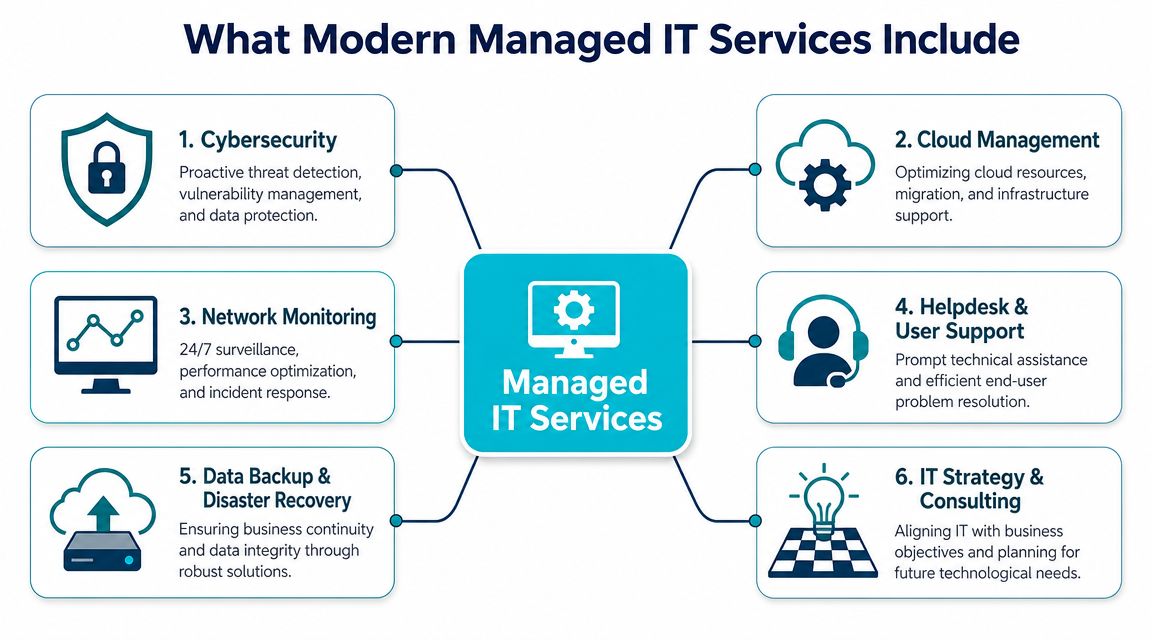
That stack matters because each layer covers a different failure mode. Helpdesk alone doesn't protect you from ransomware. Antivirus alone doesn't validate backups. Backups alone don't fix bad network design.
The core layers that actually matter
Monitoring and maintenance sit at the base. Servers, workstations, network equipment, and business-critical services need health checks, alerting thresholds, patch workflows, and firmware oversight. Without that discipline, teams operate blind until a user notices a problem.
Cybersecurity is the next layer, and it needs to be broader than one endpoint tool. In real environments, that means endpoint protection, mailbox security, access control, firewall policy review, vulnerability reduction, and hardening for internet-facing systems.
Backup and disaster recovery are where many providers overpromise. A backup job showing "success" doesn't mean recovery will be clean. A serious MSP validates retention, restoration order, off-site protection, and recovery paths for both files and full systems.
Infrastructure management is where depth shows
This is the dividing line between basic support shops and technically capable partners. It's one thing to reset passwords and deploy laptops. It's another to manage virtualization hosts, storage performance, private cloud capacity, firewall rules, and recovery design across hybrid infrastructure.
A mature service provider should be comfortable with environments such as:
- Bare metal servers for workloads that need dedicated resources or licensing isolation
- Virtual machines on KVM or Proxmox for predictable multi-workload hosting
- Private cloud clusters where high availability, snapshots, and controlled growth matter
- Secure web hosting bundles for websites, email, databases, and admin tooling that need hardening and managed oversight
Good managed service isn't a pile of tools. It's a control system for risk, performance, and recoverability.
One practical example is ARPHost, which provides managed infrastructure options that span VPS hosting, secure web hosting bundles, bare metal servers, dedicated Proxmox private clouds, colocation, and fully managed IT services. That kind of stack can simplify accountability because the team supporting the environment can also support the underlying platform.
Why infrastructure ownership changes support quality
When a provider has direct control over hosting platforms and core systems, troubleshooting tends to be faster and cleaner. You don't get as much finger-pointing between the hosting vendor, the MSP, the firewall provider, and the backup vendor. For business owners, that usually means less time spent mediating technical disputes and more confidence that someone owns the outcome.
The Business Case for Outsourcing IT in Fort Lauderdale

Outsourcing IT isn't about giving up control. It's about putting the right controls in place without building a full internal department around every specialty. For many Fort Lauderdale companies, that's the only realistic way to get disciplined support across infrastructure, security, backups, and vendor management at the same time.
The local market itself supports that view. Managed IT services in Fort Lauderdale are part of a mature provider market. Some local firms state they've supported businesses in Fort Lauderdale and Broward County for over 24 years and focus on organizations with 10 to 400 employees, which signals that this isn't a niche model for tiny startups but a standard operating approach for established SMBs and mid-market companies, as shown by Network Computer Pros' managed IT services in Fort Lauderdale.
Hurricane season changes the continuity conversation
In South Florida, continuity planning can't stop at antivirus and cloud apps. You need to know where your backups live, how quickly key systems can be restored, what happens if an office is unavailable, and whether your internet, phones, file access, and remote workflows still function under disruption.
For many companies, outsourcing helps because the provider has already built the operating discipline around:
- Off-site backups that aren't dependent on one office
- Restore testing for the systems you can't afford to guess about
- Hybrid infrastructure choices that can split risk across locations
- Clear recovery priorities so payroll, communication, and client systems come back in the right order
A lot of businesses don't need a massive cloud transformation. They need a realistic continuity design that works when weather, power, or facility access become the immediate problem.
Compliance pressure is broader than regulated industries think
Healthcare, finance, legal, marine operations, and professional services all face some version of the same issue. Sensitive data lives across email, endpoints, file shares, SaaS platforms, and mobile devices. If those systems aren't managed coherently, compliance becomes guesswork.
Outsourcing gives smaller organizations access to process maturity they often can't staff internally. That includes documented patching, access reviews, endpoint standards, and backup controls.
This video gives a useful overview of how businesses think about managed support and continuity:
Outsourcing works best when the provider doesn't just answer tickets. They standardize your environment so support, security, and recovery stop fighting each other.
Decoding Managed IT Pricing and Service Tiers
Most business owners ask the pricing question too late. They compare proposals after they've already accepted different assumptions about what's included. That's how one quote looks cheaper until you discover backups, after-hours support, vendor coordination, or security tooling are outside the base agreement.
At a market level, managed services are clearly not a fringe category. The global managed services market reached $344.4 billion in 2024 and is projected to reach $834.7 billion by 2032, according to managed services market statistics compiled by Market.us. That growth tracks with what buyers now expect locally: not just helpdesk, but coverage across data center, network, and backup or recovery functions.
The common pricing models
Most MSP agreements fall into a few structures:
- Per user works well when employees use multiple devices and shared cloud platforms. It aligns cost with headcount.
- Per device fits environments with fixed assets, kiosks, shared workstations, or operational equipment.
- Tiered bundles package a baseline of support and security with optional add-ons for compliance, cloud administration, or strategy.
- Hybrid pricing combines a recurring managed fee with project work for migrations, major upgrades, or office moves.
If you want a clearer picture of how providers package those options, review these managed services pricing models before comparing quotes.
What usually separates one tier from another
The issue isn't price alone. It's scope. A low-cost agreement may only cover remote support during business hours. A strategic agreement usually includes planning, lifecycle recommendations, security administration, backup oversight, and regular reporting.
| Service Level | Typical Inclusions | Estimated Cost/User/Month | Best For |
|---|---|---|---|
| Basic | Helpdesk, reactive support, limited device oversight, basic onboarding/offboarding | Varies by provider and scope | Very small firms with simple environments |
| Proactive | Monitoring, patching, endpoint management, backup oversight, security tooling, vendor coordination | Varies by provider and scope | SMBs that need stable daily operations |
| Strategic | Proactive services plus planning, infrastructure roadmap, policy guidance, compliance support, leadership reporting | Varies by provider and scope | Growing firms with multiple systems, locations, or compliance pressure |
What works and what doesn't
What works is transparent scoping. You should know whether the monthly fee includes server administration, Microsoft 365 support, firewall changes, after-hours incidents, procurement guidance, and backup testing.
What doesn't work is buying the cheapest bundle and assuming it includes strategic coverage. It usually doesn't.
For some companies, the right entry point isn't full end-user outsourcing at all. It may be managed infrastructure first, such as a secure VPS for an internal application, a dedicated private cloud for consolidation, or colocation for hardware that can't stay in-office. That approach can control cost while still improving resilience.
Your Vendor Selection Checklist Questions to Ask
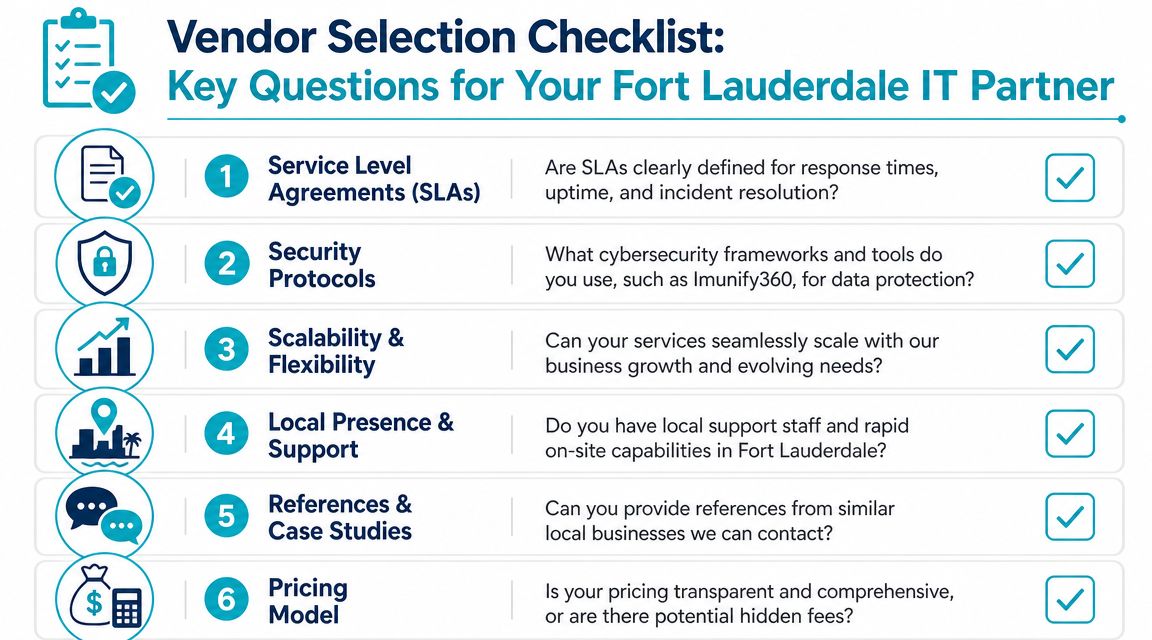
Most MSP sales calls sound polished. That doesn't tell you how they'll handle a failed restore, a firewall misconfiguration, or a messy tenant migration. You need questions that force operational detail into the open.
Ask about service accountability first
Start with the agreement, not the tool list. Ask to see response commitments, escalation rules, and what counts as covered support.
Use questions like these:
- What are your response and resolution targets for different incident severities?
- What support is available after hours, on weekends, and during major weather events?
- What work is included in the recurring agreement, and what triggers project billing?
A provider that's comfortable with clarity won't dodge those questions. You should also review the actual managed IT services agreement language before signing anything.
Push on security and recovery details
Weak providers default to vague phrases. Don't let them.
Ask directly:
- Which endpoint, email, and firewall controls do you manage day to day?
- How do you verify backups are recoverable, not just completed?
- What is your process for handling a compromised account or suspicious endpoint behavior?
- Do you harden hosted web workloads with tools such as Imunify360 where applicable?
If a provider can explain detection, containment, restoration, and communication in plain language, that's a good sign. If they retreat into buzzwords, keep looking.
Test for infrastructure depth
Not every MSP can support modern virtualization, private cloud design, or hybrid hosting decisions. If your business runs line-of-business apps, remote desktops, specialized databases, or multiple sites, ask harder questions.
Examples:
- Do you support Proxmox, VMware, KVM, or mixed virtualization environments?
- Who manages host updates, storage health, and failover planning?
- Can you support bare metal, colocation, and cloud-hosted workloads under one operating model?
- How do you document dependencies between internet, phones, servers, backups, and third-party apps?
The best vendors answer with process, not slogans.
Onboarding and Migrating to a New IT Partner
Switching providers makes business owners nervous for good reason. A bad transition can break trust, interrupt operations, and expose undocumented systems that no one touched for years. A good transition does the opposite. It surfaces hidden risk early and puts controls in place without creating chaos for staff.
The sequence that keeps migrations under control
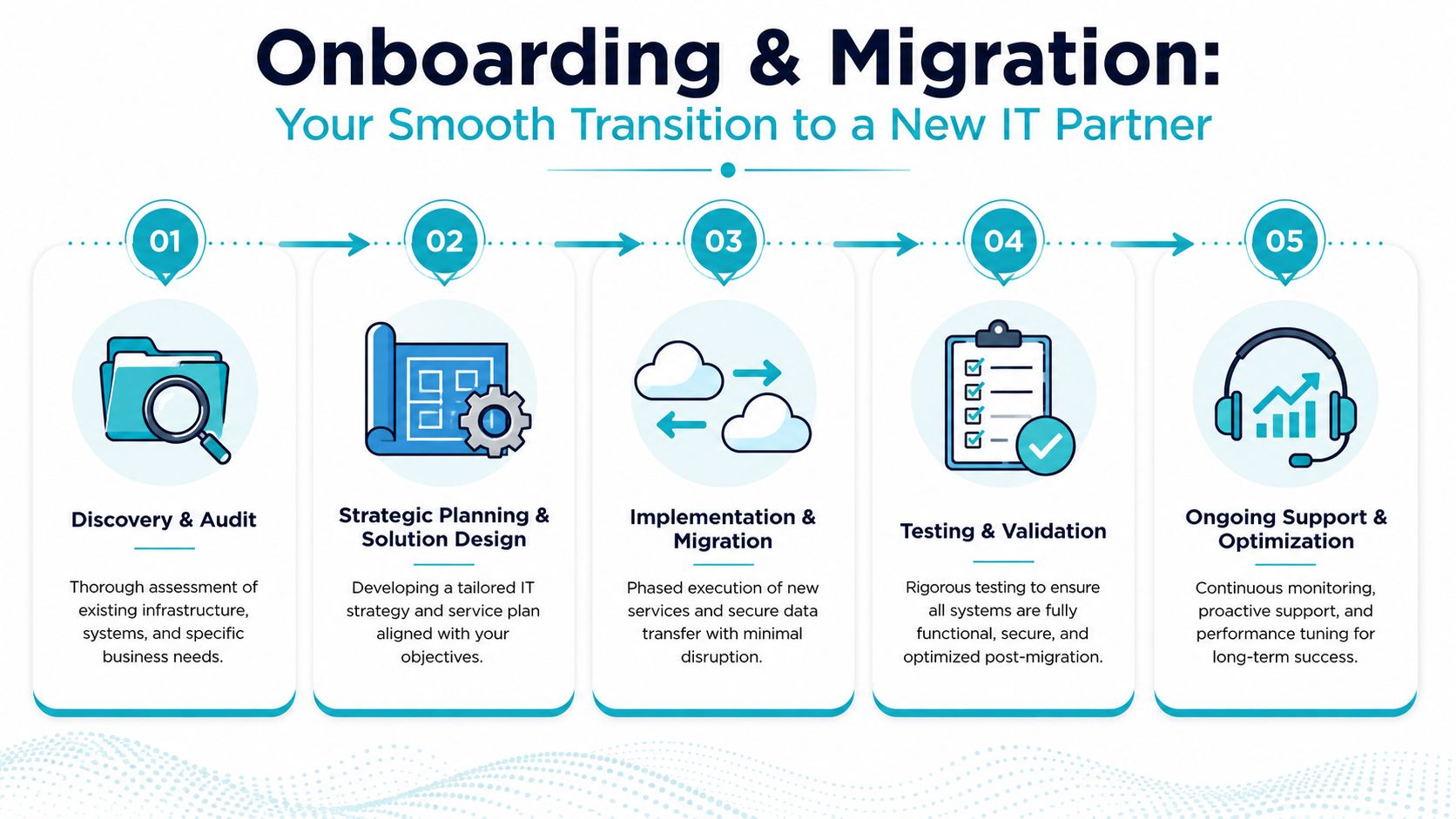
A disciplined onboarding process usually follows five phases.
Discovery and audit. The incoming team reviews users, endpoints, servers, cloud tenants, admin accounts, backup jobs, firewall rules, vendors, and line-of-business dependencies. The point isn't just inventory. It's identifying what can break.
Planning and solution design. After discovery, the provider maps immediate fixes, deferred improvements, and migration priorities. During this stage, businesses decide whether to keep legacy systems in place, move workloads to a virtualized cluster, or split services across hosted and on-prem resources.
Implementation and migration. Good teams move in phases. They stabilize the current environment first, then transition monitoring, patching, security controls, backups, and infrastructure with change windows that fit the business.
What a smooth handoff actually requires
The overlooked part of onboarding is validation. Every migrated workload should be tested, not assumed healthy because it powered on.
That usually means:
- Credential control is transferred and documented
- Monitoring and alerts are confirmed on every critical asset
- Backup and restore checks are run against production priorities
- User support paths are communicated so staff know where to go on day one
A provider earns trust during onboarding by finding fragile systems before they fail, not by promising the transition will be effortless.
For more complex environments, this may include moving VMware workloads into a Proxmox-based private cloud, separating public-facing services onto hardened hosting, or relocating sensitive systems onto dedicated hardware. The technical path varies. The discipline shouldn't.
Frequently Asked Questions About Fort Lauderdale IT Services
Can I use an MSP if I already have an in-house IT person
Yes. In many businesses, the right model is co-managed IT. Your internal person keeps ownership of user relationships, business applications, and day-to-day priorities, while the external partner handles monitoring, patching, backup oversight, infrastructure administration, and escalation support.
That arrangement works especially well when your internal staff is strong on support but stretched on security, cloud platforms, or server operations.
Can a managed provider support my industry-specific software
Usually, yes, but its true value is often in supporting the environment around the software. A provider may not write or customize your vertical application, but they can manage the servers, storage, virtualization, backups, network performance, access control, and vendor coordination that keep it stable.
That's often the difference between "the app is down" and "the app vendor, host platform, and internal users are all working from the same documented system."
What should I look for in managed IT services fort lauderdale providers
Look for operational clarity. You want a provider that can explain support scope, security responsibilities, backup validation, escalation paths, and infrastructure capabilities without evasive language.
Also check whether they can support where you're going, not just where you are now. A company that only handles desktop support may struggle once you need private cloud hosting, dedicated servers, hardened web hosting, or colocation.
How long does onboarding usually take
It depends on how complex your environment is and how well your current systems are documented. Small, standardized environments move faster. Older businesses with multiple vendors, inherited servers, and incomplete credential records take longer.
The right provider won't rush the assessment just to make the sales cycle feel easy.
Do I need to move everything to the cloud
No. Many Fort Lauderdale businesses are better served by a hybrid design. Some workloads belong in SaaS platforms. Some belong on dedicated infrastructure. Some need private virtualization, local performance, or stricter control over recovery and access.
The right answer is based on application fit, security, continuity, and supportability. Not trend chasing.
What's the biggest mistake businesses make when changing IT providers
They focus on the monthly fee and ignore the operating model. Cheap support that doesn't include documentation, security discipline, tested backups, and infrastructure accountability often costs more after the first serious issue.
The better question is whether the service reduces risk and improves uptime in a way your business can feel.
If you want a practical review of your current environment, ARPHost, LLC can help you map support gaps, hosting dependencies, backup exposure, and migration options across managed IT, VPS, bare metal, private cloud, colocation, and secure web hosting. That kind of assessment is often the fastest way to decide whether your current setup is protecting the business or just keeping it running until the next problem.
