

A lot of nonprofit leaders are dealing with the same pattern right now. The donor database slows down the week before a campaign. Shared files live in too many places. Staff members keep asking who to call when email breaks, the copier stops scanning, or a board member can't log in from home. Nothing feels catastrophic until one day it is.
That reactive pattern costs more than most boards realize. It pulls program staff into troubleshooting, delays fundraising work, and creates unnecessary risk around donor, volunteer, and financial records. The issue usually isn't negligence. It's that nonprofits depend heavily on technology while operating with tight staffing and tight budget controls.
Managed IT services for nonprofits is the practical answer when an organization needs reliable systems but can't justify building a deep internal IT department. The important question isn't whether outside help is useful. It's how much of your environment should be outsourced, what should stay in-house, and how to avoid paying for more service than you require.
From Crisis Management to Mission Enablement
A familiar nonprofit failure looks like this. A fundraising campaign goes live, online donations start coming in, and the CRM integration fails. Receipts don't send. Staff members start exporting spreadsheets by hand. Leadership asks whether donor data is safe, while the only "IT person" is also the operations manager who already has five other priorities.
That is what a break-fix model produces. IT gets attention only when something breaks badly enough to interrupt work. The nonprofit doesn't really have an IT strategy. It has a series of emergencies.

Why nonprofits end up here
For many organizations, the constraint is structural, not temporary. A 2023 nonprofit technology staffing report found that small nonprofits spend about 13.2% of the total budget on IT, while larger nonprofits average around 2.8%, which shows why smaller teams often struggle to justify a full internal IT department even as their dependence on technology grows.
That gap shapes every decision. Boards want careful stewardship. Executive directors want to protect program budgets. Development teams need stable tools but don't want infrastructure spending to overshadow mission work.
What managed services changes
Managed services changes the operating model. Instead of waiting for failures and paying unpredictably for cleanup, the organization moves core IT into a planned operating expense with defined support, monitoring, maintenance, and security responsibilities.
That matters at the board level because the conversation changes from "Why are we spending money on IT?" to "What level of technology support protects fundraising, finance, and service delivery?"
Practical rule: If your staff only notices IT when something is broken, you're already paying for under-management. You're just paying through interruptions, workarounds, and risk instead of a clear service agreement.
What mission enablement actually means
Mission enablement isn't abstract. It means staff can access the systems they need. Donor records stay available and protected. Online giving pages remain reliable. Financial systems work during audits, grant reporting, and board review cycles. New staff onboarding doesn't turn into a scavenger hunt for passwords and old laptops.
A good managed service relationship doesn't make technology flashy. It makes technology boring in the best possible way. Stable. Predictable. Accountable.
That is usually the primary goal for a nonprofit. Not more technology. Better control over the technology it already depends on.
The Strategic Benefits of Proactive IT Management
Nonprofits don't need IT for its own sake. They need it because nearly every mission activity now runs through systems that can fail, drift out of date, or become insecure if nobody is actively maintaining them.
The strategic value of managed services comes from replacing reactive support with continuous oversight. A nonprofit-focused analysis from Prelude Services notes that a major driver of adoption is that MSPs provide the expertise and infrastructure of a full in-house IT department, including 24/7 support and enterprise-grade tools for a predictable monthly fee, while improving data protection and lowering operating costs through that model of support.
Protecting sensitive donor and operational data
Most nonprofits hold more sensitive data than they sometimes admit in board discussions. Donor records, payment workflows, grant files, volunteer details, HR records, and beneficiary information often live across email, cloud storage, accounting systems, and web apps.
When those systems aren't monitored and patched consistently, risk piles up over time. Old user accounts stay active. Shared folders become too broad. Staff work around access problems by downloading data locally. A proactive provider reduces that exposure by managing endpoint protection, access controls, update cycles, and security tooling as a routine discipline instead of a post-incident scramble.
Keeping fundraising and service delivery online
Downtime isn't just inconvenient. It interrupts donations, communications, reporting, and service coordination. If your website is down during a campaign, or email authentication breaks before a major announcement, the problem hits both revenue and trust.
A proactive model treats uptime as an operational requirement. Systems are watched, alerts are reviewed, backups are verified, and recurring issues get fixed at the root instead of reopened every month. That is the difference between support that closes tickets and support that stabilizes the environment.
Reliable IT is part of program delivery now. If staff can't access systems, the mission slows down with them.
Giving staff their time back
One of the least discussed benefits is focus. Program directors shouldn't be resetting laptops. Development teams shouldn't be diagnosing inbox issues. Finance teams shouldn't be guessing whether a failed sync is harmless or a compliance problem.
A well-run managed environment gives staff a clear support path and gives leadership visibility into what is being maintained behind the scenes. That improves decision-making because technology becomes something the organization can plan around instead of fear.
Why ARPHost excels here
For nonprofits that need hands-on infrastructure support, ARPHost provides managed services for servers, networks, patching, monitoring, security updates, and troubleshooting, alongside infrastructure options such as VPS hosting, secure web hosting bundles, bare metal servers, and private cloud environments. That matters when a nonprofit wants one provider to handle both the systems layer and the hosting layer, rather than splitting accountability between several vendors.
If your current setup includes aging virtual machines, scattered website hosting, and no consistent monitoring, consolidating those responsibilities can simplify support and reduce finger-pointing when incidents happen.
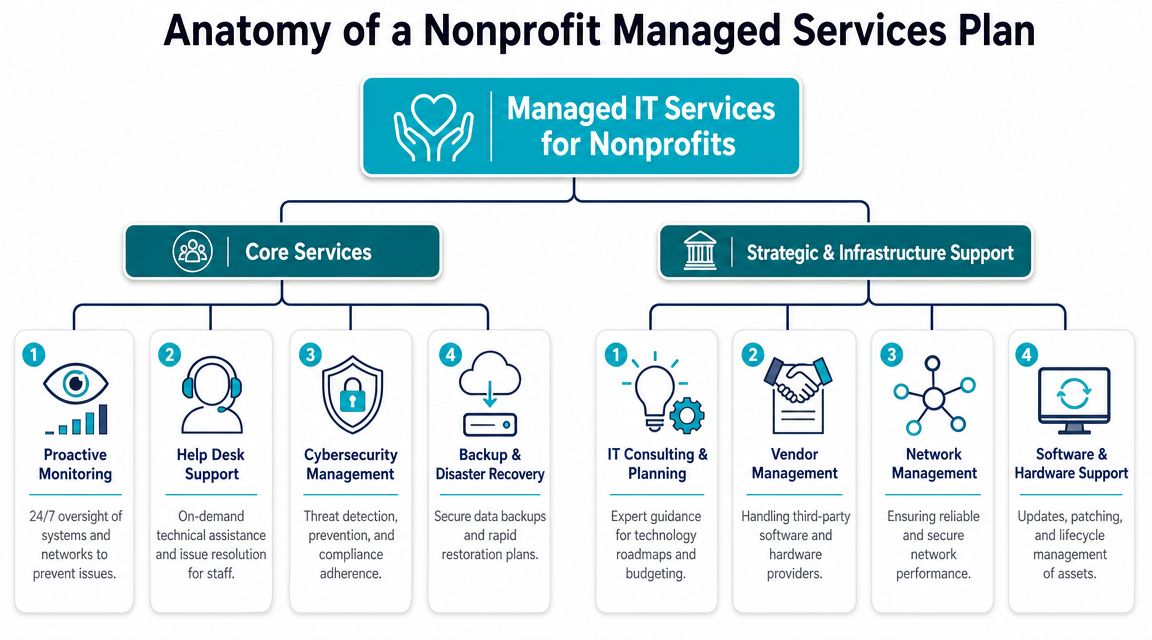
Anatomy of a Nonprofit Managed Services Plan
A managed services agreement shouldn't be a vague promise to "handle IT." It should define what gets monitored, what gets secured, what gets backed up, who supports users, and who helps leadership make decisions about the next year instead of only the next outage.
At a technical level, one major differentiator in nonprofit MSP engagements is cybersecurity and compliance hardening. Nonprofits handle donor and financial data, so managed services commonly bundle monitoring, compliance support, and secure cloud infrastructure to reduce risk and avoid unnecessary capital spending.
Security controls that should be standard
If a proposal barely mentions security, treat that as a warning. For nonprofits, this layer isn't optional because donor trust is tied directly to how records, payment workflows, and staff access are protected.
Look for these elements:
- Endpoint protection: Laptops and desktops need centrally managed antivirus, threat detection, and policy enforcement.
- Firewall and network management: The provider should manage rule reviews, secure remote access, and network segmentation where appropriate.
- Patch management: Operating systems, third-party software, and server workloads need scheduled updates with testing and rollback planning.
- Access hygiene: User onboarding and offboarding should be documented, especially for staff turnover, contractors, and board transitions.
If your nonprofit runs donation pages, member portals, or content-heavy websites, secure hosting also matters. A bundle that includes isolation, malware scanning, and hardened web hosting controls is often more useful than generic low-cost hosting.
Backup and disaster recovery
Many nonprofits say they have backups when what they really have is a sync folder and hope. Those are not the same thing.
A usable backup and disaster recovery plan should answer a few operational questions:
- What is being backed up
- Where it is stored
- How restores are tested
- Who approves recovery decisions during an incident
- Which systems come back first
A provider should also distinguish between file restoration, full server recovery, and cloud application protection. If your accounting system, donor platform exports, and internal file shares all have different recovery methods, someone has to own that map.
Infrastructure and hosting choices
Managed IT services for nonprofits become highly practical under these circumstances. Not every organization needs the same hosting model.
A few common fits:
| Environment need | Typical fit |
|---|---|
| Public website, email, small app footprint | Secure web hosting bundle or VPS |
| Legacy business app that needs dedicated resources | Bare metal server |
| Multiple virtual workloads, isolation, admin control | Proxmox private cloud |
| Existing hardware with specialized compliance or locality needs | Colocation |
For nonprofits with mixed workloads, a private cloud can be useful because it gives more control over segmentation, snapshots, and VM administration than shared environments. A team comparing options can review ARPHost's managed IT and infrastructure services to see how managed support can pair with hosted infrastructure rather than treating them as separate purchases.
User support and leadership support
End-user help desk matters, but it isn't enough on its own. Many nonprofits buy support for tickets and forget to buy support for planning.
A sound plan should include both:
- Help desk support for staff: Password resets, workstation issues, software problems, onboarding, and day-to-day troubleshooting.
- Strategic advising: Budget planning, license review, vendor coordination, hardware refresh timing, and risk prioritization.
- Vendor management: Someone needs to own escalations with the donor CRM, accounting software provider, ISP, copier vendor, and web developer.
- Documentation: Password escrow procedures, asset inventory, network maps, admin roles, and service account ownership should all be written down.
If your provider can't explain who owns vendor coordination and documentation, you don't have a managed plan. You have outsourced ticket resolution.
Matching Pricing Models to Your Nonprofit Budget
Pricing conversations often go wrong because nonprofits compare monthly numbers without comparing scope. A lower quote can be more expensive in practice if key items are excluded, response times are vague, or every project becomes a separate bill.
The better way to assess managed it services for nonprofits is to match the pricing model to your operating reality. How stable is your user count? How much internal technical capacity do you already have? Do you need strategic guidance, or just occasional hands-on help?
Managed IT Pricing Model Comparison for Nonprofits
| Model | Budget Predictability | Best For.. | Potential Downside |
|---|---|---|---|
| Flat-fee | High | Organizations that want broad coverage, routine support, and fewer billing surprises | May include services you don't use if scope isn't tailored well |
| Per-user or per-device | Moderate to high | Teams with fairly consistent staffing and standard endpoints | Can get messy if shared devices, seasonal staff, or mixed environments aren't defined clearly |
| A la carte or block hours | Low to moderate | Small nonprofits with limited day-to-day needs and occasional project work | Encourages reactive support and can make urgent issues more expensive |
When flat-fee works best
Flat-fee pricing usually fits nonprofits that want stability. If you need help desk coverage, patching, monitoring, security management, and regular oversight, a fixed monthly agreement is often easier to budget and easier to explain to a finance committee.
It also reduces internal friction. Staff don't hesitate to open a ticket because they worry about every small request being billable.
When per-user or per-device makes sense
This model can work well when the environment is standardized. If most employees use similar laptops, the same productivity stack, and the same support patterns, per-user pricing is straightforward.
It gets harder when the nonprofit has rotating volunteers, shared kiosks, temporary campaign staff, or a mix of office and field devices. In those cases, make sure the proposal defines exactly what counts as a billable user or managed device.
Where block hours still have a place
Block hours aren't always wrong. They can fit organizations with a capable internal operations lead, very low ticket volume, and a narrow need for outside support. For example, you might only need occasional firewall work, a server maintenance window, or project support during an office move.
The risk is behavioral. Block-hour arrangements often preserve the old habit of waiting too long to ask for help.
A pricing model should support the behavior you want. If you want preventive maintenance, don't choose a contract that rewards postponing maintenance.
A useful step before signing anything is to compare proposals against a clear service matrix instead of cost alone. If your board or leadership team needs a framework for that review, ARPHost publishes a page on managed services pricing models that can help structure the conversation.
How to Choose the Right IT Partner A Checklist
The first decision isn't which provider to hire. It's which support model fits your nonprofit.
A lot of organizations jump straight to full outsourcing because their current setup feels chaotic. That can be the right move, but not always. A nonprofit-focused review from Greystone Technology makes an important point: the key question is when outsourcing is less affordable than a hybrid model, and in many cases the best fit is a managed provider for core infrastructure like security and backups while an internal staff member handles program-specific apps and vendor management.

Step one decides the model
Use these decision cues before you issue an RFP or request proposals:
- Choose full MSP support if your organization has no real internal IT ownership, recurring operational issues, and no one who can manage vendors or security decisions consistently.
- Choose a hybrid model if you already have an operations or systems lead who understands your workflows and can own application decisions, but needs outside expertise for infrastructure, monitoring, backup, and security.
- Choose selective project help if your environment is simple, your support needs are infrequent, and your biggest gaps are one-time projects rather than daily operations.
That single choice prevents a lot of overspending. It also prevents the opposite mistake, which is buying too little support and leaving the hardest work on staff who were never hired to manage risk.
Provider checklist for boards and executive directors
When you interview providers, don't stop at "Do you support nonprofits?" Ask questions that expose how they think.
Use a checklist like this:
- Ask about ownership boundaries: Who handles user support, vendors, renewals, backups, and security incidents?
- Ask about nonprofit software reality: Have they worked around donor systems, grant reporting workflows, accounting restrictions, and line-of-business applications that cannot be easily replaced?
- Ask about offboarding discipline: How do they remove access for former employees, contractors, and board members?
- Ask about escalation paths: Who responds after hours, who makes decisions during an outage, and who speaks to leadership?
- Ask about documentation: Will you receive current asset inventories, admin access records, backup maps, and change logs?
- Ask about flexibility: Can they support a hybrid arrangement without trying to take over every function?
A practical RFP outline
A short, well-written RFP usually gets better responses than a giant generic questionnaire. Include these sections:
Organization profile
Mission, team size, locations, remote work profile, major systems, and any seasonal staffing patterns.Current environment
Workstations, servers, cloud tools, websites, line-of-business apps, phone systems, and known pain points.Required services
Help desk, monitoring, backups, cybersecurity, vendor management, strategic planning, cloud hosting, network support.Preferred support model
Full MSP, hybrid, or project-based.Governance expectations
Reporting cadence, leadership meetings, documentation requirements, incident communication, and approval workflows.Transition requirements
Discovery process, onboarding expectations, migration handling, and support during cutover.
If you want to tighten expectations around service boundaries and accountability, it's worth reviewing what a strong managed IT services agreement should cover before you compare vendors.
The right provider doesn't just answer technical questions. They help you define which responsibilities should stay inside your organization and which ones should move out.
The Onboarding and Migration Timeline What to Expect
Many nonprofit leaders delay needed IT changes because they're worried the transition itself will create more disruption than the current problems. That fear is reasonable. A rushed migration can break access, confuse staff, and expose data if ownership isn't clear.
A disciplined onboarding process does the opposite. It reduces uncertainty by moving from discovery to implementation in controlled stages. The operational value of managed IT comes from making technology proactive. MSPs continuously monitor systems, apply updates, and back up data to prevent downtime before it occurs, which is especially important for nonprofits with limited internal staff.
Phase one through phase three
The first phase is discovery and assessment. The provider inventories users, devices, servers, websites, cloud services, admin roles, backup status, and major business workflows. This is also where they find hidden problems, such as former staff accounts, unsupported software, or systems nobody officially owns.
The second phase is solution design. Support responsibilities are assigned, priorities are ranked, and the migration sequence is planned. If the nonprofit is moving workloads to hosted infrastructure, the provider now decides what stays where, what gets modernized, and what should be retired instead of carried forward.
The third phase is implementation and migration. Good providers don't move everything at once. They stage changes, validate access, test backups, and schedule cutovers around operational calendars such as campaign launches, board meetings, and finance deadlines.
Phase four and phase five
The fourth phase is training and go-live. Staff need new support procedures, clearer access workflows, and simple instructions for who to contact and when. Training doesn't have to be elaborate, but it does need to be intentional.
The fifth phase is ongoing optimization. During this stage, managed service value becomes visible over time. Repeated issues are documented and corrected. Patch cycles become routine. Backup alerts are reviewed. Leadership gets a clearer picture of which systems are stable, which are risky, and what should be budgeted next.
What your nonprofit should do during onboarding
The nonprofit side of the process matters just as much as the provider side. Assign an internal decision-maker, even if they aren't technical. That person should approve changes, coordinate with department heads, and help resolve questions about software ownership, user access, and timing.
Keep the initial scope tight. Stabilize the essentials first: identity and access, endpoints, backups, servers, websites, email, and core data systems. Expansion can come later.
Your Next Steps and Frequently Asked Questions
A familiar nonprofit scenario goes like this. A staff member cannot access the donor system on the morning of a campaign launch. The part-time IT contact is unavailable. Nobody is sure whether the problem sits with Microsoft 365, a password policy, a laptop, or the vendor. At that point, the question is no longer whether IT matters. A key question is how much operational ownership your organization needs, and who should hold it.
That is the decision to make next. Technology now sits inside fundraising, finance, programs, volunteer coordination, and public trust. Nonprofits do not all need the same support model, though. Some need a full managed services provider. Some do better with a hybrid structure where an internal operations lead works with an outside partner. Others only need selective help for infrastructure, security, backups, or escalation support. The right choice depends on risk tolerance, internal capacity, and total cost over time, not on whichever package sounds the most complete.
Common questions boards and leadership teams ask
What's the difference between an MSP and a freelance IT consultant
A freelance consultant usually fits project work, specialized advice, or occasional troubleshooting. An MSP takes responsibility for ongoing operations such as monitoring, patching, backups, endpoint management, user support, documentation, and incident response.
That difference matters to boards because continuity has a cost. A single consultant can be a good fit for a small, stable environment, but that person can also become a coverage gap if they are unavailable or if the environment grows more complex.
Can we still use nonprofit software discounts and donated tools
Usually, yes. A good provider should evaluate what you already have before recommending changes.
The larger question is whether those discounted tools are easy to support, secure enough for the data involved, and compatible with the rest of your stack. I have seen nonprofits save money on licensing and spend more in staff time, workarounds, and preventable support tickets. A lower subscription price does not always mean a lower total cost of ownership.
How does an MSP help with compliance and grant requirements
An MSP supports the operating discipline behind compliance. That often includes access controls, audit logs, backup verification, device standards, change tracking, and clearer procedures for handling sensitive records.
Your nonprofit still owns governance decisions. The provider helps you carry them out consistently, which is often where smaller organizations struggle.
What should we bring to the first conversation with a provider
Bring a current list of users, devices, locations, major software systems, websites, and vendors. Include the problems that keep recurring, any recent outages or security scares, and the calendar realities that affect timing, such as board meetings, audits, campaigns, and year-end finance work.
That gives the provider enough context to recommend the right level of outsourcing instead of defaulting to a generic proposal.
Should hosting and managed services come from the same provider
Sometimes that simplifies support. One provider can own infrastructure, backups, performance, and troubleshooting without finger-pointing between vendors.
Sometimes separation makes more sense, especially if a line-of-business application has strict hosting requirements or a specialized vendor relationship. The better question is not whether everything sits under one contract. It is whether each critical system has a clearly assigned owner, a support path, and documented accountability.
Start with the operating model you need. Full MSP, hybrid support, or selective help. Then ask providers to price and explain that model clearly, including what stays in-house, what they own, and what will still require staff time.
If your nonprofit needs a clearer plan for infrastructure, hosting, or day-to-day IT ownership, ARPHost, LLC offers options ranging from managed IT support and secure VPS hosting to secure web hosting bundles, bare metal servers, and Dedicated Proxmox private clouds. If you would rather start with a scoped discussion than commit to a broad engagement, a practical next step is to contact ARPHost about your current environment and support model.
