

Think of your company's IT infrastructure like a high-performance engine. The old "break-fix" model is like waiting for that engine to seize up on the highway before calling a tow truck. It’s chaotic, expensive, and brings everything to a screeching halt. In contrast, Managed IT services for businesses are your dedicated pit crew—constantly monitoring, tuning, and optimizing your Proxmox VE clusters, bare metal servers, and network devices to prevent failures before they happen.
Shifting from Reactive Repairs to Proactive Strategy
The real difference between outdated IT support and modern managed services comes down to a fundamental shift in mindset. Instead of treating technology as a series of fires to put out, a Managed Service Provider (MSP) sees your infrastructure as a critical asset that needs constant, proactive care to fuel your growth. It’s about moving from playing defense to playing offense with your technology stack.
This proactive approach is catching on, and fast. The U.S. managed services market is expected to hit $69.55 billion by 2025 and is on track to soar to $116.25 billion by 2030. This boom is driven by businesses needing to lock down increasingly complex IT environments—from private clouds to hybrid deployments—and get the most out of their cloud investments. You can get a clearer picture of this trend from the latest MSP statistics.
Before we dive deeper, let’s clear up how this model stacks up against a traditional internal team.
Comparing In-House IT vs Managed IT Services
The decision between building an in-house team and partnering with an MSP often comes down to cost, expertise, and focus. An internal team offers dedicated, on-site presence but often comes with higher overhead and a narrower skill set. An MSP provides a broad team of specialists in areas like Proxmox VE, Juniper networking, and bare metal solutions, typically for a predictable monthly fee.
| Aspect | In-House IT Team | Managed IT Services (MSP) |
|---|---|---|
| Cost Structure | High fixed costs (salaries, benefits, training, tools). Unpredictable project costs. | Predictable monthly subscription fee. Economies of scale reduce tool costs. |
| Expertise & Skills | Limited to the knowledge of hired staff. Can be a single point of failure. | Access to a diverse team of certified specialists (security, cloud, networking). |
| Availability | Typically 8/5 business hours. 24/7 coverage requires expensive shift staffing. | 24/7/365 monitoring and support is standard for most providers. |
| Proactive vs Reactive | Often overwhelmed with daily tickets, leaving little time for strategic planning. | Built on proactive monitoring, maintenance, and prevention to minimize downtime. |
| Tools & Technology | Requires significant capital investment in monitoring and security software. | Leverages enterprise-grade tools across all clients, making them affordable. |
| Strategic Focus | Pulled in multiple directions; focus can shift from strategic projects to daily fixes. | Focuses on optimizing infrastructure, allowing your team to focus on business goals. |
Ultimately, the right choice depends on your business’s unique needs, but an MSP model is designed to align technology performance directly with your business success.
The Core Philosophy of Managed Services
At its heart, the managed services model is built on alignment. Your MSP only succeeds if your systems are running smoothly. If you're experiencing downtime, they're not doing their job. This shared goal creates a true partnership, where your provider is constantly motivated to improve performance, tighten security, and boost reliability.
This proactive approach is built on a few key pillars:
- Continuous Monitoring: Using advanced tools to keep a 24/7 watch on servers, networks, and applications. This helps spot red flags—like failing hardware or unusual network traffic—long before they can cause an outage. For example, a monitoring agent might trigger an alert if a Proxmox cluster node's CPU usage remains above 90% for more than 10 minutes, indicating a potential performance bottleneck.
- Preventative Maintenance: This involves systematically applying security patches, updating software, and optimizing configurations to keep everything healthy and secure. A practical example is scheduling quarterly firmware updates for all Juniper network devices to mitigate known vulnerabilities.
- Strategic Planning: An MSP acts as your technology advisor, offering expert guidance on your tech roadmap, budgeting, and adopting new solutions like Proxmox VE private clouds or securing Juniper network devices to support your long-term goals.
A partnership with a quality MSP transforms your IT from a cost center focused on repairs into a strategic asset focused on innovation and uptime. It’s about ensuring the technical foundation is not just stable but also optimized for future growth.
This model frees up your internal team to stop firefighting and start focusing on high-value initiatives that actually move the needle. With the technical grunt work handled by specialists, your organization is in a much better position to innovate, scale, and compete.
The Building Blocks of a Managed Services Partnership
A solid managed IT partnership is built on a handful of core, proactive services. These aren't just checklist items; they're the engine that shifts your IT from a reactive, break-fix model—where you're always putting out fires—to one that’s predictive and strategic. It's about preventing problems before they start, locking down your data, and squeezing every ounce of performance out of your tech stack.
This is the fundamental shift we're talking about: moving from chaos to control.
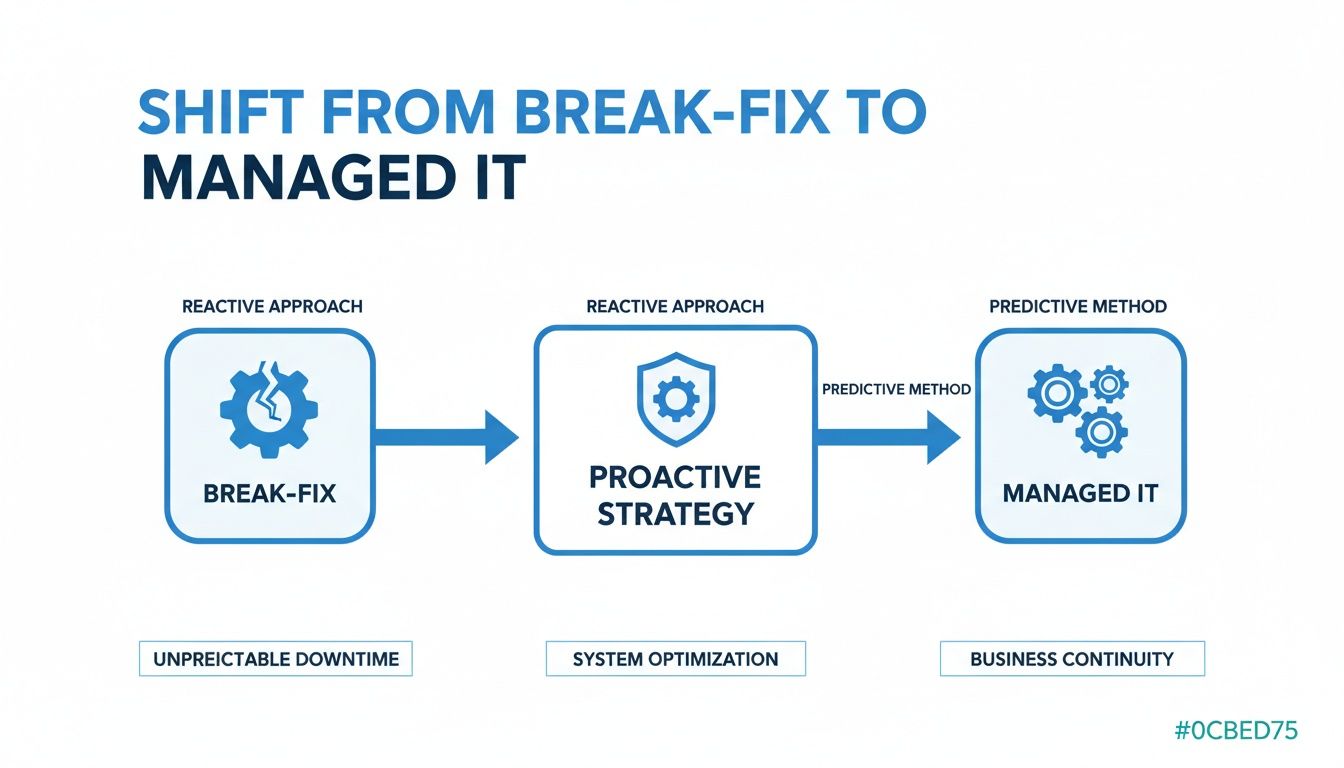
You’re essentially trading unpredictable downtime and emergency invoices for planned maintenance and strategic oversight. The end game? Uninterrupted business continuity.
24/7 Proactive Infrastructure Monitoring
The bedrock of any managed service is constant vigilance. Think of it as a digital nervous system for your infrastructure, using automated tools to keep an eye on everything from your Proxmox VE clusters and Juniper network devices down to individual KVM virtual servers. It senses trouble long before it escalates into a full-blown crisis.
Instead of waiting for an email saying "the server is down," monitoring agents track key metrics in real-time—CPU usage, memory, disk I/O, network latency, you name it. The moment a metric crosses a set threshold, like a storage volume on a Proxmox host hitting 85% capacity, an alert fires. This gives our technicians the heads-up to step in, add more storage, and completely sidestep an outage that would have otherwise brought your applications to a grinding halt.
A Best-Practice Patch Management Workflow
Let's be blunt: unpatched software is an open invitation for cyberattacks. A disciplined, structured patch management workflow isn't just nice to have; it's non-negotiable for keeping your environment secure. The goal is to get security updates tested and rolled out systematically, with as little disruption as possible.
A workflow that actually works has a few key stages:
- Identification: We're constantly scanning for new security patches for your operating systems, applications, and network gear like your Juniper routers. For example, a newly discovered vulnerability in the Junos OS would immediately be flagged for action.
- Staging and Testing: Before a critical patch ever touches your live systems, it's deployed to a non-production, sandboxed environment that mirrors your setup. This is where we make sure the update doesn't cause conflicts or tank performance.
- Scheduled Deployment: Once it's validated, the patch is scheduled for deployment during a planned maintenance window—usually well outside of business hours to avoid messing with your team's workflow. We might use an automation tool like Ansible to deploy the patch across an entire server fleet simultaneously.
- Verification: After the rollout, we double-check that everything is patched correctly and running smoothly, closing the loop and documenting the update.
This turns patching from a frantic, reactive chore into a strategic security function.
Practical Backup and Disaster Recovery Planning
A Backup and Disaster Recovery (BDR) plan is your company’s insurance policy against a catastrophic data loss. But a plan on paper is useless. A practical BDR strategy involves clear goals, regular drills, and technology you can count on. Strong managed services partnerships are built on core strategies that include the optimal resource allocation for your IT environment, ensuring your tech assets are always working at their full potential.
Here are the essential components of a BDR plan that won't fail you:
- Defining RTO and RPO: Your Recovery Time Objective (RTO) is the absolute maximum downtime your business can stomach. Your Recovery Point Objective (RPO) is the maximum amount of data you can afford to lose, measured in time. For a critical database, you might set an RPO of 15 minutes and an RTO of 1 hour.
- Automated Backups: We set up automated, versioned backups for your most important systems, like the VMs in your Proxmox private cloud, and store them securely in geographically separate locations. For instance, using Proxmox Backup Server to create incremental, deduplicated backups to an offsite location.
- Simulated Recoveries: This is the most crucial part. We regularly run drills, like a test recovery of a critical KVM virtual machine to a secondary site. We time the process to ensure we can hit your RTO and verify every bit of data is intact.
A BDR plan is only as good as its last test. Simulated recoveries prove the strategy works, so when a real disaster hits, your team and tech are ready to respond predictably and effectively.
Layered Security and Proactive Threat Hunting
Finally, a truly comprehensive security strategy goes beyond just putting up a wall. It involves multiple layers of defense and an active hunt for hidden threats. Managed firewalls on your Juniper devices are the first line, controlling traffic flowing in and out of your network with best-practice rules.
Endpoint protection takes it a step further by installing advanced anti-malware and detection software on every server and workstation. This software is always looking for suspicious activity, like unusual file changes or network connections on a bare metal server.
But the most advanced layer is proactive threat hunting. This isn't automated; it's a hands-on process where security analysts dig through logs and network data, searching for the subtle clues—Indicators of Compromise (IOCs)—that automated tools often miss. By actively hunting for anomalies, they can find and neutralize stealthy threats before they do real damage, securing your business from the inside out.
How Managed Services Create Strategic Value
Signing on with a Managed Service Provider (MSP) is about more than just handing off your daily IT headaches. It’s a strategic move that fundamentally changes how your business operates and invests in technology. The real magic happens when you stop spending money reacting to problems and start investing it proactively to fuel growth.
This is a complete shift in mindset. You break free from the chaotic cycle of surprise hardware failures, emergency repair bills, and the crippling cost of downtime. Instead, you get a predictable monthly fee that covers everything from routine maintenance to advanced security, turning a volatile cost center into a stable, budget-friendly expense.
Calculating the Total Cost of Ownership
It’s a common mistake to just compare an in-house IT salary to an MSP’s monthly fee. A true Total Cost of Ownership (TCO) analysis tells a much bigger story. An internal IT team comes with a ton of hidden expenses that go way beyond payroll.
Think about all the other costs you're on the hook for:
- Recruitment and Training: The endless cycle of finding, hiring, and training staff on new technologies like Proxmox VE or Juniper network security is a massive financial drain.
- Software and Tooling: Enterprise-level monitoring, security, and management software licenses can easily run into the tens of thousands of dollars every year.
- Benefits and Overhead: Health insurance, retirement plans, and other benefits can add 20-30% or more on top of an employee's base salary.
- Emergency Capital: When a server dies or you get hit with a cyberattack, you need cash—right now. These unplanned expenses can throw your entire budget into chaos.
An MSP rolls all of these unpredictable costs into a single, flat fee. Because they spread the expense of top-tier experts and enterprise-grade tools across their entire client base, you get access to resources that would be impossible to afford on your own.
Gaining Instant Access to Specialized Expertise
Let's be realistic: building an in-house team with deep knowledge in every critical area—from virtualization and cloud architecture to cybersecurity and network engineering—is a fantasy for most businesses. Hiring a Proxmox specialist, a certified Juniper engineer, and a cybersecurity analyst would be absurdly expensive.
This is where an MSP gives you a massive strategic edge. You instantly get a deep bench of specialists available whenever you need them. Planning a complex VMware-to-Proxmox migration? Need to troubleshoot a tricky network problem? The right expert is already on your team, ready to go. This is a huge part of addressing the IT skills gap and the outsourcing imperative that so many companies are struggling with today.
By partnering with an MSP, you aren't just hiring a generalist; you are retaining an entire department of certified professionals. This instantly elevates your organization's technical capabilities without the associated overhead.
Strengthening Security and Compliance Posture
With cyber threats on the rise and regulations getting stricter, a strong security and compliance posture isn't optional. Standards like GDPR, HIPAA, or PCI-DSS demand not just the right tech but also perfect documentation and auditable processes.
An experienced MSP shores up your defenses in a few key ways:
- Implementing Best Practices: They deploy and manage security tools like managed firewalls and endpoint protection based on proven industry standards, not guesswork. For instance, implementing zone-based policies on a Juniper firewall to segment traffic between production and development environments.
- Ensuring Consistent Patching: A strict patch management schedule is enforced, closing security holes before attackers can find them.
- Providing Audit-Ready Documentation: MSPs keep meticulous logs and records of all maintenance, security alerts, and incident responses—exactly what you need to pass an audit with flying colors.
This disciplined approach drastically reduces your risk and turns compliance from a painful, one-off project into a continuous, managed process. The result is a leaner, more secure, and more focused organization, finally free from constant IT firefighting. If you want to dig deeper into the benefits, you can discover why managed IT services are crucial for business success.
How to Choose the Right MSP for Your Business

Picking the right Managed Service Provider (MSP) is one of the most important tech decisions you'll ever make. This isn't just about hiring a support desk; you're entrusting a core piece of your business to an outside team. The right partner can turbocharge your growth and lock down your defenses. The wrong one? It can bog down operations and leave you wide open to security threats.
It’s no surprise that more companies are making this move. The global managed services market hit $335.37 billion in 2024 and is on track to smash $731.08 billion by 2030. That explosive growth is fueled by increasingly complex IT systems and relentless cybersecurity risks, which makes your choice more critical than ever. For a deeper dive, check out the latest managed services market research.
Evaluate Technical Depth and Certifications
Any MSP website can promise you the moon, but their real value is in the team's technical chops. You need a partner with proven, hands-on experience with the exact technologies that run your business. Vague claims about "cloud management" just don't cut it. You need to see the proof.
When you're vetting a provider, dig for specific certifications and real-world experience in your key areas:
- Virtualization Platforms: Do they have engineers certified in Proxmox VE or VMware? Can they actually design, deploy, and manage a sophisticated private cloud? Ask about their experience with clustering, high availability, and live migration.
- Networking Hardware: If your network runs on specific brands, ask for credentials. A partner with Juniper-certified engineers (think JNCIA or JNCIP) will be far more effective at managing and securing your network.
- Security Frameworks: Ask about their team’s security certifications, like CompTIA Security+ or CISSP. These show they have a foundational understanding of modern cybersecurity principles.
Doing this homework ensures you're partnering with a team that not only understands your current setup but can also guide its growth. This is especially true when it comes to managed IT services for small business, where this level of specialized knowledge is a game-changer.
Dissect the Service Level Agreement
The Service Level Agreement, or SLA, is the legal backbone of your partnership. Too many businesses just glance at the uptime guarantee—like "99.9% uptime"—and call it a day. That’s a mistake. While uptime is important, the real value is buried in the details that define what happens when things inevitably go wrong.
An SLA is more than a guarantee of availability; it is a clear, measurable promise of response and resolution. Scrutinize the fine print to understand exactly what the MSP is committing to deliver during a crisis.
When you review an SLA, zoom in on these critical points:
- Guaranteed Response Times: How fast will a qualified engineer actually start working on your ticket? Look for different tiers based on the problem's severity (e.g., 15 minutes for a critical outage, 4 hours for a minor request).
- Resolution Targets: Does the SLA mention a target for fixing the problem, or just for responding to it? A quick "we got your ticket" email is useless if the problem drags on for days.
- Escalation Procedures: What’s the official process for escalating an issue that isn't getting solved? You need a clear path to management when your back is against the wall.
- Penalties for Non-Compliance: What happens if they miss their own targets? A solid SLA will outline service credits or other remedies for failing to meet their promises.
Ask Technically Specific Questions
The final step is to cut through the sales pitch and ask sharp, technical questions that expose a provider's true capabilities. This is where you test their expertise and see if their real-world processes match your needs. Get a list of scenario-based questions ready.
Here are a few examples to get you started:
- "Walk me through your process for a live migration from a VMware environment to a Proxmox 9 cluster. What tools do you use, and how do you keep downtime to a minimum?"
- "What specific tools do you use for proactive threat monitoring on bare metal servers? If a breach is detected, what's your standard incident response protocol?"
- "Can you give me an example of how you'd configure firewall rules on a Juniper device to secure a hybrid environment connecting a private cloud with public cloud resources?"
Their answers will tell you everything you need to know. A true technical partner will welcome these questions and give you detailed, confident responses. If they stumble or give you vague answers, you know you're talking to a sales organization, not an engineering one.
Managed Services in Action with Technical Scenarios

Talking about the benefits of managed IT services for businesses is great, but let's get our hands dirty. The real value snaps into focus when you see how a skilled MSP handles complex, real-world technical problems.
We're moving past the "what" and into the "how"—translating abstract concepts into tangible results. These aren't just IT projects; they're strategic moves that connect deep technical work, like firewall rules and server migrations, directly to your bottom line. Think better performance, lower overhead, and a security posture you can actually trust.
Scenario One: Migrating from VMware to a Proxmox Private Cloud
An e-commerce company is growing fast, but their legacy VMware environment is starting to feel like an anchor. The licensing costs are spiraling, and the platform feels rigid. Their goal? Ditch the expensive vendor lock-in and move to a managed Proxmox VE private cloud for more control and lower costs.
The MSP’s job is to orchestrate this entire migration without taking their 24/7 online store offline.
It all starts with a deep-dive audit of their existing VMware setup. Every virtual machine, every resource allocation, every dependency—it all gets mapped out. From there, the MSP provisions the new Proxmox cluster on powerful dedicated hardware, configuring it for high availability and shared storage right out of the gate.
The secret to a flawless migration isn't just moving data; it's about re-architecting the entire environment for the better. A top-tier MSP doesn't just lift-and-shift. They turn a technical chore into a strategic upgrade that improves performance and resilience.
Here’s how the technical execution breaks down:
- Network Replication: First, the MSP meticulously recreates the VMware network inside Proxmox, setting up all the necessary bridges and VLANs. This ensures that when the switch is flipped, everything just works.
- Automated VM Conversion: To make things quick, engineers use command-line tools and custom scripts to convert VMware’s VMDK disk files into a format that Proxmox’s KVM hypervisor can use. Automation is key here. A common command might look like this:
qm importovf <vmid> <manifest>.ovf <storage> --format qcow2 - Data Synchronization: Before the final move, the MSP uses tools like
rsyncto copy the bulk of the data from the live VMware VMs to the new Proxmox VMs. This dramatically shrinks the amount of data that needs to be moved during the final cutover. - Scheduled Cutover: During a planned, low-traffic maintenance window, the old VMware VMs are shut down. A final, quick
rsynccatches any last-second changes, and the new Proxmox VMs are brought online.
The result for the business? A 30% reduction in annual licensing fees and a far more agile infrastructure that’s ready for whatever comes next.
Scenario Two: Managing a Hybrid Cloud Environment
Now, picture a financial services firm with a tricky balancing act. They need the raw, unadulterated performance of bare metal servers for their databases, but they also want the flexibility of KVM virtualization for their apps. An MSP steps in to design and manage a hybrid environment that gives them both.
The solution is a two-part harmony:
- Managed Bare Metal Servers: High-octane dedicated servers are set aside just for the company's core SQL databases. This guarantees maximum I/O performance with zero resource contention.
- Private KVM Cloud: A managed Proxmox cluster hosts all the customer-facing applications, letting the firm instantly scale resources up or down to handle traffic spikes.
The real magic, though, is making these two distinct environments talk to each other securely. This is where the MSP's networking expertise shines. Using Juniper network devices as the security backbone, the team builds a rock-solid, high-speed private connection between the bare metal and virtual worlds.
Technical Breakdown: Securing the Hybrid Setup
A setup like this demands a zero-trust security model—nothing gets a free pass. The MSP uses the Juniper hardware to implement precise firewall rules and VPN tunnels.
1. Firewall Rule Configuration:
Strict, zone-based firewall policies are put in place. The KVM application servers live in an "APP-ZONE," while the bare metal database servers are isolated in a "DB-ZONE."
A security policy is then written to permit only the app servers to talk to the database servers, and only on the specific SQL port (like TCP/1433). Any other traffic between the zones is dropped. A CLI snippet for this on a Juniper SRX device might look like this:
set security policies from-zone APP-ZONE to-zone DB-ZONE policy ALLOW-SQL match source-address any
set security policies from-zone APP-ZONE to-zone DB-ZONE policy ALLOW-SQL match destination-address any
set security policies from-zone APP-ZONE to-zone DB-ZONE policy ALLOW-SQL match application junos-ms-sql
set security policies from-zone APP-ZONE to-zone DB-ZONE policy ALLOW-SQL then permit
This simple rule prevents a breach in the app zone from ever reaching the company's most critical data.
2. VPN Tunnel for Remote Access:
For secure remote administration, the MSP configures an IPsec VPN tunnel on the Juniper gear. This encrypted tunnel ensures all management traffic is completely shielded from prying eyes.
This managed hybrid solution delivers the best of both worlds: the power of bare metal where it counts and the agility of virtualization where it's needed, all wrapped in an airtight security framework. This level of expertise is critical, especially as the North American managed services market is expected to hit $119.18 billion by 2030, with managed security driving a huge chunk of that growth. If you're curious, you can explore the full North America managed services report for more on market trends.
These examples show that an MSP’s value goes way beyond just fixing things when they break. It’s about architecting and managing complex, high-stakes systems, and ensuring they're built on a foundation of resilience. To learn more about that crucial piece of the puzzle, check out our guide on what is disaster recovery planning.
Got Questions About Managed IT? We've Got Answers.
Even after you see the benefits, stepping into a partnership for managed IT services can feel like a big move. It’s natural to have questions. Here are some of the most common ones we hear from businesses weighing their options, answered straight up.
What's the Real Difference Between Managed IT and Break-Fix Support?
It all comes down to one thing: being proactive versus reactive.
Think of break-fix support as the IT equivalent of an emergency plumber. You only call them—and pay a premium—when a pipe has already burst and your office is flooding. By then, the damage is done, and you’re bleeding money from downtime.
Managed IT services flip that script entirely. For a predictable monthly fee, a Managed Service Provider (MSP) is always on watch, actively monitoring, maintaining, and securing your systems to stop problems before they happen. It’s about regular maintenance to keep the pipes from ever bursting in the first place.
How Do MSPs Actually Handle Security and Compliance?
A real MSP doesn't just install antivirus software and call it a day. They build a multi-layered security strategy designed to protect your data and keep you compliant with regulations like HIPAA or PCI-DSS.
Here’s what that typically looks like in practice:
- Managed Firewalls: We’re talking about actively configuring and managing serious hardware, like Juniper devices, to act as a gatekeeper for your network, blocking anything suspicious.
- Endpoint Detection and Response (EDR): This isn't your grandpa's antivirus. EDR tools are deployed on servers and workstations to actively hunt for threats and shut them down, not just react to known malware signatures.
- Proactive Patch Management: We stick to a strict schedule for testing and rolling out security patches. This closes the door on vulnerabilities before attackers even know they exist.
- Vulnerability Scanning: Your infrastructure is regularly scanned from top to bottom to find weak spots, which are then flagged and fixed.
When it comes to compliance, an MSP enforces the specific technical controls you need. That means managing who has access to what, ensuring data is encrypted whether it's sitting on a server or moving across the network, and keeping detailed logs to prove you’re meeting the standard.
A strong MSP doesn’t just sell you security tools; they run a security program. They bring the technology, the expertise, and the documentation you need to build an IT environment that's both defensible and compliant.
Can an MSP Work with My Existing IT Staff?
Absolutely. In fact, this is one of the smartest ways to structure your IT. It’s called a co-managed IT model, and it’s a powerful partnership where the MSP strengthens your internal team instead of replacing them.
In a co-managed setup, the MSP can take on the heavy lifting or specialized tasks that often overwhelm a small internal team. This might include:
- 24/7/365 Infrastructure Monitoring: Keeping a constant eye on critical systems like Proxmox clusters and bare metal servers, so your team can sleep at night.
- Advanced Cybersecurity: Managing the complex security tools and leading the charge if a security incident ever occurs.
- Backup and Disaster Recovery: Owning the BDR plan, from running backups to performing regular tests to make sure they actually work.
This frees up your in-house experts to focus on what they do best: driving business-specific projects that generate revenue and push your company forward. It’s the best of both worlds.
What Does the Onboarding Process Look Like?
A professional onboarding isn’t about just flipping a switch and hoping for the best. It’s a carefully structured project designed to make the transition completely seamless, with zero disruption to your daily work.
Here are the typical phases:
- Deep Discovery: It starts with a thorough audit. The MSP maps out your entire IT world—every server, network device, application, and user account. They also take the time to learn your business goals and how your team actually works.
- Agent Deployment: Next, monitoring, management, and security agents are rolled out across your infrastructure. These are the tools that give the MSP the visibility and control needed to manage everything proactively.
- Configuration and Documentation: This is where the MSP sets up your backup and disaster recovery plans, configures security policies, and creates detailed documentation for your entire environment. No more guessing games.
- Phased Transition: Finally, management responsibilities are handed over in a controlled, phased manner. The goal is a smooth transition that marks the official start of the partnership without your team missing a beat.
Ready to transform your IT from a reactive cost center into a strategic asset? ARPHost, LLC provides comprehensive managed IT services, from Proxmox private clouds and bare metal servers to proactive security and 24/7 expert support. Let us handle the technology so you can focus on growing your business. Discover our managed solutions today.