

A lot of Albuquerque business owners reach the same point. The office is busy, revenue is moving in the right direction, and then technology starts stealing hours from the day. A workstation won't sync correctly. Microsoft 365 permissions are a mess. The firewall hasn't been reviewed in too long. Someone mentions HIPAA, ransomware, cyber insurance questionnaires, or backup testing, and suddenly the problem isn't just "IT support." It's business risk.
Most companies don't need more random fixes. They need control. They need someone watching systems before users notice trouble, tightening security before an incident, and treating infrastructure like an operating system for the business instead of a pile of unrelated subscriptions and devices.
Navigating the Albuquerque IT Landscape
A familiar Albuquerque scenario looks like this. A clinic manager, law office administrator, manufacturer, or professional services owner starts with an in-house generalist or a local break-fix technician. That works for a while. Then the business adds remote staff, cloud apps, compliance obligations, VoIP, shared file access, and a few line-of-business systems that nobody wants to touch because "they still work."
At that point, every outage gets more expensive.

Why local companies shift away from reactive support
Reactive support usually fails in the same ways:
- Problems are discovered late. Users become the monitoring system.
- Costs are uneven. Quiet months look cheap until one bad week wipes out the budget.
- Documentation is weak. Passwords, vendors, backup jobs, and network decisions live in someone's inbox.
- Security work gets postponed. Patching, endpoint policy, access reviews, and restore testing slip behind daily demands.
That's where managed it services albuquerque firms step in. The model isn't new, and that's important. New Mexico's managed services market has been around long enough to separate real operators from casual support shops. A local directory notes that firms such as LDD Consulting have served Albuquerque and nearby markets since 2003, while J and J Technical Services supports more than 75 client organizations statewide and offers 24×7 support, which shows a mature regional market rather than a temporary trend.
Local maturity matters. You aren't buying a novelty service. You're choosing how much operational discipline your business wants around IT.
What that maturity means for buyers
An established MSP market changes the buying decision. You're no longer asking, "Should we outsource some helpdesk tickets?" You're asking:
- Who can support our systems continuously?
- Who can handle compliance expectations without drama?
- Who can document and standardize our environment?
- Who can still provide on-site help when something physical breaks?
For Albuquerque businesses, that's a useful shift. It turns IT from a recurring distraction into a service category with known expectations, known trade-offs, and real local options.
Defining Modern Managed IT Services
Modern managed services aren't just outsourced troubleshooting. A mature provider runs a continuous operational loop that includes monitoring, maintenance, security control, user support, and recovery planning. That matters because most business disruptions don't begin with a dramatic outage. They start small. A failed backup job. A storage alert nobody sees. One user added to the wrong group. Another server that needed patching last week.
A technically mature stack combines 24/7 monitoring, device management, backup and disaster recovery, and, for regulated organizations, compliance reporting. That combination turns support into something measurable and predictable.
The break-fix model versus the managed model
Break-fix support waits for symptoms. Managed services work on causes.
A break-fix vendor often gets the call after users are blocked. A managed provider should already know that disk space is tightening, antivirus is out of policy, login failures are increasing, or a backup job didn't complete. One model bills for interruption. The other is supposed to reduce interruption.
Here's the practical distinction:
- Break-fix asks: what's broken right now?
- Managed services ask: what is drifting out of policy, out of capacity, or out of protection?
That sounds subtle, but it changes everything from labor planning to cyber readiness.
What belongs in a real managed services stack
If you're reviewing providers, these are the components that should work together, not sit in separate silos:
- Monitoring and alerting: Servers, endpoints, and network devices need continuous visibility so technicians can catch trouble early.
- Endpoint management: Patch deployment, device health, antivirus status, and policy enforcement should be centrally managed.
- Helpdesk operations: Users still need a fast path for access issues, printer problems, app failures, and account changes.
- Backup and disaster recovery: Many buyers overestimate coverage in this area. Backup jobs alone don't equal business continuity.
- Compliance and reporting: In healthcare, legal, finance, and government-adjacent work, reporting matters almost as much as the controls.
Why these pieces have to operate as one system
Companies get into trouble when they buy tools instead of a service model. They may have antivirus from one vendor, backups from another, Microsoft 365 managed internally, and no one clearly responsible for alert review or change control. Then something goes wrong and every vendor points somewhere else.
Practical rule: If your provider can't show how monitoring, patching, endpoint protection, backup, and reporting connect to each other, you're probably buying a bundle of tools, not managed service accountability.
A strong MSP should be able to explain the operating rhythm. What gets checked daily. What gets patched on schedule. What gets escalated after hours. Which issues get tested. Which processes get documented. That rhythm is what separates modern managed it services albuquerque buyers need from a helpdesk contract with nicer branding.
The Strategic Business Benefits of a Local MSP
The financial argument for a local MSP usually starts with cost, but cost isn't the first advantage. The first advantage is predictability. When you know who owns endpoint policy, patching, backups, user requests, and vendor coordination, leadership can stop absorbing technical noise all week.

Better planning beats cheaper emergencies
Small and midsize firms often delay the managed model because they want to avoid a new recurring bill. That's understandable. But if you're already paying for piecemeal support, emergency cleanup, duplicate software, and staff time spent chasing vendors, you're making a make-or-buy decision whether you call it that or not. It's about accountability, continuity, and management overhead.
A local MSP also knows the shape of Albuquerque businesses. They understand that many firms want remote support for speed but still need someone who can show up when a switch fails, a workstation needs replacing, or a firewall change affects the whole office.
Technical features only matter when they change outcomes
The business case becomes clearer when you tie service features to specific results:
- 24/7 helpdesk access helps users keep moving when issues hit outside normal hours.
- Remote monitoring and network visibility reduce the chance that failures sit unnoticed.
- Endpoint management and antivirus oversight lower the risk created by inconsistent patching and stale devices.
- Cloud administration matters because Microsoft 365, Google Workspace, and AWS misconfigurations can create both cost leakage and security exposure.
Those are technical functions, but the outcomes are operational. Fewer interruptions. Fewer unknowns during audits. Less executive time spent refereeing vendors and internal complaints.
A good local provider also becomes useful during vendor sprawl. Many Albuquerque organizations have a phone system vendor, a line-of-business app vendor, an ISP, a copier contract, website hosting, and one employee who somehow became responsible for all of it. A competent MSP gives that environment a central operator.
For a more detailed view of how the model supports business operations, this overview of managed service provider benefits is worth reviewing.
After you've looked at strategy on paper, it helps to hear how service teams explain the day-to-day value in practice.
Why local still matters in a remote-first support world
National MSPs can look polished. They often have broad tooling and scripted onboarding. But local context still matters when your business has a physical office, industry-specific hardware, or regionally regulated workflows.
A provider doesn't need to be down the street to be effective. They do need to understand when remote support is enough and when your business needs hands on hardware, network, or user-side intervention.
That balance is where many SMBs get real value. Not from a generic promise of "fully managed support," but from consistent, local execution.
Understanding Common Service Packages and Local Pricing
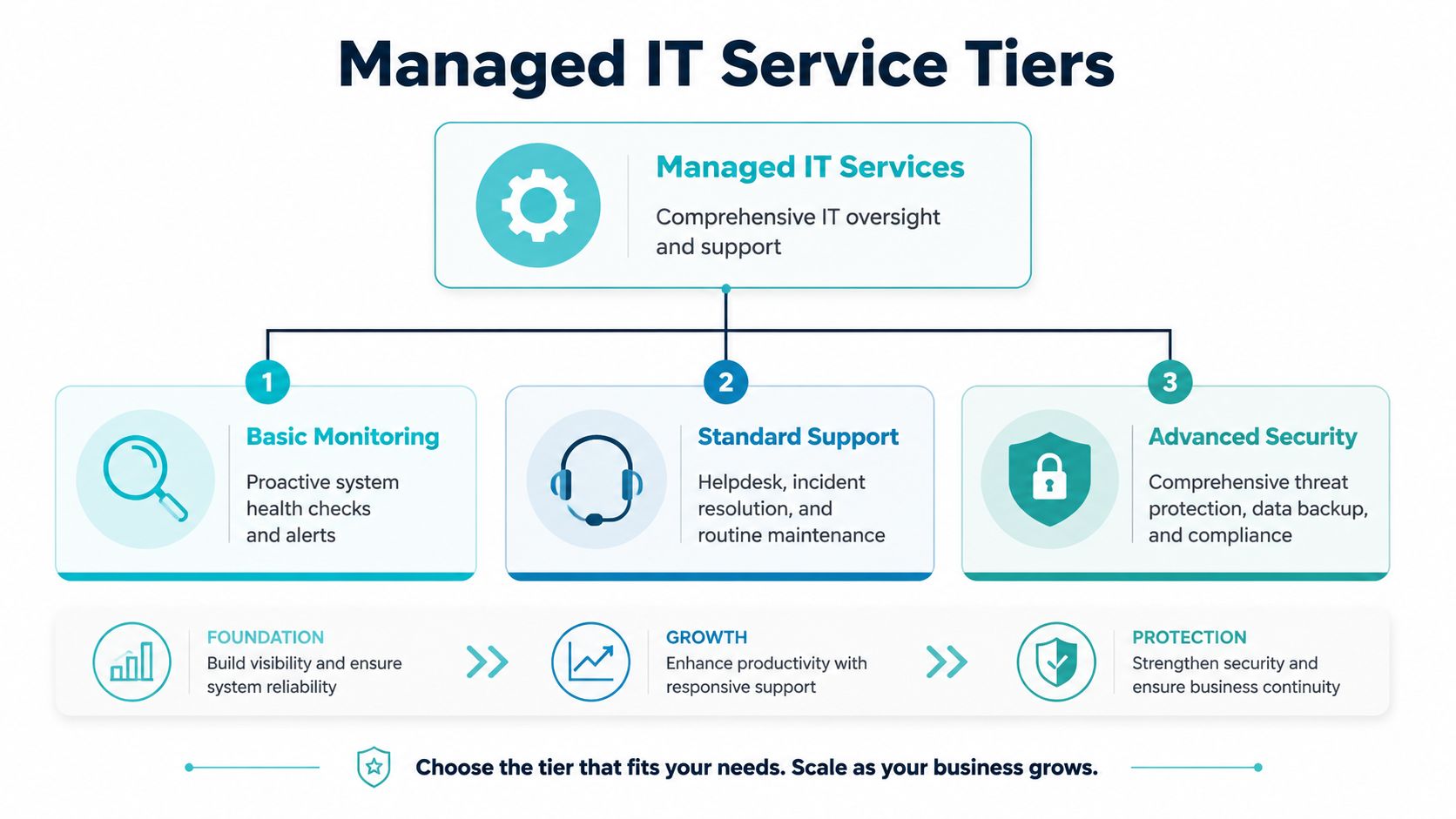
Most MSP proposals look more confusing than they should. The labels vary, but the packages usually fall into three groups: monitoring-first, support-focused, and security-heavy. The differences aren't cosmetic. They determine whether you're buying alert visibility, operational support, or full accountability for uptime, security, and compliance tasks.
What the common package tiers usually include
Basic monitoring
This tier is often the entry point for businesses coming off break-fix support. It may include device health checks, alerting, patch visibility, and limited maintenance. It's useful if you already have internal IT and need an extra layer of tooling and oversight.
It usually isn't enough for organizations that need fast user support, vendor coordination, or compliance-driven reporting.
Standard support
Most small businesses begin receiving real operational value at this stage. It typically combines monitoring with helpdesk response, routine maintenance, endpoint protection oversight, and account support. If your employees regularly open tickets and your office depends on cloud apps every day, this package tends to fit better than monitoring alone.
Advanced security
This level usually adds stricter endpoint controls, backup and recovery management, compliance-oriented processes, and deeper involvement in cloud administration and infrastructure risk. For healthcare and other regulated sectors, this is often the practical baseline, not the luxury tier.
Albuquerque pricing benchmarks that actually help budgeting
One useful thing about the local market is that there are published benchmarks for regulated industries. A local provider summary states that medical clinics in Albuquerque typically pay $140 to $210 per user per month, with small clinics of 5 to 10 users spending about $700 to $1,800 per month, and mid-size clinics of 15 to 30 users spending about $2,500 to $6,000 per month. The same summary says onboarding typically takes 30 to 45 days.
Those numbers shouldn't be copied blindly into every industry. They do give buyers a practical frame. In Albuquerque, managed IT isn't priced like random hourly support for regulated clients. It's packaged as a service with security, documentation, and response expectations built in.
What changes the monthly number
If two providers quote different prices, the gap usually comes from scope, not just margin. These factors move the proposal up or down:
- User count and device complexity: Five users on standard laptops aren't the same as five users with specialized workstations, mobile devices, shared exam room systems, or multiple locations.
- Compliance burden: HIPAA-aligned workflows, access controls, and reporting add real work.
- Cloud footprint: Microsoft 365 administration, identity management, and third-party SaaS support all take time.
- Response expectations: Faster SLAs and broader after-hours coverage usually cost more.
- Server and infrastructure responsibility: Managing line-of-business servers, storage, virtualization, or VoIP adds depth.
A business owner should also look past the quote itself and think about adjacent systems.
A simple way to read a proposal
Use this three-part test before comparing providers:
| Package signal | What it usually means | What to confirm |
|---|---|---|
| Low monthly price | Monitoring only, thin support, or many exclusions | Ask what's billable outside the base plan |
| Mid-range package | Reasonable helpdesk and maintenance coverage | Confirm user support scope, after-hours process, and cloud admin responsibilities |
| Higher-complexity package | Security, backup oversight, and compliance-heavy work included | Ask which protections are included versus just recommended |
If you want a cleaner framework for comparing package design and billing logic, this breakdown of managed services pricing models gives a useful lens for reading proposals without getting lost in sales language.
Your Buyer's Checklist for Choosing an Albuquerque Provider
Most MSP interviews are too polite. The provider gives a slide deck, mentions cybersecurity, says they do backups, and promises responsive support. That isn't enough. If you're buying managed it services albuquerque support for, ask direct questions that force operational clarity.
The strongest providers usually show the same proactive differentiators. They emphasize 24/7 helpdesk access, remote monitoring, antivirus and endpoint management, plus backup and disaster recovery because those controls reduce downtime and security risk more effectively than reactive support.
The questions that expose weak service design
A provider should be able to explain not just what they sell, but how they run it.
Ask how alerts are triaged. Ask whether patching is automated, approved in stages, or handled manually. Find out who owns Microsoft 365 changes. Determine what happens if a restore fails. Also clarify what documentation you receive if the relationship ends.
If a provider answers every technical question with "it depends," keep pushing. Some situations do depend. Core operating procedures shouldn't.
MSP evaluation checklist
| Criteria | Why It Matters | Questions to Ask Your Potential Provider |
|---|---|---|
| Monitoring coverage | You need visibility before users report failures | Which systems do you monitor continuously, and who reviews alerts after hours? |
| Helpdesk access | Users judge IT by responsiveness | How do users open requests, and what happens with urgent issues outside business hours? |
| Endpoint management | Unmanaged devices create avoidable risk | Who handles patching, antivirus status, device inventory, and policy enforcement? |
| Backup and recovery | Backups are useless if restores fail under pressure | How do you verify restores, and who owns recovery coordination during an outage? |
| Cloud administration | Most SMBs rely heavily on Microsoft 365 or other SaaS | Do you manage identity, licensing, access changes, and configuration drift? |
| Documentation | Hidden knowledge creates lock-in and fragility | What network, account, vendor, and backup documentation do we receive? |
| Onboarding process | A messy transition causes months of confusion | What do you collect first, what gets standardized, and what are the first risks you address? |
| Compliance support | Regulated firms need proof, not just good intentions | What reports, policies, and controls do you support for regulated environments? |
| Escalation path | Not every issue belongs at the same support tier | When does an issue move from helpdesk to engineering, and how is that communicated? |
| Co-managed flexibility | Internal IT may still own applications or strategy | How do you split responsibilities when we keep some functions in-house? |
Red flags that buyers often miss
Some warning signs don't show up in a proposal:
- Vague backup language: "We back everything up" isn't an answer.
- No ownership boundaries: If nobody clearly owns cloud permissions, patch windows, or firewall changes, problems will sit.
- Tool-first selling: A stack of logos isn't a service model.
- Weak offboarding documentation: If they can't explain how you regain administrative clarity later, you're buying dependency.
- No service agreement detail: Your contract should define scope, responsibilities, exclusions, and response handling clearly.
The actual agreement matters as much as the pitch. Before signing, review a framework like this managed IT services agreement guide so you can compare provider promises against what the contract really commits them to do.
How to shortlist providers without wasting a month
Use a staged process:
- Start with fit. Do they regularly support organizations of your size, complexity, and compliance profile?
- Move to operations. Can they explain monitoring, support flow, and recovery procedures plainly?
- Test accountability. Who owns what when something breaks?
- Check transition readiness. A strong MSP has a disciplined onboarding method, not improvised discovery.
That process usually reveals the difference between polished marketing and durable service delivery.
ARPHost Solutions Modern Infrastructure and Managed Expertise
A common Albuquerque scenario goes like this. The office has one vendor handling support tickets, another hosting a line-of-business app, and a backup product nobody has tested under pressure. Everything looks acceptable until a failed update, ransomware event, or storage issue forces the owner to find out who owns recovery.
That is the point where infrastructure quality stops being an abstract IT topic and becomes an operating risk.
Many MSPs describe backup, security, and cloud support at a high level. Fewer explain how recovery works in practice, what virtualization platform they support, or how they handle businesses that want more control than a shared public cloud model usually provides. As noted earlier in this article, disaster recovery gaps often show up in the restore process, not in the sales proposal.

Where infrastructure strategy changes the managed service conversation
For a small professional office, standard help desk coverage and endpoint management may be enough. For a manufacturer, healthcare practice, engineering firm, or multi-site company in Albuquerque, the bigger issue is often architectural. They may need to consolidate scattered hosting, move away from aging VMware systems, separate sensitive workloads from general business apps, or place systems on dedicated hardware for performance and control.
Those choices affect cost, recovery time, compliance exposure, and day-to-day administration.
Different infrastructure models solve different problems:
- VPS hosting works well for lighter application hosting, development environments, and predictable web workloads.
- Secure web hosting bundles fit companies that need hardened hosting for websites, email, and common CMS platforms without building every control from scratch.
- Bare metal servers make sense for workloads that need dedicated hardware, tighter performance consistency, or specific software requirements.
- Dedicated Proxmox private clouds give businesses more control over virtualization, storage, and workload separation than many local MSPs are prepared to offer or explain.
- Colocation fits organizations that want to keep ownership of hardware while placing it in a datacenter environment with better power, cooling, and connectivity than an office server room.
Some businesses also need fast deployment for standard platforms such as WordPress, Joomla, or Magento. In that case, instant application deployment saves setup time while still keeping the environment manageable.
Recovery design is where weak managed service models show up
If a company runs a private application server, an internal document system, and a public website, "backup completed" does not answer the essential business question. Owners need to know whether restores are application-consistent, whether backup copies are protected from accidental deletion or ransomware-driven encryption, and whether workloads can be moved to another host cleanly if hardware fails.
Immutable backups matter here because they protect the backup set itself. Verified recovery matters because a backup that cannot be restored fast enough is just retained data.
Backups protect copies. Recovery protects operations. Buyers should never confuse the two.
Why ARPHost fits this conversation
ARPHost, LLC offers managed IT services alongside the infrastructure many Albuquerque providers leave vague or outsource. That includes VPS hosting, secure web hosting bundles, bare metal servers, colocation, instant applications, Proxmox private clouds, VMware migration support, and Proxmox Backup as a Service with immutable, encrypted storage.
That mix changes the service model in a practical way. A business does not have to split responsibility between an MSP, a separate hosting company, and a third backup vendor every time a system issue crosses boundaries.
What stands out in practice
- Managed services and infrastructure under one provider: Support, monitoring, updates, and server administration can be handled within one operating model.
- Proxmox private cloud options: Useful for organizations that want virtualization flexibility, tenant separation, and direct administrative control without defaulting to a hyperscaler.
- Bare metal and colocation paths: A better fit for applications that need dedicated resources, licensing control, or custom network design.
- Immutable backup services: Important for ransomware planning, regulated data handling, and recovery confidence.
- VMware migration support: Relevant for companies reassessing legacy virtualization costs and looking for a practical transition path.
- 24/7 support access: Necessary for hosted infrastructure and business systems that do not fail on a schedule.
Matching the service mix to the business
The right design depends on what the company is trying to protect and how much control it needs to keep. A small office may only need secure hosting and managed oversight for a few systems. A larger organization may need private cloud resources, VPN-connected workloads, documented recovery targets, and a staged migration plan off older infrastructure.
If you are comparing technical options in this category, these pages are useful starting points:
- Explore secure VPS bundles
- View Proxmox private cloud plans
- Review managed services options
- Start with VPS hosting
Start Your Proactive IT Strategy with ARPHost Today
A common Albuquerque scenario starts the same way. An office loses access to line-of-business systems on a Tuesday morning, the backup status looked fine last week, and nobody can say with confidence who owns the restore process, the firewall rules, or the vendor escalation. That is the point where reactive IT gets expensive.
Companies usually get better results once they treat IT as an operating function with assigned ownership, documented recovery steps, and infrastructure choices tied to actual business risk. In Albuquerque, that decision should be based on local provider realities, not generic MSP sales language. The useful questions are practical. Who handles endpoint policy changes? Who tests restores? Which team member documents cloud admin access? And who exactly is responsible when a hosted workload slows down at 2 a.m.?
What Effective Managed IT Looks Like in Practice
What works is usually straightforward:
- Defined responsibility: Your team and the provider know who owns user support, patching, backups, cloud administration, and after-hours response.
- Recovery that has been tested: Backup reports matter less than a provider that can explain restore order, recovery time, and failure points.
- A fit-for-purpose platform: Sensitive workloads may belong on a private cloud or dedicated infrastructure. Public websites and lighter applications may not.
- Reporting leadership can use: Owners and managers should get clear status, risk, and project visibility without chasing updates.
This is also where provider depth matters. Some Albuquerque firms can cover help desk and basic maintenance, but they stop short when the discussion turns to virtualization strategy, immutable backups, or a migration off older VMware estates. ARPHost, LLC stands out when a business needs both managed support and modern infrastructure options under one roof, especially for companies that want more control than a generic cloud bundle provides.
If your environment still depends on tribal knowledge, a few aging servers, and a backup job nobody has restored from recently, start there. Document the systems that keep revenue moving. Identify single points of failure. Confirm which compliance requirements apply to your data, then compare providers on execution, not promises.
If that review shows gaps, talk with ARPHost, LLC about a managed approach that fits how your business runs. That may include managed IT support, secure hosting, Proxmox private cloud design, immutable backup planning, or bare metal infrastructure for workloads that need tighter control.
