

Most IT teams don't decide to look for managed cloud hosting solutions because cloud is fashionable. They do it because routine infrastructure work starts crowding out the work that moves the business forward.
A familiar pattern shows up fast. Someone on the team owns patching because nobody else has time. Backups exist, but restore testing is irregular. Monitoring is split across a few dashboards, a pile of alerts, and tribal knowledge. A performance issue hits at the wrong time, and the people who should be improving delivery pipelines or hardening customer-facing systems are instead chasing disk pressure, stale snapshots, and half-documented firewall rules.
That’s the point where “we can manage it ourselves” stops being a technical preference and becomes an operational risk.
When DIY Infrastructure Becomes a Liability
The failure mode rarely starts with a major outage. It starts with small compromises. Deferred updates. Manual workarounds. A backup job that still “works” but no longer matches recovery requirements. An engineer who knows exactly how the environment fits together, until they take vacation or leave.
Managed cloud hosting solutions are useful when infrastructure needs to be treated like a service with defined ownership, not a side task assigned to whoever is least busy. The provider isn’t just renting you compute. They’re taking responsibility for repeatable operations such as system maintenance, monitoring, backup handling, and fault response.
What usually breaks first
A stretched internal team can keep a small footprint alive for a long time. Growth changes the math.
- Operational drift accumulates. One server gets a hotfix, another doesn't, and configuration parity disappears.
- Security work becomes reactive. Patching gets bundled into outage windows instead of becoming normal maintenance.
- Incident response slows down because the people troubleshooting aren't always the people who built the environment.
- Strategic projects slip. Migration planning, automation, documentation, and architecture cleanup get pushed behind urgent tickets.
Practical rule: If your senior technical staff spends more time keeping the platform stable than improving it, your hosting model is working against you.
The market has already moved in this direction. The U.S. cloud managed services market is projected to grow at a 10.55% CAGR from 2025 to 2033, and over 50% of enterprises rely on MSPs for public cloud workloads, according to IMARC Group’s cloud managed services market analysis. That matters because it confirms this isn't a fallback for under-resourced teams. It's a normal operating model for organizations that don't want infrastructure complexity to consume their engineering capacity.
What a better operating model looks like
A good managed environment changes ownership boundaries.
Your team should still control application logic, deployment approvals, data handling decisions, and business-specific policies. The provider should own the repetitive infrastructure work that benefits from specialization and consistency.
That split is practical when you need:
- Predictable maintenance instead of ad hoc patch windows
- Clear escalation paths during incidents
- Documented backups and recovery workflows
- Infrastructure choices that fit the workload, not just what the team already knows
If your team is already at that threshold, a next step is to review a provider’s service boundary in detail and compare it against your own operational gaps. For organizations that need help beyond raw hosting, managed infrastructure and IT support options are often the right place to start.
Decoding the Cloud Public Private and Hybrid Models
The hosting model and the service model are different decisions. Before choosing managed services, it helps to get clear on where the workloads should live.
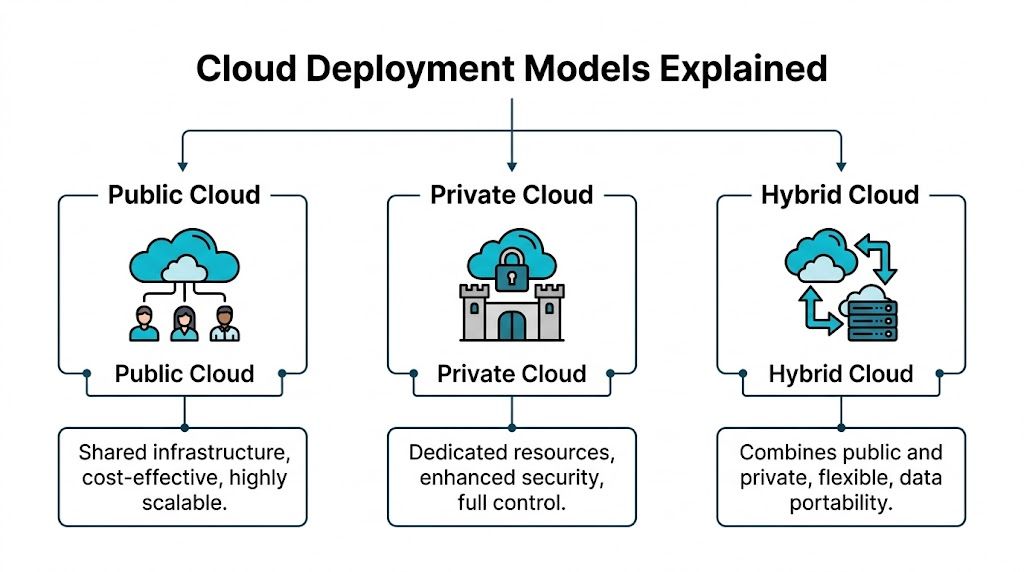
Public, private, and hybrid cloud aren’t marketing categories. They represent different control boundaries, cost behavior, and operational trade-offs.
Public cloud
Public cloud is the fastest path to on-demand infrastructure. You consume shared platform resources from a hyperscaler or provider and pay based on the service model and resource use.
That works well when demand is volatile, deployment speed matters, or teams need access to a broad catalog of services. It works less well when billing complexity grows faster than governance, or when the workload is steady enough that variable pricing stops being an advantage.
A simple analogy is renting an apartment in a large building. You don't maintain the structure, and scaling into another unit is easier than building a house. But you accept the rules of the building, the shared environment, and less control over how the underlying systems operate.
Private cloud
Private cloud gives you dedicated resources with tighter control over virtualization, network policy, storage layout, and tenant isolation. You can still automate aggressively and deliver cloud-style self-service, but the infrastructure is reserved for your workloads.
That model fits organizations with compliance pressure, predictable application profiles, or technical teams that need root-level control without the overhead of building everything from scratch on-prem.
Think of it as owning a house. You decide how it’s configured, what gets changed, and how the space is segmented. The trade-off is that design decisions matter more, and someone needs to run the property well.
For teams evaluating control and billing trade-offs, this comparison of private cloud vs public cloud is a useful framework.
Hybrid cloud
Hybrid cloud is what many mature environments become after the first wave of cloud adoption. Some workloads stay on dedicated infrastructure for security, licensing, latency, or cost reasons. Others stay in public cloud because elasticity or managed platform services are worth it.
Hybrid works when placement is intentional. It fails when teams drift into it by accident and end up managing two incomplete strategies at once.
A practical analogy is owning a house while renting extra storage for seasonal overflow. Your core assets stay where you have control. The variable or temporary parts live somewhere more flexible.
This model is now mainstream. 85% to 90% of organizations operate in hybrid or multi-cloud environments, and over 70% of enterprises with a multi-cloud strategy favor a hybrid model.
Choosing the right fit
Use a simple filter:
| Model | Best fit | Main strength | Main trade-off |
|---|---|---|---|
| Public cloud | Burst workloads, rapid experiments, managed service-heavy stacks | Fast provisioning and broad service catalog | Less cost predictability, less infrastructure control |
| Private cloud | Steady workloads, regulated data, custom network or virtualization needs | Control, isolation, consistent performance | More architecture responsibility |
| Hybrid cloud | Mixed workload profiles, staged modernization, selective cloud use | Flexible placement and reduced lock-in | Requires disciplined operations across environments |
The wrong model usually isn't technically impossible. It's just expensive, hard to govern, or awkward to support six months later.
Managed Versus Unmanaged A Clear Comparison
A lot of confusion comes from mixing up infrastructure type with service scope. Public or private tells you where the workload runs. Managed or unmanaged tells you who does the work.
An unmanaged server can be public, private, virtual, or bare metal. The common feature is responsibility. You provision the instance, then your team handles operating system updates, service hardening, backup policy, monitoring, and incident response.
Managed hosting changes that split. You still own the application and business logic, but the provider takes on the operational burden that would otherwise land on your administrators or developers.
Responsibility matrix
| Task | Unmanaged Hosting (Customer Responsibility) | Managed Hosting (Provider Responsibility) |
|---|---|---|
| Initial OS setup | Customer builds and validates baseline | Provider deploys and standardizes build |
| Patch management | Customer schedules and applies updates | Provider handles routine OS maintenance |
| Security monitoring | Customer configures tools and responds to alerts | Provider monitors and escalates issues |
| Firewall policy implementation | Customer creates and maintains rules | Provider manages and adjusts infrastructure-level policy |
| Backup job configuration | Customer defines schedules and verifies jobs | Provider configures and operates backup routines |
| Restore testing | Customer plans and executes tests | Provider supports or runs validated recovery workflows |
| Performance monitoring | Customer tunes thresholds and dashboards | Provider watches platform health and resource pressure |
| Incident response | Customer investigates service failures | Provider handles infrastructure-side triage |
| Capacity planning | Customer tracks growth and resizes systems | Provider recommends and implements scaling changes |
That table is the real buying decision. If your team is strong in automation, Linux administration, and network troubleshooting, unmanaged infrastructure can be a good fit. If your team is lean, split across priorities, or tired of acting as a 24/7 operations desk, managed service usually pays for itself in reduced risk and regained focus.
When unmanaged still makes sense
Unmanaged hosting isn't a bad option. It's a specialized one.
It works well for teams that:
- Need complete control over kernel choices, custom services, or unusual security stacks
- Already run mature operations with tested patching, alerting, and backup discipline
- Want minimal provider involvement because internal processes are stronger than any bundled support model
When managed is the safer choice
Managed service becomes the right answer when infrastructure tasks are important but not differentiating. Most businesses don't win because they manually patch servers better than everyone else. They win because their customer systems stay available and their staff can work on revenue, delivery, and product operations.
A provider relationship should feel like an extension of your ops function, not a ticket relay. If you’re weighing both paths for virtual infrastructure, this comparison of managed vs unmanaged VPS hosting helps clarify where the operational handoff really happens.
The mistake isn't choosing unmanaged. The mistake is choosing unmanaged without staffing for it.
Choosing Your Infrastructure Virtual Private Servers vs Bare Metal
Once the service boundary is clear, the next decision is the substrate. Most managed cloud hosting solutions are built on one of two foundations. Virtual Private Servers or bare metal servers.
The choice affects performance isolation, scaling behavior, licensing flexibility, and how much customization you can safely support.

What VPS gives you
A VPS is a virtual machine running on a physical host through a hypervisor such as KVM. In some environments, lightweight containers such as LXC are also used for specific Linux workloads. The goal is to carve stable, isolated environments out of larger hardware pools.
That’s attractive for common business applications because provisioning is quick, resizing is simpler, and infrastructure can be standardized across many tenants or internal teams. For web apps, utility services, staging environments, API nodes, and ordinary line-of-business workloads, VPS is often the most efficient starting point.
Typical strengths include:
- Fast deployment for new workloads or temporary environments
- Resource efficiency when applications don't need a full server
- Cleaner scaling for RAM and CPU adjustments
- Simpler replacement workflows if a VM needs to be rebuilt
The trade-off is that virtualization adds a layer between the workload and the hardware. In a well-designed cluster that usually isn't a problem. For latency-sensitive databases, licensing-bound software, or workloads that want direct access to all machine resources, it can matter a lot.
What bare metal changes
A bare metal server is a single physical server assigned to one customer or one use case. No hypervisor overhead is required unless you choose to install one yourself.
This is the right fit when you need hard isolation, consistent hardware access, or enough resource density that stacking multiple large VMs on shared hosts becomes inefficient. It’s common for database backends, large application nodes, custom virtualization hosts, and private cloud foundations.
For readers comparing deployment models, this explanation of what a bare metal server is covers the fundamentals well.
Proxmox and VMware in practical terms
The platform decision usually comes down to operational style as much as features.
Proxmox VE is attractive when teams want an open, flexible virtualization stack with support for KVM virtual machines, LXC containers, clustering, and storage integration. It's a strong fit for private cloud builds because it gives administrators direct control over how compute, storage, and high availability are designed.
VMware is still common in established environments with existing tooling, operational familiarity, and legacy process around vSphere-based estates. But many teams now reassess licensing, platform complexity, and long-term cost when they refresh infrastructure.
A practical migration path often looks like this:
- Audit current workloads by CPU, RAM, storage profile, and recovery needs.
- Separate fixed-resource systems from elastic or general-purpose systems.
- Map heavy or sensitive workloads to dedicated hosts or a private cloud cluster.
- Move commodity services such as web, app, and utility nodes onto well-managed VPS infrastructure.
- Test migration sequencing before touching the most business-critical systems.
Here’s a simple command often used on a Proxmox node to check cluster state during operations or migration work:
pvecm status
That small detail matters. A good managed environment shouldn’t hide everything. It should reduce operational burden while preserving visibility for technical teams that need to validate health, membership, and failover readiness.
A lot of teams also want a quick visual walkthrough before committing to a platform decision. This overview is a good primer:
A simple decision rule
Use VPS when the workload needs flexibility more than exclusive hardware. Use bare metal when the workload needs determinism more than convenience.
One practical option in this space is ARPHost, which offers KVM VPS, bare metal servers, and Proxmox-based private cloud deployments for teams that want either a managed or unmanaged operating model. That combination is useful because many environments don't stay in one category forever. They start with a VPS, move a data tier to bare metal, then consolidate part of the stack into a private cloud cluster as requirements tighten.
The Non-Negotiables Security Backups and SLAs
A managed service is only as credible as its operating discipline. Good sales language doesn't matter if the environment is easy to misconfigure, hard to restore, or vague about uptime responsibility.
Security, backups, and SLAs are where providers reveal whether they run a real platform or just resell infrastructure with support layered on top.

Security has to be layered
A secure managed environment doesn't depend on one product. It depends on multiple controls that support each other.
At minimum, that should include:
- System hardening so the base OS starts from a controlled, minimal state
- Firewall management at the network and host layers
- Malware and file integrity controls for web-facing systems
- Patch discipline that closes known issues without waiting for emergencies
- Access control hygiene around administrative accounts and service credentials
On shared and web-heavy stacks, tools such as Imunify360 and CloudLinux OS are useful because they add tenant isolation and malware-focused controls where many compromises happen. In private cloud and VPS environments, the principle is the same even if the toolset differs. The provider should be able to explain exactly how they harden nodes, segment traffic, and handle privilege.
Ask one blunt question during evaluation: “If a customer account is compromised, what controls stop that incident from turning into an infrastructure-wide problem?”
Backups are only real if restore paths are tested
Many buyers ask whether backups are included. The better question is whether recovery is operationally believable.
A useful backup design should define:
| Area | What to verify |
|---|---|
| Scope | Which systems, volumes, databases, and configs are covered |
| Schedule | How often data protection runs and when |
| Storage | Where backup data lives and how it's isolated |
| Integrity | How failed jobs and corrupted chains are detected |
| Recovery | Whether point-in-time or full-system restores are supported |
Immutable backup storage is especially important for ransomware resilience and operator error. If backups can be modified or deleted from the same trust boundary as production, they aren't a strong last line of defense.
SLA numbers need translation
Top-tier managed cloud hosting solutions commonly offer 99.9% to 99.99% uptime SLAs through redundant architecture, load balancing, failover, and proactive monitoring. That same source notes 99.99% uptime can reduce downtime to less than 52 minutes per year and associates these designs with 30% to 40% OpEx reductions.
Those numbers matter less as marketing and more as architecture clues. If a provider promises a high SLA, ask what makes it possible:
- Redundant infrastructure so one host or path doesn't become a single point of failure
- Load balancing to distribute requests and avoid node saturation
- Transparent failover so workloads can move or recover without manual improvisation
- Proactive monitoring that catches storage, compute, and network anomalies before users do
An SLA without a clear technical basis is just a contract line. An SLA backed by architecture is operationally meaningful.
Navigating Cloud Costs and Pricing Models
A lot of companies move into cloud expecting lower cost and end up with lower visibility instead. The issue isn't that public cloud is wrong. It's that many finance and IT teams don't discover the full pricing behavior until workloads stabilize and invoices become harder to predict.
For steady-state systems, managed cloud hosting solutions should make cost planning easier, not harder.
Why public cloud bills surprise teams
Public cloud pricing is flexible, but flexibility can hide waste. Compute can be overprovisioned. Storage classes can drift from policy. Data transfer charges can show up after architecture decisions are already in production.
That hurts smaller IT teams most because they often don't have dedicated FinOps discipline. They have a platform to run and a budget to protect, but not the time to reverse-engineer every billing line.
The biggest trouble spots are usually:
- Data transfer fees that don't appear obvious during initial design
- Idle but allocated resources left running after projects change
- Complex service dependencies where one design choice triggers charges elsewhere
- Lack of workload placement discipline when every application defaults to the same public cloud pattern
Where managed private and hybrid models can win
The economic situation transforms., many SMBs struggle with opaque public cloud bills, and managed private or hybrid clouds can cut costs by 30% to 50% for steady workloads compared with public clouds.
That doesn't mean private is always cheaper. It means stable workloads often don't benefit enough from hyperscale elasticity to justify variable billing and egress exposure.
Public cloud is strongest when variability is the requirement. If the workload is stable month after month, predictability often matters more than theoretical elasticity.
Pricing models worth comparing
Not every provider prices the same way, and that's where buyers should slow down.
| Pricing model | How it works | Where it fits | Common risk |
|---|---|---|---|
| Fixed fee | Monthly price for a defined bundle of resources and service | Stable environments with clear capacity needs | Paying for a bundle that no longer matches usage |
| Pay as you go | Charges rise and fall with measured consumption | Experimental or bursty workloads | Budget volatility |
| Resource based managed plan | Pricing tied to CPU, RAM, storage, backups, and support scope | Mixed workloads needing both flexibility and support | Scope confusion if management boundaries aren't explicit |
The best provider conversations are specific. Ask for billing examples, included services, backup costs, migration scope, and what triggers overages. If the answer is vague, the invoice probably won't be clear either.
For many organizations, the most cost-effective design isn't “all public” or “all private.” It's a deliberate split between predictable workloads on dedicated or private infrastructure and variable workloads on elastic platforms.
How to Choose Your Managed Hosting Partner
The right provider isn't just selling servers. They're taking ownership of operational outcomes that your business depends on. That means evaluation should focus less on homepage promises and more on what happens during maintenance, failure, growth, and migration.
Provider evaluation checklist
Use this short list during vendor review.
- Platform depth: Can the provider support the stack you run, whether that's Proxmox, VMware migration, KVM VPS, containers, or dedicated hosts?
- Operational clarity: Who patches the OS, monitors services, manages backups, and responds to alerts?
- Support access: Can you reach someone competent when the issue is urgent, or are you entering a generic queue?
- Infrastructure quality: Ask how storage is designed, how network redundancy is handled, and what failover process exists.
- Security posture: Look for a concrete answer on hardening, malware controls, access handling, and backup isolation.
- Commercial transparency: You should be able to understand recurring charges before you sign.
A good partner should answer these without hiding behind jargon.
Migration planning checklist
Before any move, the internal team should document a few basics:
- Inventory the environment. Include workloads, dependencies, backup scope, and any systems that can't tolerate disruption.
- Classify by criticality. Not every server deserves the same migration order.
- Define rollback conditions. Know when you'll stop, revert, or delay.
- Test on a small slice first. Move a non-critical workload before touching the revenue path.
- Confirm post-migration operations. Monitoring, backups, and patching must be working on day one, not added later.
A migration plan is incomplete if it only covers cutover. It also needs recovery, validation, and ownership after the move.
Why ARPHost Excels Here
A strong fit in this category usually means one provider can support multiple operating models without forcing a redesign every time requirements change. That includes managed and unmanaged plans, VPS and bare metal options, Proxmox private cloud support, backup services, and practical migration help.
That mix is useful for IT managers because the decision usually isn't permanent. A workload might begin on secure web hosting, move to managed VPS as requirements grow, and later shift into a dedicated private cloud or bare metal footprint when isolation and control become more important.
If you're evaluating providers now, the two best next steps are straightforward. Request a managed services quote with your real workload list, or talk through the migration plan before you move anything business-critical.
Frequently Asked Questions About Managed Hosting
Can I migrate an existing VMware environment to a Proxmox private cloud
Yes, in many cases you can. The important work isn't the hypervisor conversion by itself. It's mapping CPU, memory, storage, networking, backup behavior, and boot dependencies before the move. Test migrations on non-critical systems first, then validate performance and recovery before larger cutovers.
Do I still get root access with a managed solution
Often, yes, but it depends on the service boundary. Some managed plans preserve full administrative access while the provider handles patching, monitoring, and backups. Others restrict certain infrastructure-level changes to keep the environment supportable. Ask this early and get it in writing.
Is managed hosting only for large enterprises
No. Smaller businesses often benefit the most because they feel the staffing gap first. If one or two people are carrying server administration, security maintenance, and on-call work, managed hosting can remove a lot of operational drag.
How does managed hosting help with compliance
It helps by making infrastructure controls more consistent. A competent provider can support segmentation, backup policy, patch routines, logging, and access control practices that align with your compliance program. Compliance still belongs to the business, but managed operations make it easier to maintain enforceable technical controls.
Should I choose VPS or bare metal for a new deployment
Choose VPS when you need quick provisioning, flexible scaling, and efficient resource use. Choose bare metal when the application needs dedicated hardware, stronger isolation, or highly predictable performance. If you're unsure, start by classifying the workload rather than picking the infrastructure first.
If you're planning a move to managed cloud hosting solutions and want a provider that can support VPS, bare metal, private cloud, backups, and hands-on operations, talk to ARPHost, LLC. Their team can help map the right hosting model to your workload, migration path, and support requirements.
