

A Magento store usually starts feeling slow in familiar ways. Category pages hesitate before products render. Search feels sticky. Add-to-cart works, but the mini cart updates a beat too late. Then traffic climbs, a sales event hits, or a new extension goes live, and the whole stack shows its weak points.
Most Magento performance optimization advice doesn’t help much because it stays generic. It says to enable caching, compress images, and use a CDN. That’s not wrong, but it skips the order of operations that matters. If the server is mis-tuned, frontend tweaks won’t save you. If Varnish invalidation is wrong, you’ll chase ghosts. If one bloated extension is dragging every request through extra observers and database calls, more CPU won’t fix the root problem.
The workflow that works is disciplined. Start at the foundation. Tune the request path. Fix cache strategy. Clean up frontend delivery. Audit modules ruthlessly. Then test under realistic traffic and keep watching the stack after launch.
Your Blueprint for a High-Speed Magento Store
A slow Magento store isn’t just annoying. It interferes with product discovery, strains checkout, and creates support tickets that shouldn’t exist in the first place. Teams often feel this before they can clearly measure it. Merchants notice slower admin actions. Developers see longer deploys and reindex windows. Customers leave.
The practical fix is to stop treating performance as one problem. Magento performance optimization is a chain of dependencies. Hardware, hypervisor, OS, web server, PHP-FPM, OPcache, database behavior, full-page cache, sessions, blocks, frontend assets, and third-party code all influence the final page experience.
Start with the request path
When I audit Magento, I trace one request end to end:
- Connection lands on the web server. Nginx or Apache needs to serve static assets cleanly and hand dynamic work off without overhead.
- PHP-FPM executes Magento. Bad worker sizing, stale pools, or weak OPcache settings create queueing and memory churn.
- Database and cache backends respond. Magento leans heavily on cache consistency and indexed data.
- Browser renders the page. Oversized JS, layout shifts, and poor asset ordering still ruin an otherwise healthy backend.
That order matters because it stops teams from polishing the wrong layer first.
Generic advice isn’t enough
A lot of public guidance skips the operational details that separate a decent store from a consistently fast one. The broad UX and page health perspective is useful, but Magento still demands deeper stack tuning than a typical CMS.
Practical rule: Fix what the customer waits on first. In Magento, that usually means backend response path, cache behavior, and only then frontend polish.
Use this blueprint in priority order:
- Stabilize the platform with production mode, healthy PHP-FPM pools, tuned OPcache, and sensible database settings.
- Replace basic caching with a real cache architecture using Varnish and Redis.
- Trim render-blocking assets instead of blindly enabling every performance toggle in Admin.
- Cull extensions that add work without adding revenue.
- Load test logged-in flows because catalog browsing alone won’t expose the ugliest bottlenecks.
That sequence saves time. It also prevents the classic cycle of tweaking CSS while PHP workers are drowning.
Building a High-Performance Server Foundation
Magento speed starts lower than expected. If the server stack is weak, every optimization after that is a patch on top of a bad base.
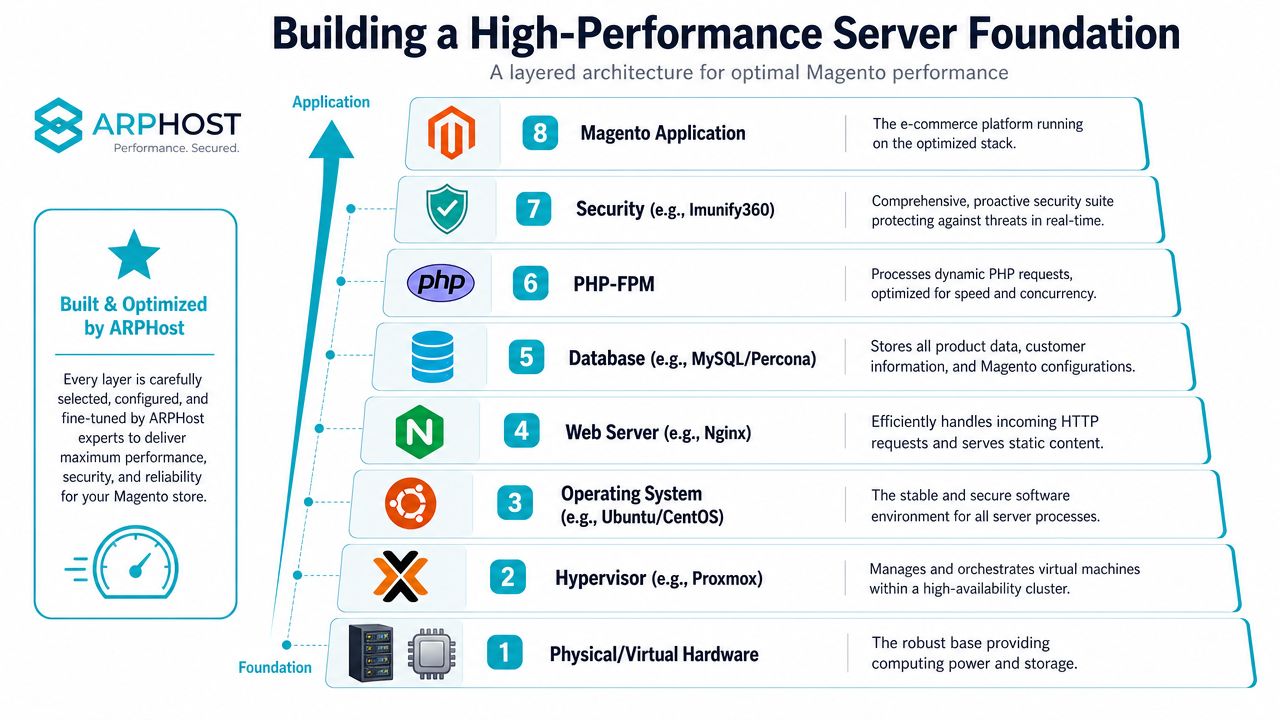
Google’s recommended Time To First Byte is 800 milliseconds or less, Adobe recommends a 2GB minimum OPcache memory, and 78% of Magento stores fail TTFB benchmarks due to unoptimized PHP OPcache settings. If your stack misses that baseline, frontend work won’t compensate.
Lock Magento into a production-ready state
A surprising number of stores limp along with weak deployment hygiene. Start by verifying the application state and the indexers:
php bin/magento deploy:mode:set production
php bin/magento cache:flush
php bin/magento indexer:reindex
php bin/magento indexer:status
If you deploy often, add static content and DI compilation to your release process, not to ad hoc terminal sessions during business hours:
php bin/magento setup:di:compile
php bin/magento setup:static-content:deploy -f
Tune PHP-FPM and OPcache first
PHP-FPM is usually where a store becomes erratic under concurrency. Too many workers and the node swaps or thrashes memory. Too few and requests queue. Use measured worker counts based on available RAM, not guesswork.
A clean starting point for a Magento PHP-FPM pool looks like this:
[www]
pm = dynamic
pm.max_children = 40
pm.start_servers = 8
pm.min_spare_servers = 8
pm.max_spare_servers = 16
pm.max_requests = 500
request_terminate_timeout = 300s
For OPcache, don’t accept defaults that were meant for smaller PHP apps:
opcache.enable=1
opcache.memory_consumption=2048
opcache.interned_strings_buffer=64
opcache.max_accelerated_files=65407
opcache.validate_timestamps=0
opcache.revalidate_freq=0
opcache.save_comments=1
After changes, restart services cleanly:
systemctl restart php8.2-fpm
systemctl reload nginx
Keep PHP workers boring. Stable memory use and predictable recycling beat aggressive worker counts every time.
Give MySQL or Percona enough room to breathe
Magento punishes weak database memory allocation and poor indexing discipline. Stores with layered navigation, search usage, and extension-heavy catalogs generate a lot of query pressure.
A common baseline on a dedicated Magento database node or strong single server:
[mysqld]
innodb_buffer_pool_size = 8G
innodb_buffer_pool_instances = 8
innodb_log_file_size = 1G
innodb_flush_method = O_DIRECT
max_connections = 300
tmp_table_size = 256M
max_heap_table_size = 256M
The exact values depend on dataset size and available memory, but the principle doesn’t change. Keep active data in memory as much as possible and avoid forcing Magento into disk-heavy waits.
Choose the right platform tier
Not every store needs dedicated hardware on day one. A smaller catalog with moderate traffic can run well on a VPS if the CPU allocation is consistent, storage is fast, and the node isn’t oversold. Larger stores with heavy search, indexing pressure, or many concurrent shoppers usually need isolation.
Use this decision framework:
| Store profile | Better fit | Why |
|---|---|---|
| Small to midsize catalog, controlled traffic | VPS | Lower cost, fast deployment, simpler ops |
| Large catalog, frequent imports, busy checkout | Bare metal | Dedicated CPU, RAM, and storage consistency |
| Multiple stores, staging, shared ops team | Private cloud | Better isolation and operational control |
If you’re evaluating hosting specifically for Magento, ARPHost’s Magento hosting guidance is a useful reference point for matching store complexity to infrastructure type. For heavier workloads, the AMD EPYC 4584PX configuration with 16 cores and 192GB DDR5 RAM is well suited to database-heavy Magento nodes, while the Ryzen 9600X is a sensible fit for smaller single-tenant storefronts that benefit from high clock speed.
Implementing an Advanced Caching Strategy
Magento’s built-in Full Page Cache is a starting point. It isn’t the finish line. For serious stores, the practical comparison is simple. Default FPC can help. Varnish plus Redis is the setup that changes how the store feels under load.
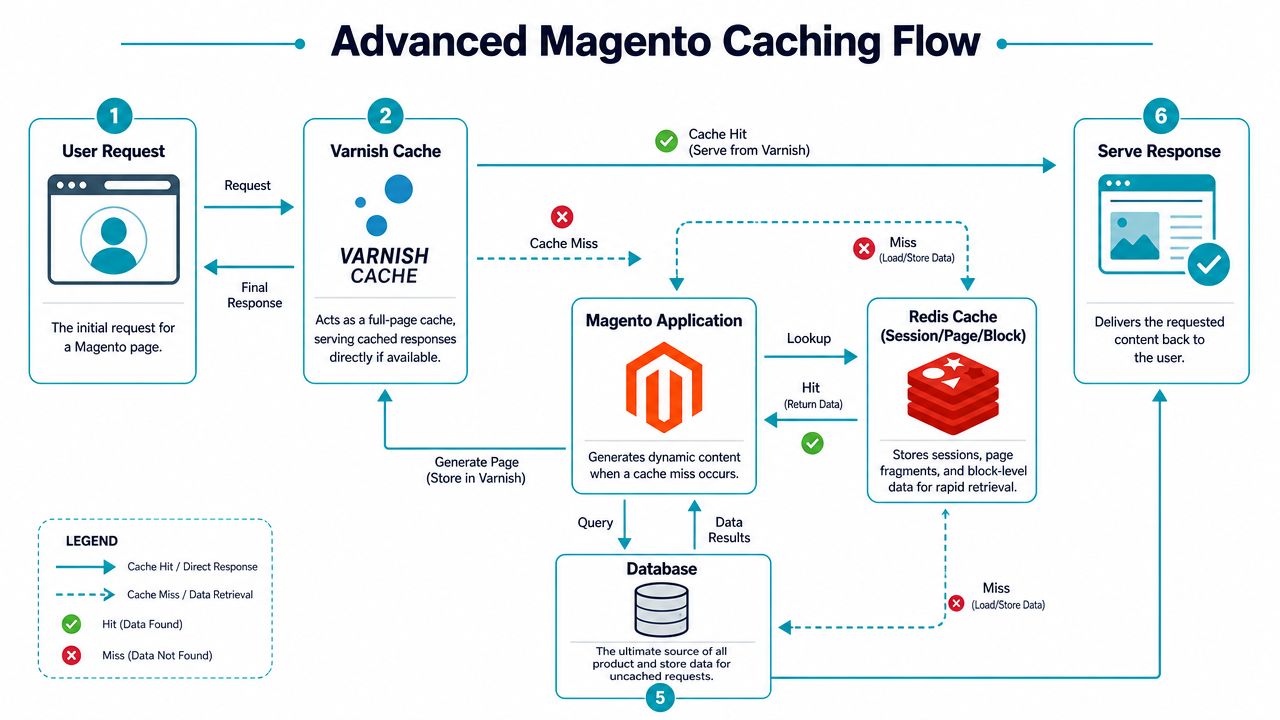
Implementing Varnish cache can accelerate mobile web loading speed by more than 25x compared to standard caching methods. However, success rates drop significantly if cache invalidation triggers are misconfigured, a common pitfall affecting 65% of initial deployments.
Default FPC versus Varnish plus Redis
Here’s the trade-off in plain terms:
| Approach | Strength | Weak point |
|---|---|---|
| Magento default FPC | Easy to enable | Doesn’t extract the same edge performance under load |
| Varnish reverse proxy | Memory-backed full-page delivery | Needs correct invalidation and ESI planning |
| Redis for sessions and backend cache | Fast state and cache retrieval | Must be wired cleanly to avoid fragmentation |
Varnish handles cacheable page delivery in memory. Redis reduces backend overhead for sessions and cache bins. Together, they remove a lot of repeated work from PHP and the database.
A short visual walkthrough helps before implementation:
Configure Magento for Varnish
Set Magento to use Varnish from the application side first:
php bin/magento config:set system/full_page_cache/caching_application 2
php bin/magento cache:flush
Generate a VCL file that matches your Magento version and Varnish deployment:
php bin/magento varnish:vcl:generate --export-version=6 > /etc/varnish/default.vcl
A trimmed Varnish service example:
ExecStart=/usr/sbin/varnishd
 -a:80
 -T localhost:6082
 -f /etc/varnish/default.vcl
 -s malloc,4G
Add Redis for sessions and backend cache
Magento behaves better when sessions don’t live in slower storage paths. Configure Redis deliberately:
php bin/magento setup:config:set
 --session-save=redis
 --session-save-redis-host=127.0.0.1
 --session-save-redis-db=2
 --cache-backend=redis
 --cache-backend-redis-server=127.0.0.1
 --cache-backend-redis-db=0
 --page-cache=redis
 --page-cache-redis-server=127.0.0.1
 --page-cache-redis-db=1
A matching Redis memory policy for Magento cache nodes often starts here:
maxmemory-policy allkeys-lru
appendonly no
Get invalidation and ESI right
Most broken Varnish rollouts don’t fail because Varnish is bad. They fail because invalidation rules are sloppy. Product updates don’t purge correctly. Category pages stay stale. Personalized blocks aren’t separated properly.
Use ESI for dynamic fragments such as mini cart or customer-specific content. Keep product, category, and CMS page invalidation tied to actual content changes. Test these flows every time you deploy a new module that touches observers, cache tags, or catalog updates.
A fast cache with bad invalidation is worse than a slower store. Customers notice stale pricing and wrong availability immediately.
This is also the point where managed infrastructure earns its keep. On a secure managed VPS hosting stack or dedicated node, providers can pre-wire Varnish, Redis, service supervision, and rollback procedures so a cache change doesn’t become an outage.
Optimizing Frontend Assets and Delivery
Once backend response is under control, the browser becomes the next bottleneck. At this point, many Magento teams follow old advice and make the store slower.
The biggest example is JavaScript bundling. 65% of developers report speed degradation after enabling Magento’s default JavaScript bundling, and it can increase render-blocking time by 30 to 40% on mobile devices according to the discussion summarized in this Magento optimization thread on Reddit. That’s why blanket advice to turn it on as a best practice is unreliable.
Disable the default bundling habit
Magento’s built-in bundling often creates large render-blocking payloads that don’t align with how modern browsers handle parallel requests. On stores already using HTTP/2 or better, forcing giant bundles can be counterproductive.
Check current settings:
php bin/magento config:show dev/js/enable_js_bundling
php bin/magento config:show dev/js/minify_files
php bin/magento config:show dev/css/minify_files
If default bundling is enabled and mobile rendering is lagging, test with it disabled:
php bin/magento config:set dev/js/enable_js_bundling 0
php bin/magento cache:flush
Then rebuild assets during deployment rather than mid-day troubleshooting.
Use critical-path delivery instead
A better frontend pattern is smaller initial payloads, critical CSS for above-the-fold rendering, and delayed loading for non-essential scripts. That doesn’t mean strip everything. It means sequence assets so product content becomes usable first.
Focus on this set of actions:
- Prioritize critical CSS so the browser can paint layout and typography before the entire stylesheet tree arrives.
- Defer non-essential JavaScript for sliders, review widgets, chat, and marketing tags that don’t need to block first render.
- Serve modern image formats where supported and keep originals optimized before they ever hit the server.
- Lazy load below-the-fold media so category and product pages don’t front-load every image request.
The principles around render blocking, media handling, and script restraint apply directly here.
Reduce layout instability
Frontend speed isn’t just about bytes. It’s also about visual stability. Reserve space for image blocks, embedded reviews, banners, and recommendation widgets so the page doesn’t jump while the browser catches up.
A practical example for a review widget container:
.product-reviews-summary {
 min-height: 120px;
}
For images:
.product-image-container {
 aspect-ratio: 4 / 5;
 overflow: hidden;
}
Don’t let third-party widgets decide your layout. Reserve space before they load.
If you want a technical walkthrough on broader delivery improvements, this website performance optimization guide covers the surrounding hosting and asset-delivery decisions that support Magento stores well.
Auditing and Managing Magento Extensions
Third-party extensions are often the saboteurs in Magento environments. I see the same pattern on overloaded stores. Teams tune PHP-FPM, add Redis, and rework cache rules, while one module still fires extra observers on every product view, drags in global JavaScript, or adds expensive database reads to requests that should stay simple.
A fast Magento build has fewer surprises. Every installed module needs a clear purpose, a known owner, and measurable impact.
Start with a full extension inventory
Get the actual list first, not the list someone remembers from the last deployment.
php bin/magento module:status
composer show | grep magento
Then sort each module into categories that force a decision:
- Revenue-critical
- Operations-critical
- Nice to have
- Unknown owner
- Legacy or replaced
Unknown and legacy modules are where stores usually bleed performance. If nobody can explain what a package does, why it still exists, or what breaks if you remove it, it should not stay in production by default.
I also check whether the extension touches quote, checkout, customer session, catalog save events, or indexers. Those are expensive parts of Magento. A bad module there rarely stays isolated.
Measure extension cost in staging
Extension reviews fail when teams rely on assumptions. Test the module against real store paths in staging and compare response times, query volume, and background job behavior before and after disabling it.
Disable safely:
php bin/magento module:disable Vendor_Module
php bin/magento setup:upgrade
php bin/magento cache:flush
Focus on the pages and jobs that expose extension overhead fastest:
- Category pages with layered navigation
- Product detail pages with custom widgets
- Search result pages
- Add-to-cart and cart update actions
- Admin product saves
- Cron and indexer runs
If response time drops after disabling a module, keep digging. Check slow query logs, Magento exception logs, and MySQL process activity. Stores with extension-heavy catalogs often need a parallel database performance optimization workflow because bad modules and slow queries usually show up together.
Audit the extension the way Magento executes it
A module can look harmless in the admin and still hurt every request. Review it from four angles:
| Audit question | Why it matters |
|---|---|
| Does it touch checkout or customer session state? | Session-bound paths bypass full-page cache and expose backend latency immediately |
| Does it inject JS or CSS globally? | Site-wide assets slow pages that do not even use the feature |
| Does it add custom indexers or cron jobs? | Background jobs compete for CPU, RAM, and database time |
| Is it duplicating native Magento capability? | Duplicate features add maintenance cost without adding useful function |
The worst offenders are usually broad-scope modules. GDPR banners that load on every route. Search add-ons that rewrite catalog queries. Marketing widgets that inject scripts into all layouts instead of the few pages that need them.
Set hard rules for future installs
Magento stores do not get slow in one day. They get slow because nobody enforces admission standards for new code.
Use a simple policy before approving any extension:
- Assign a functional owner. Someone has to justify the business case and approve keeping it.
- Benchmark in staging. Test category, product, cart, checkout, admin save, and cron impact before release.
- Review dependencies. Old Composer packages, abandoned libraries, and version conflicts are warning signs.
- Write the rollback steps. If deploys fail, cache behavior breaks, or query load spikes, removal should take minutes, not a late-night incident call.
On ARPHost-managed Magento environments, this process is easier to enforce because infrastructure, caching, PHP workers, and deployment checkpoints are handled in one place. That matters during extension testing. You can disable a suspect module, clear the right services, watch resource usage, and roll back cleanly without three teams arguing over whether the problem is code or hosting.
Benchmarking Testing and Continuous Monitoring
Most Magento stores are tested in a way that hides the underlying problem. Someone runs a homepage test, checks a waterfall, maybe loads a product page in an incognito window, and calls it performance validation. That approach misses the traffic patterns that diminish revenue.
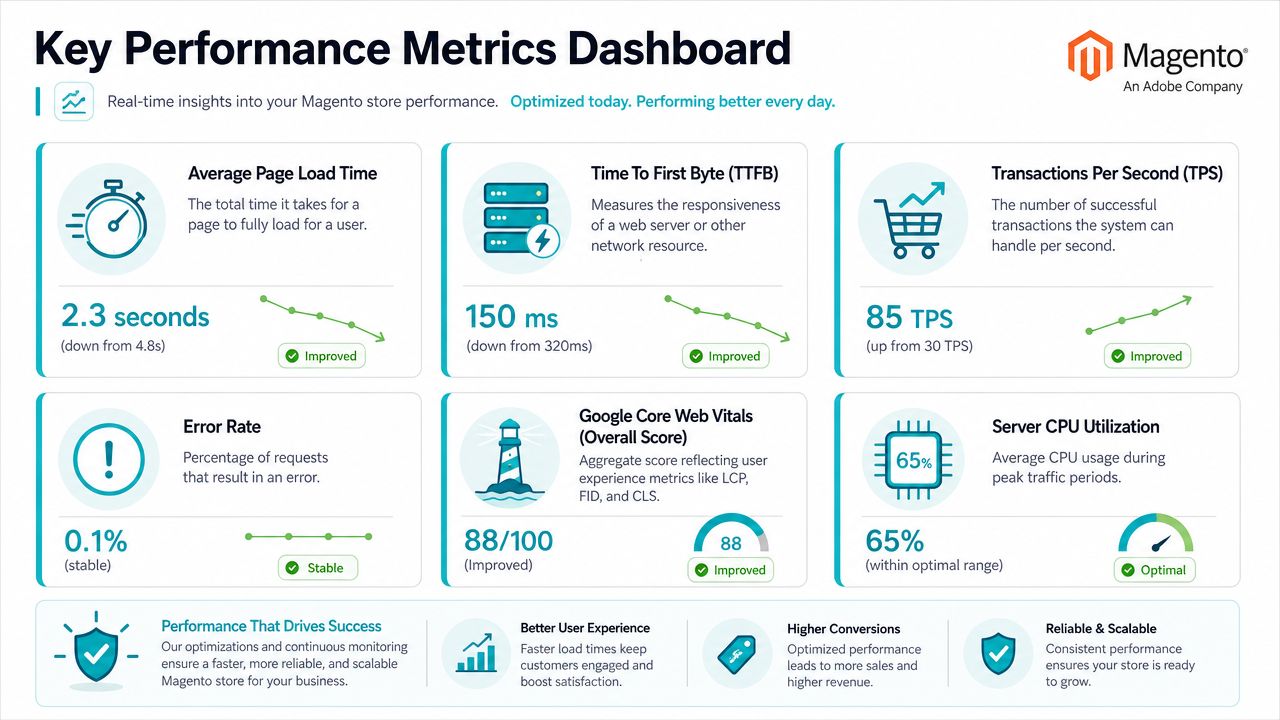
Step-by-step Magento performance testing reveals that 78% of bottlenecks only emerge under real-world logged-in user interactions with carts and search, and success rates for identifying true weak links reach 92% only when tests include varying datasets and background cron-like loads.
Build tests that resemble production
Your load model should include customer state, not just anonymous browsing. Logged-in users trigger different cache behavior, session handling, and database access patterns. Search, add-to-cart, cart updates, login failures, and checkout steps reveal much more than a homepage test ever will.
Use a test plan like this:
- Clone production conditions as closely as possible. Catalog size, customer volume, orders, and background jobs matter.
- Define KPIs before the first run. Focus on TTFB, response time, concurrency tolerance, application errors, and resource saturation.
- Model real user actions including search, layered navigation, login, cart updates, and checkout movement.
- Include think time and error paths so sessions behave like humans, not scripts.
- Increase traffic gradually instead of spiking instantly and learning nothing useful.
- Correlate app and server telemetry during each run.
Use tools that expose where time is spent
A practical toolkit:
- Apache Bench for quick endpoint checks
- Siege for repeatable concurrent request testing
- JMeter or Gatling for realistic multi-step flows
- Blackfire for application profiling
- Magento profiler and logs for code-path visibility
- System metrics for CPU, RAM, disk wait, Redis behavior, and PHP-FPM queue pressure
Quick examples:
ab -n 500 -c 20 https://example.com/
siege -c25 -t5M https://example.com/customer/account/login/
Those commands are useful for spot checks, but the primary value comes from scenario-based tests with authenticated sessions.
Simple page-load tests make bad stores look healthy. Logged-in traffic tells the truth.
Watch the system after the fix
Optimization isn’t complete when the benchmark looks good once. It isn’t complete until you monitor after releases, catalog imports, promo changes, and extension updates.
Track at least these signals continuously:
- TTFB drift on core page types
- PHP-FPM worker exhaustion
- Redis memory pressure and eviction behavior
- Database slow query growth
- Cron overlap and queue backlog
- Application errors during peak usage
For stores where database latency remains stubborn, database performance optimization practices are often the next layer to review, especially on large catalogs with custom reporting or extension-heavy search behavior.
Scaling Magento with ARPHost’s Expert Solutions
A Magento store usually starts to strain in a predictable way. Traffic rises, extensions pile up, imports run longer, cache hit rate drops during promos, and the team starts chasing symptoms instead of fixing capacity and operational gaps. At that point, scaling is no longer a hosting purchase. It is an architecture decision and a staffing decision.
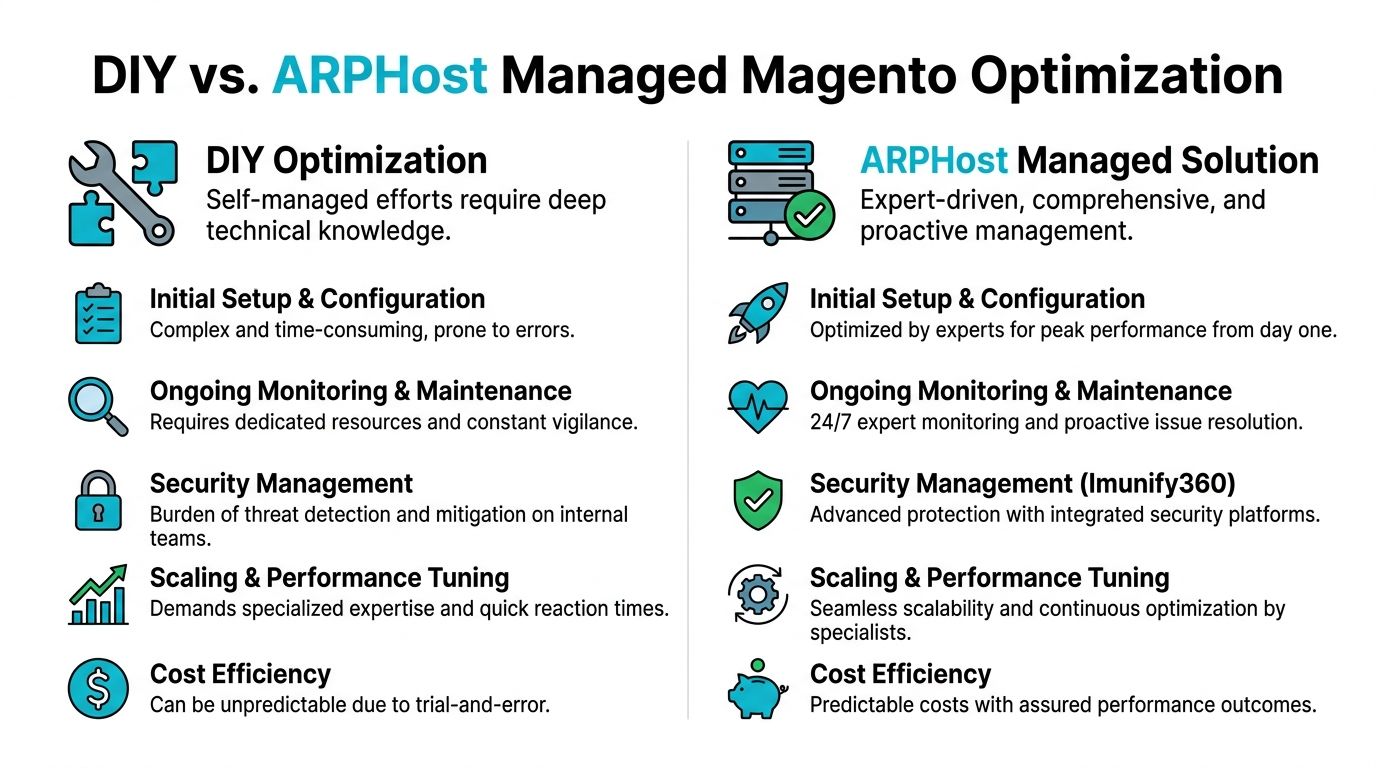
The right setup depends on what is under load. A single-store catalog with moderate traffic usually needs clean compute allocation, fast storage, sensible PHP-FPM limits, and enough headroom for reindexing and cron without hurting checkout. A multi-store deployment with ERP syncs, heavy search usage, large imports, and frequent promotions needs something different. It needs dedicated resources, cleaner isolation, and an operator who can change capacity without turning a busy week into an outage.
That is the practical value ARPHost brings. The infrastructure options cover the common Magento growth paths, from smaller VPS-based deployments to dedicated servers and private virtualization clusters. Beyond the infrastructure, the managed side reduces the operational mistakes that slow stores down over time: rushed migrations, weak backup discipline, poor cache changes, extension sprawl, and slow incident response.
Managed versus self-managed is usually a team capacity question, not a philosophical one. If your staff can handle Linux administration, database tuning, PHP runtime behavior, deployment controls, backups, monitoring, and after-hours incidents, self-management can work. If those responsibilities are split across developers, agencies, and an overstretched internal admin, stores drift. Drift is what causes the recurring problems other guides skip over: Varnish configured but ineffective, Redis sized too small, MySQL contention during imports, and staging environments that do not match production.
A managed model helps keep those basics intact:
| Operational area | Self-managed failure pattern | Managed advantage |
|---|---|---|
| Capacity planning | Hardware changes happen after slowdowns | Growth is planned before peak events |
| Cache layer | Varnish or Redis changes break hit rate or session behavior | Cache changes are reviewed and tested |
| Store isolation | Staging, cron, and production compete for resources | Workloads are separated cleanly |
| Recovery | Backups exist but restores are untested | Recovery procedures are part of operations |
| Ongoing maintenance | Extension and config debt accumulates quietly | Reviews and patching happen on schedule |
For agencies and enterprise teams, isolation often matters as much as raw speed. Multiple storefronts, staging nodes, admin tools, and support services should not all fight for the same pool of CPU and memory. Dedicated virtualization solves that if it is built and maintained correctly. For single-tenant Magento, dedicated bare metal is often the cleaner answer, especially once database load and indexing jobs become the primary bottleneck.
There is also a sensible middle ground. Some operators keep application ownership in-house and use ARPHost for the infrastructure layer, backups, monitoring, and incident handling. That model works well for teams with Magento developers who do not want to become full-time systems engineers.
The main point is simple. Scaling Magento successfully requires more than adding cores or RAM. It requires a hosting environment that matches the store’s traffic pattern, extension profile, and operational maturity. ARPHost, LLC provides that range, including VPS, bare metal, Proxmox private cloud, secure hosting bundles, colocation, instant applications, and managed services, without forcing every store into the same template.
If your store keeps getting slower after each release, seasonal sale, or catalog expansion, the next step is to stop patching around the problem and put the platform on infrastructure that can be tuned and supported properly.
