

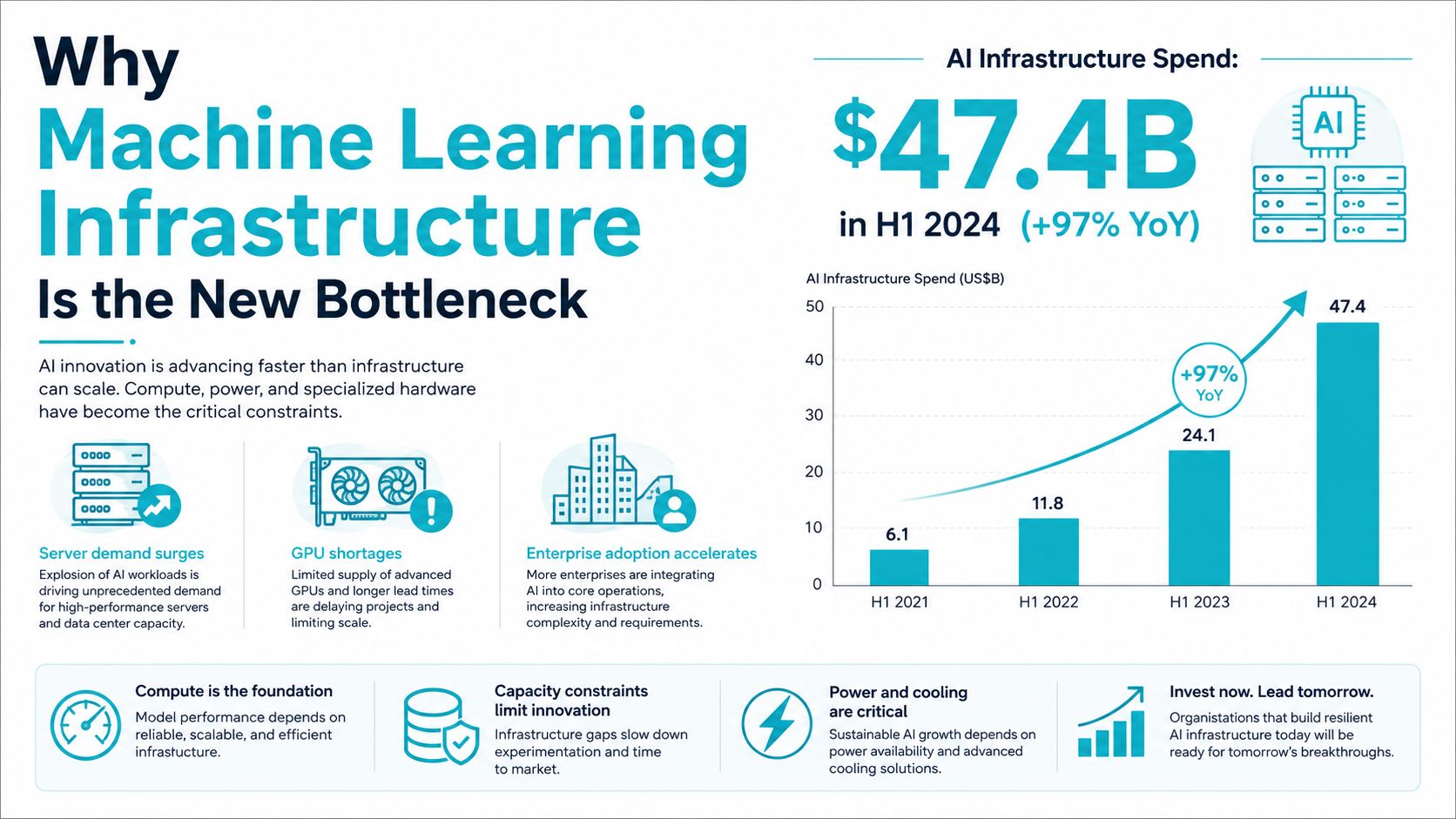
AI infrastructure spending hit $47.4 billion in the first half of 2024, and servers accounted for 95% of that outlay, which tells you exactly where the pressure moved. The work is no longer just about building a better model, it's about keeping machine learning infrastructure fed, aligned, observable, and cheap enough that the GPUs aren't burning money while they sit idle. IDC's projection that the market could pass $200 billion by 2028 makes the same point at a larger scale, this is now a core capital category, not a side project. IDC's AI infrastructure update shows why the stack underneath the model is where the outcome is decided.
The practical shift is simple. If your data feed can't keep pace, your accelerators don't matter. If your serving layer drifts away from training assumptions, your model quality drops even when the math is sound. That's why teams that used to ask “which GPU should we buy?” are now asking “what's our cost per utilized GPU hour and what's starving the pipeline?”
The better way to think about this is as a throughput problem with four moving parts. Compute, networking, storage, and orchestration all have to line up, or the platform starts paying for capacity it can't use.
Why Machine Learning Infrastructure Is the New Bottleneck
The spending data matters because it captures a hard change in behavior, not just a trend line. IDC reported $47.4 billion in worldwide AI infrastructure spending in 1H24, up 97% year over year, with servers at 95% of total spend and accelerator-equipped servers at 70% of server AI infrastructure spending, growing 178% in the same period (IDC). That mix says the platform itself became the constraint, since buying more general-purpose infrastructure no longer solves the problem.
The same update also put the market on track to surpass $200 billion by 2028 (IDC). That's a useful planning horizon because it tells infrastructure teams they're not buying into a temporary spike, they're building for a multi-year capital cycle. In practical terms, the expensive part of ML is increasingly the part that keeps data moving, not the part that changes a loss curve.
What changed in the last platform cycle
A model that trains well on a notebook can still fail in production if the stack around it isn't shaped for real workloads. Large foundation models, continuous experimentation, and production inference all push the system in different ways, so a platform that only optimizes for one stage will show bottlenecks somewhere else. The result is familiar to anyone who has run ML in anger, the GPUs are there, but the real-time feed isn't.
Practical rule: when utilization drops, don't start with the accelerator spec sheet. Start with the data path, the storage tier, and the orchestration handoff.
The good news is that the bottleneck is now visible, which makes it manageable. If your team can measure feed rate, storage latency, and occupancy, you can stop guessing about whether the platform is “fast enough” and start sizing it based on actual demand. That mindset is much closer to how seasoned infrastructure teams treat databases and observability stacks than how older ML projects treated experimentation.
The Four Layers of a Production ML Stack
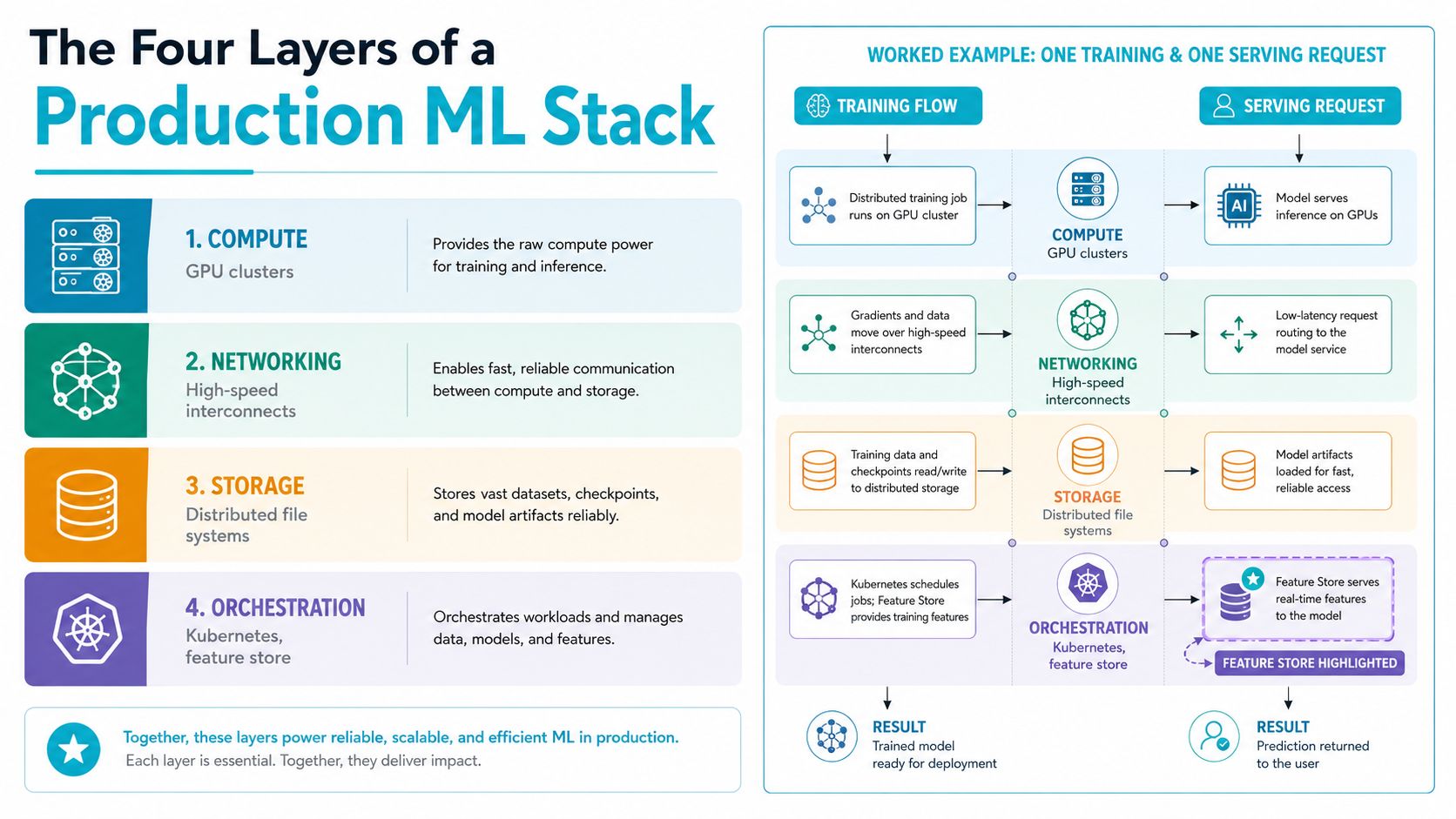
A useful definition of machine learning infrastructure is still the four-part stack that recent reviews keep coming back to, compute, networking, storage, and orchestration software (stack review). That framing works because it names what touches a training job and a serving request, instead of hiding everything under “the cloud.”
Compute and networking do different jobs
Compute is the obvious part, GPUs, TPUs, or custom AI chips do the math. Networking is what keeps multi-node work from stalling when gradients, checkpoints, or feature fetches need to move quickly between systems. When those two are mismatched, you end up with expensive silicon waiting on links that weren't designed for the workload.
Storage sits underneath both of them. If training data lands slowly or checkpointing is too heavy, the cluster can look healthy on paper while spending half its time stalled on I/O. That's why “fast enough storage” usually fails as a requirement, because the actual question is whether the storage tier can keep pace with model size, dataset churn, and experiment frequency.
Orchestration is the control plane, not decoration
Orchestration software coordinates the whole thing, and in practice that means tools like Kubernetes, Ray, and MLflow are part of the runtime, not just operational glue (stack review). A single feature-store-backed request shows how this works. The ingest job writes a cleaned feature, the store versions it, training reads the same value, and serving fetches that same feature later for inference.
That feature parity is where a lot of systems break. Once training and serving start reading different values, the model may still run, but it's no longer behaving the way the team validated it. Carnegie Mellon's ML infrastructure guidance also calls out training-serving skew, data versioning, and monitoring as recurring pain points, which matches what platform teams run into when pipelines become system-wide instead of model-centric (Red Hat on production ML).
A recent production architecture paper makes the same point with a six-layer view, data ingestion, processing and storage, model development and training, deployment and serving, monitoring and drift detection, and security and governance (production stack paper). The useful lesson isn't the number of layers, it's that ingestion, monitoring, and governance are part of the architecture, not add-ons.
Choosing Where ML Workloads Actually Run
The location decision is usually framed as cloud versus on-prem, but that's too narrow for teams that have real data gravity, regulatory pressure, or a limited budget. On-prem gives you tighter control and a clearer bill, public cloud gives you elasticity, hybrid gives you a way to split the difference, and edge is what you use when bandwidth or locality matters more than centralization. The right answer depends on whether the workload is constrained by latency, compliance, cost predictability, or connectivity.
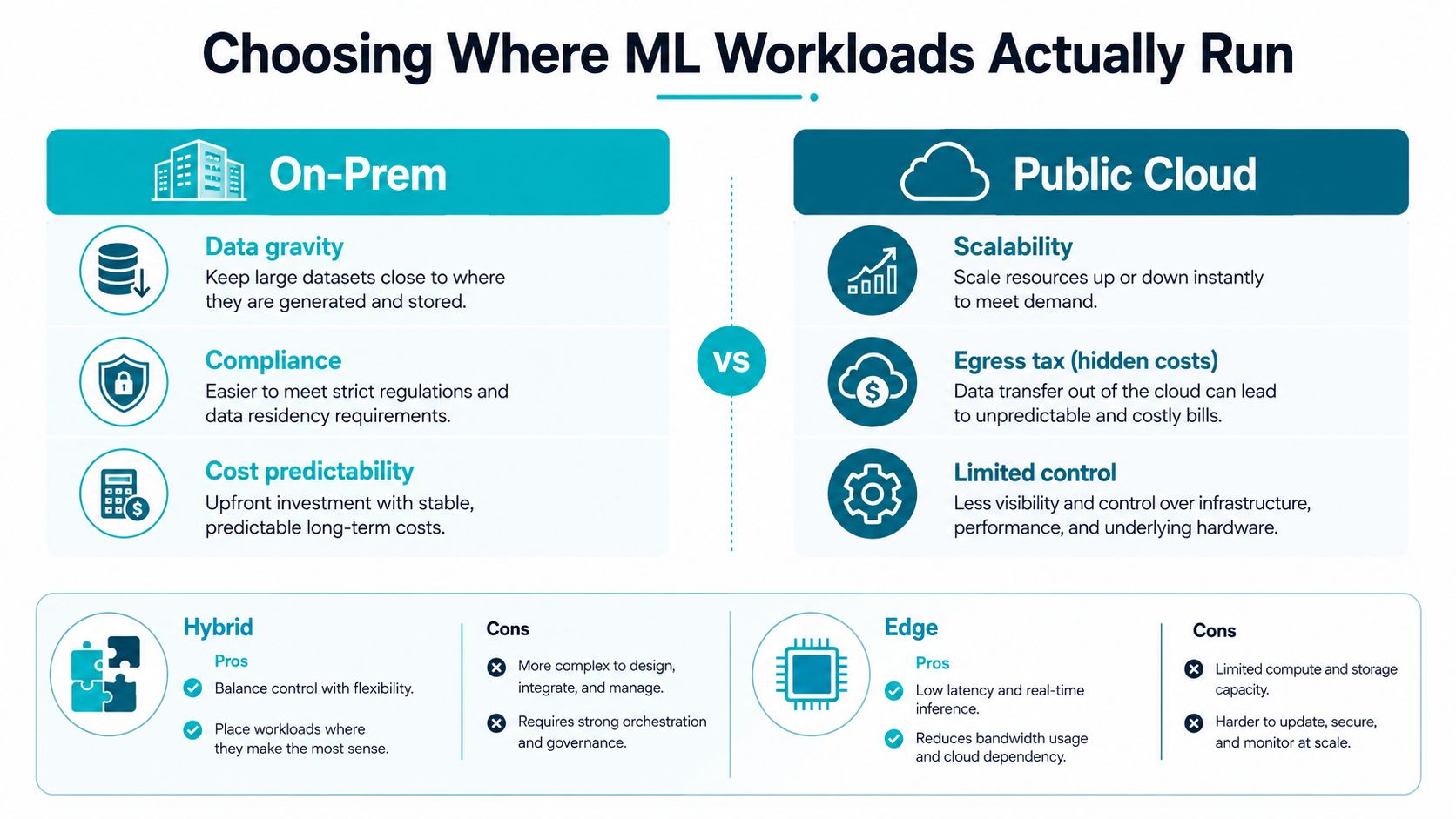
A 2025 AI infrastructure report recommends hybrid cloud for workloads with performance sensitivity or regulatory needs, and that lines up with what most operators see in practice.
The decision lens that actually helps
Use four questions, in this order. First, where does the data already live. Second, what latency can the business tolerate. Third, how much cost variability can finance absorb. Fourth, what happens when a dataset or model needs to leave the region.
ARPHost's private cloud versus public cloud comparison is a useful internal reference point if you're deciding whether dedicated hardware or shared elasticity is the better fit for your stack. That kind of comparison matters most when the workload is small enough that every hour of idle capacity hurts, but important enough that you can't afford weak governance.
Hybrid isn't a compromise when the workload has two different shapes. It's often the cleanest way to keep training close to the data and serving close to the user.
Edge deserves a mention because many guides ignore it. Constrained environments, intermittent connectivity, and messy local datasets are exactly where a cloud-only assumption falls apart, especially in smaller enterprises and public-sector deployments. That's the part of ML infrastructure most platform blogs skip, even though it's where a lot of practical deployment work happens.
Hardware Choices That Actually Move the Needle
The first hardware mistake is buying for headline specs instead of feed rate. The second is assuming more GPU means better throughput when the CPU, memory, or storage tier can't keep up. A recent SEI rule of thumb says system RAM should equal or exceed the total device memory across all GPUs in a multi-GPU system, so a machine with one GPU and 16 GB of GPU memory needs at least 16 GB of RAM plus room for the OS and application processes (SEI guidance).
What each component is really doing
GPUs are the obvious line item, and a 2025 review notes that high-end AI GPUs can cost more than $30,000 each That price makes wasted occupancy hurt fast, which is why the right sizing question is not “how many GPUs can we buy,” but “how many GPU hours will we use.”
CPUs still matter because preprocessing, feature loading, and serving logic often run there. Memory matters because long-running jobs hate paging and because offload strategies need space to breathe. NVMe matters because the platform can't serve a hungry training loop from slow storage and expect stable occupancy.
A concrete server mapping
If you want a hardware profile that fits memory-heavy inference or dense virtualization, the AMD EPYC 4584PX bare metal configuration, 16 cores, 192GB DDR5 RAM, NVMe SSD storage, is a clean anchor for that kind of workload. It's the sort of box that fits large in-memory feature sets, retrieval-heavy pipelines, and inference stacks that need room for model artifacts and data buffers without constantly fighting the allocator.
High-memory dedicated server hosting is the right product class to examine when memory pressure, not raw core count, is the limiter. For teams running private inference or RAG services, that often beats chasing more general compute.
Practical rule: buy the memory tier first if your pipeline does heavy feature joins, retraining, or multi-model inference. Under-sized RAM turns a fast server into an expensive stall point.
MLOps Workflows Beyond the Demo
Production ML breaks less often on the math than on the handoff between data, code, and serving. Run:ai's 2023 State of AI Infrastructure Survey found that only 37% of AI/ML models were already deployed in production, while 91% of companies planned to grow GPU capacity or other AI infrastructure by an average of 23% That gap shows the need for stronger control points before more accelerators.
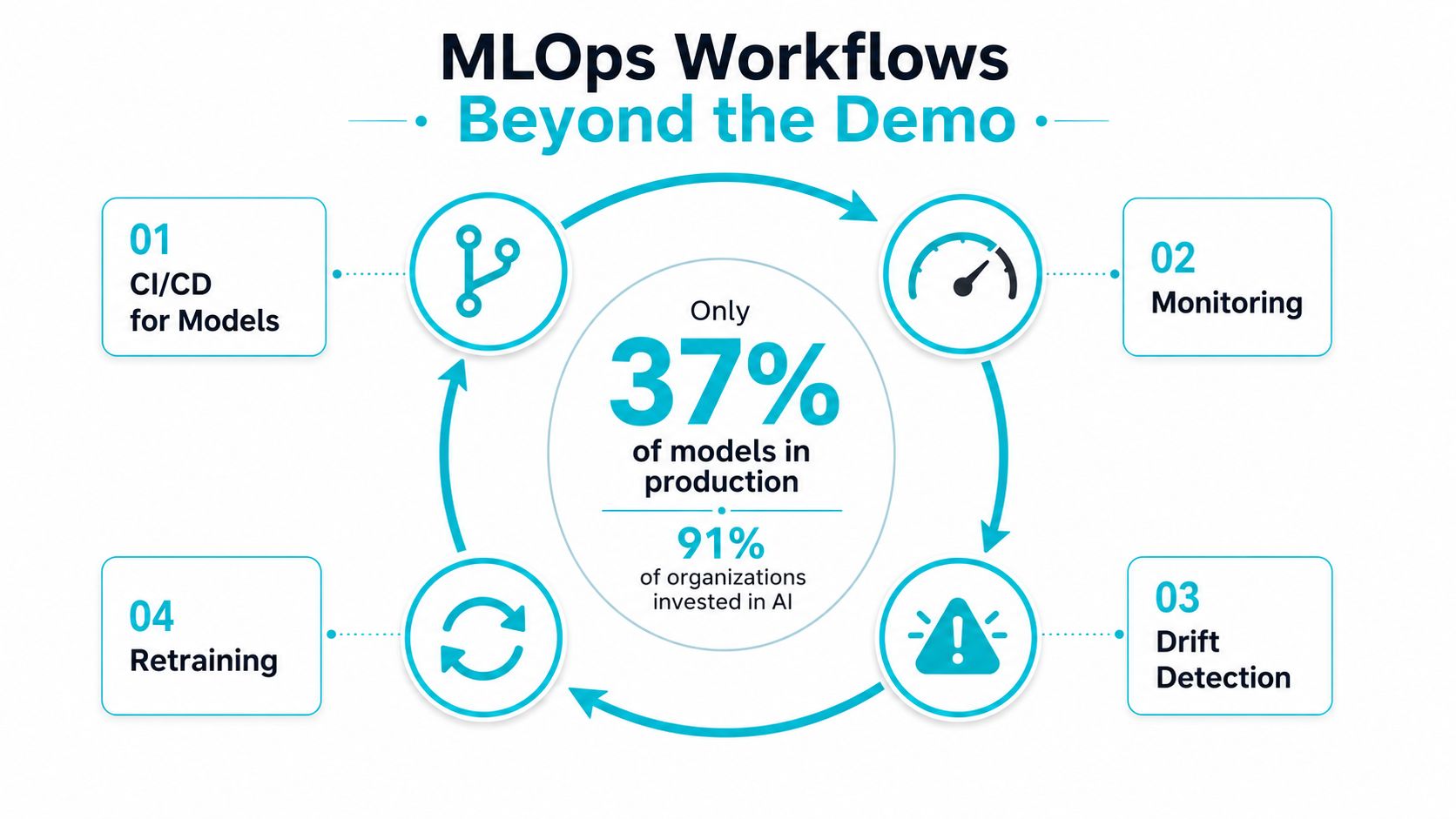
The workflow that holds up in practice is boring in the best way. New code goes through CI/CD, the model is validated against a versioned dataset, serving is monitored for latency and quality drift, and retraining only happens when the guardrails say the input distribution changed enough to justify it. The failure mode is usually a missing control, not a missing algorithm.
The control points worth shipping next sprint
Feature parity: make training and serving read the same definitions from the same feature store.
Versioned lineage: keep dataset snapshots, feature versions, and model artifacts tied together.
Latency budgets: set a hard ceiling for inference and alert before users feel the slowdown.
Rollback paths: keep the last known good model and config one click away.
If the capture process is messy, no amount of downstream orchestration fully repairs it.
When you put monitoring, drift detection, and retraining into the same loop, the platform becomes easier to reason about. That doesn't eliminate complexity, but it does move the pain into places where infrastructure teams can automate it.
Three Deployment Profiles That Actually Work
A small team usually doesn't need a giant platform on day one, it needs one configuration that matches one workload. The cleanest way to build that is to map workload shape to deployment profile, then decide how much control you need around the box. Once you do that, the hardware choice stops being abstract.
Single-tenant dev and inference on Ryzen
The AMD Ryzen 9600X configuration, 6 cores, 96GB DDR5 RAM, NVMe SSD storage, works well for single-tenant applications, development environments, and high-clock-speed workloads. That makes it a good fit for lightweight LLM inference, internal tooling, and development sandboxes where you want predictable performance without paying for dense multi-tenant overhead.
For orchestration, keep it simple. A single-node KVM setup or a lightweight container stack is enough when the workload is narrow and the team wants fast iteration more than cluster complexity. If you need a reference point for placing compute in a shared facility, what colocation hosting means in practice is the right adjacent read.
Memory-heavy private cloud on EPYC
The AMD EPYC 4584PX profile fits memory-heavy inference, large databases, and high-density virtualization. This is the box I'd reach for when RAG pipelines need enough RAM for indexes, caches, and model buffers, or when a private cloud has to serve several workloads without constant swapping or page pressure.
This is also where a Proxmox-based private cloud makes sense, especially when you want dedicated hardware and root-level control without building every layer yourself. For teams that care about keeping datasets and models close to the infrastructure they control, that balance is usually better than bolting everything onto a generic public-cloud bill.
High-density cluster on dual Xeon
The Dual Intel Xeon E5-2690 V3 configuration, 28 cores, 56 threads, 64GB DDR4 ECC RAM, enterprise storage, is the right shape for Proxmox clusters, multi-tenant VPS nodes, and mixed workloads that benefit from host density. It's not the fastest single box in the lineup, but it's a practical foundation for building a cluster where the control plane matters more than any one node.
If your team is growing from one or two workloads into a pool of services, clustering starts to pay off here. You can separate tenants, apply different resource policies, and keep the environment usable as the platform gets busier.
Comparing the Profiles Side by Side
| Profile | Best-Fit Workload | Cost Posture | Control Level | Scalability |
|---|---|---|---|---|
| VPS hosting from $5.99/month | Development, small inference, utility services | Lowest entry cost | Moderate | Good for small steps and simple growth |
| Proxmox private clouds | Private ML platforms, RAG, isolated serving | Mid-range, dedicated hardware cost | High | Strong for clustered expansion |
| Bare metal servers | Memory-heavy inference, dense virtualization, multi-tenant compute | Higher upfront, clearer utilization economics | Highest | Best when you own the scaling plan |
The right shortlist is usually obvious once the workload is named plainly. Small teams that need flexibility can start with VPS hosting, while workloads that need isolation and predictable capacity belong in dedicated private cloud or bare metal.
Security, Backups, and Scaling This With ARPHost
Security starts with identity, secrets, and network segmentation, not with a firewall sticker. ML platforms also need immutable backups, because checkpoints, dataset versions, and model registries are part of the business record, not just engineering clutter. A daily backup schedule with one-click restoration is especially useful when retraining jobs, experiment artifacts, or serving configs need to be recovered quickly after a bad deploy.
Cost guardrails matter just as much. Idle GPUs can drain a budget, so shut off unused environments, separate training from serving, and tag every cluster or host by owner and purpose. Managed backup and recovery services help here because they keep the restore path tested instead of theoretical.
For teams that want the operations off their plate, ARPHost, LLC provides VPS hosting, dedicated bare metal, Proxmox private clouds, colocation, and fully managed IT services. Proxmox private clouds are the cleanest fit when you need dedicated hardware with administrative control, while managed services make sense when your team wants monitoring, patching, and backup operations handled by someone else.
If you're buying next week, start with the smallest environment that can keep the feed rate high and the serving path stable. Then expand only after the platform shows you where utilization lands.
If you're evaluating machine learning infrastructure for a production workload, ARPHost, LLC can supply the underlying VPS, bare metal, private cloud, and managed services you need to keep compute fed and serving stable. Visit ARPHost, LLC to compare deployment options, then choose the configuration that matches your data path, budget, and control requirements.
