

Your site doesn’t usually fail all at once. It starts with slower admin logins, checkout pages that hesitate under normal traffic, and support tickets that say “email feels delayed again.” Shared hosting can carry a small site for a while, but once your business depends on predictable performance, the limits stop being technical trivia and become operational risk.
That’s where KVM VPS hosting becomes a practical upgrade. It gives you the control and isolation most growing businesses need, without pushing you straight into dedicated hardware before the workload justifies it.
When Your Business Outgrows Shared Hosting
A common pattern looks like this. A business launches on shared hosting because it’s simple and cheap. Then the website adds a store, a booking system, more plugins, or a custom internal app. Traffic doesn’t need to explode for problems to show up. One neighbor on the same server can burn CPU, saturate disk activity, or trigger security headaches that affect everyone else.

The decision to move usually isn’t driven by a single outage. It’s driven by accumulated friction. Your team starts working around the hosting platform instead of using it. Developers avoid deploying changes at peak hours. Marketing hesitates before sending campaigns. Finance sees revenue tied to a platform that feels unpredictable.
What changes at this stage
KVM VPS hosting is the point where hosting starts behaving like infrastructure instead of rented shelf space. You get a server environment with stronger isolation, root control, and a clearer path for scaling. That matters when your application stack needs consistency more than bargain-basement pricing.
The broader market reflects that shift. The global VPS hosting market was valued at approximately USD 801 million in 2023 and is forecast to reach USD 1,346.3 million by 2030, with a 9.0% CAGR, which points to rising demand for flexible, secure, and customizable hosting solutions according to this VPS market projection.
Shared hosting is fine until another tenant’s behavior becomes your customer experience problem.
The business case for moving now
A VPS is usually the right move when you need one or more of these:
- Steadier application behavior when website traffic, cron jobs, or database activity rises
- Administrative control for packages, firewall policy, web stack tuning, and deployment workflows
- Cleaner isolation from other tenants than typical shared environments provide
- A realistic upgrade path toward managed VPS, private cloud, or bare metal later
If you’re weighing the jump, this guide on shared hosting vs VPS is a useful starting point. If the pain points already sound familiar, start by looking at a small KVM plan and size up from observed usage rather than guesses.
How KVM Virtualization Actually Works
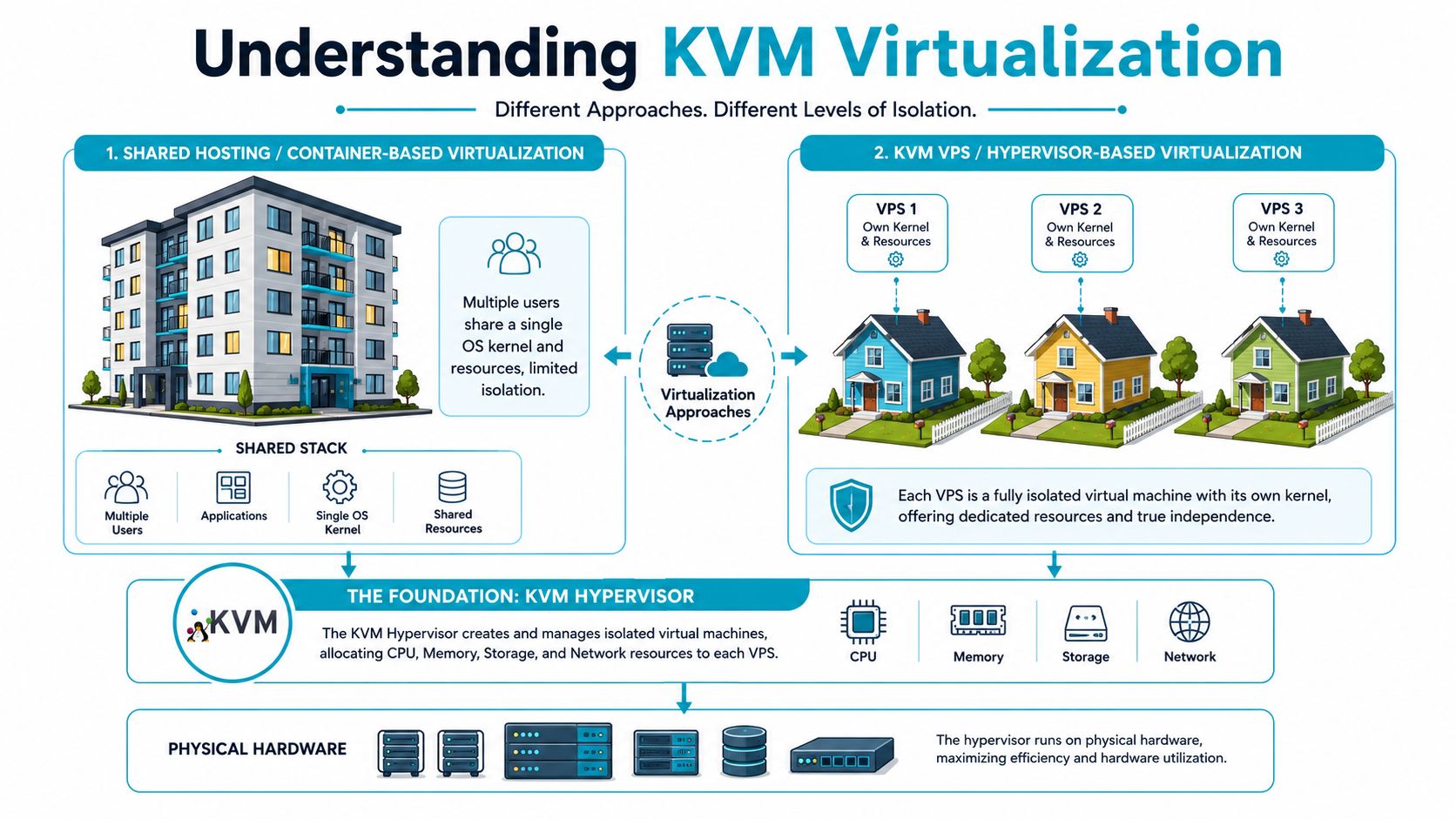
KVM stands for Kernel-based Virtual Machine, and the important part isn’t the acronym. It’s the architecture. KVM creates fully isolated virtual machines instead of lightweight containers that all depend on the same host kernel.
Apartments versus separate houses
A useful analogy is this:
- Shared hosting or container-style virtualization feels like apartments in one building. Tenants have separate units, but they still depend on common structure and shared building systems.
- KVM VPS hosting is closer to separate houses on the same street. Each one has its own space, its own operating system behavior, and much firmer boundaries.
That difference is why KVM is taken more seriously for production workloads. If one VPS is misconfigured, overloaded, or compromised, the isolation model is far better suited to keeping neighboring workloads unaffected.
KVM VPS hosting provides full virtualization isolation where each virtual machine operates with dedicated CPU, RAM, and storage resources. The same explanation notes that the KVM hypervisor is integrated directly into the Linux kernel and functions as a type-1 hypervisor.
What that means in practice
Inside a KVM VM, the guest operating system behaves like it owns a real server. You can:
- Run your own kernel-compatible stack instead of being locked to a provider’s shared kernel model
- Choose your OS and software layout with fewer platform restrictions
- Set your own firewall, packages, and runtime behavior without waiting for a host-wide policy
- Keep workloads separated when one app has very different requirements from another
That last point holds greater significance than often realized. A staging environment, a database node, and a customer-facing web server shouldn’t all be forced into the same operational shape.
Here’s a simplified way to picture it:
| Layer | In KVM VPS hosting |
|---|---|
| Physical server | CPU, RAM, storage, network hardware |
| Hypervisor layer | KVM manages virtual machine isolation |
| Guest VM | Separate OS instance with its own resources |
| Application stack | Web server, database, queue workers, containers, custom apps |
For readers who want a quick visual walkthrough before digging deeper, this overview helps:
Why the architecture matters
The technical distinction shows up in day-to-day operations. KVM is usually the safer fit when you need kernel-level independence, cleaner security separation, or stable behavior under mixed workloads.
Practical rule: If the server runs something you’d lose sleep over breaking, choose the virtualization model with stronger isolation first and optimize cost second.
The Core Business Benefits of Using KVM
Technical features only matter if they change the outcome for the business. KVM does that in a few concrete ways.
Consistency beats theoretical speed
The biggest advantage is stability under normal production conditions. A VPS with dedicated resources is easier to trust than an environment where resource contention is harder to see and harder to control. Teams notice that in the places where revenue lives: checkout flows, client portals, API responses, admin tasks, and scheduled jobs.
When performance is more predictable, operations get simpler. Developers troubleshoot the app instead of guessing whether a neighbor caused the slowdown. Support teams stop treating intermittent slowness as “just hosting.” Managers get fewer surprises during campaigns and product launches.
Isolation improves security posture
Isolation isn’t only about speed. It reduces blast radius.
If one customer on a shared platform gets hit with abuse, malware, or runaway processes, the surrounding tenants can feel the side effects. KVM reduces that exposure by separating virtual machines more cleanly. That doesn’t replace patching, firewall rules, backups, or access control, but it gives those controls a stronger base.
A second benefit is compliance and audit readiness. When an IT manager needs to explain where applications run, who controls the system, and how segmentation works, a KVM VPS is easier to defend than vague shared hosting boundaries.
If the application handles customer records, internal documents, or revenue events, better isolation usually pays for itself before the first incident.
Flexibility without an early jump to bare metal
A business rarely needs dedicated hardware on day one. It does need room to grow without rebuilding everything later.
KVM is a good middle ground because it supports custom stacks, separate environments, and controlled scaling. You can run a standard LAMP stack, a reverse proxy in front of app containers, a lightweight Git runner, or an internal dashboard on the same general platform model. That flexibility is a practical reason many teams move before they are forced to.
This is also where server virtualization benefits become clearer in business terms. Better workload separation means fewer cross-system surprises. Easier provisioning means less time waiting on infrastructure. Cleaner resource allocation means fewer arguments over whether the problem is code or hosting.
Cost stays easier to forecast
Dedicated servers make sense for some workloads, but they also commit you to a larger fixed footprint. KVM VPS hosting lets you step up in a more controlled way. That’s useful when you want performance and control now, but your long-term capacity needs are still evolving.
For many businesses, the win isn’t “lowest cost.” It’s predictable cost for infrastructure that stops getting in the way.
KVM vs OpenVZ LXC and Cloud VMs
Not every virtual server product is built the same way, even when the plan pages look similar. Often, this leads to purchasing errors. A provider lists vCPUs, RAM, and storage, and the buyer assumes those specs tell the whole story. They don’t.
Virtualization Technology Comparison
| Feature | KVM | OpenVZ / LXC | Public Cloud VMs (e.g, EC2) |
|---|---|---|---|
| Resource model | Dedicated virtual machine allocation | More lightweight, often closer to container-style isolation | Virtual machine abstraction on provider infrastructure |
| Kernel independence | Yes, each VM has its own environment | More limited, especially in shared-kernel approaches | Usually yes from the guest perspective |
| OS flexibility | Strong | More restricted in practice | Strong, but tied to provider image model |
| Isolation level | High | Lower than full VM isolation | High, depends on instance type and platform controls |
| Operational control | High, especially on unmanaged plans | Good for simpler workloads | High, but often paired with platform complexity |
| Best fit | Production apps, business sites, mixed workloads | Lightweight tasks, lower-risk environments, specific container use cases | Elastic cloud-native systems, teams comfortable with cloud tooling |
Where KVM fits best
KVM is usually the right answer when the workload is important enough that you care about isolation, consistent behavior, and guest-level control. That includes business websites, SaaS applications, customer portals, internal line-of-business apps, and development environments that need to resemble production.
It also handles mixed-use hosting better. If one server runs a web app, queue worker, monitoring stack, and a VPN endpoint, KVM gives those functions a stronger boundary than shared-kernel options.
Where OpenVZ or LXC can still make sense
Container-based virtualization can be efficient. That efficiency is real, and for the right workload it’s useful. Lightweight environments, disposable development boxes, or narrowly defined services can run well there.
The trade-off is that efficiency and density often come with less independence at the guest level. That matters less for temporary or low-risk tasks. It matters a lot for workloads that need custom kernels, stricter separation, or stronger confidence under load.
There’s also a persistent information gap around cheap KVM plans. Buyers often compare only the monthly price and not the host node quality, storage behavior, or contention profile. This skepticism shows up in operational communities too, as discussed in this sysadmin discussion about whether KVM VPS servers are worth it. The useful takeaway isn’t that cheap KVM is bad. It’s that a very low-cost plan needs to be judged by workload fit, not by marketing labels.
A cheap KVM plan can be enough for a modest web app. It’s a poor place to gamble with heavy databases, latency-sensitive services, or anything you can’t easily move.
KVM versus public cloud instances
Public cloud VMs solve a different problem. They’re good when you need deep ecosystem integration, elastic orchestration, or region-by-region deployment tied to managed cloud services. They’re often less attractive when you want straightforward pricing, root access without platform sprawl, and a server that behaves like a server.
Many SMBs and internal IT teams don’t need a large cloud control plane. They need one reliable machine, clear costs, and support from people who understand virtualization instead of pointing them toward more dashboard layers.
The hard question about NVMe and fast networking
Modern infrastructure adds another decision point. Providers advertise NVMe storage and fast connectivity, but buyers still need to ask whether the virtualization layer matches the workload. That’s especially relevant for write-heavy databases, analytics services, and cluster nodes that care about storage behavior under pressure.
There’s a real gap in mainstream guidance here. Vendors market KVM plus NVMe plus fast networking, but the practical question is whether the workload needs dedicated hardware instead of a well-built VPS. For standard production hosting, KVM often fits well. For sustained, low-latency, storage-intensive workloads, bare metal is still the cleaner answer.
Performance Tuning and Securing Your Server
Buying the right VPS is only half the job. A poorly maintained KVM server can perform badly and become unsafe even when the underlying infrastructure is solid.
First tasks after provisioning
Start with the basics. On a fresh Linux server, update packages, create a non-root administrative user, and enable a host firewall.
sudo apt update && sudo apt upgrade -y
sudo adduser opsadmin
sudo usermod -aG sudo opsadmin
sudo ufw allow OpenSSH
sudo ufw enable
Then check what’s running. Don’t assume a template is minimal.
ss -tulpn
systemctl list-units --type=service --state=running
A small amount of discipline here prevents a lot of cleanup later. Unused services create attack surface. Default settings create surprises.
Watch the right metrics
CPU is often the primary focus because it’s easy to understand. Disk and memory pressure often cause the more expensive problems.
Use these tools regularly:
- htop for CPU, memory, and process visibility
- iotop for disk activity by process
- df -h to catch storage exhaustion before it becomes an outage
- journalctl for service failures and boot-time issues
sudo apt install htop iotop -y
htop
sudo iotop
df -h
journalctl -p err -b
What you’re looking for isn’t just “high usage.” You’re looking for repeated patterns. PHP workers piling up, database writes stalling, swap pressure, log growth, backup jobs colliding with application demand. That’s how you distinguish a small VPS that needs tuning from one that merely needs a larger plan.
Harden the host before you stack software on top
A basic hardening pass should include:
- SSH hygiene by disabling password login if you use keys
- Firewall review so only required ports stay exposed
- Patch routine for OS and application packages
- Backups and restore testing because backups you haven’t restored are still unproven
This server hardening checklist is a good reference for teams that want a repeatable baseline.
One infrastructure detail worth tracking is the hypervisor stack itself. Bacloud’s review of Proxmox VE 9.0 Beta notes that it updates the KVM/QEMU stack to version 10.0.2, with upstream performance gains and enhanced block device I/O capabilities that matter in dense VPS environments.
Security hardening isn’t a one-time setup task. It’s an operating habit.
For teams that don’t want to own every patch cycle and monitoring task internally, one option is to use managed infrastructure and security bundles. ARPHost offers KVM VPS hosting, secure web hosting bundles with Imunify360, CloudLinux OS, and Webuzo, plus managed services for patching, backups, and monitoring.
Choosing the Right Server Size and Plan
Most bad hosting purchases come from two mistakes. People either buy the smallest plan that looks cheap, or they jump straight to oversized hardware because they don’t trust sizing. The right answer is workload-based.

Match the plan to the job
An SMB running a website, business email services, a database-backed CMS, or a small internal app usually does well with a modest KVM VPS to start. The main requirement is not raw scale. It’s headroom for updates, backups, and occasional traffic spikes without turning routine activity into an incident.
A DevOps team needs something different. CI jobs, preview environments, registries, and agent workloads create short bursts of CPU, memory, and disk I/O. That kind of work often runs fine on a VPS if the workflows are disciplined. It becomes a poor fit if runners pile up, container builds thrash storage, or multiple teams share the same box without quotas.
When cheap KVM is enough, and when it isn’t
A low-cost KVM VPS can be perfectly reasonable for:
- A business website with predictable demand
- A development environment with light parallel work
- A small app node serving APIs, dashboards, or back-office tools
It’s a weaker fit for:
- Large databases that care about sustained storage behavior
- AI or ML inference nodes that need more memory and steadier throughput
- High-density virtualization where one layer of virtualization sits on top of another
The hard part is storage, not just CPU. If you’re deploying Proxmox with ZFS or Ceph, memory planning for storage services matters too. Proxmox hardware requirements state that production deployments using ZFS or Ceph should budget approximately 1 GB of dedicated RAM for every 1 TB of used storage capacity.
Bare metal becomes the right move at a clear point
If your workload is memory-intensive, write-heavy, or sensitive to storage latency, skip the argument and move to dedicated hardware. That’s especially true for larger databases, AI or ML inference, media processing, or private virtualization nodes.
A practical example is the AMD EPYC 4584PX configuration in Tampa, FL with 16 cores, 192GB DDR5 RAM, and NVMe SSD storage, which is a sensible step up for memory-heavy databases and dense virtualization. For Proxmox clusters or multi-tenant nodes, the Dual Intel Xeon E5-2690 V3 system with 28 cores, 64GB DDR4 ECC RAM, and enterprise storage is also relevant. Single-tenant application stacks that care more about clock speed than core count may fit the AMD Ryzen 9600X with 6 cores and 96GB DDR5 RAM.
Managed versus unmanaged
This is usually a staffing decision, not a technical one.
| Plan style | Best for | Trade-off |
|---|---|---|
| Unmanaged VPS | Teams with Linux, security, and monitoring experience | Lower platform help, more internal responsibility |
| Managed VPS | Businesses that want the server operated for them | Higher service cost, lower admin burden |
| Bare metal | Heavy or sensitive workloads | More capacity, less virtualization compromise |
If you need a low-friction starting point, a small KVM VPS can make sense before moving upward. If you already know your app is storage-heavy or memory-hungry, asking for a managed services quote first is the smarter move than resizing repeatedly.
Your KVM Migration Checklist and Final Verdict
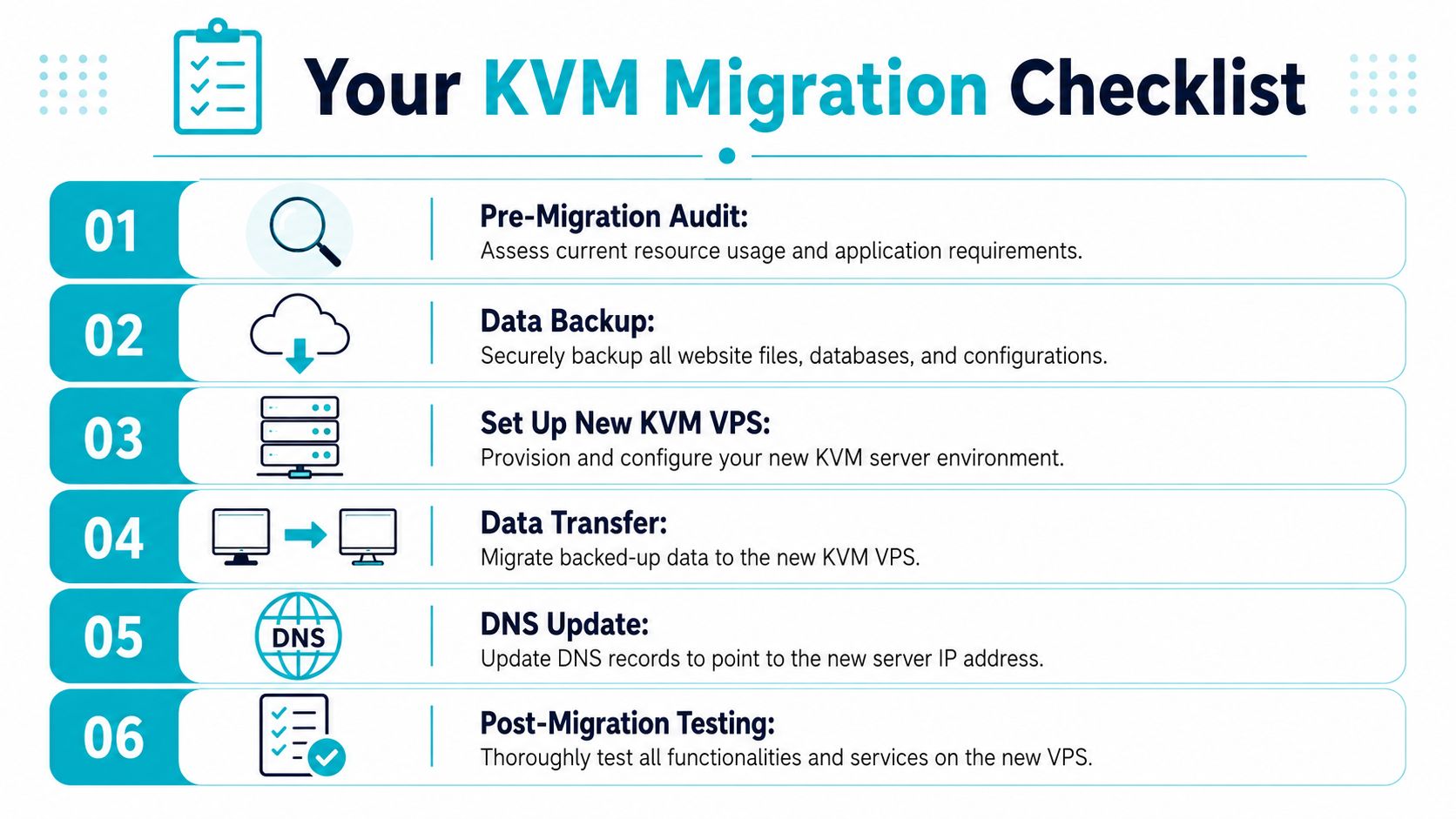
Most KVM migrations are straightforward when the team plans them properly. The failures usually come from skipped inventory, rushed cutovers, or testing too little before DNS changes.
Migration checklist
Audit the current environment
Document applications, service dependencies, cron jobs, SSL handling, database versions, storage usage, and any custom packages. If you miss a background service, the migration may look successful until a scheduled task stops unnoticed.Choose the right target platform
Decide whether the workload belongs on a KVM VPS, a managed VPS, a Proxmox private cloud, or bare metal. The right answer depends on operational ownership and workload profile, not only budget.Create verified backups
Back up files, databases, application configs, and secrets. Then test recovery. A backup that hasn’t been restored is still an assumption.Build the new server cleanly
Apply updates, create users, harden SSH access, configure the firewall, and install only the required software stack. Don’t clone old mistakes into a new environment.Transfer and test before cutover
Move the data, validate the application, check logs, and test admin workflows, email-dependent functions, scheduled tasks, and third-party integrations.Complete post-migration checks
Watch system metrics, verify backup jobs, review logs, and confirm that users are reaching the new platform cleanly.
Final verdict
KVM VPS hosting is the right fit when your business has outgrown shared hosting but doesn’t yet need dedicated hardware for every workload. It gives you stronger isolation, better operational control, and a cleaner path toward stable production hosting. Cheap KVM plans can work for modest applications. They’re not a substitute for bare metal when storage latency, memory pressure, or virtualization density becomes central to the workload.
If the priority is predictable performance for a growing business application, KVM is often the sensible next step. If the workload is already pushing into database-heavy, AI-related, or private cloud territory, dedicated hardware or a Proxmox-based environment is usually the more honest choice.
If you’re planning your next hosting upgrade, ARPHost, LLC provides KVM VPS hosting, bare metal servers, Proxmox private clouds, secure web hosting bundles, colocation, instant applications, and fully managed IT services. You can start with a VPS, move to dedicated infrastructure when the workload demands it, or request a custom managed solution that fits your stack and operating model.
